
Gym guide
A learning path for a gym or fitness centre, new or running: job titles, members on subscriptions, check-in, personal trainers, studio rental, opening balances.
On this page
- A new business
- Who does what
- 1. Shop details and users
- 2. Master data
- 3. First capital and buying
- 4. One working day
- 5. Expenses
- 6. Reports per job title
- 7. Checklists
- A running business
- 1. Master data
- 2. Team practice
- 3. Empty the practice transactions
- 4. Opening balances
- 5. Check before going live
- 6. Going live
This guide is for the team setting up Vende at a gym or fitness centre with members on subscriptions, day visitors, personal trainers, and a studio rented by the hour. It has two parts: A new business for a gym just opening, with no members, stock or payables from before, and A running business for a gym moving to Vende, with team practice and opening balances. The example is Bugar Sehat Gym. The names of the gym, members, suppliers and people and all the figures are made up.
What the business looks like:
- Members: pay monthly or every three months, are billed automatically, and check in with a member card.
- Day visitors: pay a ticket per visit.
- Personal trainers: training sessions are sold as a service, and the trainer is paid a commission per session.
- Studio: rented by the hour to exercise groups.
- Drinks and supplements: sold at the front desk.
Work through it from the top. Every step names its menu, who does it, what changes afterwards, and an example with figures.
The features in this guide come with the Fitness centre/gym business type package, except those marked extra. The shop's features show under Settings → Subscription, section This shop's features. If a menu is missing, contact the Vende team.
Tip: Lost on a page? Press the ? button at the top of that page. A short tour shows every field, on the Member Check-in screen too.
A new business
Who does what
This package holds four users, the owner included.
| Part of the gym | Job title in Vende | What they do and open |
|---|---|---|
| Owner | Owner | Every menu, also suppliers, purchases, commission rates, the points settings, paying commission, expenses, opening balances, and Reports → Profit & Loss |
| Morning front desk | Head Cashier | Members and their subscriptions, check-in, selling on the till, studio rental, the visits and commission reports |
| Afternoon front desk | Cashier | Members and their subscriptions, check-in, selling on the till, studio rental |
| Warehouse | Warehouse Admin | Products, services, stock, Reports → Stock |
Trainers need no account. Their names are enough as service staff. Every role is explained in Roles and permissions.
1. Shop details and users
Done by the Owner: fill in Settings → Shop (name, address, WhatsApp, logo), then create the accounts in Settings → Users with the Job title of the table above. See Adding and managing users.
The people at Bugar Sehat Gym: Pak Rendra (owner), Mbak Sari (morning front desk, Head Cashier), Mas Doni (afternoon front desk, Cashier), Mas Fikri (warehouse, Warehouse Admin), and the trainers Coach Bima and Coach Lala (no account).
2. Master data
A gym of this business type already has the product categories Memberships, Training Services, Vitamins and Supplements, Beverages and Sportswear, the units Session, Bottle and Can, and the expense categories Staff Commission, Equipment Maintenance, and Towel and Linen Laundry.
Membership and trainer services
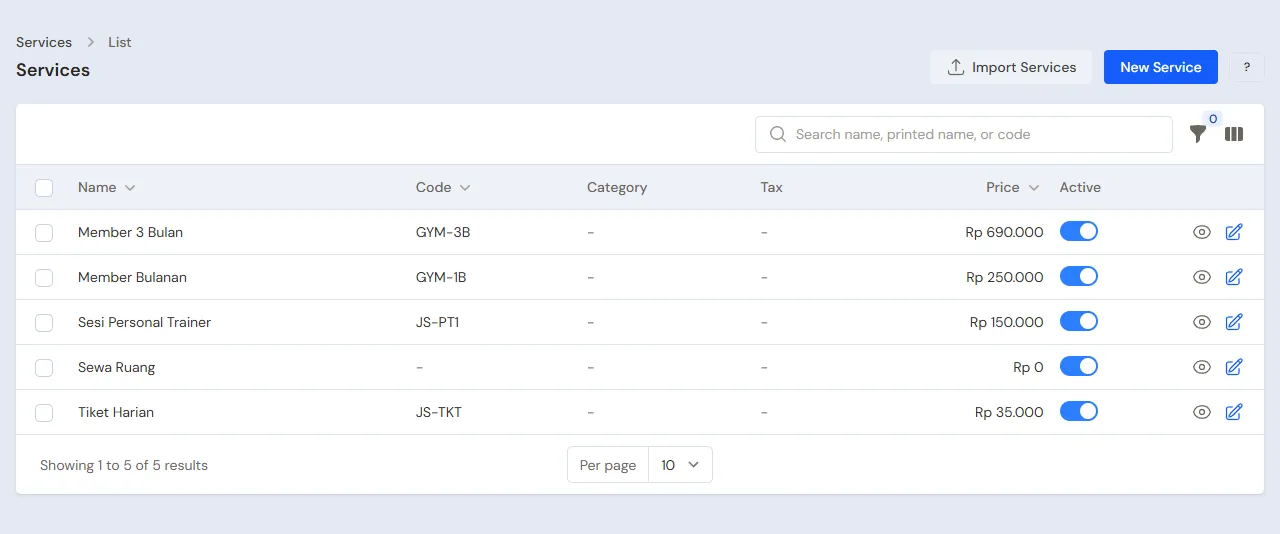
Warehouse Admin: in Master Data → Services, create:
| Service | Category | Price | Default subscription length |
|---|---|---|---|
| Member Bulanan (monthly) | Memberships | Rp 250.000 | 1 |
| Member 3 Bulan (3 months) | Memberships | Rp 690.000 | 3 |
| Tiket Harian (day pass) | Memberships | Rp 35.000 | Empty |
| Sesi Personal Trainer | Training Services | Rp 150.000 | Empty |
A service with a Default subscription length is recorded as income month by month: Member 3 Bulan Rp 690.000 comes in at Rp 230.000 a month for three months. See Adding a service. There are two services here because the 3-month price is a package of its own. A membership whose price just multiplies by the length needs only one service: the Billing period on the customer subscription decides monthly, every 3 months or yearly.
Drinks and supplements
Warehouse Admin: in Master Data → Products, create Air Mineral 600 ml (Beverages, Bottle, cost Rp 3.000, selling Rp 6.000) and Whey Protein Sachet (Vitamins and Supplements, Pieces, cost Rp 15.000, selling Rp 25.000). See Adding a product.
Trainers and their commission
- Head Cashier: in Master Data → Service Staff, register Coach Bima and Coach Lala.
- Owner: in Master Data → Commission Rates, create a rate with Service Sesi Personal Trainer, Service staff left empty, Worked out as Rupiah per service, and Rate 60.000. The other services have no rate, so they earn no commission.
The rental studio
Head Cashier: in Master Data → Rental Units, create Studio Senam (exercise studio) with the Unit Type Room and an Hourly Rate of Rp 100.000. Service on the Note may stay empty, so its note uses the service Room Rental and goes to Rental Revenue.
Points and members
- Owner: in Settings → Points, switch on Enable customer points, enter Spending per point 10.000 and Value of 1 point 100. See Giving and redeeming customer points.
- Head Cashier: in Master Data → Customers, register every member with a WhatsApp number and a Member photo, for example Rina Anggraini and Toni Wijaya. The photo shows when the member checks in.
- Owner: in Master Data → Suppliers, register Distributor Minuman Segar.
3. First capital and buying
- The Owner records Rp 10.000.000 of capital into Bank BCA in Transactions → Finance → Owner's Capital.
- The Owner records the note of Distributor Minuman Segar in Transactions → Purchases, paid in full from Bank BCA: 48 Air Mineral × Rp 3.000 (Rp 144.000) and 20 Whey Protein Sachet × Rp 15.000 (Rp 300.000), so Rp 444.000.
See Recording a purchase note.
4. One working day
An example day at Bugar Sehat Gym:
| Order | Who | Job | The money |
|---|---|---|---|
| 1 | Head Cashier | Rina joins on Member Bulanan | Rp 250.000 cash |
| 2 | Head Cashier | Toni joins on Member 3 Bulan | Rp 690.000 transfer |
| 3 | Head Cashier | Rina and Toni check in | None |
| 4 | Cashier | Two day visitors | Rp 70.000 cash |
| 5 | Cashier | Toni's personal trainer session and Rina's 2 bottles of water | Rp 150.000 + Rp 12.000 cash |
| 6 | Cashier | Studio Senam for 2 hours | Rp 200.000 cash |
| 7 | Owner | Coach Bima's commission paid | Rp 60.000 from the drawer |
A new member
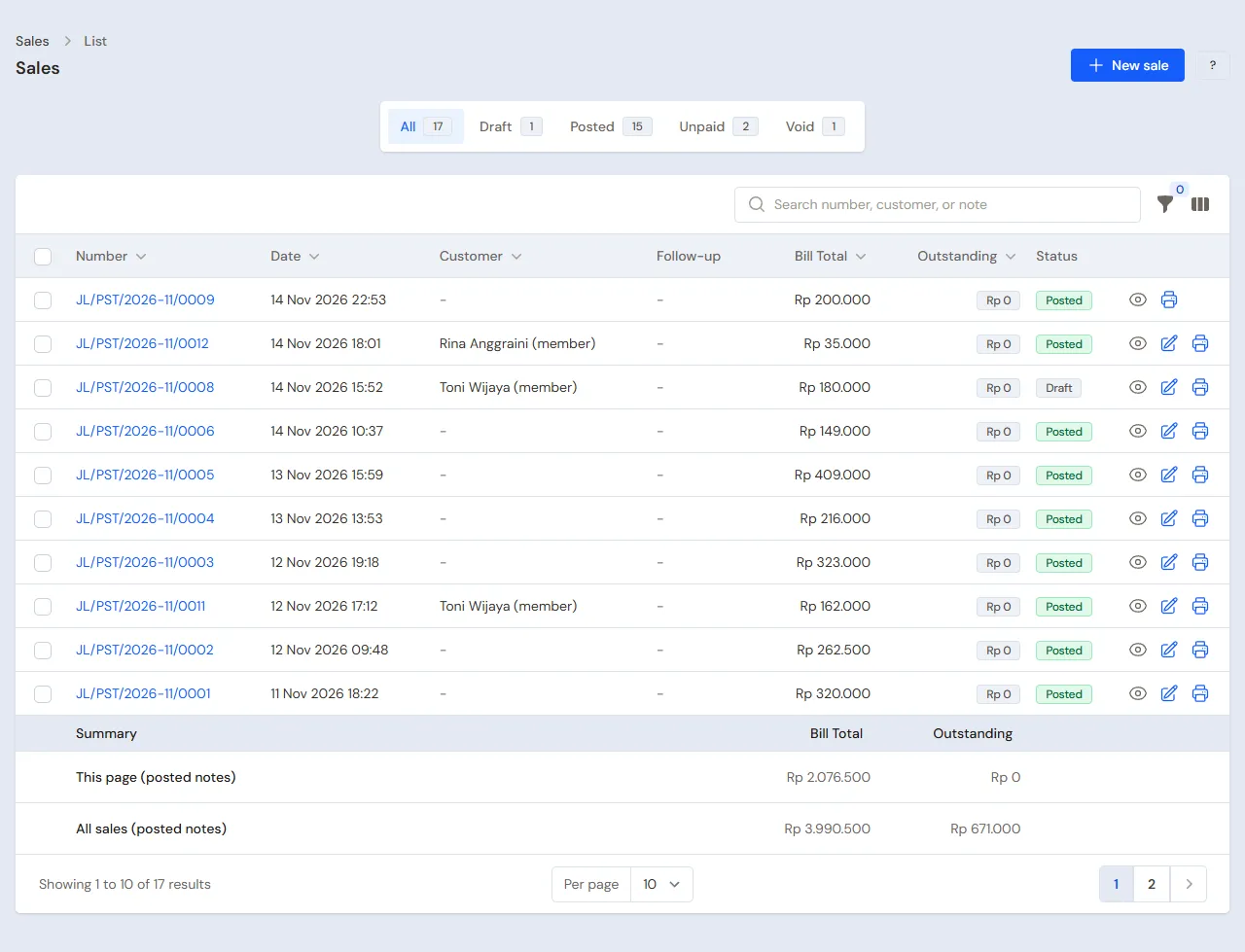
- Head Cashier: sell Member Bulanan Rp 250.000 on the till through Transactions → Sales, button New sale, in Rina's name. The line is marked 1-month subscription. See Recording a sale on the till.
- Head Cashier: in Transactions → Customer Subscriptions, press New Customer Subscription and choose that line under From sale note. Change Subscribed since to the day Rina joined, for example 20 October, and Next period starts to the same date a month later, 20 November, then press Create.
- Why change them: From sale note fills in the dates from the fee's income month, the 1st of this month for a note of the 1st to the 15th and the 1st of next month for a note of the 16th to the 31st. Left as they are, Rina who paid on the 20th is Refused at check-in at once.
- The same for Toni with Member 3 Bulan Rp 690.000, paid by transfer into Bank BCA, a Billing period of 3, and Next period starts three months after the day he joined, for example 20 January.
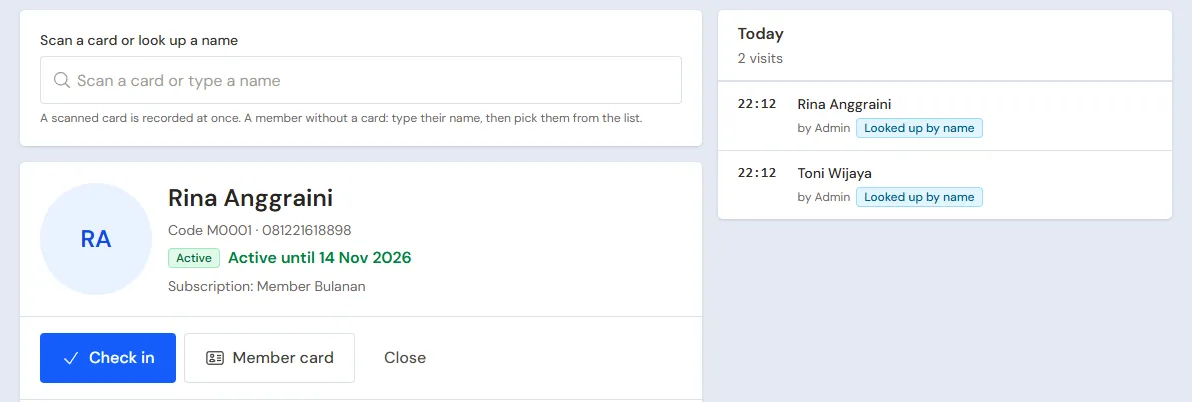
- Head Cashier: in Transactions → Member Check-in, choose Rina, press Member card, then print the card or send its picture on WhatsApp. A member without a code is given one at once, for example M0001.
Rina's paid time runs from Subscribed since to the day before Next period starts, for example 20 October to 19 November. Three days before the next period, Vende makes the draft note of her fee and gives notice in the bell: Subscription note draft for Rina Anggraini. See Billing customer subscriptions automatically.
Checking in
The Head Cashier or the Cashier scans the member card in Transactions → Member Check-in. The visit is recorded at once and the screen shows the photo and the paid time. A member without a card is searched by name or phone number, then press Check in.
Paid time that has ended makes the screen say Refused. Press Renew to open the next fee at the till, take the payment, then scan the card again.
Day visitors, trainers and drinks
The Cashier (Mas Doni) records on the till through Transactions → Sales:
- Two day visitors: Tiket Harian quantity 2, Rp 70.000 cash, without a customer's name.
- Toni trains with Coach Bima: Sesi Personal Trainer Rp 150.000 with Performed by Coach Bima, cash.
- Rina buys 2 Air Mineral 600 ml, Rp 12.000 cash.
A member chosen on the note earns points. A day visitor without a name does not.
Studio rental
Cashier: Komunitas Zumba uses Studio Senam. In Transactions → Rental Board, tap Studio Senam, then press Start. After two hours, open its session and press Finish & Pay: Rp 200.000 cash.
The trainers' commission
The commission is written when the note is saved: Coach Bima Rp 60.000 for one session. The Head Cashier reads the commission in Reports → Service Staff Commissions. The Owner pays it in that report with the Pay Commission button: choose the trainer, the category Staff Commission, the account Cashier Cash and the amount. The commission is paid as an Expense.
5. Expenses
The Owner records the towel laundry in the category Towel and Linen Laundry, the equipment servicing in the category Equipment Maintenance, and the rent and electricity, in Transactions → Finance → Expenses. See Recording shop expenses.
6. Reports per job title
| Report | What it shows | Opened by | When |
|---|---|---|---|
| Reports → Member Visits | The number of visits, the busiest hours and the visits per member | Head Cashier | Every week |
| Transactions → Customer Subscriptions | Active members with their next period | Head Cashier | Every week |
| Reports → Service Staff Commissions | Every trainer's sessions and commission, and what is not paid yet | Head Cashier | Every week |
| Reports → Stock | The drinks and supplements left | Warehouse Admin | Every week |
| Reports → Profit & Loss | Member fees per month, tickets, trainer sessions, studio rental, drinks, points, commission and expenses | Owner | Every month |
7. Checklists
- Every day: the Head Cashier and the Cashier record every visit in Member Check-in and save the fee drafts in the bell.
- Every week: the Owner pays the trainers' commission. The Head Cashier reads Member Visits and calls the members who have not come for a long time.
- Every month: the Warehouse Admin counts the drinks and supplements with a stocktake. The Owner reads Profit & Loss.
A running business
This part is for the team moving a gym already running to Vende: there are already members paid up to a certain day, members whose paid time has ended, members' points, and drinks in stock. The order is always the same:
- Fill in the master data.
- Practise transactions until everyone is used to them.
- Empty the practice transactions.
- Fill in the opening balances on the first day.
- Go live.
The opening balances come last on purpose, so the practice does not upset their figures. The examples in this part use Bugar Sehat Gym from the new business part.
1. Master data
Do Who does what, 1. Shop details and users and 2. Master data above. Also register every member with a photo, every supplier still owed, and every good still in stock.
Master data is not deleted when the practice transactions are emptied. Customer subscriptions are master data too, so the practice subscriptions are deleted by hand (part 3).
2. Team practice
Work in a practice shop of the type Fitness centre/gym with all four accounts. Every step names who and what must show.
Practice 1: master data
- Owner: shop details, the three users, the supplier, the commission rate and the points settings.
- Mas Fikri (Warehouse Admin): the four services and both goods.
- Head Cashier: both trainers, Studio Senam and both members with their photos.
Practice 2: one working day
- Owner: Rp 10.000.000 of capital and the purchase note as in part 3.
- Head Cashier: both new members with their subscriptions and cards, then check both in.
- Check: the Member Check-in screen says Rina is active up to the day before the same date next month, for example joined on 20 October, active up to 19 November.
- Cashier: the day visitors, the trainer session, the water and the studio rental as in part 4.
- Owner: pay Coach Bima Rp 60.000 of commission from Cashier Cash.
After Practice 2 this must show, for practice on the 1st to the 15th:
| Report | What must show | Opened by |
|---|---|---|
| Reports → Cash Balance | Bank BCA Rp 10.000.000 − Rp 444.000 + Rp 690.000 = Rp 10.246.000; Cashier Cash Rp 250.000 + Rp 70.000 + Rp 150.000 + Rp 12.000 + Rp 200.000 − Rp 60.000 = Rp 622.000 | Owner |
| Reports → Stock | Water 46, whey 20 | Warehouse Admin |
| Reports → Member Visits | 2 visits | Head Cashier |
| Reports → Profit & Loss | Income this month Rp 250.000 + Rp 230.000 + Rp 70.000 + Rp 150.000 + Rp 12.000 + Rp 200.000 = Rp 912.000, cost of goods sold Rp 6.000, Points Expense (26 + 84) × Rp 100 = Rp 11.000, the expense Staff Commission Rp 60.000. The Rp 460.000 left of Member 3 Bulan waits in Unearned Revenue for the next two months | Owner |
For practice on the 16th to the 31st, both fees become income only from next month: income this month Rp 912.000 − Rp 250.000 − Rp 230.000 = Rp 432.000, and the whole Rp 940.000 of fees waits in Unearned Revenue. The members' paid time still starts on the day they joined.
Rina's points are 25 from her fee and 1 from the drinks, Toni's 69 from his fee and 15 from the trainer session.
Practice 3: opening balances
Fill in the opening balances with the example of part 4 below, check them as in part 5, then empty again.
3. Empty the practice transactions
Done by the Owner in Settings → Empty Transactions, button Empty All Transactions. Notes, member visits, rental sessions, the commission written and its payments, points, purchases, payments, expenses, capital and opening balances are deleted. Services, products, service staff, commission rates, rental units, customers with their photos, customer subscriptions, suppliers, cash accounts, users and settings stay. Vende makes a full backup first. See Emptying transactions or all data.
The practice subscriptions are still there and their Next period starts has moved on. After emptying, the Head Cashier deletes them in Transactions → Customer Subscriptions, then registers the real members in part 4.
4. Opening balances
Example: Bugar Sehat Gym starts using Vende for real on Monday, 2 November.
Stock
Done by the Owner in Settings → Opening Balances, with As of that day: Opening Stock Air Mineral 600 ml 30 Bottles at Rp 3.000 and Whey Protein Sachet 12 Pieces at Rp 15.000. See Entering opening cash, stock, receivables and payables.
Members already paid up
Opening Balances has no tab for members' paid time. The way to do it is with customer subscriptions:
- The Head Cashier opens Transactions → Customer Subscriptions, button New Customer Subscription, one for every member. From sale note stays empty, because the old note is not in Vende.
- Choose the Customer and the Subscription service, then fill in the Billing period of the plan. A member who pays an old fee or a promotional price: fill in the Price per period with the fee they pay too, so you need no new plan for every price.
- Fill in Subscribed since with the real start date, even if long ago.
- Fill in Next period starts with the day after the paid time ends, at the earliest the start of this month.
- Press Create.
| Member | Service | Subscribed since | Paid up to | Next period starts |
|---|---|---|---|---|
| Rina Anggraini | Member Bulanan | 15 August | 14 November | 15 November |
| Toni Wijaya | Member 3 Bulan | 1 October | 31 December | 1 January |
| Dewi Lestari | Member Bulanan | 1 June | 31 October, not renewed | 1 November |
What follows:
- On the first day, Rina checks in with paid time up to 14 November, and Toni up to 31 December.
- Dewi is Refused. Automatic billing runs every day just after midnight, so her November fee draft is in the bell from the next morning. When Dewi comes, Renew opens that draft at the till. Once Rp 250.000 is paid, Dewi is active up to 30 November.
- Rina's fee draft is made on 12 November, three days before her next period.
- Fees paid before the first day do not come into Vende's Profit & Loss, nor the part of them used after the first day. Profit & Loss holds only the fees paid in Vende.
Members' old points
Opening Balances has no tab for points. The Owner creates the category Poin awal (opening points) in Master Data → Point Adjustment Categories, then the Head Cashier adds every member's points in Transactions → Point Adjustments, button New Point Adjustment: the Customer, the Category Poin awal, Add, and the Points. Example: Rina 80 points. As a result Reports → Profit & Loss for the first month holds a Points Expense of 80 × Rp 100 = Rp 8.000, even though the points were earned before the first day. Cash does not change.
Opening cash
The Owner fills in the Opening Cash tab for every account with the money counted on the morning of the first day. Example: Cashier Cash Rp 700.000 and Bank BCA Rp 6.000.000.
5. Check before going live
| Report | What must show | Opened by |
|---|---|---|
| Reports → Cash Balance | Bank BCA Rp 6.000.000 and Cashier Cash Rp 700.000, the same as the money counted | Owner |
| Reports → Stock | Water 30, whey 12 | Warehouse Admin |
| Transactions → Customer Subscriptions | Three Active subscriptions with their next period on 15 November, 1 January and 1 November | Head Cashier |
| Transactions → Member Check-in | Rina active up to 14 November, Toni up to 31 December, Dewi refused | Head Cashier |
| Master Data → Customers | Rina 80 points | Head Cashier |
A figure is different? The Owner corrects its line in Settings → Opening Balances, and the Head Cashier corrects the subscription, before real transactions are recorded.
6. Going live
From that day every fee, visit, ticket, trainer session, studio rental, sale and payment is recorded in Vende as in the new business part, with the same checklists.
Checks in the first week:
- Head Cashier: every member who comes shows the right paid time in Member Check-in, and the fee drafts in the bell are saved.
- Owner: Reports → Profit & Loss for the first week holds only the fees, tickets, sessions, rentals and expenses since the first day, plus the Points Expense of the old points.