
Paying for the subscription
Create a subscription invoice, transfer to Vende's bank account, then upload the transfer proof so the subscription is extended.
On this page
A Vende subscription is paid by bank transfer. Nothing is taken from your bank account automatically. The price is your shop's own price, shown in Settings → Subscription, in the Current plan section.
Before you pay, verify your email first. See Verifying your email.
Steps to pay
-
Open Settings → Subscription.
-
Press Pay subscription. While your subscription is active, the button reads Renew subscription.
-
Check the package and its price in the window that opens, then press Create invoice.
-
Vende creates an invoice for one period, with its amount and due date. The account to transfer to is written in the An invoice is awaiting payment box on the same page.
-
Transfer the amount of the invoice.
-
In the Invoices section, press Upload proof on the row of that invoice.
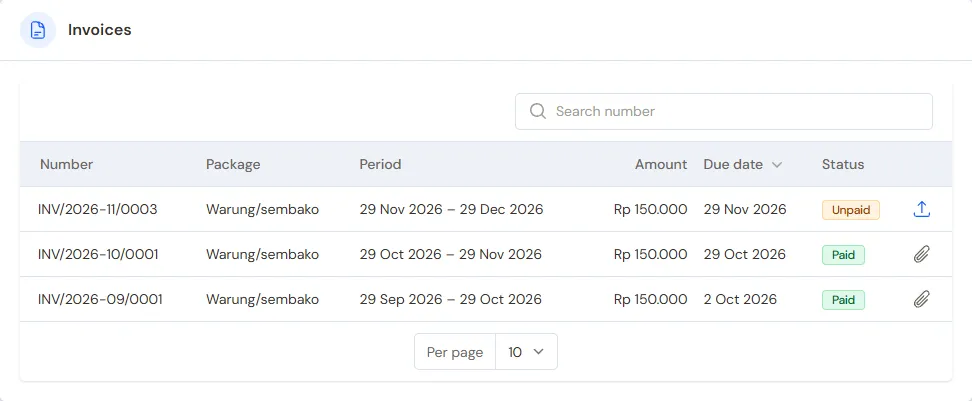
The upload icon is on the row of the invoice that is Unpaid -
Attach the Transfer proof (a photo, a screenshot, or a PDF from your bank), then fill in Amount transferred and Transfer time. The Sender name helps the check.
-
Press Submit. The message Transfer proof sent. shows.
The Vende team checks your payment, then extends the subscription. The remaining time of your current subscription is not lost. You are notified once the payment has been checked.
A shop whose price is Free does not need to pay, so the Pay subscription button does not show.
Invoice status
| Status | Meaning |
|---|---|
| Unpaid | The invoice is waiting to be paid. |
| Overdue | The invoice is not paid and its due date has passed. |
| Proof being checked | The transfer proof has been uploaded and the Vende team is checking it. |
| Paid | The payment has been received. |
| Void | The invoice was cancelled. |
When a transfer proof is rejected, the reason is written under the status of the invoice. Upload the right proof again.
Invoices made for you
When the trial ends, the first invoice is created by itself, due on the last day of the grace period. A few days before the subscription ends, the holders of the Settings role also get a reminder email, and a renewal invoice is created, due on the day the subscription ends. Pay it the same way.
The renewal invoice of the running subscription cannot be cancelled from the shop. Contact the Vende team when that invoice is wrong.
Grace period and a view-only shop
When the trial or the subscription period ends unpaid, the shop can still be used as usual during the grace period, usually 7 days. Meanwhile the holders of the Settings role see the box The trial has ended. 5 days left to pay (or The subscription is unpaid. 5 days left to pay) at the top of the Dashboard and on the Settings → Subscription page, with the invoice and the last day to pay. The same notice goes to the bell. Press Pay now to open the Subscription page.
If it is still unpaid when the grace period is over, the shop is view only:
- all data and reports can still be opened, PDFs and prints still work, and a backup can still be made and downloaded in Settings → Backup;
- nothing can be recorded or changed: no new sales, no edits, no imports, no Excel export, no orders to another Vende shop in this shop's name, and the AI cannot record (Ask Vende can still be asked, but its cards cannot be saved yet). A page that only records, such as the till, does not open and says why;
- the shop's public catalog can still be browsed, but without a cart: buyers cannot order through the catalog or the buyer portal until it is paid;
- every user of the shop sees a red strip at the top of every page. The holders of the Settings role get a Pay now button there.
The Settings → Subscription page still works in full: create the invoice, transfer, then upload the proof as usual. As soon as the Vende team approves the payment, the shop can be used again. Data is never deleted for paying late. Once the proof is uploaded, the red strip and the box on the Dashboard say the transfer proof is being checked, with a View invoice button. Support Tickets can also still be opened and answered, for instance to ask about the payment.
A transfer proof sent before the grace period is over keeps the shop usable until the proof has been checked. Paid within the grace period, the next period counts from the day the subscription ended. Paid once the shop is view only, the next period counts from the day the payment is approved. The same goes when the proof is only checked after the period it pays for has also ended, so the shop can be used again at once.
A shop whose price is Free, or that is paid through a day still to come, is never affected.
When an invoice is not paid
Besides that, an overdue invoice can lead the Vende team to suspend the shop. While it is suspended, the shop's users cannot sign in, but the shop's data is not changed. Contact the Vende team to pay it. Once the payment is approved and no invoice is overdue any more, the shop opens again by itself.
Tip: Cannot see the account number yet? Contact the Vende team through Support Tickets or WhatsApp Chat at the bottom of the sidebar.