
Collecting receivables through collectors
Hand unpaid notes to a collector in a Collection List, let the collector record the results on a phone, then receive the deposit at the office.
On this page
A shop with field collectors can hand unpaid notes to collectors. The collector collects using a phone, and the office receives the money.
This is an extra feature. If its menu is missing, contact the Vende team to switch it on.
What to prepare
- Check that the Transactions → Finance → Collection Lists menu is there. If it is not, ask the Vende team to switch on the Collectors feature. See Extra shop features.
- Create a user for each collector in Settings → Users, with the Collector job title (the Collector role) and the branch where they work. See Adding and managing users.
1. The office makes a Collection List
- Choose one branch in the branch switcher.
- Open Transactions → Finance → Collection Lists, then press Make Collection List.
- Filter the notes if needed: by Customer, Customer group, Address contains (for one area), Due by, or Only past due.
- Tick the notes to collect.
- Choose Make Collection List, then choose the Collector and the Collection date.
Notes that another collector is collecting are not shown. A note can only be on one open list.
2. The collector collects from a phone
The collector opens Transactions → Today's Collections on their phone.
-
The notes on their collection list show under the Not visited, Recorded, and All tabs. Each note shows what is still owed now.
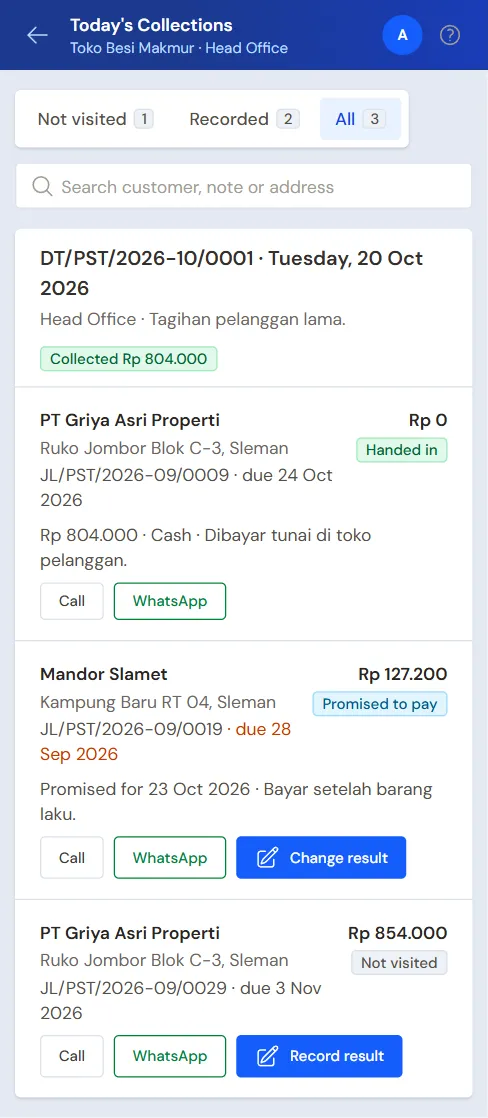
Today's Collections on the collector's phone -
Press Call or WhatsApp to contact the customer. The WhatsApp message already holds the note number and what is still owed.
-
After the visit, press Record result, then choose the Result:
- Paid: fill in the Amount paid and the Payment method;
- Promised to pay: fill in the promised date;
- Not collected: choose a Reason, for example Not there.
-
Add a photo if needed: Take photo to photograph it with the phone's camera. Photos from the gallery cannot be chosen, so the photo is taken while collecting. Tick Include my location to record the location too.
-
Press Save result.
No signal? The result is kept on the phone and sent by itself when the signal is back. A result can still be changed while the office has not received its money.
3. The office receives the deposit
Collected money only goes into the books when the office receives the deposit.
- Open the collection list, then press Receive deposit. You can also go through Transactions → Finance → Collector Deposits.
- Choose the Collector. The notes paid to that collector and not handed in yet are filled in straight away.
- Correct Paid by the customer when the customer paid an amount other than the collector recorded. Remove the rows whose money has not been handed over.
- For a transfer, QRIS, or a card, choose the account in Into account.
- Choose Cash received into, then fill in Cash received, meaning the cash actually counted at the office.
- Press Create.
Each customer gets a sale payment, and the amount left on their notes goes down.
Money a driver takes on a delivery run is received the same way: Vende makes a Collection List for that run in the driver's name, and you pick the driver as the Collector.
When the deposit differs
When the cash received differs from the collection results, choose a Difference category. The difference is recorded as a cash adjustment.
When money is short, choose how to record the shortfall:
- Cash difference (borne by the shop);
- Collector advance (paid back by the collector): the shortfall becomes an advance to the collector, paid back later through Transaction Details → Advance Repayments. See Recording advances and their repayments.
A deposit recorded by mistake can be deleted from its page. Its payments, cash adjustment, and collector advance are undone too, and its notes wait for a deposit again.
Closing a Collection List
When the collecting is over and all the collected money has been received, open the collection list, then press Close list. The notes not visited can go on another collection list.
Notes can be added to a list that is still open through Add notes.
Report
Open Reports → Collections per Collector to see the results of each collector and the promises to pay that are due.
Supporting reading
Articles on the background and the arithmetic.