
Your shop's package, price and limits
See your shop's package, its price, how long it is valid, its features, and the usage of users and storage in Settings → Subscription.
On this page
A shop's package is the business type chosen when the shop was created. The package gives the shop its first features, its subscription price and its user limit. After the shop is created, all of it belongs to the shop itself: the Vende team can change the price, the user limit or the features for your shop only.
You can see all of it in Settings → Subscription. Only holders of the Settings role can open this page. This is usually the shop owner.
Seeing the current package
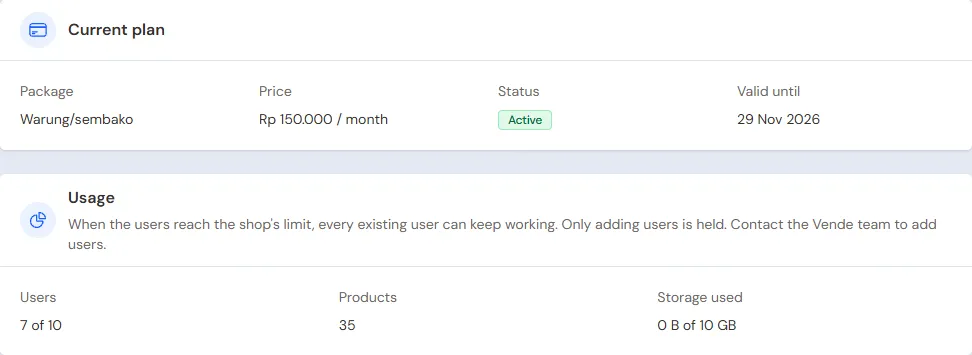
The Current plan section shows:
- your shop's Package;
- the Price per period, or Free;
- the Status, for example Trial or Active;
- Valid until.
Want to know the price for your business, or change the business type? Contact the Vende team.
The trial
Your first shop gets a free trial. The trial is only given once per owner account, so a later shop gets its first invoice straight away. During the trial, the Free trial box at the top of the page says until when the trial runs and how many days are left.
When the trial ends, the subscription continues at your shop's price and its first invoice is issued. The shop can still be used during the grace period (usually 7 days) to pay. If it is not paid by the end of the grace period, the shop is view only until paid. All data is kept. You can also pay ahead with Pay subscription. See Paying for the subscription.
This shop's features
The This shop's features section lists the basic features and the extra features that are on for your shop, grouped by area. The Vende team switches on other features. See Extra shop features.
Usage and the user limit
The Usage section compares the number of Users with the shop's user limit, for example "3 of 5". The number of Products is shown too. There is no limit on products.
When the users reach the limit:
- every existing user can keep working as usual;
- only adding users is held. The add button turns grey with the reason;
- deactivate staff who no longer work for you, or contact the Vende team to add users.
Invitations not yet accepted count too. Users who are deactivated do not count.
Storage
Product images, the logo and the shop's attachments use storage space. Its usage is shown in the Usage section, at Storage used. When the storage is full, new uploads are refused. Delete images you do not use, or contact the Vende team to add storage.
Your data stays yours
Stopping payment does not delete the shop's data. You can also always download all data through a Backup.