
Reorder Suggestion
See which goods need buying again and how many, grouped per supplier, then turn them into a draft purchase order with one button.
On this page
The Reorder Suggestion report works out which goods need buying for one warehouse. It works from the average sales, the current stock and the orders that have not arrived yet.
This is an extra feature. If its menu is missing, contact the Vende team to switch it on.
Opening the Reorder Suggestion
- Open Reports → Reorder Suggestion.
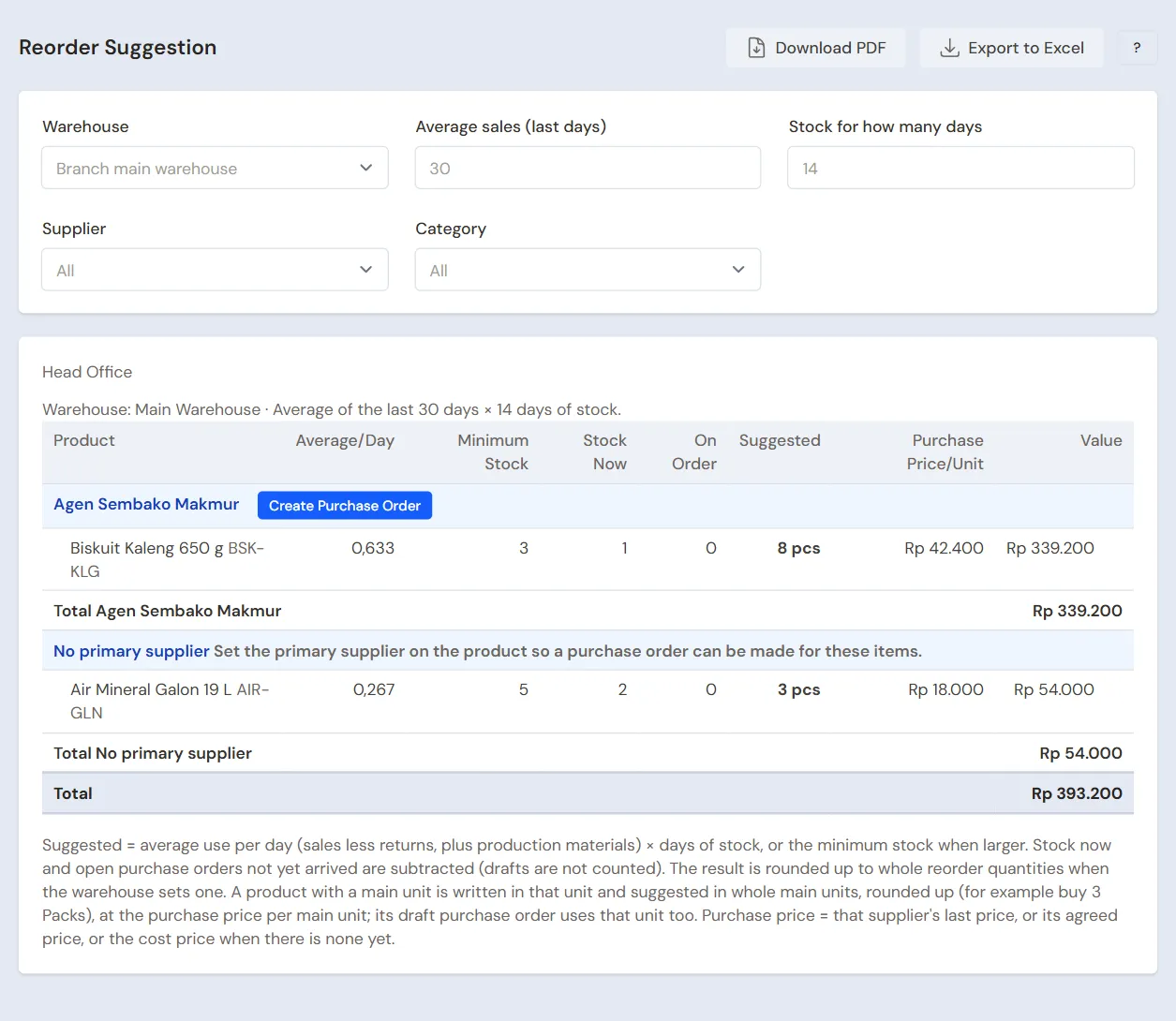
- Choose the Warehouse. By default it is the branch's main warehouse.
- Fill in Average sales (last days). By default it is 30 days.
- Fill in Stock for how many days, that is how many days of stock you want to have after buying. By default it is 14 days.
- If needed, narrow it down to one Supplier or one Category.
The report is worked out again every time you change a filter.
Reading the result
Goods are grouped by the Primary Supplier on the product record. When it is not filled in, the goods go into the group of the supplier they were last bought from. Each row shows:
- Average/Day: the use per day, from sales less returns;
- Minimum Stock and Stock Now;
- On Order: open purchase orders that have not arrived yet (drafts are not counted);
- Suggested: the quantity suggested to buy;
- Purchase Price/Unit: the last price from that supplier, or the agreed price, or the cost price. The cost price is only used for holders of Sensitive Reports; for anyone else a product without a supplier price is written at Rp 0, and its price is filled in on the draft purchase order.
Goods with no primary supplier that were never bought go into the No primary supplier group. Fill in the Primary Supplier on their product record so they can be put on a purchase order too.
How the suggestion is worked out
Need = the average per day × the days of stock. When the minimum stock is larger, the minimum stock is used. Then the current stock and the goods already on order are taken off.
Example: an average of 5 pcs sold per day, stock for 14 days. The need is 70 pcs. The current stock is 20 pcs and 10 pcs are on order. Suggested is 40 pcs.
- When the warehouse's Reorder Quantity is set, the suggestion is rounded up to a multiple of it.
- Goods that have a main unit are suggested in whole main units, rounded up, for example buy 3 Packs.
Making an order from the suggestion
- On the supplier's row, press Create Purchase Order.
- Agree in the window that opens.
- Vende makes a draft purchase order from that suggestion. Check it and change it if needed.
- Press Make It an Order when the order is sent to the supplier.
See Purchase orders.
Goods without a primary supplier
Goods that have no primary supplier and have never been bought from any supplier show in the No primary supplier group. Fill in Primary Supplier on their product record, so a purchase order can be made for them straight away.
Tip: The Reorder Suggestion uses Minimum Stock and Reorder Quantity. See Minimum stock and stock alerts to set them per warehouse.
Supporting reading
Articles on the background and the arithmetic.
- Stok Sering Habis Padahal Laris: Cara Menentukan Kapan Belanja Ulang Rumus titik pesan ulang yang bisa dihitung di buku tulis: berapa banyak stok tersisa saat Anda harus memesan lagi supaya tidak kehabisan.
- Stok Awal Toko Baru: Cara Menentukan Barang dan Jumlahnya Cara menyusun daftar barang pertama toko baru dari kebutuhan pembeli sekitar, membagi modal ke tiga kelompok barang, dan menghitung jumlah beli pertama untuk dua minggu.