
The notification bell and alerts
Read the notifications on the bell, know the stock and due date alerts sent every morning, and set their day limits.
On this page
The bell in the top right corner tells you about things that need your attention. The number on the bell shows the notifications you have not read yet.
Reading notifications
-
Press the bell at the top right.
-
The Notifications list opens. When a notification has an Open button, press it to open the page it is about.
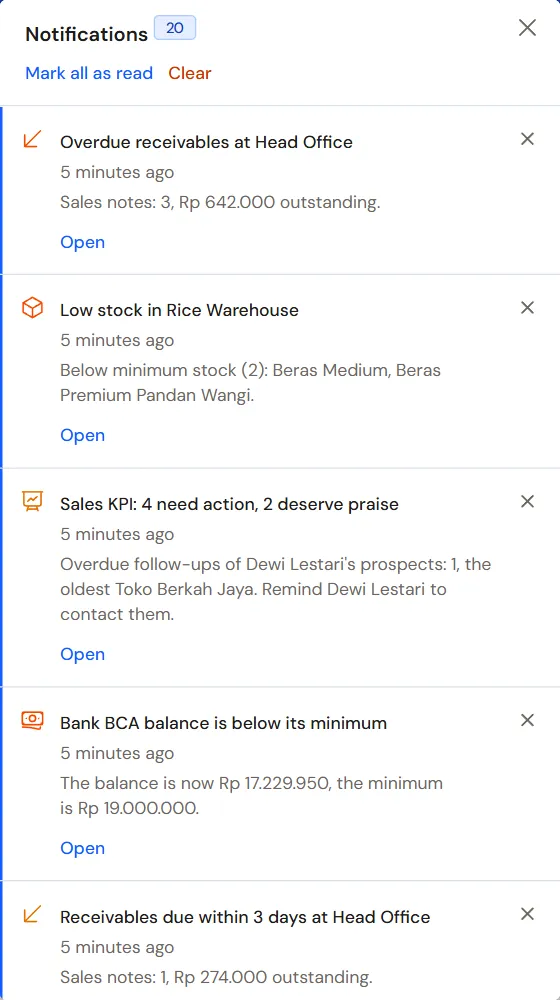
The notification list of the bell -
Press Mark all as read once you have read them all, or Clear to empty the list.
Each shop has its own bell. When you work in two shops, the bell of one shop does not show the notifications of the other. Notifications that have been read and are older than 90 days are deleted by themselves.
Alerts every morning
Every morning, at about 08:00 WIB, Vende checks your shop and sends alerts to the people who look after each matter:
| Alert | Sent to |
|---|---|
| Low stock, meaning stock that has reached or dropped below the product's minimum stock | Warehouse Manager |
| Customer receivables and advances that are almost due or overdue | Finance Manager |
| Payables to suppliers and loans of the shop that are almost due or overdue | Finance Manager |
| Unpaid expenses and income not received yet that are almost due or overdue | Finance Manager |
| Cash account balances below the minimum limit or above the maximum limit | Finance Manager |
| Sales orders to be picked up tomorrow | Cashier Operator at that branch |
When the Batches & expiry feature is on, the Warehouse Operator also gets alerts about batches that are about to expire. When the Production QC feature is on, the holders of the Retained Sample permission (Warehouse Operator and Warehouse Manager) get an alert when a retained sample's keep period is about to end or has ended, one notice per branch until the sample is marked destroyed (see Production QC). When the shop uses expense budgets, the holders of the Sensitive Reports role (for example the Finance Head job title and the owner) are told when the spending of one expense category reaches 80% and 100% of that month's budget. The spending of a parent category is that of the parent and all its children. See Expense budgets and sales targets. When the shop pays PPh Final UMKM, the Finance Manager is told on the 1st and a few days before the 15th when last month's tax must be paid (see PPh Final UMKM).
Alerts follow the reports and lists a person may open. So holders of General Reports and the Auditor also get the stock, receivable, payable and cash balance alerts. Field Sales and the Auditor also get the alert about sales orders picked up tomorrow, and Production the alert about late production orders.
When the Serial numbers feature is on, the Purchasing Operator at that branch is told when serial-numbered goods were sold with their serial to follow, meaning their purchase or opening stock has not been recorded yet. See Sell first, serial to follow.
When the Staff attendance feature is on, holders of Attendance Manager are told every morning when leave requests and overtime are still waiting for a decision.
Alerts about a warehouse or cash account used by one branch only are sent only to the people at that branch.
Other notifications
The bell also tells you about jobs that run in the background, for example:
- an import from Excel that has finished;
- an Empty Transactions or a Close Shop that has finished;
- access requests from staff, and the decisions on your own requests;
- Cost rose, check the sell price: after a purchase leaves a selling price below the cost or a margin under the thin margin limit. It goes to whoever may change prices in the purchase's branch, with a Change prices button. See From the Cost rose notice.
Setting the alert day limits
- Open Settings → Alerts.
- Under Stock Warnings, fill in:
- Slow-Moving Goods: goods that still have stock but have not sold for this many days. The default is 30 days.
- Not Counted: goods not counted in a stocktake for this many days. The default is 90 days.
- About to Expire: batches that expire within this many days. The default is 30 days.
- Under Due Dates, fill in Due Date Reminder: how many days before the due date receivables, payables, the end of a retained sample's keep period and the PPh Final UMKM payment are announced. The default is 3 days. Enter 0 for overdue ones only.
- Under Thin Margin, fill in Thin Margin Limit in percent. The default is 10. Margin is profit divided by the selling price. The limit is used by the Cost rose notice and is the starting value of Thin margin limit in Profit by Note.
- Press Save changes.
Slow-moving goods and goods not counted yet show on the Dashboard, in the Stock Warnings box, together with goods whose stock is low.
Display goods can be left out of the stock warnings. Turn on Leave out of alerts on the form of the product or of its warehouse.
Tip: The balance limits of a cash account are set on the cash account form, in the Balance Limits section. The minimum stock is set on the product form. See Minimum stock and stock alerts.