
Moving money between cash accounts
Record a drawer deposit to the bank or a bank withdrawal for change with a Cash Transfer, without changing the profit.
On this page
Money that moves from one place to another is still the shop's money. Record it with a Cash Transfer so the balances of both cash accounts are right.
Example
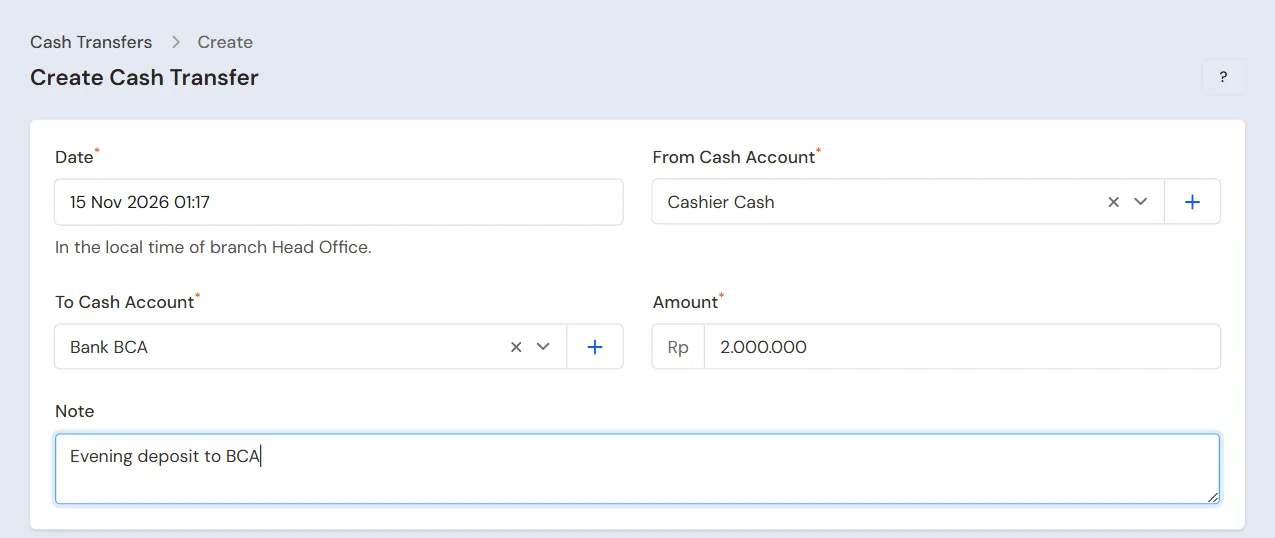
In the afternoon Bu Siti deposits Rp 2.000.000 from the cash drawer into the shop's BCA account.
- The Cashier Cash balance goes down by Rp 2.000.000.
- The Bank BCA balance goes up by Rp 2.000.000.
- The shop's profit does not change.
Recording a cash transfer
- Open Transactions → Finance → Cash Transfers.
- Press New Cash Transfer.
- Fill in Date, when the money moved.
- Choose From Cash Account, for example Cashier Cash.
- Choose To Cash Account, for example Bank BCA. It must be a different account from the first one.
- Fill in Amount, for example Rp 2.000.000.
- Fill in Note if needed, for example the deposit slip number.
- Press Create.
Both cash accounts must be allowed for the branch you have selected. Set their branches on the cash account.
Bank fees
A Cash Transfer has no field for an admin fee. If the bank takes a fee, record the transfer for the amount the receiving account got. Then record the fee as an expense from the cash account that was charged.
Example: Bu Siti moves Rp 1.000.000 from Bank BRI to Bank BCA, and BRI charges a fee of Rp 6.500. Record a transfer of Rp 1.000.000 from Bank BRI to Bank BCA, then an expense of Rp 6.500 from Bank BRI.
Between budgeting pockets
A budgeting pocket under a bank account is a cash account of its own, so money given from the bank account to a pocket, or moved from one pocket to another, is also recorded with a Cash Transfer. For example Rp 6.000.000 from Kas BCA Hugo to Kas BCA Hugo › Budgeting P1. The bank account's balance in the Balance Sheet and Cash Balance does not change, since a parent's balance already holds all its pockets. See Budgeting pockets under a bank account.
Editing or deleting
- Press Edit on the transfer's row.
- Correct the fields, then press Save changes.
- To undo a transfer recorded by mistake, press Delete on the edit page. Both balances go back to what they were before the transfer.
Tip: Transfers between cash accounts are not counted as money in or out in the This month part of the Finance page. In the Cash Book, a transfer shows as money out of the source account and money into the receiving account. The Cash Flow report does not count it, because the money only changes place.