
Counting the drawer with Cash Count
The cashier counts the money in the drawer without seeing the book balance, then Vende shows whether it is exact, short or over.
Use Cash Count at the start of a shift, at the end of a shift, or at any time. Vende hides the book balance on purpose until the count is saved. That way the cashier counts the money that is really there.
This is an extra feature. If its menu is missing, contact the Vende team to switch it on.
Before you start: cash accounts in charge
A person can only count the cash accounts they are in charge of. The owner sets this for each person:
- Open Settings → Users.
- Press the user's name in the list, for example Bu Siti.
- In the Cash Accounts in Charge part, tick the cash account, for example Cashier Cash.
- Press Save changes.
An owner who wants to count cash too also needs to tick the cash accounts in charge on their own user record. See also Adding and managing users.
Counting the cash
-
Open Transactions → Finance → Cash Count. You can also open this screen from the Cash Count box on the Dashboard.
-
Choose the Cash account to count. Only the cash accounts you are in charge of in this branch are shown.
-
Choose Purpose: Start of shift, End of shift or Spot count.
-
Count all the physical money in that cash account, including money that will be deposited. Enter the total in Money counted.
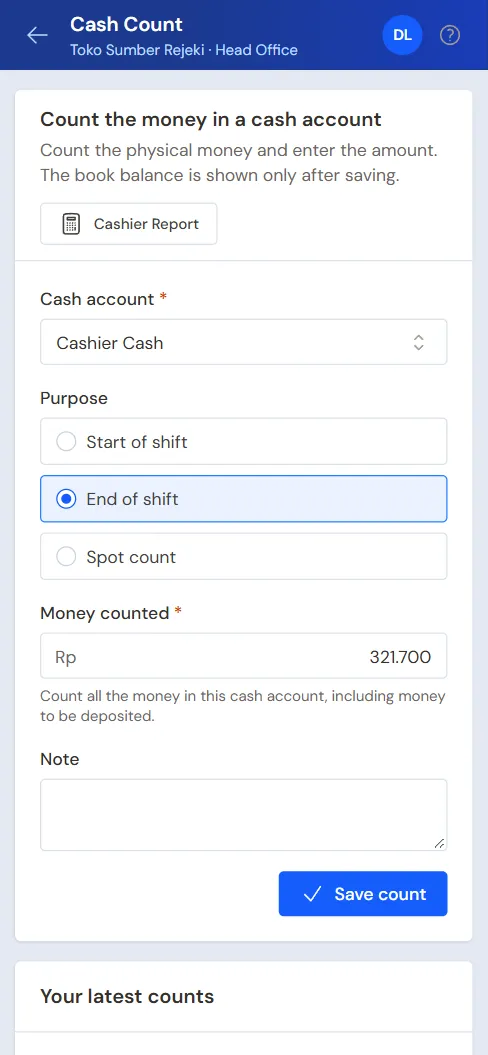
Cash Count on a phone -
Fill in Note if needed, for example money borrowed for a moment.
-
Press Save count.
Vende then shows the Cash count result: the book balance and the outcome, which is Exact, Short or Over. The count is locked at once and cannot be changed. Your earlier counts show in the Your latest counts part.
An account with pockets is checked against its own balance plus all its pockets', the same as in Cash Balance. So count all of its money, including the money given to pockets.
If there is a difference
- The manager who handles cash counts gets a notification in the bell.
- A cash count does not change the balance by itself. The manager opens the count, then presses Acknowledge.
- To book the difference, the manager presses Create Cash Adjustment. A new cash adjustment form opens. Fill in the direction, the category Cashier difference, the cash account and the amount of the difference. See Cash Adjustments.
The count's page also has Print count sheet, for signing. A wrong count can be deleted by someone with the right to do so, as long as a manager has not acknowledged it yet.
Tip: Each cashier's shift summary and the history of all counts are in the Cashier Report.
Supporting reading
Articles on the background and the arithmetic.
- Modal Kembalian Kasir: Berapa Besarnya dan Cara Mencatatnya Cara menentukan uang pembuka laci kasir dari pecahan yang paling sering dibutuhkan, mencatatnya terpisah dari hasil penjualan, dan menghitung ulang tiap shift supaya selisih tidak menumpuk.
- Uang Laci Kasir Selisih Setiap Hari, Apa yang Perlu Dicek Uang di laci kasir tidak sama dengan catatan: tujuh hal yang perlu dicek sebelum menyimpulkan ada yang mengambil.