
Setting document numbering
Set the prefix, the pattern, the number of digits, and when the sequence starts again for each kind of document.
Vende numbers every document by itself. By default, a sale note number looks like JL/PST/2026-10/0001:
- JL: the prefix of the kind of document (JL for sales, BL for purchases, and so on);
- PST: the branch code;
- 2026-10: the year and the month;
- 0001: the sequence number, which starts again from 1 every month (you can change this to every day, every year, or never).
When your shop wants another form, change it in Settings → Numbering.
Before a document is saved, its number field shows - with a hint that the number is assigned automatically when it is saved. The product and service code fields and the preview cards say AUTO. The real number is made when it is saved, and the word AUTO is never stored as a number.
Changing the number pattern
-
Open Settings → Numbering.
-
Press the section of the kind of document you want to change, for example Sale, to open it.
-
Change its fields:
- Prefix: at most 10 characters, for example INV.
- Pattern: how the number is built, using the codes below.
- Digits: the length of the sequence number. For example, 4 digits give 0001.
- Sequence starts again: Every day, Every month, Every year, or Never.
-
Check Next number under the title of that section. The example uses the branch you have chosen and today's date.
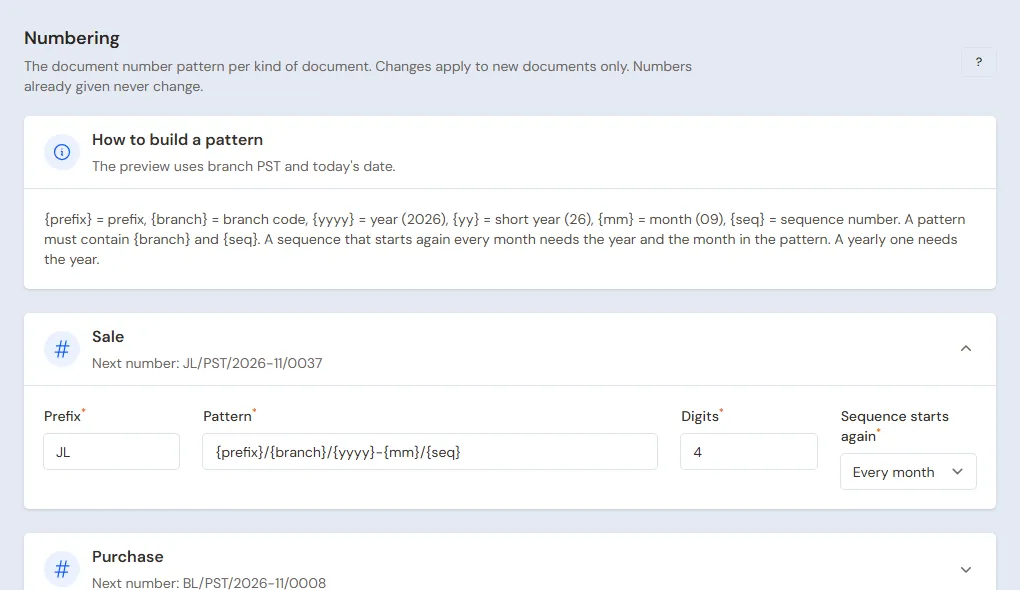
Next number under the section title shows what the pattern produces -
Press Save changes.
Codes to build a pattern
| Code | Meaning | Example |
|---|---|---|
| {prefix} | Prefix | JL |
| {branch} | Branch code | PST |
| {yyyy} | Year | 2026 |
| {yy} | Short year | 26 |
| {mm} | Month | 10 |
| {dd} | Day | 15 |
| {seq} | Sequence number | 0001 |
The rules:
- A pattern must contain {branch} and exactly one {seq}.
- Separate {branch} from the other parts with a slash, a dot, a hyphen, or a space.
- A sequence that starts again every day needs the year, the month, and the day ({dd}) in the pattern.
- A sequence that starts again every month needs the year and the month in the pattern.
- A sequence that starts again every year needs the year in the pattern.
For example, the prefix INV, the pattern {prefix}-{branch}-{yyyy}-{seq}, and a sequence that starts again Every year give INV-PST-2026-0001.
For a number that starts from 1 every day, for example a note number used as a queue number in a cafe, choose Every day and a pattern such as {prefix}-{branch}-{yyyy}{mm}{dd}-{seq}. The first note of 15 November 2026 gets JL-PST-20261115-0001 and the first note of the next day gets JL-PST-20261116-0001. The day changes on the branch's clock, so a note at 00:01 branch time already belongs to the new day.
Good to know
- A change only applies to new documents. Numbers already used do not change.
- When you choose Every day but the pattern does not yet hold the year, the month, and the day, Vende refuses to save and says the pattern must hold the year, the month, and the day.
- Each branch has its own number sequence, because the branch code is part of the number.
- The number of a deleted document is not used again. That is why a number is sometimes missing from the list.
- After Empty Transactions, the numbering starts again from the beginning.
- The branch code is set on the branch form. See Setting up branches and warehouses.