
Entering opening cash, stock, receivables and payables
Record the cash, goods, customer receivables, supplier payables, loans and advances the shop already has when it starts using Vende.
On this page
- Opening cash
- Opening stock
- Opening receivables
- Opening payables
- Opening loans
- Opening advances
- Made a typo?
- Gallons at customers
- Member points
- Orders with a down payment
- Rental bookings with a down payment
- Daily rentals running
- Lodging with guests staying
- A factory still being dismantled
- Hotel with guests staying
- Monthly members
- Machines and vehicles
- Moving from another program?
Your shop surely already had cash, goods, and perhaps receivables, payables, loans or advances before using Vende. Record them all once on the Settings → Opening Balances page, so your reports are right from the first day.
Opening balances are booked as the shop's starting capital, not as income. So opening balances do not make your profit look higher.
Important: Enter every opening balance with the same date: the day the shop starts using Vende.
This page has six tabs: Opening Receivables, Opening Payables, Opening Loans, Opening Advances, Opening Cash and Opening Stock. The Opening Loans tab is only there when the Loans extra feature is on.
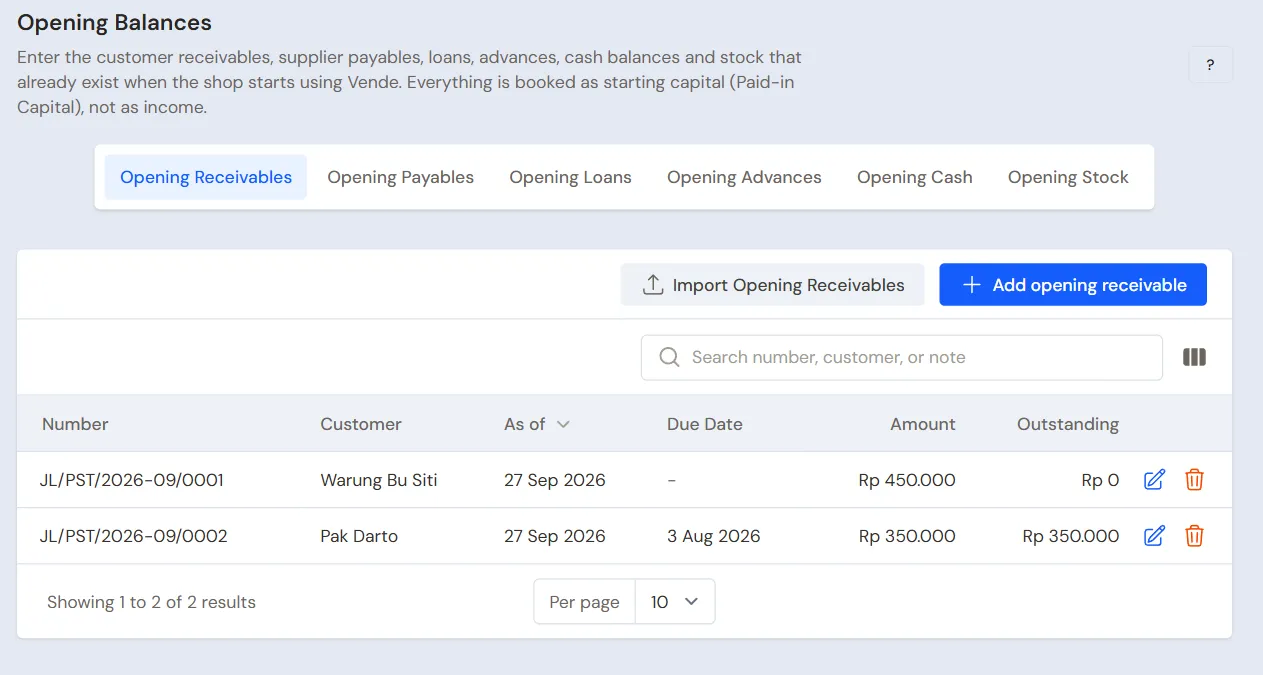
Opening balances are recorded at the branch chosen in the top bar. A shop with several branches: choose the branch in the top bar first, not All branches. The branch name is written below the As of field.
Opening cash
Opening cash is the money already in each cash account, for example what is in the cash drawer or the balance of a bank account.
- Open Settings → Opening Balances, then choose the Opening Cash tab.
- Press Add opening cash.
- Choose the Cash Account, for example Cashier Cash.
- Fill in Amount, for example Rp 500.000.
- Check As of, then press Submit.
You can rename the default cash accounts of a new shop and add other accounts. See Cash accounts and bank accounts.
A cash account has only one opening cash balance. When that account already has one, the saved values are filled in for you to change.
Opening stock
Opening stock is the goods already in the warehouse or on the shelves.
- Choose the Opening Stock tab, then press Add opening stock.
- Choose the Warehouse, Product and Unit.
- Fill in Quantity, for example 20.
- Check Cost Price per Unit. It is filled in from the product's cost price.
- Press Submit.
Goods kept per batch, such as Air Galon 19 L, also ask for their batch: pick a batch already there or fill in Batch number and Expiry. One batch takes one row, and the Batch column of the list shows the batch of every row. Goods with serial numbers ask for Serial numbers, one per line.
The Stock Value column in the list is the quantity times the cost price. This value goes into the balance sheet as inventory.
Tip: Lots of goods? Press Import Opening Stock and upload an Excel file, for example the result of a stock count.
Opening receivables
Opening receivables are money your customers still owe your shop.
- Choose the Opening Receivables tab, then press Add opening receivable.
- Choose the Customer, for example Bu Siti.
- Fill in Amount, for example Rp 250.000.
- Fill in Due Date if there is one, then press Submit.
Each opening receivable becomes one opening balance note. A customer may have several notes, each with its own due date. These notes can be paid like any ordinary sales note.
An opening receivable note is dated on the first day. The credit limit Max. total receivable counts it at once, but Max. age of oldest note counts its age from the first day, not from the old note's date. See Wholesaler guide: credit limits and old notes.
Opening payables
Opening payables are money the shop still owes its suppliers. It works the same as opening receivables: choose the Opening Payables tab, press Add opening payable, choose the Supplier, then fill in the amount and due date. These notes can be paid like any ordinary purchase note.
Opening receivables and opening payables can also be imported from Excel with the import button on each tab. Every imported row adds one note, so do not import the same file twice.
Opening loans
Opening loans are loans the shop has not paid off yet, for example from a bank or the family. It works the same as opening payables: choose the Opening Loans tab, press Add opening loan, choose the Lender, then fill in the principal left as the Amount and the due date. The money goes into no cash account, because it was used before you started using Vende.
An opening loan shows in Transactions → Finance → Loans and on the Payable Card as Opening loan. Its instalments are recorded on that loan's page as usual. See Recording loans and their repayments.
Opening advances
Opening advances are advances not paid back yet, for example staff advances. Choose the Opening Advances tab, press Add opening advance, choose the Borrower, then fill in what is left and the due date. Its repayments are recorded in Transactions → Finance → Advances like any advance.
Made a typo?
Use the Edit (pencil) or Delete (trash can) icon on the wrong row. An opening balance note that already has a payment or an applied credit cannot be deleted. Remove the payment or undo the applied credit first. The same goes for an opening loan or advance that already has instalments or repayments.
Only holders of the Settings role, usually the shop owner, can open this page.
Gallons at customers
A drinking water factory whose customers already hold gallons records them with a Stock Adjustment of the category Opening stock in the Goods at Customers warehouse, one per customer, and their old deposits with the Old deposit button in Master Data → Customers. See Drinking water factory guide: a running business.
A refill depot that only holds gallon deposits, without the extra feature Gallon exchange, records one deposit note per customer on the first day, and fills in the Opening Cash of the account holding that money with the money counted minus those deposits. See Water refill depot and gas agent guide: a running business.
Member points
This page has no points tab. Members' points from the old program are recorded in Transactions → Point Adjustments on the first day, one adjustment per member with the category Poin Awal. Every point added is booked as Points Expense, so the first day's Profit & Loss already shows their value although nothing is sold yet, and when those points are redeemed later there is no expense again. See Minimarket guide: members' points from the old program.
Orders with a down payment
This page has no orders tab. Orders whose down payment came in before the first day, such as a birthday cake or boxed meals for an event, are recorded again in Transactions → Sales Orders on the first day with Receive Down Payment into the account where the money is kept. The Opening Cash of that account is the money counted less those down payments, so its balance equals the money there. See Cake and bread shop guide: orders already paid a down payment.
Menu items of a stall or café made when they are ordered get no opening stock: their materials do. A menu item marked Made when ordered takes its materials when the note is saved, and dishes cooked ahead are recorded with a production. See Café guide.
Rental bookings with a down payment
Hourly rental is an extra feature. If its menu is missing, contact the Vende team to switch it on. This page has no bookings tab either. Table, room or court bookings whose down payment came in before the first day are recorded again in Transactions → Rental Bookings on the first day, then Receive Down Payment into the account where the money is kept. The Opening Cash of that account is the money counted less those down payments. When the session is paid on the Rental Board, its down payment is deducted. See Billiard hall guide: bookings already paid a down payment.
Daily rentals running
Daily rentals is an extra feature. If its menu is missing, contact the Vende team to switch it on. This page has no rentals tab either. Clothes or goods out with a customer on the first day are recorded in Transactions → Daily Rentals with their real pickup day, then Pick Up with the rent and deposit already paid into the account where the money is kept. A booking whose down payment came in is recorded with Down Payment. The Opening Cash of that account is the money counted less that money. See Dress and costume rental guide: clothes out on hire and bookings.
Lodging with guests staying
Lodging is an extra feature. A guest staying on the first day is recorded in Transactions → Room Board with Book a Room and the real check-in day, then Check in with the rate and deposit already paid into the account the money is kept in. That account's Opening Cash is reduced by that money, as with daily rentals. See the Lodging and homestay guide.
A factory still being dismantled
Dismantling Projects is an extra feature. If the menu is missing, contact the Vende team to turn it on. A factory already bought whose goods are not all sold is recorded in Transactions → Dismantling Projects with Buy Factory, using the price really paid, so the cost of each item is right. The opening stock of factory goods is not entered in Opening Balances. See Factory dismantling and reconditioning guide.
Hotel with guests staying
Hotel is an extra feature. A guest staying on the first day is recorded as in a lodging, and unpaid company bills are recorded as opening receivables per company. The first Transactions → Close Day closes the first day. See the Hotel guide.
Monthly members
Subscription products is an extra feature. If its menu is missing, contact the Vende team to switch it on. Members who pay a monthly fee are registered in Transactions → Customer Subscriptions on the first day, with Next period starts set to the first period not paid. The fees already paid are in the opening cash, and an unpaid fee of an earlier month goes in as an opening receivable. See Coworking and meeting room guide: monthly members.
Machines and vehicles
This page has no fixed asset tab. Machines, tools and vehicles you already have are recorded with the extra feature Fixed Assets on the first day, with their value added to the opening cash. See Fixed assets and depreciation.
Moving from another program?
If your data is in another cashier or accounting program, the opening balances can be brought over at once together with the transaction history. See Moving from Doctor Accounting or another program.
Supporting reading
Articles on the background and the arithmetic.
- Pembukuan Sederhana untuk Toko: Catatan Apa Saja yang Dibutuhkan Lima catatan yang cukup untuk pembukuan toko kecil, dan satu contoh buku kas harian yang bisa langsung dipakai.
- Pindah dari Buku Tulis ke Aplikasi: Urutan yang Aman agar Data Tidak Berantakan Urutan pindah dari buku catatan ke aplikasi tanpa kehilangan data: tanggal mulai, saldo awal, bekerja berdampingan beberapa hari, dan mencocokkan hasilnya.