
Water refill depot and gas agent guide
A learning path for a water refill depot and gallon or gas agent, new or running: refill service, gallon deposits, office deliveries, opening balances.
On this page
- A new business
- Who does what
- 1. Shop details and users
- 2. Master data
- 3. Starting capital and the first purchase
- 4. One day at the depot
- 5. Receivables, payables and stock
- 6. Machine and delivery costs
- 7. Reports per job title
- 8. Checklist
- A running business
- 1. Master data
- 2. Practice for the team
- 3. Emptying the practice transactions
- 4. Opening balances
- 5. Check before going live
- 6. Going live
This guide is for the team setting up Vende at a drinking water refill depot that is also an agent for branded gallon water and an LPG gas outlet, serving buyers at the depot and delivering to offices. It has two parts: A new business for a depot just opening, with no stock, receivables or payables from before, and A running business for one moving to Vende, with team practice and opening balances. The example is Depot Tirta Sejuk. The names of the depot, customers, suppliers and people and all the figures are made up.
What the business looks like:
- Refills: buyers bring their own gallon. The raw water is bought per tanker, and every gallon takes one cap and one seal.
- Borrowed gallons: a buyer without a gallon borrows one of the depot's with a deposit, paid back when the gallon comes back.
- Goods: branded gallon water and 3 kg LPG gas, swapped for the buyer's empty gallon or cylinder.
- Deliveries: regular offices order every week, delivered by the depot's courier, and pay within 30 days.
Work through it from the top. Every step names its menu, who does it, what changes afterwards, and an example with figures.
The features in this guide come with the Water refill depot and gallon/gas agent business type package, except those marked extra. The shop's features show under Settings → Subscription, section This shop's features. If a menu is missing, contact the Vende team. This package also holds Invoice mode, an optional screen for writing notes like an invoice by keyboard, with a due date and remarks. A new depot still opens the till when you press New sale, because refills, gas and new galon loans are written there. For notes like an invoice, choose Invoice mode with the sales input button, or make it the shop's default screen in Settings → Till display. See Making a note in invoice mode.
Tip: Lost on a page? Press the ? button at the top of that page. A short tour shows every field, on the till and Today's Deliveries too.
A new business
Who does what
This package holds three users, the owner included.
| Part of the depot | Job title in Vende | What they do and open |
|---|---|---|
| Owner | Owner | Every menu: products and services, buying raw water, gas and gallons, expenses, payments, opening balances and every report |
| Depot keeper | Head Cashier | The till, customers, gallon deposits and their refunds, office orders, delivery runs, notes from delivery notes, Reports → Container Deposits |
| Courier | Driver | Transactions → Today's Deliveries on the phone: calls, the map and the result of every delivery |
Every role is explained in Roles and permissions.
1. Shop details and users
Done by the Owner: fill in Settings → Shop (name, address, WhatsApp, logo), then create the accounts in Settings → Users with the Job title of the table above. See Adding and managing users.
The people at Depot Tirta Sejuk: Pak Rahman (owner), Mas Dimas (depot keeper, Head Cashier) and Kang Yusuf (courier, Driver).
2. Master data
A shop of this business type already has the product categories Refilled Water, Bottled Water, LPG Gas, and Gallons and Cylinders, the units Gallon (19 l), Cylinder and Carton, and the expense categories Machine Maintenance, Fuel and Vehicle Maintenance.
Refill materials and goods
Owner: in Master Data → Products, create:
| Item | Type | Category | Base Unit | Cost Price | Selling Price |
|---|---|---|---|---|---|
| Air Baku Pegunungan (raw water) | Raw Material | Refilled Water | Litre | Rp 40 | |
| Tutup Galon (cap) | Raw Material | Gallons and Cylinders | Pieces | Rp 300 | |
| Segel Galon (seal) | Raw Material | Gallons and Cylinders | Pieces | Rp 200 | |
| Air Kemasan Galon 19 L (branded water) | Finished Goods | Bottled Water | Gallon (19 l) | Rp 17.000 | Rp 20.000 |
| Gas LPG 3 kg | Finished Goods | LPG Gas | Cylinder | Rp 18.000 | Rp 22.000 |
Branded gallon water and gas are sold as a swap: the buyer hands over an empty gallon or cylinder and pays for its contents only. The stock counted is only the full gallons and cylinders. The empty gallons and cylinders swapped go back to the supplier when buying, so they are not recorded as stock. Recording empty gallons as stock and the gallons borrowed per customer is the extra feature Gallon exchange. See Gallon exchange and borrowed gallons.
The refill service
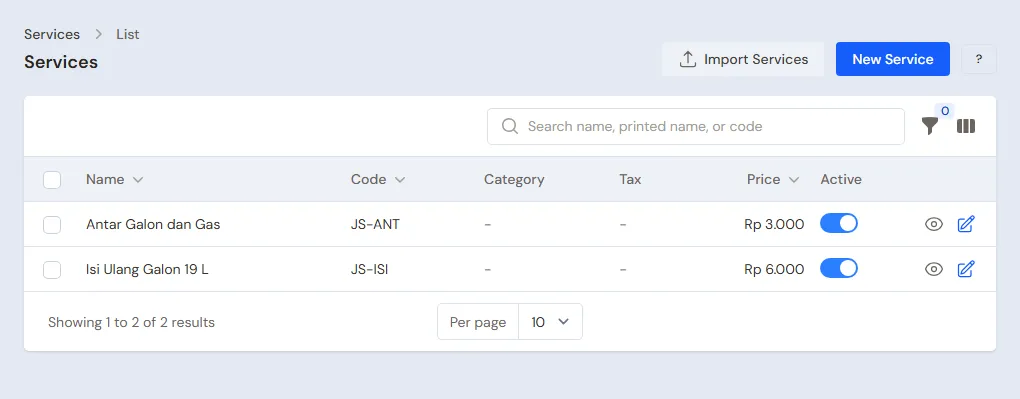
Owner: in Master Data → Services, press New Service:
- Fill in the Name Isi Ulang Galon 19 L (gallon refill), the Price Rp 6.000 and the Category Refilled Water.
- Under Materials used, press Add material: 19 Litres of Air Baku Pegunungan, 1 Tutup Galon and 1 Segel Galon.
- Press Create.
Every refill sold takes 19 litres of raw water, 1 cap and 1 seal off the stock. The cost of one refill: 19 × Rp 40 + Rp 300 + Rp 200 = Rp 1.260. See Adding a service.
The gallon deposit
Owner: in Master Data → Services, create the service Jaminan Galon 19 L (gallon deposit), Price Rp 40.000, Category Gallons and Cylinders, then turn on Container deposit (gallon, gas cylinder).
The money of this service is recorded as a customer deposit, not as income. The depot's gallons lent out are not recorded as goods for sale; how many gallons every customer holds is read from their deposits in Reports → Container Deposits.
Customers and suppliers
- Head Cashier: in Master Data → Customers, list Kantor CV Maju Bersama with Payment Terms (days) 30 and its delivery address. Buyers who borrow a gallon are listed the first time they borrow one. See Adding and changing customers.
- Owner: in Master Data → Suppliers, list Mata Air Sejuk (raw water per tanker), Toko Kemasan Galon Jaya (caps and seals), Agen LPG Mandiri Jaya, and Distributor Air Kemasan Sentosa with Payment Terms (days) 14. See Adding suppliers.
3. Starting capital and the first purchase
- The Owner records capital of Rp 15.000.000 into Bank BCA in Transactions → Finance → Owner's Capital.
- The Owner records the purchase notes in Transactions → Purchases, paid from Bank BCA: Mata Air Sejuk 5.000 Litres of Air Baku Pegunungan × Rp 40 = Rp 200.000; Toko Kemasan Galon Jaya 500 Tutup Galon × Rp 300 and 500 Segel Galon × Rp 200, so Rp 250.000; Agen LPG Mandiri Jaya 50 Cylinders of Gas LPG 3 kg × Rp 18.000 = Rp 900.000.
- The Owner records the note of Distributor Air Kemasan Sentosa, 14 days to pay: 40 Gallons of Air Kemasan Galon 19 L × Rp 17.000 = Rp 680.000.
- The Owner moves Rp 200.000 of change money from Bank BCA to Cashier Cash in Transactions → Finance → Cash Transfers.
See Recording a purchase note.
4. One day at the depot
| Time | Work | Who |
|---|---|---|
| Morning | The office's weekly order and the delivery run | Head Cashier |
| Morning | Deliver and record the result on the phone | Driver |
| All day | Refills, borrowed gallons, gas | Head Cashier |
| Midday | Notes from the delivery notes | Head Cashier |
| Afternoon | Count the drawer and deposit at the bank | Owner |
Refills and gas at the depot
The Head Cashier (Mas Dimas) opens the till with New sale on the Dashboard or in Transactions → Sales.
- A buyer who brings gallons: add Isi Ulang Galon 19 L as many as the gallons, then pay. Over that day 30 gallons, 30 × Rp 6.000 = Rp 180.000, in cash.
- Gas buyers: 8 Cylinders of Gas LPG 3 kg × Rp 22.000 = Rp 176.000, in cash, once their empty cylinders are taken.
See Recording a sale at the till.
A buyer borrows a gallon
Pak Asep has no gallon yet.
- Head Cashier: pick Pak Asep in the Customer field, or add him with + Create new. A deposit is always held in a customer's name.
- Add Isi Ulang Galon 19 L 1 and Jaminan Galon 19 L 1: Rp 6.000 + Rp 40.000 = Rp 46.000.
- Press Pay, take the cash, then press Save transaction.
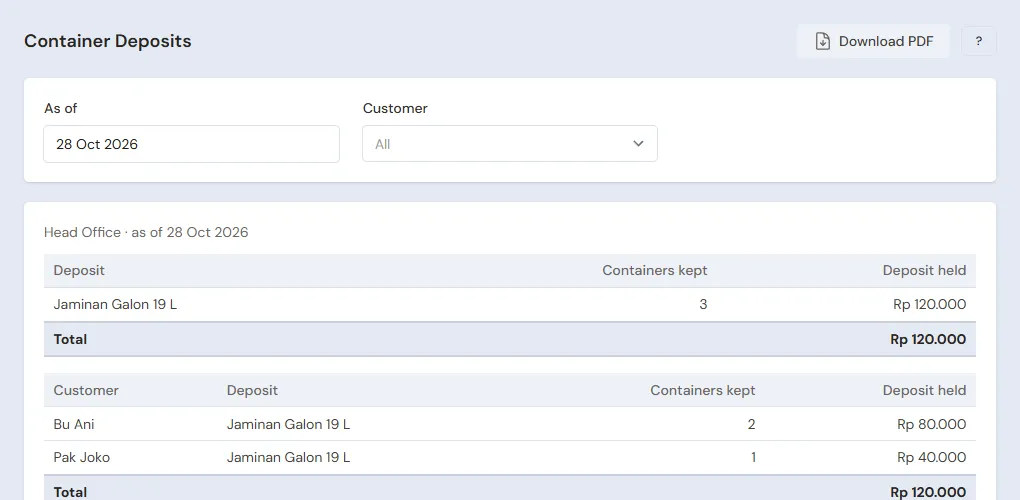
The day's sales are only Rp 6.000; Rp 40.000 becomes Pak Asep's deposit. Reports → Container Deposits shows Pak Asep holding 1 container with a deposit of Rp 40.000. Opened by the Head Cashier.
When Pak Asep brings the gallon back, the Head Cashier presses Add return, picks his borrowing note in the tab From the original note, picks Jaminan Galon 19 L 1, then refunds Rp 40.000 in cash. See Recording a sales return.
The office order and delivery
- Head Cashier: in Transactions → Sales Orders, press New Sales Order, pick Kantor CV Maju Bersama, enter 10 Gallons of Air Kemasan Galon 19 L and 2 Cylinders of Gas LPG 3 kg: 10 × Rp 20.000 + 2 × Rp 22.000 = Rp 244.000. Press Save. See Recording a sales order.
- Head Cashier: in Transactions → Delivery Runs, press Make Delivery Run, pick Sales orders, tick that office's order, pick Make Delivery Run, then pick Kang Yusuf as the Driver on the phone. Press Print & make delivery notes. The stock leaves then.
- Driver (Kang Yusuf): on the phone, open Transactions → Today's Deliveries. Kantor CV Maju Bersama is on the list with the Call and Map buttons. Once the goods are received and the empty gallons taken, press Delivered.
- Head Cashier: on that order, press Make Note from Delivery Notes, then Make Draft Note. Press Pay, Unpaid, then Save transaction. The office owes Rp 244.000, due in 30 days.
See Delivering with the daily delivery run. The refill service cannot go out on a delivery note, because a service has no stock; an office that orders refills is recorded with a normal note at the till.
Closing the depot
The Owner counts the drawer: Rp 200.000 + Rp 180.000 + Rp 46.000 + Rp 176.000 = Rp 602.000, the same as Cashier Cash in Reports → Cash Balance. Rp 402.000 is deposited at Bank BCA with Transactions → Finance → Cash Transfers; the Rp 200.000 of change stays in the drawer. The deposit money goes to the bank too, but stays recorded as the customer's deposit, not the depot's money.
5. Receivables, payables and stock
- The Owner records Kantor CV Maju Bersama's transfer under Transaction Details → Sale Payments. See Paying a note that is not paid in full.
- The Owner pays Distributor Air Kemasan Sentosa before the due date under Transaction Details → Purchase Payments. See Paying a supplier.
- Once a month the Owner counts the caps, seals, gas and branded gallon water in Transactions → Stocktakes, and reads the raw water left from the tank's meter. See Counting stock with a stocktake.
The stock after that day: raw water 5.000 − 31 × 19 = 4.411 litres, caps and seals 469 each, Gas LPG 3 kg 40 cylinders and Air Kemasan Galon 19 L 30 gallons.
6. Machine and delivery costs
- New filters and UV lamps are recorded by the Owner in Transactions → Finance → Expenses, category Machine Maintenance, for example Rp 350.000.
- The delivery motorbike's fuel goes under the category Fuel, and its servicing under Vehicle Maintenance.
The profit of that day: refills 31 × Rp 6.000 = Rp 186.000 go on the Service Revenue row, while gas 10 × Rp 22.000 = Rp 220.000 and branded gallon water 10 × Rp 20.000 = Rp 200.000 go on the Sales of Goods row, Rp 420.000, so Net sales of Rp 606.000. Cost of goods sold: refills 31 × Rp 1.260 = Rp 39.060, gas 10 × Rp 18.000 = Rp 180.000 and gallon water 10 × Rp 17.000 = Rp 170.000, so Rp 389.060. A gross profit of Rp 216.940. The deposit of Rp 40.000 is not part of it.
7. Reports per job title
| Report | What it holds | Opened by | When |
|---|---|---|---|
| Reports → Container Deposits | The gallons held and every customer's deposit money | Head Cashier | Every week |
| Reports → Cash Balance | The drawer and the bank | Owner | Every afternoon |
| Reports → Stock | Raw water, caps, seals, gas and branded gallon water | Owner | Before buying |
| Reports → Receivables | Every office's bills | Owner | Every week |
| Reports → Payables | The bottled water distributor's notes | Owner | Every week |
| Reports → Profit & Loss | Sales, the cost of refills and goods, and machine costs | Owner | Every month |
8. Checklist
- Every day: the Head Cashier records every refill, gas sale and gallon deposit, makes the delivery run and bills what was delivered. The Driver records every delivery. The Owner matches the drawer and deposits at the bank.
- Every week: the Owner reads Stock before ordering raw water and gas, and the Head Cashier matches the Container Deposits with the depot's gallons that are out.
- Every month: the Owner takes stock, records the machine maintenance and reads the Profit & Loss.
A running business
This part is for the team moving a running depot to Vende: raw water, caps, gas and gallon water in the store room, customers holding the depot's gallons with a deposit, offices that have not paid, and payables to the distributor. The order is always the same:
- Enter the master data.
- Practise transactions until every part is used to them.
- Empty the practice transactions.
- Enter the opening balances on the first day.
- Go live.
The opening balances come last on purpose, so the practice does not spoil their figures. The examples in this part use Depot Tirta Sejuk from the new business part.
1. Master data
Work through the parts Who does what, 1. Shop details and users and 2. Master data above. Also list every customer holding a depot gallon with a deposit, every office that still owes a bill and every supplier still owed. The master data is not deleted when the practice transactions are emptied.
2. Practice for the team
Work in a practice shop of the Water refill depot and gallon/gas agent type with the three accounts.
Practice 1: master data
- Owner: the shop details, both users, the five items, both services and the four suppliers.
- Check: Kang Yusuf only sees Today's Deliveries.
- Head Cashier: Kantor CV Maju Bersama.
- Check: at the till, Jaminan Galon 19 L without a customer is refused with the message that a deposit is held in the customer's name.
Practice 2: one day at the depot
- Owner: the capital of Rp 15.000.000, the four purchase notes and the Cash Transfer of Rp 200.000.
- Head Cashier: 30 refills Rp 180.000, Pak Asep borrowing a gallon Rp 46.000, and 8 cylinders of gas Rp 176.000, all in cash.
- Head Cashier: the order of Kantor CV Maju Bersama, Rp 244.000, and its delivery run for Kang Yusuf.
- Driver: in Transactions → Today's Deliveries, mark that office Delivered.
- Head Cashier: the note from the delivery note, unpaid.
- Owner: the Cash Transfer of Rp 402.000 to Bank BCA.
After Practice 2 this must show:
| Report | What must show | Opened by |
|---|---|---|
| Reports → Cash Balance | Bank BCA Rp 15.000.000 − Rp 200.000 − Rp 250.000 − Rp 900.000 − Rp 200.000 + Rp 402.000 = Rp 13.852.000, Cashier Cash Rp 200.000 | Owner |
| Reports → Container Deposits | Pak Asep 1 container, Rp 40.000 | Head Cashier |
| Reports → Receivables | Kantor CV Maju Bersama Rp 244.000 | Owner |
| Reports → Payables | Distributor Air Kemasan Sentosa Rp 680.000 | Owner |
| Reports → Stock | Raw water 4.411 litres, caps and seals 469, gas 40 cylinders, branded gallon water 30 | Owner |
| Reports → Profit & Loss | Sales of Goods Rp 420.000, Service Revenue Rp 186.000 (Net sales Rp 606.000), and Cost of Goods Sold Rp 389.060 | Owner |
Practice 3: opening balances
Enter the opening balances with the example of part 4 below, the gallon deposits included, check them as in part 5, then empty them again.
3. Emptying the practice transactions
Done by the Owner in Settings → Empty Transactions, button Empty All Transactions. Notes with deposits and their returns, orders, delivery notes, delivery runs, purchases, stock adjustments, stocktakes, payments, expenses, cash transfers, capital and opening balances are deleted. Products, services with their materials, customers, suppliers, cash accounts, users and settings stay. Vende makes a full backup first. See Emptying transactions or all data.
4. Opening balances
Done by the Owner in Settings → Opening Balances on the morning of the first day, before the depot opens, with As of that day. See Entering opening cash, stock, receivables and payables.
- Opening Stock: the raw water from the tank's meter, for example Air Baku Pegunungan 3.000 Litres at Rp 40, Tutup Galon and Segel Galon 300 Pieces, Gas LPG 3 kg 25 Cylinders at Rp 18.000 and Air Kemasan Galon 19 L 20 Gallons at Rp 17.000.
- Opening Receivables: one row per office note not paid yet, for example Kantor CV Maju Bersama Rp 488.000.
- Opening Payables: Distributor Air Kemasan Sentosa Rp 340.000.
- Opening Cash: the money counted in every account, less the gallon deposits still held (see below).
Gallons customers are borrowing
Opening Balances has no deposits tab. The deposit money already received is recorded with one note per customer on the first day, before the depot opens:
- Owner: count the deposits still held from the old book, for example Bu Ani 2 gallons (Rp 80.000) and Pak Joko 1 gallon (Rp 40.000), so Rp 120.000. The money is kept at Bank BCA, whose balance today is Rp 8.000.000.
- Owner: in the Opening Cash tab, fill in Bank BCA with the money counted less the deposits: Rp 8.000.000 − Rp 120.000 = Rp 7.880.000. Cashier Cash gets the drawer's money, for example Rp 200.000.
- Head Cashier: at the till, make one note for Bu Ani holding Jaminan Galon 19 L 2, and one note for Pak Joko holding Jaminan Galon 19 L 1. Press Pay, pick Bank BCA on the payment line, then press Save transaction.
Afterwards Bank BCA is back at Rp 8.000.000, and Reports → Container Deposits shows Bu Ani 2 containers Rp 80.000 and Pak Joko 1 container Rp 40.000. Deposit notes add no sales, so the first day's Profit & Loss stays empty. When the gallons come back, their deposits are refunded with a return like a new deposit. Customers who borrow a gallon without a deposit are not recorded.
5. Check before going live
| Report | What must show | Opened by |
|---|---|---|
| Reports → Cash Balance | Bank BCA Rp 8.000.000 and Cashier Cash Rp 200.000 | Owner |
| Reports → Container Deposits | Bu Ani 2 containers Rp 80.000, Pak Joko 1 container Rp 40.000 | Head Cashier |
| Reports → Stock | Raw water 3.000 litres, gas 25 cylinders, branded gallon water 20 | Owner |
| Reports → Receivables | Kantor CV Maju Bersama Rp 488.000 | Owner |
| Reports → Payables | Distributor Air Kemasan Sentosa Rp 340.000 | Owner |
The figures differ? The Owner corrects the row in Settings → Opening Balances, and the Head Cashier corrects the deposit notes, before any real transaction is recorded.
6. Going live
From that day every refill, gas sale, deposit, order and delivery is recorded in Vende as in the new business part, with the same checklist. In the first week the Head Cashier matches Reports → Container Deposits with the depot's gallons held by customers, and the Owner matches the raw water left with the tank's meter.