
Pet shop and animal feed guide
A learning path for a pet shop and animal feed seller, new or running: pet food with batches, feed per sack, grooming and boarding, opening balances.
On this page
- A new business
- Who does what
- 1. Shop details and users
- 2. Master data
- 3. Starting capital and the first purchase
- 4. One day at the pet shop
- 5. Receivables, payables and groomers' wages
- 6. Reports per job title
- 7. Checklist
- A running business
- 1. Master data
- 2. Practice for the team
- 3. Emptying the practice transactions
- 4. Opening balances
- 5. Check before going live
- 6. Going live
This guide is for the team setting up Vende at a pet shop that sells pet food and supplies, offers grooming and boarding, and also sells animal feed per sack or by the kilo. It has two parts: A new business for a pet shop just opening, with no stock, receivables or payables from before, and A running business for one moving to Vende, with team practice and opening balances. The example is Anabul Ceria Pet Shop. The names of the shop, customers, suppliers and people and all the figures are made up.
What the business looks like:
- Goods: dry and wet cat food, a dewormer with an expiry date per batch, and cat litter.
- Animal feed: chicken feed bought per 50 kg sack, sold per sack to farmers or by the kilogram.
- Services: cat baths by two groomers, who use shampoo from stock, and cat boarding per day.
- Selling: buyers pay cash or by QRIS. Regular farmers pay for feed within 14 days.
Work through it from the top. Every step names its menu, who does it, what changes afterwards, and an example with figures.
The features in this guide come with the Pet shop and animal feed business type package, except those marked extra. The shop's features show under Settings → Subscription, section This shop's features. If a menu is missing, contact the Vende team.
Tip: Lost on a page? Press the ? button at the top of that page. A short tour shows every field, on the till screen too.
A new business
Who does what
This package holds three users, the owner included.
| Part of the pet shop | Job title in Vende | What they do and open |
|---|---|---|
| Owner | Owner | Every menu: suppliers and purchases, payments, groomers' wages, expenses, opening balances and every report |
| Cashier and grooming front desk | Head Cashier | The till, customers, service staff, grooming and boarding, returns |
| Store room | Warehouse Admin | Products, services and their materials, batches, expired goods, stocktakes, Reports → Stock |
Groomers need no account: they are listed in Master Data → Service Staff and picked by the cashier on every service. Every role is explained in Roles and permissions.
1. Shop details and users
Done by the Owner: fill in Settings → Shop (name, address, WhatsApp, logo), then create the accounts in Settings → Users with the Job title of the table above. See Adding and managing users.
The people at Anabul Ceria Pet Shop: Mbak Citra (owner), Rafi (cashier and front desk, Head Cashier) and Pak Darto (store room, Warehouse Admin). Dewi and Sekar are groomers without an account.
2. Master data
A shop of this business type already has the product categories Pet Food, Animal Feed, Pet Accessories, Animal Medicines and Vitamins, and Grooming and Boarding, the units Gunny Sack, Sack and Can, and the expense category Equipment Maintenance.
Goods
Warehouse Admin: in Master Data → Products, create:
| Item | Type | Category | Base Unit | Cost Price | Selling Price | Batches |
|---|---|---|---|---|---|---|
| Makanan Kucing Kering 1 kg (dry cat food) | Finished Goods | Pet Food | Pieces | Rp 45.000 | Rp 58.000 | Yes |
| Makanan Kucing Basah 400 g (wet cat food) | Finished Goods | Pet Food | Can | Rp 18.000 | Rp 25.000 | Yes |
| Obat Cacing Kucing (dewormer) | Finished Goods | Animal Medicines and Vitamins | Pieces | Rp 15.000 | Rp 22.000 | Yes |
| Pasir Kucing 10 L (cat litter) | Finished Goods | Pet Accessories | Pieces | Rp 35.000 | Rp 48.000 | No |
| Pakan Ayam Petelur (chicken feed) | Finished Goods | Animal Feed | Kilogram | Rp 7.000 | Rp 8.500 | No |
| Sampo Grooming (shampoo) | Raw Material | Grooming and Boarding | Litre | Rp 120.000 | No |
- For goods with batches, turn on Track batches & expiry in the Tracking section. See Batches and expiry dates.
- Pakan Ayam Petelur gets the Other Units Gunny Sack of 50 with a Selling Price of Rp 400.000, then the Main Unit Gunny Sack, so the stock shows as 7 Gunny Sacks 45 Kilograms. See Base unit, other units and main unit.
- Sampo Grooming is a Raw Material, so it does not show at the till; it is only used by the bath service.
Grooming and boarding services
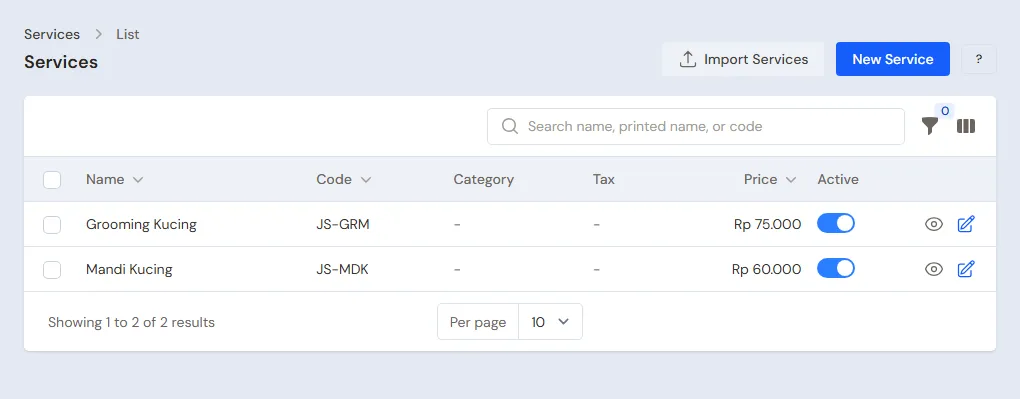
Warehouse Admin: in Master Data → Services, press New Service:
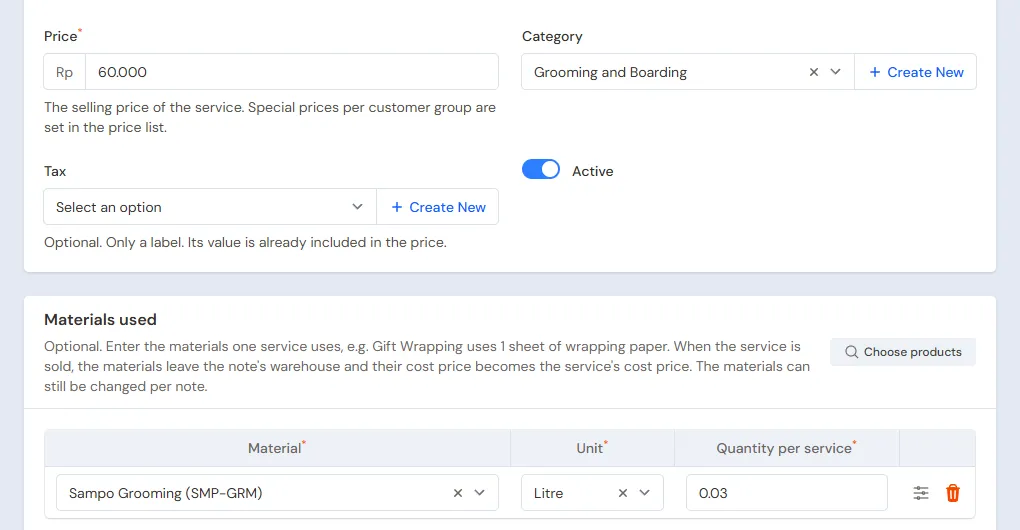
- Name Mandi Kucing (cat bath), Price Rp 60.000, Category Grooming and Boarding. Under Materials used, press Add material, pick Sampo Grooming with the Quantity per service 0,03 (30 ml). Press Create.
- Name Penitipan Kucing per Hari (cat boarding per day), Price Rp 40.000, without materials. Press Create.
Every Mandi Kucing sold takes 0,03 litre of shampoo, so its cost is 0,03 × Rp 120.000 = Rp 3.600. See Adding a service.
Groomers, customers and suppliers
- Head Cashier: in Master Data → Service Staff, list Dewi and Sekar.
- Head Cashier: in Master Data → Customers, list the pet owners who come often, for example Bu Wulan, and the farmer Pak Slamet with Payment Terms (days) 14. See Adding and changing customers.
- Owner: in Master Data → Suppliers, list Distributor Pakan Hewan Sejahtera with Payment Terms (days) 30, and Pabrik Pakan Ternak Makmur and Toko Grooming Sentosa without terms. See Adding suppliers.
3. Starting capital and the first purchase
- The Owner records capital of Rp 25.000.000 into Bank BCA in Transactions → Finance → Owner's Capital.
- The Owner records the note of Distributor Pakan Hewan Sejahtera in Transactions → Purchases, 30 days to pay: 40 Makanan Kucing Kering 1 kg × Rp 45.000 = Rp 1.800.000, 48 Cans of Makanan Kucing Basah 400 g × Rp 18.000 = Rp 864.000, 20 Obat Cacing Kucing × Rp 15.000 = Rp 300.000 and 20 Pasir Kucing 10 L × Rp 35.000 = Rp 700.000. That is Rp 3.664.000. Fill in the batch number and expiry of every item with batches in its line details. See Recording a purchase note.
- The Owner records the note of Pabrik Pakan Ternak Makmur, paid from Bank BCA: 10 Gunny Sacks of Pakan Ayam Petelur × Rp 350.000 = Rp 3.500.000.
- The Owner records the note of Toko Grooming Sentosa, paid from Bank BCA: 2 Litres of Sampo Grooming × Rp 120.000 = Rp 240.000.
- The Owner moves Rp 300.000 of change money from Bank BCA to Cashier Cash in Transactions → Finance → Cash Transfers.
4. One day at the pet shop
| Time | Work | Who |
|---|---|---|
| Morning | Cats come for a bath or boarding | Head Cashier |
| All day | Selling food, litter and feed | Head Cashier |
| Midday | Feed per sack for a farmer, on credit | Head Cashier |
| Afternoon | A boarded cat is picked up | Head Cashier |
| Afternoon | Batches about to expire | Warehouse Admin |
| Evening | Count the drawer and deposit at the bank | Owner |
Grooming
Bu Wulan brings her two cats for a bath.
- The Head Cashier (Rafi) opens the till with New sale on the Dashboard or in Transactions → Sales, then picks Bu Wulan in the Customer field.
- Add Mandi Kucing, quantity 2, then pick Dewi in the Performed by field of its line. Bu Wulan also buys 1 Obat Cacing Kucing.
- That is 2 × Rp 60.000 + Rp 22.000 = Rp 142.000. Press Pay, pick Bank BCA with the method QRIS, then press Save transaction.
The note and the receipt write Performed by: Dewi on the service's line. See Recording a sale at the till.
Boarding
Pak Rudi leaves his cat for three days.
- When the cat arrives, the Head Cashier makes a note for Pak Rudi holding Penitipan Kucing per Hari, quantity 3, Performed by Sekar, then presses Save draft. A draft does not change the cash yet.
- When the cat is picked up, open Transactions → Sales, tab Draft, open the note, then press Edit this note. Change the number of days when it differs, then pay: 3 × Rp 40.000 = Rp 120.000, in cash.
The Draft tab is also the list of cats being boarded. See Saving a draft.
Food, litter and feed
- A walk-in buyer: 2 Makanan Kucing Kering 1 kg (Rp 116.000), 1 Pasir Kucing 10 L (Rp 48.000) and 3 Cans of Makanan Kucing Basah 400 g (Rp 75.000), so Rp 239.000, in cash.
- A buyer of loose feed: 5 Kilograms of Pakan Ayam Petelur, Rp 42.500, in cash, weighed out of an opened sack.
- Pak Slamet, a farmer: 2 Gunny Sacks of Pakan Ayam Petelur × Rp 400.000 = Rp 800.000. Pick Pak Slamet, switch the unit to Gunny Sack, press Pay, Unpaid, then Save transaction. His receivable is due in 14 days.
Food with batches leaves from the batch that expires first.
Batches about to expire
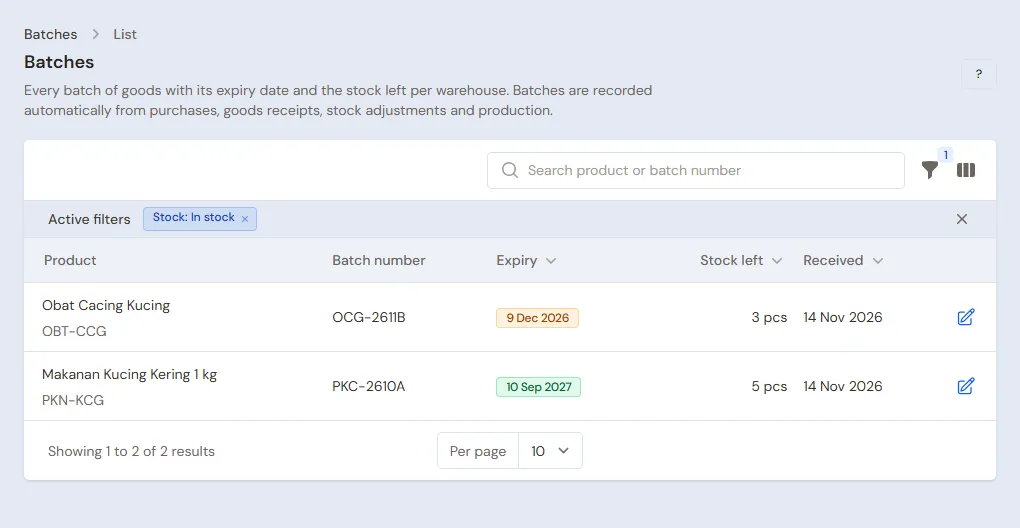
The Warehouse Admin (Pak Darto) opens Master Data → Batches with the expiry filter, then puts the food about to pass its date at the front. Food past its date is taken out in Transactions → Stock Adjustments, direction Out, category Expired, with its batch. See Stock adjustments.
Closing the shop
The Owner counts the drawer: Rp 300.000 + Rp 120.000 + Rp 239.000 + Rp 42.500 = Rp 701.500, the same as Cashier Cash in Reports → Cash Balance, then deposits Rp 401.500 at Bank BCA with Transactions → Finance → Cash Transfers.
5. Receivables, payables and groomers' wages
- The Owner records Pak Slamet's payment under Transaction Details → Sale Payments. See Paying a note that is not paid in full.
- The Owner pays Distributor Pakan Hewan Sejahtera before the due date under Transaction Details → Purchase Payments. See Paying a supplier.
- Groomers' wages are recorded by the Owner in Transactions → Finance → Expenses, category Salaries. Every groomer's work and commission are worked out with the extra feature Service staff commissions, which opens the Service Staff Commissions report. Without it, the service staff is still written on every note.
- Scissors, hair dryers and grooming tables that are serviced go under the category Equipment Maintenance.
The profit of that day: the baths 2 × Rp 60.000 = Rp 120.000 and the boarding Rp 120.000 go on the Service Revenue row, Rp 240.000, while the goods Rp 22.000 + Rp 239.000 + Rp 42.500 + Rp 800.000 go on the Sales of Goods row, Rp 1.103.500, so Net sales of Rp 1.343.500. Cost of goods sold Rp 936.200 (feed 105 kg × Rp 7.000 = Rp 735.000, dry food 2 × Rp 45.000 = Rp 90.000, wet food 3 × Rp 18.000 = Rp 54.000, litter Rp 35.000, dewormer Rp 15.000, shampoo for two baths 2 × Rp 3.600 = Rp 7.200), so a gross profit of Rp 407.300.
6. Reports per job title
| Report | What it holds | Opened by | When |
|---|---|---|---|
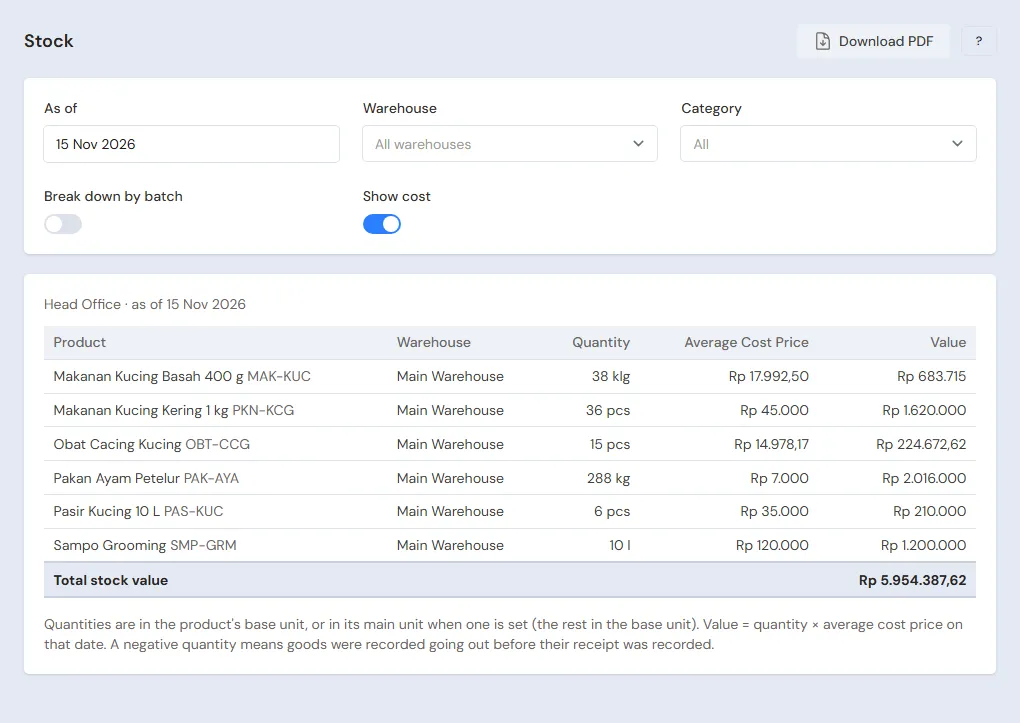
| Reports → Stock | Food per batch, feed in sacks and kilograms, shampoo | Warehouse Admin | Every day |
| Reports → Cash Balance | The drawer and the bank | Owner | Every evening |
| Reports → Receivables | The farmers' bills and their due dates | Owner | Every week |
| Reports → Payables | The distributor's notes and their due dates | Owner | Every week |
| Reports → Profit & Loss | Sales of goods and services, cost of goods sold, shampoo used, and expenses | Owner | Every month |
7. Checklist
- Every day: the Head Cashier records every service with its staff, every boarding as a draft, and every sale. The Owner matches the drawer and deposits at the bank.
- Every week: the Warehouse Admin checks the batches about to expire and the shampoo left. The Owner reads Receivables and Payables.
- Every month: the Warehouse Admin takes stock, weighing the opened feed sacks too. The Owner records the groomers' wages and reads the Profit & Loss.
A running business
This part is for the team moving a running pet shop to Vende: food with its batches, feed in the store room, cats being boarded, farmers who have not paid, and payables to the distributor. The order is always the same:
- Enter the master data.
- Practise transactions until every part is used to them.
- Empty the practice transactions.
- Enter the opening balances on the first day.
- Go live.
The opening balances come last on purpose, so the practice does not spoil their figures. The examples in this part use Anabul Ceria Pet Shop from the new business part.
1. Master data
Work through the parts Who does what, 1. Shop details and users and 2. Master data above. Also list every farmer who still owes a bill, every owner of a cat being boarded, and every supplier still owed. The master data is not deleted when the practice transactions are emptied.
2. Practice for the team
Work in a practice shop of the Pet shop and animal feed type with the three accounts.
Practice 1: master data
- Owner: the shop details, both users and the three suppliers.
- Pak Darto (Warehouse Admin): the six items, both services with their materials, and batches for the food and the dewormer.
- Check: Sampo Grooming does not show at the till.
- Head Cashier: Dewi and Sekar, Bu Wulan and Pak Slamet.
Practice 2: one day at the pet shop
- Owner: the capital of Rp 25.000.000, the three purchase notes and the Cash Transfer of Rp 300.000.
- Head Cashier: Bu Wulan's grooming Rp 142.000 by QRIS, Pak Rudi's boarding draft then paid Rp 120.000 in cash, the sales of Rp 239.000 and Rp 42.500 in cash, and Pak Slamet's feed Rp 800.000 unpaid.
- Owner: the Cash Transfer of Rp 401.500 to Bank BCA.
After Practice 2 this must show:
| Report | What must show | Opened by |
|---|---|---|
| Reports → Cash Balance | Bank BCA Rp 25.000.000 − Rp 3.500.000 − Rp 240.000 − Rp 300.000 + Rp 142.000 + Rp 401.500 = Rp 21.503.500, Cashier Cash Rp 300.000 | Owner |
| Reports → Receivables | Pak Slamet Rp 800.000 | Owner |
| Reports → Payables | Distributor Pakan Hewan Sejahtera Rp 3.664.000 | Owner |
| Reports → Stock | Dry food 38, wet food 45 cans, dewormer 19, litter 19, feed 7 Gunny Sacks 45 Kilograms, shampoo 1,94 litres | Warehouse Admin |
| Reports → Profit & Loss | Sales of Goods Rp 1.103.500, Service Revenue Rp 240.000 (Net sales Rp 1.343.500), and Cost of Goods Sold Rp 936.200 | Owner |
Practice 3: opening balances
Enter the opening balances with the example of part 4 below, check them as in part 5, then empty them again.
3. Emptying the practice transactions
Done by the Owner in Settings → Empty Transactions, button Empty All Transactions. Notes and drafts, purchases, batches, stock adjustments, stocktakes, payments, expenses, cash transfers, capital and opening balances are deleted. Products, services with their materials, service staff, customers, suppliers, cash accounts, users and settings stay. Vende makes a full backup first. See Emptying transactions or all data.
4. Opening balances
Done by the Owner in Settings → Opening Balances on the morning of the first day, with As of that day. See Entering opening cash, stock, receivables and payables.
- Opening Stock: one row per batch for food and medicine, for example Makanan Kucing Kering 1 kg 12 Pieces of batch MK-2612 and 10 Pieces of batch MK-2701, at Rp 45.000. Feed goes in by the kilogram, for example 320 Kilograms (6 sacks and one opened sack of 20 kg) at Rp 7.000. Shampoo goes in by the litre left, for example 1,5 Litres at Rp 120.000.
- Opening Receivables: one row per farmer note not paid yet, for example Pak Slamet Rp 1.200.000 with its due date.
- Opening Payables: Distributor Pakan Hewan Sejahtera Rp 2.000.000.
- Opening Cash: the money counted, for example Cashier Cash Rp 300.000 and Bank BCA Rp 10.000.000.
Cats being boarded on the first day are recorded by the Head Cashier as boarding drafts, with the days since each cat arrived. When it is picked up, the draft is paid as usual. When its owner paid in advance before the first day, make no draft: the money is already in the opening cash.
5. Check before going live
| Report | What must show | Opened by |
|---|---|---|
| Reports → Cash Balance | Cashier Cash Rp 300.000 and Bank BCA Rp 10.000.000 | Owner |
| Reports → Stock | Dry food 22: 12 of batch MK-2612 and 10 of batch MK-2701, feed 6 Gunny Sacks 20 Kilograms, shampoo 1,5 litres | Warehouse Admin |
| Reports → Receivables | Pak Slamet Rp 1.200.000 | Owner |
| Reports → Payables | Distributor Pakan Hewan Sejahtera Rp 2.000.000 | Owner |
The figures differ? The Owner corrects the row in Settings → Opening Balances before any real transaction is recorded.
6. Going live
From that day every service, boarding, sale and purchase is recorded in Vende as in the new business part, with the same checklist. In the first week the Head Cashier matches the Draft tab with the cats in the boarding cages, and the Warehouse Admin matches Reports → Stock with the shelves and the store room.