
Plastics and housewares shop guide
A learning path for a plastics and housewares shop, new or running: colour variants, scores and sets, quantity prices, selling to warungs, opening balances.
On this page
- A new business
- Who does what
- 1. Shop details and users
- 2. Master data
- 3. Starting capital and the first purchase
- 4. One selling day
- 5. Receivables and payables
- 6. Stock per colour and stocktakes
- 7. Reports per job title
- 8. Checklist
- A running business
- 1. Master data
- 2. Practice for the team
- 3. Emptying the practice transactions
- 4. Opening balances
- 5. Check before going live
- 6. Going live
This guide is for the team setting up Vende at a plastics and housewares shop that sells buckets, dippers, food carriers and cleaning tools, by the piece and per score (kodi, 20 pieces) to warungs. It has two parts: A new business for a shop just opening, with no stock, receivables or payables from before, and A running business for one moving to Vende, with team practice and opening balances. The example is Toko Plastik Aneka Jaya. The names of the shop, customers, suppliers and people and all the figures are made up.
What the business looks like:
- Goods: buckets in three colours, dippers per piece or per score, food carriers per set, and brooms.
- Buying: from a plastics factory with 30 days to pay, and from a housewares wholesaler in cash.
- Selling: walk-in buyers pay cash or by QRIS. Buyers who take many, for example for a celebration, get a cheaper price. Regular warungs take goods per score and may pay part.
Work through it from the top. Every step names its menu, who does it, what changes afterwards, and an example with figures.
The features in this guide come with the Plastics and housewares business type package, except those marked extra. The shop's features show under Settings → Subscription, section This shop's features. If a menu is missing, contact the Vende team.
Tip: Lost on a page? Press the ? button at the top of that page. A short tour shows every field, on the till screen too.
A new business
Who does what
This package holds three users, the owner included.
| Part of the shop | Job title in Vende | What they do and open |
|---|---|---|
| Owner | Owner | Every menu: suppliers and purchases, payments, expenses, opening balances and every report |
| Cashier | Head Cashier | The till, warung customers, colour swaps, returns |
| Store room | Warehouse Admin | Products with their variants and prices, stock adjustments, stocktakes, Reports → Stock |
Every role is explained in Roles and permissions.
1. Shop details and users
Done by the Owner: fill in Settings → Shop (name, address, WhatsApp, logo), then create the accounts in Settings → Users with the Job title of the table above. See Adding and managing users.
The people at Toko Plastik Aneka Jaya: Bu Mei (owner), Yanto (cashier, Head Cashier) and Asih (store room, Warehouse Admin).
2. Master data
A shop of this business type already has the product categories Plasticware, Kitchenware, Cleaning Supplies, Containers and Storage, and Household Supplies, the units Score (20 pcs), Set and Box, and the expense category Shopping Bags.
Buckets with colour variants
Warehouse Admin: in Master Data → Products, press New Product:
- Fill in the Name Ember Plastik 20 L (plastic bucket), the Category Plasticware and the Base Unit Pieces.
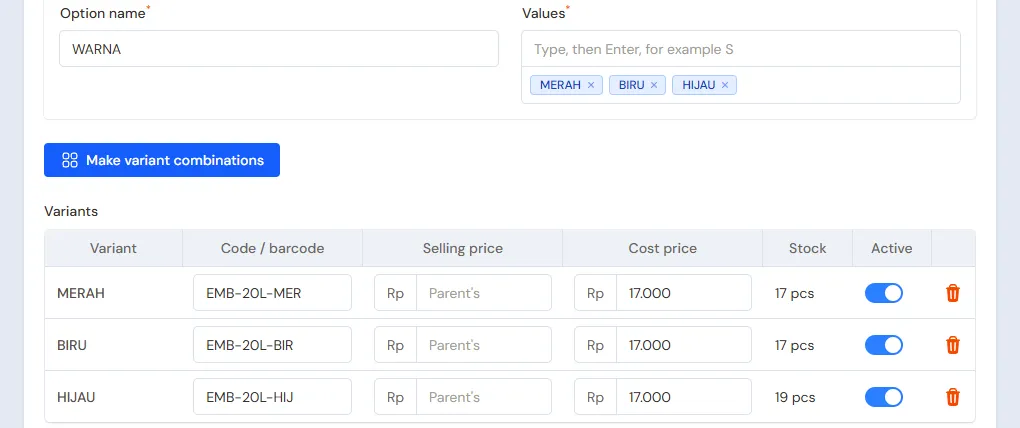
- In the Variants section, turn on Has variants (size, colour and more), fill in the Option name Warna (colour) with the values Merah, Biru and Hijau (red, blue, green), then press Make variant combinations.
- Press Fill in empty codes, or scan every colour's barcode into Code / barcode.
- Fill in the parent's Cost Price Rp 17.000 and Selling Price Rp 25.000. Variants whose selling price stays empty follow the parent's. Press Create.
Every colour becomes an item of its own, for example Ember Plastik 20 L - Biru, with its own stock. At the till, tap Ember Plastik 20 L then pick its colour. See Product variants.
Other goods, scores and quantity prices
Warehouse Admin: create the other goods with the Type Finished Goods:
| Item | Category | Base Unit | Cost Price | Selling Price | Other Units |
|---|---|---|---|---|---|
| Gayung Plastik (dipper) | Plasticware | Pieces | Rp 3.000 | Rp 5.000 | Score of 20, Selling Price Rp 80.000 |
| Rantang Susun 3 (food carrier) | Kitchenware | Set | Rp 45.000 | Rp 65.000 | |
| Sapu Ijuk (broom) | Cleaning Supplies | Pieces | Rp 15.000 | Rp 22.000 |
On Gayung Plastik, fill in the Quantity prices table: From quantity 10, price Rp 4.500. A buyer of 10 dippers or more pays Rp 4.500 a dipper, and one score stays Rp 80.000. See Quantity prices.
Important: Quantity prices are counted per variant. A buyer of 6 red buckets and 6 blue ones counts as 6 and 6, not 12. Goods often bought in mixed colours are better given a price per score or per dozen under Other Units.
Customers and suppliers
- Head Cashier: in Master Data → Customers, list the warungs that buy per score, for example Warung Bu Yuli with Payment Terms (days) 14. See Adding and changing customers.
- Owner: in Master Data → Suppliers, list Pabrik Plastik Sinar Cemerlang with Payment Terms (days) 30 and Grosir Perabot Mulia without terms. See Adding suppliers.
3. Starting capital and the first purchase
- The Owner records capital of Rp 20.000.000 into Bank BCA in Transactions → Finance → Owner's Capital.
- The Owner records the note of Pabrik Plastik Sinar Cemerlang in Transactions → Purchases, 30 days to pay: Ember Plastik 20 L 20 pcs per colour, so 60 × Rp 17.000 = Rp 1.020.000, and 10 Scores of Gayung Plastik × Rp 60.000 = Rp 600.000. That is Rp 1.620.000. Type the parent's name, then pick every colour. See Recording a purchase note.
- The Owner records the note of Grosir Perabot Mulia, paid from Bank BCA: 10 Sets of Rantang Susun 3 × Rp 45.000 = Rp 450.000 and 20 Sapu Ijuk × Rp 15.000 = Rp 300.000, so Rp 750.000.
- The Owner moves Rp 200.000 of change money from Bank BCA to Cashier Cash in Transactions → Finance → Cash Transfers.
The stock afterwards: Ember Plastik 20 L 20 red, 20 blue and 20 green, Gayung Plastik 200 pcs, Rantang Susun 3 10 sets and Sapu Ijuk 20 pcs.
4. One selling day
| Time | Work | Who |
|---|---|---|
| Morning | Retail sales | Head Cashier |
| Midday | A warung takes goods per score, pays part | Head Cashier |
| Midday | A celebration buyer at the quantity price | Head Cashier |
| Afternoon | A colour swap | Head Cashier |
| Afternoon | Count the drawer, record the shopping bags | Owner |
Retail sales
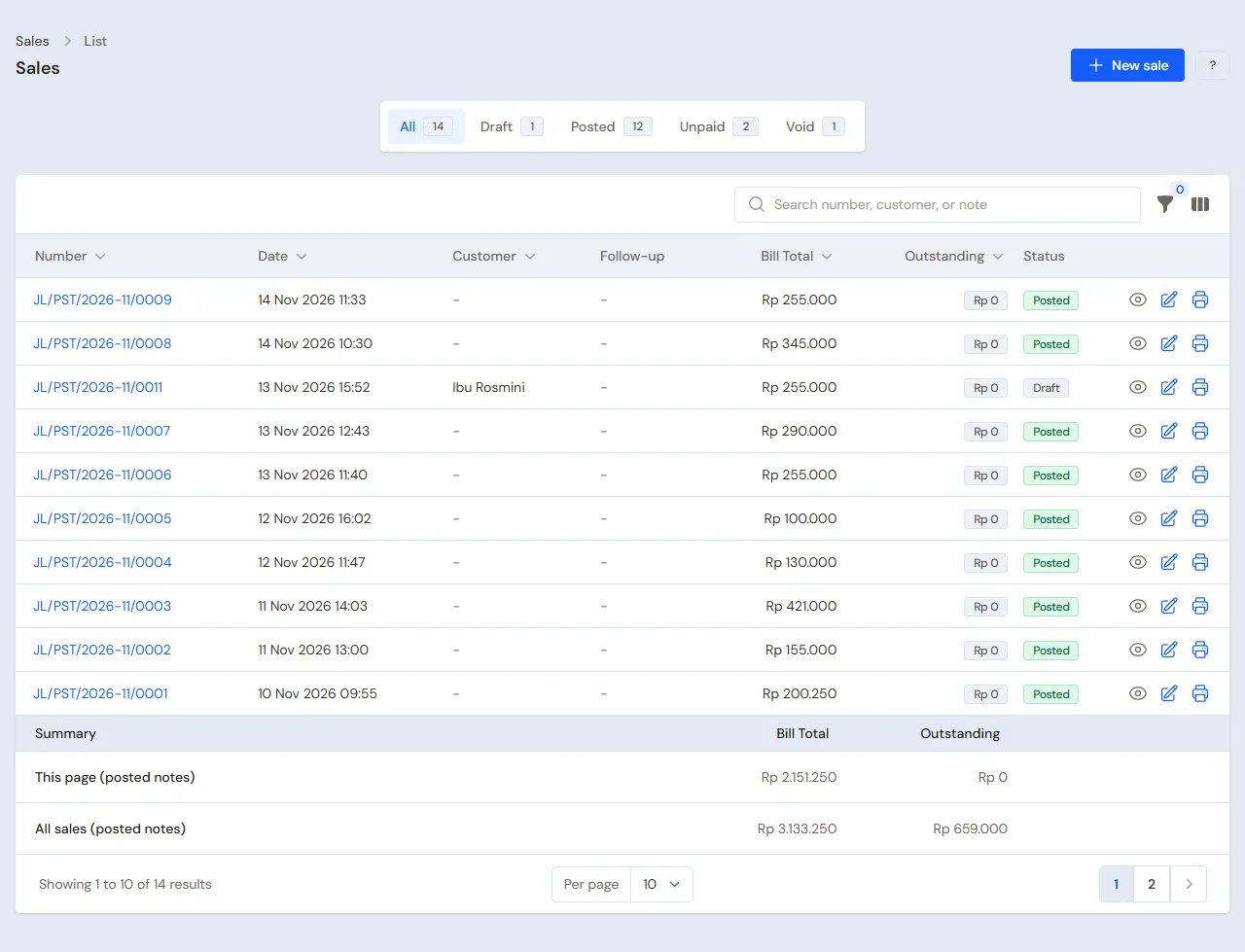
The Head Cashier (Yanto) opens the till with New sale on the Dashboard or in Transactions → Sales. The first buyer takes 1 Ember Plastik 20 L - Biru and 1 Sapu Ijuk: Rp 25.000 + Rp 22.000 = Rp 47.000, in cash. See Recording a sale at the till.
A warung takes goods per score
Warung Bu Yuli takes 2 Scores of Gayung Plastik and 6 buckets, two per colour.
- Head Cashier: pick Warung Bu Yuli in the Customer field.
- Add Gayung Plastik, switch its unit to Score, quantity 2: Rp 160.000. Add Ember Plastik 20 L - Merah, - Biru and - Hijau, 2 each: 6 × Rp 25.000 = Rp 150.000. That is Rp 310.000.
- Press Pay, type 150.000 in cash, check Becomes receivable of Rp 160.000 due in 14 days, then press Save transaction.
See Taking payment at the till.
A celebration buyer
A celebration committee buys 12 Gayung Plastik. The quantity price applies by itself: 12 × Rp 4.500 = Rp 54.000, paid by QRIS into Bank BCA.
A colour swap
Bu Yuli comes back in the afternoon and swaps 1 green bucket for a red one. The Head Cashier presses Add return, picks Bu Yuli's note in the tab From the original note, picks Ember Plastik 20 L - Hijau 1, then adds Ember Plastik 20 L - Merah 1. There is Rp 0 to pay. See Recording a sales return.
Closing the shop
- The Owner records the shopping bags bought in cash from the drawer, Rp 25.000, in Transactions → Finance → Expenses, category Shopping Bags, from Cashier Cash.
- The Owner counts the drawer: Rp 200.000 + Rp 47.000 + Rp 150.000 − Rp 25.000 = Rp 372.000, the same as Cashier Cash in Reports → Cash Balance.
- The Owner deposits Rp 172.000 at Bank BCA with Transactions → Finance → Cash Transfers. The Rp 200.000 of change stays in the drawer.
5. Receivables and payables
- A week later Bu Yuli pays the Rp 160.000. The Owner records it under Transaction Details → Sale Payments. See Paying a note that is not paid in full.
- The Owner pays Pabrik Plastik Sinar Cemerlang before the due date under Transaction Details → Purchase Payments. See Paying a supplier.
- Cracked buckets from the factory go back with a purchase return, and buckets broken in the shop are taken out by the Warehouse Admin in Transactions → Stock Adjustments, category Damaged. See Returning goods to a supplier and Stock adjustments.
The profit of that day: sales of Rp 47.000 + Rp 310.000 + Rp 54.000 = Rp 411.000, cost of goods sold Rp 290.000 (buckets 7 × Rp 17.000 = Rp 119.000, dippers 52 × Rp 3.000 = Rp 156.000, broom Rp 15.000), so a gross profit of Rp 121.000, less the shopping bags of Rp 25.000.
6. Stock per colour and stocktakes
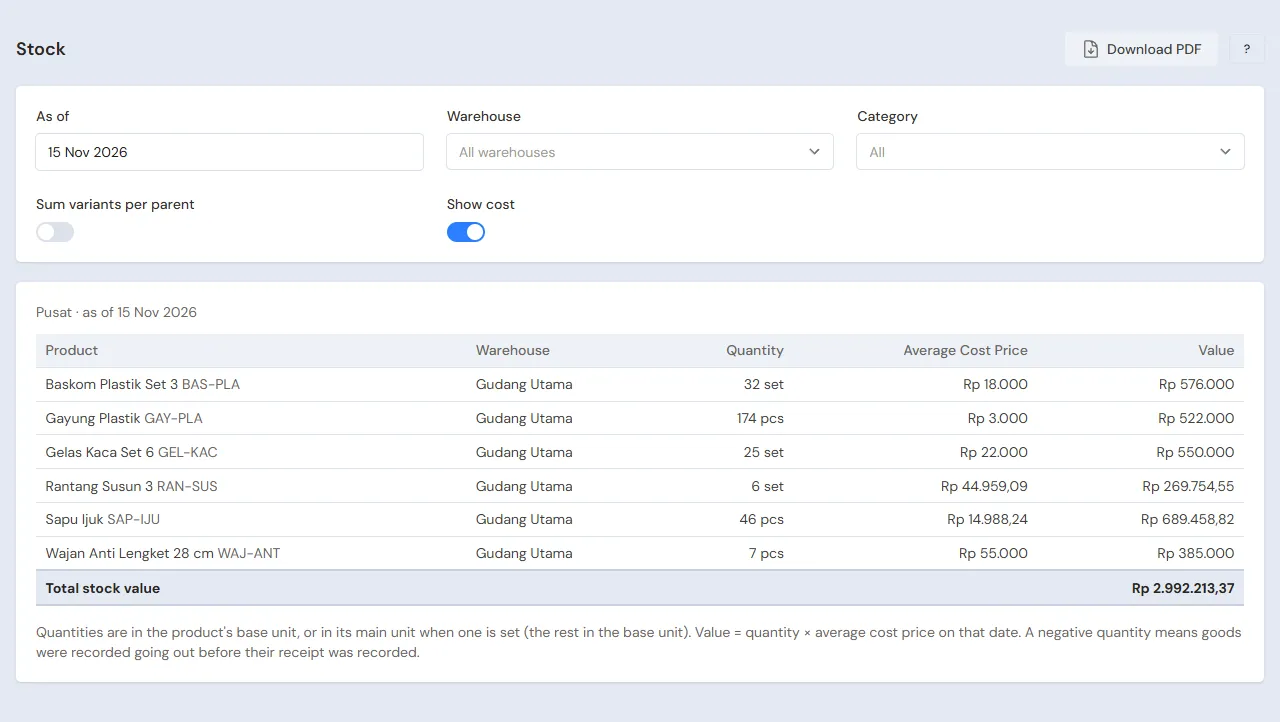
The Warehouse Admin reads Reports → Stock every day. Every colour shows on its own; turn on Sum variants per parent for the total of all colours. Once a month they count the stock in Transactions → Stocktakes: type the parent's name, and all its colours show. See Counting stock with a stocktake.
7. Reports per job title
| Report | What it holds | Opened by | When |
|---|---|---|---|
| Reports → Stock | Every colour's stock, or summed per parent | Warehouse Admin | Every day |
| Reports → Cash Balance | The drawer and the bank | Owner | Every afternoon |
| Reports → Receivables | What every warung still owes | Owner | Every week |
| Reports → Payables | The factory's notes and their due dates | Owner | Every week |
| Reports → Profit & Loss | Sales, cost of goods sold, damaged goods and expenses | Owner | Every month |
8. Checklist
- Every day: the Head Cashier picks the right colour on every note. The Owner matches the drawer and deposits at the bank.
- Every week: the Warehouse Admin checks the colours running low with Sum variants per parent turned off. The Owner reads Receivables and Payables.
- Every month: the Warehouse Admin takes stock. The Owner reads the Profit & Loss.
A running business
This part is for the team moving a running plastics shop to Vende: goods on the shelves and in the store room in many colours, warungs that still owe bills, and payables to the factory. The order is always the same:
- Enter the master data.
- Practise transactions until every part is used to them.
- Empty the practice transactions.
- Enter the opening balances on the first day.
- Go live.
The opening balances come last on purpose, so the practice does not spoil their figures. The examples in this part use Toko Plastik Aneka Jaya from the new business part.
1. Master data
Work through the parts Who does what, 1. Shop details and users and 2. Master data above. Goods with variants can be imported from Excel with the columns Variant Parent and Variant. See Importing and exporting products with Excel. Also list every warung that still owes a bill and every supplier still owed. The master data is not deleted when the practice transactions are emptied.
2. Practice for the team
Work in a practice shop of the Plastics and housewares type with the three accounts.
Practice 1: master data
- Owner: the shop details, both users and both suppliers.
- Asih (Warehouse Admin): Ember Plastik 20 L with three colours, Gayung Plastik with the unit Score and its quantity price, Rantang Susun 3 and Sapu Ijuk.
- Check: in Master Data → Products, turn on the filter Hide variant rows: Ember Plastik 20 L shows once with three variants.
- Head Cashier: Warung Bu Yuli.
Practice 2: one selling day
- Owner: the capital of Rp 20.000.000, both purchase notes and the Cash Transfer of Rp 200.000.
- Head Cashier: the retail sale of Rp 47.000 in cash, Warung Bu Yuli's Rp 310.000 with Rp 150.000 paid, the celebration's Rp 54.000 by QRIS, then swap one green bucket for a red one.
- Owner: the shopping bags of Rp 25.000 from Cashier Cash, then the Cash Transfer of Rp 172.000 to Bank BCA.
After Practice 2 this must show:
| Report | What must show | Opened by |
|---|---|---|
| Reports → Cash Balance | Bank BCA Rp 20.000.000 − Rp 750.000 − Rp 200.000 + Rp 54.000 + Rp 172.000 = Rp 19.276.000, Cashier Cash Rp 200.000 | Owner |
| Reports → Receivables | Warung Bu Yuli Rp 160.000 | Owner |
| Reports → Payables | Pabrik Plastik Sinar Cemerlang Rp 1.620.000 | Owner |
| Reports → Stock | Buckets red 17, blue 17, green 19 (summed 53), dippers 148, brooms 19, food carriers 10 | Warehouse Admin |
| Reports → Profit & Loss | Sales Rp 411.000, cost of goods sold Rp 290.000, shopping bags Rp 25.000 | Owner |
Practice 3: opening balances
Enter the opening balances with the example of part 4 below, check them as in part 5, then empty them again.
3. Emptying the practice transactions
Done by the Owner in Settings → Empty Transactions, button Empty All Transactions. Notes and their returns, purchases, stock adjustments, stocktakes, payments, expenses, cash transfers, capital and opening balances are deleted. Products with their variants, units and quantity prices, customers, suppliers, cash accounts, users and settings stay. Vende makes a full backup first. See Emptying transactions or all data.
4. Opening balances
Done by the Owner in Settings → Opening Balances on the morning of the first day, with As of that day. See Entering opening cash, stock, receivables and payables.
- Opening Stock: every colour goes in as its own row, for example Ember Plastik 20 L - Merah 12 Pieces, - Biru 8 Pieces and - Hijau 15 Pieces, at Rp 17.000. Dippers still bundled per score are counted in pieces, for example 4 scores and 7 pcs = 87 Pieces at Rp 3.000.
- Opening Receivables: one row per warung note not paid yet, for example Warung Bu Yuli Rp 240.000.
- Opening Payables: Pabrik Plastik Sinar Cemerlang Rp 900.000 with its due date.
- Opening Cash: the money counted, for example Cashier Cash Rp 200.000 and Bank BCA Rp 6.500.000.
Many goods go in faster through Import Opening Stock from Excel, one row per colour.
5. Check before going live
| Report | What must show | Opened by |
|---|---|---|
| Reports → Cash Balance | Cashier Cash Rp 200.000 and Bank BCA Rp 6.500.000 | Owner |
| Reports → Stock | Buckets red 12, blue 8, green 15 (summed 35), dippers 87 | Warehouse Admin |
| Reports → Receivables | Warung Bu Yuli Rp 240.000 | Owner |
| Reports → Payables | Pabrik Plastik Sinar Cemerlang Rp 900.000 | Owner |
The figures differ? The Owner corrects the row in Settings → Opening Balances before any real transaction is recorded.
6. Going live
From that day every sale and purchase is recorded in Vende as in the new business part, with the same checklist. In the first week the Warehouse Admin matches every colour's stock in Reports → Stock with the shelves, and the Head Cashier gets used to picking the right colour on every note.