
Grocery shop guide
A learning path for a grocery shop, new or running: sack and sachet strip units, buying from the wholesaler, one selling day, neighbours on credit, practice.
On this page
- A new business
- Who does what
- 1. Shop details and users
- 2. Master data
- 3. Starting capital and the first purchase
- 4. One selling day
- 5. Credit, payables and expenses
- 6. The weekly stocktake
- 7. Reports per job title
- 8. Checklist
- A running business
- 1. Master data
- 2. Practice for the team
- 3. Emptying the practice transactions
- 4. Opening balances
- 5. Check before going live
- 6. Going live
This guide is for the team setting up Vende at a grocery shop (warung sembako) that sells rice, sugar, oil, eggs and kitchen needs by the piece. It has two parts: A new business for a shop just opening, with no stock, credit or payables from before, and A running business for a shop moving to Vende, with team practice and opening balances. The example is Warung Bu Darsih. The names of the shop, customers, suppliers and people and all the figures are made up.
What the business looks like:
- Goods: rice and sugar weighed out per kilogram from the sack, cooking oil, eggs, instant noodles per pack or per carton, and coffee sachets one by one or per strip.
- Buying: from the usual wholesaler once a week, partly paid in cash and the rest within 7 days, and eggs from a farmer, paid in cash.
- Selling: buyers come to the shop and pay in cash or by QRIS. Regular neighbours may buy on credit and pay at the weekend.
Work through it from the top. Every step names its menu, who does it, what changes afterwards, and an example with figures.
The features in this guide come with the Grocery/convenience store business type package, except those marked extra. The shop's features show under Settings → Subscription, section This shop's features. If a menu is missing, contact the Vende team.
Tip: Lost on a page? Press the ? button at the top of that page. A short tour shows every field, on the till screen too.
A new business
Who does what
This package holds two users, the owner included.
| Part of the shop | Job title in Vende | What they do and open |
|---|---|---|
| Owner | Owner | Every menu: products, buying from the wholesaler, paying payables, receiving credit repayments, expenses, stocktakes, opening balances and every report |
| Shop keeper | Cashier | The till on a phone or computer: cash and QRIS sales, neighbours on credit, swapping goods. Adds new customers from the till |
The shop keeper opens no reports, purchases or cash. A busier shop adds users to its subscription, for example a second shop keeper with the job title Cashier. Every role is explained in Roles and permissions.
1. Shop details and users
Done by the Owner: fill in Settings → Shop (name, address, WhatsApp, logo), then create the shop keeper's account in Settings → Users with the Job title Cashier. See Adding and managing users.
The people at Warung Bu Darsih: Bu Darsih (owner) and Nisa (shop keeper, Cashier).
2. Master data
A shop of this business type already has the product categories Staple Foods, Beverages, Snacks, Spices and Seasonings, Toiletries and Household Supplies, and the units Pieces, Kilogram, Gram, Litre, Dozen and Pack. This business type has no expense categories of its own; the common ones such as Electricity and Rent are there.
The units Sack, Carton and Sachet Strip
Owner: in Master Data → Units, button New Unit, add Karung (sack), Dus (carton) and Renteng (sachet strip), each with the Decimal Places Whole numbers (1, 2, 3). Kilogram already takes three decimals, so 0,5 kg of sugar can be sold. See Base unit, other units and main unit.
Goods
Owner: in Master Data → Products, create every item with the Type Finished Goods:
| Item | Category | Base Unit | Cost Price | Selling Price | Other Units |
|---|---|---|---|---|---|
| Beras Medium (rice) | Staple Foods | Kilogram | Rp 12.000 | Rp 13.500 | Karung of 25 |
| Gula Pasir (sugar) | Staple Foods | Kilogram | Rp 16.000 | Rp 18.000 | Karung of 50 |
| Minyak Goreng 1 L (cooking oil) | Staple Foods | Pieces | Rp 17.000 | Rp 19.000 | Dozen of 12 |
| Telur Ayam (eggs) | Staple Foods | Kilogram | Rp 26.000 | Rp 29.000 | |
| Mi Instan Goreng (noodles) | Staple Foods | Pieces | Rp 2.800 | Rp 3.500 | Dus of 40 |
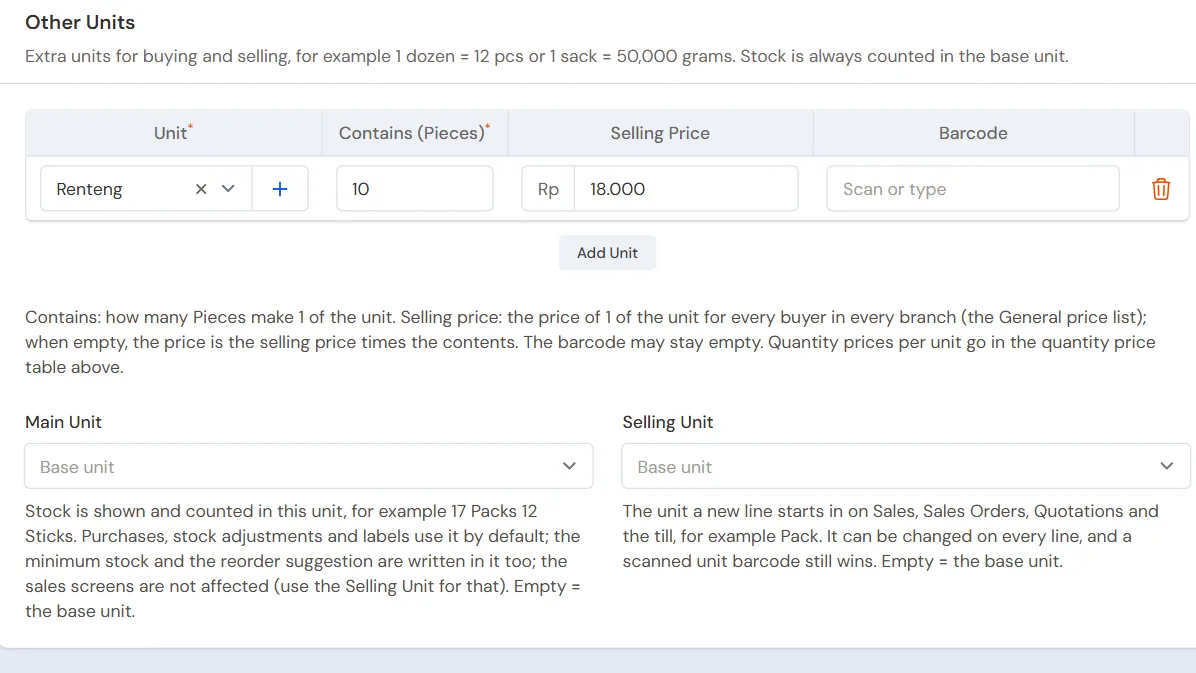
| Kopi Sachet (coffee) | Beverages | Pieces | Rp 1.300 | Rp 2.000 | Renteng of 10, Selling Price Rp 18.000 |
Other units go in the Other Units section, button Add Unit: pick the Unit, fill in what it contains, and a Selling Price when it differs from the selling price times the contents. A strip of coffee sells for Rp 18.000, cheaper than 10 × Rp 2.000. The Karung and Dus units are used when buying from the wholesaler, so the purchase note matches the wholesaler's note.
Fill in a Minimum Stock for goods that must not run out, for example Beras Medium 10 kg. See Minimum stock and stock alerts.
Credit customers and suppliers
- Owner: in Master Data → Customers, list the neighbours who may buy on credit, for example Bu Sumi and Pak Darto, with Payment Terms (days) 7. Other buyers need not be listed.
- Owner: in Master Data → Suppliers, list Grosir Sinar Makmur with Payment Terms (days) 7, and Peternak Telur Pak Karim without terms.
See Adding and changing customers and Adding suppliers.
Cash accounts
Owner: in Master Data → Cash Accounts, a new shop already has Owner Cash, Cashier Cash, Bank BCA and Bank BRI. Cashier Cash is the shop's drawer: cash taken at the till goes there. Bank BCA is used for QRIS money. Rename or switch off the accounts not used. See Cash accounts and bank accounts.
3. Starting capital and the first purchase
- The Owner records capital of Rp 5.000.000 into Owner Cash in Transactions → Finance → Owner's Capital. See Putting in and taking out capital.
- The Owner records the note of Grosir Sinar Makmur in Transactions → Purchases: 2 Karung of Beras Medium × Rp 300.000 = Rp 600.000, 25 Kilograms of Gula Pasir × Rp 16.000 = Rp 400.000, 2 Dozen of Minyak Goreng 1 L × Rp 204.000 = Rp 408.000, 1 Dus of Mi Instan Goreng Rp 112.000, and 10 Renteng of Kopi Sachet × Rp 13.000 = Rp 130.000. That is Rp 1.650.000, of which Rp 1.000.000 is paid from Owner Cash. The other Rp 650.000 becomes a payable, due in 7 days.
- The Owner records the note of Peternak Telur Pak Karim, paid in full from Owner Cash: 10 Kilograms of Telur Ayam × Rp 26.000 = Rp 260.000.
- The Owner moves Rp 200.000 of change money from Owner Cash to Cashier Cash in Transactions → Finance → Cash Transfers. See Moving money between cash accounts.
The stock afterwards: Beras Medium 50 kg, Gula Pasir 25 kg, Minyak Goreng 1 L 24 pcs, Telur Ayam 10 kg, Mi Instan Goreng 40 pcs and Kopi Sachet 100 pcs. The cost of every item is the one in the table above: a sack of rice of Rp 300.000 holds 25 kg, so Rp 12.000 a kg. See Recording a purchase note.
4. One selling day
| Time | Work | Who |
|---|---|---|
| Morning | Open the till, check the Cash account | Cashier |
| All day | Cash and QRIS sales | Cashier |
| Midday | A neighbour on credit | Cashier |
| Afternoon | Swapping a damaged item | Cashier |
| Evening | Move the drawer money, take damaged goods out | Owner |
A cash sale
The Cashier (Nisa) opens the till with New sale on the Dashboard or in Transactions → Sales. On a phone, the note details are summed up in one line at the top.
- Type the item's name or scan its barcode. Rice and sugar are weighed first, then the quantity is typed in kg, for example 5 or 0,5.
- The first buyer, for example: 5 kg of Beras Medium (Rp 67.500), 1 kg of Gula Pasir (Rp 18.000) and 2 Minyak Goreng 1 L (Rp 38.000). That is Rp 123.500.
- Press Pay, type the money received, for example 150.000, check the Change of Rp 26.500, then press Save transaction.
The money goes into Cashier Cash. See Recording a sale at the till and Taking payment at the till.
A sale paid by QRIS
The second buyer takes 1 Renteng of Kopi Sachet (Rp 18.000) and 5 Mi Instan Goreng (Rp 17.500), so Rp 35.500, and pays by QRIS. In the payment window the Cashier picks Bank BCA on the payment line, switches the method to QRIS, then presses Save transaction once the money is in. The unit Renteng is picked on the item's line; the coffee stock goes down by 10 pcs.
A neighbour on credit
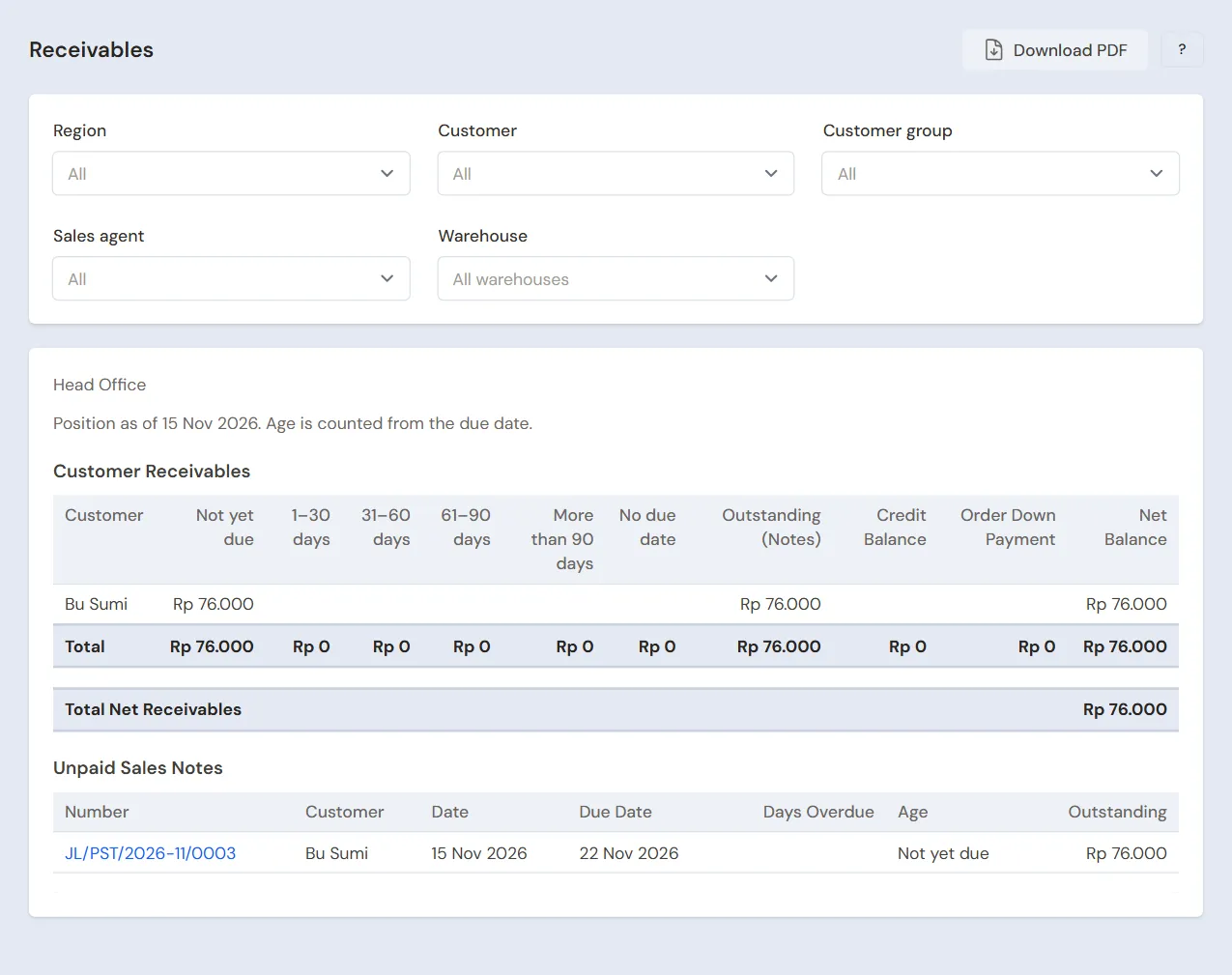
Bu Sumi takes 2 kg of Telur Ayam (Rp 58.000) and 1 kg of Gula Pasir (Rp 18.000), so Rp 76.000, and pays at the weekend.
- Cashier: pick Bu Sumi in the Customer field. A neighbour not listed yet is added straight away with + Create new.
- Add the goods, press Pay, then press Unpaid.
- Check the line Becomes receivable of Rp 76.000 and the due date 7 days ahead, then press Save transaction.
A walk-in buyer cannot buy on credit; a customer must be picked first. Bu Sumi's credit shows in Reports → Receivables. See Managing customer receivables.
Swapping a damaged item
In the afternoon the first buyer comes back: one Minyak Goreng 1 L leaks and is swapped for a new one.
- Cashier: press Add return, pick that buyer's note in the tab From the original note, then pick Minyak Goreng 1 L, quantity 1.
- Add a new Minyak Goreng 1 L, 1 pcs, as a normal sale.
- Press Pay. There is Rp 0 to pay; press Save transaction.
The leaking oil goes back into stock first. See Recording a sales return.
Closing the shop
- The Owner counts the drawer. It must hold Rp 200.000 + Rp 123.500 = Rp 323.500, the same as Cashier Cash in Reports → Cash Balance.
- The Owner moves the day's takings of Rp 123.500 from Cashier Cash to Owner Cash with Transactions → Finance → Cash Transfers. The Rp 200.000 of change stays in the drawer.
- The Owner takes the leaking oil out in Transactions → Stock Adjustments, direction Out, category Damaged, 1 pcs. Its value, Rp 17.000, becomes a loss in the Profit & Loss. See Stock adjustments.
The drawer is short or over? Record the difference in Transactions → Finance → Cash Adjustments. See Recording a cash difference with a Cash Adjustment. Cash counts and shift handovers are the extra feature Cash Count & Cashier Shifts.
5. Credit, payables and expenses
- On Saturday Bu Sumi pays her Rp 76.000 in cash. The Owner records it under Transaction Details → Sale Payments into Owner Cash. See Paying a note that is not paid in full.
- Before the due date the Owner pays the rest of Grosir Sinar Makmur's note, Rp 650.000, under Transaction Details → Purchase Payments. See Paying a supplier.
- The Owner records Rp 100.000 of prepaid electricity from Owner Cash in Transactions → Finance → Expenses, category Electricity. See Recording shop expenses.
- Household shopping paid from the shop's money is recorded as capital taken out (drawings), not as an expense, so the shop's profit stays right. Noodles or eggs cooked for the family are taken out with Transactions → Stock Adjustments, category Personal use.
The profit of that day: sales of Rp 123.500 + Rp 35.500 + Rp 76.000 = Rp 235.000, cost of goods sold Rp 205.000 (rice Rp 60.000, sugar Rp 32.000, oil Rp 34.000, coffee Rp 13.000, noodles Rp 14.000, eggs Rp 52.000), so a gross profit of Rp 30.000, less the leaking oil of Rp 17.000 and the electricity of Rp 100.000.
6. The weekly stocktake
Rice and sugar weighed out by the kilo usually shrink a little. Once a week the Owner weighs what is left of the rice and sugar and counts the other goods in Transactions → Stocktakes. The difference is booked when the stocktake is posted. See Counting stock with a stocktake.
For example: the stock shows Beras Medium 45 kg, the scale shows 44,6 kg. The difference of 0,4 kg × Rp 12.000 = Rp 4.800 becomes a loss.
7. Reports per job title
| Report | What it holds | Opened by | When |
|---|---|---|---|
| Reports → Cash Balance | The money in the drawer, in Owner Cash and in the bank | Owner | Every evening |
| Reports → Receivables | Every neighbour's credit and its due date | Owner | Every Saturday |
| Reports → Payables | What is left on the wholesaler's notes and when it is due | Owner | Before buying |
| Reports → Stock | What is left of every item; goods under their minimum stock are flagged | Owner | Before buying |
| Reports → Profit & Loss | Sales, cost of goods sold, damaged goods and expenses | Owner | Every month |
One neighbour's credit from the start until now is in Reports → Receivable Card; its PDF can be sent to that neighbour as a reminder.
8. Checklist
- Every day: the Cashier records every sale and every credit at the till. The Owner matches the drawer with the Cash Balance and moves the takings.
- Every week: the Owner reads Stock and Payables before buying from the wholesaler, records credit repayments, and weighs the rice and sugar with a stocktake.
- Every month: the Owner records the electricity and rent, then reads the Profit & Loss.
A running business
This part is for the team moving a running grocery shop to Vende: goods on the shelves, neighbours' credit in a notebook, and payables to the wholesaler. The order is always the same:
- Enter the master data.
- Practise transactions until the shop keeper is used to them.
- Empty the practice transactions.
- Enter the opening balances on the first day.
- Go live.
The opening balances come last on purpose, so the practice does not spoil their figures. The examples in this part use Warung Bu Darsih from the new business part.
1. Master data
Work through the parts Who does what, 1. Shop details and users and 2. Master data above. Also list every neighbour who still owes money in the notebook, and every supplier still owed. Many goods go in faster with an Excel import. See Importing and exporting products with Excel. The master data is not deleted when the practice transactions are emptied.
2. Practice for the team
Work in a practice shop of the Grocery/convenience store type with both accounts. Every step names who does it and what must show.
Practice 1: master data
- Owner: the shop details, Nisa's account, the units Karung, Dus and Renteng, the six items, Bu Sumi and Pak Darto, and both suppliers.
- Check: Nisa only sees Customers, Sales and Sale Lines in the sidebar.
- Cashier: open the till and search for Kopi Sachet.
- Check: the unit Renteng can be picked on its line at Rp 18.000.
Practice 2: one selling day
- Owner: the capital of Rp 5.000.000, both purchase notes, and the Cash Transfer of Rp 200.000 as in part 3.
- Cashier: the cash sale of Rp 123.500, the QRIS sale of Rp 35.500, Bu Sumi's credit of Rp 76.000, then swap one leaking oil as in part 4.
- Owner: the Cash Transfer of Rp 123.500 to Owner Cash, the stock adjustment of 1 damaged oil, and the electricity of Rp 100.000.
After Practice 2 this must show:
| Report | What must show | Opened by |
|---|---|---|
| Reports → Cash Balance | Owner Cash Rp 5.000.000 − Rp 1.000.000 − Rp 260.000 − Rp 200.000 + Rp 123.500 − Rp 100.000 = Rp 3.563.500, Cashier Cash Rp 200.000, Bank BCA Rp 35.500 | Owner |
| Reports → Receivables | Bu Sumi Rp 76.000 | Owner |
| Reports → Payables | Grosir Sinar Makmur Rp 650.000 | Owner |
| Reports → Stock | Rice 45 kg, sugar 23 kg, oil 21 pcs, eggs 8 kg, noodles 35 pcs, coffee 90 pcs | Owner |
| Reports → Profit & Loss | Sales Rp 235.000, cost of goods sold Rp 205.000, damaged goods Rp 17.000 and electricity Rp 100.000 | Owner |
Practice 3: opening balances
Enter the opening balances with the example of part 4 below, check them as in part 5, then empty them again.
3. Emptying the practice transactions
Done by the Owner in Settings → Empty Transactions, button Empty All Transactions. Sale notes and their returns, purchases, payments, cash transfers, stock adjustments, stocktakes, expenses, capital and opening balances are deleted. Products with their other units, units, customers, suppliers, cash accounts, users and settings stay. Vende makes a full backup first. See Emptying transactions or all data.
4. Opening balances
Done by the Owner in Settings → Opening Balances on the morning of the first day, before the shop opens, with As of that day. See Entering opening cash, stock, receivables and payables.
- Opening Stock: count and weigh the goods on the shelves and in the store room, for example Beras Medium 30 Kilograms at Rp 12.000, Gula Pasir 15 Kilograms at Rp 16.000 and Minyak Goreng 1 L 20 Pieces at Rp 17.000. Many goods go in through Import Opening Stock from Excel.
- Opening Receivables: one row for every credit in the notebook, with its due date, for example Bu Sumi Rp 120.000 and Pak Darto Rp 85.000, both due this Saturday.
- Opening Payables: what is left on Grosir Sinar Makmur's note, Rp 500.000, with its due date.
- Opening Cash: the money counted in every account: the shop's drawer in Cashier Cash, for example Rp 200.000, the owner's savings in Owner Cash Rp 1.500.000, and the QRIS bank account in Bank BCA Rp 2.300.000.
Leave out notebook credit when it is no longer clear who owes what: opening receivables are money that will really still be collected.
5. Check before going live
| Report | What must show | Opened by |
|---|---|---|
| Reports → Cash Balance | Cashier Cash Rp 200.000, Owner Cash Rp 1.500.000, Bank BCA Rp 2.300.000 | Owner |
| Reports → Stock | Rice 30 kg, sugar 15 kg, oil 20 pcs | Owner |
| Reports → Receivables | Bu Sumi Rp 120.000 and Pak Darto Rp 85.000 | Owner |
| Reports → Payables | Grosir Sinar Makmur Rp 500.000 | Owner |
The figures differ? The Owner corrects the row in Settings → Opening Balances before any real transaction is recorded.
6. Going live
From that day every sale and every credit is recorded at the till, and every purchase in Vende, as in the new business part, with the same checklist. Old credit is paid like new credit, under Transaction Details → Sale Payments. In the first week the Owner matches the drawer every evening and weighs the rice and sugar at the end of the week.
Supporting reading
Articles on the background and the arithmetic.