
One account for several shops
Use one account for several shops, switch shops from the shop menu, create a new shop, or leave a shop you no longer look after.
On this page
One Vende account can be used in several shops. For example, you own Toko Berkah and Toko Maju Jaya, or you are staff at two different shops. One email and one password are enough.
Shop or branch?
- A branch is for one business with several places. Products, customers, and reports are shared, and goods can be moved between branches.
- A separate shop is for a truly different business. Each shop has its own data, users, and subscription.
Extra branches are set up by the Vende team. See Setting up branches and warehouses.
Switching shops
-
Press the shop name at the top of the sidebar. On a phone, first open the sidebar with the menu button at the top left.
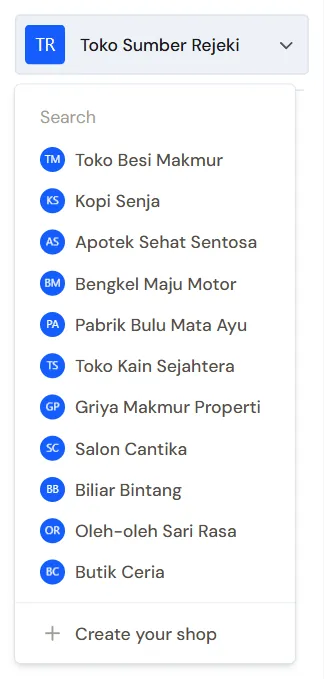
Your shops -
Choose the shop you want to open.
Each shop has its own address, for example ending in /app/toko-berkah and /app/toko-maju-jaya. The notification bell is also separate for each shop.
In the buyer portal, the account menu holds the name of the shop you opened last, to go back to it. See Switching to the buyer portal or another panel.
Creating a new shop
- Press the shop name at the top of the sidebar.
- Press Create your shop. This choice only shows for shop owners.
- Fill in Shop or business name, then choose a Type of business from the list.
- Press Create shop.
The new shop is set up like your first shop. See Creating your first shop.
The free trial is only for the first shop of your account. A later shop gets its first invoice straight away. The number of unpaid shops for one account is limited too. When the limit is reached, the Create your shop page explains it. First pay the subscription of one of your shops in Settings → Subscription, or contact the Vende team.
Joining someone else's shop
When another shop invites you as staff, open the invitation email, sign in with your account, then press Accept invitation. That shop then shows in your list of shops. Your roles may differ in each shop.
Leaving a shop
No longer working or helping at a shop? You can take your account off that shop yourself.
- Open the shop you want to leave.
- Press the circle with your initials at the top right.
- Press Leave this shop.
- Read the explanation, then press Yes, leave the shop.
Your roles and branches in that shop are revoked, and you no longer answer for its cash accounts. Your account, your other shops, and the notes or records you made stay. Afterwards, Vende opens another one of your shops. When you have no other shop, you are taken to the Create your shop page.
The shop must keep at least one active user with the Settings role and one with the User Manager role. If you are the only holder of either, first give that role to someone else in Settings → Users, then leave.
Important: To come back to that shop, you need a new invitation from its owner.