
Changing your profile, password, and language
Change your name and password, choose your own sales screen, and choose Indonesian or English.
On this page
Everyone manages their own account through the account menu at the top right. Press the circle with your initials to open it.
Changing your name or password
- Open the account menu, then press Profile.
- Change the Name if needed. This is the name shown as yours in the app, for example in the activity history.
- To change the password, fill in New password and Confirm new password.
- Fill in Current password. This box shows after you type a new password.
- Press Save changes.
The Email address is only shown in Profile and cannot be changed here. See how to change your email.
Your own sales screen
When you may record sales, Profile also has the Sales Input & Till Display section. Here you choose the screen the new sale button opens: Till, Invoice mode, or Quick sale. You can also choose the layout of the goods catalog.
This choice applies on every device, for the shop that is open only. Leave it empty to follow the device's choice, then the shop settings.
Changing the language
-
Open the account menu.
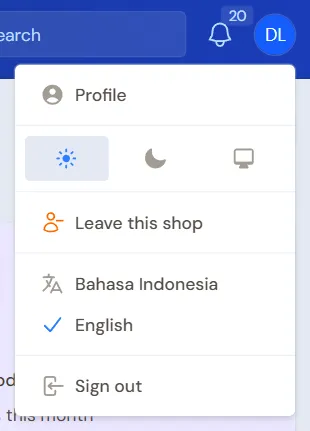
The account menu at the top right -
Choose Bahasa Indonesia or English.
The page loads again in that language. The choice is remembered for your account on every device. Money is still written in rupiah.
Light or dark display
In the same account menu, you can choose a light display, a dark display, or follow the theme of the device. The default is light. The account menu on the work screens such as the cashier is the same as on the ordinary pages: name and email, profile, display, Leave this shop, the other panels if any, language and Sign out, in the same order. The choice is remembered in this browser for every screen: choose it on one screen and the others follow. On another device or browser, choose it once more.
Switching to the buyer portal or another panel
One account can open more than one place in Vende. When yours can, the account menu holds the shortcuts, above the language choices (also in the account menu of the work screens such as the cashier):
- Buyer Portal, once a shop has linked your account to one of its customers. See Receiving orders from the buyer portal.
- The name of your shop, while you are in the buyer portal or the central panel. It is the shop you opened last. To move to another shop, use the shop list at the top of the side menu, see Switching shops.
- Central Panel, for the Vende team only.
Users who only open their own shop do not see these choices.
Leaving this shop
The account menu also has Leave this shop. This choice takes your account off the shop that is open only, after you confirm it. It is different from Sign out, which only ends your session. See Leaving a shop.