
Wholesaler guide
A learning path for a wholesaler or distributor, new or running: two warehouses, warung prices, credit limits, sales routes, delivery runs, opening balances.
On this page
- A new business
- Who does what
- 1. Shop details and users
- 2. Master data
- 3. Starting capital, buying and filling the front shop
- 4. One working day
- 5. Receivables, payables and collection
- 6. Expenses, sales commission and stocktakes
- 7. Reports per job title
- 8. Checklist
- A running business
- 1. Master data
- 2. Practice for the team
- 3. Emptying the practice transactions
- 4. Opening balances
- 5. Check before going live
- 6. Going live
This guide is for the team setting up Vende at a wholesaler or distributor that sells staples per carton and per bale to warungs and shops through salespeople, and to buyers who come to its front shop. It has two parts: A new business for a wholesaler just starting, with no stock, receivables or payables from before, and A running business for one moving to Vende, with team practice and opening balances. The example is UD Sumber Pangan. The names of the business, warungs, suppliers and people and all the figures are made up.
What the business looks like:
- Goods: cooking oil, instant noodles and sugar, bought per carton and per bale from a big distributor with 30 days to pay.
- Warehouses: a big warehouse at the back for stock and deliveries, and a front shop for buyers who come themselves.
- Selling: two salespeople visit warungs along their routes and take orders on the phone. A driver delivers the goods the next day, billed with 14 days to pay and a credit limit per warung.
- Front shop: buyers who come in pay cash at the general price.
Work through it from the top. Every step names its menu, who does it, what changes afterwards, and an example with figures.
The features in this guide come with the Wholesaler/distributor business type package, except those marked extra. The shop's features show under Settings → Subscription, section This shop's features. If a menu is missing, contact the Vende team. This package also holds Invoice mode, a screen for writing notes to shops and stalls like an invoice by keyboard. See Making a note in invoice mode. A new shop with this package opens Invoice mode when you press New sale, on a phone too; change it in Settings → Till display if you prefer the till.
Tip: Lost on a page? Press the ? button at the top of that page. A short tour shows every field, on Today's Visits and Today's Deliveries too.
A new business
Who does what
This package holds eight users, the owner included.
| Part of the wholesaler | Job title in Vende | What they do and open |
|---|---|---|
| Owner | Owner | Every menu, also prices per group, opening balances and Reports → Profit & Loss |
| Buying | Purchasing Admin | Suppliers and the distributor's purchase notes |
| Warehouse head | Warehouse Admin | Products and units, warehouses, stock transfers to the front shop, delivery runs, delivery notes, packing into boxes, stocktakes, Reports → Stock |
| Sales admin | Head Cashier | Customers, groups and credit limits, sales routes, orders, notes from delivery notes, Reports → Visits per Sales Person, Reports → Sales KPI (an extra feature, switched on in Settings → Sales Activity) |
| Front shop cashier | Cashier | The till, from the front shop's warehouse |
| Salespeople | Salesperson | Transactions → Today's Visits on the phone: check-in, orders, shelf photos. Records no money |
| Finance admin | Finance Admin | Payments of warungs and the distributor, expenses, cash transfers, Reports → Receivables, Reports → Payables, Reports → Cash Balance |
The driver needs no account: the delivery run and its delivery notes are printed, then the Warehouse Admin records the result from that paper. A driver who records it on the phone is invited with the job title Driver and opens Transactions → Today's Deliveries, by adding a user to the subscription. Every role is explained in Roles and permissions.
1. Shop details and users
Done by the Owner: fill in Settings → Shop (name, address, WhatsApp, logo), then create the accounts in Settings → Users with the Job title of the table above. For the front-shop cashier (Rani), also set Sales input to the till, because this shop opens Invoice mode. See Adding and managing users.
The people at UD Sumber Pangan: Pak Gunawan (owner), Pak Hadi (buying, Purchasing Admin), Mas Joko (warehouse head, Warehouse Admin), Mbak Sari (sales admin, Head Cashier), Rani (front shop cashier, Cashier), Andi and Fikri (Salesperson), and Bu Ratna (finance admin, Finance Admin). Pak Slamet, the delivery driver, has no account.
2. Master data
A shop of this business type already has the product categories Staple Foods, Beverages, Snacks, Spices and Seasonings, Toiletries, Household Supplies and Cigarettes, the units Carton, Box, Bale, Sachet Strip, Gunny Sack and Sack, and the expense categories Fuel, Vehicle Maintenance and Loading and Unloading.
Two warehouses
Warehouse Admin: in Master Data → Warehouses, rename Main Warehouse to Gudang Besar (big warehouse), then press New Warehouse, fill in the Name Toko Depan (front shop) and pick its branch under Branches Allowed. A warehouse without a branch does not show at the till or on notes. Goods arrive at Gudang Besar, then part of them moves to Toko Depan. See Managing warehouses.
Goods per carton and per bale
Warehouse Admin: in Master Data → Products, create every item with the Type Finished Goods, its smallest base unit, and its big unit under Other Units:
| Item | Base Unit | Cost Price | Selling Price | Other Units | Selling Price of the other unit |
|---|---|---|---|---|---|
| Minyak Goreng 2 L (cooking oil) | Pieces | Rp 34.000 | Rp 37.000 | Carton of 6 | Rp 216.000 |
| Mi Instan Goreng (noodles) | Pieces | Rp 2.750 | Rp 3.200 | Carton of 40 | Rp 118.000 |
| Gula Pasir 1 kg (sugar) | Pieces | Rp 16.500 | Rp 17.500 | Bale of 20 | Rp 345.000 |
Pick the Main Unit Carton or Bale, so the stock shows as 43 Cartons rather than 258 pcs. Fill in the carton's Barcode when there is one. See Base unit, other units and main unit.
The Warung group, prices and credit limits
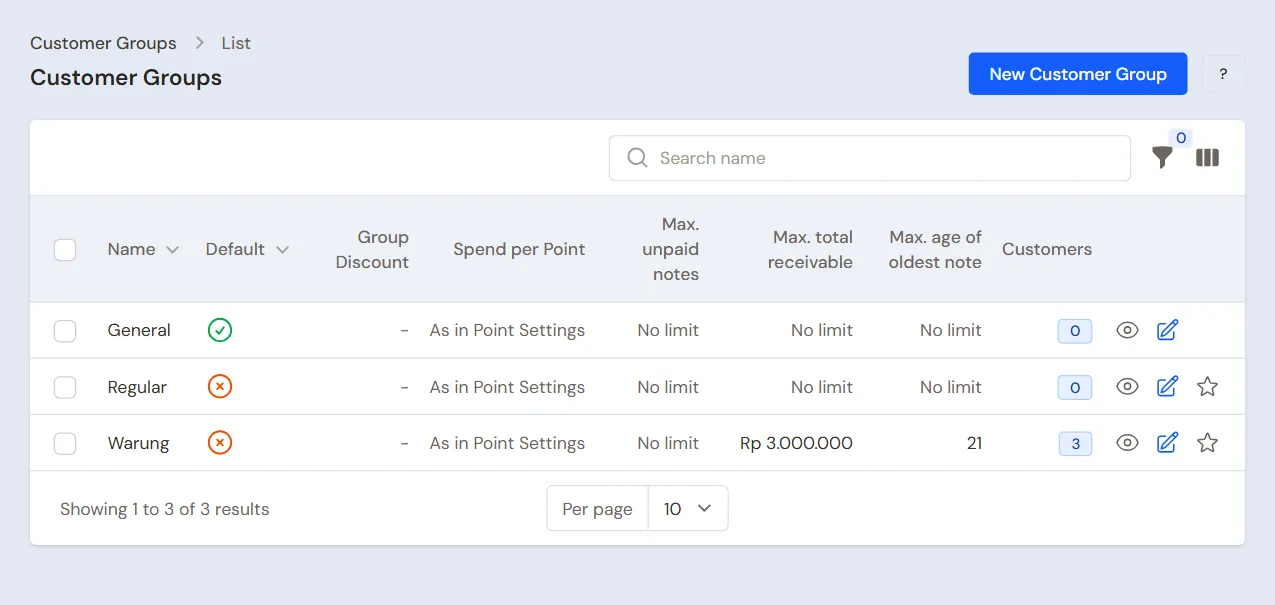
- Head Cashier: in Master Data → Customer Groups, create the group Warung. In the Credit Limit section, fill in Max. total receivable Rp 3.000.000 and Max. age of oldest note 21 days.
- Owner: open every item, tab Price List, press New Price, pick the Customer Group Warung, then fill in its price: Minyak Goreng 2 L Unit Carton Rp 210.000, Mi Instan Goreng Carton Rp 115.000, and Gula Pasir 1 kg Bale Rp 340.000.
- Head Cashier: in Master Data → Customers, create Warung Bu Imas, Toko Rejeki Baru and Warung Pak Udin in the Warung group, with Payment Terms (days) 14 and their delivery addresses.
Note: When the sales agents are divided per district, turn on the extra Sales feature, create the regions in Master Data → Regions with the Sales in charge, then fill in the Region of each customer. A new customer in that region starts with that Sales, and the Receivables report and Profit by Item can be read per region. See Regions and the Sales in charge.
Front shop buyers who are not listed pay the general price. See Prices per customer group and Managing customer receivables. One warung with a price of its own gets a Special Price from the Head Cashier in Master Data → Special Prices. See Special Prices for customers and groups.
Sales routes
Head Cashier in Master Data → Sales Routes, button New Sales Route:
- Fill in the name Rute Pasar Baru, then pick Andi as the Sales person.
- Tick the Visit days Monday and Thursday. Nothing ticked means every day.
- Under Customers on the route, press Add customer for Warung Bu Imas, then Toko Rejeki Baru. The order here is the visiting order on the salesperson's phone.
- Press Create. Also create Fikri's route for the warungs of his area.
Suppliers and cash accounts
- Purchasing Admin: in Master Data → Suppliers, list Distributor Pangan Nusantara with Payment Terms (days) 30. See Adding suppliers.
- Owner: in Master Data → Cash Accounts, use Bank BCA for the transfers of warungs and the distributor, Owner Cash for the office cash, and Cashier Cash for the front shop's drawer.
3. Starting capital, buying and filling the front shop
- The Owner records capital of Rp 100.000.000 into Bank BCA in Transactions → Finance → Owner's Capital.
- The Finance Admin moves Rp 1.000.000 from Bank BCA to Owner Cash for the office cash, and Rp 300.000 to Cashier Cash as change for the front shop, in Transactions → Finance → Cash Transfers.
- The Purchasing Admin records the note of Distributor Pangan Nusantara in Transactions → Purchases, Warehouse Gudang Besar, 30 days to pay: 50 Cartons of Minyak Goreng 2 L × Rp 204.000 = Rp 10.200.000, 100 Cartons of Mi Instan Goreng × Rp 110.000 = Rp 11.000.000, and 20 Bales of Gula Pasir 1 kg × Rp 330.000 = Rp 6.600.000. That is Rp 27.800.000, unpaid. See Recording a purchase note.
- The Finance Admin records the unloading porters' Rp 150.000 from Owner Cash in Transactions → Finance → Expenses, category Loading and Unloading.
- The Warehouse Admin moves 5 Cartons of Minyak Goreng 2 L, 5 Cartons of Mi Instan Goreng and 2 Bales of Gula Pasir 1 kg from Gudang Besar to Toko Depan in Transactions → Stock Transfers. See Transferring stock between warehouses.
The unloading cost is recorded as an expense, so the cost of the goods stays the distributor's price. Putting that cost into the cost of the goods is the extra feature Purchase Costs. See Extra purchase costs.
4. One working day
| Time | Work | Who |
|---|---|---|
| Monday | Warung visits and orders | Salesperson |
| Monday afternoon | Check the orders that came in | Head Cashier |
| Monday | Front shop sales | Cashier |
| Tuesday morning | Delivery run and delivery notes | Warehouse Admin |
| Tuesday afternoon | Notes from the delivery notes | Head Cashier |
| Thursday | Warung payments come in | Finance Admin |
Sales visits
Salesperson (Andi), on the phone:
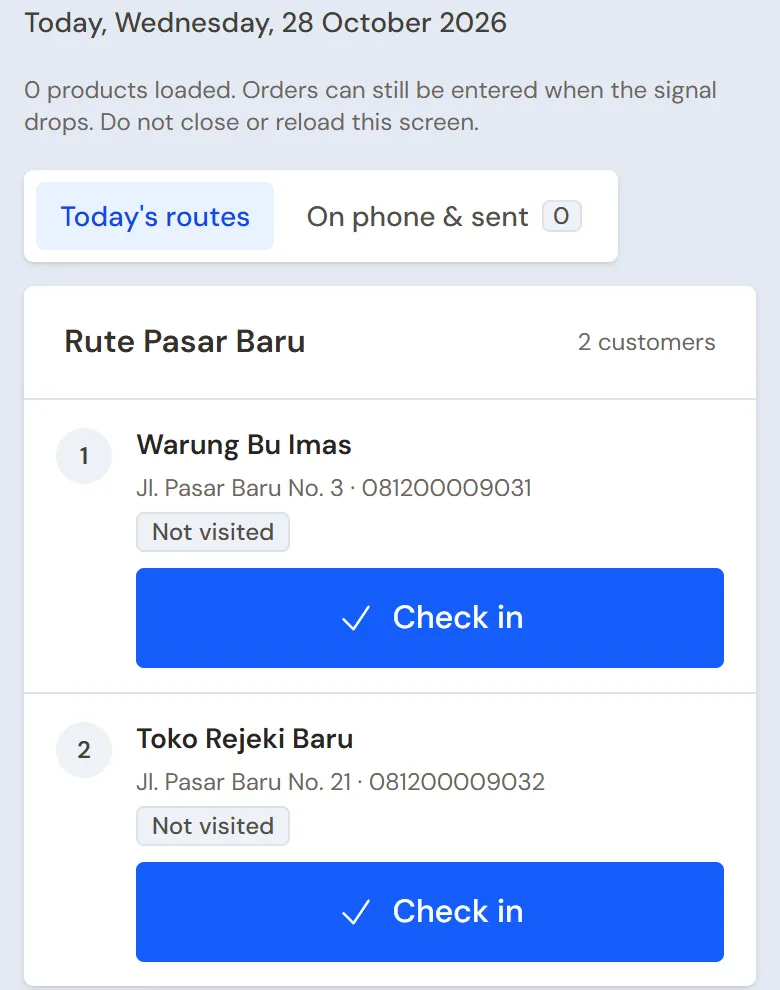
- Open Transactions → Today's Visits. The tab Today's routes holds Warung Bu Imas, then Toko Rejeki Baru.
- At Warung Bu Imas, press Check in. The phone's location is recorded with it, and the warung's receivable and last order show at the top.
- Pick Order and enter 2 Cartons of Minyak Goreng 2 L and 3 Cartons of Mi Instan Goreng. The prices follow the Warung group: 2 × Rp 210.000 + 3 × Rp 115.000 = Rp 765.000. Press Send visit.
- At Toko Rejeki Baru, order 5 Cartons of Mi Instan Goreng and 2 Bales of Gula Pasir 1 kg: 5 × Rp 115.000 + 2 × Rp 340.000 = Rp 1.255.000. If needed, take Shelf photos and write the goods to be taken back under Returns & notes.
Note: The My sales card at the top of the screen shows your sales today and this month. It fills in only when your manager has registered you under Master Data → Sales Agents (an extra feature) and filled Linked User with your login. Without that, the card asks to be linked and orders from this screen carry no Sales name.
A warung that orders nothing is recorded as No order with its reason. The order becomes a Sales Order at the office. Without a signal the visit is kept on the phone and sent by itself when the signal returns. Stock and credit limits are checked when the order is received. Stock already booked by other open orders does not count as for sale. When stock is short or a credit limit would be passed, the order is still kept and the salesperson is told.
A salesperson who builds relationships before there are sales, for example by getting to know a guard, another distributor's salesperson or the owner of a new shop, uses the extra Sales activity part. The owner switches on Contacts and visit purposes in Settings → Sales Activity; the phone then shows a Relations card to pick or add the people met, fill in the purpose and take a photo together. A shop that requires a check-out uses the Check out and send visit button; when Contacts and visit purposes or a required check-out is on, there is also a No check-in button to write a visit down afterwards. The bell also reminds you of a salesperson who has not sold or not visited for this many working days in a row (the limits are in Settings → Alerts). The details are in Sales activity.
That holds for a salesperson with the May Order Beyond Stock role (job title Salesperson). A salesperson who may only order as much stock as can be sold gets the job title Salesperson (within stock): a visit's order and an order under Transactions → Sales Orders asking for more than can be sold are refused. A refused visit is marked Needs fixing on the phone: lower the quantity, then send it again. The sales admin still decides which orders become sales. See Orders within stock.
Orders at the office
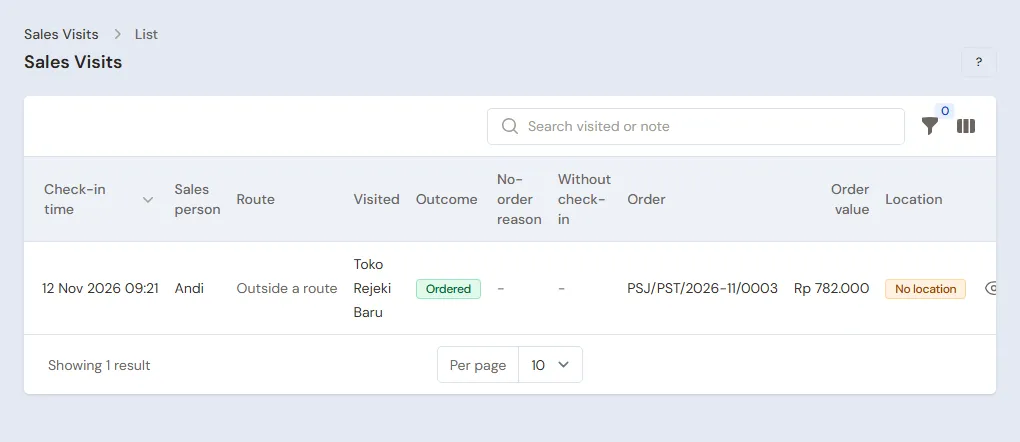
Head Cashier: open Transactions → Sales Orders, tab Open. Both orders from Andi's visits are there, in Andi's name. An order by phone or WhatsApp is recorded with New Sales Order. An order not delivered yet can still be changed. The Stock column says Enough or Short: earlier orders are served first, so an order that is Short waits or is sent in part. See Recording a sales order.
Front shop sales
The Cashier (Rani, whose Sales input is already set to the till) opens the till with Transactions → Sales. In the Warehouse field above the note, pick Toko Depan, so the stock is taken from there. A walk-in buyer takes 1 Carton of Minyak Goreng 2 L and 1 Bale of Gula Pasir 1 kg: the units Carton and Bale are picked on their lines, Rp 216.000 + Rp 345.000 = Rp 561.000, paid in cash. See Recording a sale at the till.
Sending with a delivery run
Warehouse Admin, Tuesday morning:
- Open Transactions → Delivery Runs, press Make Delivery Run and pick Sales orders.
- Tick the orders of Warung Bu Imas and Toko Rejeki Baru, then pick Make Delivery Run. Fill in From warehouse Gudang Besar, the Driver name Pak Slamet and the Vehicle.
- Put the stops in the order of the road, then press Print & make delivery notes. Both delivery notes are made and their stock leaves Gudang Besar. Print them for Pak Slamet.
- In the afternoon, from the paper brought back, mark both shops Delivered. Goods a warung refused are recorded as Partly or Failed, and the rest goes back into stock.
See Delivering with the daily delivery run.
Mixed orders: packing into boxes
Some warungs order a mix: whole cartons and loose pieces. A whole carton ships as its own parcel, and the loose goods are packed into boxes so that the driver and the warung can count the delivery per package. For example, Toko Rejeki Baru's order taken by Andi on his phone: 10 Pcs Minyak Goreng 2 L, 40 Pcs Mi Instan Goreng (one whole carton), 12 Pcs Deterjen Bubuk 800 g and 6 Renteng Kecap Manis Sachet. This order is separate from the practice figures in this guide.
- Sales (Andi): the visit and the order as usual. The order shows up in Transactions → Sales Orders in Andi's name. At UD Sumber Pangan Andi's order waits in the Awaiting review tab, and Andi sees its status on his phone.
- Head Cashier: open the order from the bell or the Dashboard. In Stock for This Order, every item must read Enough, and the warung's credit limit must not be passed. Press Accept so the order becomes Open and its stock is booked, or Reject with a reason if the goods are not there. Andi is told in the bell. See Sales orders need an admin to accept them.
- Warehouse Admin: send it with a delivery run or Transactions → Delivery Notes → Make Delivery Note. The stock leaves Gudang Besar.
- Warehouse Admin: open the delivery note and press Packing. Make three packages (pick the type under New box) and fill them:
- Parcel 1 (4 kg): 40 Pcs Mi Instan Goreng, one whole carton that is not opened.
- Box 2 (15.5 kg): 6 Pcs Minyak Goreng 2 L and 4 Pcs Deterjen Bubuk 800 g.
- Box 3 (15.5 kg): 4 Pcs Minyak Goreng 2 L, 8 Pcs Deterjen Bubuk 800 g and 6 Renteng Kecap Manis Sachet. The 10 Pcs of oil are split over two boxes.
- At the top of the Packing page, Goods on this delivery note says that all the goods are in boxes. If some are left, it names the goods and what is left.
- Warehouse Admin: press Print Box Labels for the labels Parcel 1 of 3, Box 2 of 3 and Box 3 of 3 to stick on the packages, then Print Packing List for the driver and Toko Rejeki Baru.
- At the warung, the receiver counts the three packages and matches them with the packing list. The QR code on a label opens the contents of that package on a phone without signing in.
- Head Cashier: make the note from the delivery note as usual.
Note: Step 2 applies when the shop turns on Orders from sales need an admin to accept them in Settings → Sales (off by default, a sales order is Open at once). It is on at UD Sumber Pangan.
The demo shop UD Sumber Pangan has a delivery note like this one, with its boxes. See Packing into boxes, sacks or parcels.
Billing what was delivered
Head Cashier: on each order, press Make Note from Delivery Notes, then Make Draft Note. Press Pay, Unpaid, then Save transaction.
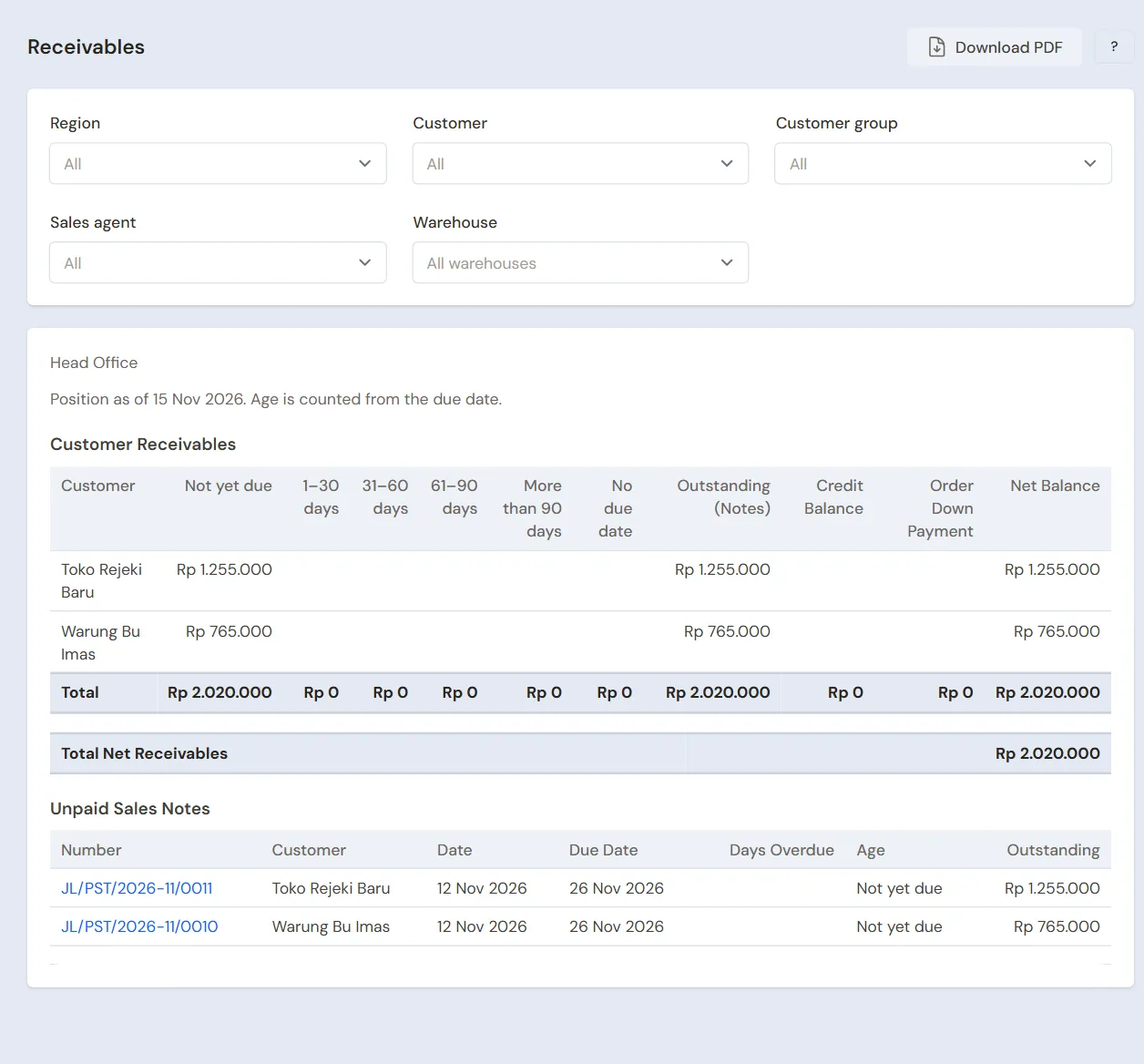
Afterwards Warung Bu Imas owes Rp 765.000 and Toko Rejeki Baru Rp 1.255.000, due in 14 days. A note over the Warung group's credit limit is held until a permitted user fills in the Reason for passing the credit limit. See Sending goods in stages with delivery notes.
Closing the day
The Finance Admin counts the front shop's drawer: Rp 300.000 + Rp 561.000 = Rp 861.000, the same as Cashier Cash in Reports → Cash Balance. The takings of Rp 561.000 move to Bank BCA with Transactions → Finance → Cash Transfers.
5. Receivables, payables and collection
- On Thursday Andi comes back to Warung Bu Imas. On the check-in screen he sees the warung's bill. A salesperson records no money: Bu Imas transfers Rp 765.000 to Bank BCA.
- The Finance Admin records that transfer under Transaction Details → Sale Payments. See Paying a note that is not paid in full.
- The Finance Admin pays Distributor Pangan Nusantara before the due date under Transaction Details → Purchase Payments. See Paying a supplier.
- The Finance Admin reads Reports → Receivables every week and tells the Head Cashier which warungs are past due.
Collecting through collectors with collection lists is the extra feature Collectors. See Collecting receivables through collectors.
6. Expenses, sales commission and stocktakes
- The Finance Admin records the delivery car's fuel in Transactions → Finance → Expenses, category Fuel, and its servicing in the category Vehicle Maintenance.
- Sales commission is not worked out by itself yet. The Head Cashier reads every salesperson's Order value in Reports → Visits per Sales Person, for example Andi Rp 40.000.000 a month × 1% = Rp 400.000, then the Finance Admin pays it as an expense. The order value is the orders recorded and accepted by an admin, not the money received, so cancelled orders and orders still Awaiting review are not counted.
- The Warehouse Admin counts Gudang Besar and Toko Depan once a month in Transactions → Stocktakes, one stocktake per warehouse. See Counting stock with a stocktake.
The profit of that day: sales of Rp 765.000 + Rp 1.255.000 + Rp 561.000 = Rp 2.581.000, cost of goods sold 3 Cartons of oil × Rp 204.000 + 8 Cartons of noodles × Rp 110.000 + 3 Bales of sugar × Rp 330.000 = Rp 2.482.000, so a gross profit of Rp 99.000, less the unloading cost of Rp 150.000.
7. Reports per job title
| Report | What it holds | Opened by | When |
|---|---|---|---|
| Reports → Stock | Stock per warehouse in cartons and bales | Warehouse Admin | Every day |
| Reports → Visits per Sales Person | Visits, orders, no orders with their reasons, and every salesperson's order value | Head Cashier | Every day |
| Reports → Sales KPI (an extra feature, switched on in Settings → Sales Activity) | Salespeople to act on and to praise, visits per working day, EC, NOO, RO, AO, check-ins far from the customer | Head Cashier | Every week |
| Reports → Receivables | Every warung's bills and their age | Finance Admin | Every week |
| Reports → Payables | The distributor's notes and their due dates | Finance Admin | Every week |
| Reports → Cash Balance | The money in the bank, the office cash and the front shop's drawer | Finance Admin | Every day |
| Reports → Profit & Loss | Sales, cost of goods sold and expenses | Owner | Every month |
8. Checklist
- Every day: the Salespeople send every visit. The Head Cashier checks the orders and makes notes from the delivered delivery notes. The Warehouse Admin makes the delivery run and records its result. The Finance Admin matches the front shop's drawer.
- Every week: the Finance Admin records the warungs' payments and reads Receivables and Payables. The Head Cashier reads the Sales KPI with every salesperson.
- Every month: the Warehouse Admin takes stock of both warehouses. The Owner reads the Profit & Loss.
A running business
This part is for the team moving a running wholesaler to Vende: stock in two warehouses, warungs that still owe bills, payables to the distributor, and sales routes already running. The order is always the same:
- Enter the master data.
- Practise transactions until every part is used to them.
- Empty the practice transactions.
- Enter the opening balances on the first day.
- Go live.
The opening balances come last on purpose, so the practice does not spoil their figures. The examples in this part use UD Sumber Pangan from the new business part.
1. Master data
Work through the parts Who does what, 1. Shop details and users and 2. Master data above. Also list every warung that still owes a bill and every distributor still owed, and put the warungs on routes along the visiting days already running. Many goods and customers are imported from Excel. See Importing and exporting products with Excel. The master data is not deleted when the practice transactions are emptied.
2. Practice for the team
Work in a practice shop of the Wholesaler/distributor type with the eight accounts. During the practice, leave the routes' Visit days empty so they show every day.
Practice 1: master data
- Owner: the shop details, the seven users and the Warung group's prices.
- Check: Andi only sees Customers, Sales Routes, Sales Orders, Sales Visits and Today's Visits.
- Mas Joko (Warehouse Admin): both warehouses and the three items with their Cartons and Bales.
- Check: Toko Depan has its branch under Branches Allowed, so it shows in the Warehouse field of Rani's till.
- Head Cashier: the Warung group with its credit limit, the three warungs and Rute Pasar Baru.
- Check: on Andi's phone, Transactions → Today's Visits shows Warung Bu Imas, then Toko Rejeki Baru.
Practice 2: one working day
- Owner: the capital of Rp 100.000.000.
- Finance Admin: the Cash Transfers of Rp 1.000.000 and Rp 300.000, then the unloading cost of Rp 150.000.
- Purchasing Admin: the note of Distributor Pangan Nusantara, Rp 27.800.000, on credit.
- Warehouse Admin: the stock transfer to Toko Depan.
- Andi (Salesperson): the visits and orders of both warungs.
- Cashier: the front shop sale of Rp 561.000 in cash from the Toko Depan warehouse.
- Mas Joko: the delivery run, printing the delivery notes, marking them Delivered.
- Head Cashier: both notes from the delivery notes, unpaid.
- Finance Admin: the Cash Transfer of Rp 561.000 to Bank BCA, then Warung Bu Imas's payment of Rp 765.000 into Bank BCA.
After Practice 2 this must show:
| Report | What must show | Opened by |
|---|---|---|
| Reports → Cash Balance | Bank BCA Rp 100.000.000 − Rp 1.000.000 − Rp 300.000 + Rp 561.000 + Rp 765.000 = Rp 100.026.000, Owner Cash Rp 850.000, Cashier Cash Rp 300.000 | Finance Admin |
| Reports → Receivables | Toko Rejeki Baru Rp 1.255.000 | Finance Admin |
| Reports → Payables | Distributor Pangan Nusantara Rp 27.800.000 | Finance Admin |
| Reports → Stock | Gudang Besar: oil 43 Cartons, noodles 87 Cartons, sugar 16 Bales. Toko Depan: oil 4 Cartons, noodles 5 Cartons, sugar 1 Bale | Warehouse Admin |
| Reports → Profit & Loss | Sales Rp 2.581.000, cost of goods sold Rp 2.482.000, unloading Rp 150.000 | Owner |
Practice 3: opening balances
Enter the opening balances with the example of part 4 below, check them as in part 5, then empty them again.
3. Emptying the practice transactions
Done by the Owner in Settings → Empty Transactions, button Empty All Transactions. Notes, orders, sales visits, delivery notes, delivery runs, purchases, stock transfers, stock adjustments, stocktakes, payments, expenses, cash transfers, capital and opening balances are deleted. Products with their units and price lists, warehouses, groups with their credit limits, Special Prices, customers, sales routes, suppliers, cash accounts, users and settings stay. Vende makes a full backup first. See Emptying transactions or all data.
4. Opening balances
Done by the Owner in Settings → Opening Balances on the morning of the first day, with As of that day. See Entering opening cash, stock, receivables and payables.
- Opening Stock: the count of every warehouse, with the right Warehouse on every row, for example Minyak Goreng 2 L at Gudang Besar 30 Cartons and at Toko Depan 4 Cartons, at a cost of Rp 34.000 a piece.
- Opening Receivables: one row per warung note not paid yet, with its old due date, for example Warung Pak Udin Rp 2.400.000 due yesterday, and Toko Rejeki Baru Rp 600.000 due in 10 days.
- Opening Payables: one row per distributor note, for example Distributor Pangan Nusantara Rp 15.000.000.
- Opening Cash: the money counted in every account, for example Bank BCA Rp 60.000.000, Owner Cash Rp 1.000.000 and Cashier Cash Rp 300.000.
Orders the salespeople took that are not delivered yet are recorded again as new orders on the first day in Transactions → Sales Orders.
Credit limits and old notes
The opening receivable notes are dated on the first day. So:
- Max. total receivable counts the old receivables at once. Warung Pak Udin, who owes Rp 2.400.000, may only take Rp 600.000 more on credit.
- Max. age of oldest note counts the age from the first day, not from the old note's date. Warung Pak Udin's note, already past due, only holds back the next credit note after more than 21 days from the first day.
- The old due dates still count: a note past its due date is flagged red at the till, and Reports → Receivables writes how many days it is late in the column Days Overdue.
A warung whose old bill is long overdue is collected from before it gets credit again. The Head Cashier opens that warung in Master Data → Customers and, in the Credit Limit section, fills in Max. unpaid notes with the number of notes it has not paid, for example 1 for Warung Pak Udin. The next credit note is then refused at once, unless a user allowed to do so fills in Reason for passing the credit limit; a note paid in full still goes through. Once the bill is paid, empty that field again so the warung follows the Warung group's limits again.
5. Check before going live
| Report | What must show | Opened by |
|---|---|---|
| Reports → Cash Balance | The money counted in every account | Finance Admin |
| Reports → Stock | Oil 30 Cartons at Gudang Besar and 4 Cartons at Toko Depan | Warehouse Admin |
| Reports → Receivables | Warung Pak Udin Rp 2.400.000 past due, Toko Rejeki Baru Rp 600.000 | Finance Admin |
| Reports → Payables | Distributor Pangan Nusantara Rp 15.000.000 | Finance Admin |
The figures differ? The Owner corrects the row in Settings → Opening Balances before any real transaction is recorded.
6. Going live
From that day every visit, order, delivery run, note and payment is recorded in Vende as in the new business part, with the same checklist. In the first week the Head Cashier checks that every route shows on the salesperson's phone on its day, and the Finance Admin checks that payments of old receivables lower Reports → Receivables.