
Farm supply shop guide
A learning path for a farm supply shop, new or running: fertiliser per sack and per kilo, seeds and pesticides with batches, farmers' credit until harvest.
On this page
- A new business
- Who does what
- 1. Shop details and users
- 2. Master data
- 3. Starting capital and the first purchase
- 4. One selling day
- 5. Credit repayments and payables
- 6. Stocktakes and transport costs
- 7. Reports per job title
- 8. Checklist
- A running business
- 1. Master data
- 2. Practice for the team
- 3. Emptying the practice transactions
- 4. Opening balances
- 5. Check before going live
- 6. Going live
This guide is for the team setting up Vende at a farm supply shop that sells fertiliser, seeds, pesticides and tools to farmers, part of it paid after the harvest. It has two parts: A new business for a shop just opening, with no stock, receivables or payables from before, and A running business for one moving to Vende, with team practice and opening balances. The example is Toko Tani Subur Makmur. The names of the shop, farmers, suppliers and people and all the figures are made up.
What the business looks like:
- Fertiliser: bought per 50 kg sack, sold per sack or by the kilogram.
- Seeds and pesticides: have a batch number and an expiry date, so the one that expires first is sold first.
- Buying: from a distributor with 30 days to pay, and tools from a hardware shop in cash.
- Selling: walk-in buyers pay cash or by QRIS. Regular farmers may take goods on credit and pay after the harvest, about four months later.
Work through it from the top. Every step names its menu, who does it, what changes afterwards, and an example with figures.
The features in this guide come with the Farm supply shop (fertiliser, seeds, pesticides) business type package, except those marked extra. The shop's features show under Settings → Subscription, section This shop's features. If a menu is missing, contact the Vende team.
Tip: Lost on a page? Press the ? button at the top of that page. A short tour shows every field, on the till screen too.
A new business
Who does what
This package holds three users, the owner included.
| Part of the shop | Job title in Vende | What they do and open |
|---|---|---|
| Owner | Owner | Every menu: suppliers and purchases, farmers' repayments, payables, expenses, opening balances and every report |
| Shop keeper | Head Cashier | The till, regular farmers, credit, returns |
| Store room | Warehouse Admin | Products and units, batches, expired goods, stocktakes, Reports → Stock |
Every role is explained in Roles and permissions.
1. Shop details and users
Done by the Owner: fill in Settings → Shop (name, address, WhatsApp, logo), then create the accounts in Settings → Users with the Job title of the table above. See Adding and managing users.
The people at Toko Tani Subur Makmur: Pak Darmaji (owner), Mas Eko (shop keeper, Head Cashier) and Mas Teguh (store room, Warehouse Admin).
2. Master data
A shop of this business type already has the product categories Fertilisers, Seeds and Seedlings, Pesticides, Farm Tools and Animal Feed, the units Gunny Sack, Sack and Bottle, and the expense categories Loading and Unloading and Fuel.
Goods
Warehouse Admin: in Master Data → Products, create every item with the Type Finished Goods:
| Item | Category | Base Unit | Cost Price | Selling Price | Other Units | Batches |
|---|---|---|---|---|---|---|
| Pupuk NPK 16-16-16 (fertiliser) | Fertilisers | Kilogram | Rp 12.000 | Rp 14.000 | Gunny Sack of 50, Selling Price Rp 675.000 | No |
| Benih Padi Inpari 32 5 kg (rice seed) | Seeds and Seedlings | Pieces | Rp 60.000 | Rp 75.000 | Yes | |
| Insektisida Cair 500 ml (insecticide) | Pesticides | Bottle | Rp 65.000 | Rp 80.000 | Yes | |
| Cangkul Baja (hoe) | Farm Tools | Pieces | Rp 75.000 | Rp 95.000 | No |
- The fertiliser takes the base unit Kilogram so that selling by the kilogram takes from the same stock as selling per sack. Pick the Main Unit Gunny Sack, so the stock shows as 17 Gunny Sacks 45 Kilograms. See Base unit, other units and main unit.
- For the seeds and pesticides, turn on Track batches & expiry in the Tracking section. See Batches and expiry dates.
Farmers and suppliers
- Head Cashier: in Master Data → Customers, list the farmers who may take credit, for example Pak Karyo and Kelompok Tani Sri Rejeki (a farmer group), with Payment Terms (days) 120, about until the harvest. See Adding and changing customers.
- Owner: in Master Data → Suppliers, list CV Agro Lestari with Payment Terms (days) 30, and Toko Perkakas Jaya without terms. See Adding suppliers.
Cash accounts
Owner: in Master Data → Cash Accounts, use Cashier Cash for the shop's drawer, Owner Cash for the office money, and Bank BCA for transfers and QRIS. See Cash accounts and bank accounts.
3. Starting capital and the first purchase
- The Owner records capital in Transactions → Finance → Owner's Capital: Rp 30.000.000 into Bank BCA and Rp 1.000.000 into Owner Cash.
- The Owner records the note of CV Agro Lestari in Transactions → Purchases, 30 days to pay: 20 Gunny Sacks of Pupuk NPK 16-16-16 × Rp 600.000 = Rp 12.000.000, 40 Pieces of Benih Padi Inpari 32 5 kg × Rp 60.000 = Rp 2.400.000, and 24 Bottles of Insektisida Cair 500 ml × Rp 65.000 = Rp 1.560.000. That is Rp 15.960.000. In the line details of the seed and the insecticide, fill in the batch number and expiry from the pack, for example BNH-2610 expiring 30 June 2027 and INS-0925 expiring 30 September 2027. See Recording a purchase note.
- The Owner records the note of Toko Perkakas Jaya, paid from Bank BCA: 10 Cangkul Baja × Rp 75.000 = Rp 750.000.
- The Owner records Rp 100.000 for the porters who unloaded 20 sacks, from Owner Cash, in Transactions → Finance → Expenses, category Loading and Unloading.
- The Owner moves Rp 300.000 of change money from Owner Cash to Cashier Cash in Transactions → Finance → Cash Transfers.
The stock afterwards: Pupuk NPK 1.000 kg (20 sacks), Benih Padi 40 pcs of batch BNH-2610, Insektisida 24 bottles of batch INS-0925 and Cangkul 10 pcs.
4. One selling day
| Time | Work | Who |
|---|---|---|
| Morning | A farmer takes fertiliser and seed on credit | Head Cashier |
| All day | Cash and QRIS retail sales | Head Cashier |
| Afternoon | Check the batches about to expire | Warehouse Admin |
| Afternoon | Count the drawer, move the takings | Owner |
A farmer's credit until harvest
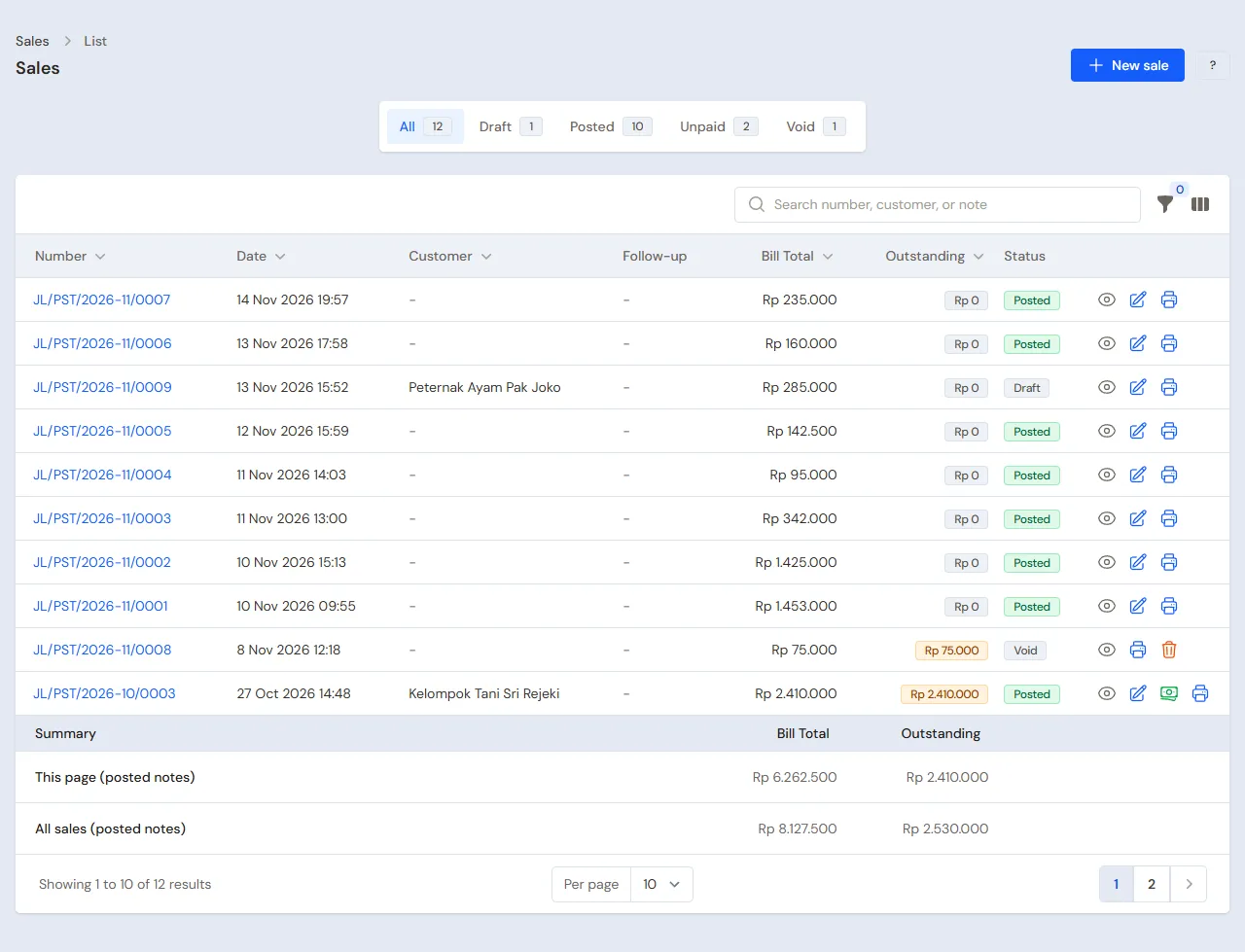
Pak Karyo starts planting and takes 2 Gunny Sacks of Pupuk NPK 16-16-16 and 2 Pieces of Benih Padi Inpari 32 5 kg.
- The Head Cashier (Mas Eko) opens the till with New sale on the Dashboard or in Transactions → Sales, then picks Pak Karyo in the Customer field.
- Add the fertiliser, switch its unit to Gunny Sack on its line, then add the seed: 2 × Rp 675.000 + 2 × Rp 75.000 = Rp 1.500.000.
- Press Pay, press Unpaid, check Becomes receivable of Rp 1.500.000 due in 120 days, then press Save transaction.
The seed that leaves is taken from the batch that expires first. See Recording a sale at the till and Taking payment at the till.
Retail sales
- A walk-in buyer: 5 Kilograms of Pupuk NPK 16-16-16 (Rp 70.000) and 1 Bottle of Insektisida Cair 500 ml (Rp 80.000), so Rp 150.000, in cash. The fertiliser is weighed out of an opened sack.
- A second buyer: 1 Cangkul Baja Rp 95.000, paid by QRIS into Bank BCA.
Expired goods
The Warehouse Admin (Mas Teguh) opens Master Data → Batches and uses the expiry filter to find seeds and pesticides about to pass their date, then puts them at the front to be sold first. The bell also reminds of them; the number of days is set in Settings → Alerts, field About to Expire, by the Owner.
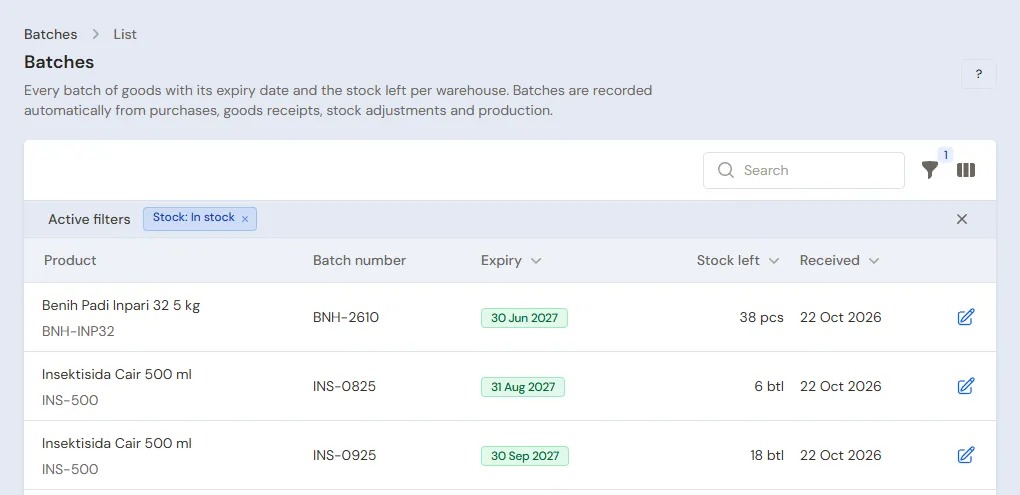
Pesticides past their date are taken out by the Warehouse Admin in Transactions → Stock Adjustments, direction Out, category Expired, with their batch: their value becomes a loss. A distributor willing to take expired goods back gets them with a purchase return recorded by the Owner. See Stock adjustments and Returning goods to a supplier.
Closing the shop
The Owner counts the drawer: Rp 300.000 + Rp 150.000 = Rp 450.000, the same as Cashier Cash in Reports → Cash Balance, then moves Rp 150.000 to Owner Cash with Transactions → Finance → Cash Transfers.
5. Credit repayments and payables
- After the harvest Pak Karyo pays Rp 1.000.000 in cash and the rest next month. The Owner records it under Transaction Details → Sale Payments into Owner Cash; the other Rp 500.000 stays a receivable. See Paying a note that is not paid in full.
- The due date of a note whose harvest comes late is moved with Change due date (in the More menu) on the note's page. See Correcting a wrong note.
- The Owner pays CV Agro Lestari before the due date under Transaction Details → Purchase Payments. See Paying a supplier.
Farmers' credit is usually far bigger than the cash sales. The Owner reads Reports → Receivables every week to see how much of the shop's money is still with the farmers, and matches the buying from the distributor to the money at hand.
6. Stocktakes and transport costs
- Fertiliser weighed out of a sack usually shrinks a little. Once a month the Warehouse Admin counts the full sacks and weighs the opened ones in Transactions → Stocktakes. See Counting stock with a stocktake.
- Fuel for the car bringing fertiliser to the fields is recorded by the Owner in Transactions → Finance → Expenses, category Fuel.
The profit of that day: sales of Rp 1.500.000 + Rp 150.000 + Rp 95.000 = Rp 1.745.000, cost of goods sold Rp 1.520.000 (fertiliser 105 kg × Rp 12.000 = Rp 1.260.000, seed 2 × Rp 60.000 = Rp 120.000, insecticide Rp 65.000, hoe Rp 75.000), so a gross profit of Rp 225.000, less the unloading cost of Rp 100.000. This profit is recorded although Pak Karyo's money only comes in after the harvest.
7. Reports per job title
| Report | What it holds | Opened by | When |
|---|---|---|---|
| Reports → Stock | Fertiliser in sacks and kilograms, seeds and pesticides per batch | Warehouse Admin | Every day |
| Reports → Cash Balance | The drawer, the office cash and the bank | Owner | Every afternoon |
| Reports → Receivables | Every farmer's credit and its due date | Owner | Every week |
| Reports → Payables | The distributor's notes and their due dates | Owner | Every week |
| Reports → Profit & Loss | Sales, cost of goods sold, expired goods and expenses | Owner | Every month |
One farmer's credit from the start of the season until now is in Reports → Receivable Card; its PDF can be sent to that farmer.
8. Checklist
- Every day: the Head Cashier records every sale and credit at the till. The Owner matches the drawer with the Cash Balance.
- Every week: the Warehouse Admin checks the batches about to expire. The Owner reads Receivables and Payables.
- Every month: the Warehouse Admin takes stock of the fertiliser. The Owner reads the Profit & Loss.
- Every harvest: the Owner records the farmers' repayments and moves the due dates that come late.
A running business
This part is for the team moving a running farm supply shop to Vende: fertiliser, seeds and pesticides in the store room with their batches, farmers' credit in a notebook until the harvest, and payables to the distributor. The order is always the same:
- Enter the master data.
- Practise transactions until every part is used to them.
- Empty the practice transactions.
- Enter the opening balances on the first day.
- Go live.
The opening balances come last on purpose, so the practice does not spoil their figures. The examples in this part use Toko Tani Subur Makmur from the new business part.
1. Master data
Work through the parts Who does what, 1. Shop details and users and 2. Master data above. Also list every farmer who still owes credit, and every supplier still owed. The master data is not deleted when the practice transactions are emptied.
2. Practice for the team
Work in a practice shop of the Farm supply shop (fertiliser, seeds, pesticides) type with the three accounts.
Practice 1: master data
- Owner: the shop details, both users and both suppliers.
- Check: Mas Eko sees neither Purchases nor Reports in the sidebar.
- Mas Teguh (Warehouse Admin): the four items, the fertiliser with the unit Gunny Sack of 50, batches for the seed and the insecticide.
- Head Cashier: Pak Karyo and Kelompok Tani Sri Rejeki.
Practice 2: one selling day
- Owner: the capital of Rp 30.000.000 and Rp 1.000.000, both purchase notes with batches, the unloading cost of Rp 100.000 and the Cash Transfer of Rp 300.000.
- Head Cashier: Pak Karyo's credit of Rp 1.500.000, the cash sale of Rp 150.000 and the hoe of Rp 95.000 by QRIS.
- Owner: the Cash Transfer of Rp 150.000 to Owner Cash.
After Practice 2 this must show:
| Report | What must show | Opened by |
|---|---|---|
| Reports → Cash Balance | Bank BCA Rp 30.000.000 − Rp 750.000 + Rp 95.000 = Rp 29.345.000, Owner Cash Rp 1.000.000 − Rp 100.000 − Rp 300.000 + Rp 150.000 = Rp 750.000, Cashier Cash Rp 300.000 | Owner |
| Reports → Receivables | Pak Karyo Rp 1.500.000, due in 120 days | Owner |
| Reports → Payables | CV Agro Lestari Rp 15.960.000 | Owner |
| Reports → Stock | Fertiliser 17 Gunny Sacks 45 Kilograms, seed 38 of batch BNH-2610, insecticide 23 of batch INS-0925, hoes 9 | Warehouse Admin |
| Reports → Profit & Loss | Sales Rp 1.745.000, cost of goods sold Rp 1.520.000, unloading Rp 100.000 | Owner |
Practice 3: opening balances
Enter the opening balances with the example of part 4 below, check them as in part 5, then empty them again.
3. Emptying the practice transactions
Done by the Owner in Settings → Empty Transactions, button Empty All Transactions. Notes, purchases, batches, stock adjustments, stocktakes, payments, expenses, cash transfers, capital and opening balances are deleted. Products with their units and prices, customers, suppliers, cash accounts, users and settings stay. Vende makes a full backup first. See Emptying transactions or all data.
4. Opening balances
Done by the Owner in Settings → Opening Balances on the morning of the first day, with As of that day. See Entering opening cash, stock, receivables and payables.
- Opening Stock: count the full sacks, weigh the opened one, then enter them in kilograms, for example Pupuk NPK 16-16-16 620 Kilograms (12 sacks and one opened sack of 20 kg) at Rp 12.000. Seeds and pesticides take one row per batch with its Batch number and Expiry, for example Insektisida Cair 500 ml 6 Bottles of batch INS-0825 and 10 Bottles of batch INS-0925, at Rp 65.000.
- Opening Receivables: one row for every farmer's credit in the notebook, with the expected harvest as its Due Date, for example Pak Karyo Rp 2.250.000 due 15 February 2027 and Kelompok Tani Sri Rejeki Rp 4.800.000 due 1 March 2027.
- Opening Payables: CV Agro Lestari Rp 7.500.000 with its due date.
- Opening Cash: the money counted in every account, for example Cashier Cash Rp 300.000 and Bank BCA Rp 12.000.000.
Credit taken in different seasons goes in as different rows, so every credit has its own due date and its repayment is easy to match.
5. Check before going live
| Report | What must show | Opened by |
|---|---|---|
| Reports → Cash Balance | Cashier Cash Rp 300.000 and Bank BCA Rp 12.000.000 | Owner |
| Reports → Stock | Fertiliser 12 Gunny Sacks 20 Kilograms, insecticide 16 bottles: 6 of batch INS-0825 and 10 of batch INS-0925 | Warehouse Admin |
| Reports → Receivables | Pak Karyo Rp 2.250.000 and Kelompok Tani Sri Rejeki Rp 4.800.000 | Owner |
| Reports → Payables | CV Agro Lestari Rp 7.500.000 | Owner |
The figures differ? The Owner corrects the row in Settings → Opening Balances before any real transaction is recorded.
6. Going live
From that day every sale, credit and purchase is recorded in Vende as in the new business part, with the same checklist. Old credit is repaid like new credit, under Transaction Details → Sale Payments. In the first week the Warehouse Admin matches Reports → Stock with the store room, and the Owner matches Reports → Receivables with the old credit book.