
Fresh vegetable, fruit, meat and fish seller guide
A learning path for a fresh food stall, new or running: weighed goods, food stall orders, morning deliveries, shrinkage, team practice, opening balances.
On this page
- A new business
- Who does what
- 1. Shop details and users
- 2. Master data
- 3. Starting capital and early morning buying
- 4. One selling day
- 5. Receivables and payables
- 6. Reports per job title
- 7. Checklist
- A running business
- 1. Master data
- 2. Practice for the team
- 3. Emptying the practice transactions
- 4. Opening balances
- 5. Check before going live
- 6. Going live
This guide is for the team setting up Vende at a stall or shop selling fresh vegetables, fruit, meat and fish, at the market and by delivering orders to food stalls every morning. It has two parts: A new business for a stall just starting, with no stock, receivables or payables from before, and A running business for one moving to Vende, with team practice and opening balances. The example is Lapak Segar Bu Mirna. The names of the stall, customers, suppliers and people and all the figures are made up.
What the business looks like:
- Goods: tomatoes and chicken per kilogram, chillies per ons (100 g) or per kilogram, and spinach per bunch. Almost everything is weighed.
- Buying: at the wholesale market every early morning, paid in cash, and chicken from a farm with 7 days to pay.
- Selling: walk-in buyers at the stall pay cash. Regular food stalls order by WhatsApp in the afternoon, their goods are weighed and delivered in the morning, then billed once a week.
- Shrinkage: wilted greens and weight lost are recorded every afternoon, so stock and profit stay right.
Work through it from the top. Every step names its menu, who does it, what changes afterwards, and an example with figures.
The features in this guide come with the Fresh vegetables, fruit, meat and fish business type package, except those marked extra. The shop's features show under Settings → Subscription, section This shop's features. If a menu is missing, contact the Vende team.
Tip: Lost on a page? Press the ? button at the top of that page. A short tour shows every field, on the till screen too.
A new business
Who does what
This package holds three users, the owner included.
| Part of the stall | Job title in Vende | What they do and open |
|---|---|---|
| Owner | Owner | Every menu: buying at the wholesale market and the farm, market expenses, payments, opening balances and every report |
| Stall keeper | Head Cashier | The till, regular customers, food stall orders, notes from delivery notes |
| Weighing and store room | Warehouse Admin | Products and units, weighing orders, delivery runs, wilted goods, stocktakes, Reports → Stock |
The courier needs no account: the delivery run and its delivery notes are printed, then the Warehouse Admin records the result from that paper. Every role is explained in Roles and permissions.
1. Shop details and users
Done by the Owner: fill in Settings → Shop (name, address, WhatsApp, logo), then create the accounts in Settings → Users with the Job title of the table above. See Adding and managing users.
The people at Lapak Segar Bu Mirna: Bu Mirna (owner), Teh Ida (stall keeper, Head Cashier) and Ujang (weighing and store room, Warehouse Admin). Kang Dedi, the courier on a motorbike, has no account.
2. Master data
A shop of this business type already has the product categories Vegetables, Fruit, Meat, Fish and Seafood, Eggs, and Spices and Seasonings, the units Ons (100 g, two decimals), Bunch and Whole Animal, and the expense categories Market Fees, Ice, and Loading and Unloading. Kilogram takes three decimals, so 1,25 kg can be sold.
Weighed goods
Warehouse Admin: in Master Data → Products, create every item with the Type Finished Goods:
| Item | Category | Base Unit | Cost Price | Selling Price | Other Units |
|---|---|---|---|---|---|
| Tomat (tomatoes) | Vegetables | Kilogram | Rp 8.000 | Rp 12.000 | |
| Cabai Merah Keriting (red chillies) | Spices and Seasonings | Ons (100 g) | Rp 4.000 | Rp 5.000 | Kilogram of 10, Selling Price Rp 48.000 |
| Bayam (spinach) | Vegetables | Bunch | Rp 2.000 | Rp 3.000 | |
| Daging Ayam Potong (chicken) | Meat | Kilogram | Rp 32.000 | Rp 38.000 |
The chillies take the base unit Ons so that selling per ons and orders per kilogram are both easy: 1 Kilogram of chillies takes 10 ons off the stock. See Base unit, other units and main unit.
Vegetable prices often change every morning. The Warehouse Admin changes many prices at once with Quick Price Edit. See Bulk Price Edit and Quick Price Edit.
Customers and suppliers
- Head Cashier: in Master Data → Customers, list Warung Makan Bu Tati with Payment Terms (days) 7 and her delivery address. See Adding and changing customers.
- Owner: in Master Data → Suppliers, list Bandar Sayur Pak Rahmat (cash) and Peternakan Ayam Sumber Rezeki with Payment Terms (days) 7. See Adding suppliers.
Cash accounts
Owner: in Master Data → Cash Accounts, use Owner Cash for the market money, Cashier Cash for the stall's drawer, and Bank BCA for the food stalls' transfers. See Cash accounts and bank accounts.
3. Starting capital and early morning buying
- The Owner records capital of Rp 5.000.000 into Owner Cash in Transactions → Finance → Owner's Capital.
- The Owner records the note of Bandar Sayur Pak Rahmat in Transactions → Purchases, paid in cash from Owner Cash: 20 Kilograms of Tomat × Rp 8.000 = Rp 160.000, 5 Kilograms of Cabai Merah Keriting × Rp 40.000 = Rp 200.000, and 50 Bunches of Bayam × Rp 2.000 = Rp 100.000. That is Rp 460.000.
- The Owner records the note of Peternakan Ayam Sumber Rezeki, 7 days to pay: 30 Kilograms of Daging Ayam Potong × Rp 32.000 = Rp 960.000.
- The Owner records the market costs from Owner Cash in Transactions → Finance → Expenses: the market fee of Rp 5.000 (category Market Fees), ice for the chicken Rp 20.000 (Ice), and porters Rp 15.000 (Loading and Unloading).
- The Owner moves Rp 200.000 of change money to Cashier Cash in Transactions → Finance → Cash Transfers.
The stock afterwards: Tomat 20 kg, Cabai 50 ons, Bayam 50 bunches and Daging Ayam 30 kg. See Recording a purchase note.
4. One selling day
| Time | Work | Who |
|---|---|---|
| The afternoon before | A food stall's order by WhatsApp | Head Cashier |
| 04.00 | Weigh the order, change its quantities to the scale | Warehouse Admin, Head Cashier |
| 05.00 | Delivery run and delivery notes | Warehouse Admin |
| 06.00 to 12.00 | Walk-in sales at the stall | Head Cashier |
| Midday | Notes from the delivery notes | Head Cashier |
| Afternoon | Wilted goods and weighing what is left | Warehouse Admin |
A food stall's order
Head Cashier (Teh Ida): Bu Tati orders by WhatsApp for tomorrow morning. Open Transactions → Sales Orders, press New Sales Order, pick Warung Makan Bu Tati, fill in the Pickup Date tomorrow morning, then enter 10 Kilograms of Daging Ayam Potong, 5 Kilograms of Tomat and 1 Kilogram of Cabai Merah Keriting. Press Save. See Recording a sales order.
Weigh first, then send
The weight on the scale seldom matches the order. A delivery note holds all of the order's goods still waiting, so the order's quantities are changed to the scale first:
- Ujang weighs Bu Tati's order: the chicken is 10,4 kg, the tomatoes and chillies are exact. He writes the weight on the order paper.
- Head Cashier: open Bu Tati's order, press Edit, change the chicken to 10,4, then save. The order now holds 10,4 × Rp 38.000 + 5 × Rp 12.000 + 1 × Rp 48.000 = Rp 395.200 + Rp 60.000 + Rp 48.000 = Rp 503.200.
The morning delivery
Warehouse Admin (Ujang):
- Open Transactions → Delivery Runs, press Make Delivery Run and pick Sales orders.
- Tick Bu Tati's order and the other food stalls' orders of that day, then pick Make Delivery Run. Fill in the Driver name Kang Dedi and the Vehicle Motor.
- Press Print & make delivery notes. Every food stall's delivery note is made and its stock leaves. Print them for Kang Dedi.
- When Kang Dedi is back, mark every food stall Delivered, or Partly when some goods were refused.
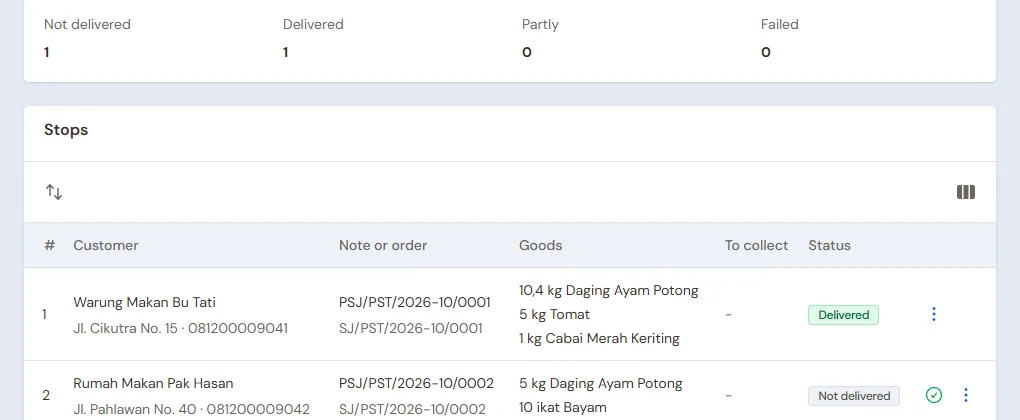
See Delivering with the daily delivery run.
Walk-in sales at the stall
The Head Cashier opens the till with New sale on the Dashboard or in Transactions → Sales, then types the weight from the scale:
- The first buyer: 2 kg of Tomat (Rp 24.000), 3 Ons of Cabai Merah Keriting (Rp 15.000) and 4 Bunches of Bayam (Rp 12.000). That is Rp 51.000, in cash.
- The second buyer: 1,5 kg of Daging Ayam Potong, Rp 57.000, in cash.
See Recording a sale at the till.
Billing the delivered order
Head Cashier: on Bu Tati's order, press Make Note from Delivery Notes, then Make Draft Note. Press Pay, Unpaid, then Save transaction. Bu Tati owes Rp 503.200, due in 7 days. Every morning becomes one note, and all the notes of the week are paid at once. See Sending goods in stages with delivery notes.
Shrinkage and wilted goods
Warehouse Admin, in the afternoon:
- The wilted spinach, 6 bunches, is taken out in Transactions → Stock Adjustments, direction Out, category Damaged: 6 × Rp 2.000 = Rp 12.000 becomes a loss. See Stock adjustments.
- The tomatoes left are weighed in Transactions → Stocktakes. The stock shows 20 − 5 − 2 = 13 kg, the scale 12,6 kg. The difference of 0,4 kg × Rp 8.000 = Rp 3.200 is booked when the stocktake is posted. See Counting stock with a stocktake.
Recording shrinkage every day keeps the cost of goods sold and the daily profit right, and tomorrow morning's stock matches the stall.
Closing the stall
The Owner counts the drawer: Rp 200.000 + Rp 51.000 + Rp 57.000 = Rp 308.000, the same as Cashier Cash in Reports → Cash Balance, then moves the takings of Rp 108.000 to Owner Cash with Transactions → Finance → Cash Transfers. That money buys tomorrow's goods at dawn.
5. Receivables and payables
- On Saturday Bu Tati transfers all the notes of the week to Bank BCA. The Owner records it under Transaction Details → Sale Payments. One payment can be split over several notes at once. See Paying a note that is not paid in full.
- The Owner pays Peternakan Ayam Sumber Rezeki Rp 960.000 before the due date under Transaction Details → Purchase Payments. See Paying a supplier.
- Chicken a food stall sends back because it is not fresh is recorded by the Head Cashier with a return at the till. See Recording a sales return.
The profit of that day: sales of Rp 503.200 + Rp 51.000 + Rp 57.000 = Rp 611.200, cost of goods sold Rp 496.800 (chicken 11,9 kg × Rp 32.000 = Rp 380.800, tomatoes 7 kg × Rp 8.000 = Rp 56.000, chillies 13 ons × Rp 4.000 = Rp 52.000, spinach 4 bunches × Rp 2.000 = Rp 8.000), so a gross profit of Rp 114.400, less the shrinkage of Rp 12.000 + Rp 3.200 and the market costs of Rp 40.000.
6. Reports per job title
| Report | What it holds | Opened by | When |
|---|---|---|---|
| Reports → Stock | What is left of every item, for tomorrow's buying | Warehouse Admin | Every afternoon |
| Reports → Cash Balance | The drawer, the market money and the bank | Owner | Every afternoon |
| Reports → Receivables | Every food stall's notes not paid yet | Owner | Every Saturday |
| Reports → Payables | The farm's notes and their due dates | Owner | Every week |
| Reports → Profit & Loss | Sales, cost of goods sold, shrinkage and market costs | Owner | Every week |
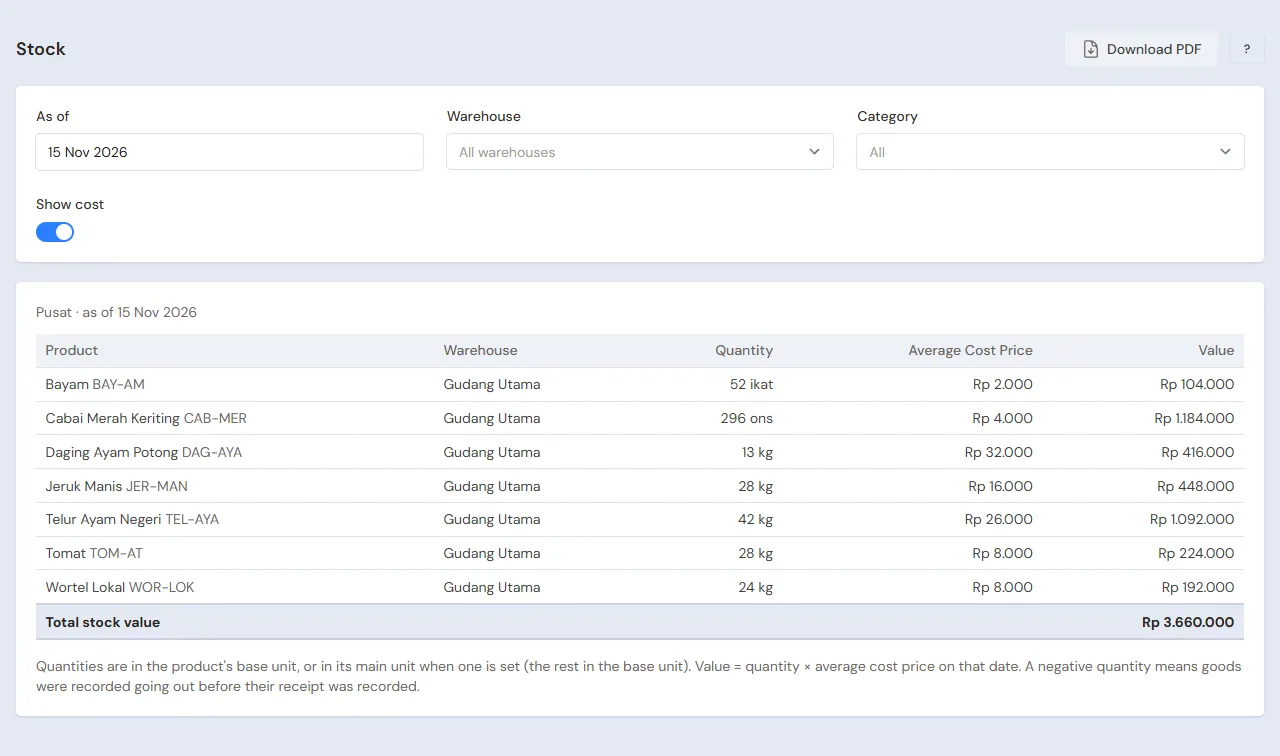
7. Checklist
- Every day: the Head Cashier records the orders and changes them to the scale. The Warehouse Admin makes the delivery run, records its result, takes out wilted goods and weighs what is left. The Owner records the dawn buying and the market costs, then matches the drawer.
- Every week: the Owner records the food stalls' payments, pays the farm and reads the Profit & Loss.
- Every month: the Owner compares this month's shrinkage with last month's in the Profit & Loss.
A running business
This part is for the team moving a running stall to Vende: goods left over, food stalls that have not paid this week's notes, and payables to the farm. The order is always the same:
- Enter the master data.
- Practise transactions until every part is used to them.
- Empty the practice transactions.
- Enter the opening balances on the first day.
- Go live.
The opening balances come last on purpose, so the practice does not spoil their figures. The examples in this part use Lapak Segar Bu Mirna from the new business part.
1. Master data
Work through the parts Who does what, 1. Shop details and users and 2. Master data above. Also list every regular food stall and every supplier still owed. The master data is not deleted when the practice transactions are emptied.
2. Practice for the team
Work in a practice shop of the Fresh vegetables, fruit, meat and fish type with the three accounts.
Practice 1: master data
- Owner: the shop details, both users and both suppliers.
- Check: Ujang sees Delivery Runs and Delivery Notes, but not Sales Orders.
- Ujang (Warehouse Admin): the four items, Cabai Merah Keriting with the base unit Ons and Kilogram of 10 included.
- Head Cashier: Warung Makan Bu Tati.
- Check: at the till, 1 Kilogram of Cabai Merah Keriting costs Rp 48.000.
Practice 2: one selling day
- Owner: the capital of Rp 5.000.000, both purchase notes, the market costs of Rp 40.000 and the Cash Transfer of Rp 200.000.
- Head Cashier: Bu Tati's order, then change its chicken to 10,4 kg.
- Ujang: the delivery run, printing the delivery notes, marking them Delivered.
- Head Cashier: the walk-in sales of Rp 51.000 and Rp 57.000 in cash, then the note from the delivery note, unpaid.
- Ujang: 6 bunches of wilted spinach, then the stocktake of the tomatoes at 12,6 kg.
- Owner: the Cash Transfer of Rp 108.000 to Owner Cash.
After Practice 2 this must show:
| Report | What must show | Opened by |
|---|---|---|
| Reports → Cash Balance | Owner Cash Rp 5.000.000 − Rp 460.000 − Rp 40.000 − Rp 200.000 + Rp 108.000 = Rp 4.408.000, Cashier Cash Rp 200.000 | Owner |
| Reports → Receivables | Warung Makan Bu Tati Rp 503.200 | Owner |
| Reports → Payables | Peternakan Ayam Sumber Rezeki Rp 960.000 | Owner |
| Reports → Stock | Tomatoes 12,6 kg, chillies 37 ons, spinach 40 bunches, chicken 18,1 kg | Warehouse Admin |
| Reports → Profit & Loss | Sales Rp 611.200, cost of goods sold Rp 496.800, shrinkage Rp 15.200, market costs Rp 40.000 | Owner |
Practice 3: opening balances
Enter the opening balances with the example of part 4 below, check them as in part 5, then empty them again.
3. Emptying the practice transactions
Done by the Owner in Settings → Empty Transactions, button Empty All Transactions. Notes, orders, delivery notes, delivery runs, purchases, stock adjustments, stocktakes, payments, expenses, cash transfers, capital and opening balances are deleted. Products with their units and prices, customers, suppliers, cash accounts, users and settings stay. Vende makes a full backup first. See Emptying transactions or all data.
4. Opening balances
Done by the Owner in Settings → Opening Balances at dawn on the first day, before buying at the market, with As of that day. See Entering opening cash, stock, receivables and payables.
- Opening Stock: weigh what is left from yesterday, for example Daging Ayam Potong 6 Kilograms at Rp 32.000 and Tomat 4 Kilograms at Rp 8.000. Greens that have wilted are left out.
- Opening Receivables: one row per food stall note not paid yet, for example Warung Makan Bu Tati Rp 1.450.000 due this Saturday.
- Opening Payables: Peternakan Ayam Sumber Rezeki Rp 1.920.000 with its due date.
- Opening Cash: the money counted, for example Owner Cash Rp 2.500.000 for buying, Cashier Cash Rp 200.000 of change and Bank BCA Rp 3.000.000.
The food stalls' orders for the first day, taken yesterday afternoon, are recorded as new orders on the first day in Transactions → Sales Orders, before they are weighed.
5. Check before going live
| Report | What must show | Opened by |
|---|---|---|
| Reports → Cash Balance | Owner Cash Rp 2.500.000, Cashier Cash Rp 200.000, Bank BCA Rp 3.000.000 | Owner |
| Reports → Stock | Chicken 6 kg, tomatoes 4 kg | Warehouse Admin |
| Reports → Receivables | Warung Makan Bu Tati Rp 1.450.000 | Owner |
| Reports → Payables | Peternakan Ayam Sumber Rezeki Rp 1.920.000 | Owner |
The figures differ? The Owner corrects the row in Settings → Opening Balances before any real transaction is recorded.
6. Going live
From that day every purchase, order, morning delivery, sale and shrinkage is recorded in Vende as in the new business part, with the same checklist. In the first week the Warehouse Admin weighs what is left every afternoon and matches it with Reports → Stock, and the Owner checks that Bu Tati's payment that Saturday settles her old notes.