
Lodging and homestay guide
A lodging team's learning path, new or running: job titles, rooms, nightly bookings, check-in, extra charges, check-out, occupancy report, opening balances.
On this page
- A new business
- Who does what
- 1. Shop details and users
- 2. Master data
- 3. Starting capital and purchases
- 4. A week at the front desk
- 5. Towel laundry and expenses
- 6. Reports per job title
- 7. Checklist
- A running business
- 1. Master data
- 2. Team practice
- 3. Clear the practice transactions
- 4. Opening balances
- 5. Check before starting
- 6. Start for real
This guide is for the team setting up Vende at a lodging run by its owner: a losmen, guest house, daily boarding house or villa with up to about 20 rooms. Rooms are hired by the night, guests pay a down payment and a deposit, laundry or breakfast is added to the room bill, and drinks and snacks are sold at the till. It has two parts: A new business for a lodging just opening, with no guests staying, receivables or payables from before, and A running business for a lodging moving to Vende, with team practice and opening balances. The example is Homestay Kenanga. The business, guests, suppliers, people and every figure are made up.
What the business looks like:
- Rooms: each room is a service hired out by the day with 1 piece. Its selling price is the rate per night.
- Stays: the guest books with a check-in day and a check-out day, pays a down payment, then pays the rest of the rate and the deposit at check-in. The check-out day does not hold the room, so the next guest may check in that day.
- Extra charges: laundry, breakfast and an extra bed are added to the bill while the guest stays.
- Check-out: everything becomes one note, the deposit is cut from it and what is left goes back. The room waits to be cleaned.
- Drinks and snacks: sold at the till as goods with stock.
Work through it from the top. Every step names its menu, who does it, what changes afterwards, and an example with figures.
The features in this guide come with the Lodging & homestay business type package. The shop's features show under Settings → Subscription, section This shop's features. If a menu is missing, contact the Vende team.
Tip: Lost on a page? Press the ? button at the top of that page. A short tour shows every field.
A new business
Who does what
This package holds three users, the owner included.
| Part of the business | Job title in Vende | What they do and open |
|---|---|---|
| Owner | Owner | Every menu, also the rooms, rates, purchases, expenses, opening balances and Reports → Profit & Loss |
| Lodging head | Head Cashier | Changing and cancelling bookings, Reports → Room Occupancy |
| Front desk | Cashier | The Room Board, bookings, check-in, extra charges, check-out, and selling drinks at the till |
| Housekeeper | Housekeeping | Transactions → Rooms to clean, without prices or cash |
Every role is explained in Roles and permissions.
1. Shop details and users
Done by the Owner: fill in Settings → Shop (name, address, WhatsApp, logo), then make the accounts in Settings → Users with the Job title of the table above. See Adding and managing users.
The people of Homestay Kenanga: Pak Hendra (owner), Bu Sari (lodging head, Head Cashier) and Rani (front desk, Cashier).
2. Master data
This business type already has the product categories Rooms, Food, Beverages, Snacks, Laundry Services, Extra Services and Toiletries, the units Portion, Bottle and Set, and the expense categories Towel and Linen Laundry, Equipment Maintenance and Internet and Phone Credit.
Rooms
Owner: in Master Data → Services, make each room, switch on Hired out by the day, set Number of units to 1 and put the rate per night in Selling Price:
| Room | Category | Price (per night) | Pieces | Deposit per piece | Late fee per day |
|---|---|---|---|---|---|
| Kamar 1 Standar | Rooms | Rp 250.000 | 1 | Rp 100.000 | Rp 100.000 |
| Kamar 2 Standar | Rooms | Rp 250.000 | 1 | Rp 100.000 | Rp 100.000 |
| Kamar 3 Deluxe | Rooms | Rp 350.000 | 1 | Rp 100.000 | Rp 150.000 |
| Kamar 5 Keluarga | Rooms | Rp 500.000 | 1 | Rp 150.000 | Rp 200.000 |
The late fee per day is used when a guest checks out after the check-out day. Room sales go to Rental Revenue in Profit and Loss. See Daily rentals: clothes, gowns and costumes for the room fields and Lodging: rooms, guests and bills for the Room Board.
Extra charges
Owner: in Master Data → Services, make ordinary services (without Hired out by the day): Laundry per Kg Rp 10.000, Breakfast per Person Rp 25.000 and Extra Bed per Night Rp 75.000.
Drinks and snacks
Owner: in Master Data → Products, make Air Mineral 600 ml in the category Beverages, Selling Price Rp 5.000, and Mi Instan Cup in Snacks, Selling Price Rp 10.000. See Adding a product.
Guests and suppliers
Cashier: in Master Data → Customers, register the regular guests with a WhatsApp number. A new guest can be added right from the booking form with the plus button beside Guest.
Owner: in Master Data → Suppliers, register Grosir Minuman Kaliurang.
3. Starting capital and purchases
- The Owner records Rp 5.000.000 of capital into Bank BCA in Transactions → Finance → Owner's Capital.
- The Owner records the note of Grosir Minuman Kaliurang in Transactions → Purchases, paid in full from Bank BCA: 100 Air Mineral 600 ml × Rp 2.000 = Rp 200.000. See Recording a purchase note.
Rooms have no stock: what Vende guards is their schedule.
4. A week at the front desk
The week of 10 to 16 November at Homestay Kenanga:
| Guest | Room | Check-in and check-out | Down payment | Extra charges |
|---|---|---|---|---|
| Pak Dimas | Kamar 1 Standar | 10 - 13 Nov (3 nights) | Rp 150.000 cash | Laundry 3 kg, breakfast for 2 |
| KKN group | Kamar 3 Deluxe | 11 - 14 Nov (3 nights) | Rp 200.000 transfer | Extra bed 3 nights |
| Bu Lestari | Kamar 5 Keluarga | 14 - 16 Nov (2 nights) | Rp 250.000 cash | None |
Booking and down payment
The Cashier (Rani) in Transactions → Room Board, button Book a Room (or Book on the room's card):
- Pak Dimas: Guest Pak Dimas, Rooms Kamar 1 Standar, Check-in 10 Nov, Check-out 13 Nov. Under check-out Vende writes 3 nights and Rp 750.000. Deposit is left blank, so it becomes Rp 100.000 from the room. Save, then on the booking's page press Down Payment, Rp 150.000 cash into Kas Tunai Kasir.
- KKN group: Kamar 3 Deluxe, 11 to 14 Nov, Rp 1.050.000. Down Payment Rp 200.000 into Bank BCA by transfer.
Another guest asks for Kamar 1 Standar from 12 to 14 Nov. Vende refuses and names Pak Dimas's booking, because the night of the 12th is taken. A guest asking from 13 Nov is served: Pak Dimas's check-out day does not hold the room.
Check-in
The Cashier opens the booking from the Room Board and presses Check in. Paid Now holds the rest of the rate and the deposit:
- 10 Nov, Pak Dimas: Rp 750.000 + Rp 100.000 − Rp 150.000 = Rp 700.000 cash.
- 11 Nov, KKN group: Rp 1.050.000 + Rp 100.000 − Rp 200.000 = Rp 950.000 transfer into Bank BCA.
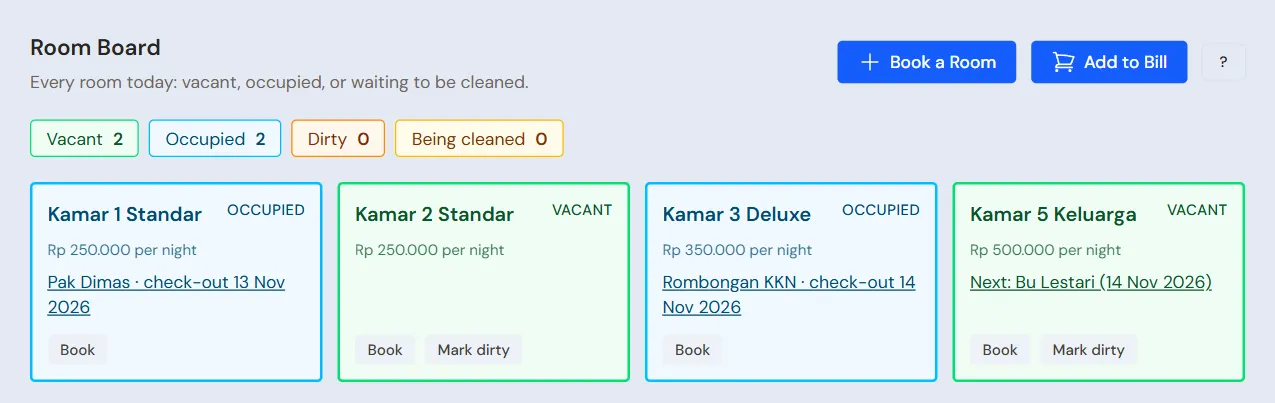
Until check-out, that money is held for the guest and is not income yet. The room shows Occupied on the Room Board.
Extra charges
When a guest asks for laundry or breakfast, the Cashier opens the booking and presses Add to Bill, or presses Add to Bill on the Room Board and picks the guest. Find the guest by name or room number ("Pak Dimas (Room 1 Standard)"). One row per charge, service and quantity; press Add row when there are several at once, and save once. The price fills in from the service and may be changed:
- Pak Dimas: Laundry per Kg × 3 = Rp 30.000, Breakfast per Person × 2 = Rp 50.000.
- KKN group: Extra Bed per Night × 3 = Rp 225.000.
Added by mistake? Remove from Bill on the booking's page takes the chosen charge off while the guest has not checked out.
Check-out
The Cashier opens the booking and presses Check out. Late Days fills in by itself when the guest stays past the check-out day, and can be set to 0 to waive it. Pick the cash account the deposit goes back from, then press Save and make the note.
| Guest | Note | Money held | Handed back |
|---|---|---|---|
| Pak Dimas, 13 Nov | Room Rp 750.000 + extras Rp 80.000 = Rp 830.000 | Rp 850.000 | Rp 20.000 cash |
| KKN group, 14 Nov | Room Rp 1.050.000 + extra bed Rp 225.000 = Rp 1.275.000 | Rp 1.150.000 | None; fill in Paid Now Rp 125.000 transfer |
A room a guest has just left shows Dirty. A user with the Housekeeping job title gets a bell notification, opens Transactions → Rooms to clean on the phone, presses Start cleaning, then Mark clean when it is done (the front desk can also use the buttons on the room's card on the Room Board). An empty room that suddenly needs cleaning can be marked with Mark dirty.
A typing mistake? The Head Cashier presses Open Again on the booking's page, then the Cashier presses Check out again with the right figures.
The Transactions → Daily Rentals list has the quick tabs Ready for pickup for bookings whose check-in day has come, and Late to return for guests who have not checked out past their day.
5. Towel laundry and expenses
The Owner records the laundry of towels and sheets, Rp 150.000, in the category Towel and Linen Laundry, paid from Kas Tunai Kasir, and also electricity, water and internet, in Transactions → Finance → Expenses. See Recording shop expenses.
6. Reports per job title
| Report | What it shows | Opened by | When |
|---|---|---|---|
| Transactions → Room Board | Rooms vacant, occupied, dirty and being cleaned, guests arriving and due out | Cashier | Every day |
| Transactions → Rooms to clean | Rooms that are dirty or being cleaned | Housekeeping | Every day |
| Reports → Cash Balance | Money in the drawer and the bank, the deposits held included | Owner | Every day |
| Reports → Room Occupancy | Nights sold, occupancy and the income of each room | Head Cashier | Every month |
| Reports → Profit & Loss | Rental Revenue, drink sales, their cost, and laundry costs | Owner | Every month |
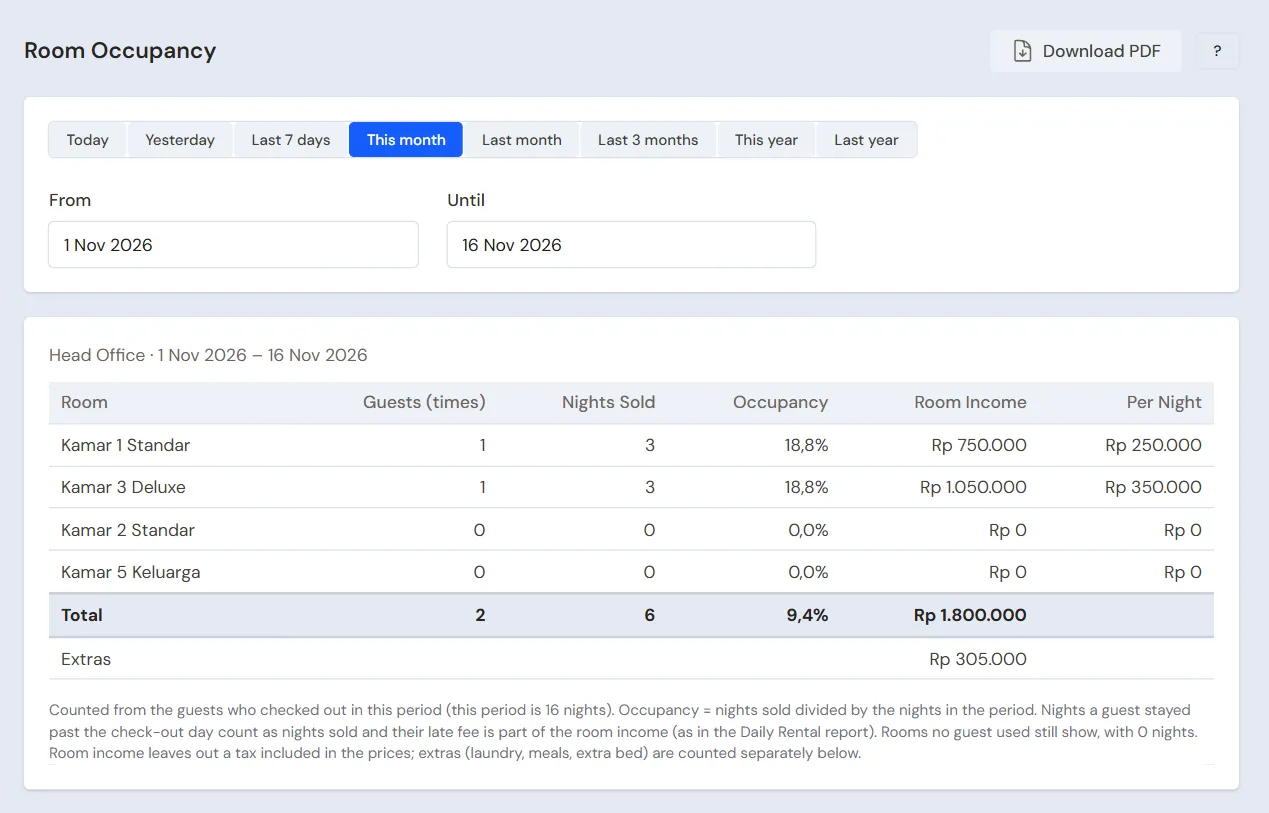
The Room Occupancy report counts the guests who checked out in its period. The extra charges (laundry, breakfast, extra bed) are counted separately below the table.
7. Checklist
- Every day: the Cashier opens the Room Board, presses Check in when a guest arrives and Check out when a guest leaves, and makes sure dirty rooms get cleaned.
- Every week: the Owner records the laundry of towels and sheets.
- Every month: the Head Cashier reads Reports → Room Occupancy to see the rooms that are rarely taken. The Owner reads Profit & Loss.
A running business
This part is for the team moving a lodging that already runs to Vende: guests are staying, bookings with a down payment wait for dates to come, and drinks are in the cupboard. The order is always the same:
- Fill in the master data.
- Practise transactions until each part is familiar.
- Clear the practice transactions.
- Enter the opening balances on the first day.
- Start for real.
Opening balances are entered last on purpose, so practice does not upset their figures. The example in this part uses Homestay Kenanga from the new business part.
1. Master data
Do Who does what, 1. Shop details and users and 2. Master data above. Also register every guest now staying or who has paid a down payment on a booking.
Master data stays when the practice transactions are cleared.
2. Team practice
Do it in a practice shop of the Lodging & homestay type with all three accounts. Every step names who and what must show.
Practice 1: master data
- Owner: shop details, both users, the four rooms, the extra services, drinks and the supplier.
- Check: Rani sees the Room Board but not Profit & Loss.
- Cashier: the three guests.
Practice 2: one week
- Owner: capital and the purchase note as in part 3.
- Cashier: the three bookings as in part 4, from booking to check-out.
- Check: a booking of Kamar 1 Standar for 12 to 14 Nov is refused, and one for 13 Nov is accepted.
- Owner: the towel laundry expense of Rp 150.000 as in part 5.
After Practice 2 this must show:
| Report | What must show | Opened by |
|---|---|---|
| Reports → Cash Balance | Bank BCA Rp 5.000.000 − Rp 200.000 + Rp 200.000 + Rp 950.000 + Rp 125.000 = Rp 6.075.000; Kas Tunai Kasir Rp 150.000 + Rp 700.000 − Rp 20.000 − Rp 150.000 = Rp 680.000 | Owner |
| Reports → Room Occupancy | Kamar 1 Standar 3 nights Rp 750.000, Kamar 3 Deluxe 3 nights Rp 1.050.000, extras Rp 305.000 | Head Cashier |
| Reports → Stock | Air Mineral 600 ml: 100 bottles | Owner |
Practice 3: opening balances
Enter the opening balances with the example in part 4 below, check them as in part 5, then clear again.
3. Clear the practice transactions
Done by the Owner in Settings → Empty Transactions, button Empty All Transactions. Bookings with their down payment and deposit, notes, purchases, payments, expenses, capital and opening balances are deleted. Rooms, extra services, drinks, guests, suppliers, cash accounts, users and settings stay. Vende makes a full backup first. See Clearing transactions or all data.
4. Opening balances
Example: Homestay Kenanga starts using Vende for real on Monday, 2 November. That morning:
- Bu Wati is staying in Kamar 2 Standar since 31 October, checking out on 3 November. She has paid the rate Rp 750.000 and the deposit Rp 100.000 in cash.
- Pak Anton has booked Kamar 5 Keluarga for 21 to 23 November with a down payment of Rp 250.000 that went into Bank BCA.
- The drawer holds Rp 1.200.000 and Bank BCA Rp 8.000.000.
Stock
Done by the Owner in Settings → Opening Balances, with As of that day. See Entering opening cash, stock, receivables and payables.
- Opening Stock: the drinks and snacks for sale, for example Air Mineral 600 ml 100 Bottles at Rp 2.000. Rooms have no stock.
Guests staying and bookings
Opening Balances has no tab for stays. The way with what is there:
- The Cashier makes Bu Wati's booking with Book a Room, Check-in 31 Oct and Check-out 3 Nov, then presses Check in with Paid Now Rp 850.000 into Kas Tunai Kasir, the account the money is kept in now.
- The Cashier makes Pak Anton's booking for 21 to 23 Nov, then presses Down Payment Rp 250.000 into Bank BCA.
- The Owner fills in Opening Cash of each account with the money counted minus the money recorded in steps 1 and 2: Kas Tunai Kasir Rp 1.200.000 − Rp 850.000 = Rp 350.000, and Bank BCA Rp 8.000.000 − Rp 250.000 = Rp 7.750.000.
As a result:
- The cash balance equals the money counted, and Rp 850.000 and Rp 250.000 are held for Bu Wati and Pak Anton.
- Kamar 2 Standar shows as occupied on the Room Board, so nobody else can book it until Bu Wati checks out.
- When Bu Wati checks out on 3 November, her Rp 750.000 note goes into the November Reports → Profit & Loss although her stay began in October, and Rp 100.000 goes back.
5. Check before starting
| Report | What must show | Opened by |
|---|---|---|
| Reports → Cash Balance | Kas Tunai Kasir Rp 1.200.000 and Bank BCA Rp 8.000.000, the money counted | Owner |
| Reports → Stock | Air Mineral 600 ml: 100 bottles | Owner |
| Transactions → Room Board | Kamar 2 Standar Occupied by Bu Wati until 3 Nov, Kamar 5 Keluarga with Pak Anton as the next guest | Cashier |
A figure differs? The Owner corrects its row in Settings → Opening Balances before real transactions are recorded.
6. Start for real
From that day every booking, check-in, extra charge, check-out, drink sale, purchase and expense is recorded in Vende as in the new business part, with the same checklist.
First week check:
- Cashier: every room with a guest shows Occupied on the Room Board.
- Owner: the first week's Reports → Profit & Loss holds only the guests checked out, the drinks and the expenses since the first day.