
Dress and costume rental guide
A dress rental team's learning path, new or running: job titles, clothes for hire, bookings, deposits, late fees, reports per item, practice, opening balances.
On this page
- A new business
- Who does what
- 1. Shop details and users
- 2. Master data
- 3. Opening capital and purchases
- 4. One week at the front desk
- 5. Laundry and expenses
- 6. Reports per job title
- 7. Checklists
- A running business
- 1. Master data
- 2. Practice for the team
- 3. Empty the practice transactions
- 4. Opening balances
- 5. Check before you start
- 6. Start for real
This guide is for the team setting up Vende at a dress rental: wedding gowns, party dresses, kebaya, suits and beskap, traditional wear and costumes hired by the day, plus accessories for sale. It has two parts: A new business for a rental just opening, with no rentals running, receivables or payables from before, and A running business for a rental moving to Vende, with team practice and opening balances. The example is Butik Sewa Ayu. The names of the business, customers, suppliers and people and all the figures are made up.
What the business looks like:
- Clothes for hire: each piece of clothing is a service hired out by the day, with its size and colour in its name. Identical clothes of more than one piece are entered once with their number of pieces.
- Rentals: the customer books with a pickup day and a return day, pays a down payment, then pays the rest of the rent and the deposit on pickup. When the clothes come back, the late fee and damage are worked out and the deposit left is handed back.
- Accessories: slippers and brooches sold at the till as goods with stock.
- Customers: people, and wedding organizers with their own price.
Work through it from the top. Every step names its menu, who does it, what changes afterwards, and an example with figures.
The features in this guide come with the Dress & costume rental business type package. The shop's features show under Settings → Subscription, section This shop's features. If a menu is missing, contact the Vende team.
Tip: Lost on a page? Press the ? button at the top of that page. A short tour shows every field.
A new business
Who does what
This package holds three users, the owner included.
| Part of the business | Job title in Vende | What they do and open |
|---|---|---|
| Owner | Owner | Every menu, also the clothes for hire, accessories, purchases, expenses, opening balances and Reports → Profit & Loss |
| Shop head | Head Cashier | The wedding organizers' prices, changing and cancelling rentals, Reports → Rentals by Item |
| Front desk | Cashier | Customers, bookings, down payments, pickups and returns, selling accessories at the till |
Every role is explained in Roles and permissions.
1. Shop details and users
Done by the Owner: fill in Settings → Shop (name, address, WhatsApp, logo), then make the accounts in Settings → Users with the Job title of the table above. See Adding and managing users.
The people of Butik Sewa Ayu: Bu Ratna (owner), Mbak Sinta (shop head, Head Cashier) and Dimas (front desk, Cashier).
2. Master data
This business type already has the product categories Wedding Gowns, Party Dresses, Kebaya, Suits, Traditional Wear, Costumes, Rental Accessories and Accessories, the units Set and Pair, and the expense categories Laundry and Dry Cleaning and Tailoring and Garment Repairs.
Clothes for hire
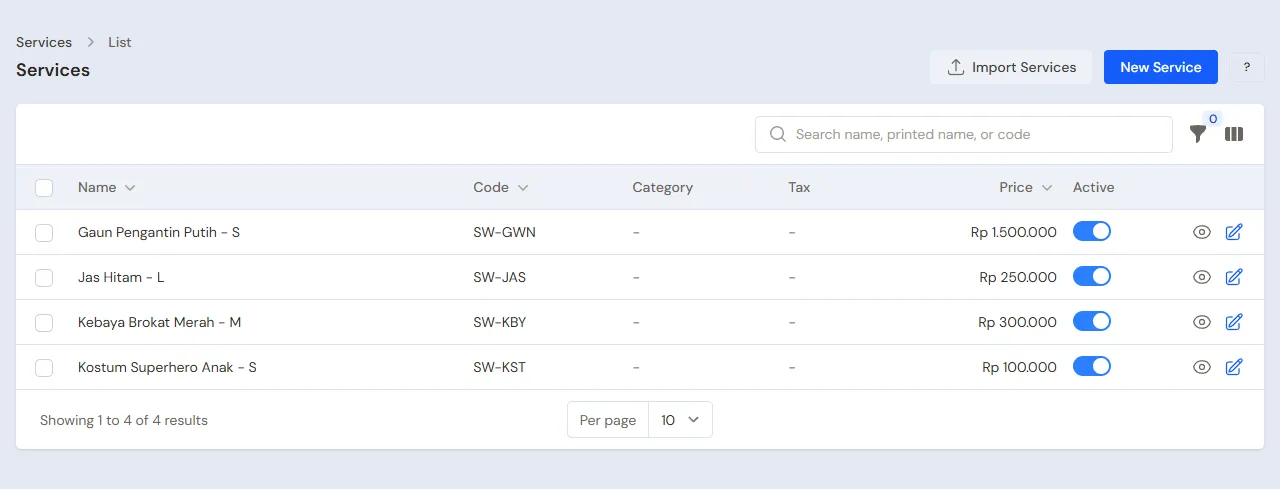
Owner: in Master Data → Services, make each piece of clothing, switch on Hired out by the day, then fill in its pieces, deposit and late fee:
| Clothing | Category | Price (one hire) | Pieces | Deposit per piece | Late fee per day |
|---|---|---|---|---|---|
| Gaun Pengantin Putih - S | Wedding Gowns | Rp 1.500.000 | 1 | Rp 2.000.000 | Rp 200.000 |
| Kebaya Brokat Merah - M | Kebaya | Rp 300.000 | 1 | Rp 500.000 | Rp 50.000 |
| Jas Hitam - L | Suits | Rp 250.000 | 3 | Rp 300.000 | Rp 50.000 |
| Kostum Superhero Anak - S | Costumes | Rp 100.000 | 2 | Empty (ID card) | Rp 25.000 |
Price is the rent for one hire, for example three days. A longer hire just gets another price on its rental line. Sales of these services go to Rental Revenue in Profit and Loss. See Daily rentals: clothes, gowns and costumes.
Accessories for sale
Owner: in Master Data → Products, make Selop Bordir Emas 38 in the category Accessories, Sell Price Rp 85.000. See Adding a product.
Wedding organizers and customers
Head Cashier:
- In Master Data → Customer Groups, make the group Wedding Organizer. See Setting up customer groups.
- In Master Data → Special Prices, make a rule for the Customer Group Wedding Organizer, Applies to One product Gaun Pengantin Putih - S, Fixed price Rp 1.300.000. See Special Prices for customers and groups.
- In Master Data → Customers, register WO Bahagia in the group Wedding Organizer, then Bu Rina, Pak Andi and Mbak Dewi with their WhatsApp numbers.
Owner: in Master Data → Suppliers, register Toko Aksesori Pengantin.
3. Opening capital and purchases
- The Owner records Rp 5.000.000 of capital into Bank BCA in Transactions → Finance → Owner's Capital.
- The Owner records the note of Toko Aksesori Pengantin in Transactions → Purchases, paid in full from Bank BCA: 10 Selop Bordir Emas 38 × Rp 50.000 = Rp 500.000. See Recording a purchase note.
Clothes bought for hire are recorded as an expense or an asset as the shop is used to. Clothes for hire have no stock: what Vende keeps is their schedule.
4. One week at the front desk
The week from 10 to 16 November at Butik Sewa Ayu:
| Customer | Clothing | Rental days | Down payment | On pickup | On return |
|---|---|---|---|---|---|
| Bu Rina | Kebaya Brokat Merah - M | 12 - 14 Nov | Rp 100.000 cash | Rp 700.000 cash | 16 Nov, 2 days late, torn sleeve |
| WO Bahagia | Gaun Pengantin Putih - S | 14 - 15 Nov | Rp 500.000 transfer | Rp 2.800.000 transfer | 15 Nov, fine |
| Pak Andi | 2 Jas Hitam - L | 13 Nov | None | Rp 1.100.000 cash | 14 Nov, 1 day late |
| Mbak Dewi | Kostum Superhero Anak - S | 15 Nov | None | None, ID card as deposit | 15 Nov, Rp 100.000 cash |
Bookings and down payments
The Cashier (Dimas) in Transactions → Daily Rentals, button New Daily Rental, on 10 November:
- Bu Rina: Customer Bu Rina, Pickup Day 12 Nov, Return Day 14 Nov, Items Hired Kebaya Brokat Merah - M. Deposit is left empty, so it takes Rp 500.000 from the service. Save, then press Down Payment Rp 100.000 cash into Kas Tunai Kasir.
- WO Bahagia: Gaun Pengantin Putih - S, 14 to 15 Nov. Rent per Piece comes in at Rp 1.300.000 from the Special Price. Save, then Down Payment Rp 500.000 into Bank BCA by transfer.
Mbak Dewi also wants Kebaya Brokat Merah - M for 14 to 15 Nov. As soon as the kebaya is picked, the rental screen marks it under its line and refuses to save it, because the 14th is still Bu Rina's: the pickup and return days both count. She picks a costume for her child.
Clothes picked up
The Cashier opens the rental and presses Pick Up. Paid Now holds the rest of the rent and the deposit:
- 12 Nov, Bu Rina: Rp 300.000 + Rp 500.000 − Rp 100.000 = Rp 700.000 cash. She also buys 2 Selop Bordir Emas 38 at the till: open the till with New sale on the Dashboard, Rp 170.000 cash. See Selling at the till.
- 13 Nov, Pak Andi comes without a booking: New Daily Rental for that day with 2 Jas Hitam - L (Quantity 2), then Pick Up: rent 2 × Rp 250.000 + deposit 2 × Rp 300.000 = Rp 1.100.000 cash.
- 14 Nov, WO Bahagia: Rp 1.300.000 + Rp 2.000.000 − Rp 500.000 = Rp 2.800.000 by transfer into Bank BCA.
- 15 Nov, Mbak Dewi: her deposit is an ID card and the rent is paid on return, so Paid Now is 0.
Until the clothes come back, all that money is held for the customer and is not income yet. The rental's page shows it under Money Held.
Clothes returned
The Cashier opens the rental and presses Return. Days Late fills itself in. A damage charge goes on its item's line. Choose the cash account the deposit left goes back from, then press Save and make the note.
| Customer | Note | Money held | Handed back |
|---|---|---|---|
| Pak Andi, 14 Nov | Rent Rp 500.000 + 1 day late × 2 × Rp 50.000 = Rp 600.000 | Rp 1.100.000 | Rp 500.000 cash |
| WO Bahagia, 15 Nov | Rent Rp 1.300.000 | Rp 2.800.000 + Rp 500.000 = Rp 3.300.000 | Rp 2.000.000 by transfer from Bank BCA |
| Mbak Dewi, 15 Nov | Rent Rp 100.000 | Rp 0 | None; fill in Paid Now Rp 100.000 cash |
| Bu Rina, 16 Nov | Rent Rp 300.000 + 2 days late × Rp 50.000 + damage Rp 50.000 = Rp 450.000 | Rp 800.000 | Rp 350.000 cash |
For Bu Rina, fill in Damage/Loss Charge Rp 50.000 with the note torn sleeve. A regular customer a little late may have the fee waived with Days Late 0. See Daily rentals: clothes, gowns and costumes.
A damage charge typed wrongly? The Head Cashier presses Reopen on the rental's page, then the Cashier presses Return again with the right figure.
The Transactions → Daily Rentals list has the quick tabs Ready for pickup for rentals whose pickup day has come, and Late to return for clothes not back yet. The Cashier opens them every morning.
5. Laundry and expenses
The Owner records the dry cleaning of the wedding gown, Rp 150.000, and the laundry of the kebaya, Rp 50.000, in the category Laundry and Dry Cleaning, paid from Kas Tunai Kasir, and the rent and electricity, in Transactions → Finance → Expenses. The tailoring of the torn sleeve goes in the category Tailoring and Garment Repairs. See Recording shop expenses.
6. Reports per job title
| Report | What it holds | Opened by | When |
|---|---|---|---|
| Transactions → Daily Rentals | Clothes ready for pickup, out on hire, and late to return | Cashier | Every day |
| Reports → Cash Balance | Money in the drawer and the bank, the deposits held included | Owner | Every day |
| Reports → Rentals by Item | Clothes from the one hired most, with rent, late fees and damage charges | Head Cashier | Every month |
| Reports → Profit & Loss | Rental Revenue, accessory sales, their cost, and laundry costs | Owner | Every month |
7. Checklists
- Every day: the Cashier records every booking before taking its down payment, presses Pick Up when clothes leave and Return when they come back, and calls the customers under Late to return.
- Every week: the Owner records the laundry and dry cleaning costs.
- Every month: the Head Cashier reads Reports → Rentals by Item to choose which clothes to add. The Owner reads Profit & Loss.
A running business
This part is for the team moving a running dress rental to Vende: clothes out with customers, bookings with down payments for days to come, and accessories in the display case. The order is always the same:
- Enter the master data.
- Practise transactions until every part is used to them.
- Empty the practice transactions.
- Enter the opening balances on the first day.
- Start for real.
The opening balances come last on purpose, so practice does not upset their figures. The examples of this part use Butik Sewa Ayu from the new business part.
1. Master data
Do the parts Who does what, 1. Shop details and users and 2. Master data above. Also register every customer who has clothes out or has paid a booking's down payment.
Master data is not deleted when the practice transactions are emptied.
2. Practice for the team
Do it in a practice shop of the type Dress & costume rental with the three accounts. Each step names who does it and what must show.
Practice 1: master data
- Owner: the shop details, both users, the four clothes for hire, the slippers and the supplier.
- Check: Dimas sees Daily Rentals but not Profit & Loss.
- Head Cashier: the Wedding Organizer group with its Special Price, and the four customers.
Practice 2: one week
- Owner: the capital and the purchase note as in part 3.
- Cashier: the four rentals as in part 4, from booking to return, and 2 slippers at the till.
- Check: Mbak Dewi's booking of the kebaya for 14 to 15 Nov is refused.
- Owner: the laundry and dry cleaning cost of Rp 200.000 as in part 5.
After Practice 2 this must show:
| Report | What must show | Opened by |
|---|---|---|
| Reports → Cash Balance | Bank BCA Rp 5.000.000 − Rp 500.000 + Rp 500.000 + Rp 2.800.000 − Rp 2.000.000 = Rp 5.800.000; Kas Tunai Kasir Rp 100.000 + Rp 700.000 + Rp 170.000 + Rp 1.100.000 − Rp 500.000 + Rp 100.000 − Rp 350.000 − Rp 200.000 = Rp 1.120.000 | Owner |
| Reports → Rentals by Item | Gaun Pengantin Putih - S Rp 1.300.000, Jas Hitam - L 2 pieces Rp 600.000, Kebaya Brokat Merah - M Rp 450.000 (rent Rp 300.000, late fee Rp 100.000, damage Rp 50.000), Kostum Superhero Anak - S Rp 100.000 | Head Cashier |
| Reports → Stock | Selop Bordir Emas 38: 8 pcs | Owner |
| Reports → Profit & Loss | Rental Revenue Rp 450.000 + Rp 1.300.000 + Rp 600.000 + Rp 100.000 = Rp 2.450.000, Sales of Goods Rp 170.000, Cost of Goods Sold Rp 100.000, Laundry and Dry Cleaning expense Rp 200.000 | Owner |
Practice 3: opening balances
Enter the opening balances with the example of part 4 below, check them as in part 5, then empty again.
3. Empty the practice transactions
Done by the Owner in Settings → Empty Transactions, button Empty All Transactions. The daily rentals with their down payments and deposits, notes, purchases, payments, expenses, capital and opening balances are deleted. The clothes for hire, accessories, customer groups, Special Prices, customers, suppliers, cash accounts, users and settings stay. Vende makes a full backup first. See Emptying transactions or all data.
4. Opening balances
Example: Butik Sewa Ayu starts using Vende for real on Monday, 2 November. That morning:
- Pak Budi has 1 Jas Hitam - L out since 30 October, due back on 3 November. He has paid Rp 250.000 of rent and Rp 300.000 of deposit in cash.
- WO Bahagia has booked Gaun Pengantin Putih - S for 21 to 22 November with a Rp 500.000 down payment that went into Bank BCA.
- The drawer holds Rp 1.200.000 and Bank BCA Rp 8.000.000.
Stock
Done by the Owner in Settings → Opening Balances, with As of that day. See Entering opening cash, stock, receivables and payables.
- Opening Stock: the accessories for sale, for example Selop Bordir Emas 38 8 Pieces at Rp 50.000. Clothes for hire have no stock.
Clothes out on hire and bookings
Opening Balances has no tab for rentals. The way with what is there:
- The Cashier makes Pak Budi's rental in Transactions → Daily Rentals with Pickup Day 30 Oct and Return Day 3 Nov, then presses Pick Up with Paid Now Rp 550.000 into Kas Tunai Kasir, the account that holds the money now.
- The Cashier makes WO Bahagia's booking for 21 to 22 Nov, then presses Down Payment Rp 500.000 into Bank BCA.
- The Owner fills in each account's Opening Cash with the money counted less the money recorded in steps 1 and 2: Kas Tunai Kasir Rp 1.200.000 − Rp 550.000 = Rp 650.000, and Bank BCA Rp 8.000.000 − Rp 500.000 = Rp 7.500.000.
As a result:
- The cash balances equal the money counted, and Rp 550.000 and Rp 500.000 are held for Pak Budi and WO Bahagia.
- Pak Budi's suit is recorded as out, so nobody else can book it until it is back, and a late fee is worked out if he is late.
- When Pak Budi comes back on 3 November, his Rp 250.000 note goes into the November Reports → Profit & Loss although his hire began in October, and Rp 300.000 goes back.
5. Check before you start
| Report | What must show | Opened by |
|---|---|---|
| Reports → Cash Balance | Kas Tunai Kasir Rp 1.200.000 and Bank BCA Rp 8.000.000, the money counted | Owner |
| Reports → Stock | Selop Bordir Emas 38: 8 pcs | Owner |
| Transactions → Daily Rentals | Pak Budi's rental Picked up with Money Held Rp 550.000, WO Bahagia's booking Booked with Rp 500.000 | Cashier |
A figure differs? The Owner corrects its row in Settings → Opening Balances before real transactions are recorded.
6. Start for real
From that day every booking, pickup, return, accessory sale, purchase and expense is recorded in Vende as in the new business part, with the same checklists.
Checks of the first week:
- Cashier: every piece of clothing missing from the wardrobe has a rental Picked up in Transactions → Daily Rentals.
- Owner: the first week's Reports → Profit & Loss holds only the rentals returned, the accessories and the expenses since the first day.