
Clinic guide
The learning order for a clinic team, new or running: roles, doctors, medicines, patients, queue, medical record, till note, doctor fee, BPJS, opening balances.
On this page
- A new business
- Who does what
- 1. Shop data and users
- 2. Master data
- 3. Starting capital and purchases
- 4. One day at the clinic
- 5. Reports per job
- 6. Checklist
- A running business
- 1. Master data
- 2. Practice for the team
- 3. Clear the practice transactions
- 4. Opening balances
- 5. Check before starting
- 6. Start for real
This guide is for the team setting Vende up in a primary care clinic, a doctor's practice, a dentist or a midwife: patients with a medical record number, a queue per poli and doctor, a medical record per visit, the clinic pharmacy and the doctors' fee. It has two parts: A new business for a clinic that has just opened, with no receivables or old stock, and A running business for a clinic that moves to Vende, with practice for the team and opening balances. The example is Klinik Pratama Sehat Sentosa. The clinic's name, patients, suppliers, people and all figures are made up.
The business in short:
- Polis: General (dr. Andi), Dental (drg. Maya) and Mother and Child (Midwife Ratna).
- Patients: every patient has a medical record number, NIK, blood type, allergies and a BPJS number if any. A patient is a customer, so notes and receivables use what exists.
- Visits: a patient is registered, gets a queue number per poli, is called, examined and then billed.
- Clinic pharmacy: medicines are sold with expiry per batch, and a prescription-only medicine carries the visit number and the doctor's name.
- Payers: general pays themselves, an insurer or company is billed on terms, BPJS is not billed per visit.
Work through it in order. Every step names the menu, who does it, what changes afterwards and the example figures.
The features in this guide come with the Clinic business type package. The shop's features show under Settings → Subscription, section This shop's features. If a menu is missing, contact the Vende team.
Tip: Lost on a page? Tap the ? button at the top of that page. A short tour shows every field.
A new business
Who does what
This package holds five users, the owner included.
| Part of the business | Job title in Vende | What they do and open |
|---|---|---|
| Owner | Owner | Every menu, the medical record too, rates, purchases, expenses, opening balances and Reports → Profit & Loss |
| Head of registration | Head Cashier | Changes visits, the doctor schedules, the doctor fee rates and the commission report |
| Registration and till | Cashier | Registers and corrects patients, registers visits, calls patients, takes the payment of visit notes |
| Doctors and nurses | Medical staff | Examines, writes the medical record and taps Finish & Bill, takes no money |
| Pharmacy | Warehouse Admin | Purchases of medicines and consumables, stock and expiry |
Each role is explained in Roles and permissions. The Cashier and the Head Cashier do not open the content of a medical record (vital signs, SOAP notes, diagnoses), only the owner and Medical staff do.
1. Shop data and users
Done by the Owner: fill in Settings → Shop (name, address, WhatsApp, logo), then create accounts under Settings → Users with the Job title from the table above. See Adding and managing users.
Example people at Klinik Pratama Sehat Sentosa: dr. Andi Prasetyo (owner and general practitioner, Medical staff), Wulan (head of registration, Head Cashier) and Agus (Warehouse Admin).
2. Master data
This business type already has the categories Consultations and Examinations, Medical Procedures, Prescription Drugs, Over-the-counter Drugs, Vitamins and Supplements and Medical Consumables, the units Strip, Tablet, Bottle, Sachet and Box, and the expense categories Equipment Maintenance, Equipment Calibration, Laboratory Tests, Medical Waste Disposal and Permits and Certification.
Doctors and procedures
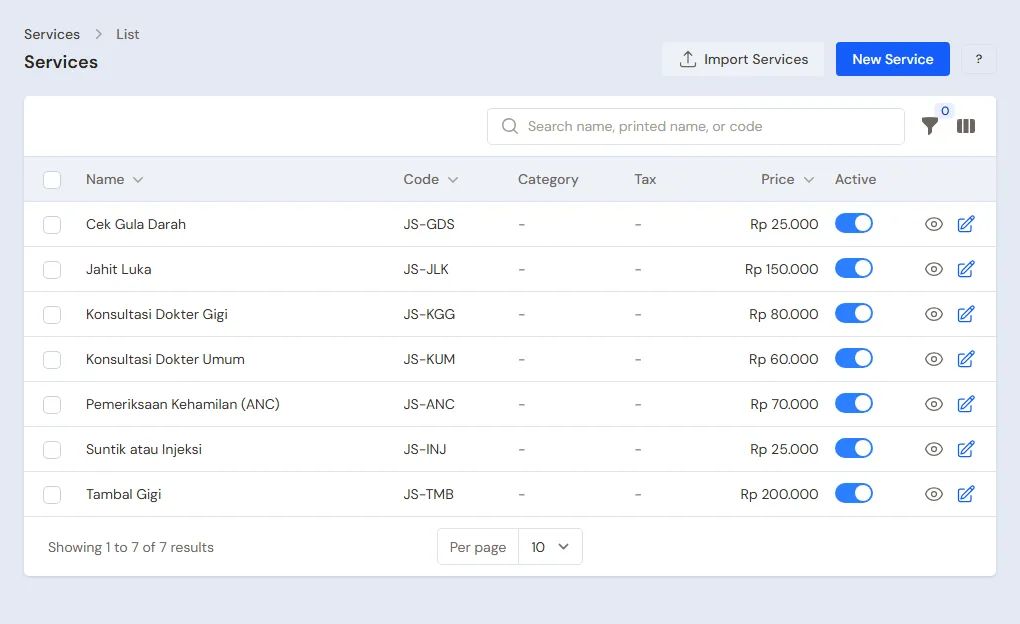
Owner: under Master Data → Service Staff, create dr. Andi Prasetyo, drg. Maya Anggraini and Midwife Ratna Dewi. Under Master Data → Services, create the consultations and procedures:
| Service | Price |
|---|---|
| General Practitioner Consultation | Rp 60.000 |
| Dental Consultation | Rp 80.000 |
| Pregnancy Check (ANC) | Rp 70.000 |
| Wound Stitching | Rp 150.000 |
| Injection | Rp 25.000 |
| Tooth Filling | Rp 200.000 |
| Blood Sugar Test | Rp 25.000 |
The doctor fee: under Master Data → Commission Rates, create a rate of 50% for all services and a rate of 40% for Pregnancy Check for Midwife Ratna. See Service commissions.
Doctor schedules
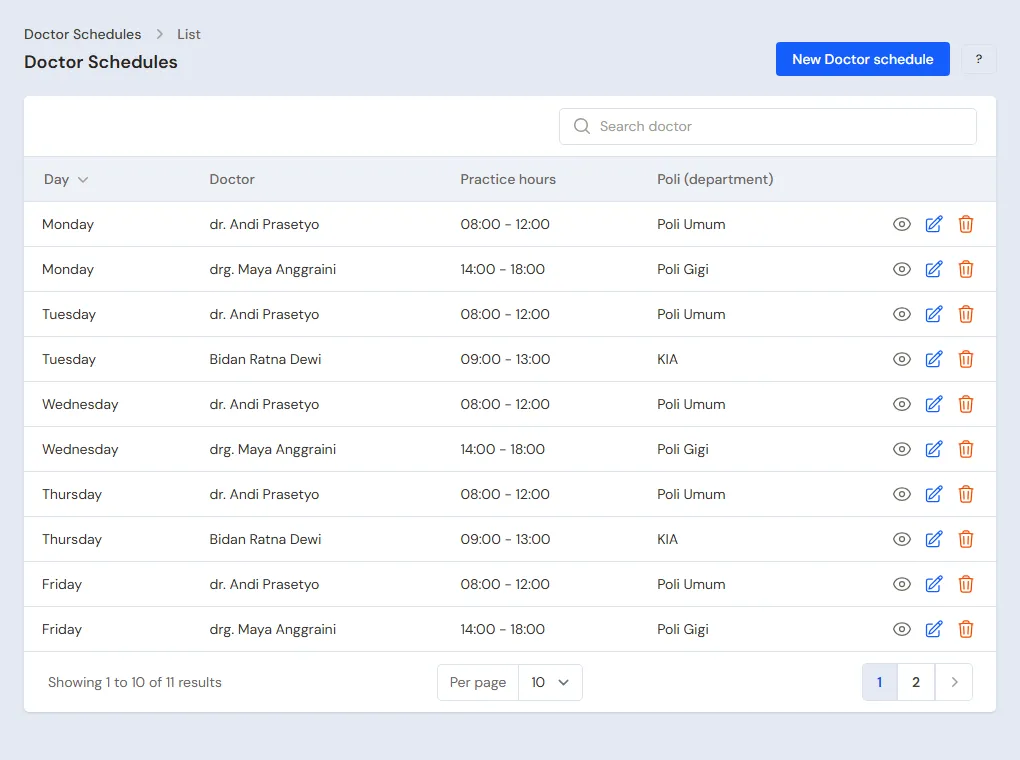
Head Cashier: under Master Data → Doctor Schedules, add dr. Andi Monday to Saturday 08:00-12:00 General, drg. Maya Monday, Wednesday and Friday 14:00-18:00 Dental, and Midwife Ratna Tuesday and Thursday 09:00-13:00 Mother and Child.
Medicines and consumables
Warehouse Admin: under Master Data → Products, create the medicines with their cost and selling price, for example:
| Item | Category | Cost | Selling price |
|---|---|---|---|
| Paracetamol 500 mg (strip) | Over-the-counter Drugs | Rp 3.000 | Rp 6.000 |
| Amoxicillin 500 mg (strip) | Prescription Drugs | Rp 9.000 | Rp 16.000 |
| Children's Cough Syrup 60 ml | Over-the-counter Drugs | Rp 9.000 | Rp 18.000 |
| Wound Suture Thread | Medical Consumables | Rp 12.000 | Rp 25.000 |
Switch on Prescription required for prescription drugs and Track batches & expiry for medicines. See Selling prescription medicine and compounds.
Insurers and companies
Head Cashier: under Master Data → Customers, create PT Asuransi Mitra Sehat with Payment terms (days) 30 and its credit limit. A patient covered by this insurer gets it under Payer when registered.
3. Starting capital and purchases
The Owner enters the capital under Transactions → Finance → Owner's Capital. The Warehouse Admin records the purchase of medicines from PBF Kimia Medika under Transactions → Purchases with the batch number and expiry of each medicine.
4. One day at the clinic
Morning: patients arrive
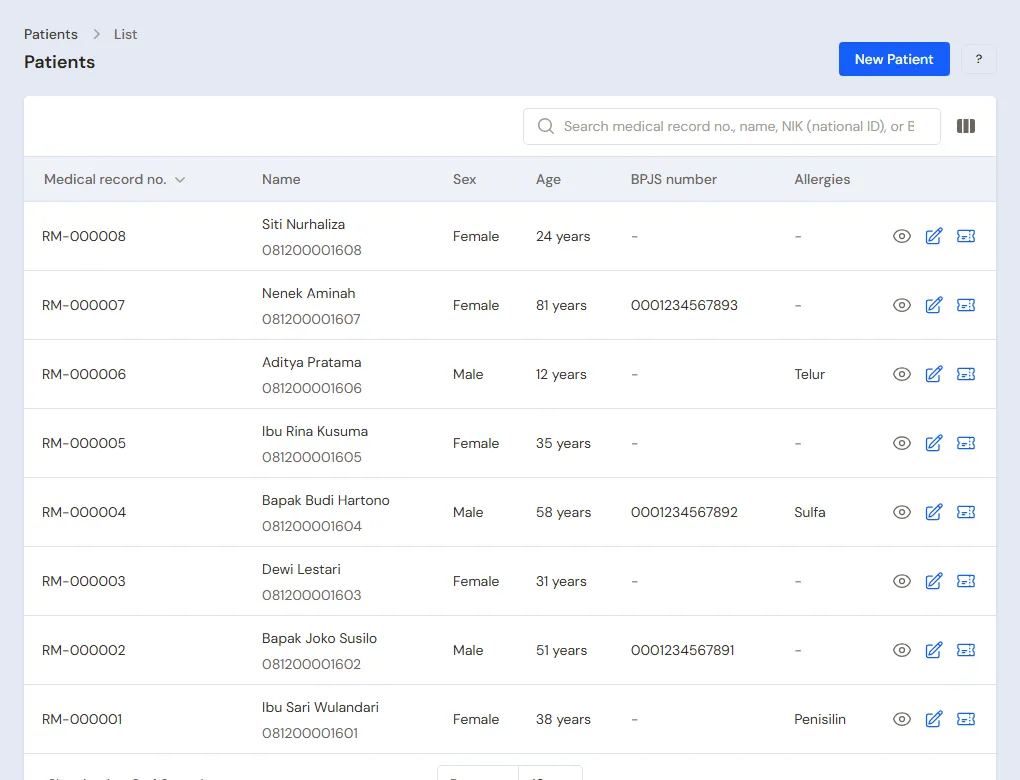
- The Cashier registers Ibu Sari under Master Data → Patients: date of birth 5 June 1988, NIK, blood type O, Allergies Penicillin. She gets RM-000001.
- Under Transactions → Visits, Register: patient Ibu Sari, Poli General, Doctor dr. Andi, Payer General, Complaint cough and cold for three days. Queue 1.
- Pak Joko registers after her and gets queue 2. Pak Budi uses BPJS, so his BPJS number is filled in on his record first.
The doctor examines
- dr. Andi taps Call on Ibu Sari's row, then opens the visit. The Penicillin allergy shows at the top of the page.
- Medical record: blood pressure 118/76, temperature 37.9, subjective cough and cold for three days, assessment upper respiratory infection, diagnosis J06.9.
- Procedures and medicines: General Practitioner Consultation 1, Paracetamol 500 mg 1 strip (3 x 1 tablet when feverish), Children's Cough Syrup 1 bottle. Sick leave 2 days.
- Save, then Finish & Bill. A draft note of Rp 60.000 + Rp 6.000 + Rp 18.000 = Rp 84.000 waits at the till. The sick letter is printed with the Sick letter button.
The till and the pharmacy
The Cashier opens the draft note, checks the medicines (the patient's allergy shows on the visit page), takes Rp 84.000 in cash and hands over the medicines. The batch stock goes down. The doctor fee of 50% of Rp 60.000 = Rp 30.000 is worked out for dr. Andi when the note is posted.
Insurance and BPJS
- Bu Dewi is covered by PT Asuransi Mitra Sehat. Her visit uses Payer Insurance. The Consultation Rp 60.000, Wound Stitching Rp 150.000, Injection Rp 25.000, thread Rp 25.000, syringe Rp 3.000 and Amoxicillin Rp 16.000 become a draft note of Rp 279.000 in the insurer's name. The cashier posts it without payment, so it is a 30-day receivable.
- Pak Budi is treated under BPJS. Finish & Bill records the consultation at Rp 0 and sends out Amlodipine 3 strips as free goods. The monthly BPJS capitation is recorded by the Owner under Transactions → Finance → Income.
SATUSEHAT (optional)
A clinic that has its credentials from the Ministry of Health fills them in under Settings → SATUSEHAT (the owner), presses Test connection, and fills in the patient's and the doctor's NIK. After that, in the Production environment, Finish & Bill also sends Ibu Sari's visit to SATUSEHAT (in Testing with the Send to SATUSEHAT button). If it fails, the reason is written on the visit page, and the Send to SATUSEHAT again button is there. The full explanation is in Clinic.
5. Reports per job
- Head Cashier: Reports → Service Staff Commissions for the doctor fee.
- Warehouse Admin: Reports → Stock and the batches close to expiry.
- Owner: Reports → Profit & Loss, Reports → Receivables for the insurer's bill, and the Activity History for who opened a medical record.
6. Checklist
- Every day: the Cashier registers the visit before the patient enters the examination room, Medical staff tap Finish & Bill after the examination, and the cashier settles the draft note.
- Every week: the Warehouse Admin checks medicines close to expiry and makes purchases.
- Every month: the Head Cashier pays the doctor fee from the commission report and bills the insurers. The Owner records the BPJS capitation.
A running business
This part is for a clinic moving its records from a ledger or patient cards to Vende: there are old patients, medicine stock on the shelf and insurer bills that are not paid yet. The order is always the same:
- Fill in the master data.
- Practise transactions until each part is familiar.
- Clear the practice transactions.
- Enter the opening balances on the start day.
- Start for real.
The opening balances come last on purpose, so practice does not disturb their figures. The example in this part uses Klinik Pratama Sehat Sentosa from the new business part.
1. Master data
Do Who does what, 1. Shop data and users and 2. Master data above. Old patients need not be entered at once: register them under Master Data → Patients when they next come for treatment, with a new medical record number. If the old card has a number of its own, write it in the customer's note.
Master data is not removed when the practice transactions are cleared.
2. Practice for the team
Do this in a practice shop of the Clinic type with all the accounts.
- Owner and Warehouse Admin: the doctors, procedures, medicines and the first purchase.
- Cashier: register two patients, one general and one BPJS, then register their visits.
- Check: the same patient cannot be registered twice in the same poli.
- Medical staff: call, fill in the medical record and Finish & Bill.
- Check: the Cashier does not see the vital signs and the diagnoses on the visit page.
- Cashier: post the draft note and take the payment.
- Owner: open the Activity History and see who opened the medical record.
3. Clear the practice transactions
Done by the Owner under Settings → Empty Transactions, button Empty All Transactions. Visits, notes, purchases, payments and opening balances are removed. Patients, doctors, services, medicines and customers stay.
4. Opening balances
Example: the clinic starts using Vende for real on Monday, 2 November. That morning there is Rp 1.000.000 in the drawer, Rp 6.000.000 in Bank BCA, and PT Asuransi Mitra Sehat still owes Rp 1.500.000 for three October visits.
Done by the Owner under Settings → Opening Balances, with As of that day. See Entering opening balances for cash, stock, receivables and payables.
- Opening Cash: Cashier Cash Rp 1.000.000 and Bank BCA Rp 6.000.000.
- Opening Stock: every medicine on the shelf with its batch number and expiry, for example Paracetamol 500 mg 80 strips.
- Opening Receivables: PT Asuransi Mitra Sehat Rp 1.500.000 with its real terms and due date.
5. Check before starting
| Report | What must show | Opened by |
|---|---|---|
| Reports → Cash Balance | Cashier Cash Rp 1.000.000 and Bank BCA Rp 6.000.000, the same as the money counted | Owner |
| Reports → Stock | The quantity of each medicine equals the shelf | Warehouse Admin |
| Reports → Receivables | PT Asuransi Mitra Sehat Rp 1.500.000 | Owner |
Figures differ? The Owner corrects the rows under Settings → Opening Balances before real transactions are recorded.
6. Start for real
From that day every patient is registered in Vende, and the paper cards are no longer written. Check in the first week: every examined patient has a Done visit under Transactions → Visits, and every visit note is posted at the till.