
Hotel guide
A hotel team's learning path, new or running: room types and season rates, guest charges, check-out, company billing, close day, opening balances.
On this page
This guide is for the team setting up Vende at a small to mid-size hotel: rooms of several types with rates that differ by season and weekend, bookings from online travel agents, a restaurant and minibar that charge to the guest's room, regular company accounts, and closing the day every night. It has two parts: A new business for a hotel just opening, with no guests staying, receivables or payables from before, and A running business for a hotel moving to Vende, with team practice and opening balances. The example is Hotel Melati. The business, guests, companies, people and every figure are made up.
The business in short:
- Rooms and types: each room is a service hired out by the day with one unit, and its type (Standard, Deluxe) sets the rate per night by season and day.
- Bookings: from the phone, walk-ins or online agents, with the booking source noted.
- Guest charges: the restaurant, bar, minibar and laundry charge to the room, paid at check-out with the room.
- Companies: guests of a regular company are billed to the company as a receivable, within its credit limit.
- Close day: each night the day is closed and its figures are kept.
Work from the top down. Each step names the menu, who does it, what changes afterwards, and example figures.
The features in this guide come with the Hotel business type package. The shop's features show in Settings → Subscription, under This shop's features. If a menu is missing, contact the Vende team.
Tip: Lost on a page? Press the ? button at the top of it. A short tour shows each field.
A new business
Who does what
This package holds five users, the owner included.
| Part of the business | Job title in Vende | What they do and open |
|---|---|---|
| Owner | Owner | Every menu, also room types, rates, taxes, purchases, expenses, opening balances and Reports → Profit & Loss |
| Hotel manager | Head Cashier | Transactions → Close Day, changing and cancelling bookings, Reports → Room Occupancy |
| Front desk | Cashier | The Room Board, bookings, check-in, guest charges, check-out and restaurant orders |
| Housekeeper | Housekeeping | Transactions → Rooms to clean, without prices or cash |
In the example shop Hotel Melati, Wulan works the front desk with the Cashier job title, and Hendra looks after purchases, stock and money with the Warehouse Admin job title.
Every role is explained in Roles and permissions.
1. Shop details and users
Done by the Owner: fill in Settings → Shop (name, address, WhatsApp, logo), then create the accounts in Settings → Users with the Job title from the table above. See Adding and managing users.
2. Master data
This business type already has the product categories Rooms, Restaurant Menu, Bar Drinks, Minibar, Laundry Services, Extra Services and Toiletries, the units Portion, Bottle, Glass and Set, and expense categories such as Laundry, Equipment Maintenance, Electricity and Online Travel Agent Commission.
Room types and rooms
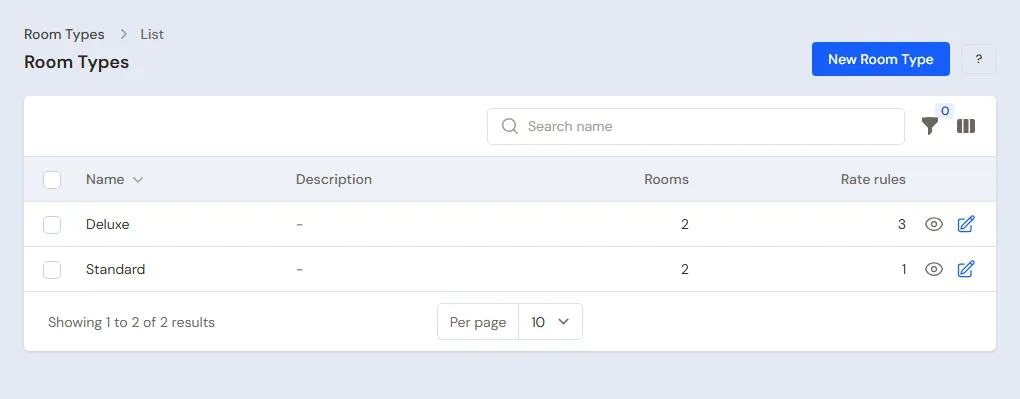
Owner: in Master Data → Room Types, create Standard and Deluxe and add the rate rules:
| Type | Rule | Rate per night |
|---|---|---|
| Deluxe | Weekends (Friday and Saturday) | Rp 600.000 |
| Deluxe | Christmas holidays, 20 to 31 December | Rp 800.000 |
| Deluxe | Christmas holidays on Friday and Saturday | Rp 1.000.000 |
| Standard | Weekends (Friday and Saturday) | Rp 400.000 |
Then in Master Data → Services, create each room, switch on Hired out by the day, set Number of units to 1, put the weekday rate in Selling Price and pick its Room type:
| Room | Type | Selling Price (weekdays) |
|---|---|---|
| Kamar 101 | Standard | Rp 300.000 |
| Kamar 102 | Standard | Rp 300.000 |
| Kamar 201 | Deluxe | Rp 450.000 |
| Kamar 202 | Deluxe | Rp 450.000 |
See Hotel: room types, guest bills and close day.
Outlet charges
Owner: in Master Data → Services, create Laundry per Kg Rp 10.000. In Master Data → Products, create restaurant dishes (Nasi Goreng Rp 35.000, category Restaurant Menu), bar drinks (Orange Juice Rp 30.000) and minibar items (Bottled Water 600 ml Rp 10.000). Table orders use Master Data → Tables.
Tax, service charge and companies
Owner: when the hotel charges PB1, the Vende team turns on the extra feature Taxes on the note. Create the 10% PB1 tax in Master Data → Taxes, set it on the rooms, dishes and minibar items, then switch on Collect tax on notes in Settings → Sales. Put 10% in Service Charge on the branch (Master Data → Branches). Cashier registers the regular companies in Master Data → Customers, for example PT Maju Jaya with a receivable limit of Rp 5.000.000.
3. A week at the front desk
Example Friday 13 to Wednesday 18 November at Hotel Melati:
| Guest | Room | Check-in and check-out | Source | Notes |
|---|---|---|---|---|
| Pak Dimas | Kamar 201 Deluxe | 13 - 15 Nov (2 nights) | Traveloka TV-889211 | Dinner charged to the room |
| Bu Lestari | Kamar 101 Standard | 14 - 16 Nov (2 nights) | Direct | Laundry 3 kg |
| Pak Anto | Kamar 102 Standard | 16 - 18 Nov (2 nights) | Booking.com | Billed to PT Maju Jaya |
Book the rooms
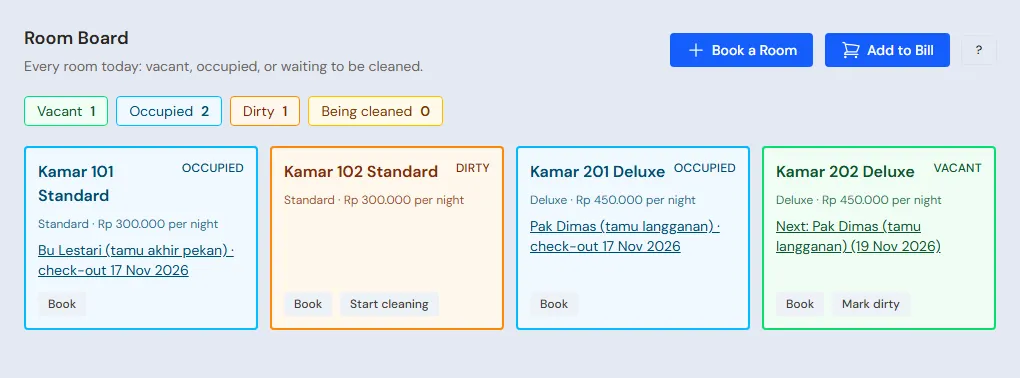
Cashier on Transactions → Room Board, Book a Room: fill in the guest, room, dates, Booking source and Agent booking code. Under check-out Vende writes the rate: Pak Dimas 2 Deluxe nights on Friday and Saturday Rp 600.000 + Rp 600.000 = Rp 1.200.000. For Pak Anto fill in Bill to a company or agent with PT Maju Jaya: no deposit is asked and no down payment is taken.
Check-in and guest charges
Cashier presses Check-in on the booking's page. Until check-out the guest can add charges: Add to Bill with From Laundry for Bu Lestari (Laundry per Kg × 3 = Rp 30.000), and minibar for Pak Dimas (Bottled Water × 2 = Rp 20.000). The guest is found by name or room number, and several charges at once are written as rows saved together. When a guest checks out, the staff with the Housekeeping job title get a bell notification and clean through Transactions → Rooms to clean.
Pak Dimas has dinner at the restaurant: Cashier presses Charge Restaurant Order to Room on his booking's page, picks the running table order, and that order (2 Nasi Goreng = Rp 70.000) moves to the room bill. The table is free again.
When the hotel uses Ordering from the table, a guest can also order from their room: at check-in Vende makes a secret QR for the stay. Cashier presses Food Ordering QR on the booking's page to print the slip or send the link by WhatsApp. Bu Lestari scans the QR on her phone, picks 1 Nasi Goreng and sends it; the order shows on the Café Board as "Bu Lestari (Kamar 101 Standard)". Once Cashier presses Accept, the order becomes a Restaurant charge on her room bill (Rp 35.000) and its kitchen ticket prints. The QR stops working at check-out.
Check-out
Cashier presses Check-out. The window shows the room, charges, service charge and PB1, the same as the note. Pak Dimas: room Rp 1.200.000 + charges Rp 90.000 = Rp 1.290.000, service charge 10% Rp 129.000, PB1 10% of Rp 1.419.000 = Rp 141.900, total Rp 1.560.900. Pak Anto: the note is written to PT Maju Jaya and becomes its receivable, with no payment from the guest.
Close day
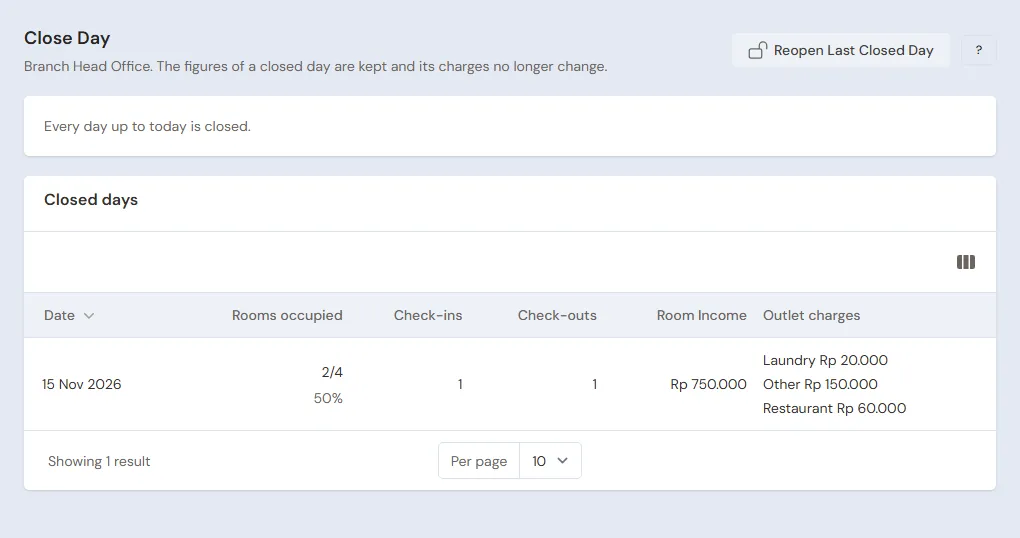
Head Cashier opens Transactions → Close Day every night. If a booking should have arrived and is not checked in, Vende names it: check the guest in or cancel it, then press Close Day. The day's figures are kept: rooms occupied, check-ins and check-outs, room income and each outlet's charges.
4. Reports per job title
| Report | What it shows | Opened by | When |
|---|---|---|---|
| Transactions → Room Board | Rooms vacant, occupied, dirty and being cleaned, with tonight's rate | Cashier | Every day |
| Transactions → Rooms to clean | Rooms that are dirty or being cleaned | Housekeeping | Every day |
| Transactions → Close Day | The figures of each closed day | Head Cashier | Every night |
| Reports → Room Occupancy | Nights sold and income of each room | Head Cashier | Every month |
| Reports → Receivables | Company bills not yet paid | Owner | Every week |
| Reports → Profit & Loss | Rental revenue, restaurant, minibar, service charge and expenses | Owner | Every month |
5. Checklist
- Every day: Cashier checks the Room Board, checks guests in and out, and makes sure restaurant bills move to the room before the guest leaves.
- Every night: Head Cashier closes the day.
- Every month: Owner collects the company receivables and reads Profit & Loss.
A running business
This part is for the team moving a hotel that already runs to Vende: guests are staying, bookings with a down payment wait for dates to come, and company bills are unpaid. The order is always the same:
- Fill in the master data.
- Practise transactions until each part is familiar.
- Clear the practice transactions.
- Enter the opening balances on the first day.
- Start for real.
Opening balances are entered last on purpose, so practice does not upset their figures. The example in this part uses Hotel Melati from the new business part.
1. Master data
Do Who does what, 1. Shop details and users and 2. Master data above. Also register every guest now staying, the regular companies, and guests who have paid a down payment.
2. Team practice
Do it in a practice shop of the Hotel type with the three accounts.
- Owner: the room types with their rates, the four rooms, the outlet charges, the tax and the companies.
- Check: a Friday to Sunday stay in a Deluxe room is priced at the weekend rate.
- Cashier: the three bookings as in part 3, from booking to check-out, including the restaurant order charged to the room.
- Check: PT Maju Jaya's note becomes a receivable, and a note past its credit limit is refused with the limit.
- Head Cashier: Close Day until it works, including one refusal because of a booking not yet checked in.
3. Clear the practice transactions
Done by the Owner in Settings → Empty Transactions, button Empty All Transactions. Stay bookings, notes, purchases, payments, expenses, capital, opening balances and closed days are deleted. Room types, rooms, outlet charges, guests, companies, cash accounts, users and settings stay. Vende makes a full backup first. See Clearing transactions or all data.
4. Opening balances
Done by the Owner in Settings → Opening Balances, with As of the first day. See Entering opening balances for cash, stock, receivables and payables.
- Opening Cash and Opening Stock: money in the drawer and bank, and drinks, minibar items and restaurant ingredients.
- Opening Receivables: unpaid company bills, per company.
- Guests staying and bookings: recorded with Book a Room at their real check-in dates, then Check-in with the money already paid to the account where it is kept, and that account's Opening Cash is lowered by that money. The first Close Day closes the first day.
5. Check before starting
| Report | What should show | Opened by |
|---|---|---|
| Reports → Cash Balance | Money in the drawer and bank equals the money counted | Owner |
| Reports → Receivables | Each company with its bill | Owner |
| Transactions → Room Board | Occupied rooms with their guests | Cashier |
6. Start for real
From that day every booking, check-in, guest charge, check-out and day close is recorded in Vende as in the new business part, with the same checklist.