
Clinical laboratory guide
The learning order for a laboratory team, new or running: parameters, tests, patients, samples, results, validation, company check-ups, opening balances.
On this page
- A new business
- Who does what
- 1. Shop data and users
- 2. Master data
- 3. Reagent purchases
- 4. One day at the laboratory
- 5. Reports per job
- 6. Checklist
- A running business
- 1. Master data
- 2. Practice for the team
- 3. Clear the practice transactions
- 4. Opening balances
- 5. Check before starting
- 6. Start for real
This guide is for the team setting Vende up in a clinical laboratory: tests with reference ranges per sex and age, packages such as check-up and pre-marital, registration with a doctor referral or a company check-up, sample collection at the laboratory or at the patient's home, flagged results, validation by a doctor and the letterhead result sheet. It has two parts: A new business for a laboratory that is just opening, and A running business for a laboratory moving to Vende, with practice for the team and opening balances. The example is Laboratorium Klinik Cahaya Medika. The laboratory, patients, companies, people and every figure are made up.
The business in short:
- Tests: complete blood count, glucose, cholesterol, liver and kidney function, urinalysis, HBsAg, blood group, and the Routine Check, Basic MCU and Pre-marital packages.
- One patient's flow: register and pay at the till, take the sample, the analyst enters the results, the responsible doctor validates, the result is printed or sent by WhatsApp.
- Where patients come from: walk-in, a doctor's referral (the referring doctor earns a fee) or a company check-up billed monthly.
- Home service: the sample is taken at the patient's home in the morning.
- Reagents and equipment: reagents per batch with expiry, and equipment calibration with reminders.
Work through it in order. This guide uses the patients and visits of the Clinic feature, see Clinic, and the results are covered in full in Laboratory. The shop's features show under Settings → Subscription, section This shop's features. If a menu is missing, contact the Vende team.
Tip: Lost on a page? Press the ? button at the top of that page. A short tour points at every field.
A new business
Who does what
This package has five users, the owner included.
| Part of the business | Job title in Vende | What they do and open |
|---|---|---|
| Owner | Owner | Every menu, the lab results too, rates, purchases, expenses, opening balances and Reports → Profit & Loss |
| Registration and till | Cashier | Registers patients and tests, marks samples taken, takes the payment of notes, does not open results |
| Analyst and doctor | Medical staff | Enters results, validates (the responsible doctor), prints results, notes calibrations |
| Reagent store | Warehouse Admin | Purchases of reagents and consumables, stock and expiry |
Each role is explained in Roles and permissions.
1. Shop data and users
Done by the Owner: fill in Settings → Shop (name, address, WhatsApp, the logo for the result letterhead), then create accounts under Settings → Users. Example people at Laboratorium Klinik Cahaya Medika: dr. Rina Anggraini, Sp.PK (responsible doctor, Medical staff), Dewi (analyst, Medical staff), Wulan (registration, Cashier) and Agus (Warehouse Admin).
2. Master data
This business type already has the categories Haematology, Clinical Chemistry, Immunology and Serology, Urine and Stool, Check-up Packages, and Reagents and Consumables, and the expense categories Equipment Calibration, Quality Control and Proficiency Testing, and Medical Waste Disposal.
Doctors
Owner: under Master Data → Service Staff, create dr. Rina Anggraini, Sp.PK (who signs the results) and the doctors who often refer, for example dr. Hendra Gunawan and dr. Lestari Handayani. Referral fee: under Master Data → Commission Rates, create a rate of 10% for dr. Hendra and dr. Lestari. The responsible doctor gets no rate.
Parameters and reference ranges
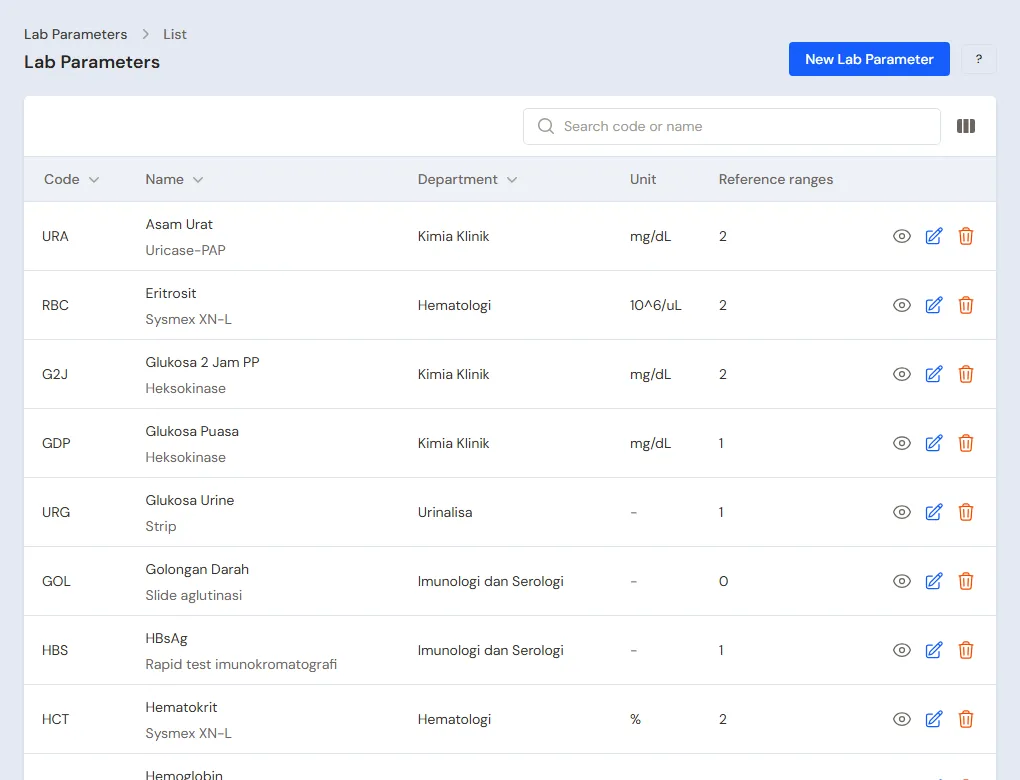
Owner: under Master Data → Lab Parameters, create the parameters, for example Haemoglobin (g/dL, Haematology): women 12.0 to 15.5, men 13.5 to 17.5. Others: Fasting Glucose 70 to 100 mg/dL, Total Cholesterol below 200 mg/dL, Urine Protein with the choices Negative and Positive 1+ to 3+ and the normal value Negative.
Services and tests
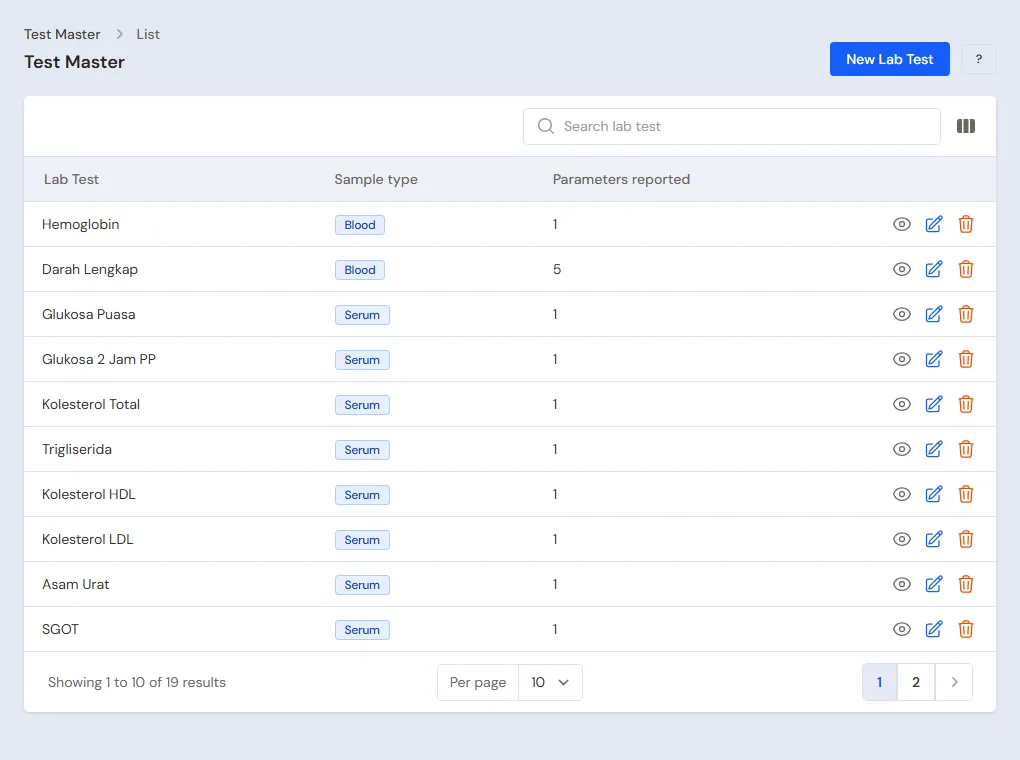
Owner: under Master Data → Services, create the services, then under Master Data → Test Master link each service to its parameters and sample type:
| Test | Sample | Price |
|---|---|---|
| Complete Blood Count (HGB, WBC, PLT, HCT, RBC) | Blood | Rp 85.000 |
| Fasting Glucose (fasting required) | Serum | Rp 30.000 |
| Total Cholesterol | Serum | Rp 40.000 |
| Routine Urinalysis | Urine | Rp 50.000 |
| Routine Check package (Blood Count, Fasting Glucose, Cholesterol, Uric Acid) | Blood | Rp 180.000 |
| Basic MCU package (nine tests) | Blood | Rp 420.000 |
| Pre-marital package | Blood | Rp 320.000 |
A package holds other tests and is billed at its own service price.
Reagents and consumables
Warehouse Admin: under Master Data → Products, create the reagents and consumables with Use batch & expiry on, for example Glucose Reagent 100 ml, EDTA Tube, Serum Tube and Urinalysis Strips. On each test, fill in Reagents per test, for example Fasting Glucose uses 1 Serum Tube and 0.005 bottle of Glucose Reagent.
Regular companies
Owner: under Master Data → Customers, create PT Maju Bersama Logistik with Payment terms (days) 30 and its credit limit.
3. Reagent purchases
The Owner records the purchase from PT Mitra Diagnostik Nusantara under Transactions → Purchases, with the batch number and expiry of each reagent.
4. One day at the laboratory
Morning: patients arrive
- The Cashier registers Ibu Sari under Master Data → Patients if she is not there yet.
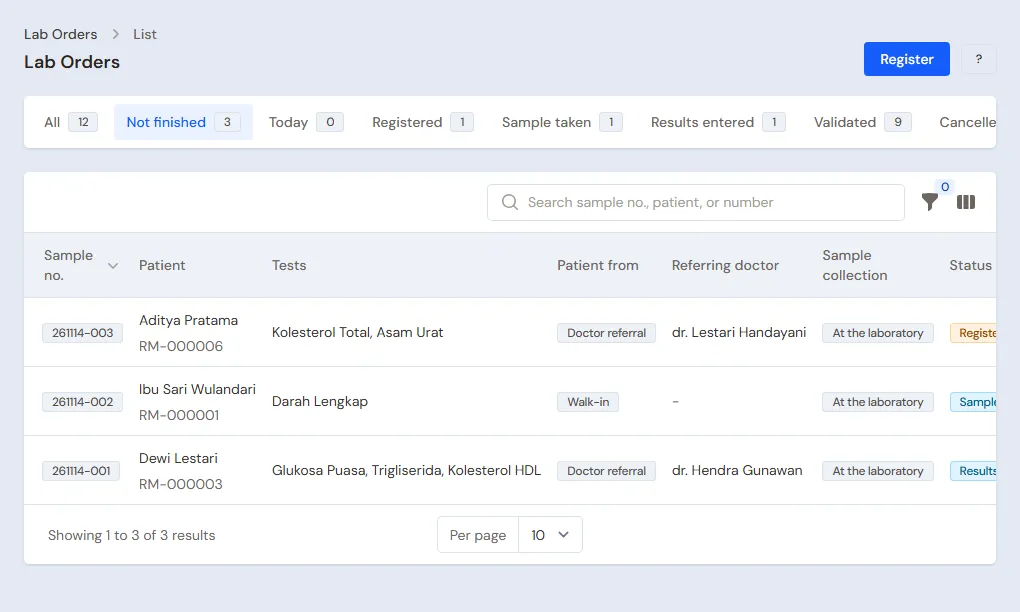
- Under Transactions → Lab Orders, Register: patient Ibu Sari, tests Fasting Glucose and Total Cholesterol, Walk-in, payer General. Sample number 261112-001 appears and a draft note of Rp 70.000 waits at the till. Ibu Sari pays cash.
- Pak Joko is referred by dr. Hendra for the Routine Check package: Patient from Doctor referral, referring doctor dr. Hendra. Dr. Hendra's 10% fee is worked out when the note is posted.
Sample and results
- The Medical staff member (analyst) presses Sample taken on Ibu Sari's row.
- Once the analyzer is done, the analyst presses Enter results: Fasting Glucose 118, Total Cholesterol 232. Both are flagged H because they are above the reference range.
- Every parameter is filled, so the status becomes Results entered.
Validation and the result
dr. Rina opens the order, checks the results, presses Validate and picks her name. The glucose and cholesterol reagents leave the stock of the batch closest to expiry. Print result PDF produces the letterhead sheet, and Send WhatsApp opens WhatsApp with a message for Ibu Sari.
Company check-up and home service
- Employees of PT Maju Bersama Logistik come for the Basic MCU package. At registration pick Company check-up and the company (the payer becomes Insurance by itself). Each employee becomes one draft note of Rp 420.000 in the company's name. The Cashier posts it without payment, so it becomes a 30-day receivable. At month end the company's Reports → Receivable Card is its monthly bill.
- Nenek Aminah gets Home service: fill in the visit address, and the staff member presses Sample taken after taking the sample at her home.
5. Reports per job
- Head Cashier or Owner: Reports → Service Staff Commissions for the referring doctor fee, and Reports → Receivables for the company bill.
- Warehouse Admin: Reports → Stock and the reagent batches close to expiry.
- Owner: Reports → Profit & Loss and the Activity History for who opened results.
6. Checklist
- Every day: the Cashier registers tests before the sample is taken, the analyst enters results, the doctor validates before results are released.
- Every week: the Warehouse Admin checks reagents close to expiry and makes purchases. Check Equipment Calibrations for what is due.
- Every month: the Head Cashier bills companies from the Receivable Card and pays the referring doctors from the commission report.
A running business
This part is for a laboratory moving its records from a program or books to Vende: there are regular patients and companies, reagents in the cabinet and company bills not yet paid. The order is always the same:
- Fill in the master data.
- Practise transactions until each part is comfortable.
- Clear the practice transactions.
- Enter the opening balances on the start day.
- Start for real.
The example in this part uses Laboratorium Klinik Cahaya Medika from the new business part.
1. Master data
Do Who does what, 1. Shop data and users and 2. Master data above. Old results are not entered into Vende: the earlier result archive stays where it is, and old patients are registered under Master Data → Patients when they next come. Master data is not removed when the practice transactions are cleared.
2. Practice for the team
Do this in a practice shop of the Clinical Laboratory type with every account.
- Owner: parameters with reference ranges, tests, packages and reagents.
- Cashier: register two patients, one walk-in and one doctor referral, then one company check-up.
- Check: the Cashier does not see the results on the order page.
- Medical staff: mark the sample taken, enter results with one value outside the range, then validate.
- Check: the value outside the range is flagged, and the results cannot be changed after validation.
- Cashier: post the draft notes and take payment.
- Owner: open Activity History and see who opened the results.
3. Clear the practice transactions
Done by the Owner under Settings → Empty Transactions, button Empty All Transactions. Lab orders, notes, purchases, payments and opening balances are removed. Parameters, tests, packages, reagents, patients and customers stay.
4. Opening balances
Example: the laboratory starts using Vende for real on Monday, 2 November. That morning there is Rp 1.000.000 in the drawer, Rp 8.000.000 at Bank BCA, and PT Maju Bersama Logistik still owes Rp 12.600.000 for 30 employees' check-ups in October.
Done by the Owner under Settings → Opening Balances, with As of that day. See Entering opening balances for cash, stock, receivables and payables.
- Opening Cash: Cashier Cash Rp 1.000.000 and Bank BCA Rp 8.000.000.
- Opening Stock: the reagents in the cabinet with their batch numbers and expiry, for example Glucose Reagent 100 ml 4 bottles.
- Opening Receivables: PT Maju Bersama Logistik Rp 12.600.000 with its real terms and billing date.
5. Check before starting
| Report | What should show | Opened by |
|---|---|---|
| Reports → Cash Balance | Cashier Cash Rp 1.000.000 and Bank BCA Rp 8.000.000 | Owner |
| Reports → Stock | The quantity of each reagent equals the cabinet | Warehouse Admin |
| Reports → Receivables | PT Maju Bersama Logistik Rp 12.600.000 | Owner |
Figures differ? The Owner corrects the rows under Settings → Opening Balances before real transactions are recorded.
6. Start for real
From that day every patient is registered in Vende. Check in the first week: every lab order has a sample number, every released result is Validated, and every lab note is posted at the till.