
Laundry guide
A learning path for a laundry, new or running: job titles, laundry orders by weight and piece, detergent per kg, boarding house prices, opening balances.
On this page
- A new business
- Who does what
- 1. Shop details and users
- 2. Master data
- 3. First capital and buying
- 4. One working day
- 5. Receivables and expenses
- 6. Reports per job title
- 7. Checklists
- A running business
- 1. Master data
- 2. Team practice
- 3. Empty the practice transactions
- 4. Opening balances
- 5. Check before going live
- 6. Going live
This guide is for the team setting up Vende at a laundry that washes by weight and by piece, takes in laundry at the front desk, uses detergent from its stock, and serves boarding houses and hotels at their own price. It has two parts: A new business for a laundry just opening, with no stock, receivables or payables from before, and A running business for a laundry moving to Vende, with team practice and opening balances. The example is Laundry Wangi Bersih. The names of the laundry, customers, suppliers and people and all the figures are made up.
What the business looks like:
- Laundry by weight: weighed, regular in two days or express in six hours, and every kilogram uses detergent from the stock.
- Laundry by piece: bed covers by the piece and shoes by the pair.
- Stages: received, washing, ironing, ready for pickup, then picked up.
- Customers: people who collect points, and boarding houses with their own price who pay monthly.
Work through it from the top. Every step names its menu, who does it, what changes afterwards, and an example with figures.
The features in this guide come with the Laundry business type package, except those marked extra. The shop's features show under Settings → Subscription, section This shop's features. If a menu is missing, contact the Vende team.
Tip: Lost on a page? Press the ? button at the top of that page. A short tour shows every field, on the Laundry Board too.
A new business
Who does what
This package holds three users, the owner included.
| Part of the laundry | Job title in Vende | What they do and open |
|---|---|---|
| Owner | Owner | Every menu, also services, detergent, purchases, stock, payments, expenses, opening balances, and Reports → Profit & Loss |
| Front desk | Head Cashier | Customers and boarding house prices, laundry orders, the Laundry Board, billing at the till, point adjustments |
| Washing and ironing | Cashier | Laundry orders, the Laundry Board, billing at the till when the front desk is empty |
The washer takes the job title Cashier, not Technician. A Technician only sees the work orders whose service staff is linked to his account, and a laundry order has no mechanic, so a Technician's Laundry Board is always empty. Every role is explained in Roles and permissions.
1. Shop details and users
Done by the Owner: fill in Settings → Shop (name, address, WhatsApp, logo), then create the accounts in Settings → Users with the Job title of the table above. See Adding and managing users.
The people at Laundry Wangi Bersih: Bu Yanti (owner), Mbak Ani (front desk, Head Cashier) and Mas Udin (washing and ironing, Cashier).
2. Master data
A laundry of this business type already has the product categories Laundry by Weight, Laundry by Piece and Laundry Supplies, the units Pair, Set and Bottle besides Kilogram and Litre, and the expense categories Machine Maintenance and LPG Gas.
Detergent
Owner: in Master Data → Products, create Deterjen Cair (liquid detergent) in the category Laundry Supplies, Base Unit Litre, first cost price Rp 20.000, Selling Price Rp 0 since it is not sold. See Adding a product.
Services
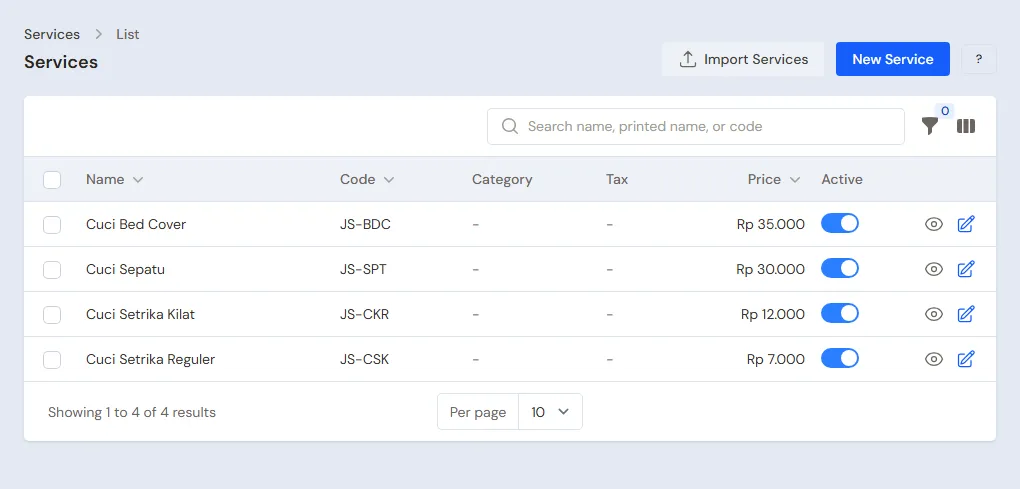
Owner: in Master Data → Services, create every service:
| Service | Category | Unit | Price | Time taken | Materials used |
|---|---|---|---|---|---|
| Cuci Setrika Reguler (wash and iron, regular) | Laundry by Weight | Kilogram | Rp 7.000 | 2880 (2 days) | Deterjen Cair 0,05 litre |
| Cuci Setrika Kilat (wash and iron, express) | Laundry by Weight | Kilogram | Rp 12.000 | 360 (6 hours) | Deterjen Cair 0,05 litre |
| Cuci Bed Cover | Laundry by Piece | Pieces | Rp 35.000 | 2880 (2 days) | None |
| Cuci Sepatu (shoes) | Laundry by Piece | Pair | Rp 30.000 | 2880 (2 days) | None |
The material's Quantity per service counts per kilogram, so 4 kg of laundry use 4 × 0,05 = 0,2 litre. The detergent's cost becomes the service's cost, so the laundry's profit in the reports already has the detergent taken off. See Laundry: washing by weight and by piece.
Boarding houses and hotels
Head Cashier:
- In Master Data → Customer Groups, create the group Kos dan Hotel (boarding houses and hotels), with Spend per Point 0 so this group earns no points. See Setting up customer groups.
- In Master Data → Special Prices, create a rule for the Customer Group Kos dan Hotel, Applies to One product Cuci Setrika Reguler with the Unit Kilogram, Fixed price Rp 6.000. See Special Prices for customers and groups.
- In Master Data → Customers, register Bu Marni and Pak Hadi with their WhatsApp numbers, and Kos Melati in the group Kos dan Hotel with 30 days' credit.
Points and suppliers
- Owner: in Settings → Points, switch on Enable customer points, enter Spending per point 10.000 and Value of 1 point 100. See Giving and redeeming customer points.
- Owner: in Master Data → Suppliers, register Toko Sabun Bersih Jaya.
3. First capital and buying
- The Owner records Rp 5.000.000 of capital into Bank BCA in Transactions → Finance → Owner's Capital.
- The Owner records the note of Toko Sabun Bersih Jaya in Transactions → Purchases, paid in full from Bank BCA: 20 litres of Deterjen Cair × Rp 20.000 = Rp 400.000.
See Recording a purchase note.
4. One working day
An example day at Laundry Wangi Bersih:
| Customer | Laundry | Total | Paid now | At pickup |
|---|---|---|---|---|
| Bu Marni | Cuci Setrika Reguler 4 kg | Rp 28.000 | Rp 28.000 cash | Paid in full |
| Kos Melati | Cuci Setrika Reguler 10 kg × Rp 6.000 | Rp 60.000 | None | Receivable, paid at the end of the month |
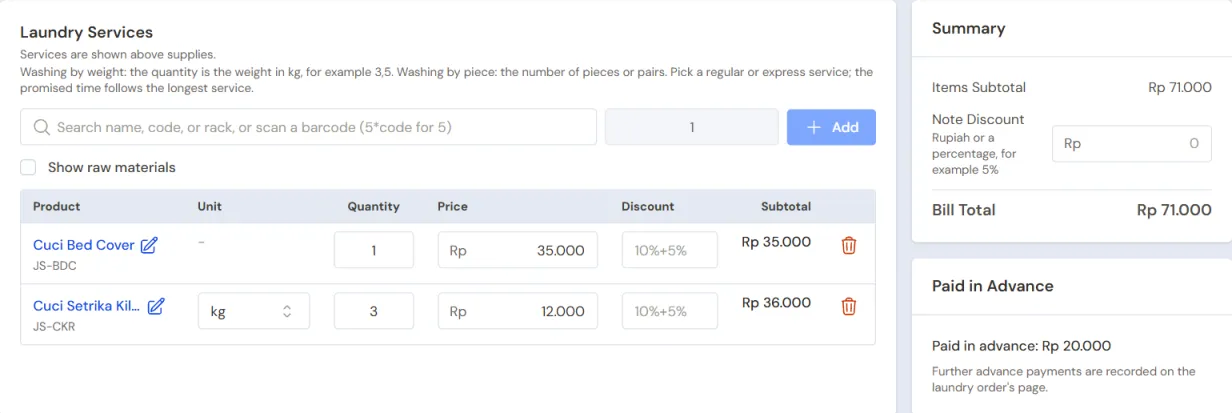
| Pak Hadi | Cuci Bed Cover 1 and Cuci Setrika Kilat 3 kg | Rp 35.000 + Rp 36.000 = Rp 71.000 | Rp 20.000 cash | Rp 51.000 cash |
Taking in laundry
The Head Cashier (Mbak Ani) in Transactions → Laundry Board, button New laundry order, for every customer:
- Choose the Customer, then fill in the Laundry Details if needed, for example 3 shirts, 2 trousers.
- Add the services. For laundry by weight, the quantity is the weight from the scales. Kos Melati's price comes in at Rp 6.000 from the Special Price.
- Promised Ready is filled in from the longest service.
- Fill in Paid now when the customer pays in advance, then pick the Cash account and the Payment method.
- Press Save, then Print Laundry Slip for the slip and its bag label.
See Laundry: washing by weight and by piece.
Wash, iron, tell the customer
The Cashier (Mas Udin) in Transactions → Laundry Board: tap the laundry's card and move its stage, from Received to Washing, Ironing, then Ready for pickup. When it is ready, press Tell the customer on WhatsApp on its card. A card turns red once the promised time has passed.
Laundry picked up
- Head Cashier: tap its card, then press Bill at the till. The draft note opens with what was paid in advance taken off. Pak Hadi pays Rp 51.000 in cash. Kos Melati's note is saved without a payment, so it becomes a receivable due in 30 days.
- Head Cashier: back on the Laundry Board, tap its card, then choose Picked up.
The detergent leaves the stock when the note is saved: (4 + 10 + 3) kg × 0,05 = 0,85 litre. Bu Marni earns 2 points and Pak Hadi 7 points. Kos Melati earns none.
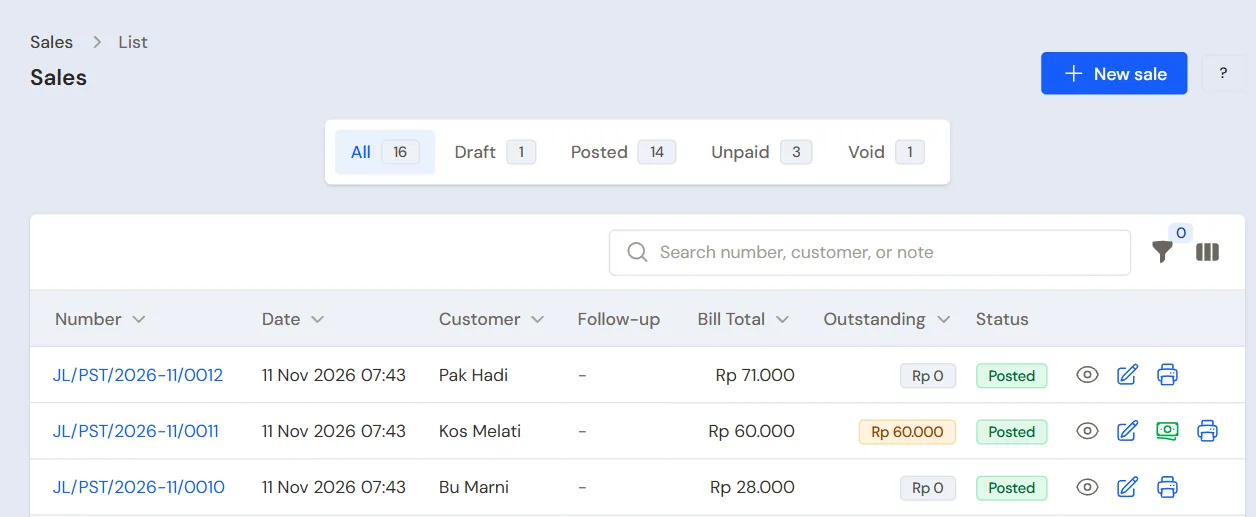
Laundry Ready for pickup for 3 days or more and not picked up gets the Not picked up mark. The Head Cashier sees their list in Transactions → Laundry Orders, quick filter Left uncollected.
5. Receivables and expenses
- The Owner records Kos Melati's payment at the end of the month in Transaction Details → Sale Payments: Rp 60.000 into Bank BCA. See Recording payment of an unpaid note.
- The Owner records the dryer gas in the category LPG Gas, the machine servicing in the category Machine Maintenance, and the rent and electricity, in Transactions → Finance → Expenses. See Recording shop expenses.
6. Reports per job title
| Report | What it shows | Opened by | When |
|---|---|---|---|
| Transactions → Laundry Board | The laundry not picked up yet by stage | Cashier | Every day |
| Transactions → Laundry Orders | Every laundry order, also those left uncollected | Head Cashier | Every day |
| Reports → Stock | The detergent left | Owner | Every week |
| Reports → Receivables | What boarding houses and hotels owe, with due dates | Owner | Every week |
| Reports → Profit & Loss | Laundry income, the detergent's cost, points and expenses | Owner | Every month |
7. Checklists
- Every day: the Head Cashier makes a laundry order for every load that comes in and bills it at pickup. The Cashier keeps the stage on the Laundry Board up to date and tells the customers.
- Every week: the Head Cashier calls the customers whose laundry is left uncollected. The Owner reads Receivables.
- Every month: the Owner measures the detergent left with a stocktake and reads Profit & Loss.
A running business
This part is for the team moving a laundry already running to Vende: there is already detergent in the store room, customers' laundry not picked up yet, boarding houses owing money, and customers' points. The order is always the same:
- Fill in the master data.
- Practise transactions until everyone is used to them.
- Empty the practice transactions.
- Fill in the opening balances on the first day.
- Go live.
The opening balances come last on purpose, so the practice does not upset their figures. The examples in this part use Laundry Wangi Bersih from the new business part.
1. Master data
Do Who does what, 1. Shop details and users and 2. Master data above. Also register every customer whose laundry is still at the laundry, who still owes money or who holds points.
Master data is not deleted when the practice transactions are emptied.
2. Team practice
Work in a practice shop of the type Laundry with all three accounts. Every step names who and what must show.
Practice 1: master data
- Owner: shop details, both users, the detergent, the four services with their materials, the points settings and the supplier.
- Check: Mas Udin sees Laundry Orders, the Laundry Board and Sales, but not Profit & Loss.
- Head Cashier: the group Kos dan Hotel with its Special Price, and the three customers.
Practice 2: one working day
- Owner: Rp 5.000.000 of capital and the purchase note as in part 3.
- Head Cashier: the three laundry orders as in part 4.
- Check: Kos Melati's order is Rp 60.000.
- Cashier: move all three loads up to Ready for pickup.
- Head Cashier: bill all three at the till, then mark them Picked up.
- Check: the Laundry Board is empty again.
After Practice 2 this must show:
| Report | What must show | Opened by |
|---|---|---|
| Reports → Cash Balance | Bank BCA Rp 5.000.000 − Rp 400.000 = Rp 4.600.000; Cashier Cash Rp 28.000 + Rp 20.000 + Rp 51.000 = Rp 99.000 | Owner |
| Reports → Receivables | Kos Melati Rp 60.000 | Owner |
| Reports → Stock | Deterjen Cair 20 − 0,85 = 19,15 litres | Owner |
| Reports → Profit & Loss | Income Rp 28.000 + Rp 60.000 + Rp 71.000 = Rp 159.000, the detergent's cost 17 kg × 0,05 × Rp 20.000 = Rp 17.000, Points Expense (2 + 7) × Rp 100 = Rp 900 | Owner |
Practice 3: opening balances
Fill in the opening balances with the example of part 4 below, check them as in part 5, then empty again.
3. Empty the practice transactions
Done by the Owner in Settings → Empty Transactions, button Empty All Transactions. Laundry orders with their payments in advance, notes, points, purchases, payments, expenses, capital and opening balances are deleted. The detergent, the services with their materials, customer groups, Special Prices, customers, suppliers, cash accounts, users and settings stay. Vende makes a full backup first. See Emptying transactions or all data.
4. Opening balances
Example: Laundry Wangi Bersih starts using Vende for real on Monday, 2 November. That morning Bu Marni's 5 kg, already paid in full at Rp 35.000, and Kos Melati's 8 kg, not paid yet, are still at the laundry.
Stock, receivables
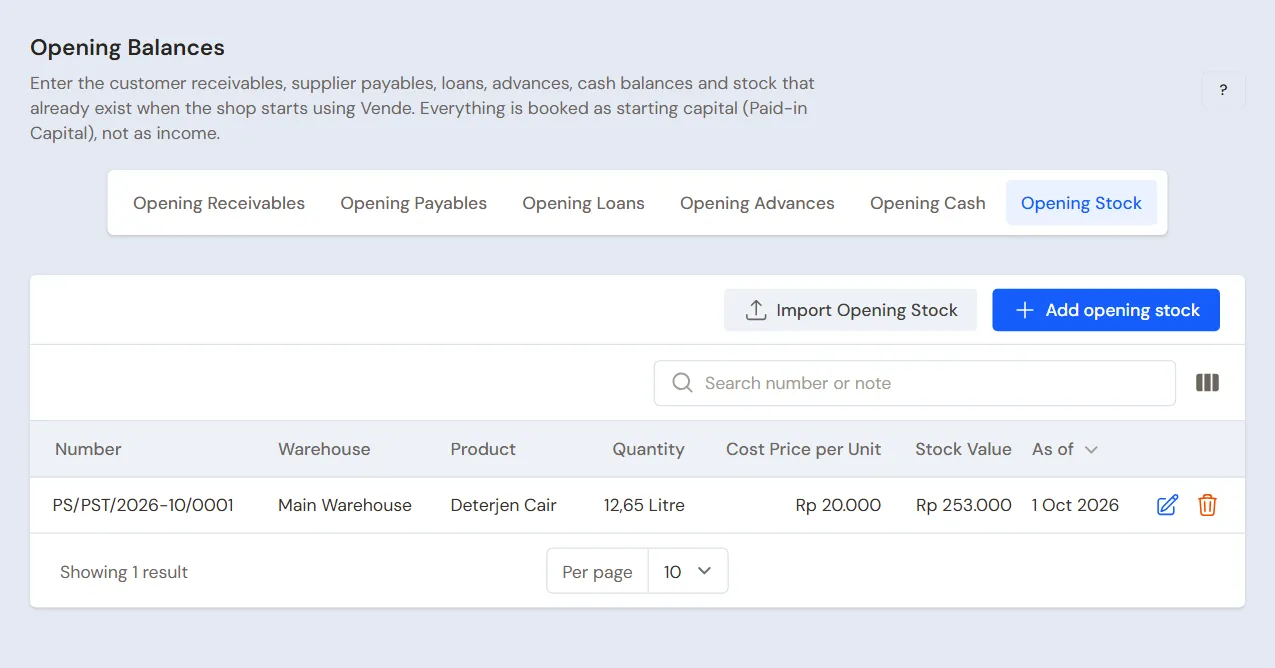
Done by the Owner in Settings → Opening Balances, with As of that day. See Entering opening cash, stock, receivables and payables.
- Opening Stock: the Deterjen Cair measured in the can plus the detergent for the laundry not billed yet (see below). Example: 12 litres + (5 + 8) kg × 0,05 = 12,65 Litres at Rp 20.000 (stock value Rp 253.000).
- Opening Receivables: Kos Melati Rp 240.000 for October's laundry, with its due date.
Laundry not picked up yet
Opening Balances has no tab for laundry still at the laundry. The way to do it with what is there:
- The Head Cashier makes a laundry order on the first day for every load not picked up yet, with its services and weight, as in part 4.
- What was already paid goes into Paid now, into the cash account that now holds the money.
- The Owner fills in that account's Opening Cash with the money counted less what was paid.
Example: Bu Marni's order of Cuci Setrika Reguler 5 kg Rp 35.000 with Paid now Rp 35.000 into Cashier Cash, and Kos Melati's order of 8 kg × Rp 6.000 = Rp 48.000 without a payment. The drawer holds Rp 400.000, so the Opening Cash of Cashier Cash is Rp 400.000 − Rp 35.000 = Rp 365.000.
What follows:
- Cashier Cash is the same as the drawer, and Bu Marni's laundry order holds Rp 35.000.
- At billing, Bu Marni's order is already paid and Kos Melati's Rp 48.000 becomes a receivable, so Kos Melati owes Rp 240.000 + Rp 48.000 = Rp 288.000.
- The 0,65 litre of detergent for those two loads leaves at billing, even though it was used before the first day. That is why Opening Stock is raised by as much, and after billing the stock is 12 litres, the same as the can.
- Reports → Profit & Loss records Rp 35.000 + Rp 48.000 = Rp 83.000 with a detergent cost of Rp 13.000 on the note's day.
Customers' old points
Opening Balances has no tab for points. The Owner creates the category Poin awal (opening points) in Master Data → Point Adjustment Categories, then the Head Cashier adds every customer's points in Transactions → Point Adjustments, button New Point Adjustment: the Customer, the Category Poin awal, Add, and the Points. Example: Bu Marni 45 points. As a result Reports → Profit & Loss for the first month holds a Points Expense of 45 × Rp 100 = Rp 4.500, even though the points were earned before the first day. Cash does not change.
Opening cash
The Owner fills in the Opening Cash tab for every account: Cashier Cash Rp 365.000 as above, and Bank BCA with the account balance, for example Rp 3.000.000.
5. Check before going live
| Report | What must show | Opened by |
|---|---|---|
| Reports → Cash Balance | Bank BCA Rp 3.000.000 and Cashier Cash Rp 400.000, the same as the money counted | Owner |
| Reports → Stock | Deterjen Cair 12,65 litres | Owner |
| Reports → Receivables | Kos Melati Rp 240.000 | Owner |
| Transactions → Laundry Board | Bu Marni's and Kos Melati's laundry in the Received column | Cashier |
| Master Data → Customers | Bu Marni 45 points | Head Cashier |
A figure is different? The Owner corrects its line in Settings → Opening Balances before real transactions are recorded.
6. Going live
From that day every load, sale, purchase and payment is recorded in Vende as in the new business part, with the same checklists.
Checks in the first week:
- Cashier: every laundry bag on the rack has its card on the Laundry Board.
- Owner: the detergent left in Reports → Stock matches the can, and Reports → Profit & Loss for the first week holds only the laundry and expenses since the first day, plus the Points Expense of the old points.
Supporting reading
Articles on the background and the arithmetic.
- Modal Usaha Laundry Kiloan dan Hitungan Balik Modalnya Perkiraan modal peralatan laundry kiloan, hitungan titik impas dalam kilogram per bulan, dan risiko yang sering menggerus untung.
- Cara Menentukan Harga Laundry per Kilo agar Tidak Boncos Cara menyusun tarif laundry per kilo dari biaya variabel dan biaya tetap, dan kenapa tarif yang sama bisa untung di 1.000 kg tetapi rugi di 600 kg.