
Savings and loan cooperative guide
Learning order for a savings and loan cooperative team, new or running: members, savings, daily loans, collectors, deposits, SHU, practice, opening balances.
On this page
- A new business
- Who does what
- 1. Shop details and users
- 2. Master data
- 3. Starting capital and the first savings
- 4. One working day: loans, collecting and the deposit
- 5. Arrears and bad loans
- 6. Expenses
- 7. Year end: SHU and RAT
- 8. Reports per job title
- 9. Checklist
- A running business
- 1. Master data
- 2. Practice for the team
- 3. Empty the practice transactions
- 4. Opening balances on the start day
- 5. Check before you start
- 6. Start for real
This guide is for the team setting Vende up in a savings and loan cooperative, a BMT, or a daily lending business for market traders. It has two parts: A new business for a cooperative that is just starting, with no old members or loans, and A running business for a cooperative moving to Vende, with practice for the team and opening balances. The example is Koperasi Pasar Sentosa. The cooperative, its members, the people and all the figures are made up.
The business in short:
- Members: market traders. Each member pays a principal saving once when joining, a mandatory saving every month, and may save voluntarily.
- Daily loans: a 5% admin fee taken up front, a service charge of 10% of the principal, paid back in 20 equal daily instalments.
- Field collectors: two collectors walk the market every day, record the instalments on their phones and hand the cash in to the office every afternoon.
- Year end: the surplus (SHU, sisa hasil usaha) is shared with the members, and the material for the annual members' meeting (RAT) comes from the books.
- Team: the owner or chairman, one finance admin and two collectors.
Work through it from the top. Every step names the menu, who does it, what changes afterwards and example figures. Is the cooperative already running, with members, savings or loans not yet paid off? Do A running business as well. Step-by-step practice for the team is in Practice for the team.
The features in this guide come with the package of the Savings and loan cooperative business type, except those marked as extra. The shop's features are listed in Settings → Subscription, under Features of this shop. If a menu is missing, contact the Vende team.
Tip: Lost on a page? Press the ? button at the top of that page. A short tour shows every field.
A new business
Who does what
Everyone gets one job title in Vende. The title ticks their roles at once, and everyone sees only the menus of their own work.
| Part of the business | Job title in Vende | What they do and open |
|---|---|---|
| Owner or chairman | Owner | Every menu: shop details, users, capital, opening balances, backup and Reports → Profit & Loss |
| Finance admin | Finance Admin | Members, savings, loans, collector deposits, SHU, expenses and the savings and loan reports |
| Field collector | Collector | Only Transactions → Collect Today (Cooperative) on the phone: the loans handed to them |
Good to remember:
- One person may hold several jobs. In a small cooperative the owner is often the finance admin too: the Owner title already covers everything.
- The package holds five users: the owner, the finance admin and three collectors. The example uses two collectors. See Settings → Subscription.
- A collector sees only the loans handed to them, and only in the branch where they work.
Each role is explained in Roles and permissions.
1. Shop details and users
Done by the Owner.
- Open Settings → Shop. Fill in the name, address, WhatsApp number and logo. See Filling in the shop details and logo.
- Open Settings → Users and create an account for each person with the Job Title from the table above. A collector gets the Collector title and the branch where they work. See Adding and managing users.
The people at Koperasi Pasar Sentosa: Pak Hasan (owner, Owner), Bu Rahma (finance admin, Finance Admin), Dedi and Yanto (collectors, Collector).
2. Master data
A cooperative sells no goods, so there are no product categories or units to prepare. A shop of this type already has the expense categories Staff Commission, Fuel, Internet and Phone Credit and Annual Members Meeting (RAT), next to Electricity, Water, Rent, Salary and Transport.
Members
Done by the Finance Admin in Master Data → Cooperative Members, button Create Member.
- Choose the Customer. A new customer can be added right from that field: fill in the name, WhatsApp number and address, because the collector uses them to call and to send receipts.
- The Member Number fills in by itself (A-0001, A-0002, and so on).
- Fill in the Stall or Kiosk (for example Los Sayur A-12) so the collector can find the member in the market, and the Guarantor Name and phone.
- Press Create.
The first members: Bu Siti Aminah (Los Sayur A-12), Pak Joko Santoso (Los Daging B-03), Bu Ani Lestari (Warung Nasi C-07), and so on up to ten members. See Cooperative, members and savings.
Cash accounts
Done by the Owner in Master Data → Cash Accounts. A new shop already has Owner Cash, Cashier Cash, Bank BCA and Bank BRI. This example uses Owner Cash as the office cash where loans leave and deposits arrive. See Cash and bank accounts.
3. Starting capital and the first savings
The board's capital
Done by the Owner in Transactions → Finance → Owner's Capital: the board puts Rp 30.000.000 into Owner Cash. Its balance becomes Rp 30.000.000. See Capital contributions and withdrawals (drawings).
A new business does not use Settings → Opening Balances. Opening balances are only for a cooperative that already has money, savings or loans before using Vende.
Members' savings
Done by the Finance Admin in Transactions → Finance → Member Savings, button Create Savings Entry.
- Choose the Member and the Kind of Savings Principal Savings. The balance of that kind shows under Amount.
- Choose Deposit, the Cash Account Owner Cash and fill in the Amount Rp 100.000. Press Create.
- Every month repeat it with Mandatory Savings of Rp 20.000 for each member.
- A member who saves more is recorded with Voluntary Savings. Example: Bu Siti deposits Rp 500.000, then withdraws Rp 200.000.
Principal and mandatory savings are the cooperative's capital and can be paid back only when the member leaves. Voluntary savings can be withdrawn any time until the balance is used up, and in the books they are what the cooperative owes its members. Vende refuses a withdrawal above the balance.
4. One working day: loans, collecting and the deposit
Example: today is an ordinary working day. Bu Siti, whose first loan is paid off, borrows again Rp 1.500.000.
| When | What happens | Done by |
|---|---|---|
| Morning | Bu Siti's new loan is given | Finance Admin |
| Midday | The collectors walk the market and record instalments on their phones | Collector |
| Afternoon | Dedi hands his money in at the office, the difference is recorded | Finance Admin |
Giving a loan
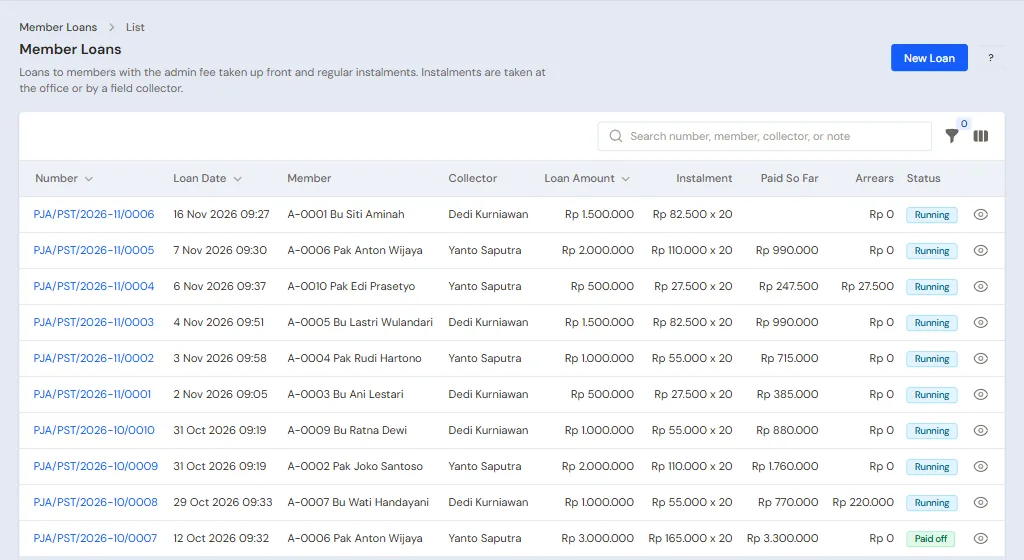
Done by the Finance Admin in Transactions → Finance → Member Loans, button Create Loan.
- Choose the Member Bu Siti Aminah, Money Leaves Cash Account Owner Cash and the Collector Dedi.
- Fill in the Loan Amount Rp 1.500.000, the Admin Fee Rp 75.000 (5%) and the Service Charge (total) Rp 150.000 (10%).
- Choose Instalments Daily, fill in Number of Instalments 20 and leave First Instalment as tomorrow.
- Read the summary below it: the member receives Rp 1.425.000, instalment Rp 82.500 for 20 days, Rp 1.650.000 to be paid back. Press Create.
The admin fee is taken from the money the member receives and is income at once. The service charge becomes income bit by bit as instalments come in. See Cooperative, loans and field collectors.
The collector records instalments on the phone
Done by the Collector on the phone, Transactions → Collect Today (Cooperative). Dedi's list today holds five cards: Bu Ani Rp 27.500, Bu Lastri Rp 82.500, Bu Ratna Rp 55.000, Bu Wati Rp 55.000, who is still behind, and Bu Siti's new loan, whose first instalment is tomorrow.
- Each loan shows as a card with the name, stall, instalment, arrears and what is left of the loan. Those behind come first.
- Press Call or WhatsApp to reach a member who is not at the stall.
- After receiving money, press Record Payment, check the Amount paid, then press Record.
- Press Send the receipt by WhatsApp so the member holds the receipt.
Dedi receives three instalments, Rp 165.000 in all. Bu Wati has not paid. Money the collector records is not in the books yet: an instalment is booked when the office receives the deposit.
Receiving the collector's deposit
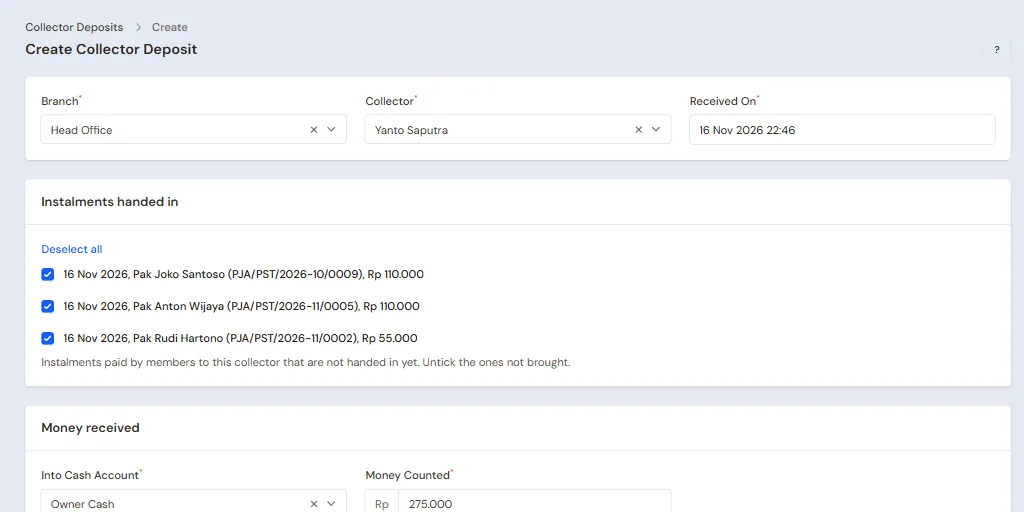
Done by the Finance Admin in the afternoon in Transactions → Finance → Collector Deposits, button Create Collector Deposit.
- Choose the Collector Dedi. His three instalments are ticked at once. Untick any that were not brought.
- Choose Into Cash Account Owner Cash, then fill in Money Counted Rp 160.000, the money really counted at the office.
- It is Rp 5.000 short of what is expected (Rp 165.000), so choose the Difference Category Cashier difference. The difference is booked as a cash adjustment.
- Press Create.
Afterwards Owner Cash goes up by Rp 160.000 and Dedi's three instalments enter the books: their principal lowers the member loans receivable and their service charge becomes income. Yanto is still in the market with three instalments not handed in (Rp 275.000), and Reports → Deposits per Collector shows that money still in his hands.
5. Arrears and bad loans
- A member who skips an instalment is behind. Bu Wati has not paid four instalments up to today, so in Reports → Outstanding Loans her arrears are Rp 220.000, grouped by how late, and her card on the collector's phone says 3 days late. Remind by WhatsApp on the loan's page opens a reminder message.
- Vende refuses a new loan for a member who is still behind or whose loan is bad. The message names the loan in the way, with a button to open it.
- A member who stopped paying, like Pak Maman, is marked bad by the Finance Admin with Mark as Bad Loan on the loan's page. The principal still lent out, Rp 325.000, is written off to Bad Loan Loss. Money that comes in afterwards is booked as income, and the mark can be removed only while no money came back.
6. Expenses
Done by the Finance Admin in Transactions → Finance → Expenses, button Create Expense. Example for a month:
| Expense | Category | Amount | Paid from |
|---|---|---|---|
| Fuel for two collectors | Fuel | Rp 100.000 | Owner Cash |
| Data plan for the office and collectors' phones | Internet and Phone Credit | Rp 100.000 | Owner Cash |
| Dedi's commission | Staff Commission | Rp 500.000 | Owner Cash |
| Yanto's commission | Staff Commission | Rp 500.000 | Owner Cash |
Vende does not work out a collector's commission itself: write the amount as agreed, for example a percentage of the money collected according to Reports → Deposits per Collector. Expenses lower the cash when recorded and enter Reports → Profit & Loss. See Recording expenses.
7. Year end: SHU and RAT
After the financial year is closed, the Finance Admin opens Reports → Annual Meeting Material (RAT) for the members' meeting: savings, loans outstanding, income and the year's surplus. Then the SHU is shared in Transactions → Finance → Member SHU, button Create SHU: fill in the Financial Year, the Reserve Fund, and the shares By Savings and By Service Charge (the meeting's decision). Each member's share is paid in cash or added to their voluntary savings. See Cooperative, SHU and meeting material.
8. Reports per job title
| Report | What it shows | Opened by | When to read it |
|---|---|---|---|
| Transactions → Collect Today (Cooperative) | The collector's loans today and the instalments already recorded | Collector | Every day |
| Reports → Deposits per Collector | Each collector's money: collected, handed in, difference, still in their hands | Finance Admin | Every day |
| Reports → Outstanding Loans | Running loans, what is left, arrears and bad loans | Finance Admin | Every week |
| Reports → Member Savings | Each member's balance per kind of savings | Finance Admin | Every month |
| Reports → Lending Income | Admin fees, service charge, recoveries and bad loan losses | Finance Admin | Every month |
| Reports → Profit & Loss | Lending income and the month's expenses | Owner | Every month |
How to read each report is in How to read reports.
9. Checklist
Every day
- Collector: every instalment received is recorded on the phone before going home, and the money is handed in at the office.
- Finance Admin: the collector's deposit is received with the money counted, and the difference is recorded.
Every week
- Finance Admin: members who are behind in Reports → Outstanding Loans are contacted, and loans long overdue are considered for marking as bad.
Every month
- Finance Admin: the mandatory savings are recorded, and the commission and expenses of the month are recorded.
- Owner: Reports → Profit & Loss is read, then a backup is downloaded in Settings → Backup.
A running business
This part is for the team moving a running cooperative to Vende. It already has members with their savings, loans still running and money in the cash. The order is always the same:
- Fill in the master data.
- Practise transactions until everyone is at ease.
- Empty the practice transactions.
- Fill in the opening balances on the start day.
- Start for real.
The opening balances are filled in last so that practice does not disturb the figures. A cooperative that is just starting only needs A new business. The example here uses Koperasi Pasar Sentosa from that part.
1. Master data
Do Who does what, 1. Shop details and users and 2. Master data of the new business part: the users with their job titles and every member in Master Data → Cooperative Members with their stall and guarantor. A long customer list (name, WhatsApp, address) can be imported from Excel, see Importing data from Excel; the stall and guarantor are filled in one by one when each customer is made a member.
Master data is not deleted when the practice transactions are emptied later.
2. Practice for the team
The team does this practice step by step with the data of Koperasi Pasar Sentosa. If what you see differs from what is written, find the missed step before going on. Do it in a practice shop of the Savings and loan cooperative type. The practice uses three accounts: Pak Hasan (Owner), Bu Rahma (Finance Admin) and Dedi (Collector). All steps can be done on the same day.
Practice 1: master data
- Owner: fill in the cooperative's name in Settings → Shop, then create the accounts of Bu Rahma and Dedi in Settings → Users with their job titles.
- Check: Dedi signs in from his phone and sees only Collect Today (Cooperative).
- Finance Admin: make Bu Siti Aminah and Bu Ani Lestari members in Master Data → Cooperative Members.
Practice 2: savings, loans, collecting and the deposit
- Owner: put in capital of Rp 30.000.000 to Owner Cash in Transactions → Finance → Owner's Capital.
- Finance Admin: record Principal Savings of Rp 100.000 and Mandatory Savings of Rp 20.000 for both members.
- Check: Reports → Member Savings shows Rp 120.000 for each member.
- Finance Admin: give Bu Siti a loan of Rp 1.500.000 with an admin fee of Rp 75.000 and a service charge of Rp 150.000, 20 daily instalments, collector Dedi.
- Check: the summary says the member receives Rp 1.425.000 and the instalment is Rp 82.500.
- Finance Admin: give Bu Ani a loan of Rp 500.000 with an admin fee of Rp 25.000 and a service charge of Rp 50.000, 20 daily instalments, collector Dedi.
- Check: the instalment is Rp 27.500.
- Finance Admin: because the first instalment is due tomorrow, change the First Instalment of both loans to today so they show on Dedi's list.
- Collector: open Collect Today (Cooperative) on the phone, record Rp 82.500 from Bu Siti and Rp 27.500 from Bu Ani.
- Check: both cards are marked paid and Reports → Deposits per Collector shows Rp 110.000 still in Dedi's hands.
- Finance Admin: receive Dedi's deposit with Money Counted Rp 108.000.
- Check: the shortfall of Rp 2.000 is booked as a cash adjustment.
What should be visible after Practice 2:
| Report | What it shows | Opened by |
|---|---|---|
| Reports → Cash Balance | Owner Cash Rp 28.448.000: capital Rp 30.000.000 and savings Rp 240.000, less the loans paid out net Rp 1.425.000 and Rp 475.000, plus the deposit Rp 108.000 | Finance Admin |
| Reports → Outstanding Loans | Two running loans, principal outstanding Rp 1.900.000 | Finance Admin |
| Reports → Profit & Loss | Admin fees Rp 100.000 and service charge Rp 10.000 from the two instalments, less the cash difference Rp 2.000: profit Rp 108.000 | Owner |
Practice 3: opening balances
Do part 4 below with its example figures in the practice shop, after the practice transactions are emptied (part 3), then check with part 5.
3. Empty the practice transactions
Done by the Owner in Settings → Empty Transactions, button Empty All Transactions. Vende makes a full backup first.
| What is deleted | What stays |
|---|---|
| Savings, loans, instalments and collector deposits | Cooperative members and customers |
| Expenses, capital and opening balances | Cash accounts, users and settings |
4. Opening balances on the start day
Example: Koperasi Pasar Sentosa starts using Vende for real on the first day of this month. Opening Balances has no tab for members' savings and loans. The way is with what exists: both are recorded on the start day, then the Opening Cash is adjusted so the money in the cash equals the money counted.
Members' savings
The Finance Admin records each member's savings balance on the start day in Transactions → Finance → Member Savings: one deposit for each kind of savings, to Owner Cash. Example: Bu Siti Principal Savings Rp 100.000, Mandatory Savings Rp 120.000 and Voluntary Savings Rp 300.000.
Loans still running
The Finance Admin records each loan not yet paid off in Transactions → Finance → Member Loans on the start day, with what is left as a new loan:
- The Loan Amount is the principal left, the Admin Fee is Rp 0 (already taken earlier) and the Service Charge (total) is the service charge left.
- The Number of Instalments is the instalments left and the First Instalment is the first day still collected.
Example: Bu Ani's loan has 10 instalments of Rp 27.500 left, that is principal Rp 250.000 and service charge Rp 25.000. That principal and service charge never went through the new books, so they are not counted twice as income.
Opening cash
Done by the Owner in Settings → Opening Balances, tab Opening Cash. The money counted in the office cash, less the savings recorded above, plus the loan principal recorded above, because both records already changed the cash.
Example: money counted Rp 10.000.000, savings Rp 520.000 and loan principal Rp 250.000. The Opening Cash of Owner Cash = Rp 10.000.000 less Rp 520.000 plus Rp 250.000 = Rp 9.730.000.
5. Check before you start
| Report | What should be visible | Opened by |
|---|---|---|
| Reports → Cash Balance | Owner Cash Rp 10.000.000, the same as the money counted | Finance Admin |
| Reports → Member Savings | Each member's balance equals the old savings book | Finance Admin |
| Reports → Outstanding Loans | Every running loan with its principal left | Finance Admin |
Figures differ? The Owner corrects the rows in Settings → Opening Balances and the Finance Admin corrects the savings or loan entries before real transactions are recorded. See Filling in opening balances.
6. Start for real
From that day, every saving, loan, instalment and deposit is recorded in Vende as in the new business part. First week check: collectors record every instalment on the phone, the afternoon deposit is received with the money counted, and Reports → Outstanding Loans equals the old loan book.