
Hospital guide
The learning order for a small hospital team, new or running: rooms, doctors, IGD, inpatient stays, bill, deposit, discharge, BPJS claims, opening balances.
On this page
- A new business
- Who does what
- 1. Shop data and users
- 2. Master data
- 3. Medicine purchases
- 4. One day at the hospital
- 5. Reports per job
- 6. Checklist
- A running business
- 1. Master data
- 2. Practice for the team
- 3. Clear the practice transactions
- 4. Opening balances
- 5. Check before starting
- 6. Start for real
This guide is for the team setting Vende up in a small private hospital (type C or D): outpatient polis, the IGD with triage, inpatient care in rooms by class, a running bill with a deposit, general, insurance, company and BPJS payers, the pharmacy, the laboratory and the doctor fee per procedure. It has two parts: A new business for a hospital that is just opening, and A running business for a hospital moving to Vende, with practice for the team and opening balances. The example is RSU Bina Sehat. The hospital, patients, payers, people and every figure are made up.
The business in short:
- Outpatient: the patient registers to a poli and a doctor, is examined, and the procedures and medicines become a note at the till. This is the Visits queue of the Clinic feature.
- IGD: a patient comes without an appointment and gets a triage colour (red, yellow, green, black). The queue of the IGD poli puts red first.
- Inpatient: the patient is admitted to a room of the room board, the room class is its category, and the doctor in charge (DPJP) is recorded.
- Running bill: procedures, medicines, consumables, lab, radiology, meals and the room nights gather on one bill per stay, with a deposit.
- Payers: a general patient pays himself, an insurer or company is billed after discharge, and BPJS is billed as an INA-CBG claim.
Work through it in order. This guide uses the patients and visits of Clinic, the lab results of Laboratory and the rooms of Lodging; inpatient stays are covered in full in Hospital. The shop's features are shown under Settings → Subscription, section This shop's features. When a menu is missing, contact the Vende team. The SATUSEHAT integration and an official medical record export do not exist in Vende yet.
Tip: Lost on a page? Press the ? button at the top of that page. A short tour points at every field.
A new business
Who does what
This package holds eight users, the owner included.
| Part of the business | Job in Vende | What they do and open |
|---|---|---|
| Owner | Owner | Every menu, also the medical record, rates, purchases, expenses, opening balances and Reports → Profit & Loss |
| Registration and cashier | Cashier | Registers patients, admits patients, takes deposits, interim bills, discharges and claims |
| Doctors, nurses, analysts | Medical staff | Examine, write the medical record, put procedures and medicines on the bill of an inpatient stay; they do not bill and take no money |
| Pharmacy and warehouse | Warehouse Admin | Medicines and consumables as goods, stock and expiry |
Each role is explained in Roles and permissions.
1. Shop data and users
Done by the Owner: fill in Settings → Shop, then create the accounts under Settings → Users. Example people at RSU Bina Sehat: dr. Hendra Gunawan, Sp.PD (DPJP), dr. Lestari Handayani (IGD doctor), Nurse Maya (nurse), Wulan (registration, Cashier) and Agus (pharmacy, Warehouse Admin).
2. Master data
This business type already has the categories Consultations and Examinations, Medical Procedures, Prescription Drugs, Medical Consumables, Radiology, Laboratory Tests, Patient Meals and four room categories: VIP Rooms, Class 1, Class 2 and Class 3 Rooms.
Rooms and classes
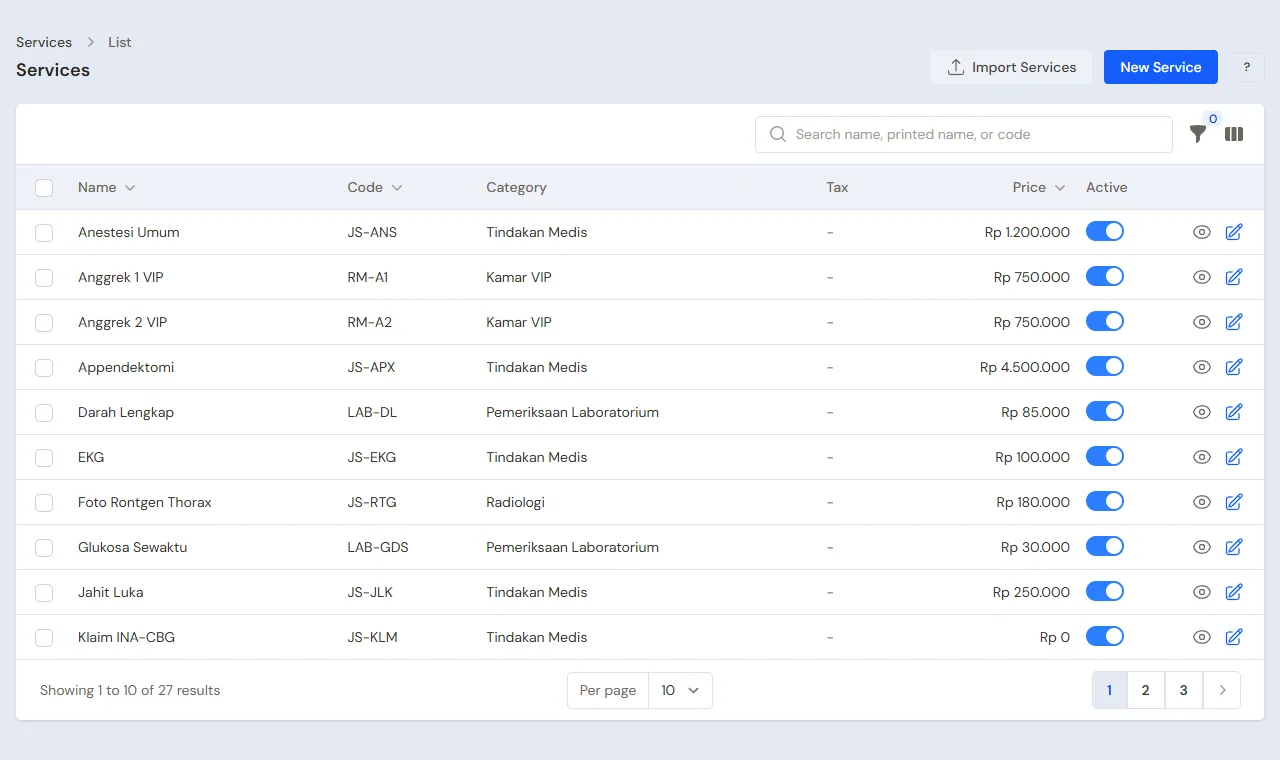
Owner: under Master Data → Services, create each bed as a service with Hired out by the day and one piece. Selling Price is the rate per night and Category is the room class.
| Room | Category | Rate per night |
|---|---|---|
| Mawar 1 to Mawar 4 | Class 1 Rooms | Rp 300.000 |
| Melati 1 to Melati 6 | Class 2 Rooms | Rp 200.000 |
| Anggrek 1 and 2 | VIP Rooms | Rp 750.000 |
The beds show on Transactions → Room Board, as Vacant, Occupied or Dirty.
Doctors and service rates
Owner: under Master Data → Service Staff, create the doctors and nurses. The doctor fee per procedure: under Master Data → Commission Rates, create a rate per doctor, for example 50% for dr. Hendra. The fee is worked out when the note is posted.
Operating rooms and procedure services
Owner: under Data Master → Operating Rooms, make OK 1, OK 2 (kind Operating room) and VK 1 (kind Delivery room). Under Data Master → Services, make the procedure services: Appendectomy (Rp 4.500.000), General Anesthesia (Rp 1.200.000), Operating Room Use (Rp 1.000.000), Normal Delivery (Rp 3.500.000) and Delivery Room Use (Rp 800.000). Commission rates for the surgeon, the anesthetist and the obstetrician are made like any other doctor's.
Services, medicines and payers
Owner and Warehouse Admin: under Master Data → Services, create Specialist Doctor Round (Rp 150.000), IV Line Placement (Rp 75.000), Chest X-ray (Rp 180.000), Patient Meal per Day (Rp 60.000) and a service Klaim INA-CBG (Rp 0, used to bill the BPJS claim). Under Master Data → Products, create the medicines and consumables with Track batches & expiry. Under Master Data → Customers, create the payers: PT Asuransi Mitra Sehat with Payment Term (days) 30 and a credit limit, and one customer BPJS Kesehatan.
3. Medicine purchases
Owner records the purchases under Transactions → Purchases, with the batch number and expiry.
4. One day at the hospital
Morning: polis and the IGD
- Cashier registers the patient under Master Data → Patients when new, then Transactions → Visits → Register to a poli and a doctor.
- An IGD patient is registered to the IGD poli with an IGD triage. Pak Darto arrives with chest pain: triage Red, and his name is at the top of the IGD queue.
- The doctor writes the medical record and puts procedures and medicines in the visit's charges.
Midday: inpatient
- The doctor decides Pak Darto is admitted. On his IGD visit Cashier presses Admit (or Transactions → Inpatient Stays → Admit Patient): pick a free room (Mawar 2, Class 1), the doctor in charge, the payer and why he is admitted. The IGD procedures and medicines move onto the inpatient bill and are not billed twice.
- The room is occupied on the Room Board at once. The expected stay only holds the room; the nights billed are counted to the day he goes home.
- The family pays a Deposit of Rp 1.000.000.
During the stay
- Doctors and nurses use Add Charge: Specialist Doctor Round, infusions (medicines leave stock when billed), gauze, and a patient meal each day. The performer of a procedure earns the fee.
- Write progress note adds the daily progress note (doctor, nurse, pharmacist, nutritionist) under the Progress notes tab; only people who may read medical records see it.
- A patient changes class (for example the family asks for a VIP room)? Move Room bills the nights in the old room at the old rate and moves the patient to the new room, so the new rate applies only to the nights after.
- Lab: Lab Order opens the lab registration for this patient, and the tests go on the inpatient bill, not on a till note.
- Supporting exams: Request Radiology orders an ultrasound or X-ray and its fee goes straight onto the bill. The radiologist enters the findings, the impression and the images under Transactions → Radiology → Enter Result; only Medical Staff and the owner open them. Ibu Rina (insurance) has an Abdominal Ultrasound ordered for her appendicitis.
- Operation or delivery: Transactions → Operation Schedule → Schedule books an OK or VK by the hour with the surgeon and the anesthetist, and refuses a clashing hour. Start and then Finish put the procedure, anesthesia and room use fees on the running bill. Ibu Rina is operated in OK 1; Dewi Lestari gives birth in VK 1.
- The insurer has a limit? Fill Insurer plafon per stay (on the admit form or the Insurer Plafon button): the payer's part stops at the plafon and the rest becomes the patient's part by itself. Ibu Rina has a plafon of Rp 8.000.000, so the part of her operation bill above it becomes her own bill. The plafon never goes back: if it is raised or a payer line is removed, a line that became the patient's part stays the patient's until staff press Make it the payer's part on that line.
- The payer does not cover something? On the line press Make it the patient's part.
- Interim Bill turns what is on the bill into a note now, useful for a long stay.
Discharge
Cashier presses Discharge: pick the condition (recovered, referred, left against advice or deceased), who covers the room, then Pay in full now with the chosen cash account. The room nights go on the bill, the deposit is cut onto the patient's note, the rest is handed back, and the room becomes Dirty.
Discharge and SATUSEHAT
When the hospital has filled its credentials under Settings → SATUSEHAT, a discharged stay is sent to SATUSEHAT by itself in production (or with Send to SATUSEHAT on the stay page), as long as the patient's NIK and the doctor's NIK are filled.
BPJS patients
Pick the payer BPJS and the BPJS Kesehatan customer when admitting. At discharge enter the INA-CBG code, the tariff and the claim service. The BPJS note holds goods and services at Rp 0 (the cost of the drugs goes to the cost of goods sold) plus one claim line for the tariff, so the receivable from BPJS is the tariff. The stay page shows Cost minus tariff: the cost at the hospital's own prices minus the tariff. Press Submit Claim when it is sent, and Claim Paid after BPJS paid through Receive Payment. If BPJS paid less than the tariff (for example Rp 300.000 short), choose Write off the claim difference when marking it paid: the difference is recorded as a sales return and the claim finishes.
BPJS outpatient is a claim at a hospital too: register the BPJS visit with the BPJS Kesehatan customer, then Finish & Bill asks for the INA-CBG code, the tariff and the claim service. Pak Darto's hypertension check-up at the polyclinic is a claim of Rp 320.000, submitted with Submit Claim on his visit page.
5. Reports per job
- Head Cashier or Owner: Reports → Receivables for the insurer and BPJS bills, and Reports → Service Staff Commissions for the doctor fee.
- Warehouse Admin: Reports → Stock and the batches close to expiry.
- Head Cashier or Owner: Reports → Inpatient Report for the BOR, the LOS and the income per class and payer.
- Owner: Reports → Profit & Loss and the Activity History for who opened a medical record.
6. Checklist
- Every day: Cashier checks the patients still in bed and their deposits, nurses put the day's meals and procedures on the bill.
- Every week: interim-bill long stays, and check the BPJS claims not submitted yet.
- Every month: bill the insurers from the Receivable Card, record the BPJS claim payments, and pay the doctor fee from the commission report.
A running business
This part is for a hospital moving its records from a program or books to Vende: some patients are still in bed, insurer receivables and BPJS claims are unpaid, the pharmacy has stock and there is money in the till. The order is always the same:
- Fill in the master data.
- Practise transactions until each part feels familiar.
- Clear the practice transactions.
- Enter the opening balances on the start day.
- Start for real.
The examples in this part use RSU Bina Sehat from the new business part.
1. Master data
Do the parts Who does what, 1. Shop data and users and 2. Master data above. Old medical records are not entered in Vende: the archive stays where it was, and old patients are registered under Master Data → Patients the next time they come. A patient who is in bed during the move is admitted again in Vende on the start day, and the deposit already paid is recorded again as a deposit. The master data is not removed when the practice transactions are cleared.
2. Practice for the team
Do it in a practice shop of the type Hospital with every account.
- Owner: rooms per class, doctors with commission rates, services, medicines and payers.
- Cashier: register an IGD patient with red triage and an outpatient, then admit the IGD patient to a room and take a deposit.
- Check: the room shows Occupied on the Room Board, and the IGD visit can no longer be billed by itself.
- Medical staff: add a round, an infusion and a meal to the bill.
- Check: Medical staff see no Discharge or Interim Bill button.
- Cashier: Interim Bill, then Discharge with pay in full. Repeat for an insurance and a BPJS patient.
- Check: the deposit is used up (cut and handed back), the room is Dirty, and the BPJS note is worth the claim tariff.
- Owner: open Reports → Receivables and the Activity History.
3. Clear the practice transactions
Done by the Owner under Settings → Empty Transactions, button Empty All Transactions. Stays, visits, notes, purchases, payments and opening balances are removed. Rooms, doctors, services, medicines, patients and customers stay.
4. Opening balances
Example: the hospital starts using Vende for real on Monday, 2 November. That morning the drawer holds Rp 5.000.000, Bank BCA Rp 40.000.000, PT Asuransi Mitra Sehat still owes Rp 28.000.000 and BPJS Kesehatan Rp 96.000.000 for unpaid claims.
Done by the Owner under Settings → Opening Balances, with As of that day. See Entering opening balances for cash, stock, receivables and payables.
- Opening Cash: Cashier Cash Rp 5.000.000 and Bank BCA Rp 40.000.000.
- Opening Stock: the medicines and consumables with their batch numbers and expiry.
- Opening Receivables: PT Asuransi Mitra Sehat Rp 28.000.000 and BPJS Kesehatan Rp 96.000.000 with their real terms and due dates.
5. Check before starting
| Report | What must show | Opened by |
|---|---|---|
| Reports → Cash Balance | Cashier Cash Rp 5.000.000 and Bank BCA Rp 40.000.000 | Owner |
| Reports → Stock | The quantity of every medicine matches the pharmacy | Warehouse Admin |
| Reports → Receivables | PT Asuransi Mitra Sehat Rp 28.000.000 and BPJS Kesehatan Rp 96.000.000 | Owner |
Different figures? The Owner corrects the rows under Settings → Opening Balances before real transactions are recorded.
6. Start for real
From that day every patient is registered in Vende. Check in the first week: every inpatient has a room on the room board, every discharged stay has a note, and every BPJS claim has a status.