
Salon guide
A learning path for a salon, barbershop or spa, new or running: job titles, services with materials, stylists' commission, points, promotions, opening balances.
On this page
- A new business
- Who does what
- 1. Shop details and users
- 2. Master data
- 3. First capital and buying
- 4. One working day
- 5. Payables and expenses
- 6. Reports per job title
- 7. Checklists
- A running business
- 1. Master data
- 2. Team practice
- 3. Empty the practice transactions
- 4. Opening balances
- 5. Check before going live
- 6. Going live
This guide is for the team setting up Vende at a salon, barbershop or spa that sells treatments, a few care products, and pays its stylists or therapists a commission. It has two parts: A new business for a salon just opening, with no stock, receivables or payables from before, and A running business for a salon moving to Vende, with team practice and opening balances. The example is Salon Cantika. The names of the salon, customers, suppliers and people and all the figures are made up.
What the business looks like:
- Treatments: haircuts, creambath, smoothing, facials and manicures are sold as services, and the creambath cream leaves the stock with them.
- Care products: shampoo, hair vitamins and serum are sold at the till.
- Stylists and therapists: chosen on every service line and paid a commission.
- Regular customers: collect points and get promotions.
Work through it from the top. Every step names its menu, who does it, what changes afterwards, and an example with figures.
The features in this guide come with the Salon/barbershop/spa business type package, except those marked extra. The shop's features show under Settings → Subscription, section This shop's features. If a menu is missing, contact the Vende team.
Tip: Lost on a page? Press the ? button at the top of that page. A short tour shows every field, in the commission report too.
A new business
Who does what
This package holds five users, the owner included.
| Part of the salon | Job title in Vende | What they do and open |
|---|---|---|
| Owner | Owner | Every menu, also suppliers, purchases, commission rates, the points settings, paying commission, expenses, opening balances, and Reports → Profit & Loss |
| Morning front desk | Head Cashier | Customers, service staff, promotions, selling on the till, point adjustments, the commission report |
| Afternoon front desk | Cashier | Customers and selling on the till |
| Warehouse and buying | Warehouse Admin | Products, services and their materials, stock, Reports → Stock |
Stylists and therapists need no account. Their names are enough as service staff, chosen by the front desk on the note. Every role is explained in Roles and permissions.
1. Shop details and users
Done by the Owner: fill in Settings → Shop (name, address, WhatsApp, logo), then create the accounts in Settings → Users with the Job title of the table above. See Adding and managing users.
The people at Salon Cantika: Bu Ratih (owner), Dina Lestari (morning front desk, Head Cashier), Sinta (afternoon front desk, Cashier) and Fajar Nugraha (warehouse and buying, Warehouse Admin). The stylists are Yuni Kartika and Dodi Firmansyah, the therapist Rara Amelia, all three without an account.
2. Master data
A salon of this business type already has the product categories Hair Services, Face and Body Treatments, Massage and Spa Services, Nail Services and Beauty Products, the units Session and Bottle, and the expense categories Staff Commission, Towel and Linen Laundry, and Equipment Maintenance.
Products and materials
Warehouse Admin: in Master Data → Products, create every good:
| Good | Category | Base Unit | First cost price | Selling Price |
|---|---|---|---|---|
| Sampo Keratin 250 ml | Beauty Products | Bottle | Rp 45.000 | Rp 65.000 |
| Vitamin Rambut isi 6 | Beauty Products | Pieces | Rp 18.000 | Rp 28.000 |
| Serum Wajah Vitamin C | Beauty Products | Bottle | Rp 55.000 | Rp 85.000 |
| Krim Creambath Sachet | Beauty Products | Pieces | Rp 8.000 | Rp 0, a material not for sale |
See Adding a product.
Services and their materials
Warehouse Admin: in Master Data → Services, create Potong Rambut Wanita (women's haircut) Rp 50.000, Creambath Rp 85.000 and Smoothing Rambut Rp 350.000 in the category Hair Services, Facial Wajah Rp 120.000 in the category Face and Body Treatments, and Manicure Rp 60.000 in the category Nail Services.
On Creambath, under Materials used, press Add material, pick Krim Creambath Sachet, and enter a Quantity per service of 1. Every Creambath sold takes one sachet, and its Rp 8.000 cost becomes that service's cost. See Adding a service.
Stylists and their commission
- Head Cashier: in Master Data → Service Staff, register Yuni Kartika, Rara Amelia and Dodi Firmansyah.
- Owner: in Master Data → Commission Rates, create two rates. First, Service and Service staff left empty, Worked out as Percent of the service value, Rate 10. Second, Service Smoothing Rambut, Worked out as Rupiah per service, Rate 40.000. The most specific rate is used, so every smoothing earns Rp 40.000, and the other services 10%.
Points, promotions and customers
- Owner: in Settings → Points, switch on Enable customer points, enter Spending per point 10.000 and Value of 1 point 100. Spending Rp 145.000 earns 14 points, worth Rp 1.400 when redeemed. See Giving and redeeming customer points.
- Head Cashier: in Master Data → Promotions, create the promotion buy 2 Sampo Keratin and get 1 Vitamin Rambut isi 6 free, then switch it on once its rule is checked. Promotions are for goods only; treatments cannot be used in a promotion, so money off a treatment is given with a line discount at the till. See Giving discounts and free goods.
- Head Cashier: in Master Data → Customers, register Ibu Hesti Wulandari and Nadia Putri with their WhatsApp numbers. Only registered customers earn points.
- Owner: in Master Data → Suppliers, register Distributor Kosmetik Priangan (14 days' credit).
Vende has no appointment book for salons yet. Keep appointments in a book or on WhatsApp as usual, then make the note when the customer arrives.
3. First capital and buying
- The Owner records Rp 15.000.000 of capital into Bank BCA in Transactions → Finance → Owner's Capital.
- The Owner records the note of Distributor Kosmetik Priangan in Transactions → Purchases, 14 days' credit: 24 Sampo Keratin × Rp 45.000 (Rp 1.080.000), 30 Vitamin Rambut × Rp 18.000 (Rp 540.000), 12 Serum Wajah × Rp 55.000 (Rp 660.000) and 50 Krim Creambath Sachet × Rp 8.000 (Rp 400.000), so Rp 2.680.000.
See Recording a purchase note.
4. One working day
The Head Cashier records every customer on the till through Transactions → Sales, button New sale. On every service line, choose Performed by, the stylist or therapist who carries it out. See Recording a sale on the till.
| Customer | On the note | Paid | Points |
|---|---|---|---|
| Ibu Hesti Wulandari | Creambath Rp 85.000 (Yuni) and Manicure Rp 60.000 (Rara) | Rp 145.000 cash | 14 |
| Nadia Putri | Smoothing Rambut Rp 350.000 (Yuni) and 1 Sampo Keratin Rp 65.000 | Rp 415.000 by transfer into Bank BCA | 41 |
| Walk-in buyer | Potong Rambut Wanita Rp 50.000 (Dodi) | Rp 50.000 cash | None |
When Ibu Hesti comes back, the Head Cashier chooses her name at the till, fills in Redeem points 14, and her note is Rp 1.400 lower.
The stylists' commission
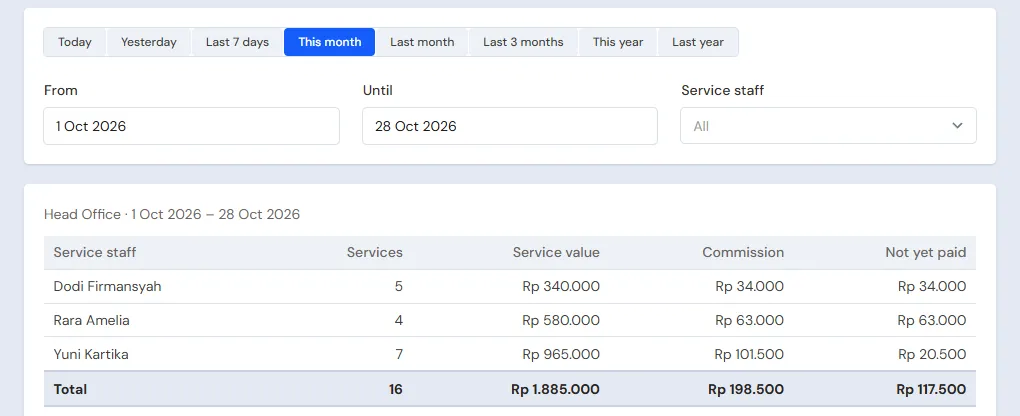
The commission is written when the note is saved, from the service lines that have someone performing them:
| Service staff | Services | Commission |
|---|---|---|
| Yuni Kartika | Creambath Rp 85.000 × 10% and Smoothing Rambut Rp 40.000 | Rp 8.500 + Rp 40.000 = Rp 48.500 |
| Rara Amelia | Manicure Rp 60.000 × 10% | Rp 6.000 |
| Dodi Firmansyah | Potong Rambut Wanita Rp 50.000 × 10% | Rp 5.000 |
The Head Cashier reads the commission in Reports → Service Staff Commissions, with every note when one person is chosen. The Owner pays it every Saturday in that report with the Pay Commission button: choose the person, the category Staff Commission, the account Cashier Cash and the amount. The commission is paid as an Expense, and the Not yet paid column goes to zero.
5. Payables and expenses
- The Owner pays Distributor Kosmetik Priangan before the due date in Transaction Details → Purchase Payments: Rp 2.680.000 from Bank BCA. See Paying what you owe suppliers.
- The Owner records the towel laundry in the category Towel and Linen Laundry, and the rent and electricity, in Transactions → Finance → Expenses. See Recording shop expenses.
6. Reports per job title
| Report | What it shows | Opened by | When |
|---|---|---|---|
| Reports → Service Staff Commissions | Services, commission and what is not paid yet per stylist | Head Cashier | Every week |
| Reports → Stock | The products and creambath cream left | Warehouse Admin | Every week |
| Reports → Payables | What is owed to the distributor, with due dates | Owner | Every week |
| Reports → Profit & Loss | Treatments and products sold, cost of goods and materials, points, commission and expenses | Owner | Every month |
7. Checklists
- Every day: the Head Cashier and the Cashier choose who performs every service line and a registered customer on every note.
- Every week: the Owner pays the commission from Reports → Service Staff Commissions. The Warehouse Admin checks the sachets and products in stock.
- Every month: the Warehouse Admin counts the products with a stocktake. The Owner reads Profit & Loss.
A running business
This part is for the team moving a salon already running to Vende: there are already products in stock, regular customers holding points, stylists' commission, and debts to the distributor. The order is always the same:
- Fill in the master data.
- Practise transactions until everyone is used to them.
- Empty the practice transactions.
- Fill in the opening balances on the first day.
- Go live.
The opening balances come last on purpose, so the practice does not upset their figures. The examples in this part use Salon Cantika from the new business part.
1. Master data
Do Who does what, 1. Shop details and users and 2. Master data above. Also register every customer holding points, every supplier still owed, and every good still in stock.
Master data is not deleted when the practice transactions are emptied.
2. Team practice
Work in a practice shop of the type Salon/barbershop/spa with all four accounts. Every step names who and what must show.
Practice 1: master data
- Owner: shop details, the three users, the supplier, both commission rates and the points settings.
- Check: Sinta does not see Reports → Profit & Loss.
- Fajar (Warehouse Admin): the four goods and the five services, with the sachet as Creambath's material.
- Head Cashier: the three service staff, the promotion and both customers.
Practice 2: one working day
- Owner: Rp 15.000.000 of capital and the purchase note as in part 3.
- Head Cashier: the three notes as in part 4, with someone performing every service line.
- Check: in Master Data → Customers, Ibu Hesti has 14 points and Nadia 41 points.
- Owner: pay Yuni Rp 48.500, Rara Rp 6.000 and Dodi Rp 5.000 of commission from Cashier Cash.
After Practice 2 this must show:
| Report | What must show | Opened by |
|---|---|---|
| Reports → Cash Balance | Bank BCA Rp 15.000.000 + Rp 415.000 = Rp 15.415.000; Cashier Cash Rp 145.000 + Rp 50.000 − Rp 59.500 = Rp 135.500 | Owner |
| Reports → Payables | Distributor Kosmetik Priangan Rp 2.680.000 | Owner |
| Reports → Stock | Shampoo 23, vitamins 30, serum 12, sachets 49 | Warehouse Admin |
| Reports → Service Staff Commissions | Yuni Rp 48.500, Rara Rp 6.000, Dodi Rp 5.000, all paid | Head Cashier |
| Reports → Profit & Loss | Sales Rp 145.000 + Rp 415.000 + Rp 50.000 = Rp 610.000, cost of goods sold Rp 8.000 + Rp 45.000 = Rp 53.000, Points Expense (14 + 41) × Rp 100 = Rp 5.500, the expense Staff Commission Rp 59.500 | Owner |
Practice 3: opening balances
Fill in the opening balances with the example of part 4 below, check them as in part 5, then empty again.
3. Empty the practice transactions
Done by the Owner in Settings → Empty Transactions, button Empty All Transactions. Notes, the commission written and its payments, the points earned, redeemed and adjusted, purchases, payments, expenses, capital and opening balances are deleted, so every customer's points go back to zero. Products, services and their materials, service staff, commission rates, promotions, customers, point adjustment categories, suppliers, cash accounts, users and the points settings stay. Vende makes a full backup first. See Emptying transactions or all data.
4. Opening balances
Example: Salon Cantika starts using Vende for real on Monday, 2 November.
Stock and payables
Done by the Owner in Settings → Opening Balances, with As of that day. See Entering opening cash, stock, receivables and payables.
- Opening Stock: Sampo Keratin 250 ml 18 Bottles at Rp 45.000, Vitamin Rambut isi 6 20 Pieces at Rp 18.000, Serum Wajah Vitamin C 8 Bottles at Rp 55.000, Krim Creambath Sachet 30 Pieces at Rp 8.000.
- Opening Payables: Distributor Kosmetik Priangan Rp 1.500.000 with its due date.
Customers' old points
Opening Balances has no tab for points. The way to do it with what is there:
- The Owner creates the category Poin awal (opening points) in Master Data → Point Adjustment Categories.
- The Head Cashier opens Transactions → Point Adjustments, button New Point Adjustment, for every customer: choose the Customer, the Category Poin awal, Add, then fill in the Points and a Note.
When a point was worth something else in the old records, work it out first: old points × their old value ÷ Vende's Value of 1 point. Example: Ibu Hesti holds 120 points worth Rp 100.
What follows:
- Ibu Hesti's Points column in Master Data → Customers becomes 120, and she can redeem them at the till from that day.
- Reports → Profit & Loss for the first month holds a Points Expense of 120 × Rp 100 = Rp 12.000, even though the points were earned before the first day. Cash does not change.
Commission not paid yet
Opening Balances has no tab for the stylists' commission either. Work out the commission up to the day before the start from the old records and pay it before the first day. Reports → Service Staff Commissions only counts the services on Vende's notes, from the first day.
Opening cash
The Owner fills in the Opening Cash tab for every account with the money counted on the morning of the first day. Example: Cashier Cash Rp 500.000 and Bank BCA Rp 8.000.000.
5. Check before going live
| Report | What must show | Opened by |
|---|---|---|
| Reports → Cash Balance | Bank BCA Rp 8.000.000 and Cashier Cash Rp 500.000, the same as the money counted | Owner |
| Reports → Stock | Shampoo 18, vitamins 20, serum 8, sachets 30 | Warehouse Admin |
| Reports → Payables | Distributor Kosmetik Priangan Rp 1.500.000 | Owner |
| Master Data → Customers | Ibu Hesti 120 points | Head Cashier |
| Reports → Service Staff Commissions | Empty | Head Cashier |
A figure is different? The Owner corrects its line in Settings → Opening Balances, and the Head Cashier corrects the point adjustment, before real transactions are recorded.
6. Going live
From that day every treatment, sale, purchase, commission and payment is recorded in Vende as in the new business part, with the same checklists.
Checks in the first week:
- Head Cashier: every service line has someone performing it, and the commission in Reports → Service Staff Commissions matches the stylists' own notes.
- Owner: Reports → Profit & Loss for the first week holds only the treatments, sales and expenses since the first day, plus the Points Expense of the old points.