
Billiard hall guide
A learning path for a billiard hall, new or running: tables with day and night rates, hour packages, bookings with a down payment, points, opening balances.
On this page
- A new business
- Who does what
- 1. Shop details and users
- 2. Master data
- 3. Starting capital and the first purchases
- 4. One day at the billiard hall
- 5. Receivables, payables and expenses
- 6. Reports per job title
- 7. Checklist
- A running business
- 1. Master data
- 2. Team practice
- 3. Empty the practice transactions
- 4. Opening balances
- 5. Check before going live
- 6. Going live
This guide is for the team setting up Vende at a billiard hall that rents out tables by the hour and sells drinks and snacks. It has two parts: A new business for a hall just opening, with no stock, receivables or payables from before, and A running business for one moving to Vende, with team practice and opening balances. The example is Biliar Bintang. The names of the business, customers, suppliers and people and all the figures are made up.
What the business looks like:
- Tables: three standard tables at Rp 40.000 an hour, Rp 50.000 an hour from 18.00, and one Meja VIP (VIP table) at Rp 60.000 an hour.
- Packages: Paket 3 Jam (3-hour package) Rp 100.000 on the standard tables and Paket 2 Jam VIP Rp 100.000.
- Selling: bottled tea, mineral water, coffee, peanuts, cup noodles and billiard chalk, brought to the table or bought at the till.
- Guests: walk-in guests, members who collect points, and a community that books the VIP table with a down payment.
Work through it from the top. Every step names its menu, who does it, what changes afterwards, and an example with figures.
The features in this guide come with the Billiard hall business type package, except those marked extra. The shop's features show under Settings → Subscription, section This shop's features. If a menu is missing, contact the Vende team.
Tip: Lost on a page? Press the ? button at the top of that page. A short tour shows every field, on the Rental Board too.
A new business
Who does what
This package holds three users, the owner included.
| Part of the billiard hall | Job title in Vende | What they do and open |
|---|---|---|
| Owner | Owner | Every menu: rental units and their rates, suppliers and purchases, payments, expenses, opening balances and every report |
| Table operator and cashier | Head Cashier | The Rental Board, bookings and down payments, customers, the till, cancelling a session started by mistake |
| Drinks store room | Warehouse Admin | Products, stocktakes, Reports → Stock |
Every role is explained in Roles and permissions.
1. Shop details and users
Done by the Owner: fill in Settings → Shop (name, address, WhatsApp, logo), then create the accounts in Settings → Users with the Job title of the table above. See Adding and managing users.
The people at Biliar Bintang: Pak Hendra (owner), Rizal Fahmi (table operator, Head Cashier) and Tono Wibowo (store room, Warehouse Admin).
2. Master data
A shop of this business type already has the product categories Venue Rental, Beverages, Snacks, Food and Billiard Supplies, the units Glass, Bottle and Portion, and the expense category Equipment Maintenance.
Billiard tables as rental units
Owner: in Master Data → Rental Units, press New Rental Unit for every table:
| Name | Unit Type | Hourly Rate | Time Rounding | Minimum Charge |
|---|---|---|---|---|
| Meja 1, Meja 2, Meja 3 | Table | Rp 40.000 | Per 15 minutes | 60 minutes |
| Meja VIP | Table | Rp 60.000 | Per 15 minutes | 60 minutes |
- Leave Service on the Note empty. Vende makes the service Table Rental by itself, and the rent is booked to Rental Revenue, apart from Sales of Goods.
- On Meja 1 to Meja 3, section Rates per Time Band, press Add rate: Rate Name Malam (night), Days left empty (every day), From 18:00, Until 00:00, Hourly Rate Rp 50.000.
- In the section Price Packages, press Add package: Meja 1 to Meja 3 Paket 3 Jam, Package Length 3 h, Package Price Rp 100.000; Meja VIP Paket 2 Jam VIP, 2 h, Rp 100.000.
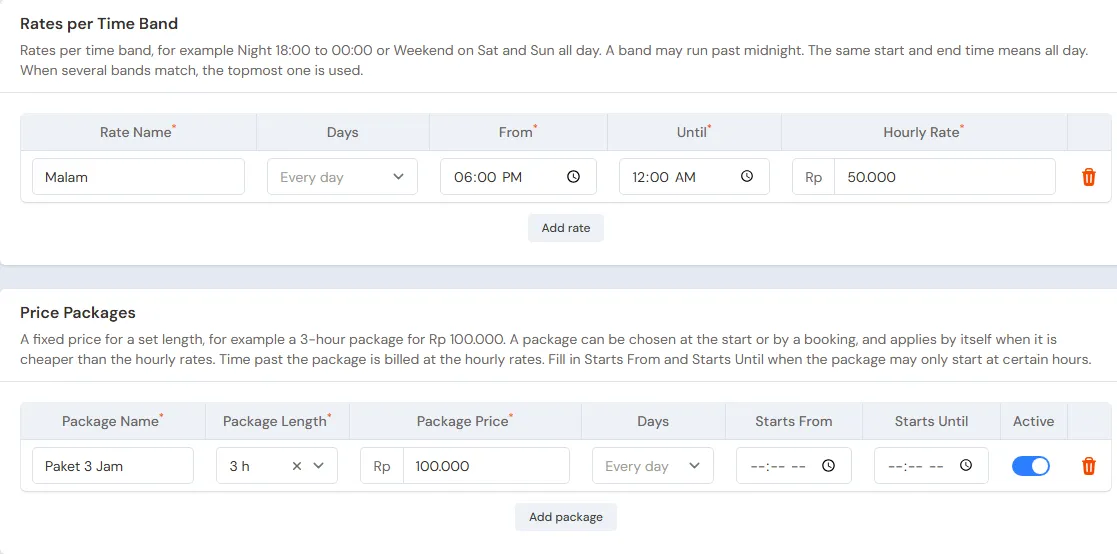
How the bill is worked out: the time played is rounded up per 15 minutes, at least 60 minutes. Playing 1 hour 5 minutes is billed as 1 hour 15 minutes. Every minute takes the rate of its time band, so playing from 17.00 to 19.00 on Meja 1 comes to 1 hour × Rp 40.000 + 1 hour × Rp 50.000 = Rp 90.000. A cheaper package applies by itself even when it was not picked.
Drinks and snacks
Warehouse Admin: in Master Data → Products, create:
| Item | Type | Category | Base Unit | Selling Price |
|---|---|---|---|---|
| Teh Botol Dingin (cold bottled tea) | Finished Goods | Beverages | Bottle | Rp 6.000 |
| Air Mineral 600 ml | Finished Goods | Beverages | Bottle | Rp 5.000 |
| Kopi Hitam Seduh (black coffee) | Finished Goods | Beverages | Glass | Rp 8.000 |
| Kacang Atom 100 g (coated peanuts) | Finished Goods | Snacks | Pieces | Rp 10.000 |
| Mi Instan Cup (cup noodles) | Finished Goods | Food | Pieces | Rp 10.000 |
| Kapur Biliar isi 12 (12 chalks) | Finished Goods | Billiard Supplies | Pack | Rp 20.000 |
Kopi Hitam Seduh is bought in one-glass sachets, so its stock is counted per glass. See Adding a product.
The Warehouse Admin does not see Cost Price, because the cost of goods shows only to the Owner and holders of Sensitive Reports. Leave it: the purchase notes in part 3 fill in every item's cost, for example Rp 3.500 for Teh Botol Dingin and Rp 12.000 for Kapur Biliar isi 12. See Cost price of goods.
Customers, points and suppliers
- Head Cashier: in Master Data → Customers, list the members, for example Mas Yoga, and Komunitas Biliar Arema, a community that often books the VIP table. See Adding and changing customers.
- Owner: in Settings → Points, turn on Enable customer points, fill in Spending per point 10.000 and Value of 1 point 100. See Giving and redeeming customer points.
- Owner: in Master Data → Suppliers, list Agen Minuman Sumber Segar with Payment Terms (days) 14, and Toko Perlengkapan Biliar Jaya without terms. See Adding a supplier.
- Owner: in Master Data → Cash Accounts, use Cashier Cash for the drawer and Bank BCA for QRIS and purchases. A new cash account shows on the Rental Board and the till only when its branch is ticked in Branches Allowed. See Cash accounts and bank accounts.
3. Starting capital and the first purchases
- The Owner records capital of Rp 10.000.000 into Bank BCA in Transactions → Finance → Owner's Capital. See Putting in and taking out capital.
- The Owner records Agen Minuman Sumber Segar's note in Transactions → Purchases, 14 days' terms: 96 Teh Botol Dingin × Rp 3.500 = Rp 336.000, 96 Air Mineral 600 ml × Rp 2.500 = Rp 240.000, 120 Glasses of Kopi Hitam Seduh × Rp 1.500 = Rp 180.000, 40 Kacang Atom 100 g × Rp 6.000 = Rp 240.000 and 48 Mi Instan Cup × Rp 4.500 = Rp 216.000. The total is Rp 1.212.000. See Recording a purchase note.
- The Owner records Toko Perlengkapan Biliar Jaya's note, paid from Bank BCA: 10 Packs of Kapur Biliar isi 12 × Rp 12.000 = Rp 120.000.
- The Owner moves Rp 300.000 of change from Bank BCA to Cashier Cash in Transactions → Finance → Cash Transfers.
4. One day at the billiard hall
| Time | Work | Who |
|---|---|---|
| Morning | Bookings from WhatsApp and their down payment | Head Cashier |
| Afternoon to night | Starting and closing tables on the Rental Board, drinks to the table | Head Cashier |
| Any time | Goods bought at the till | Head Cashier |
| Night | Count the drawer and bank the takings | Owner |
A booking and its down payment
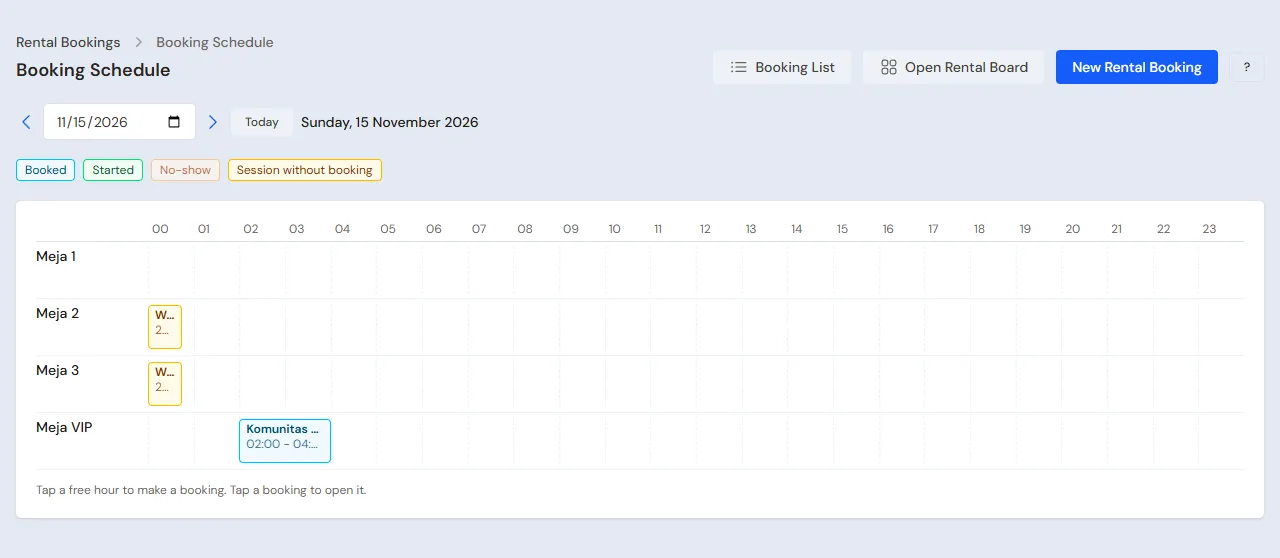
At 10.00, Komunitas Biliar Arema books Meja VIP for 20.00 with Paket 2 Jam VIP, then comes in to pay a down payment of Rp 50.000 in cash.
- Head Cashier (Rizal): in Transactions → Rental Bookings, press Schedule, then tap 20.00 in the row of Meja VIP.
- Pick the Price Package Paket 2 Jam VIP. The Length follows the package. Pick the Customer Komunitas Biliar Arema, then press Create.
- On the booking's page, press Receive Down Payment, pick Cashier Cash, fill in Rp 50.000, then save.
The down payment is no income yet: it waits as a customer advance and is deducted when the session is paid. Nobody else can book Meja VIP at that time, and the Rental Board shows the booking on the table's card.
A table for walk-in guests
- Head Cashier: in Transactions → Rental Board, tap Meja 1, which is free. Leave the Rental time on Open (pay as used), leave the Customer empty for a walk-in customer, then press Start at 14.10.
- The guests order 2 Teh Botol Dingin. Open the session of Meja 1, then tap Teh Botol Dingin under Food and drinks. The bill goes up at once.
- At 15.25 the guests are done. Press Finish & Pay: 75 minutes of play are billed as 1 h 15 min × Rp 40.000 = Rp 50.000, plus the tea Rp 12.000, so Rp 62.000. Pick the Payment method Cash, the Cash account Cashier Cash, fill in the Amount received, then press Finish & Pay.
The note is saved as an ordinary sale note and Meja 1 is free again. A walk-in customer pays in full.
A member with a package
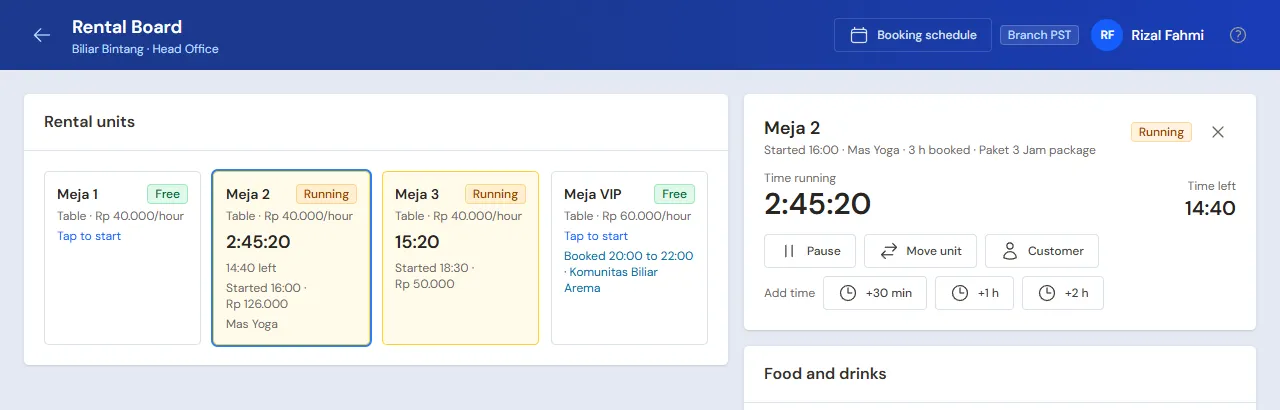
- At 16.00 Mas Yoga arrives. The Head Cashier taps Meja 2, picks the Price packages Paket 3 Jam, picks the Customer Mas Yoga, then presses Start. The card of Meja 2 shows the time left on the package.
- Mas Yoga orders 2 Kopi Hitam Seduh and 1 Kacang Atom 100 g.
- At 19.00 the package time is up. Press Finish & Pay: the package Rp 100.000 plus coffee Rp 16.000 and peanuts Rp 10.000, so Rp 126.000, paid by QRIS into Bank BCA.
Without the package, playing from 16.00 to 19.00 would come to 2 hours × Rp 40.000 + 1 hour × Rp 50.000 = Rp 130.000. Mas Yoga earns 12 points, worth Rp 1.200. Every point earned is recorded as Points Expense in the Profit & Loss. Points are redeemed at the till, for example when Mas Yoga buys a drink. A Rental Board bill cannot take points yet.
Pause and move table
At 18.30 two guests start playing on Meja 3. At 19.00 the table's lamp goes out.
- The Head Cashier presses Pause in the session of Meja 3. The time stops counting.
- At 19.10 the lamp is back on. Press Resume. If the lamp cannot be fixed, press Move unit and pick a free table: the time after the move takes the new table's rates.
- At 20.00 the guests are done and order 2 Air Mineral 600 ml. 80 minutes of play are billed as 90 minutes, all at the Malam rate: 1,5 hours × Rp 50.000 = Rp 75.000. Plus the water Rp 10.000, so Rp 85.000 in cash.
A session started by mistake is cancelled with Cancel session. Its time is not billed. Only the Head Cashier and the Owner have this button, and it is recorded in Settings → Activity History.
The booking arrives
- At 20.00 Komunitas Biliar Arema arrives. The Head Cashier taps Meja VIP, then presses Start the booking. The package and the down payment come along.
- They order 4 Teh Botol Dingin and 2 Mi Instan Cup.
- At 22.10 they are done. 130 minutes of play are billed as 135 minutes: the package Rp 100.000 and 15 minutes past the package × Rp 60.000 an hour = Rp 15.000, so the rent is Rp 115.000. Plus the tea Rp 24.000 and the noodles Rp 20.000, the bill is Rp 159.000. The down payment of Rp 50.000 is deducted, so To pay is Rp 109.000 in cash.
Komunitas Biliar Arema earns 15 points on the whole note, worth Rp 1.500. A booking whose guests do not come is marked No-show by the Head Cashier on its page, once its start time has passed: its down payment is refunded or forfeited and booked to Other Income.
Goods at the till
A guest buys 1 Pack of Kapur Biliar isi 12. The Head Cashier opens the till with New sale on the Dashboard or in Transactions → Sales, adds the chalk, and it is paid Rp 20.000 in cash. See Recording a sale at the till.
Closing
The Owner counts the drawer: Rp 300.000 + Rp 50.000 + Rp 62.000 + Rp 85.000 + Rp 109.000 + Rp 20.000 = Rp 626.000, the same as Cashier Cash in Reports → Cash Balance, then banks Rp 326.000 into Bank BCA with Transactions → Finance → Cash Transfers.
5. Receivables, payables and expenses
- A registered customer may pay less in Finish & Pay: the rest stays on that customer's account. The Owner records the payment in Transaction Details → Sale Payments. See Recording payment of an unpaid note.
- The Owner pays Agen Minuman Sumber Segar before the due date in Transaction Details → Purchase Payments. See Paying what you owe suppliers.
- New table cloth, cues and balls are recorded by the Owner in Transactions → Finance → Expenses, category Equipment Maintenance. The operator's wage goes in the category Salaries. See Recording shop expenses.
The day's profit: the table rent Rp 50.000 + Rp 100.000 + Rp 75.000 + Rp 115.000 goes on the line Rental Revenue Rp 340.000, while the drinks, snacks and chalk Rp 12.000 + Rp 26.000 + Rp 10.000 + Rp 44.000 + Rp 20.000 go on the line Sales of Goods Rp 112.000, so Net sales is Rp 452.000. The cost of goods sold is Rp 56.000 (tea 6 × Rp 3.500, coffee 2 × Rp 1.500, peanuts Rp 6.000, water 2 × Rp 2.500, noodles 2 × Rp 4.500, chalk Rp 12.000), so the gross profit is Rp 396.000, less Points Expense of 27 points × Rp 100 = Rp 2.700.
6. Reports per job title
| Report | What it holds | Opened by | When |
|---|---|---|---|
| Transactions → Rental Sessions | Every session: table, times, time billed, rent and its note | Head Cashier | At every closing |
| Reports → Cash Balance | The money in the drawer and the bank | Owner | Every night |
| Reports → Stock | The drinks, snacks and chalk left | Warehouse Admin | Every day |
| Reports → Payables | The drinks agent's notes and their due dates | Owner | Every week |
| Reports → Profit & Loss | Rental Revenue, Sales of Goods, cost of goods sold, Points Expense and expenses | Owner | Every month |
7. Checklist
- Every day: the Head Cashier starts every table on the Rental Board, records every drink in its session, and records every booking with its down payment. The Owner checks the drawer and banks the takings.
- Every week: the Warehouse Admin checks the drinks left. The Head Cashier marks the bookings whose guests did not come. The Owner reads Payables.
- Every month: the Warehouse Admin does a stocktake. The Owner records wages and table upkeep, then reads the Profit & Loss.
A running business
This part is for the team moving a running billiard hall to Vende: there are drinks in the store room already, members with points from the old programme, bookings already paid a down payment, and money owed to the drinks agent. The order is always the same:
- Fill in the master data.
- Practise transactions until every part is used to them.
- Empty the practice transactions.
- Fill in the opening balances on the first day.
- Go live.
The opening balances come last on purpose, so the practice does not mess up their figures. The examples in this part use Biliar Bintang from the new business part.
1. Master data
Do the parts Who does what, 1. Shop details and users and 2. Master data above: the tables with their rates and packages, the goods, customers, points and suppliers. List also every member who still has points and every guest who has booked with a down payment. Master data is not deleted when the practice transactions are emptied.
2. Team practice
Work in a practice shop of the type Billiard hall with all three accounts.
Practice 1: master data
- Owner: the shop details, both users, the four tables with the Malam rate and their packages, the points settings and both suppliers.
- Check: the Rental Board shows Meja 1, Meja 2, Meja 3 and Meja VIP with their hourly rates.
- Tono (Warehouse Admin): the six goods.
- Head Cashier: Mas Yoga and Komunitas Biliar Arema.
Practice 2: one day at the billiard hall
- Owner: capital Rp 10.000.000, both purchase notes and the Cash Transfer of Rp 300.000.
- Head Cashier: the booking of Meja VIP at 20.00 with a down payment of Rp 50.000, Meja 1 Rp 62.000 in cash, Meja 2 for Mas Yoga with Paket 3 Jam Rp 126.000 by QRIS, Meja 3 with a 10-minute pause Rp 85.000 in cash, Meja VIP from the booking Rp 109.000 in cash, and the chalk at the till Rp 20.000 in cash.
- When the practice does not run at the same hours, use other hours: what matters is how long the play lasts and its time band, for example play after 18.00 takes the Malam rate.
- Owner: the Cash Transfer of Rp 326.000 to Bank BCA.
After Practice 2 you should see:
| Report | What you should see | Opened by |
|---|---|---|
| Reports → Cash Balance | Bank BCA Rp 10.000.000 − Rp 120.000 − Rp 300.000 + Rp 126.000 + Rp 326.000 = Rp 10.032.000, Cashier Cash Rp 300.000 | Owner |
| Reports → Payables | Agen Minuman Sumber Segar Rp 1.212.000 | Owner |
| Reports → Stock | Bottled tea 90, mineral water 94, coffee 118 glasses, peanuts 39, cup noodles 46, chalk 9 packs | Warehouse Admin |
| Transactions → Rental Sessions | Four sessions Finished, their rent Rp 50.000, Rp 100.000, Rp 75.000 and Rp 115.000 | Head Cashier |
| Reports → Profit & Loss | Sales of Goods Rp 112.000, Rental Revenue Rp 340.000 (Net sales Rp 452.000), Cost of Goods Sold Rp 56.000 and Points Expense Rp 2.700 | Owner |
Practice 3: opening balances
Fill in the opening balances with the example of part 4 below, including the booking with a down payment and the member points, check them as in part 5, then empty again.
3. Empty the practice transactions
Done by the Owner in Settings → Empty Transactions, button Empty All Transactions. Notes, rental sessions, bookings and their down payment orders, purchases, payments, cash transfers, capital, point adjustments and member points, and opening balances are deleted. The tables with their rates and packages, goods, the service Table Rental, customers, suppliers, cash accounts, users and settings stay. Vende makes a full backup first. See Emptying transactions or all data.
4. Opening balances
Start in the morning before the first table opens, so no session is running. The Owner fills in Settings → Opening Balances with As of that day. See Entering opening cash, stock, receivables and payables.
- Opening Stock: the goods counted, for example 60 Teh Botol Dingin at Rp 3.500, 48 Air Mineral 600 ml at Rp 2.500, 80 Glasses of Kopi Hitam Seduh at Rp 1.500, 20 Kacang Atom 100 g at Rp 6.000, 24 Mi Instan Cup at Rp 4.500 and 6 Packs of Kapur Biliar isi 12 at Rp 12.000.
- Opening Payables: Agen Minuman Sumber Segar Rp 600.000 with its due date.
- Opening Receivables: one row per customer bill not paid yet, if any.
- Opening Cash: see the booking below, then Bank BCA Rp 8.000.000.
Bookings already paid a down payment
Opening Balances has no bookings tab. A booking whose down payment came in before the first day is written again on the first day:
- Owner: the Opening Cash of Cashier Cash = the money counted − the down payments of bookings still to come. For example: the drawer holds Rp 800.000, including the Rp 100.000 down payment of Komunitas Biliar Arema for Saturday at 20.00, so the opening cash is Rp 700.000.
- Head Cashier: in Transactions → Rental Bookings, create that booking as usual: Meja VIP, Saturday at 20.00, Price Package Paket 2 Jam VIP, Customer Komunitas Biliar Arema.
- Head Cashier: on the booking's page, press Receive Down Payment, pick Cashier Cash and fill in Rp 100.000. Cashier Cash is back at Rp 800.000, the same as the money in the drawer.
That down payment is no income on the first day. On Saturday the session starts from the booking and the down payment is deducted. For example: play from 20.00 to 22.10 with 4 Teh Botol Dingin makes the bill Rp 115.000 + Rp 24.000 = Rp 139.000, so To pay is Rp 39.000.
Member points from the old programme
- Head Cashier: in Master Data → Point Adjustment Categories, create the category Poin Awal (opening points).
- Head Cashier: in Transactions → Point Adjustments, press New Point Adjustment for every member who still has points: pick the Customer, the Category Poin Awal, Add, then fill in the Points. For example: Mas Yoga 150 points.
Important: Every point added is booked as Points Expense, like points earned on a purchase. So Reports → Profit & Loss of the first day holds Points Expense of 150 × Rp 100 = Rp 15.000 without any sale. When those points are redeemed, no expense comes again.
5. Check before going live
| Report | What you should see | Opened by |
|---|---|---|
| Reports → Cash Balance | Cashier Cash Rp 800.000 and Bank BCA Rp 8.000.000 | Owner |
| Reports → Stock | Bottled tea 60, mineral water 48, coffee 80 glasses, peanuts 20, cup noodles 24, chalk 6 packs | Warehouse Admin |
| Reports → Payables | Agen Minuman Sumber Segar Rp 600.000 | Owner |
| Transactions → Rental Bookings | The booking of Komunitas Biliar Arema on Meja VIP, Booked, Down Payment Rp 100.000 | Head Cashier |
| Reports → Profit & Loss | Only Points Expense Rp 15.000 | Owner |
The figures differ? The Owner corrects the row in Settings → Opening Balances before any real transaction is recorded.
6. Going live
From that day every table, drink, booking and purchase is recorded in Vende as in the new business part, with the same checklist. In the first week, the Head Cashier matches Transactions → Rental Sessions with the tables really played every night, and the Warehouse Admin matches Reports → Stock with the fridge and the store room.