
Karaoke guide
A learning path for a karaoke, new or running: rooms with day and night rates, a daytime package, bookings with a down payment, lobby orders to the kitchen.
On this page
- A new business
- Who does what
- 1. Shop details and users
- 2. Master data
- 3. Starting capital and the first purchases
- 4. One day at the karaoke
- 5. Payables, expenses and stock
- 6. Reports per job title
- 7. Checklist
- A running business
- 1. Master data
- 2. Team practice
- 3. Empty the practice transactions
- 4. Opening balances
- 5. Check before going live
- 6. Going live
This guide is for the team setting up Vende at a karaoke that rents out rooms by the hour, sells drinks and light meals, and has a lobby where guests wait. It has two parts: A new business for a karaoke just opening, with no stock, receivables or payables from before, and A running business for one moving to Vende, with team practice and opening balances. The example is Karaoke Nada Ceria. The names of the business, customers, suppliers and people and all the figures are made up.
What the business looks like:
- Rooms: Room 1 and Room 2 at Rp 60.000 an hour, Room VIP at Rp 120.000 an hour, dearer from 18.00 to 02.00.
- Package: Paket Siang 3 Jam (3-hour daytime package) Rp 150.000 on Room 1 and Room 2, which may only start from 10.00 to 15.00.
- Food and drinks: bottled drinks, fries and fried noodles cooked in the kitchen, and peanuts, brought to the room or to a lobby table.
- Guests: walk-in guests, members who collect points, and guests who book a room for a birthday with a down payment.
Work through it from the top. Every step names its menu, who does it, what changes afterwards, and an example with figures.
The features in this guide come with the Karaoke business type package, except those marked extra. The shop's features show under Settings → Subscription, section This shop's features. If a menu is missing, contact the Vende team.
Tip: Lost on a page? Press the ? button at the top of that page. A short tour shows every field, on the Rental Board and the Café Board too.
A new business
Who does what
This package holds four users, the owner included.
| Part of the karaoke | Job title in Vende | What they do and open |
|---|---|---|
| Owner | Owner | Every menu: rooms and their rates, products, lobby tables, purchases, stock, expenses, opening balances and every report |
| Front desk and room operator | Head Cashier | The Rental Board, bookings and down payments, food for the rooms, payments on the Café Board, customers, the till |
| Lobby waiter | Waiter | The Café Board on a phone: orders of the lobby tables, sent to the kitchen. Takes no money |
| Kitchen | Kitchen | The Kitchen Screen: marks lobby orders done |
Every role is explained in Roles and permissions.
Important: Food recorded on the Rental Board goes on the room's bill without a kitchen ticket. Kitchen tickets and the Kitchen Screen are for orders from the Café Board only. So the operator passes room orders to the kitchen by phone or intercom, while the waiter sends lobby table orders to the kitchen from the Café Board.
1. Shop details and users
Done by the Owner: fill in Settings → Shop (name, address, WhatsApp, logo), then create the accounts in Settings → Users with the Job title of the table above. See Adding and managing users.
The people at Karaoke Nada Ceria: Bu Melati (owner), Andre (front desk, Head Cashier), Dodi (Waiter) and Mbak Yuni (Kitchen).
2. Master data
A shop of this business type already has the product categories Venue Rental, Beverages, Snacks, Food and Meal Packages, the units Glass, Bottle and Portion, and the expense categories Equipment Maintenance, Internet and Phone Credit, and Music Licence.
Rooms as rental units
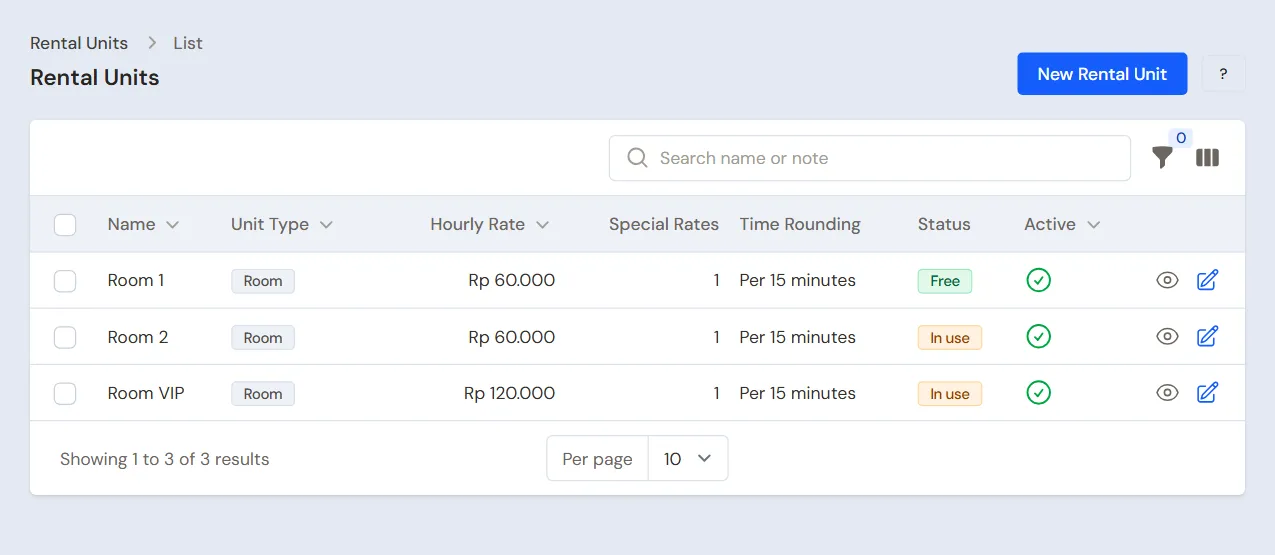
Owner: in Master Data → Rental Units, press New Rental Unit for every room. Unit Type Room, Time Rounding Per 15 minutes, Minimum Charge 60 minutes, and Service on the Note left empty, so Vende uses the service Room Rental and the money is booked to Rental Revenue.
| Name | Hourly Rate | Malam (night) rate, From 18:00 Until 02:00 | Price Package |
|---|---|---|---|
| Room 1, Room 2 | Rp 60.000 | Rp 80.000 | Paket Siang 3 Jam, 3 h, Rp 150.000, Starts From 10:00, Starts Until 15:00 |
| Room VIP | Rp 120.000 | Rp 150.000 | No package |
The night rate goes in the section Rates per Time Band (Rate Name Malam, Days left empty). A band may run past midnight. Paket Siang can only be picked when the room starts between 10.00 and 15.00. Every minute takes the rate of its time band, so a room used from 17.00 to 19.00 comes to one hour at the day rate and one hour at the night rate.
Drinks and food
Owner: in Master Data → Products, create:
| Item | Type | Category | Base Unit | Cost Price | Selling Price |
|---|---|---|---|---|---|
| Teh Botol Dingin (cold bottled tea) | Finished Goods | Beverages | Bottle | Rp 3.500 | Rp 8.000 |
| Air Mineral 600 ml | Finished Goods | Beverages | Bottle | Rp 2.500 | Rp 7.000 |
| Minuman Soda (soft drink) | Finished Goods | Beverages | Bottle | Rp 5.000 | Rp 12.000 |
| Kentang Goreng (fries) | Finished Goods | Food | Portion | Rp 7.000 | Rp 20.000 |
| Mi Goreng Instan (fried noodles) | Finished Goods | Food | Portion | Rp 4.000 | Rp 15.000 |
| Kacang Kulit 100 g (peanuts) | Finished Goods | Snacks | Pieces | Rp 5.000 | Rp 12.000 |
Kentang Goreng is bought frozen per portion and Mi Goreng Instan per pack, so every portion sold takes its own stock down. Cooking oil is recorded as an expense. A dish made of many materials, for example fried rice, needs a recipe and Production, which this package does not hold. See Adding a product.
Product options and lobby tables
- Owner: in Master Data → Product Options, press New Product Option, pick the Product Mi Goreng Instan, fill in the Group name Level Pedas (spice level), turn on Required, fill in Maximum choices 1, then add Tidak Pedas, Pedas and Sangat Pedas (mild, hot, very hot) with a Price add-on of 0. The options show on the Rental Board, the Café Board and the kitchen ticket.
- Owner: in Master Data → Tables, press New Table for Meja Lobi 1 and Meja Lobi 2 (lobby tables). The lobby tables show on the Café Board.
Customers, points and suppliers
- Head Cashier: in Master Data → Customers, list the members, for example Bu Anita. A booking guest who is no member is just written by name on the booking. See Adding and changing customers.
- Owner: in Settings → Points, turn on Enable customer points, fill in Spending per point 10.000 and Value of 1 point 100. See Giving and redeeming customer points.
- Owner: in Master Data → Suppliers, list Agen Minuman Segar Jaya with Payment Terms (days) 14, and Toko Frozen Food Makmur without terms. See Adding a supplier.
- Owner: in Master Data → Cash Accounts, use Cashier Cash for the front desk drawer and Bank BCA for QRIS and down payments by transfer. A new cash account shows on the Rental Board only when its branch is ticked in Branches Allowed. See Cash accounts and bank accounts.
3. Starting capital and the first purchases
- The Owner records capital of Rp 15.000.000 into Bank BCA in Transactions → Finance → Owner's Capital. See Putting in and taking out capital.
- The Owner records Agen Minuman Segar Jaya's note in Transactions → Purchases, 14 days' terms: 48 Teh Botol Dingin × Rp 3.500 = Rp 168.000, 48 Air Mineral 600 ml × Rp 2.500 = Rp 120.000 and 48 Minuman Soda × Rp 5.000 = Rp 240.000. The total is Rp 528.000. See Recording a purchase note.
- The Owner records Toko Frozen Food Makmur's note, paid from Bank BCA: 30 Portions of Kentang Goreng × Rp 7.000 = Rp 210.000, 40 Portions of Mi Goreng Instan × Rp 4.000 = Rp 160.000 and 20 Kacang Kulit 100 g × Rp 5.000 = Rp 100.000. The total is Rp 470.000.
- The Owner moves Rp 500.000 of change from Bank BCA to Cashier Cash in Transactions → Finance → Cash Transfers.
4. One day at the karaoke
| Time | Work | Who |
|---|---|---|
| Morning | Bookings from WhatsApp and their down payment | Head Cashier |
| Midday to night | Starting and closing rooms on the Rental Board, food for the rooms | Head Cashier |
| Evening | Lobby table orders | Waiter |
| Evening | Lobby orders done on the Kitchen Screen | Kitchen |
| Closing | Count the drawer and bank the takings | Owner |
A birthday booking
At 09.00, Mas Reza books Room 2 at 20.00 for 2 hours for a birthday, then transfers a down payment of Rp 100.000 to Bank BCA.
- Head Cashier (Andre): in Transactions → Rental Bookings, press Schedule, then tap 20.00 in the row of Room 2.
- Fill in the Length 2 h. Mas Reza is no member, so leave the Customer empty, then fill in the Guest Name Mas Reza and the Guest Phone. Press Create.
- On the booking's page, press Receive Down Payment, pick Bank BCA, fill in Rp 100.000, then save.
The time booked is billed in full even when the guests finish early. A guest without customer data pays in full when the session ends.
A daytime room with a package
- At 11.00 four students arrive. Head Cashier: in Transactions → Rental Board, tap Room 1, pick the Price packages Paket Siang 3 Jam, leave the Customer empty, then press Start.
- They order on the room phone: 6 Teh Botol Dingin and 2 Kentang Goreng. Andre opens the session of Room 1, taps the items under Food and drinks, then passes the fries order to the kitchen by intercom.
- At 14.00 the package time is up. Press Finish & Pay: the package Rp 150.000, tea 6 × Rp 8.000 = Rp 48.000 and fries 2 × Rp 20.000 = Rp 40.000, so Rp 238.000 in cash into Cashier Cash.
Past 3 hours, the minutes after are billed at Room 1's hourly rates.
A member in Room VIP
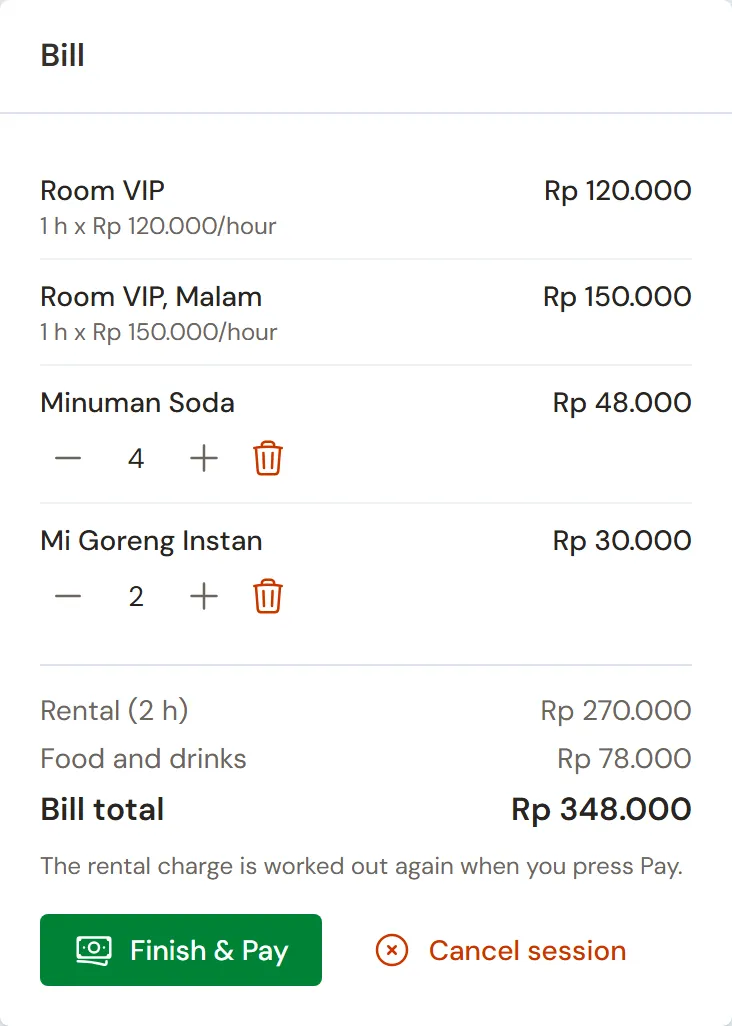
- At 17.00 Bu Anita arrives. The Head Cashier taps Room VIP, leaves the Rental time on Open (pay as used), picks the Customer Bu Anita, then presses Start.
- Bu Anita orders 4 Minuman Soda and 2 Mi Goreng Instan with the Level Pedas Pedas, picked in the options window.
- At 19.00 Bu Anita is done. The bill writes the rent per rate: 1 hour × Rp 120.000 before 18.00 and 1 hour × Rp 150.000 after, so the rent is Rp 270.000. Plus the soft drinks Rp 48.000 and the noodles Rp 30.000, the total is Rp 348.000, paid by QRIS into Bank BCA.
Bu Anita earns 34 points, worth Rp 3.400, recorded as Points Expense in the Profit & Loss. Points are redeemed at the till. A Rental Board bill cannot take points yet.
Lobby: orders to the kitchen
At 19.30 Mas Reza's friends wait at Meja Lobi 1.
- Waiter (Dodi), on a phone: open Transactions → Café Board, tap Meja Lobi 1, tap 3 Kentang Goreng, then press Send to kitchen. A kitchen ticket prints when a kitchen printer is set up on that device.
- Kitchen (Mbak Yuni): open Transactions → Kitchen Screen. Once the fries are cooked, press Done.
- Head Cashier: on the Café Board, tap Meja Lobi 1, press Pay, take Rp 60.000 in cash, then press Save payment.
See A table's order in the food stall guide.
The booking arrives
- At 20.00 Mas Reza arrives. The Head Cashier taps Room 2, then presses Start the booking. The session starts with a length of 2 hours, and its card shows the time left.
- The room orders 6 Air Mineral 600 ml.
- At 22.00 the time is up. Press Finish & Pay: 2 hours × Rp 80.000 = Rp 160.000 plus water 6 × Rp 7.000 = Rp 42.000, so Rp 202.000. The down payment of Rp 100.000 is deducted, so To pay is Rp 102.000 in cash.
The guests want more? Press Add time before the time is up. That extra time is billed even when the guests leave sooner. Guests who do not come are marked No-show by the Head Cashier on the booking's page, once its start time has passed: the down payment is refunded or forfeited and booked to Other Income.
Closing
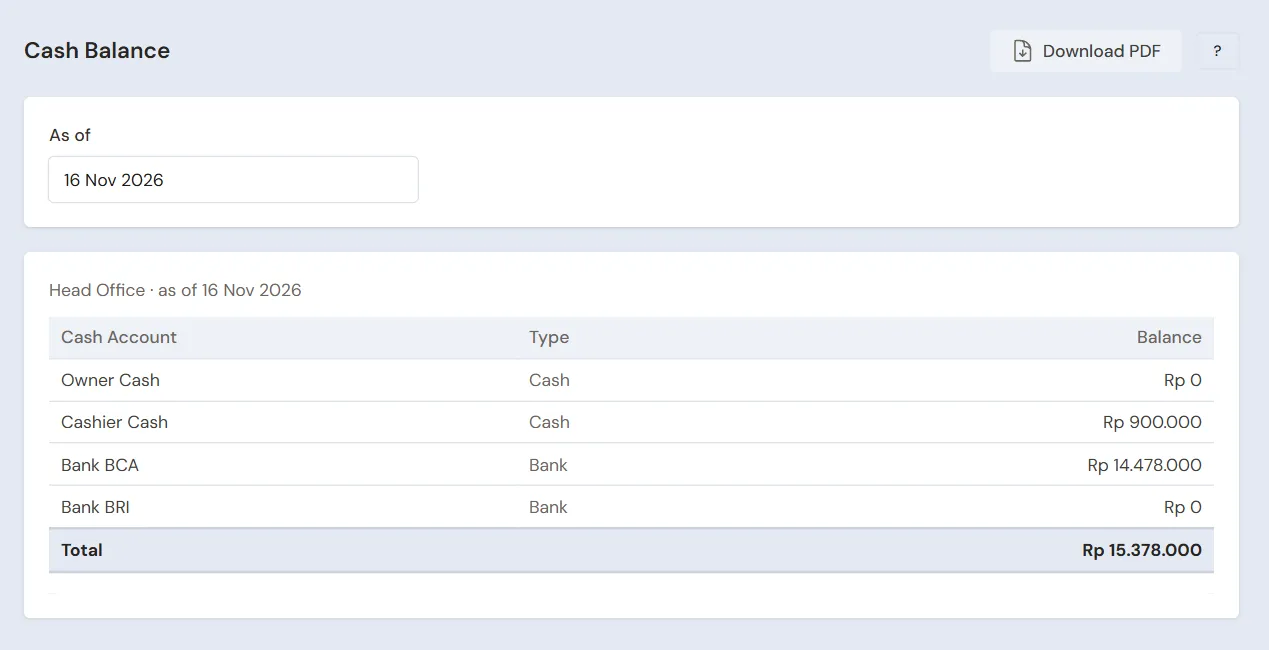
The Owner counts the drawer: Rp 500.000 + Rp 238.000 + Rp 60.000 + Rp 102.000 = Rp 900.000, the same as Cashier Cash in Reports → Cash Balance, then banks Rp 400.000 into Bank BCA with Transactions → Finance → Cash Transfers.
5. Payables, expenses and stock
- The Owner pays Agen Minuman Segar Jaya before the due date in Transaction Details → Purchase Payments. See Paying what you owe suppliers.
- The Owner records the music licence fee in Transactions → Finance → Expenses, category Music Licence, the internet in the category Internet and Phone Credit, and microphone repairs in the category Equipment Maintenance. See Recording shop expenses.
- Once a week the Owner counts the drinks and frozen fries in Transactions → Stocktakes. See Counting stock with a stocktake.
The day's profit: the room rent Rp 150.000 + Rp 270.000 + Rp 160.000 goes on the line Rental Revenue Rp 580.000, while the drinks and food Rp 88.000 + Rp 78.000 + Rp 60.000 + Rp 42.000 go on the line Sales of Goods Rp 268.000, so Net sales is Rp 848.000. The cost of goods sold is Rp 99.000 (tea 6 × Rp 3.500, fries 5 × Rp 7.000, soft drinks 4 × Rp 5.000, noodles 2 × Rp 4.000, water 6 × Rp 2.500), so the gross profit is Rp 749.000, less Points Expense Rp 3.400.
6. Reports per job title
| Report | What it holds | Opened by | When |
|---|---|---|---|
| Transactions → Rental Sessions | Every session: room, times, time billed, rent and its note | Head Cashier | At every closing |
| Transactions → Rental Bookings | Bookings to come, their down payments, and the no-shows | Head Cashier | Every morning |
| Reports → Cash Balance | The money in the drawer and the bank | Owner | At every closing |
| Reports → Stock | The drinks and frozen food left | Owner | Before buying |
| Reports → Payables | The drinks agent's notes and their due dates | Owner | Every week |
| Reports → Profit & Loss | Rental Revenue, Sales of Goods, cost of goods sold, Points Expense and expenses | Owner | Every month |
7. Checklist
- Every day: the Head Cashier starts every room on the Rental Board, records every room order in its session, and records every booking with its down payment. The Waiter records lobby orders on the Café Board. The Owner checks the drawer and banks the takings.
- Every week: the Owner does a stocktake of drinks and food, reads Payables and buys stock. The Head Cashier marks the bookings whose guests did not come.
- Every month: the Owner records the music licence, internet, electricity and wages, then reads the Profit & Loss.
A running business
This part is for the team moving a running karaoke to Vende: there are drinks and frozen food in the store room already, members with points from the old programme, birthday bookings already paid a down payment, and money owed to the drinks agent. The order is always the same:
- Fill in the master data.
- Practise transactions until every part is used to them.
- Empty the practice transactions.
- Fill in the opening balances on the first day.
- Go live.
The opening balances come last on purpose, so the practice does not mess up their figures. The examples in this part use Karaoke Nada Ceria from the new business part.
1. Master data
Do the parts Who does what, 1. Shop details and users and 2. Master data above: the rooms with their rates and package, the goods, product options, lobby tables, customers, points and suppliers. List also every member who still has points. Master data is not deleted when the practice transactions are emptied.
2. Team practice
Work in a practice shop of the type Karaoke with all four accounts.
Practice 1: master data
- Owner: the shop details, the three users, the three rooms with their night rate and daytime package, the six goods, Level Pedas, both lobby tables, the points settings and both suppliers.
- Check: Dodi sees only the Café Board in the sidebar, and Mbak Yuni only the Kitchen Screen.
- Head Cashier: Bu Anita.
- Check: on the Rental Board, Room 1 offers Paket Siang 3 Jam only between 10.00 and 15.00.
Practice 2: one day at the karaoke
- Owner: capital Rp 15.000.000, both purchase notes and the Cash Transfer of Rp 500.000.
- Head Cashier: the booking of Room 2 with a down payment of Rp 100.000 into Bank BCA, Room 1 with Paket Siang Rp 238.000 in cash, Room VIP for Bu Anita Rp 348.000 by QRIS, and Room 2 from the booking Rp 102.000 in cash.
- When the practice does not run at the same hours, use other hours: what matters is how long the room is used and its time band, for example Room VIP one hour before and one hour after 18.00.
- Dodi and Mbak Yuni: the order of Meja Lobi 1, sent to the kitchen and marked Done. The Head Cashier takes its payment of Rp 60.000 in cash.
- Owner: the Cash Transfer of Rp 400.000 to Bank BCA.
After Practice 2 you should see:
| Report | What you should see | Opened by |
|---|---|---|
| Reports → Cash Balance | Bank BCA Rp 15.000.000 − Rp 470.000 − Rp 500.000 + Rp 100.000 + Rp 348.000 + Rp 400.000 = Rp 14.878.000, Cashier Cash Rp 500.000 | Owner |
| Reports → Payables | Agen Minuman Segar Jaya Rp 528.000 | Owner |
| Reports → Stock | Bottled tea 42, mineral water 42, soft drinks 44, fries 25 portions, fried noodles 38 portions, peanuts 20 | Owner |
| Transactions → Rental Sessions | Three sessions Finished, their rent Rp 150.000, Rp 270.000 and Rp 160.000 | Head Cashier |
| Reports → Profit & Loss | Sales of Goods Rp 268.000, Rental Revenue Rp 580.000 (Net sales Rp 848.000), Cost of Goods Sold Rp 99.000 and Points Expense Rp 3.400 | Owner |
Practice 3: opening balances
Fill in the opening balances with the example of part 4 below, including the booking with a down payment and the member points, check them as in part 5, then empty again.
3. Empty the practice transactions
Done by the Owner in Settings → Empty Transactions, button Empty All Transactions. Notes, rental sessions, bookings and their down payment orders, lobby table orders, purchases, payments, cash transfers, capital, point adjustments and member points, and opening balances are deleted. The rooms with their rates and package, goods, product options, lobby tables, customers, suppliers, cash accounts, users and settings stay. Vende makes a full backup first. See Emptying transactions or all data.
4. Opening balances
Start in the morning before the first room opens, so no session is running. The Owner fills in Settings → Opening Balances with As of that day. See Entering opening cash, stock, receivables and payables.
- Opening Stock: the goods counted, for example 36 Teh Botol Dingin at Rp 3.500, 24 Air Mineral 600 ml at Rp 2.500, 24 Minuman Soda at Rp 5.000, 20 Portions of Kentang Goreng at Rp 7.000 and 30 Portions of Mi Goreng Instan at Rp 4.000.
- Opening Payables: Agen Minuman Segar Jaya Rp 400.000 with its due date.
- Opening Cash: Cashier Cash Rp 500.000, then Bank BCA as below.
Bookings already paid a down payment
Opening Balances has no bookings tab. A booking whose down payment came in before the first day is written again on the first day:
- Owner: the Opening Cash of Bank BCA = the bank balance − the down payments of bookings still to come. For example: the balance is Rp 12.000.000, including Mas Reza's down payment of Rp 200.000 for Room VIP on Saturday at 19.00, so the opening cash is Rp 11.800.000.
- Head Cashier: in Transactions → Rental Bookings, create that booking as usual: Room VIP, Saturday at 19.00, Length 3 h, Guest Name Mas Reza.
- Head Cashier: on the booking's page, press Receive Down Payment, pick Bank BCA and fill in Rp 200.000. Bank BCA is back at Rp 12.000.000, the same as the bank balance.
That down payment is no income on the first day. On Saturday the session starts from the booking, and the down payment is deducted at Finish & Pay.
Member points from the old programme
- Head Cashier: in Master Data → Point Adjustment Categories, create the category Poin Awal (opening points).
- Head Cashier: in Transactions → Point Adjustments, press New Point Adjustment for every member: pick the Customer, the Category Poin Awal, Add, then fill in the Points. For example: Bu Anita 80 points.
Important: Every point added is booked as Points Expense, like points earned on a purchase. So Reports → Profit & Loss of the first day holds Points Expense of 80 × Rp 100 = Rp 8.000 without any sale. When those points are redeemed, no expense comes again.
5. Check before going live
| Report | What you should see | Opened by |
|---|---|---|
| Reports → Cash Balance | Cashier Cash Rp 500.000 and Bank BCA Rp 12.000.000 | Owner |
| Reports → Stock | Bottled tea 36, mineral water 24, soft drinks 24, fries 20 portions, fried noodles 30 portions | Owner |
| Reports → Payables | Agen Minuman Segar Jaya Rp 400.000 | Owner |
| Transactions → Rental Bookings | Mas Reza's booking of Room VIP, Booked, Down Payment Rp 200.000 | Head Cashier |
| Reports → Profit & Loss | Only Points Expense Rp 8.000 | Owner |
The figures differ? The Owner corrects the row in Settings → Opening Balances before any real transaction is recorded.
6. Going live
From that day every room, order, booking and purchase is recorded in Vende as in the new business part, with the same checklist. In the first week, the Head Cashier matches Transactions → Rental Sessions with the front desk's guest book every night, and the Owner matches Reports → Stock with the fridge and the freezer.