
Food and drink stall guide
A learning path for a small eatery, new or running: menu and recipes, morning cooking, tables and kitchen, GoFood, leftovers, team practice, opening balances.
On this page
- A new business
- Who does what
- 1. Shop details and users
- 2. Master data
- 3. Starting capital and buying materials
- 4. A working day
- 5. GoFood receivables, payables and expenses
- 6. Stocktake of materials
- 7. Reports per job title
- Extra: an All You Can Eat restaurant
- 8. Checklists
- A running business
- 1. Master data
- 2. Team practice
- 3. Emptying the practice transactions
- 4. Opening balances
- 5. Check before going live
- 6. Going live
This guide is for the team setting up Vende at a small eatery or food stall that cooks its dishes in one go in the morning and sells them by the portion, to eat in or take away. It has two parts: A new business for a stall just opening, with no stock, receivables or payables from before, and A running business for one moving to Vende, with team practice and opening balances. The example is Warung Makan Bu Ratmi. The names of the stall, customers, suppliers and people and all the figures are made up.
The business in short:
- Menu: Nasi Putih (steamed rice), Ayam Goreng (fried chicken) and Sayur Lodeh (vegetables in coconut milk) by the portion, and Es Teh Manis (sweet iced tea) by the glass.
- Materials: rice, chicken pieces, vegetables, coconut milk, oil, seasoning, tea and sugar, bought at the market in cash and at the regular grocery with 7 days to pay.
- Cooking: every morning the dishes are cooked in one go by their recipes, before the stall opens.
- Selling: guests eat at the tables, the waiter records their order and sends it to the kitchen, and they pay at the cashier. There are take-aways too, and GoFood orders at GoFood prices.
Work from the top down. Every step names its menu, who does it, what changes afterwards and an example figure.
The features in this guide come with the Food and drink stall business type package, except those marked extra. The shop's features show under Settings → Subscription, section This shop's features. If a menu is missing, contact the Vende team.
Tip: Lost on a page? Press the ? button at the top of that page. A short tour shows every field, on the Café Board and the Kitchen Screen too.
A new business
Who does what
This package holds five users, the owner included.
| Part of the stall | Job title in Vende | What they do and open |
|---|---|---|
| Owner and head cook | Owner | Every menu: products, recipes, tables, buying materials, the morning production, leftovers, expenses, opening balances and every report |
| Cashier | Cashier | The Café Board to take payments, the till for GoFood orders, customers, product options |
| Waiter | Waiter | The Café Board on a phone: records table and take-away orders and sends them to the kitchen. Takes no money |
| Two kitchen staff | Kitchen | The Kitchen Screen on a tablet: marks every dish done |
The cashier, the waiter and the kitchen open no reports, purchases or cash. Every role is explained in Roles and permissions.
1. Shop details and users
Done by the Owner: fill in Settings → Shop (name, address, WhatsApp, logo), then create the accounts in Settings → Users with the Job title of the table above. See Adding and managing users.
The people at Warung Makan Bu Ratmi: Bu Ratmi (owner), Wulan (Cashier), Joko (Waiter), and Mbak Sri and Mbak Yati (Kitchen).
2. Master data
A shop of this business type already has the product categories Food, Beverages, Snacks and Meal Packages, and the units Portion, Glass and Cup besides the common units such as Kilogram, Litre and Pieces. This business type has no expense categories of its own; the common ones such as Electricity and Rent are there.
Materials
Owner: in Master Data → Products, create every material with the Type Raw Material:
| Material | Base Unit | Cost Price |
|---|---|---|
| Beras (rice) | Kilogram | Rp 12.000 |
| Ayam Potong (chicken piece) | Pieces | Rp 5.000 |
| Minyak Goreng (cooking oil) | Litre | Rp 20.000 |
| Bumbu Ungkep (spice paste) | Kilogram | Rp 40.000 |
| Sayur Campur (mixed vegetables) | Kilogram | Rp 10.000 |
| Santan (coconut milk) | Litre | Rp 20.000 |
| Teh Tubruk (loose tea) | Kilogram | Rp 50.000 |
| Gula Pasir (sugar) | Kilogram | Rp 15.000 |
The cost price fills in again by itself from every purchase. See Adding a product.
Dishes and their recipes
- Owner: in Master Data → Products, create every dish with the Type Finished Goods: Nasi Putih (Portion, Selling Price Rp 5.000), Ayam Goreng (Portion, Rp 15.000) and Sayur Lodeh (Portion, Rp 6.000) in the category Food, and Es Teh Manis (Glass, Rp 5.000) in the category Beverages. Leave the Cost Price at 0: the cost is worked out from the materials when a production is recorded.
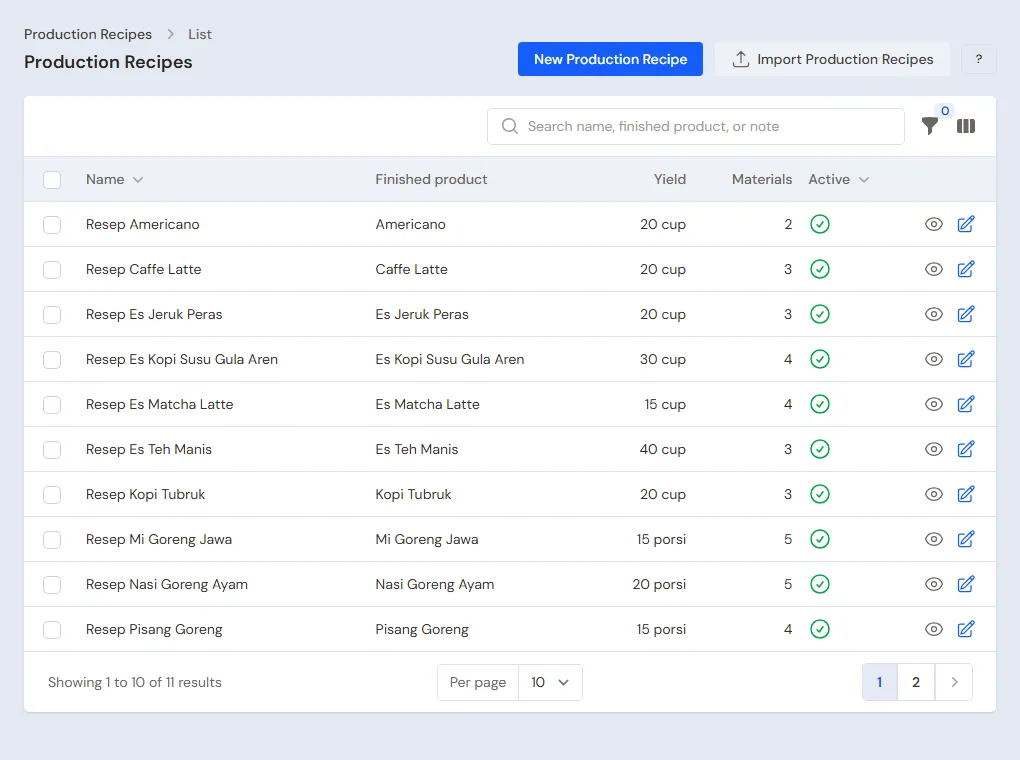
- Owner: in Master Data → Production Recipes, press New Production Recipe for every dish. Fill in the Finished product, the Yield and the Materials per recipe of one cooking:
| Recipe | Yield | Materials per recipe | Cost per portion |
|---|---|---|---|
| Nasi Putih | 20 portions | 2 kg Beras | Rp 24.000 : 20 = Rp 1.200 |
| Ayam Goreng | 10 portions | 10 Ayam Potong, 0,5 litre Minyak Goreng, 0,25 kg Bumbu Ungkep | Rp 70.000 : 10 = Rp 7.000 |
| Sayur Lodeh | 10 portions | 1 kg Sayur Campur, 0,5 litre Santan | Rp 20.000 : 10 = Rp 2.000 |
| Es Teh Manis | 20 glasses | 0,1 kg Teh Tubruk, 1 kg Gula Pasir | Rp 20.000 : 20 = Rp 1.000 |
When a production is recorded with another quantity, its materials are scaled to match. For example, 8 portions of Ayam Goreng use 8 Ayam Potong, 0,4 litre of oil and 0,2 kg of seasoning.
Product options
Owner: in Master Data → Product Options, press New Product Option:
- Pick the Product Ayam Goreng, fill in the Group name Sambal, turn on Required and fill in Maximum choices 1.
- Under Options, add Sambal Bawang and Sambal Ijo, each with a Price add-on of 0.
- Also create a group Gula (sugar) for Es Teh Manis: Manis, Kurang Manis and Tawar (sweet, less sweet, no sugar).
The options show on the Café Board and on the kitchen ticket. An extra that uses other materials, such as a fried egg, is made a dish of its own so its materials go down with the production.
Tables
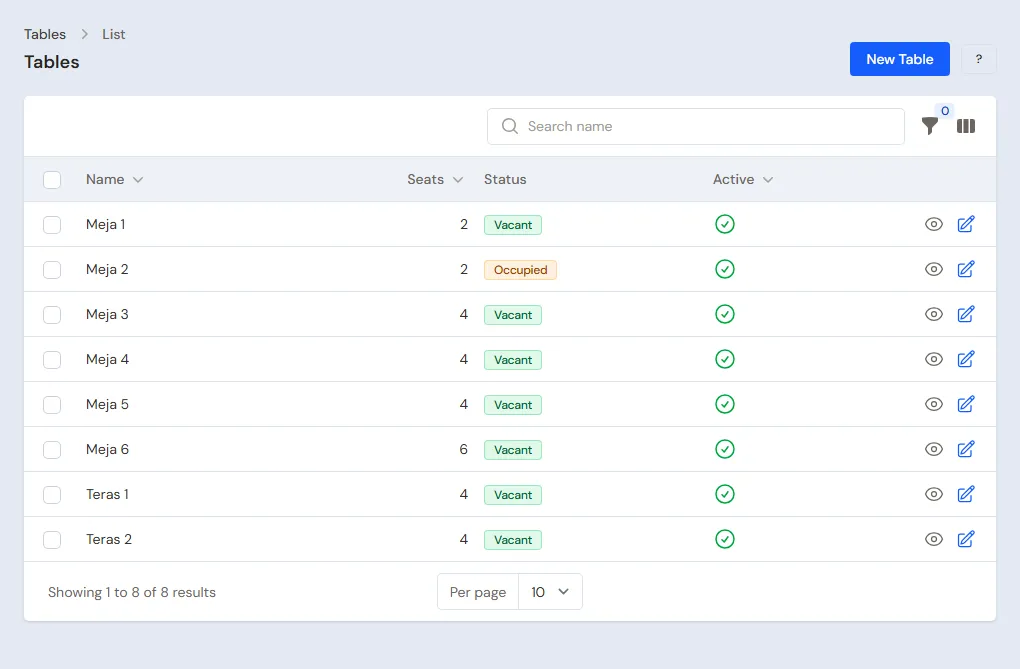
Owner: in Master Data → Tables, press New Table and fill in Meja 1 to Meja 6, each with 4 Seats. The tables show on the Café Board straight away as Vacant.
A restaurant that charges per person with a time limit for the meal (grill, shabu-shabu, buffet) does not follow this serve-yourself flow: see the All You Can Eat part of Cafés and restaurants.
GoFood and its prices
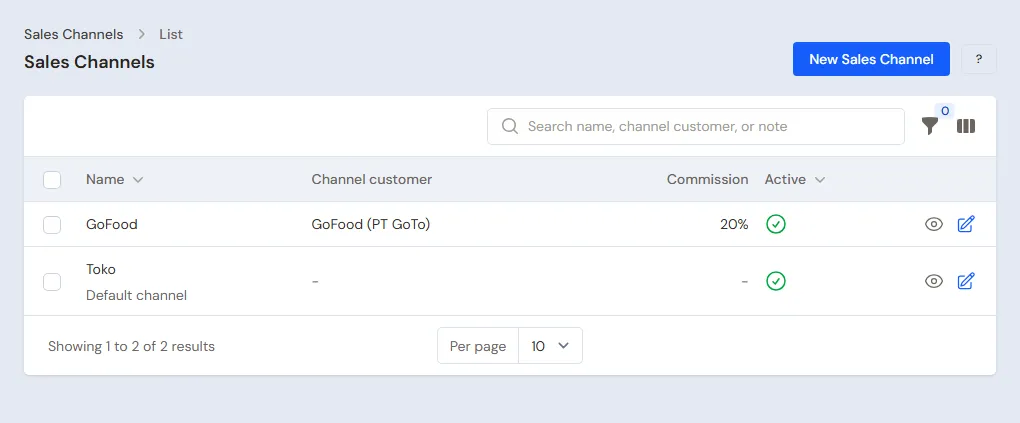
GoFood pays for its orders later, less a 20% commission.
- Owner: in Master Data → Customers, create the customer GoFood with Payment Terms (days) 7.
- Owner: in Master Data → Sales Channels, create the channel GoFood, pick GoFood as the Channel customer and fill in the Commission 20. The notes of this channel become receivables of GoFood. The commission here is only a note.
- Owner: open Ayam Goreng, tab Price List, press New Price, pick the Sales Channel GoFood, Unit Portion, Price Rp 18.000. Also create Nasi Putih at Rp 6.000. A dish with no GoFood price uses the stall's price.
- Owner: in Master Data → Expense Categories, create the category Komisi GoFood (GoFood commission).
See Understanding a product's Price List.
Suppliers and cash accounts
- Owner: in Master Data → Suppliers, list Pasar Pagi Bu Inah without terms and Toko Sembako Rejeki with Payment Terms (days) 7. See Adding a supplier.
- Owner: in Master Data → Cash Accounts, a new shop already has Owner Cash, Cashier Cash, Bank BCA and Bank BRI. Cashier Cash is the cash drawer, Bank BCA takes QRIS and the money from GoFood. See Cash accounts and bank accounts.
3. Starting capital and buying materials
- The Owner records capital of Rp 5.000.000 into Owner Cash in Transactions → Finance → Owner's Capital. See Capital contributions and withdrawals (drawings).
- The Owner records the note of Pasar Pagi Bu Inah in Transactions → Purchases, paid in full from Owner Cash: 20 Ayam Potong × Rp 5.000 = Rp 100.000, 2 kg of Sayur Campur Rp 20.000 and 1 litre of Santan Rp 20.000. That is Rp 140.000.
- The Owner records the note of Toko Sembako Rejeki, unpaid: 25 kg of Beras Rp 300.000, 5 litres of Minyak Goreng Rp 100.000, 2 kg of Bumbu Ungkep Rp 80.000, 1 kg of Teh Tubruk Rp 50.000 and 10 kg of Gula Pasir Rp 150.000. Its Rp 680.000 becomes a payable, due 7 days ahead.
- The Owner moves Rp 200.000 of change from Owner Cash to Cashier Cash in Transactions → Finance → Cash Transfers. See Moving money between cash accounts.
See Recording a purchase note.
4. A working day
| Time | Work | Who |
|---|---|---|
| Morning | Cooking and recording the production | Owner |
| Midday | Table and take-away orders | Waiter |
| Midday | Dishes done on the Kitchen Screen | Kitchen |
| Midday | Payments and GoFood orders | Cashier |
| Evening | Leftovers, the drawer money | Owner |
Morning: record what was cooked
Owner, once the dishes are cooked: in Transactions → Productions, press New Production, pick the Recipe, fill in the yield, then press Save & New for the next dish. Today, for example: Nasi Putih 10 portions, Ayam Goreng 8 portions, Sayur Lodeh 4 portions and Es Teh Manis 5 glasses.
The materials go down (1 kg of rice, 8 chicken pieces, 0,4 litre of oil, 0,2 kg of seasoning, 0,4 kg of vegetables, 0,2 litre of coconut milk, 0,025 kg of tea, 0,25 kg of sugar), and the dishes come in at the cost of their materials: Nasi Putih Rp 1.200, Ayam Goreng Rp 7.000, Sayur Lodeh Rp 2.000 and Es Teh Manis Rp 1.000 a portion.
A table's order
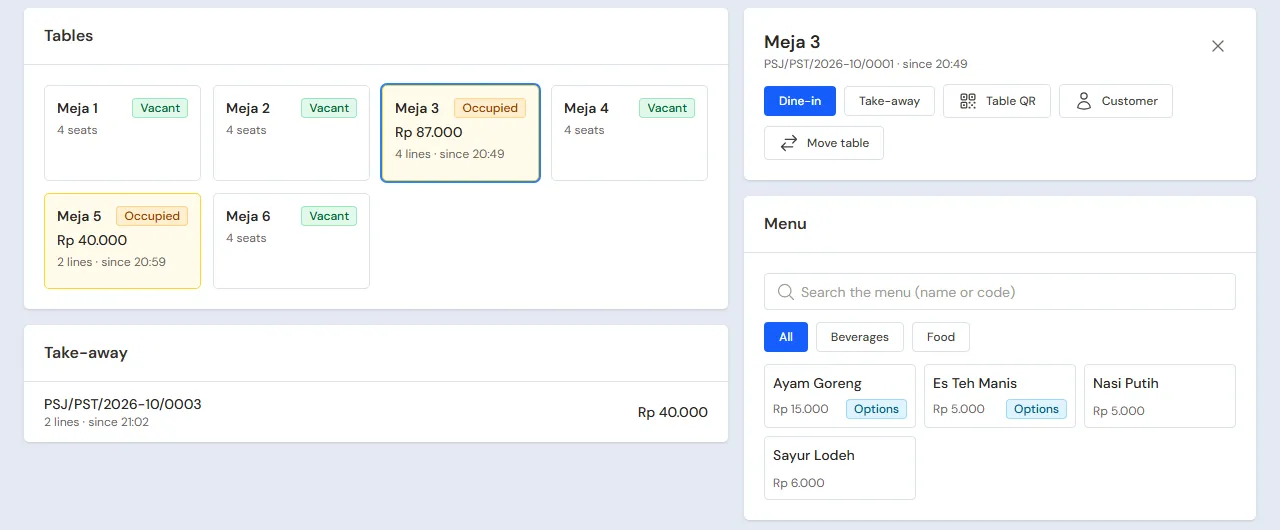
Waiter (Joko), on a phone: open Transactions → Café Board, then tap Meja 3.
- Tap the dishes ordered: 3 Nasi Putih, 3 Ayam Goreng (pick the sambal in the options window), 2 Sayur Lodeh and 3 Es Teh Manis.
- Press Send to kitchen. The lines are marked In the kitchen, and a kitchen ticket prints when a kitchen printer is set up on that device.
Guests who want to order from their own phone: press Table QR on that table's order and let them scan it. Their order waits on the Café Board until the waiter or the cashier presses Accept.
The kitchen
Kitchen (Mbak Sri), on the kitchen tablet: open Transactions → Kitchen Screen. The order of Meja 3 shows with its sambal choices. Once the dishes are taken from the pots and plated, press Done on every dish, or All done. On the Café Board the lines show Ready, and the card of Meja 3 gets a green ready to serve mark. The waiter takes the dishes to the table, then presses Served on that line, or All served, so another waiter does not bring them again. A place with many tables uses the Search tables box and the Ready to serve filter above the table list.
A take-away
Waiter: on the Café Board, press Take-away order, pick 2 Nasi Putih and 2 Ayam Goreng, and Send to kitchen. The total is Rp 40.000.
Paying at the cashier
Cashier (Wulan): in Transactions → Café Board, tap Meja 3, then press Pay.
- The bill of Meja 3: 3 × Rp 5.000 + 3 × Rp 15.000 + 2 × Rp 6.000 + 3 × Rp 5.000 = Rp 87.000.
- Pick the Payment method Cash, type the Amount received 100.000, then press Save payment. The change is Rp 13.000, and the table is vacant again.
- The take-away of Rp 40.000 is paid by QRIS: pick the Payment method QRIS and Into cash account Bank BCA.
Every payment becomes a sale note and the dishes' stock goes down.
A GoFood order
The Cashier records a GoFood order on the till through Transactions → Sales:
- Pick GoFood in Sales channel. The prices switch to the GoFood prices.
- Add 2 Nasi Putih (Rp 6.000) and 2 Ayam Goreng (Rp 18.000). That is Rp 48.000.
- Press Pay, then Unpaid, then Save transaction. The note becomes a receivable of GoFood.
See Recording a sale on the till.
Evening: leftovers and the drawer money
- The Owner opens Reports → Stock. Left today: Nasi Putih 3, Ayam Goreng 1, Sayur Lodeh 2 and Es Teh Manis 2.
- What is thrown away is taken out by the Owner in Transactions → Stock Adjustments, direction Out, category Damaged: 3 × Rp 1.200 + 1 × Rp 7.000 + 2 × Rp 2.000 + 2 × Rp 1.000 = Rp 16.600. Its value becomes a loss in the Profit & Loss. See Stock adjustments.
- The Owner counts the drawer: Rp 200.000 + Rp 87.000 = Rp 287.000, the same as Cashier Cash in Reports → Cash Balance. The takings of Rp 87.000 move to Owner Cash with Transactions → Finance → Cash Transfers.
Important: Record the production before selling starts. Dishes sold before their production is recorded go below zero in Reports → Stock, and the Dashboard shows a box of products made from a recipe whose stock is below zero, with a Record Production button. Do not enter opening stock for dishes: record their production, and the minus goes away with the right cost.
Tip: Drinks made when ordered, such as Es Teh Manis, need not be part of the morning production. Switch on Made when ordered on the product (the Tracking section), and every note saved takes its tea, sugar and glass at once. Dishes cooked in one go are still recorded with the morning production. See Café guide.
5. GoFood receivables, payables and expenses
- GoFood transfers Rp 48.000 − 20% = Rp 38.400 to Bank BCA. The Owner records a payment of Rp 48.000 for the GoFood note into Bank BCA in Transaction Details → Sale Payments, then an expense of Rp 9.600 in the category Komisi GoFood from Bank BCA in Transactions → Finance → Expenses. Bank BCA goes up by Rp 38.400, the money that came in. See Recording payment of an unpaid note and Recording shop expenses.
- Before the due date, the Owner pays Toko Sembako Rejeki's note of Rp 680.000 in Transaction Details → Purchase Payments. See Paying what you owe suppliers.
- The Owner records Rp 100.000 of electricity from Owner Cash in Transactions → Finance → Expenses, category Electricity. Gas and wages are recorded the same way; create their category in Master Data → Expense Categories when it is not there yet.
The day's profit: sales of Rp 87.000 + Rp 40.000 + Rp 48.000 = Rp 175.000, the cost of the dishes sold Rp 64.400 (7 × Rp 1.200 + 7 × Rp 7.000 + 2 × Rp 2.000 + 3 × Rp 1.000), so a gross profit of Rp 110.600, less Rp 16.600 of leftovers, Rp 100.000 of electricity and Rp 9.600 of GoFood commission.
6. Stocktake of materials
Once a week, the Owner weighs and counts the kitchen's materials in Transactions → Stocktakes. The difference, for example more seasoning used than the recipe says, is booked when the stocktake is finished. When the difference always goes the same way, correct the amount in the recipe. See Counting stock with a stocktake.
7. Reports per job title
| Report | What it holds | Opened by | When |
|---|---|---|---|
| Reports → Cash Balance | The money in the drawer, in Owner Cash and in the bank | Owner | Every evening |
| Reports → Stock | Dishes left and materials | Owner | Every evening and before buying |
| Reports → Receivables | GoFood notes not transferred yet | Owner | Every week |
| Reports → Payables | The grocery's notes and their due dates | Owner | Before buying |
| Reports → Profit & Loss | Sales, cost of the dishes sold, leftovers (Inventory Losses) and expenses | Owner | Every month |
The cashier sees the day's notes in Transaction Details → Sale Lines.
Extra: an All You Can Eat restaurant
A restaurant that charges per person with a time limit for the meal (grill, shabu-shabu, buffet) does not use the buffet flow above. All You Can Eat is an extra feature of this business type. The demo shop Bakar Bareng shows a real grill evening, and the example below uses its data: one package Grill Sepuasnya 90 Menit, six tables and three users (a cashier, a cashier manager and a warehouse user).
The package and the menu (Owner)
Owner: under Master Data → All You Can Eat Packages, press Create Package.
- Package name Grill Sepuasnya 90 Menit, Time limit for the meal 90 minutes, Last order before time is up 15 minutes.
- Late fee per block Rp 25.000 for each One late-fee block of 15 minutes, and Leftover-food fee per unit Rp 30.000 with Leftover-food unit 100 grams.
- Portion limit per guest for one order 3 and during the meal 15. Four guests at a table may order at most 12 portions in one order and 60 portions during the meal.
- Price per guest: Adult Rp 99.000 for lunch (11.00 to 17.00) and Rp 129.000 outside those hours (night); Child Rp 59.000 and Rp 79.000 (the Who counts as a child note: height 90 to 130 cm); Senior Rp 79.000 and Rp 99.000 (age 60 and over). The first price from the top that matches the day and time the table is opened is used, so the lunch price goes above the night price.
- Menu included in the package: Sapi Slice, Sapi Bulgogi, Ayam Marinasi, Udang Kupas, Sosis Bakar, Jamur Enoki, Sayur Sawi dan Paprika, Nasi Putih, and Kimchi dan Acar. Drinks (Es Teh Manis Rp 8.000, Es Jeruk Peras Rp 12.000, mineral water, cola) are not included and are billed apart.
The meat is bought by the kilo and made into a recipe per portion: Sapi Slice, Sapi Bulgogi and Ayam Marinasi use 0.1 kg of material each, so every portion that goes out lowers the meat stock and its cost goes to Cost of Goods Sold even though its price on the bill is 0. The Excel export button on the package list downloads the packages with the menu each includes.
One evening on the Café Board
- Cashier: on Transactions → Café Board, tap vacant Table 1, press Open package, choose the package, enter 2 adults, 1 child and 1 senior, then press Open table. The bill at once holds a package line for each guest kind: Rp 436.000 at the night price (2 x Rp 129.000, Rp 79.000, Rp 99.000) or Rp 336.000 at the lunch price. The table card counts down the time left.
- Cashier: the guests ask for more meat through the cashier or the table QR. Package items go in at no price and straight to the kitchen, limited to 3 portions per guest for one order (12 portions for four guests), so an order of 13 portions is refused with the reason. On the guest's phone this table shows the package note with its portion limits and the last-order time, package items marked Included in the package with no price, and drinks keep their price. Es Teh Manis and mineral water go on the bill as ordinary sales.
- Cashier: a guest joins later? Press Change guests. Guests already seated keep the price from when the table was opened and the time is not restarted. Table 6 in the demo shop starts with 2 adults and 2 children, and then a senior joins.
- After the last order (75 minutes from the table opening) the package menu can no longer be ordered, drinks still can. Table 3 in the demo shop is in this state and its card turns amber.
- Time is up: the table card turns red with the minutes over. Table 4 is 8 minutes over and is charged one late-fee block of Rp 25.000. The Cashier weighs the food left, presses Calculate fees and enters 1 (100 grams): a Leftover-food fee line of Rp 30.000 shows on the bill.
- Cashier: press Pay. Table 5 (a group of 6 guests) paid in cash after 8 minutes over and left 200 grams: the final note holds the package for 6 adults, drinks, the late fee of Rp 25.000 and the leftover-food fee of Rp 60.000.
- A waived fee: the cashier may not remove a fee, so at Table 6, which ran 22 minutes over because the kitchen was full, the Cashier used Ask a manager from that table's sales order, wrote the reason, and the cashier manager approved. The cashier removed the late-fee line once with that approval, the guests paid by transfer, and the fee is no longer on the note. The Ask a manager feature must be on.
- Owner: under Reports → All You Can Eat Profit by Package, read the tables and guests, package revenue, fees, drink sales, meat cost, profit and profit per guest. The report is read from the journals of the notes of paid tables, so a table still eating is not in it.
The package list, the prices per guest and the package table sessions are in the shop backup (Settings → Backup). Every button is explained in full in Cafe and restaurant.
8. Checklists
- Every morning: the Owner records the production of every dish before the stall opens.
- Every day: the Waiter records every order on the Café Board and the kitchen marks it Done. The Cashier takes the payments and records GoFood. In the evening the Owner takes the leftovers out and matches the drawer money.
- Every week: the Owner records the GoFood transfer with its commission, pays the grocery, and counts the materials.
- Every month: the Owner records electricity, gas and wages, then reads the Profit & Loss.
A running business
This part is for the team moving a running eatery to Vende: materials in the kitchen already, GoFood money not transferred yet, staff advances and a payable to the grocery. The order is always the same:
- Enter the master data.
- Practise transactions until everyone is used to them.
- Empty the practice transactions.
- Enter the opening balances on the first day.
- Go live.
The opening balances come last on purpose, so the practice does not spoil their figures. The examples in this part use Warung Makan Bu Ratmi from the new business part.
1. Master data
Do the parts Who does what, 1. Shop details and users and 2. Master data above. Also list every supplier still owed money. The master data, recipes, product options, tables and GoFood prices included, is not deleted when the practice transactions are emptied.
2. Team practice
Work in a practice shop of the type Food and drink stall with all five accounts. Every step names who and what must show.
Practice 1: master data
- Owner: the shop details, the four users, the eight materials, the four dishes with their recipes, the sambal and sugar options, six tables, GoFood with its prices and both suppliers.
- Check: Joko sees only the Café Board in the sidebar, and Mbak Sri only the Kitchen Screen.
- Waiter: open Transactions → Café Board and tap Ayam Goreng at Meja 1.
- Check: the options window asks for the sambal before the dish joins the order. Cancel this practice order.
Practice 2: a working day
- Owner: capital of Rp 5.000.000, both purchase notes and the Cash Transfer of Rp 200.000 as in part 3, then the morning production as in part 4.
- Joko and Mbak Sri: the order of Meja 3 and the take-away, sent to the kitchen and marked Done.
- Cashier: Meja 3 paid Rp 87.000 in cash and the take-away Rp 40.000 by QRIS, then GoFood Rp 48.000 unpaid.
- Owner: leftovers of Rp 16.600, the Cash Transfer of Rp 87.000 to Owner Cash, the GoFood payment of Rp 48.000 with the commission expense of Rp 9.600, and the electricity expense of Rp 100.000.
After Practice 2 this must show:
| Report | What must show | Opened by |
|---|---|---|
| Reports → Cash Balance | Owner Cash Rp 5.000.000 − Rp 140.000 − Rp 200.000 + Rp 87.000 − Rp 100.000 = Rp 4.647.000, Cashier Cash Rp 200.000, Bank BCA Rp 40.000 + Rp 48.000 − Rp 9.600 = Rp 78.400 | Owner |
| Reports → Receivables | Empty: the GoFood note is paid | Owner |
| Reports → Payables | Toko Sembako Rejeki Rp 680.000 | Owner |
| Reports → Stock | Every dish 0, Ayam Potong 12, Beras 24 kg, Sayur Campur 1,6 kg, Santan 0,8 litre | Owner |
| Reports → Profit & Loss | Sales of Goods Rp 175.000, Cost of Goods Sold Rp 64.400, Inventory Losses Rp 16.600, the expenses Electricity Rp 100.000 and Komisi GoFood Rp 9.600 | Owner |
Practice 3: opening balances
Enter the opening balances with the example of part 4 below, check them as in part 5, then empty them again.
3. Emptying the practice transactions
Done by the Owner in Settings → Empty Transactions, button Empty All Transactions. Sale notes with their table orders, productions, purchases, payments, cash transfers, stock adjustments, stocktakes, expenses, capital and opening balances are deleted. Products, recipes, product options, tables, the GoFood channel with its prices, customers, suppliers, cash accounts, users and settings stay. Vende makes a full backup first. See Emptying transactions or all data.
4. Opening balances
Done by the Owner in Settings → Opening Balances on the morning of the first day, before cooking, with As of that day. See Entering opening cash, stock, receivables and payables.
- Opening Stock: only the materials in the kitchen, for example Beras 20 Kilograms at Rp 12.000, Minyak Goreng 4 Litres at Rp 20.000 and Gula Pasir 5 Kilograms at Rp 15.000. Dishes get no opening stock: that day's cooking is recorded with the morning production as usual.
- Opening Receivables: the GoFood money not transferred yet, one row for the customer GoFood, as much as will come into the bank, for example Rp 350.000 due in 3 days. Its commission was taken before the first day, so there is no commission expense when that money comes in.
- Opening Advances: Joko's advance not paid back yet, for example Rp 200.000. List Joko first in Master Data → Borrowers. Its repayments are recorded in Transactions → Finance → Advances. See Recording advances and their repayments.
- Opening Payables: what is left on Toko Sembako Rejeki's note, Rp 400.000, with its due date.
- Opening Cash: the money counted in every account, for example Cashier Cash Rp 200.000, Owner Cash Rp 1.500.000 and Bank BCA Rp 3.000.000.
5. Check before going live
| Report | What must show | Opened by |
|---|---|---|
| Reports → Cash Balance | Cashier Cash Rp 200.000, Owner Cash Rp 1.500.000, Bank BCA Rp 3.000.000 | Owner |
| Reports → Stock | Rice 20 kg, oil 4 litres, sugar 5 kg, every dish 0 | Owner |
| Reports → Receivables | GoFood Rp 350.000 | Owner |
| Reports → Payables | Toko Sembako Rejeki Rp 400.000 | Owner |
The figures differ? The Owner corrects the row in Settings → Opening Balances before any real transaction is recorded.
6. Going live
From that day every dish is recorded with the morning production, every order on the Café Board and every purchase in Vende, as in the new business part, with the same checklist. The GoFood transfer for the opening receivable is recorded in Transaction Details → Sale Payments without a commission expense. In the first week the Owner checks every evening that no dish is below zero in Reports → Stock.