
Street vendor guide
A learning path for a food cart or booth, new or running: recipes per portion, selling from a phone, spice levels, GoFood, materials per note, opening balances.
On this page
- A new business
- Who does what
- 1. Shop details and users
- 2. Master data
- 3. Starting capital and buying materials
- 4. One selling day
- 5. GoFood money and other expenses
- 6. Reports for the owner
- 7. Checklists
- A running business
- 1. Master data
- 2. Team practice
- 3. Emptying the practice transactions
- 4. Opening balances
- 5. Check before going live
- 6. Going live
This guide is for the team setting up Vende at a food cart, booth or street stall that makes its food and drinks when they are ordered and records its sales from a phone. It has two parts: A new business for a stall just opening, with no stock, receivables or payables from before, and A running business for one moving to Vende, with practice and opening balances. The example is Kebab Mas Bima. The names of the stall, customers, suppliers and people and all the figures are made up.
The business in short:
- Menu: Kebab Ayam (chicken kebab) and Kebab Sapi (beef kebab) by the portion, with a spice level, and Es Teh Jumbo (large iced tea) by the cup.
- Materials: tortilla wraps, kebab meat, vegetables and sauce, cups, tea and sugar, bought in cash.
- Making: every portion is made when it is ordered, so its recipe's materials go down when the note is saved.
- Selling: buyers pay in cash or by QRIS at the cart, and GoFood orders use GoFood prices.
Work from the top down. Every step names its menu, who does it, what changes afterwards and an example figure.
The features in this guide come with the Street vendor/food cart business type package, except those marked extra. The shop's features show under Settings → Subscription, section This shop's features. If a menu is missing, contact the Vende team.
Tip: Lost on a page? Press the ? button at the top of that page. A short tour shows every field, on the till on a phone too.
A new business
Who does what
This package holds two users, the owner included.
| Part of the stall | Job title in Vende | What they do and open |
|---|---|---|
| Owner | Owner | Every menu: products, recipes, buying materials, expenses, opening balances and every report |
| Cart keeper | Cashier | The till on a phone: cash, QRIS and GoFood sales |
The cart keeper opens no reports, purchases or cash. A second cart elsewhere is a branch, an extra feature; contact the Vende team when needed. Every role is explained in Roles and permissions.
1. Shop details and users
Done by the Owner: fill in Settings → Shop (name, the stall's address, WhatsApp, a logo for the receipt), then create the cart keeper's account in Settings → Users with the Job title Cashier. See Adding and managing users.
The people at Kebab Mas Bima: Mas Bima (owner) and Dani (cart keeper, Cashier).
2. Master data
A shop of this business type already has the product categories Food, Beverages, Snacks, Ingredients and Packaging, the units Portion, Glass and Cup, and the expense categories Cooking Gas, Ice and Market Fees.
Materials
Owner: in Master Data → Products, create every material with the Type Raw Material:
| Material | Category | Base Unit | Cost Price |
|---|---|---|---|
| Kulit Tortila (tortilla wrap) | Ingredients | Pieces | Rp 2.000 |
| Daging Ayam Kebab (chicken kebab meat) | Ingredients | Kilogram | Rp 60.000 |
| Daging Sapi Kebab (beef kebab meat) | Ingredients | Kilogram | Rp 120.000 |
| Sayur dan Saus (vegetables and sauce) | Ingredients | Kilogram | Rp 40.000 |
| Gelas Jumbo (large cup) | Packaging | Pieces | Rp 1.200 |
| Teh Tubruk (loose tea) | Ingredients | Kilogram | Rp 50.000 |
| Gula Pasir (sugar) | Ingredients | Kilogram | Rp 15.000 |
See Adding a product.
The menu and its recipes per portion
- Owner: in Master Data → Products, create Kebab Ayam (Portion, category Food, Selling Price Rp 15.000), Kebab Sapi (Portion, Food, Rp 20.000) and Es Teh Jumbo (Cup, Beverages, Rp 5.000), with the Type Finished Goods and a Cost Price of 0.
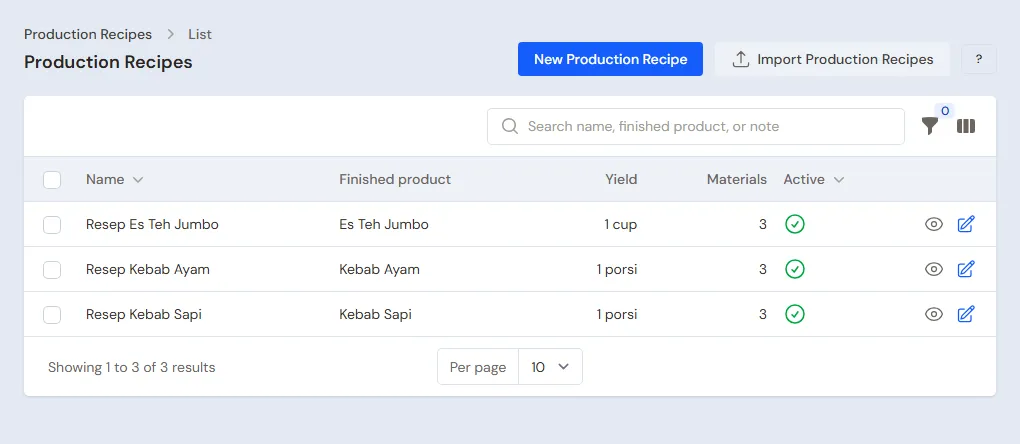
- Owner: in Master Data → Production Recipes, press New Production Recipe for every menu item, with a Yield of 1:
| Recipe | Materials per recipe | Cost per portion |
|---|---|---|
| Kebab Ayam | 1 Kulit Tortila, 0,05 kg Daging Ayam Kebab, 0,05 kg Sayur dan Saus | Rp 2.000 + Rp 3.000 + Rp 2.000 = Rp 7.000 |
| Kebab Sapi | 1 Kulit Tortila, 0,05 kg Daging Sapi Kebab, 0,05 kg Sayur dan Saus | Rp 2.000 + Rp 6.000 + Rp 2.000 = Rp 10.000 |
| Es Teh Jumbo | 1 Gelas Jumbo, 0,01 kg Teh Tubruk, 0,02 kg Gula Pasir | Rp 1.200 + Rp 500 + Rp 300 = Rp 2.000 |
- When the first recipe of a new menu item is saved, Vende switches on Made when ordered on the product at once and says so. The mark is in the Tracking section in Master Data → Products. A menu item sold before its recipe was made is switched on there by hand.
Spice level
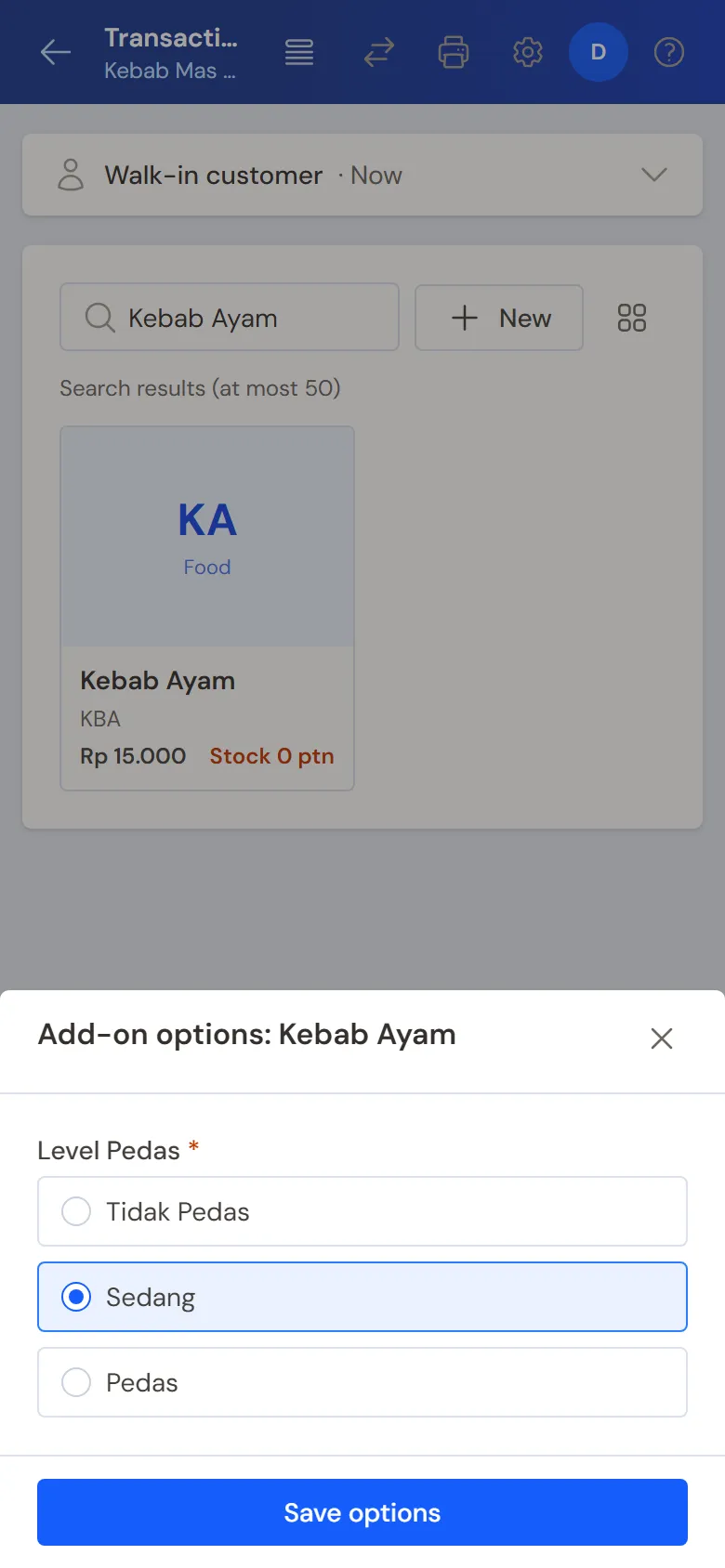
Owner: in Master Data → Product Options, press New Product Option, pick the Product Kebab Ayam, fill in the Group name Level Pedas (spice level), turn on Required, Maximum choices 1, then add Tidak Pedas, Sedang and Pedas (mild, medium, hot) with a Price add-on of 0. Create the same for Kebab Sapi.
An extra that uses materials, such as extra cheese, is made a menu item of its own (Kebab Ayam Keju) with its recipe and the Made when ordered mark, so the cheese goes down when the note is saved.
GoFood and its prices
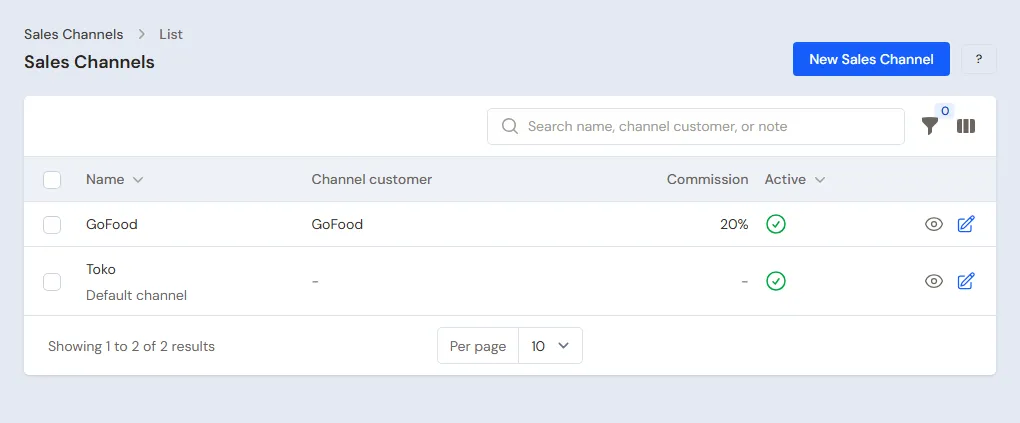
- Owner: in Master Data → Customers, create the customer GoFood with Payment Terms (days) 7.
- Owner: in Master Data → Sales Channels, create the channel GoFood, pick GoFood as the Channel customer and fill in the Commission 20. The notes of this channel become receivables of GoFood.
- Owner: open Kebab Sapi, tab Price List, press New Price, pick the Sales Channel GoFood, Unit Portion, Price Rp 24.000. See Understanding a product's Price List.
- Owner: in Master Data → Expense Categories, create the category Komisi GoFood (GoFood commission).
Suppliers and cash accounts
- Owner: in Master Data → Suppliers, list Toko Frozen Sinar and Warung Sembako Pak Ali, both without terms.
- Owner: in Master Data → Cash Accounts, Cashier Cash is the cart's drawer and Bank BCA takes QRIS and the money from GoFood. See Cash accounts and bank accounts.
3. Starting capital and buying materials
- The Owner records capital of Rp 2.000.000 into Owner Cash in Transactions → Finance → Owner's Capital. See Capital contributions and withdrawals (drawings).
- The Owner records two notes paid in full from Owner Cash in Transactions → Purchases: Toko Frozen Sinar 100 Kulit Tortila Rp 200.000, 2 kg of Daging Ayam Kebab Rp 120.000, 1 kg of Daging Sapi Kebab Rp 120.000 and 2 kg of Sayur dan Saus Rp 80.000, so Rp 520.000; Warung Sembako Pak Ali 100 Gelas Jumbo Rp 120.000, 0,5 kg of Teh Tubruk Rp 25.000 and 2 kg of Gula Pasir Rp 30.000, so Rp 175.000.
- The Owner moves Rp 100.000 of change from Owner Cash to Cashier Cash in Transactions → Finance → Cash Transfers.
See Recording a purchase note.
4. One selling day
| Time | Work | Who |
|---|---|---|
| All day | Cash, QRIS and GoFood sales from the phone | Cashier |
| Closing | Ice, the drawer money | Owner |
Selling from the phone
The Cashier (Dani) opens the till on the phone through Transactions → Sales. On a phone, the note details are summed up in one line at the top.
- Tap Kebab Ayam. The options window asks for the Level Pedas; pick Sedang, then press Save options.
- The first buyer, for example: 2 Kebab Ayam and 2 Es Teh Jumbo, Rp 40.000. Press Pay, type the money received, then Save transaction.
By the evening the cash notes add up to Rp 290.000 for 10 Kebab Ayam, 4 Kebab Sapi and 12 Es Teh Jumbo. A buyer who pays by QRIS takes 2 Kebab Ayam and 2 Es Teh Jumbo, Rp 40.000: in the payment window, pick Bank BCA and the method QRIS. See Recording a sale on the till and Selling from a phone with Quick sale.
A GoFood order
Cashier: pick GoFood in Sales channel, add 2 Kebab Sapi (GoFood price Rp 24.000), then press Pay, Unpaid and Save transaction. The note of Rp 48.000 becomes a receivable of GoFood.
Materials go down when the note is saved
Every menu item is marked Made when ordered, so every note saved takes its recipe's materials at once, and the line's cost is what those materials cost. The menu item itself has no stock, so it never goes below zero and needs no production when the stall closes.
When the note's warehouse does not hold enough of a material, the menu line gets a Short on materials warning, the note can still be saved, and the material goes below zero until its opening stock or purchase is recorded.
At closing the Owner (Mas Bima) opens Reports → Stock: the materials are down by 18 wraps, 0,6 kg of chicken, 0,3 kg of beef, 0,9 kg of vegetables and sauce, 14 cups, 0,14 kg of tea and 0,28 kg of sugar. The menu sold that day cost 12 × Rp 7.000 + 6 × Rp 10.000 + 14 × Rp 2.000 = Rp 172.000. A return, a change, a void and a deleted note bring the materials back.
Important: A stall that used to record the production of its menu at closing and then switches this on: a menu item still below zero from the old way is recorded once with Transactions → Productions for as much as it is below zero, or left as it is. See Café guide.
Ice and the drawer money
-
Rp 10.000 of ice is paid from the drawer. The Owner records it in Transactions → Finance → Expenses, category Ice, from Cashier Cash. See Recording shop expenses.
-
The Owner counts the drawer: Rp 100.000 + Rp 290.000 − Rp 10.000 = Rp 380.000, the same as Cashier Cash in Reports → Cash Balance. In the same report, Owner Cash shows Rp 1.205.000 (Rp 2.000.000 − Rp 520.000 − Rp 175.000 − Rp 100.000) and Bank BCA Rp 40.000 from the QRIS buyer.
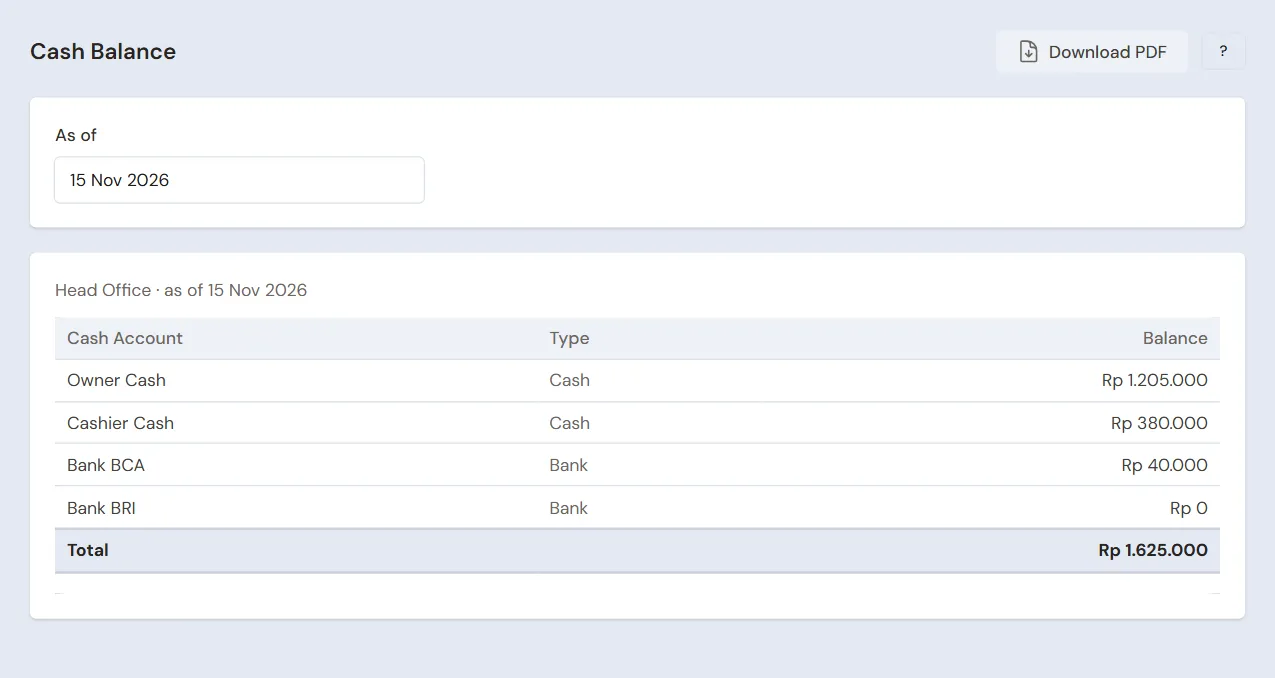
Cash Balance: the money in each account before Rp 280.000 is moved -
The Owner moves Rp 280.000 to Owner Cash with Transactions → Finance → Cash Transfers. The Rp 100.000 of change stays in the drawer.
5. GoFood money and other expenses
- GoFood transfers Rp 48.000 − 20% = Rp 38.400 to Bank BCA. The Owner records a payment of Rp 48.000 for the GoFood note in Transaction Details → Sale Payments, then an expense of Rp 9.600 in the category Komisi GoFood from Bank BCA in Transactions → Finance → Expenses. Bank BCA goes up by Rp 38.400. See Recording payment of an unpaid note.
- Gas and the pitch fee are recorded by the Owner the same way, in the categories Cooking Gas and Market Fees.
The day's profit: sales of Rp 290.000 + Rp 40.000 + Rp 48.000 = Rp 378.000, cost of the menu sold Rp 172.000, so a gross profit of Rp 206.000, less Rp 10.000 of ice and, when GoFood pays, Rp 9.600 of commission.
6. Reports for the owner
| Report | What it holds | Opened by | When |
|---|---|---|---|
| Reports → Stock | The materials left after what was sold that day | Owner | Every closing |
| Reports → Cash Balance | The money in the drawer, in Owner Cash and in the bank | Owner | Every closing |
| Reports → Receivables | GoFood notes not transferred yet | Owner | Every week |
| Reports → Profit & Loss | Sales, cost of the menu sold and expenses | Owner | Every month |
The cashier sees the day's notes in Transaction Details → Sale Lines.
7. Checklists
- Every day: the Cashier records every sale on the phone. At closing, the Owner records the ice and matches the drawer money.
- Every week: the Owner records the GoFood transfer with its commission, weighs the meat and vegetables with Transactions → Stocktakes, and buys materials.
- Every month: the Owner reads the Profit & Loss. When the meat always comes up short in the stocktake, raise its amount in the recipe. See Counting stock with a stocktake.
A running business
This part is for a running stall that starts using Vende: materials already in the cart and the freezer, and maybe GoFood money not transferred yet. The order is always the same:
- Enter the master data.
- Practise transactions until the cart keeper is used to them.
- Empty the practice transactions.
- Enter the opening balances on the first day.
- Go live.
The opening balances come last on purpose, so the practice does not spoil their figures. The examples in this part use Kebab Mas Bima from the new business part.
1. Master data
Do the parts Who does what, 1. Shop details and users and 2. Master data above. The master data, recipes, spice levels and GoFood prices included, is not deleted when the practice transactions are emptied.
2. Team practice
Work in a practice shop of the type Street vendor/food cart with both accounts.
Practice 1: master data
- Owner: the shop details, Dani's account, the seven materials, the three menu items with their recipes and the Made when ordered mark, the spice levels, GoFood with its prices and both suppliers.
- Check: Dani sees only Product Options, Sales Channels, Customers, Sales and Sale Lines in the sidebar.
- Cashier: open the till on the phone and tap Kebab Sapi.
- Check: the options window asks for the spice level.
Practice 2: one selling day
- Owner: capital of Rp 2.000.000, both purchase notes and the Cash Transfer of Rp 100.000 as in part 3.
- Cashier: cash notes up to Rp 290.000, the QRIS note of Rp 40.000 and GoFood Rp 48.000 unpaid, as in part 4.
- Owner: the ice expense of Rp 10.000 from Cashier Cash and the Cash Transfer of Rp 280.000.
After Practice 2 this must show:
| Report | What must show | Opened by |
|---|---|---|
| Reports → Cash Balance | Owner Cash Rp 2.000.000 − Rp 520.000 − Rp 175.000 − Rp 100.000 + Rp 280.000 = Rp 1.485.000, Cashier Cash Rp 100.000, Bank BCA Rp 40.000 | Owner |
| Reports → Receivables | GoFood Rp 48.000 | Owner |
| Reports → Stock | Every menu item 0, Kulit Tortila 82, Daging Ayam Kebab 1,4 kg, Daging Sapi Kebab 0,7 kg, Gelas Jumbo 86 | Owner |
| Reports → Profit & Loss | Sales of Goods Rp 378.000, Cost of Goods Sold Rp 172.000, Ice Rp 10.000 | Owner |
Practice 3: opening balances
Enter the opening balances with the example of part 4 below, check them as in part 5, then empty them again.
3. Emptying the practice transactions
Done by the Owner in Settings → Empty Transactions, button Empty All Transactions. Sale notes, productions, purchases, payments, cash transfers, expenses, capital and opening balances are deleted. Products, recipes, product options, the GoFood channel with its prices, customers, suppliers, cash accounts, users and settings stay. Vende makes a full backup first. See Emptying transactions or all data.
4. Opening balances
Done by the Owner in Settings → Opening Balances on the morning of the first day, before the stall opens, with As of that day. See Entering opening cash, stock, receivables and payables.
- Opening Stock: only the materials, for example Kulit Tortila 60 Pieces at Rp 2.000, Daging Ayam Kebab 1,5 Kilograms at Rp 60.000 and Gelas Jumbo 80 Pieces at Rp 1.200. Menu items get no opening stock.
- Opening Receivables: the GoFood money not transferred yet, as much as will come into the bank after commission, for example Rp 120.000. When that money comes in, record its payment without a commission expense.
- Opening Cash: the money counted, for example Cashier Cash Rp 100.000 and Owner Cash Rp 500.000.
5. Check before going live
| Report | What must show | Opened by |
|---|---|---|
| Reports → Cash Balance | Cashier Cash Rp 100.000, Owner Cash Rp 500.000 | Owner |
| Reports → Stock | Wraps 60, chicken 1,5 kg, cups 80, every menu item 0 | Owner |
| Reports → Receivables | GoFood Rp 120.000 | Owner |
The figures differ? The Owner corrects the row in Settings → Opening Balances before any real transaction is recorded.
6. Going live
From that day every sale is recorded on the phone and every purchase in Vende, as in the new business part, with the same checklist. In the first week the Owner makes sure every evening that the materials left in Reports → Stock match what is on the cart.