
Cake and bread shop guide
A learning path for a cake and bread shop, new or running: recipes per batch of dough, morning production with batches, promotions, cake orders with a deposit.
On this page
- A new business
- Who does what
- 1. Shop details and users
- 2. Master data
- 3. Starting capital and buying materials
- 4. A working day
- 5. Expired bread, payables and expenses
- 6. Stocktake of materials
- 7. Reports per job title
- 8. Checklists
- A running business
- 1. Master data
- 2. Team practice
- 3. Emptying the practice transactions
- 4. Opening balances
- 5. Check before going live
- 6. Going live
This guide is for the team setting up Vende at a cake and bread shop that bakes bread and cakes every morning for the display case, and takes orders for birthday cakes with a down payment. It has two parts: A new business for a shop just opening, with no stock, receivables or payables from before, and A running business for one moving to Vende, with team practice and opening balances. The example is Dapur Kue Bu Wiwik. The names of the shop, customers, suppliers and people and all the figures are made up.
The business in short:
- Products: Roti Sobek Cokelat (chocolate pull-apart bread) by the piece, which keeps three days, Bolu Pandan (pandan sponge cake) by the tray, and Kue Ulang Tahun 20 cm (birthday cake) made to order.
- Materials: flour, sugar, butter, sprinkles, cream and cake boxes from a baking supplier with 14 days to pay, and eggs from a farmer paid in cash.
- Production: every morning the bread and cakes are baked by their recipes, with a batch number and an expiry date for the bread.
- Selling: buyers come to the display case and pay in cash or by QRIS. Birthday cakes are ordered a few days ahead with a down payment.
Work from the top down. Every step names its menu, who does it, what changes afterwards and an example figure.
The features in this guide come with the Cake/bakery shop business type package, except those marked extra. The shop's features show under Settings → Subscription, section This shop's features. If a menu is missing, contact the Vende team.
Tip: Lost on a page? Press the ? button at the top of that page. A short tour shows every field, on the till and the production screen too.
A new business
Who does what
This package holds four users, the owner included.
| Part of the shop | Job title in Vende | What they do and open |
|---|---|---|
| Owner | Owner | Every menu: suppliers and purchase notes, promotions, product options, expenses, opening balances and every report |
| Display case cashier | Cashier | The till, cake orders with a down payment, customers |
| Two kitchen staff | Warehouse Admin | Products, batches, recipes, the morning production, expired bread, stocktakes, Reports → Stock |
The cashier opens no purchases, cash or reports. Every role is explained in Roles and permissions.
1. Shop details and users
Done by the Owner: fill in Settings → Shop (name, address, WhatsApp, logo), then create the accounts in Settings → Users with the Job title of the table above. See Adding and managing users.
The people at Dapur Kue Bu Wiwik: Bu Wiwik (owner), Mbak Nia (Cashier), and Pak Darto and Mbak Ika (kitchen, Warehouse Admin).
2. Master data
A shop of this business type already has the product categories Cakes, Bread, Cookies, Ingredients and Packaging, and the units Tray, Box and Slice besides the common units such as Kilogram and Pieces. This business type has no expense categories of its own; the common ones such as Electricity and Salaries are there.
Materials
Warehouse Admin: in Master Data → Products, create every material with the Type Raw Material:
| Material | Category | Base Unit | Cost Price |
|---|---|---|---|
| Tepung Terigu (flour) | Ingredients | Kilogram | Rp 12.000 |
| Gula Pasir (sugar) | Ingredients | Kilogram | Rp 15.000 |
| Telur Ayam (eggs) | Ingredients | Kilogram | Rp 28.000 |
| Mentega (butter) | Ingredients | Kilogram | Rp 60.000 |
| Cokelat Meses (chocolate sprinkles) | Ingredients | Kilogram | Rp 40.000 |
| Krim Kue (cake cream) | Ingredients | Kilogram | Rp 56.000 |
| Kotak Kue (cake box) | Packaging | Pieces | Rp 2.000 |
See Adding a product.
Bread and cakes with batches
Warehouse Admin in Master Data → Products, with the Type Finished Goods and a Cost Price of 0:
- Roti Sobek Cokelat: category Bread, Base Unit Pieces, Selling Price Rp 15.000. Under Tracking, switch on Track batches & expiry, so every bake gets a batch number and an expiry date.
- Bolu Pandan: category Cakes, Base Unit Tray, Selling Price Rp 60.000.
- Kue Ulang Tahun 20 cm: category Cakes, Base Unit Pieces, Selling Price Rp 250.000.
When they are sold, the batch that expires first leaves first. See Batches and expiry dates.
Recipes per batch of dough
Warehouse Admin: in Master Data → Production Recipes, press New Production Recipe for every product:
| Recipe | Yield | Materials per recipe | Cost |
|---|---|---|---|
| Roti Sobek Cokelat | 20 pcs | 2 kg Tepung Terigu, 0,4 kg Gula Pasir, 0,5 kg Telur Ayam, 0,2 kg Mentega, 0,1 kg Cokelat Meses | Rp 60.000, so Rp 3.000 a piece |
| Bolu Pandan | 1 tray | 0,25 kg Tepung Terigu, 0,2 kg Gula Pasir, 0,5 kg Telur Ayam, 0,1 kg Mentega, 1 Kotak Kue | Rp 28.000 |
| Kue Ulang Tahun 20 cm | 1 pcs | 0,5 kg Tepung Terigu, 0,4 kg Gula Pasir, 1 kg Telur Ayam, 0,5 kg Mentega, 0,5 kg Krim Kue, 1 Kotak Kue | Rp 100.000 |
The oven's gas and electricity are not in the recipe: both are recorded as monthly expenses.
Product options and promotions
- Owner: in Master Data → Product Options, press New Product Option, pick the Product Bolu Pandan, fill in the Group name Potong (cutting), turn on Required, Maximum choices 1, then add the options Utuh (whole) and Dipotong 10 (cut in 10) with a Price add-on of 0. The cashier picks it on the till, and the choice is printed on the receipt.
- Owner: in Master Data → Promotions, press New Promotion: Name Roti Sobek beli 5 gratis 1 (buy 5 get 1 free), Starts today, Ends a month ahead, under What must be bought Roti Sobek Cokelat with the Minimum quantity 5, and under What is given free Roti Sobek Cokelat with the Free quantity 1. Press Create, then turn on Active.
The free bread is added by itself when the note is saved, while it is in stock. Its cost is booked as Promotion Expense. See Automatic promotions.
Suppliers and cash accounts
- Owner: in Master Data → Suppliers, list Toko Bahan Kue Sumber Rasa with Payment Terms (days) 14 and Peternak Telur Pak Karim without terms. See Adding a supplier.
- Owner: in Master Data → Cash Accounts, use Cashier Cash for the display case's drawer and Bank BCA for QRIS. See Cash accounts and bank accounts.
3. Starting capital and buying materials
- The Owner records capital of Rp 5.000.000 into Owner Cash in Transactions → Finance → Owner's Capital. See Capital contributions and withdrawals (drawings).
- The Owner records the note of Toko Bahan Kue Sumber Rasa in Transactions → Purchases, unpaid: 25 kg of Tepung Terigu Rp 300.000, 10 kg of Gula Pasir Rp 150.000, 5 kg of Mentega Rp 300.000, 2 kg of Cokelat Meses Rp 80.000, 2 kg of Krim Kue Rp 112.000 and 50 Kotak Kue Rp 100.000. Its Rp 1.042.000 becomes a payable, due 14 days ahead.
- The Owner records the note of Peternak Telur Pak Karim, paid in full from Owner Cash: 10 kg of Telur Ayam × Rp 28.000 = Rp 280.000.
- The Owner moves Rp 200.000 of change from Owner Cash to Cashier Cash in Transactions → Finance → Cash Transfers.
See Recording a purchase note.
4. A working day
| Time | Work | Who |
|---|---|---|
| Dawn | Baking and recording the production with a batch | Warehouse Admin |
| All day | Display case sales, the promotion | Cashier |
| Midday | A birthday cake order with a down payment | Cashier |
| Closing | The drawer money | Owner |
| Pickup day | Baking the ordered cake, the customer collects it | Warehouse Admin and Cashier |
Dawn: production with a batch
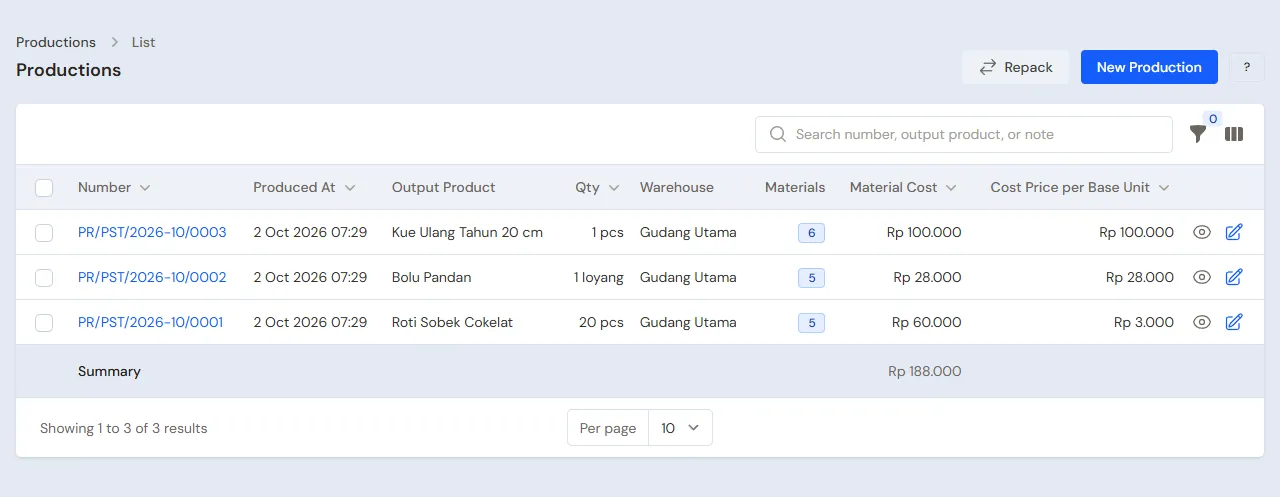
Warehouse Admin (Pak Darto), once the bread is out of the oven: in Transactions → Productions, press New Production.
- Pick the Recipe Roti Sobek Cokelat and fill in the yield 40. The materials are worked out as twice the recipe.
- In the finished goods batch, create a new batch RS-0211 that expires three days ahead.
- Press Save & New, then record 3 trays of Bolu Pandan with its recipe.
The materials of both products go down (4,75 kg of flour, 1,4 kg of sugar, 2,5 kg of eggs, 0,7 kg of butter, 0,2 kg of sprinkles and 3 boxes), then 40 Roti Sobek Cokelat of batch RS-0211 and 3 Bolu Pandan come into stock at a cost of Rp 3.000 and Rp 28.000.
Display case sales
The Cashier (Mbak Nia) opens the till with New sale on the Dashboard or in Transactions → Sales:
- The first buyer: 4 Roti Sobek Cokelat (Rp 60.000) and 1 Bolu Pandan, option Utuh (Rp 60.000). That is Rp 120.000, paid in cash.
- The second buyer: 1 Bolu Pandan, option Dipotong 10, Rp 60.000, paid by QRIS into Bank BCA.
- The third buyer: 5 Roti Sobek Cokelat, Rp 75.000 in cash. When the note is saved, one free Roti Sobek Cokelat is added under Promotions.
The bread stock goes down by 4 + 5 + 1 = 10. The cost of the free bread, Rp 3.000, becomes Promotion Expense. See Recording a sale on the till.
A birthday cake order
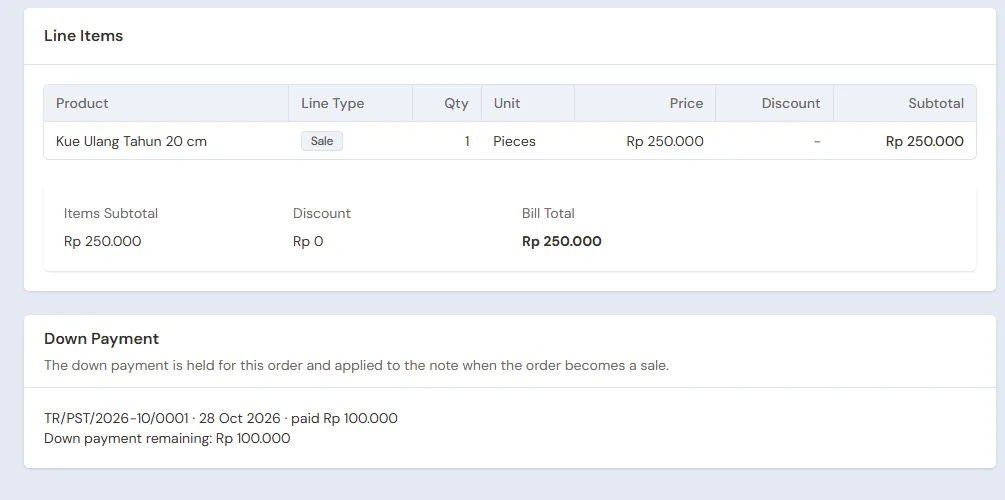
Bu Dinda orders a Kue Ulang Tahun 20 cm for Saturday and pays a down payment of Rp 100.000.
- Cashier: in Transactions → Sales Orders, press New Sales Order. Pick the Customer Bu Dinda (create her when she is not there yet), fill in the Pickup Date Saturday at 15.00, add 1 Kue Ulang Tahun 20 cm, then write in the order's note: "Tulisan: Selamat Ulang Tahun Dinda. Rasa cokelat." (the writing on the cake and its flavour).
- Press Save. The order page opens.
- Press Receive Down Payment, fill in the Amount 100.000, choose the Cash Account Cashier Cash, then press Save Down Payment.
A down payment is no sale: the money goes into the drawer, but the order holds it until the cake is collected. Product options are not on the order screen, so the flavour and writing go in the note, and the note is printed on the order. See Taking a down payment on an order.
Closing the shop
The Owner counts the drawer: Rp 200.000 + Rp 120.000 + Rp 75.000 + Rp 100.000 = Rp 495.000, the same as Cashier Cash in Reports → Cash Balance. Rp 295.000 moves to Owner Cash with Transactions → Finance → Cash Transfers. The bread not sold yet stays in stock and is sold tomorrow, as its batch has not expired.
Pickup day
- Warehouse Admin, Saturday morning: record the production of 1 Kue Ulang Tahun 20 cm with its recipe. Its cost is Rp 100.000.
- Cashier: when Bu Dinda comes, open her order in Transactions → Sales Orders, press Convert to Sale, then Pay. The payment window shows the down payment taken off, so the amount to pay is Rp 250.000 − Rp 100.000 = Rp 150.000. Take it in cash, then press Save transaction.
The order becomes Completed and a sale of Rp 250.000 is recorded on Saturday. See Recording a sales order.
5. Expired bread, payables and expenses
- Three days later, 2 Roti Sobek Cokelat of batch RS-0211 are left and expire. The Warehouse Admin takes them out in Transactions → Stock Adjustments, direction Out, category Expired, with their batch. Their value, 2 × Rp 3.000 = Rp 6.000, becomes a loss in the Profit & Loss. See Stock adjustments.
- Before the due date, the Owner pays Toko Bahan Kue Sumber Rasa's note of Rp 1.042.000 in Transaction Details → Purchase Payments. See Paying what you owe suppliers.
- The Owner records the oven's gas and electricity in Transactions → Finance → Expenses. See Recording shop expenses.
The profit up to Saturday: sales of Rp 120.000 + Rp 60.000 + Rp 75.000 + Rp 250.000 = Rp 505.000, cost of goods sold Rp 183.000 (9 pieces of bread × Rp 3.000, 2 sponge cakes × Rp 28.000, the birthday cake Rp 100.000), so a gross profit of Rp 322.000, less Rp 3.000 of Promotion Expense and Rp 6.000 of expired bread.
6. Stocktake of materials
Once a month, the Warehouse Admin weighs the flour, sugar, butter and eggs in Transactions → Stocktakes. When the flour always comes up short, the dough uses more than the recipe: correct the recipe so the bread's cost is right. See Counting stock with a stocktake.
7. Reports per job title
| Report | What it holds | Opened by | When |
|---|---|---|---|
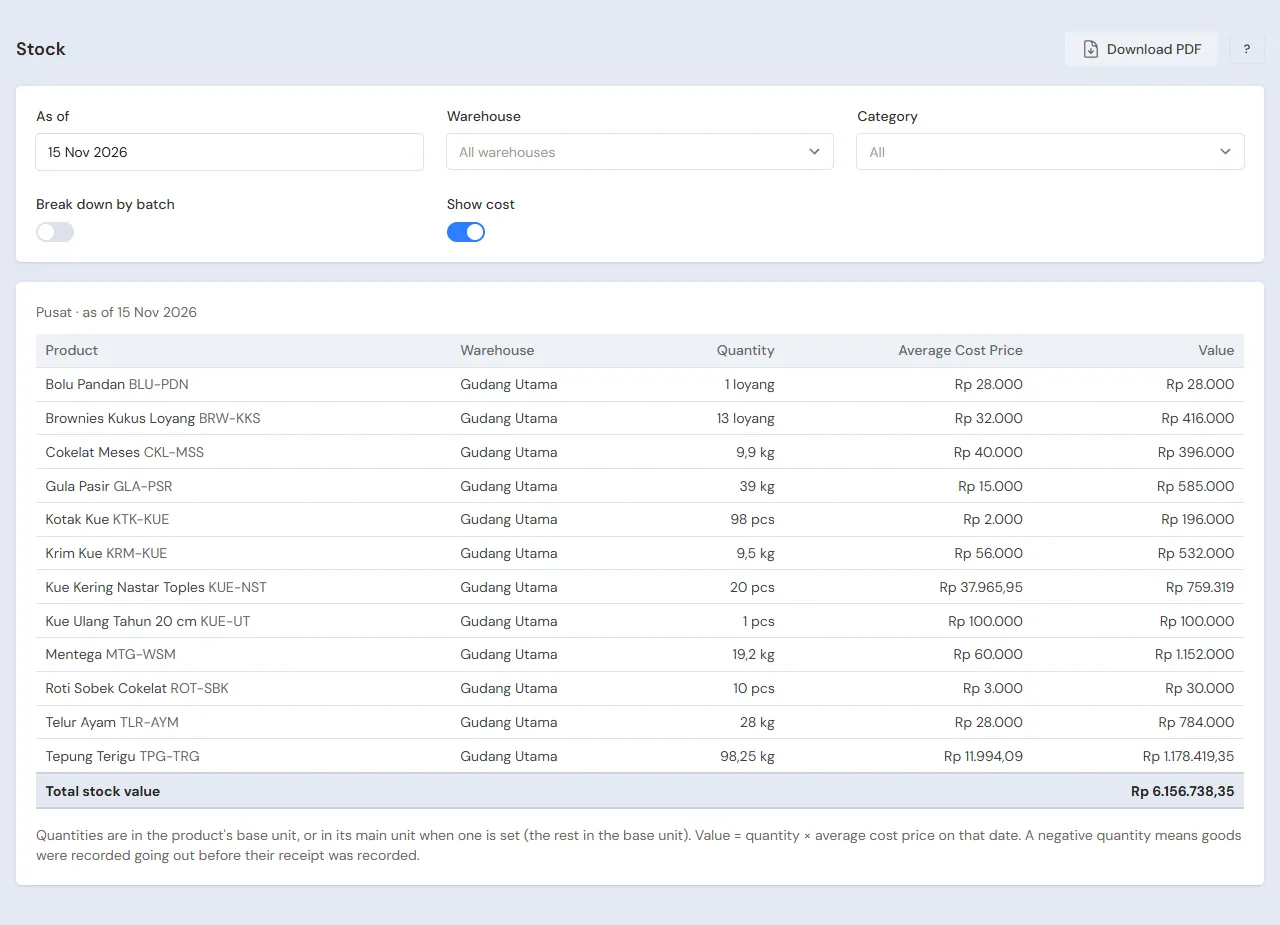
| Reports → Stock | Bread and cakes per batch, the materials left | Warehouse Admin | Every morning before baking |
| Reports → Cash Balance | The money in the drawer, in Owner Cash and in the bank | Owner | Every closing |
| Reports → Payables | The baking supplier's notes and their due dates | Owner | Before buying |
| Reports → Profit & Loss | Sales, cost of goods sold, Promotion Expense, expired bread (Inventory Losses) and expenses | Owner | Every month |
The orders to be collected today and tomorrow show in Transactions → Sales Orders. Opened by the Cashier every morning, so the kitchen knows which cakes to bake.
8. Checklists
- Every day: the Warehouse Admin records the production with its batch. The Cashier records every sale and every order with its down payment. The Owner matches the drawer money.
- Every week: the Warehouse Admin takes out the expired bread. The Owner reads the Payables and buys materials.
- Every month: the Warehouse Admin counts the materials. The Owner records gas, electricity and wages, then reads the Profit & Loss.
A running business
This part is for the team moving a running cake shop to Vende: materials, bread in the display case, cake orders already paid a down payment, and a payable to the baking supplier. The order is always the same:
- Enter the master data.
- Practise transactions until everyone is used to them.
- Empty the practice transactions.
- Enter the opening balances on the first day.
- Go live.
The opening balances come last on purpose, so the practice does not spoil their figures. The examples in this part use Dapur Kue Bu Wiwik from the new business part.
1. Master data
Do the parts Who does what, 1. Shop details and users and 2. Master data above. Also list every customer with an order or an unpaid bill, and every supplier still owed money. The master data, recipes, product options and promotions included, is not deleted when the practice transactions are emptied.
2. Team practice
Work in a practice shop of the type Cake/bakery shop with all four accounts.
Practice 1: master data
- Owner: the shop details, the three users, the Potong option for Bolu Pandan, the bread promotion and both suppliers.
- Check: Mbak Nia sees no Purchases and no Reports in the sidebar.
- Pak Darto (Warehouse Admin): the seven materials, the three products with batches for Roti Sobek Cokelat, and the three recipes.
- Cashier: open the till and pick Bolu Pandan.
- Check: the options window asks for Utuh or Dipotong 10.
Practice 2: a working day
- Owner: capital of Rp 5.000.000, both purchase notes and the Cash Transfer of Rp 200.000 as in part 3.
- Pak Darto: the production of 40 Roti Sobek Cokelat of batch RS-0211 and 3 Bolu Pandan.
- Cashier: the three display case sales, then Bu Dinda's order with a down payment of Rp 100.000.
- Owner: the Cash Transfer of Rp 295.000 to Owner Cash.
- Pak Darto and Mbak Nia: the production of the birthday cake, then Bu Dinda's order converted to a sale and paid Rp 150.000 in cash.
- Pak Darto: 2 expired pieces of bread taken out with their batch.
After Practice 2 this must show:
| Report | What must show | Opened by |
|---|---|---|
| Reports → Cash Balance | Owner Cash Rp 5.000.000 − Rp 280.000 − Rp 200.000 + Rp 295.000 = Rp 4.815.000, Cashier Cash Rp 200.000 + Rp 150.000 = Rp 350.000, Bank BCA Rp 60.000 | Owner |
| Reports → Payables | Toko Bahan Kue Sumber Rasa Rp 1.042.000 | Owner |
| Reports → Stock | Roti Sobek Cokelat 28 pcs of batch RS-0211, Bolu Pandan 1, Kue Ulang Tahun 20 cm 0, Tepung Terigu 19,75 kg, Kotak Kue 46 | Warehouse Admin |
| Reports → Profit & Loss | Sales of Goods Rp 505.000, Cost of Goods Sold Rp 183.000, Promotion Expense Rp 3.000, Inventory Losses Rp 6.000 | Owner |
Bu Dinda's order in Transactions → Sales Orders is Completed. Opened by the Cashier.
Practice 3: opening balances
Enter the opening balances with the example of part 4 below, the order with a down payment included, check them as in part 5, then empty them again.
3. Emptying the practice transactions
Done by the Owner in Settings → Empty Transactions, button Empty All Transactions. Sale notes, orders with their down payments, productions, batches, purchases, payments, cash transfers, stock adjustments, stocktakes, expenses, capital and opening balances are deleted. Products, recipes, product options, promotions, customers, suppliers, cash accounts, users and settings stay. Vende makes a full backup first. See Emptying transactions or all data.
4. Opening balances
Done by the Owner in Settings → Opening Balances on the morning of the first day, before the shop opens, with As of that day. See Entering opening cash, stock, receivables and payables.
- Opening Stock: the materials weighed, for example Tepung Terigu 15 Kilograms at Rp 12.000 and Mentega 3 Kilograms at Rp 60.000, and the bread still fit to sell with its batch and expiry, for example Roti Sobek Cokelat 12 Pieces of batch RS-0111 at Rp 3.000. Every batch is its own row.
- Opening Receivables: orders already collected but not paid yet, for example Sanggar Tari Melati Rp 300.000.
- Opening Payables: what is left on Toko Bahan Kue Sumber Rasa's note, Rp 500.000.
- Opening Cash: the money counted in every account, less the down payments of orders not collected yet (see below). For example: the drawer holds Rp 500.000, Bu Dinda's down payment of Rp 100.000 included, so Cashier Cash is entered as Rp 400.000. Bank BCA Rp 2.000.000.
Orders already paid a down payment
Opening Balances has no orders tab. An order whose down payment came in before the first day is recorded again on the first day:
- Cashier: in Transactions → Sales Orders, create Bu Dinda's order as usual, with its Pickup Date and note.
- Cashier: press Receive Down Payment, fill in the Amount 100.000, choose the Cash Account where that down payment is kept now (Cashier Cash), then press Save Down Payment.
Important: A down payment recorded adds to its cash account. So the Opening Cash of that account is the money counted less every down payment recorded again, so that Reports → Cash Balance equals the money in the drawer: Rp 400.000 + Rp 100.000 = Rp 500.000. The down payment is no sale and does not change the profit.
5. Check before going live
| Report | What must show | Opened by |
|---|---|---|
| Reports → Cash Balance | Cashier Cash Rp 500.000, Bank BCA Rp 2.000.000 | Owner |
| Reports → Stock | Flour 15 kg, butter 3 kg, Roti Sobek Cokelat 12 pcs of batch RS-0111 | Warehouse Admin |
| Reports → Receivables | Sanggar Tari Melati Rp 300.000 | Owner |
| Reports → Payables | Toko Bahan Kue Sumber Rasa Rp 500.000 | Owner |
| Reports → Profit & Loss | Empty: no sales yet | Owner |
Bu Dinda's order shows Down payment remaining Rp 100.000. Opened by the Cashier in Transactions → Sales Orders.
The figures differ? The Owner corrects the row in Settings → Opening Balances before any real transaction is recorded.
6. Going live
From that day every bake, sale and order is recorded in Vende as in the new business part, with the same checklist. When Bu Dinda collects her cake, only Rp 150.000 is left to pay. In the first week the Warehouse Admin matches the bread in the display case with Reports → Stock per batch every morning.