
Catering guide
A learning path for a caterer, new or running: recipes per 50 boxes, quotations, down payments, event day production, delivery runs, billing, opening balances.
On this page
- A new business
- Who does what
- 1. Shop details and users
- 2. Master data
- 3. Starting capital and buying materials
- 4. One order from quotation to paid
- 5. Receivables, payables and expenses
- 6. Reports per job title
- 7. Checklists
- A running business
- 1. Master data
- 2. Team practice
- 3. Emptying the practice transactions
- 4. Opening balances
- 5. Check before going live
- 6. Going live
This guide is for the team setting up Vende at a caterer that cooks boxed meals and snack boxes for office and family events, from the quotation until the bill is paid. It has two parts: A new business for a caterer just starting, with no stock, receivables or payables from before, and A running business for one moving to Vende, with team practice and opening balances. The example is Katering Dapur Sekar. The names of the business, customers, suppliers and people and all the figures are made up.
The business in short:
- Products: Nasi Kotak Ayam Bakar (a rice box with grilled chicken) and a Snack Box holding two cakes, by the box.
- Materials: rice, seasoning and boxes from a regular supplier with 14 days to pay, chicken and vegetables from the market, and ready-made cakes from a cake maker, paid in cash.
- Orders: the customer asks for a quotation, agrees to it, then pays a down payment. The rest is billed after the event, with 14 days to pay for offices.
- Production and delivery: the kitchen cooks on the morning of the event, then the driver delivers with a delivery note.
Work from the top down. Every step names its menu, who does it, what changes afterwards and an example figure.
The features in this guide come with the Catering business type package, except those marked extra. The shop's features show under Settings → Subscription, section This shop's features. If a menu is missing, contact the Vende team.
Tip: Lost on a page? Press the ? button at the top of that page. A short tour shows every field, on the quotation, order, production and Today's Deliveries screens too.
A new business
Who does what
This package holds five users, the owner included.
| Part of the business | Job title in Vende | What they do and open |
|---|---|---|
| Owner | Owner | Every menu, also suppliers and purchase notes, the payments of bills, expenses, opening balances and every report |
| Order admin | Head Cashier | Customers, quotations, orders and down payments, notes from delivery notes |
| Two kitchen staff | Warehouse Admin | Products, recipes, the event day's production, delivery runs and delivery notes, Reports → Stock |
| Driver | Driver | Transactions → Today's Deliveries on the phone: records the order as delivered |
The order admin and the kitchen open no cash and no money reports. Every role is explained in Roles and permissions.
1. Shop details and users
Done by the Owner: fill in Settings → Shop (name, address, WhatsApp, logo, the bank account in the print footer if needed), then create the accounts in Settings → Users with the Job title of the table above. See Adding and managing users.
The people at Katering Dapur Sekar: Bu Sekar (owner), Mbak Rani (order admin, Head Cashier), Pak Udin and Mbak Tuti (kitchen, Warehouse Admin), and Mas Eko (Driver).
2. Master data
A shop of this business type already has the product categories Boxed Meals, Snack Boxes, Meal Packages, Food, Ingredients and Packaging, the units Portion and Box, and the expense categories Cooking Gas and Fuel.
Materials
Warehouse Admin: in Master Data → Products, create every material with the Type Raw Material:
| Material | Category | Base Unit | Cost Price |
|---|---|---|---|
| Beras (rice) | Ingredients | Kilogram | Rp 12.000 |
| Ayam Potong (chicken piece) | Ingredients | Pieces | Rp 8.000 |
| Sayur Campur (mixed vegetables) | Ingredients | Kilogram | Rp 10.000 |
| Bumbu Bakar (grilling seasoning) | Ingredients | Kilogram | Rp 40.000 |
| Kue Lemper (sticky rice cake) | Ingredients | Pieces | Rp 2.000 |
| Risoles (spring roll) | Ingredients | Pieces | Rp 2.000 |
| Kotak Nasi (rice box) | Packaging | Pieces | Rp 1.000 |
| Kotak Snack (snack box) | Packaging | Pieces | Rp 1.000 |
Cakes bought ready from a cake maker are still materials, because they are packed again in the snack box. See Adding a product.
Products and recipes per 50 boxes
- Warehouse Admin: in Master Data → Products, create Nasi Kotak Ayam Bakar (category Boxed Meals, Base Unit Box, Selling Price Rp 30.000) and Snack Box (category Snack Boxes, Box, Rp 12.000), both with the Type Finished Goods and a Cost Price of 0.
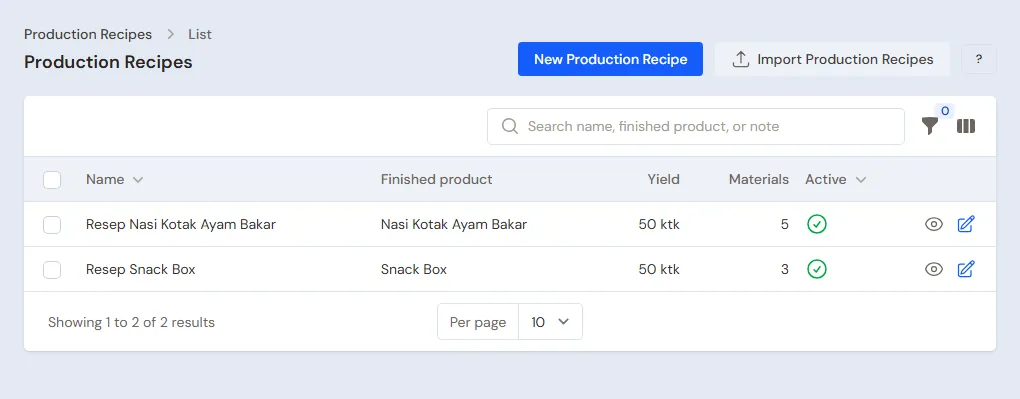
- Warehouse Admin: in Master Data → Production Recipes, press New Production Recipe:
| Recipe | Yield | Materials per recipe | Cost per box |
|---|---|---|---|
| Nasi Kotak Ayam Bakar | 50 boxes | 5 kg Beras, 50 Ayam Potong, 5 kg Sayur Campur, 1 kg Bumbu Bakar, 50 Kotak Nasi | Rp 600.000 : 50 = Rp 12.000 |
| Snack Box | 50 boxes | 50 Kue Lemper, 50 Risoles, 50 Kotak Snack | Rp 250.000 : 50 = Rp 5.000 |
An order of 100 boxes uses twice the recipe's materials when its production is recorded.
Boxed rice is cooked ahead and sent with a delivery note, so the product's Made when ordered mark is not used: a menu item marked so takes its materials when the note is saved and cannot be sent in several deliveries with delivery notes.
Customers, suppliers and cash accounts
- Head Cashier: in Master Data → Customers, create PT Maju Bersama with its office address and Payment Terms (days) 14. See Adding and changing customers.
- Owner: in Master Data → Suppliers, list Toko Beras Makmur with Payment Terms (days) 14, and UD Pangan Segar and Kue Basah Bu Narti without terms. See Adding a supplier.
- Owner: in Master Data → Cash Accounts, use Bank BCA for down payments and transfers. See Cash accounts and bank accounts.
3. Starting capital and buying materials
- The Owner records capital of Rp 20.000.000 into Bank BCA in Transactions → Finance → Owner's Capital. See Capital contributions and withdrawals (drawings).
- The Owner records the note of Toko Beras Makmur in Transactions → Purchases, unpaid: 50 kg of Beras Rp 600.000, 5 kg of Bumbu Bakar Rp 200.000, 500 Kotak Nasi Rp 500.000 and 500 Kotak Snack Rp 500.000. Its Rp 1.800.000 becomes a payable, due 14 days ahead.
Chicken, vegetables and cakes are bought the day before the event (part 4). See Recording a purchase note.
4. One order from quotation to paid
| Day | Work | Who |
|---|---|---|
| Monday | Quotation, then the order and its down payment | Head Cashier |
| Thursday | Buying chicken, vegetables and cakes | Owner |
| Friday morning | Production of 100 boxed meals and 100 snack boxes | Warehouse Admin |
| Friday morning | Delivery run and delivery note | Warehouse Admin |
| Friday midday | Delivered on the phone | Driver |
| Friday afternoon | Note from the delivery note | Head Cashier |
The quotation
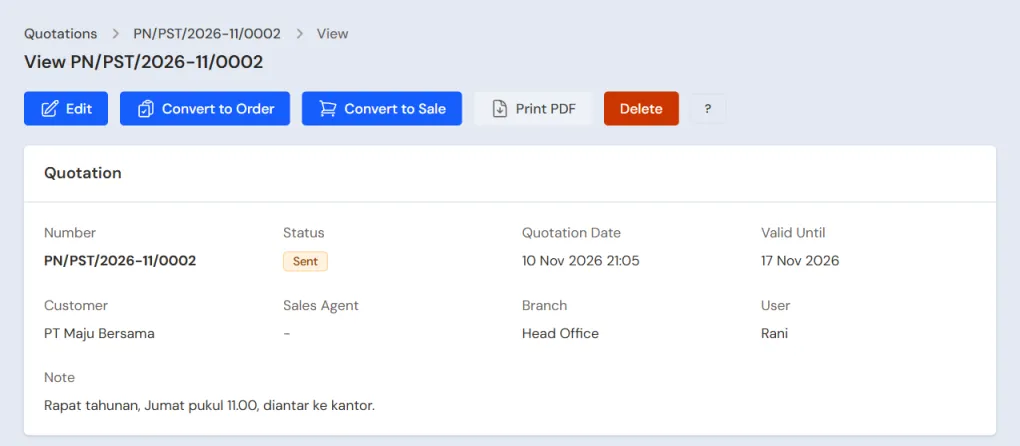
Head Cashier (Mbak Rani): in Transactions → Quotations, press New Quotation, pick PT Maju Bersama, set it valid until 7 days ahead, then add 100 Nasi Kotak Ayam Bakar (Rp 3.000.000) and 100 Snack Box (Rp 1.200.000). The total is Rp 4.200.000. Press Save, then print it or send it by WhatsApp from the quotation page, and change its status to Sent. A quotation changes neither stock nor cash.
The order and its down payment
PT Maju Bersama agrees and transfers a down payment of Rp 2.000.000.
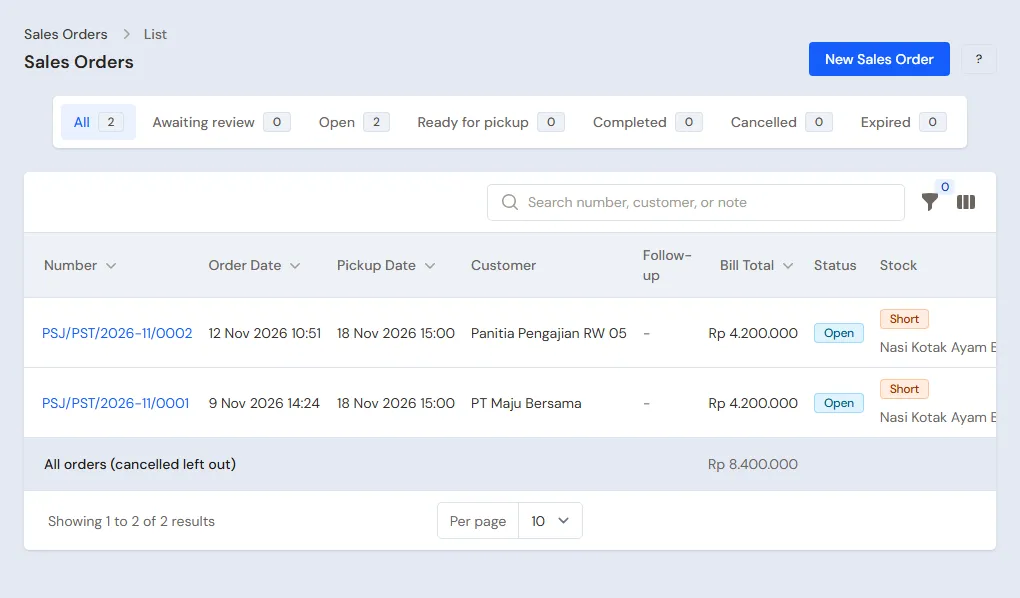
- Head Cashier: on the quotation page, press Edit and change the Status to Accepted. Then press Convert to Order, choose the Warehouse Main Warehouse and the Pickup Date Friday at 11.00, and press Convert to Order. The order page opens; check its delivery address.
- Head Cashier: on the order page, press Receive Down Payment, fill in the Amount 2.000.000, choose the Cash Account Bank BCA and the Payment Method Transfer, then press Save Down Payment.
A down payment is no sale: the money goes into Bank BCA, but the order holds it until it is billed. See Taking a down payment on an order.
Buying the day before
The Owner records two notes paid from Bank BCA in Transactions → Purchases: UD Pangan Segar 100 Ayam Potong × Rp 8.000 = Rp 800.000 and 10 kg of Sayur Campur Rp 100.000, so Rp 900.000, and Kue Basah Bu Narti 100 Kue Lemper and 100 Risoles × Rp 2.000, so Rp 400.000.
Friday morning: production
Warehouse Admin (Pak Udin), once every box is ready: in Transactions → Productions, press New Production, pick the Recipe Nasi Kotak Ayam Bakar, fill in the yield 100, then Save & New and record Snack Box 100.
The materials go down (10 kg of rice, 100 chicken pieces, 10 kg of vegetables, 2 kg of seasoning, 100 lemper, 100 risoles, 100 rice boxes, 100 snack boxes), and 100 boxed meals at a cost of Rp 12.000 and 100 snack boxes at Rp 5.000 come into stock.
Delivering with a delivery run
- Warehouse Admin: in Transactions → Delivery Runs, press Make Delivery Run, pick Sales orders, tick PT Maju Bersama's order, then pick Make Delivery Run.
- Fill in the Delivery date today, From warehouse Main Warehouse, Driver on the phone Mas Eko, Driver name and Vehicle, then save.
- Press Print & make delivery notes, then Print. The delivery note is made and 100 boxed meals and 100 snack boxes leave the stock.
- The Driver (Mas Eko) opens Transactions → Today's Deliveries on the phone. Once the order is received at PT Maju Bersama's office, he presses Delivered.
See Delivering goods with a daily delivery run.
Billing
Head Cashier: on PT Maju Bersama's order, press Make Note from Delivery Notes, choose its delivery note, then Make Draft Note. On the sales screen, press Pay, then Unpaid, then Save transaction.
The down payment of Rp 2.000.000 is taken off when the note is saved, so the rest, Rp 4.200.000 − Rp 2.000.000 = Rp 2.200.000, becomes a receivable of PT Maju Bersama, due 14 days ahead. Print the note as the bill. See Sending goods in several deliveries with delivery notes.
5. Receivables, payables and expenses
- PT Maju Bersama transfers Rp 2.200.000. The Owner records it in Transaction Details → Sale Payments into Bank BCA. See Recording payment of an unpaid note.
- Before the due date, the Owner pays Toko Beras Makmur's note of Rp 1.800.000 in Transaction Details → Purchase Payments. See Paying what you owe suppliers.
- The Owner records Rp 300.000 of gas from Bank BCA in Transactions → Finance → Expenses, category Cooking Gas. Petrol for the delivery car uses the category Fuel. See Recording shop expenses.
- An order cancelled after its down payment is cancelled from its order page: the down payment is handed back or forfeited as income. See When the order is cancelled.
The profit of this order: sales of Rp 4.200.000, cost of goods sold 100 × Rp 12.000 + 100 × Rp 5.000 = Rp 1.700.000, so a gross profit of Rp 2.500.000, less Rp 300.000 of gas.
6. Reports per job title
| Report | What it holds | Opened by | When |
|---|---|---|---|
| Reports → Stock | The materials and boxes left | Warehouse Admin | Before buying for an event |
| Reports → Receivables | Every customer's bills and their due dates | Owner | Every week |
| Reports → Payables | The regular supplier's notes and their due dates | Owner | Every week |
| Reports → Cash Balance | The money in the bank, down payments held by orders included | Owner | Every day |
| Reports → Profit & Loss | Sales, cost of goods sold and expenses | Owner | Every month |
The orders to be delivered show in Transactions → Sales Orders by their pickup date. Opened by the Head Cashier every morning, so the kitchen knows how much to cook.
7. Checklists
- Every order: the Head Cashier makes the quotation, the order and the down payment. The Warehouse Admin records the production and the delivery run. The Driver marks it delivered. The Head Cashier makes the note from the delivery note.
- Every week: the Owner reads the Receivables and Payables, records the payments that came in, and pays the suppliers.
- Every month: the Warehouse Admin counts the materials and boxes. The Owner records gas, petrol and wages, then reads the Profit & Loss.
A running business
This part is for the team moving a running caterer to Vende: materials and boxes in the store room, event orders already paid a down payment, office bills not paid yet, and a payable to the regular supplier. The order is always the same:
- Enter the master data.
- Practise transactions until everyone is used to them.
- Empty the practice transactions.
- Enter the opening balances on the first day.
- Go live.
The opening balances come last on purpose, so the practice does not spoil their figures. The examples in this part use Katering Dapur Sekar from the new business part.
1. Master data
Do the parts Who does what, 1. Shop details and users and 2. Master data above. Also list every customer with an order or an unpaid bill, and every supplier still owed money. The master data, recipes included, is not deleted when the practice transactions are emptied.
2. Team practice
Work in a practice shop of the type Catering with all five accounts.
Practice 1: master data
- Owner: the shop details, the four users and the three suppliers.
- Check: Mas Eko sees only Today's Deliveries in the sidebar.
- Pak Udin (Warehouse Admin): the eight materials, both products and both recipes.
- Head Cashier: PT Maju Bersama with 14 days to pay.
Practice 2: one order
- Owner: capital of Rp 20.000.000 and Toko Beras Makmur's note as in part 3.
- Head Cashier: the quotation of Rp 4.200.000, converted to an order, the down payment of Rp 2.000.000 into Bank BCA.
- Owner: both purchase notes, Rp 900.000 and Rp 400.000.
- Pak Udin: the production of 100 boxed meals and 100 snack boxes, the delivery run, the delivery note printed.
- Check: Reports → Stock shows Nasi Kotak Ayam Bakar and Snack Box at 0 after the delivery note is printed. Opened by the Warehouse Admin.
- Mas Eko: Delivered in Today's Deliveries.
- Head Cashier: the note from the delivery note, unpaid.
- Owner: the gas expense of Rp 300.000.
After Practice 2 this must show:
| Report | What must show | Opened by |
|---|---|---|
| Reports → Cash Balance | Bank BCA Rp 20.000.000 + Rp 2.000.000 − Rp 900.000 − Rp 400.000 − Rp 300.000 = Rp 20.400.000 | Owner |
| Reports → Receivables | PT Maju Bersama Rp 2.200.000 | Owner |
| Reports → Payables | Toko Beras Makmur Rp 1.800.000 | Owner |
| Reports → Stock | Beras 40 kg, Bumbu Bakar 3 kg, Kotak Nasi 400, Kotak Snack 400, chicken, vegetables, cakes and both products 0 | Warehouse Admin |
| Reports → Profit & Loss | Sales of Goods Rp 4.200.000, Cost of Goods Sold Rp 1.700.000, Cooking Gas Rp 300.000 | Owner |
Practice 3: opening balances
Enter the opening balances with the example of part 4 below, the order with a down payment included, check them as in part 5, then empty them again.
3. Emptying the practice transactions
Done by the Owner in Settings → Empty Transactions, button Empty All Transactions. Quotations, orders with their down payments, productions, delivery runs, delivery notes, sale notes, purchases, payments, expenses, capital and opening balances are deleted. Products, recipes, customers, suppliers, cash accounts, users and settings stay. Vende makes a full backup first. See Emptying transactions or all data.
4. Opening balances
Done by the Owner in Settings → Opening Balances on the morning of the first day, with As of that day. Finish the orders being cooked first: Opening Balances has no field for half-cooked food. See Entering opening cash, stock, receivables and payables.
- Opening Stock: the materials and boxes in the store room, for example Beras 30 Kilograms at Rp 12.000, Kotak Nasi 250 Pieces at Rp 1.000 and Kotak Snack 200 Pieces at Rp 1.000.
- Opening Receivables: one row per event bill not paid yet, with its due date, for example PT Maju Bersama Rp 1.500.000 due in 10 days.
- Opening Payables: what is left on Toko Beras Makmur's note, Rp 800.000.
- Opening Cash: the money counted in every account, less the down payments of orders recorded again (see below). For example: Bank BCA holds Rp 10.000.000, Pak Hendra's down payment of Rp 3.000.000 included, so the Opening Cash of Bank BCA is Rp 7.000.000.
Orders already paid a down payment
Opening Balances has no orders tab. An event order whose down payment came in before the first day is recorded again on the first day:
- Head Cashier: in Transactions → Sales Orders, create Pak Hendra's order as usual: 300 Nasi Kotak Ayam Bakar for a wedding, Rp 9.000.000, with its Pickup Date and address.
- Head Cashier: press Receive Down Payment, fill in the Amount 3.000.000, choose the Cash Account Bank BCA, where that down payment is kept now, then press Save Down Payment.
Important: A down payment recorded adds to its cash account. So the Opening Cash of that account is the money counted less every down payment recorded again, so that Reports → Cash Balance equals the bank balance: Rp 7.000.000 + Rp 3.000.000 = Rp 10.000.000. The down payment is no sale and does not change the profit. When it is billed, the note from its delivery note takes that down payment off.
5. Check before going live
| Report | What must show | Opened by |
|---|---|---|
| Reports → Cash Balance | Bank BCA Rp 10.000.000 | Owner |
| Reports → Stock | Rice 30 kg, Kotak Nasi 250, Kotak Snack 200 | Warehouse Admin |
| Reports → Receivables | PT Maju Bersama Rp 1.500.000 | Owner |
| Reports → Payables | Toko Beras Makmur Rp 800.000 | Owner |
| Reports → Profit & Loss | Empty: no sales yet | Owner |
Pak Hendra's order shows Down payment remaining Rp 3.000.000. Opened by the Head Cashier in Transactions → Sales Orders.
The figures differ? The Owner corrects the row in Settings → Opening Balances before any real transaction is recorded.
6. Going live
From that day every quotation, order, production and delivery is recorded in Vende as in the new business part, with the same checklist. Old bills are paid like new notes, under Transaction Details → Sale Payments. In the first week the Owner checks that every order delivered has a note, so Reports → Receivables holds every bill.