
Café guide
A learning path for a café or coffee shop, new or running: recipes per cup, table ordering, the kitchen screen, points, materials per note, opening balances.
On this page
- A new business
- Who does what
- 1. Shop details and users
- 2. Master data
- 3. Starting capital and buying materials
- 4. A working day
- 5. Payables, expenses and promotions
- 6. Stocktake of materials
- 7. Reports per job title
- Extra: All You Can Eat packages
- 8. Checklists
- A running business
- 1. Master data
- 2. Team practice
- 3. Emptying the practice transactions
- 4. Opening balances
- 5. Check before going live
- 6. Going live
This guide is for the team setting up Vende at a café or coffee shop that makes every drink when it is ordered, with tables, orders from the guests' phones and members collecting points. It has two parts: A new business for a café just opening, with no stock, receivables or payables from before, and A running business for one moving to Vende, with team practice and opening balances. The example is Kopi Teduh. The names of the café, customers, suppliers and people and all the figures are made up.
The business in short:
- Menu: Es Kopi Susu (iced milk coffee) and Es Kopi Hitam (iced black coffee) by the cup, and Roti Bakar Cokelat (chocolate toast) by the portion.
- Materials: coffee beans from a roastery with 14 days to pay, fresh milk, plastic cups, sliced bread and chocolate spread paid in cash.
- Making: the barista makes every drink when it is ordered, so its recipe's materials go down when the note is saved.
- Selling: guests sit down and order at the cashier or from the QR on their table, some take away, and members earn points on every purchase.
Work from the top down. Every step names its menu, who does it, what changes afterwards and an example figure.
The features in this guide come with the Café/coffee shop business type package, except those marked extra. The shop's features show under Settings → Subscription, section This shop's features. If a menu is missing, contact the Vende team.
Tip: Lost on a page? Press the ? button at the top of that page. A short tour shows every field, on the Café Board and the Kitchen Screen too.
A new business
Who does what
This package holds five users, the owner included.
| Part of the café | Job title in Vende | What they do and open |
|---|---|---|
| Owner | Owner | Every menu, also the points settings, opening balances and Reports → Profit & Loss |
| Café manager | Store Head | Products, recipes, product options, tables, suppliers and purchase notes, expenses, cash transfers, Reports → Cash Balance, Reports → Payables, Reports → Stock |
| Cashier | Cashier | The Café Board: table and take-away orders, guest orders from the QR, payments, new members |
| Two baristas | Kitchen | The Kitchen Screen on the bar tablet: marks every drink done |
The baristas open no money, stock or reports. Every role is explained in Roles and permissions.
1. Shop details and users
Done by the Owner: fill in Settings → Shop (name, address, WhatsApp, logo), then create the accounts in Settings → Users with the Job title of the table above. See Adding and managing users.
The people at Kopi Teduh: Mas Arga (owner), Sari (café manager, Store Head), Rina (Cashier), and Bayu and Tono (baristas, Kitchen).
2. Master data
A shop of this business type already has the product categories Coffee, Non-Coffee Drinks, Food, Snacks and Ingredients, the units Glass, Cup and Portion, and the expense categories Cooking Gas, Internet and Phone Credit, and Equipment Maintenance.
Materials
Store Head: in Master Data → Products, create every material with the Type Raw Material and the category Ingredients:
| Material | Base Unit | Cost Price | Other Units |
|---|---|---|---|
| Biji Kopi (coffee beans) | Kilogram | Rp 200.000 | |
| Susu Segar (fresh milk) | Litre | Rp 20.000 | |
| Gelas Plastik 16 oz (plastic cup) | Pieces | Rp 1.000 | |
| Roti Tawar (bread) | Pieces (one slice) | Rp 1.500 | Pack holding 10 |
| Selai Cokelat (chocolate spread) | Kilogram | Rp 60.000 |
See Adding a product.
The menu and its recipes per cup
- Store Head: in Master Data → Products, create every menu item with the Type Finished Goods and a Cost Price of 0: Es Kopi Susu (Cup, category Coffee, Selling Price Rp 20.000), Es Kopi Hitam (Cup, Coffee, Rp 15.000) and Roti Bakar Cokelat (Portion, Food, Rp 15.000). Add their photos so guests see them on the QR menu.
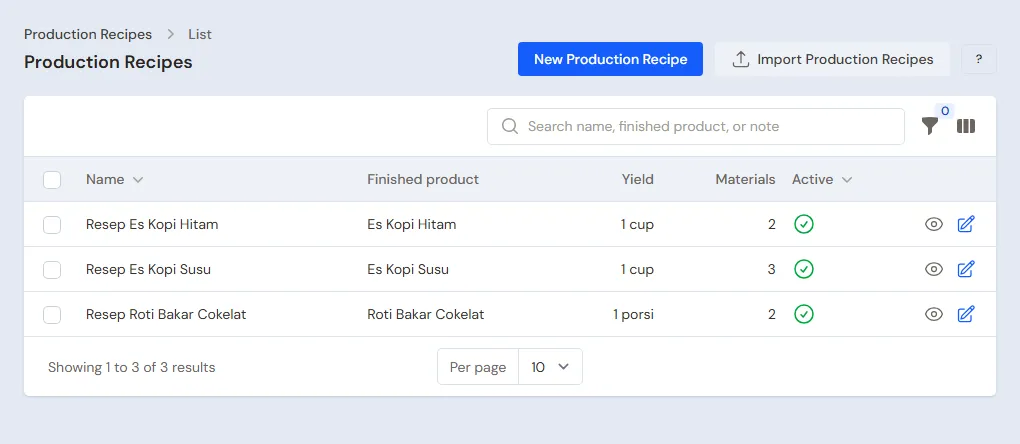
- Store Head: in Master Data → Production Recipes, press New Production Recipe for every menu item, with a Yield of 1:
| Recipe | Materials per recipe | Cost per cup or portion |
|---|---|---|
| Es Kopi Susu | 0,02 kg Biji Kopi, 0,2 litre Susu Segar, 1 Gelas Plastik 16 oz | Rp 4.000 + Rp 4.000 + Rp 1.000 = Rp 9.000 |
| Es Kopi Hitam | 0,02 kg Biji Kopi, 1 Gelas Plastik 16 oz | Rp 4.000 + Rp 1.000 = Rp 5.000 |
| Roti Bakar Cokelat | 2 Roti Tawar, 0,05 kg Selai Cokelat | Rp 3.000 + Rp 3.000 = Rp 6.000 |
- When the first recipe of a new menu item is saved, Vende switches on Made when ordered on the product at once and says so. The mark is in the Tracking section in Master Data → Products. A menu item sold or produced before its recipe was made is switched on there by hand, and an item cooked ahead, for example a whole tray of cake, is switched off there.
Product options
Store Head: in Master Data → Product Options, press New Product Option, pick the Product Es Kopi Susu, fill in the Group name Gula (sugar), turn on Required, Maximum choices 1, then add the options Normal, Kurang Manis (less sweet) and Tanpa Gula (no sugar) with a Price add-on of 0. Create the same group for Es Kopi Hitam.
An option that uses other materials, such as an extra shot or oat milk, is made a menu item of its own with its recipe and the Made when ordered mark, so its materials go down when the note is saved.
Tables and the QR
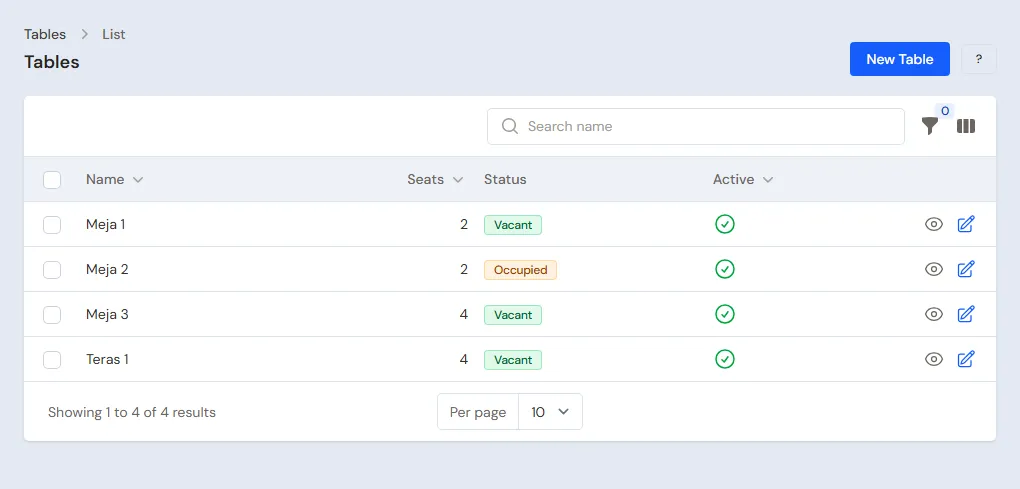
- Store Head: in Master Data → Tables, press New Table and fill in Meja 1 to Meja 8.
- Owner: in Settings → Sales, section Table ordering (QR), set whether guests may call a waiter or ask for the bill from their phone, and whether a menu item marked sold out still shows on the guests' menu.
Member points
Owner: in Settings → Points, turn on Enable customer points, fill in Spending per point 10.000 and Value of 1 point 100. See Giving and redeeming customer points.
Suppliers and cash accounts
- Store Head: in Master Data → Suppliers, list Roastery Bukit Hijau with Payment Terms (days) 14, and UD Susu Murni, Toko Kemasan Sentosa and Toko Roti Pak Harun without terms. See Adding a supplier.
- Store Head: in Master Data → Cash Accounts, use Cashier Cash for the cash drawer and Bank BCA for QRIS and purchases. See Cash accounts and bank accounts.
3. Starting capital and buying materials
- The Owner records capital of Rp 10.000.000 into Bank BCA in Transactions → Finance → Owner's Capital. See Capital contributions and withdrawals (drawings).
- The Store Head records the note of Roastery Bukit Hijau in Transactions → Purchases, unpaid: 5 kg of Biji Kopi × Rp 200.000 = Rp 1.000.000, due 14 days ahead.
- The Store Head records three notes paid from Bank BCA: UD Susu Murni 20 litres of Susu Segar Rp 400.000, Toko Kemasan Sentosa 500 Gelas Plastik 16 oz Rp 500.000, and Toko Roti Pak Harun 5 Packs of Roti Tawar × Rp 15.000 = Rp 75.000 plus 2 kg of Selai Cokelat Rp 120.000, so Rp 195.000.
- The Store Head moves Rp 300.000 of change from Bank BCA to Cashier Cash in Transactions → Finance → Cash Transfers.
See Recording a purchase note.
4. A working day
| Time | Work | Who |
|---|---|---|
| Opening | Check the Café Board and the sold-out items | Cashier |
| All day | Orders, guest orders from the QR, payments | Cashier |
| All day | Drinks done on the Kitchen Screen | Kitchen |
| Closing | The drawer money | Store Head |
An order from the table QR
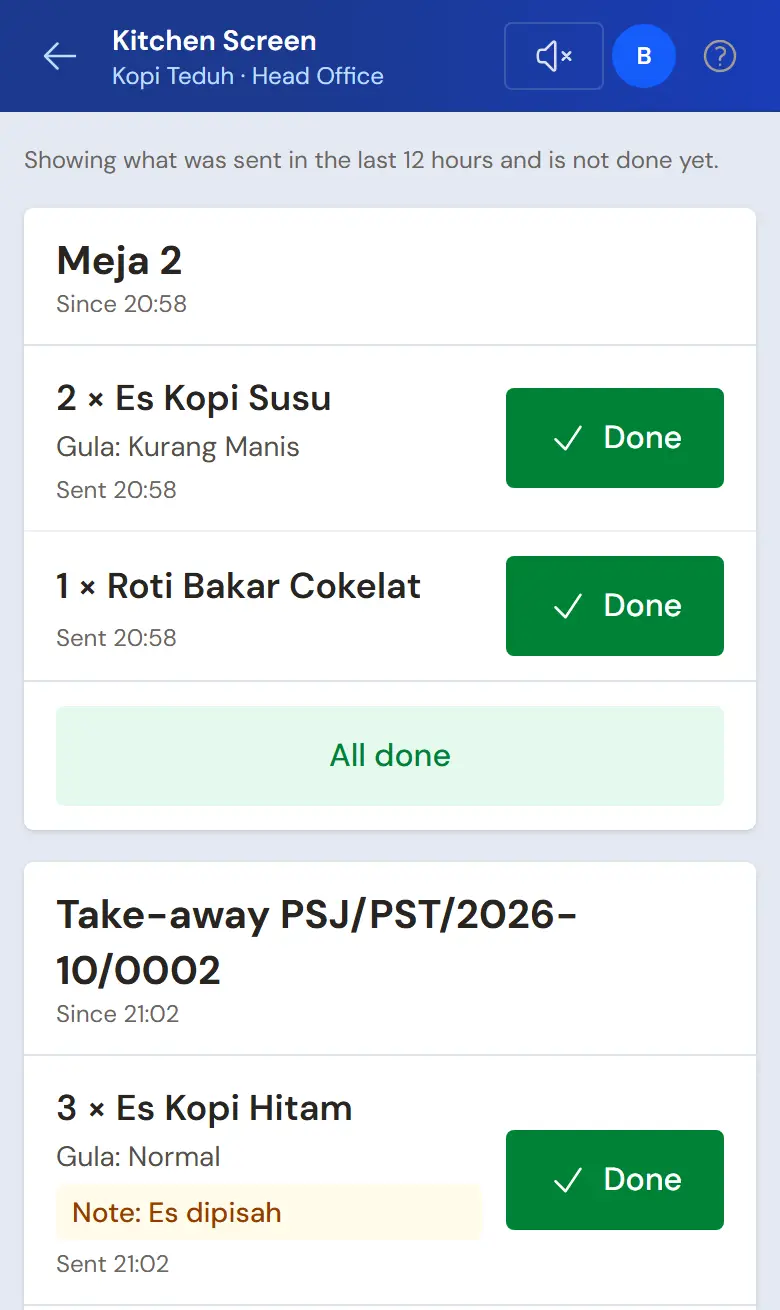
Cashier (Rina): in Transactions → Café Board, tap Meja 2 where guests just sat down, then press Table QR. The guests scan the QR with a phone, see the menu with photos and prices, and order 2 Es Kopi Susu (Gula: Kurang Manis) and 1 Roti Bakar Cokelat.
- The guest order shows on the Café Board. Check it, then press Accept. The order joins the bill of Meja 2 and goes to the kitchen at once.
- The QR stops working by itself when the bill of Meja 2 is paid.
A guest order never reaches the kitchen before the cashier accepts it. Payment still happens at the cashier.
The cashier opens and prints the table QR every time guests sit down, in the Café Board with Table QR (a slip on the receipt printer, or show it on the screen). The QR works until the table's bill is paid, so a photo of it cannot be used to order outside that visit, and the next guests get a new QR.
The barista on the Kitchen Screen
Kitchen (Bayu), on the bar tablet: open Transactions → Kitchen Screen. The card of Meja 2 holds both Es Kopi Susu with their sugar choice and the Roti Bakar Cokelat, without prices. Press Done on every item that is ready. On the Café Board its line shows Ready.
Waiter (or Cashier): the card of Meja 2 on the Café Board now has a green mark, for example 2 ready to serve. A device with the sound turned on (the speaker button above the table list, off until turned on) beeps whenever one more dish is ready. Bring the dish, tap Meja 2, then press Served on its line, or All served for every ready dish. A served line no longer counts as ready, so another waiter does not bring it twice. Take-away orders work the same way.
To know whose dishes are ready, press Name on order on the order and write the guest's name or the pager number they hold, for example "Pager 7" or "Budi". It is optional, the Cashier and the Waiter can both fill it, and it shows on the table card, the take-away card and above the open order. It is also the order's note, so it shows on its sale note. Regular customers are still picked with the Customer button; do not use it for pager numbers.
A café with many tables uses the Search tables box and the filters above the table list: All, Occupied, New guest orders and Ready to serve. The last filter is remembered on that device.
Take-away and a member
- Cashier: press Take-away order, pick 3 Es Kopi Hitam, press Send to kitchen, then Pay with the Payment method QRIS into Bank BCA: Rp 45.000.
- Mbak Laras, a new member, sits at Meja 5. The Cashier lists her in Master Data → Customers when she is not there yet.
- Cashier: tap Meja 5, press Customer and pick Mbak Laras, then add 2 Es Kopi Susu and 1 Es Kopi Hitam and Send to kitchen.
Mbak Laras earns points on her purchase when the bill is paid. Every point earned is booked as Points Expense in the Profit & Loss.
Paying
Cashier: tap the table that is done, press Pay, pick the Payment method, fill in the Amount received, then press Save payment.
- Meja 2: 2 × Rp 20.000 + Rp 15.000 = Rp 55.000 in cash. Rp 100.000 handed over, Rp 45.000 change.
- Meja 5: 2 × Rp 20.000 + Rp 15.000 = Rp 55.000 in cash. Mbak Laras earns 5 points, worth Rp 500.
The day's sales are Rp 55.000 + Rp 45.000 + Rp 55.000 = Rp 155.000.
Materials go down when the note is saved
Every menu item is marked Made when ordered, so every note saved takes its recipe's materials out of the note's warehouse at once, and the line's cost is what those materials cost. The menu item itself has no stock, so it never goes below zero and needs no production at closing.
Once the three tables of the day have paid, the Store Head (Sari) opens Reports → Stock: the materials are down by 0,16 kg of coffee beans, 0,8 litres of milk, 8 cups, 2 slices of bread and 0,05 kg of spread. The menu items sold cost 4 × Rp 9.000 + 4 × Rp 5.000 + Rp 6.000 = Rp 62.000.
- The materials of every line show on the note's page, under the menu item's name. The guest's receipt does not print them.
- A return, a change, a void and a deleted note bring the materials back. There is no separate production to delete.
- When the note's warehouse does not hold enough of a material for the quantity on the note (all menu lines that use the same material are added together), the menu line gets a warning, for example Short on materials: Susu Segar (0,3 l left, 0,35 l needed). The note can still be saved, as for ordinary goods that are short, the material goes below zero, and the Dashboard reminds you until its opening stock or purchase is recorded. After the note is saved, the same warning also shows in Invoice Mode and Quick Sale.
- A recipe changed later counts only for new notes. An old note, also when it is changed, keeps its own materials.
- When a material's cost changes because an older purchase note is recorded or changed, the cost of the notes already saved is worked out again.
Important: A café that used to record the production of its menu at closing and then switches this on: a menu item still below zero from the old way is recorded once with Transactions → Productions for as much as it is below zero, or left as it is. Marked menu items no longer show in the Dashboard box of products made from a recipe whose stock is below zero. A shop that makes its goods ahead, such as cakes baked in the morning, keeps using productions as before.
The drawer money
The Store Head counts the drawer: Rp 300.000 + Rp 55.000 + Rp 55.000 = Rp 410.000, the same as Cashier Cash in Reports → Cash Balance. The cash takings of Rp 110.000 move to Owner Cash with Transactions → Finance → Cash Transfers.
5. Payables, expenses and promotions
- Before the due date, the Store Head pays Roastery Bukit Hijau's note of Rp 1.000.000 in Transaction Details → Purchase Payments. See Paying what you owe suppliers.
- The Store Head records Rp 300.000 of internet from Bank BCA in Transactions → Finance → Expenses, category Internet and Phone Credit. See Recording shop expenses.
- A buy X get Y free promotion can also give a menu item marked Made when ordered, for example buy 2 Es Kopi Susu get 1 Es Kopi Hitam free: the free item's materials go down when the note is saved and its Rp 5.000 cost goes to Promotion Expense. Stocked goods, for example bottled water, are only given while they are in stock. See Automatic promotions.
The day's profit: sales of Rp 155.000, cost of the menu sold Rp 62.000, so a gross profit of Rp 93.000, less Rp 500 of Points Expense and Rp 300.000 of internet.
6. Stocktake of materials
Once a week, the Store Head weighs the coffee beans and counts the milk, cups and bread in Transactions → Stocktakes. A small difference is normal, as a barista does not measure exactly 20 grams for every cup. When the beans always come up short, raise their amount in the recipe. See Counting stock with a stocktake.
7. Reports per job title
| Report | What it holds | Opened by | When |
|---|---|---|---|
| Reports → Stock | The materials left after what was sold that day | Store Head | Every closing |
| Reports → Cash Balance | The money in the drawer and in the bank | Store Head | Every closing |
| Reports → Payables | The roastery's notes and their due dates | Store Head | Every week |
| Reports → Profit & Loss | Sales, cost of the menu sold, Points Expense and expenses | Owner | Every month |
One member's points balance is in Transactions → Point Adjustments, button Customer Points History. Opened by the Cashier when a member asks.
Extra: All You Can Eat packages
A café that sells an all you can eat package per person with a time limit (for example a brunch or a grill night) uses the extra feature All You Can Eat, not a price per menu item. The demo shop Bakar Bareng (business type Eatery, using the same feature) shows its evening with the data used below: the package Grill Sepuasnya 90 Menit.
- Store Head: under Master Data → All You Can Eat Packages, press Create Package. Fill in Time limit for the meal 90 minutes, Last order before time is up 15 minutes, Late fee per block Rp 25.000 for One late-fee block of 15 minutes, Leftover-food fee per unit Rp 30.000 for a unit of 100 grams, and Portion limit per guest 3 for one order and 15 during the meal.
- Store Head: under Price per guest, enter Adult Rp 99.000 for lunch (11.00 to 17.00) and Rp 129.000 outside those hours, Child Rp 59.000 and Rp 79.000, Senior Rp 79.000 and Rp 99.000. The first price from the top that matches the day and time the table is opened is used. Under Menu included in the package, choose the items ordered at no price (Sapi Slice, Sapi Bulgogi, Ayam Marinasi, Udang Kupas, Sosis Bakar, Jamur Enoki, vegetables, Nasi Putih, Kimchi); drinks are not included and are billed apart.
- Cashier: on Transactions → Café Board, tap a vacant table, press Open package, choose the package, enter the adults, children and seniors, then Open table. A family of 4 (2 adults, 1 child, 1 senior) is billed Rp 436.000 at the night price. The table card counts down the time: green, amber after the last order, red when time is up.
- Cashier: extra package items are recorded at no price and go to the kitchen, limited to 3 portions per guest for one order. QR orders work the same way, and the QR page of a package table shows its portion limits, the last-order time, and package items marked Included in the package with no price. Drinks are billed as usual.
- Cashier: a guest joins late or leaves early, press Change guests. Lowering the number of guests lowers the bill, so only the cashier manager or someone approved through Ask a manager may.
- Cashier: before Pay, weigh the food left and press Calculate fees. A table 8 minutes over is billed one late-fee block of Rp 25.000, and 200 grams left is billed Rp 60.000. A fee can only be removed by the cashier manager or through a manager's approval: in the demo shop, one table that ran 22 minutes over because the kitchen was full had its late fee waived through an approved request.
- Owner: under Reports → All You Can Eat Profit by Package, read package revenue, fees, drink sales, ingredient cost and profit per guest. The package list has an Excel export button, and the shop backup holds the packages, prices and table sessions.
These steps and buttons are explained in full in Cafe and restaurant and in the Eatery guide.
8. Checklists
- Every day: the Cashier records every order and payment on the Café Board, the baristas mark it Done. At closing, the Store Head matches the drawer money.
- Every week: the Store Head counts the materials, reads the Payables and buys materials.
- Every month: the Store Head records internet, gas and rent. The Owner reads the Profit & Loss.
A running business
This part is for the team moving a running café to Vende: materials at the bar and in the store room, members with points from the old program, and a payable to the roastery. The order is always the same:
- Enter the master data.
- Practise transactions until everyone is used to them.
- Empty the practice transactions.
- Enter the opening balances on the first day.
- Go live.
The opening balances come last on purpose, so the practice does not spoil their figures. The examples in this part use Kopi Teduh from the new business part.
1. Master data
Do the parts Who does what, 1. Shop details and users and 2. Master data above. Also list every member with their phone number, and every supplier still owed money. The master data, recipes, product options and tables included, is not deleted when the practice transactions are emptied.
2. Team practice
Work in a practice shop of the type Café/coffee shop with all five accounts.
Practice 1: master data
- Owner: the shop details, the four users and the points settings.
- Store Head: the five materials, the three menu items with their recipes, the Made when ordered mark and sugar options, eight tables and the four suppliers.
- Check: Bayu sees only the Kitchen Screen in the sidebar.
- Cashier: open Transactions → Café Board, tap Meja 1, press Table QR, and scan the QR with your own phone.
- Check: the menu shows with photos and prices, and the order from that phone waits for Accept on the Café Board. Reject this practice order.
Practice 2: a working day
- Owner: capital of Rp 10.000.000 into Bank BCA.
- Store Head: the four purchase notes and the Cash Transfer of Rp 300.000 as in part 3.
- Rina and Bayu: the QR order of Meja 2, the take-away by QRIS, and Meja 5 for Mbak Laras, all sent to the kitchen, marked Done and paid as in part 4.
- Store Head: the Cash Transfer of Rp 110.000 to Owner Cash and the internet expense of Rp 300.000.
After Practice 2 this must show:
| Report | What must show | Opened by |
|---|---|---|
| Reports → Cash Balance | Bank BCA Rp 10.000.000 − Rp 400.000 − Rp 500.000 − Rp 195.000 − Rp 300.000 + Rp 45.000 − Rp 300.000 = Rp 8.350.000, Cashier Cash Rp 300.000, Owner Cash Rp 110.000 | Store Head |
| Reports → Payables | Roastery Bukit Hijau Rp 1.000.000 | Store Head |
| Reports → Stock | Every menu item 0, Biji Kopi 4,84 kg, Susu Segar 19,2 litres, cups 492, Roti Tawar 48 slices, Selai Cokelat 1,95 kg | Store Head |
| Reports → Profit & Loss | Sales of Goods Rp 155.000, Cost of Goods Sold Rp 62.000, Points Expense Rp 500, Internet and Phone Credit Rp 300.000 | Owner |
Mbak Laras's points history shows 5 points. Opened by the Cashier in Transactions → Point Adjustments, button Customer Points History.
Practice 3: opening balances
Enter the opening balances with the example of part 4 below, the members' points included, check them as in part 5, then empty them again.
3. Emptying the practice transactions
Done by the Owner in Settings → Empty Transactions, button Empty All Transactions. Sale notes with their table orders, guest orders from the QR, the points earned and point adjustments, productions, purchases, payments, cash transfers, stock adjustments, stocktakes, expenses, capital and opening balances are deleted. Products, recipes, product options, tables, customers, suppliers, cash accounts, users and the points settings stay. Vende makes a full backup first. See Emptying transactions or all data.
4. Opening balances
Done by the Owner in Settings → Opening Balances on the morning of the first day, before the café opens, with As of that day. See Entering opening cash, stock, receivables and payables.
- Opening Stock: only the materials, for example Biji Kopi 3 Kilograms at Rp 200.000, Susu Segar 10 Litres at Rp 20.000 and Gelas Plastik 16 oz 300 Pieces at Rp 1.000. Menu items get no opening stock: their materials go down by themselves when the note is saved.
- Opening Payables: what is left on Roastery Bukit Hijau's note, Rp 600.000, with its due date.
- Opening Cash: the money counted, for example Cashier Cash Rp 300.000 and Bank BCA Rp 5.000.000.
Members' points from the old program
Opening Balances has no points tab. The members' points still valid are recorded with point adjustments on the first day:
- Store Head: in Master Data → Point Adjustment Categories, create the category Poin Awal (opening points).
- Store Head: in Transactions → Point Adjustments, press New Point Adjustment for every member: pick the Customer, the Category Poin Awal, Add, then fill in the Points. For example: Mbak Laras 120 points and Mas Dio 60 points.
- Record them before the café opens, so the points can be redeemed on the first note.
Important: Every point added is booked as Points Expense. So Reports → Profit & Loss of the first day shows Points Expense of 180 × Rp 100 = Rp 18.000 without any sales. When those points are redeemed, there is no expense again. Make sure Value of 1 point is the same as in the old program before the points go in.
5. Check before going live
| Report | What must show | Opened by |
|---|---|---|
| Reports → Cash Balance | Cashier Cash Rp 300.000, Bank BCA Rp 5.000.000 | Store Head |
| Reports → Stock | Coffee beans 3 kg, milk 10 litres, cups 300, every menu item 0 | Store Head |
| Reports → Payables | Roastery Bukit Hijau Rp 600.000 | Store Head |
| Reports → Profit & Loss | Only Points Expense of Rp 18.000 | Owner |
The figures differ? The Owner corrects the row in Settings → Opening Balances, and the Store Head corrects the point adjustment, before any real transaction is recorded.
6. Going live
From that day every order is recorded on the Café Board and every purchase in Vende, as in the new business part, with the same checklist. In the first week the Store Head makes sure every evening that the materials left in Reports → Stock match what is at the bar, and the Cashier checks the points of members who ask against their old card.