
Drinking water factory guide
A learning path for a bottled water factory, new or running: job titles, master data, a working day, reports, team practice and opening balances.
On this page
- A new business
- Who does what
- 1. Shop details and users
- 2. Master data
- 3. Starting capital and purchases
- 4. A working day
- 5. Receivables and collecting
- 6. Returns and damaged goods
- 7. Wages, salaries, attendance and commission
- 8. The reports every job title reads
- Daily checklist
- Weekly checklist
- Monthly checklist
- A running business
- 1. Master data
- 2. Practice for the team
- 3. Emptying the practice transactions
- 4. Opening balances
- 5. Checking before going live
- 6. Going live
This guide is for the team setting up Vende at a bottled drinking water factory (AMDK). It has two parts: A new business for a factory just starting, with no stock, receivables or payables from before, and A running business for a factory moving to Vende, with team practice and opening balances. The example is Pabrik Air Contoh. The names of the factory, shops and people and all the figures are made up.
What the factory looks like:
- Products: Air Gelas 220 ml (cartons of 48), Air Botol 330 ml and 600 ml (cartons of 24), Air Botol 1500 ml (cartons of 12), and Air Galon 19 L.
- Materials bought ready made from suppliers: bottles, cups, cup lids, bottle caps, gallon caps and seals, labels, cartons, tape, straws, shrink plastic, new empty gallons, and water treatment materials (filters and chemicals). Bought in cash or on credit.
- Warehouses: a materials warehouse, a production warehouse, a finished goods warehouse and a returns warehouse kept apart, plus the canvassing vehicle as a travelling warehouse.
- Production: piece-rate, daily and monthly workers. The QC lab checks every batch, once or several times a day.
- Selling: straight to shops and warungs, both by canvassing (the vehicle carries the goods and sells on the spot) and by orders delivered later. Paid in cash or on credit. Gallons are exchanged; some warungs pay a gallon deposit, some do not.
Work through it from the top. Every step names its menu, who does it, what changes afterwards, and an example with figures. The factory is already running and has stock, receivables and gallons at its customers? Work through the part A running business as well. Step-by-step practice for the team, with the figures of the new business part, is in Practice for the team.
The features in this guide come with the Drinking water factory & distribution business type package, except those marked extra. The shop's features show under Settings → Subscription, section This shop's features. If a menu is missing, contact the Vende team.
Tip: Lost on a page? Press the ? button at the top of that page. A short tour shows every field. The phone screens such as Today's Visits and the Production Board have tours too.
A new business
Who does what
Everyone at the factory gets one job title in Vende. A job title ticks its roles at once, and everyone only sees the menus of their own work.
| Part of the factory | Job title in Vende | What they do and open |
|---|---|---|
| Owner or director | Owner | Every menu: shop details, users, cash accounts, capital, opening balances, reminders, backups, and Reports → Profit & Loss |
| Head of production | Warehouse Admin | Products, recipes, production workers, production orders, receiving output, monthly factory costs, Reports → Stock and Reports → Worker Output & Wages |
| Production operator (floor supervisor) | Production | The Production Board: the output of every worker per stage. Also reads Transactions → Production Orders, including the cost of finished goods and its piece-rate wages. No products, selling prices or stock |
| QC or lab | Custom, with the Warehouse Operator role | Transactions → Production QC and Master Data → Batches. The role can also add goods and record stock, but cannot change or cancel records |
| Warehouse staff | Warehouse Admin | The materials and finished goods warehouses, moving output that passed QC, loading and unloading vehicles, delivery runs and delivery notes, stock adjustments, stocktakes |
| Salesperson | Salesperson | Transactions → Today's Visits on the phone, orders, new customers, shelf photos. No till and no money recorded |
| Driver | Cashier | The till on a phone with the vehicle's warehouse: canvassing, swapped and borrowed gallons, deposits, notes on credit. A driver who also visits a route uses Today's Visits |
| Sales admin | Head Cashier | Orders, down payments, delivery notes from orders, notes from delivery notes, returns, sales routes, Special Prices, changing and voiding notes |
| Finance admin and office cashier | Finance Admin, plus the Cashier Operator role when they also serve buyers at the office | Drivers' hand-ins, customer and supplier payments, paying wages, salaries, expenses, advances, Reports → Receivables, Reports → Payables, Reports → Cash Balance |
| Purchasing admin | Purchasing Admin | Suppliers, purchase notes, receiving goods, returns to suppliers |
| Collector | Collector | Collecting from shops on the phone. Collectors is an extra feature; this job title only shows while the feature is on |
| HR and payroll admin | Custom, with the Payroll Manager and Attendance Manager roles | Salary data, payrolls, payslips, work schedules and attendance. Payroll and Staff attendance are extra features |
Keep in mind:
- One person may do several jobs. At a small factory the head of production is usually the QC officer too, and the Warehouse Admin job title already covers QC. A Warehouse Admin who also buys materials gets the extra Purchasing Operator role.
- A user given an extra role, for example a Finance Admin with Cashier Operator, shows the Custom job title. Their menus join all their roles.
- The Finance Admin does not open profit. The finance person who reads Reports → Profit & Loss gets the Finance Head job title.
- A supervisor who needs every report except profit gets the General Reports role. It cannot change anything.
- Piece-rate, daily and monthly workers who record nothing in Vende need no account. Piece-rate workers only need listing in Master Data → Production Workers.
- The number of users follows the shop's subscription. See Settings → Subscription. Staff who check in from their own phone need an account, so they count too.
Every role is explained in Roles and permissions.
1. Shop details and users
Done by the Owner.
- Open Settings → Shop. Fill in the name, address, WhatsApp number and logo. They are printed on receipts, notes and delivery notes. See Filling in the shop details and logo.
- Open Settings → Users, then make an account for everyone. Pick the Job title from the table above. For the QC officer, pick Custom under Job title, then tick only Warehouse Operator under Roles. See Adding and managing users.
- Which roles every job title holds can be read in Settings → Roles & Permissions.
The people at Pabrik Air Contoh, for example: Rina (Salesperson), Pak Joko (canvassing driver, Cashier), Bu Lina (sales admin, Head Cashier), Bu Dewi (finance admin and office cashier), and Mas Rudi (warehouse admin and head of production, Warehouse Admin). Pak Wawan, who drives the pickup delivering orders, needs no account: his delivery run and delivery notes are printed for him to carry, and the Warehouse Admin records the results from that paper. If he records the results himself on the phone, invite him with the Driver job title.
Afterwards everyone can sign in from a phone or computer with their own email, and every record carries their name. The drivers' settings (their vehicle cash and till) are filled in under Vehicles below.
2. Master data
A shop of this business type already has the product categories Gallon Water, Bottled Water (Bottles), Cup Water, Empty Gallons, Caps and Seals, and Packaging, the units Gallon (19 l), Bottle, Glass, Carton and Roll, and expense categories such as Fuel, Machine Maintenance, Vehicle Maintenance, Permits and Certification, and Laboratory Tests. The goods, customers and suppliers are yours to add.
A lot of data? Products, customers, suppliers and recipes can be imported from Excel. See Importing data from Excel.
Warehouses
Done by the Warehouse Admin in Master Data → Warehouses.
A new shop of this business type already has four warehouses at branch Pusat, so there is nothing to create. The sample shop is Indonesian, so the guide uses the Indonesian names:
- Gudang Barang Jadi (Finished Goods Warehouse): the first warehouse, used by every new note, order and delivery note, so it is the warehouse of finished goods ready for sale.
- Gudang Bahan (Materials Warehouse): materials and packaging are kept here, and on a purchase note you pick this warehouse.
- Gudang Produksi (Production Warehouse): production is recorded here. The Production warehouse field of Production Orders and Productions already shows it. Other branches choose theirs under Default Production Warehouse in Master Data → Branches.
- Gudang Retur (Returns Warehouse): Warehouse Kind Return. Goods brought back by shops and warungs go in here, apart from the stock for sale, and it is left out of the minimum stock warnings.
A shop created before this only has Gudang Utama: rename it to Gudang Barang Jadi, then press New Warehouse for Gudang Bahan, Gudang Produksi (Warehouse Kind Regular) and Gudang Retur (Return), each with its branch under Branches Allowed. A warehouse for every canvassing vehicle is made under Vehicles below.
Production always takes the materials from, and puts its output into, the same warehouse. So the materials are moved from Gudang Bahan to Gudang Produksi with Transactions → Stock Transfers before a production order is worked, and the output that passes QC is moved to Gudang Barang Jadi the same way. A batch rejected by QC is not moved, so it is never loaded or delivered. See Setting up warehouses and Stock transfers between warehouses.
Materials and packaging
Done by the Warehouse Admin in Master Data → Products, button New Product. The materials of Pabrik Air Contoh, all of Type Raw Material except the empty gallon:
| Product | Base unit | Cost price | Used for |
|---|---|---|---|
| Galon Kosong 19 L | Gallon (19 l) | Rp 30.000 | Air Galon 19 L, also sold |
| Tutup dan Segel Galon | Pcs | Rp 600 | Air Galon 19 L |
| Label Galon | Pcs | Rp 150 | Air Galon 19 L |
| Gelas Kosong 220 ml | Pcs | Rp 100 | Air Gelas 220 ml |
| Lid Gelas 220 ml | Pcs | Rp 25 | Air Gelas 220 ml |
| Sedotan | Pcs | Rp 15 | Air Gelas 220 ml |
| Dus Gelas 220 ml | Pcs | Rp 1.580 | Air Gelas 220 ml, holds 48 |
| Botol Kosong 330 ml | Pcs | Rp 250 | Air Botol 330 ml |
| Botol Kosong 600 ml | Pcs | Rp 350 | Air Botol 600 ml |
| Botol Kosong 1500 ml | Pcs | Rp 700 | Air Botol 1500 ml |
| Tutup Botol | Pcs | Rp 75 | Every bottle |
| Label Botol 330 ml | Pcs | Rp 40 | Air Botol 330 ml |
| Label Botol 600 ml | Pcs | Rp 50 | Air Botol 600 ml |
| Label Botol 1500 ml | Pcs | Rp 85 | Air Botol 1500 ml |
| Dus Botol 330 ml | Pcs | Rp 1.340 | Air Botol 330 ml, holds 24 |
| Dus Botol 600 ml | Pcs | Rp 1.700 | Air Botol 600 ml, holds 24 |
| Dus Botol 1500 ml | Pcs | Rp 1.480 | Air Botol 1500 ml, holds 12 |
| Lakban | Roll | Rp 10.000 | Every carton, taken out as production use (part 7) |
| Plastik Shrink | Roll | Rp 100.000 | Wrapping the cartons of Air Botol 1500 ml, 1 roll for 1.000 cartons |
Galon Kosong 19 L is made as Type Finished Goods because gallons are sold too: fill in a Selling Price of Rp 45.000. Other materials sold only now and then, for example Tutup Botol to another factory, stay Raw Material: on the sales screen tick Show raw materials. See Selling raw materials. Filters and water treatment chemicals are not made as products, because they are not used per gallon or per carton. Both are recorded as expenses; see Water treatment materials below.
Fill in Minimum Stock on every material, for example 100 empty gallons and 2.000 empty cups, so the dashboard warns when it runs low. See Minimum stock and stock alerts.
Finished goods per size
Done by the Warehouse Admin in Master Data → Products. Every finished product is Type Finished Goods, with Track batches & expiry on in the Tracking section.
| Product | Base unit | Selling Price | Other unit | Price of the other unit |
|---|---|---|---|---|
| Air Gelas 220 ml | Glass | Rp 500 | Carton of 48 | Rp 20.000 |
| Air Botol 330 ml | Bottle | Rp 1.200 | Carton of 24 | Rp 24.000 |
| Air Botol 600 ml | Bottle | Rp 1.500 | Carton of 24 | Rp 30.000 |
| Air Botol 1500 ml | Bottle | Rp 3.000 | Carton of 12 | Rp 32.000 |
| Air Galon 19 L | Gallon (19 l) | Rp 20.000 | - | - |
- For Air Galon 19 L, pick Galon Kosong 19 L under Empty gallon (container) in the Tracking section. Cups and bottles have no container, because they do not come back.
- For cups and bottles, add Carton as another unit with its content and price, then pick Carton under Main Unit. Shops and warungs buy by the carton; the base unit stays the cup or bottle so returns and stocktakes can count single pieces. Stock and production quantities are then written like 99 cartons 14 bottles.
- The Cost Price may be left empty or a guess; production replaces it with the real cost.
See Adding a product, Base unit, other units and main unit, Batches and expiry dates, and Gallon exchange and borrowed gallons.
Production recipes and work stages
Done by the Warehouse Admin in Master Data → Production Recipes, button New Production Recipe. The recipe of Air Galon 19 L:
- Fill in Name Air Galon 19 L, Finished product Air Galon 19 L, Yield 1, Unit Gallon (19 l).
- Under Materials per recipe, add Galon Kosong 19 L 1 gallon, Tutup dan Segel Galon 1 Pcs, and Label Galon 1 Pcs.
- Under Production stages, press Add stage three times: Cuci Galon (washing) with a Piece-rate wage per unit of Rp 200, Isi dan Tutup (filling and capping) Rp 200, and Segel (sealing) Rp 100. A stage done by monthly or daily workers is left without a wage.
- Press Create.
One full gallon costs materials of Rp 30.000 + Rp 600 + Rp 150 = Rp 30.750, plus Rp 500 of piece-rate wages, so Rp 31.250. Its empty gallon is part of the cost, and comes off the cost again when a customer swaps gallons.
The recipes of cups and bottles are made per carton, in their base unit. Each has one stage Kemas Dus (packing) with a piece-rate wage per cup or per bottle:
- Air Gelas 220 ml, Yield 48 Glass: 48 Gelas Kosong 220 ml, 48 Lid Gelas 220 ml, 48 Sedotan, and 1 Dus Gelas 220 ml. Kemas Dus wage Rp 5 per cup. Cost per carton Rp 8.300 + Rp 240 = Rp 8.540 (about Rp 178 per cup).
- Air Botol 330 ml, Yield 24 Bottle: 24 Botol Kosong 330 ml, 24 Tutup Botol, 24 Label Botol 330 ml, and 1 Dus Botol 330 ml. Kemas Dus wage Rp 10 per bottle. Cost per carton Rp 10.100 + Rp 240 = Rp 10.340.
- Air Botol 600 ml, Yield 24 Bottle: 24 Botol Kosong 600 ml, 24 Tutup Botol, 24 Label Botol 600 ml, and 1 Dus Botol 600 ml. Kemas Dus wage Rp 10 per bottle. Cost per carton Rp 13.100 + Rp 240 = Rp 13.340 (about Rp 556 per bottle).
- Air Botol 1500 ml, Yield 12 Bottle: 12 Botol Kosong 1500 ml, 12 Tutup Botol, 12 Label Botol 1500 ml, 1 Dus Botol 1500 ml, and 0,001 Roll Plastik Shrink. Kemas Dus wage Rp 10 per bottle. Cost per carton Rp 11.900 + Rp 120 = Rp 12.020.
When packing is recorded as a last stage of its own. A factory that records Filling and Packing separately puts Packing as the last stage and gives it the carton unit: on the Packing row choose Stage unit Dus, and Per stage unit fills in 24 by itself from the product's Dus unit (it must hold the same as on the product; a unit that is not one of the product's is refused with the reason). Its piece-rate wage is then per carton, for example Rp 240 per carton instead of Rp 10 per bottle. From then on Packing takes whole cartons only on the Production Board: of 241 filled bottles, Packing records 10 cartons, and 10 cartons 1 bottle is refused. Receive Goods, stock, cost and journals are still counted in bottles: 10 cartons enter the warehouse as 240 bottles. The 241st bottle waits at Packing and, when the order is finished, becomes a stage leftover for the next order. A last stage without a stage unit uses the order's unit as before. When Kemas Dus is the recipe's only stage and has the Dus unit, Receive Goods takes whole cartons only, because a one-stage order keeps no stage leftover: 241 bottles are refused with the hint "Receive 10 dus (240 btl)", and rejects are entered per carton too.
Lakban (tape) is not put in the recipes, because one roll is shared by every carton. It is taken out of the warehouse as production use, see Monthly factory costs in part 7.
Production workers
Done by the Warehouse Admin in Master Data → Production Workers, button New Production Worker. Add every piece-rate worker with their name and phone number: Pak Darto (washing gallons), Bu Sri (filling and capping), Mas Andi (sealing), and Bu Ani (packing cartons). Their wages are worked out from the output recorded on the Production Board.
Monthly workers, for example Pak Hadi the machine operator on Rp 3.000.000, and daily workers, for example Mas Eko on Rp 100.000 a day, need not be listed here. Their pay is handled as in part 7.
Gallon deposit
Done by the Warehouse Admin in Master Data → Services, button New Service: Name Jaminan Galon 19 L, Price Rp 50.000, then switch on Container deposit (gallon, gas cylinder). The money of this service is held for the customer, not booked as income.
Vehicles, drivers and their cash
- Warehouse Admin: in Master Data → Warehouses, make a warehouse for every canvassing vehicle, for example Mobil Box L300 B 1234 XY, with Warehouse Kind Vehicle (fleet) and its branch under Branches Allowed. A warehouse without a branch does not show on notes, returns or fleet runs.
- Owner: in Master Data → Cash Accounts, make an account for every canvassing vehicle, for example Kas Mobil L300, with the same branch under Branches Allowed.
- Owner: in Settings → Users, open Pak Joko. Set Default Cash Account for Cash Sales to Kas Mobil L300, and pick Till under Sales Input & Till Display, because quick sale always swaps gallons one for one.
- Cashier (the driver): every time the till is opened on the driver's phone, check the vehicle's warehouse as in Canvassing. The till does not pick it by itself: without this step the notes take stock from Gudang Barang Jadi.
A vehicle that only delivers orders, such as Pak Wawan's pickup, needs no warehouse of its own. The driver's name and the vehicle are written on the delivery run and the delivery note. See Fleet loading and settlement.
Customer groups, prices and credit limits
The group sets every shop's and warung's prices and credit limit. Example prices per carton and per gallon:
| Product | General | Toko Besar | Warung |
|---|---|---|---|
| Air Gelas 220 ml, per Carton | Rp 20.000 | Rp 17.000 | Rp 18.000 |
| Air Botol 330 ml, per Carton | Rp 24.000 | Rp 21.000 | Rp 22.000 |
| Air Botol 600 ml, per Carton | Rp 30.000 | Rp 26.000 | Rp 27.000 |
| Air Botol 1500 ml, per Carton | Rp 32.000 | Rp 28.000 | Rp 29.000 |
| Air Galon 19 L, per Gallon | Rp 20.000 | Rp 16.000 | Rp 17.000 |
| Group | Max. total receivable | Max. age of oldest note |
|---|---|---|
| Toko Besar | Rp 5.000.000 | 30 days |
| Warung | Rp 500.000 | 14 days |
| General | empty | empty |
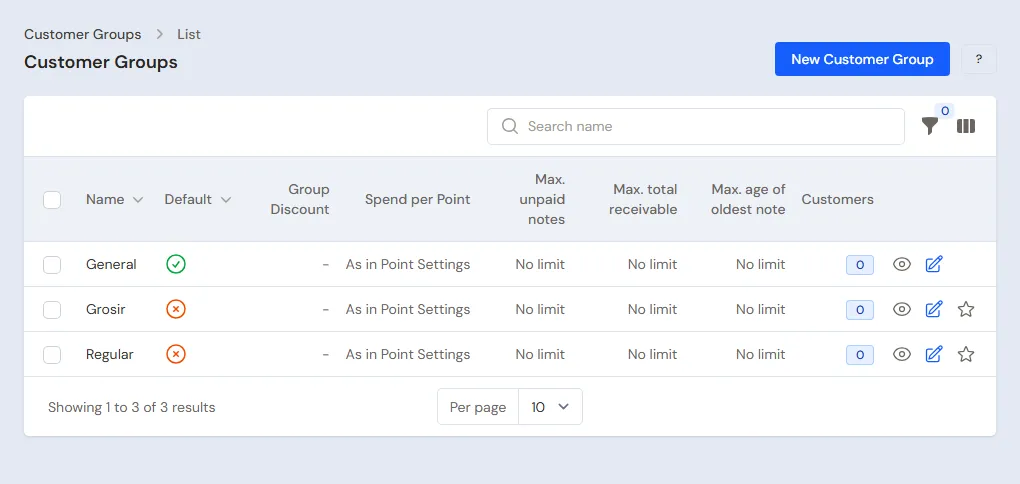
- Head Cashier: in Master Data → Customer Groups, make the groups Toko Besar (large shops) and Warung. Fill in the Credit Limit section as in the table. Buyers without a group use the General group and the product's selling price.
- Warehouse Admin: open Air Galon 19 L in Master Data → Products, tab Price List, press New Price, pick the group Toko Besar, Unit Gallon (19 l), then fill in Price Rp 16.000. Repeat for Warung, then for the cups and bottles with Unit Carton.
- Head Cashier: a shop with a price of its own gets a Special Price in Master Data → Special Prices, for example Toko Sejahtera buys Air Galon 19 L at a Fixed price of Rp 15.500. A Special Price of one customer wins over its group's price.
A cheaper price from 10 cartons, for example Toko Besar buying Air Botol 600 ml at Rp 25.000 a carton from 10 cartons, uses the extra feature Quantity prices. Without it, a group's price stays the same whatever the quantity; a large buyer can be moved to the group Toko Besar. See Quantity prices.
See Setting up customer groups, Prices per customer group, Special Prices for customers and groups, and Setting and monitoring customer receivables.
Customers
Done by the Head Cashier in Master Data → Customers. The Salesperson can add new customers from the field too. The customers of Pabrik Air Contoh:
| Customer | Group | Payment Terms (days) | Gallons |
|---|---|---|---|
| Toko Maju Jaya | Toko Besar | 14 | Swapped |
| Toko Sejahtera | Toko Besar | 14 | Swapped |
| Warung Pak Budi | Warung | empty (cash) | Borrows gallons with a deposit |
| Warung Bu Siti | Warung | 7 | Borrows gallons without a deposit |
| Warung Bu Tini | Warung | empty (cash) | Swapped |
Buyers who never borrow a gallon and always pay in full need not be listed. See Adding and changing customers.
When the salespeople are divided per district, create the regions in Master Data → Regions (the extra Sales feature) with the Sales in charge, then fill in the Region of each customer. A customer given a region and no Sales yet starts with the Sales of that region. See Regions and the Sales in charge.
Sales routes and visit days
Done by the Head Cashier in Master Data → Sales Routes, button New Sales Route.
- Fill in a name, for example Rute Cibadak, then pick Rina under Sales person.
- Tick the Visit days Monday and Thursday. Nothing ticked means every day.
- Under Customers on the route, press Add customer for Toko Maju Jaya, then Warung Bu Tini. The order here is the visiting order on the salesperson's phone; drag to change it.
- Press Create.
Afterwards the route shows on Rina's phone on its visit days. One salesperson may have several routes for different days. A driver who also visits shops gets a route the same way.
Suppliers
Done by the Purchasing Admin in Master Data → Suppliers, for example Sumber Galon (gallons, caps and seals, gallon labels), Kemasan Jaya (cups, bottles, lids, bottle caps, bottle labels, cartons, tape, straws, shrink plastic), and Filter dan Kimia Air. See Adding a supplier.
Cash accounts and expense categories
- Owner: a new shop already has Owner Cash, Cashier Cash, Bank BCA and Bank BRI in Master Data → Cash Accounts. Rename them to the factory's accounts, for example Cashier Cash to Kas Kantor. Set Bu Dewi's Default Cash Account for Cash Sales to Kas Kantor. See Cash accounts and bank accounts.
- Finance Admin: expense categories that are not there yet, for example Bahan Olah Air (water treatment), Komisi Sales and Bonus Sales, are added in Master Data → Expense Categories.
Fixed assets
Machines, lab tools and vehicles are recorded with the extra feature Fixed Assets, in Transactions → Finance → Fixed Assets. For example: Mesin Pengisi Gelas (cup filling machine) at Rp 24.000.000 with a life of 60 months, so its depreciation is Rp 400.000 a month; Alat Uji TDS dan pH (TDS and pH meter) at Rp 1.200.000 with a life of 24 months. Their price does not become an expense at once, but is spread over the months. See Fixed assets and depreciation.
Without that feature, a machine bought is recorded by the Owner in Transactions → Finance → Expenses and lowers that month's profit at once, so it is better to have the feature on before buying machines.
3. Starting capital and purchases
A new business has no old balances, so Settings → Opening Balances is not needed. The Enter opening balances step of the getting-started list on the dashboard may be skipped.
Starting capital
Owner: record the money put into the business in Transactions → Finance → Owner's Capital, for example Rp 100.000.000 into Bank BCA. See Capital contributions and withdrawals (drawings).
Buying on credit and in cash
Purchasing Admin: record every supplier's note in Transactions → Purchases, into the Warehouse Gudang Bahan. See Recording a purchase note.
- The Sumber Galon note, on 30 days' credit: 300 Galon Kosong 19 L × Rp 30.000 = Rp 9.000.000, 1.000 Tutup dan Segel Galon × Rp 600 = Rp 600.000, and 1.000 Label Galon × Rp 150 = Rp 150.000, so Rp 9.750.000. Fill in Payment Now Rp 2.750.000 from Bank BCA. The other Rp 7.000.000 becomes a payable to Sumber Galon.
- The Kemasan Jaya note, paid in full from Bank BCA: 9.600 Gelas Kosong 220 ml (Rp 960.000), 9.600 Lid Gelas 220 ml (Rp 240.000), 9.600 Sedotan (Rp 144.000), 200 Dus Gelas 220 ml (Rp 316.000), 4.800 Botol Kosong 600 ml (Rp 1.680.000), 4.800 Tutup Botol (Rp 360.000), 4.800 Label Botol 600 ml (Rp 240.000), 200 Dus Botol 600 ml (Rp 340.000), and 5 Rolls of Lakban (Rp 50.000), so Rp 4.330.000.
Afterwards the materials are in Gudang Bahan, Bank BCA goes down by Rp 2.750.000 + Rp 4.330.000 = Rp 7.080.000, and Rp 7.000.000 is owed to Sumber Galon with its due date.
Goods arriving in parts
Sumber Galon only sends 200 of the 300 gallons today:
- Purchasing Admin: when recording the note, switch off All goods have been received, then save. The payable is recorded at once; the stock does not go up yet.
- Purchasing Admin, or a Warehouse Admin with the Purchasing Operator role: press Receive Goods on that note, fill in Quantity Received of 200 gallons, 1.000 caps and seals and 1.000 labels, then Save Receipt. When the other 100 gallons arrive tomorrow, press Receive Goods again.
The stock goes up on the date the goods were received. See Receiving goods that arrive in parts.
Ordering from the supplier first with a purchase order (PO), then receiving its goods in parts, uses the extra feature Purchase orders (PO), in Transactions → Purchase Orders. Without that feature, the purchase note is recorded when the supplier's note arrives, as above. See Purchase orders.
Water treatment materials
Filters, chlorine and other chemicals are used a little at a time for every product, so they are recorded as an expense. Finance Admin: in Transactions → Finance → Expenses, pick the category Bahan Olah Air, fill in Rp 600.000 from Filter dan Kimia Air, choose Unpaid, then fill in a Due date 30 days ahead. This expense can be put into the cost of finished goods through Monthly Factory Costs in part 7. See Recording shop expenses.
Paying suppliers
Finance Admin: on the due date, open Transaction Details → Purchase Payments, press New Purchase Payment, pick the supplier, the cash account and the amount, for example Rp 7.000.000 to Sumber Galon from Bank BCA. The amount goes to the oldest notes first. The bell reminds of payables nearly due. See Paying what you owe suppliers.
4. A working day
The order of one day at Pabrik Air Contoh, with example figures that add up:
| When | Who | Work |
|---|---|---|
| Morning | Warehouse Admin | Production orders for gallons, cups and 600 ml bottles |
| Morning to afternoon | Production | Output on the Production Board |
| Midday | Warehouse Admin, QC officer | Finished goods into Gudang Produksi with a batch, QC per batch, what passed moved to Gudang Barang Jadi |
| Morning | Warehouse Admin | Loading the canvassing vehicle |
| Morning to afternoon | Salesperson | Visits to shops and warungs, orders from the phone |
| Midday | Head Cashier, Warehouse Admin | Orders checked, sent with a delivery run, billed |
| Morning to afternoon | Driver, office cashier | Canvassing and selling at the factory office |
| Afternoon | Warehouse Admin, Finance Admin | Unloading, hand-ins, empty gallons to Gudang Bahan, payments, expenses |
Everything that goes out today (a load of 60 gallons, 30 cartons of cups and 30 cartons of 600 ml bottles; delivery notes for 40 gallons, 30 cartons of cups and 50 cartons of 600 ml bottles; 1 gallon at the office) is covered by today's production.
Morning: production orders
Warehouse Admin (head of production):
- Move the materials needed from Gudang Bahan to Gudang Produksi in Transactions → Stock Transfers: empty gallons, caps and seals, labels and the other packaging for the day.
- Open Transactions → Production Orders, then press New Production Order.
- Pick the Recipe Air Galon 19 L. The stages Cuci Galon, Isi dan Tutup and Segel with their wages are copied from the recipe and can still be changed for this order only.
- Leave Production warehouse at Gudang Produksi, because the materials were moved there, and fill in Planned quantity 200.
- Save. Make the orders for Air Gelas 220 ml and Air Botol 600 ml the same way. A product with a Carton unit is entered per unit: Planned quantity 100 in the carton box, the bottle box left empty (so 4.800 cups and 2.400 bottles). No decimals; the order is kept in cups or bottles.
The Production stages part is folded, because the stages are copied from the recipe and seldom need changing.
A production order does not change the stock yet. It shows on the Production Board at once. For a large shop order, the Owner or the Store Head can also make its production orders from the order's page, button Create Production Orders.
A factory that does not use stages and piece-rate wages simply records its output in Transactions → Productions, button New Production: pick the recipe, the warehouse, the quantity and the batch, then save. The materials go down and the finished goods go up right away.
Output on the Production Board
Production (floor supervisor), on a tablet or phone in the production area:
- Open Transactions → Production Board. Every order shows as a card in the column of its stage.
- Tap the gallon card at the Cuci Galon stage. Under Record output, pick the Worker Pak Darto, fill in Good output 200, then press Save output. When some are rejected, fill in Finished goods rejected and pick what happens under Rejected goods: thrown away, reworked, or a second-grade product.
- The good goods move on to the Isi dan Tutup stage. Record Bu Sri's output of 200, then at the Segel stage Mas Andi's output of 200. Afterwards the gallon piece-rate wages are recorded: Pak Darto 200 × Rp 200 = Rp 40.000, Bu Sri Rp 40.000, and Mas Andi 200 × Rp 100 = Rp 20.000. These wages are owed until paid. The card at the last stage moves to Ready for the warehouse; the Warehouse Admin presses Receive Goods on that card.
Cups and bottles have one stage only, Kemas Dus, so they need not go through the Production Board: their output is recorded in one go in Receive Goods (see below). The board can still be used when the supervisor prefers recording on a phone; its card stays while the order runs.
Finished goods into the warehouse with a batch
Warehouse Admin:
- Open the gallon order in Transactions → Production Orders, then press Receive Goods.
- Fill in Finished goods 200. The Batch number and Expiry fill in from the production date and the product's Shelf life (for example 6 months); you can change them, for example to the number AG-001.
- Tick Finish this production order, then press Put into the warehouse.
- The bottle order (one stage, no Production Board): press Receive Goods, pick the Worker Bu Ani, fill in Finished goods 100 in the carton box, batch B600-001, then Put into the warehouse. Bu Ani's work at the Kemas Dus stage is recorded at the same time, with its wage.
- The cup order is received twice, because the last 5 cartons were packed from a machine with a fault: Worker Bu Ani, Finished goods 95 cartons batch GL-001, then 5 cartons batch GL-002. Finish this production order follows the quantity: it stays empty for 95 cartons, because the plan is not reached yet, and ticks itself for the last 5.
Bu Ani's wage that day is 4.800 × Rp 5 + 2.400 × Rp 10 = Rp 48.000. Below the fields, Receive Goods lists the materials taken out of stock, for example 2.400 Botol Kosong 600 ml, 2.400 Tutup Botol, 2.400 Label Botol 600 ml and 100 Dus Botol 600 ml.
When the output does not match the plan. For an order of 100 cartons of Air Botol 600 ml:
| What happened | How |
|---|---|
| 100 cartons and 10 bottles came out | Fill in Finished goods 100 cartons and 10 bottles. More than planned is allowed: there is a warning, but it is saved, and the materials and wages of 2.410 bottles are counted. The warning counts good and rejected bottles together, because both use materials |
| Only 99 cartons 14 bottles came out | Fill in 99 cartons and 14 bottles, then tick Finish this production order when nothing more is made |
| A stage counted per carton (24 per carton) has only 241 bottles | That stage takes whole cartons only: record 10 cartons, not 10 cartons 1 bottle (there is no bottle box there, and a fraction is refused with the reason). The 241st bottle keeps waiting at that stage and is worked on in the next order as a stage leftover. Receive Goods beyond that is refused with a message like "Packing has only recorded 10 cartons; 1 bottle is still waiting to be worked on at that stage", or, when less than one carton waits, with a note that the bottles wait for the next order. Sending a part of a carton to a subcontractor is refused too. A stage counted per bottle, such as Filling, still takes 10 cartons 1 bottle. A last stage given the Dus unit in the recipe (see Production recipes and work stages above) works the same, while Receive Goods stays in bottles: 10 cartons = 240 bottles |
| Filled bottles leak or are dented | Fill in Finished goods rejected, then pick thrown away or second grade |
| 20 empty bottles broke before filling | Empty bottles are a material, not finished goods: in Receive Goods open Spoiled materials, press Add a spoiled material, pick Botol Kosong 600 ml and enter Quantity spoiled 20. They leave stock too and their value goes into the cost of the finished goods; the Spoiled materials section of the order page lists them |
| Typed 1.000 cartons instead of 100 | Under Finished goods received, press Cancel on that receipt: the finished goods leave stock again, the materials come back, and the work and wage of Bu Ani recorded with it are cancelled too. Then receive again with the right quantity |
| The whole order is wrong and must go | On the order's page open the More menu, then press Delete everything. The window lists what is undone: the receipts, the work, the makloon dispatches, and the finished goods and materials that return to stock. Once you agree, everything is undone at once and the order is deleted. Refused if its wages or makloon were paid (delete the payment first in Wages & Makloon Payment), the month is closed, another order took its leftovers, or you may not undo one of its parts |
| 10 bottles left from yesterday are packed into a carton today | Record as many bottles as were really filled each day. Yesterday's leftover bottles came into stock as bottles yesterday, so packing them is not recorded again: stock is counted per bottle, and the carton is only how it is sold |
| The gallon order is finished, but 3 gallons were filled and not sealed yet | When the order is finished, those 3 gallons are kept as a leftover between stages: semi-finished stock in that order's warehouse, with the washing and filling wages already on them, and they do not weigh on the cost of the gallons of the finished order. In the next gallon order in the same warehouse, tap the Segel card on the Papan Produksi and press Take leftover (the card exists only when that order already has gallons waiting at Segel; otherwise use Take leftovers between stages on the order's page). The wages move with them, so that order's cost per gallon stays right. A leftover is taken whole, and can be given back with Give back in the More menu until it has been worked on. Leftovers nobody has taken are listed under Transactions → Stage Leftovers with their age and wages. If they will not be used, press Discard leftover (one at a time or several at once): their wages and materials become a Stock Loss of that month, Work in Process is clean again, and it can be undone with Undo discard while the month is still open. One-stage orders such as cups and bottles have no leftovers between stages |
Since 1 carton is used for 24 bottles, the material Dus Botol 600 ml goes out at 1/24 carton per bottle. An output of 2.410 bottles uses 100,42 cartons, so the carton stock can show a fraction, such as 184,58 pcs. The fraction evens out when the leftover bottles are packed in the next run. At a stocktake, a difference below 1 carton caused by bottles not packed yet is no mistake: enter the same number of cartons as the recorded stock so no adjustment is made.
Afterwards the materials in Gudang Produksi go down, for example Galon Kosong 19 L, the caps and seals and the gallon labels by 200 each, and the finished goods go up in Gudang Produksi. The Warehouse Admin sees the quantities only. The Owner (and holders of Sensitive Reports) see their cost in the Cost of finished goods section of the order page: Air Galon 19 L Rp 31.250, Air Gelas 220 ml about Rp 178 a cup (Rp 8.540 a carton), Air Botol 600 ml about Rp 556 a bottle (Rp 13.340 a carton), with the materials, piece-rate wages and factory costs in that cost.
QC per batch
QC officer (or the Warehouse Admin), once or several times a day:
- Open Master Data → Batches, then press QC check on batch AG-001.
- Fill in TDS, for example 8, and pH 7, pick No leak and Seal intact, then pick the Result Passed.
- Save. Check GL-001 and B600-001 too, both Passed. In the afternoon B600-001 is checked again and still Passed; the QC column of the batch list always shows the last check.
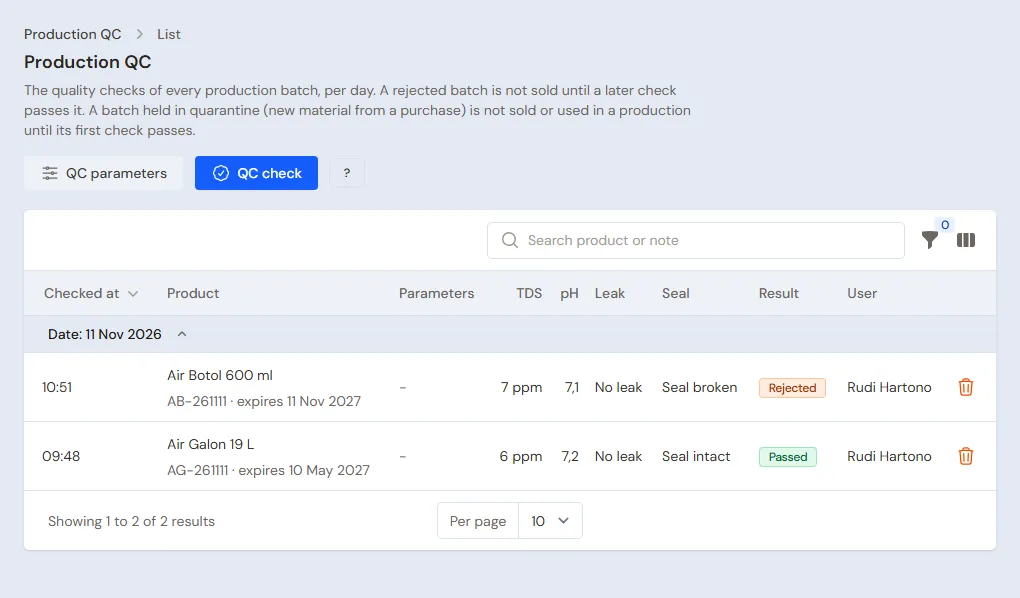
- Batch GL-002 turns out to leak: pick Leaking, then the Result Rejected.
A Rejected batch is held back from sales and delivery notes: both skip it and take another batch. A note is refused when the other batches are short. A batch not checked yet counts the same as one that passed. A later check that passes makes the batch sellable again. Every check per day is in Transactions → Production QC. See Production QC per batch.
The rejected batch and the move to Gudang Barang Jadi
Warehouse Admin:
- Take the rejected batch out: in Transactions → Stock Adjustments, pick Gudang Produksi, direction Out, category Damaged, then fill in 240 cups of Air Gelas 220 ml with batch GL-002. Its cost becomes a stock loss.
- Move what passed: in Transactions → Stock Transfers, From Warehouse Gudang Produksi, To Warehouse Gudang Barang Jadi, fill in 200 Air Galon 19 L, 95 Cartons of Air Gelas 220 ml and 100 Cartons of Air Botol 600 ml, then Post.
Afterwards Gudang Barang Jadi holds 200 gallons, 95 cartons of cups and 100 cartons of 600 ml bottles, all of batches that passed. Loading and delivery notes take from this warehouse, so the rejected batch never goes out.
Loading the canvassing vehicle
Warehouse Admin:
- Open Transactions → Fleet Loading & Settlement, press New Fleet Run, fill in Date, Vehicle Mobil Box L300 B 1234 XY, Driver/Sales Pak Joko, Vehicle cash Kas Mobil L300, and Loading warehouse Gudang Barang Jadi, then save.
- Press Load, type 60 Air Galon 19 L, 30 Cartons of Air Gelas 220 ml and 30 Cartons of Air Botol 600 ml, then post the stock transfer.
Afterwards those goods move from Gudang Barang Jadi to the vehicle's warehouse. See Fleet loading and settlement.
Sales visits
Salesperson, on the phone:
- Open Transactions → Today's Visits. The Today's routes tab holds the shops and warungs in the order of the route.
- At Toko Maju Jaya, press Check in. The phone's location is recorded with it. At the top show that shop's receivables, its notes due and its last order.
- Pick Order, then fill in 40 Air Galon 19 L and 20 Cartons of Air Botol 600 ml. Repeat order fills in the goods of the last order. The prices follow the group Toko Besar: 40 × Rp 16.000 + 20 × Rp 26.000 = Rp 1.160.000.
- When needed, fill in Stock on the shop's shelf (optional), take Shelf photos with the phone camera, and write the goods to be handed back under Returns & notes.
- Press Send visit.
Note: The My sales card at the top of the screen shows your sales today and this month. It fills in only when your manager has registered you under Master Data → Sales Agents (an extra feature) and filled Linked User with your login. Without that, the card asks to be linked and orders from this screen carry no Sales name.
At Warung Bu Tini, Rina records No order with the Reason for no order Enough stock left. A shop that is not on today's route is found under Visit off the route. A new prospect gets a stage and a follow-up date in the Prospect part.
A salesperson who builds relationships before there are sales, for example by getting to know the owner of a new shop or warung or a go-between around the factory, uses the extra Sales activity part. The owner switches on Contacts and visit purposes in Settings → Sales Activity; the phone then shows a Relations card to pick or add the people met, fill in the purpose and take a photo together. A shop that requires a check-out uses the Check out and send visit button; when Contacts and visit purposes or a required check-out is on, there is also a No check-in button to write a visit down afterwards. The bell also reminds you of a salesperson who has not sold or not visited for this many working days in a row (the limits are in Settings → Alerts). The details are in Sales activity.
Afterwards the order becomes a sales order at the office. Without signal, the visit is kept on the phone and sent by itself when the signal comes back. Stock and the credit limit are checked when the order is received, leaving out stock already booked by other open orders; when the stock is short or the credit limit would be passed, the order is still saved and the salesperson is told.
That holds for a salesperson with the May Order Beyond Stock role (job title Salesperson). A salesperson who may only order as much stock as can be sold gets the job title Salesperson (within stock): a visit's order and an order under Transactions → Sales Orders asking for more than can be sold are refused. A refused visit is marked Needs fixing on the phone: lower the quantity, then send it again. The sales admin still decides which orders become sales. See Orders within stock.
Orders reaching the office
Head Cashier (sales admin):
- Open Transactions → Sales Orders, tab Open. The order of Toko Maju Jaya from Rina's visit is here.
- An order by phone or WhatsApp is recorded with New Sales Order. For example: Toko Sejahtera orders 50 Cartons of Air Gelas 220 ml and 30 Cartons of Air Botol 600 ml: 50 × Rp 17.000 + 30 × Rp 26.000 = Rp 1.630.000. Fill in the delivery day as the Pickup Date.
- Toko Sejahtera transfers a down payment of Rp 500.000 to Bank BCA: press Receive Down Payment.
An order not yet turned into a note can still be changed. The dashboard tells about the orders due to be collected by tomorrow. See Recording a sales order and Taking a down payment on an order. A quotation before the order is the extra feature Quotations. See Making a price quotation.
Sending with a delivery run
Warehouse Admin, when Pak Wawan's pickup leaves:
- Open Transactions → Delivery Runs, press Make Delivery Run, then pick Sales orders. It lists the orders whose goods still wait to be sent.
- Tick the orders of Toko Maju Jaya and Toko Sejahtera, then pick Make Delivery Run. Fill in From warehouse Gudang Barang Jadi, Driver name Pak Wawan and Vehicle Pikap B 5678 XY. Driver on the phone stays empty because Pak Wawan takes the paper.
- In the Stops table, put them in route order: Toko Maju Jaya first, then Toko Sejahtera.
- Press Print & make delivery notes. The delivery notes of Toko Maju Jaya (40 gallons and 20 cartons of bottles) and Toko Sejahtera (50 cartons of cups and 30 cartons of bottles) are made and their stock leaves. Print the delivery run and both delivery notes for Pak Wawan to carry.
- In the afternoon, from the paper he brings back: Toko Maju Jaya Delivered. Toko Sejahtera took only 30 cartons of cups today, so pick Partly in its row menu and fill in Received 30 cartons of cups and 30 cartons of bottles.
After this the delivery run is Done. Toko Sejahtera's delivery note keeps 30 cartons of cups and 30 cartons of bottles, and 20 cartons of cups go back to Gudang Barang Jadi and wait to be delivered tomorrow. The Head Cashier can also make the delivery note of one order from the order's page, button Make Delivery Note. See Delivering goods with a daily delivery run.
Billing what was delivered
Head Cashier:
- On the order of Toko Maju Jaya, press Make Note from Delivery Notes, pick the delivery note, then press Make Draft Note.
- The draft note opens on the sales screen. Press Pay, press Unpaid, then press Save transaction.
Afterwards Rp 1.160.000 becomes the receivable of Toko Maju Jaya, due in 14 days. A note made from a delivery note swaps gallons one for one, so the 40 empties Pak Wawan brings back go into Gudang Barang Jadi. Toko Sejahtera is billed tomorrow, after its second delivery note: one note from both delivery notes, Rp 1.630.000 less the down payment of Rp 500.000, leaves a receivable of Rp 1.130.000.
A note that passes its group's credit limit is held at the payment window. The Head Cashier can ask the shop to pay first, or still save it by filling in Reason for passing the credit limit. A shop that borrows extra gallons is recorded on the till. See Sending goods in several deliveries with delivery notes.
Canvassing
The driver (job title Cashier) sells from a phone with the vehicle's warehouse:
- Every time the till is opened: press Change customer, warehouse and date, then pick Mobil Box L300 B 1234 XY under Warehouse. While that page stays open, the next notes use the same warehouse. A page opened again or reloaded, for example after the phone's browser was closed, is back on Gudang Barang Jadi. In quick sale, pick the warehouse with This device's printer and warehouse.
- Check the warehouse before the first note every time the screen is opened. A note from Gudang Barang Jadi is not counted for the vehicle: Unload All then moves the whole load back, although part of it was sold.
Pak Joko's sales today:
- A walk-in buyer buys 2 gallons and swaps 2 empties: Rp 40.000 in cash. Empty gallons back stays at 2.
- Warung Pak Budi starts buying: pick the customer, sell 3 gallons at the Warung price, set Empty gallons back to 1, add Jaminan Galon 19 L for 2, and 5 Cartons of Air Gelas 220 ml. The total is 3 × Rp 17.000 + 2 × Rp 50.000 + 5 × Rp 18.000 = Rp 241.000, paid in cash. Warung Pak Budi now borrows 2 gallons with a deposit of Rp 100.000.
- Warung Bu Siti has 7 days' credit and pays no deposit: 5 gallons with Empty gallons back 3, and 5 Cartons of Air Botol 600 ml. The total is 5 × Rp 17.000 + 5 × Rp 27.000 = Rp 220.000: press Unpaid. Rp 220.000 becomes her receivable, with the same credit limit check, and Warung Bu Siti borrows 2 gallons without a deposit.
The cash goes into Kas Mobil L300, so the vehicle cash holds Rp 281.000. The vehicle sold 10 gallons, 5 cartons of cups and 5 cartons of bottles, and took 6 empties back (2 + 1 + 3). See Recording a sale on the till and Gallon exchange and borrowed gallons.
Selling at the factory office
The office Cashier serves buyers who come to the factory on the till, from Gudang Barang Jadi. For example: one buyer swaps 1 gallon, Rp 20.000 in cash into Kas Kantor. A buyer who buys a new gallon together with its water is served with Galon Kosong 19 L and Air Galon 19 L on the same note, leaving Empty gallons back at 1; keep a few new empty gallons in Gudang Barang Jadi for that. See Selling from a phone with Quick sale.
Afternoon: unloading, hand-in and empty gallons
- Warehouse Admin: on that vehicle's fleet run page, press Unload All. The 50 full gallons, 25 cartons of cups, 25 cartons of bottles and 6 empties left move to Gudang Barang Jadi.
- Finance Admin: press Hand In. Pak Joko hands over Rp 276.000: fill in Money received Rp 276.000, pick Kas Kantor under Handed in to, then pick Cash difference (borne by the shop) or Driver kasbon (paid back by the driver) for the Rp 5.000 difference.
- Warehouse Admin: move the 47 empty gallons (6 from the vehicle, 1 from the office and 40 from Toko Maju Jaya) from Gudang Barang Jadi to Gudang Bahan with Transactions → Stock Transfers, so they can be washed and filled tomorrow.
The money received moves to the office account, and the vehicle cash is back to zero. That afternoon Gudang Barang Jadi holds 149 gallons, 60 cartons of cups and 45 cartons of 600 ml bottles.
On another day the driver also brings money for notes on credit, for example a week later Warung Bu Siti pays Pak Joko Rp 220.000. The Finance Admin records it first in Transaction Details → Sale Payments with Cash Account Kas Mobil L300, before Hand In. That money is then part of what is handed in that day. A driver kasbon is paid back through Transaction Details → Advance Repayments. See Fleet loading and settlement and Recording advances and their repayments.
Payments and expenses
- Finance Admin: a shop's transfer is recorded in Transaction Details → Sale Payments, for example Toko Maju Jaya pays Rp 1.160.000 into Bank BCA. The amount goes to the oldest notes first. See Recording payment of an unpaid note.
- Finance Admin: diesel, machine upkeep, electricity and laboratory tests are recorded in Transactions → Finance → Expenses with their default categories. See Recording shop expenses.
5. Receivables and collecting
Shop and warung receivables are kept in check from several sides:
- Credit limit: a new note that passes the group's limit is held on the sales screen, the drivers' phones included. Only the Head Cashier, the Store Head and the Owner can still save it, with a reason.
- Reminders: the Owner fills in Due Date Reminder in Settings → Alerts, for example 3 days before the due date. The bell then reminds of notes nearly due and past due.
- During visits: the salesperson sees the shop's notes due on Today's Visits, so they can remind the shop in person.
- Every week: the Finance Admin opens Reports → Receivables for the shops past due, then sends that shop's Reports → Receivable Card as a PDF over WhatsApp.
- Collected money: drivers and salespeople may take the money, but neither records note payments. Money the driver brings goes into the vehicle cash before the hand-in, as above. Money a salesperson brings is handed to the office, then the Finance Admin records it in Transaction Details → Sale Payments into Kas Kantor.
A factory with its own collectors can use the extra feature Collectors: the office makes collection lists, the collectors collect from their phones, then hand the money in at the office. See Collecting receivables through collectors and Setting and monitoring customer receivables.
6. Returns and damaged goods
Shops and warungs may hand back goods that leak, are dented or are near expiry. The goods can be swapped for new ones or taken off the bill.
| What happens | Who | How |
|---|---|---|
| Swapped for new goods: Warung Pak Budi hands back 1 dented carton of cups | Cashier or Head Cashier | On the till, Add return from its original note, then sell 1 replacement carton on the same note. Nothing is due |
| Taken off the bill: Warung Bu Siti hands back 1 carton of 600 ml bottles near expiry and takes 2 cartons of cups | Cashier or Head Cashier | One note holds the return of 1 carton from its original note and 2 cartons of cups, Unpaid: 2 × Rp 18.000 - Rp 27.000 = Rp 9.000 adds to her receivable, not Rp 36.000 |
| A leaking full gallon swapped | Cashier | Add return from its original note and sell 1 Air Galon 19 L on the same note, leaving the empty gallon fields as they are. See Gallon exchange and borrowed gallons |
| The salesperson notes a return during a visit | Salesperson, then Head Cashier | Returns & notes is a note only. The office records the return on the till when the goods arrive |
| Gudang Retur is checked | Warehouse Admin | What is damaged is taken out with Transactions → Stock Adjustments in the category Damaged or Expired, what is still good is moved with Transactions → Stock Transfers |
| Goods broken or leaking at the factory, a batch thrown away | Warehouse Admin | Transactions → Stock Adjustments, direction Out, category Damaged |
| Faulty materials sent back to the supplier | Purchasing Admin | The Returns to Supplier section of the purchase note. An example: 200 bad labels × Rp 50 = Rp 10.000 off the bill |
| A customer stops and their gallons come home | Warehouse Admin | Transactions → Stock Transfers from the Goods at Customers warehouse to Gudang Barang Jadi, pick the Customer, then Galon Kosong 19 L for the gallons that came home. See Gallon exchange and borrowed gallons |
| A deposit handed back because its gallons came home | Cashier for a deposit from a Vende note, Head Cashier or Owner for an Old deposit | On the till, pick the customer, enter the service Jaminan Galon 19 L as a return for the gallons that came home, then hand the money back. A Cashier picks the original note; an old deposit has no original note, so only someone allowed to record a return without a note can record it. Separate from the gallons' transfer |
Returned goods go into Gudang Retur, so do not forget to check them and take them out. A return recorded without new goods becomes a credit note in the customer's name; applying it to an old unpaid note uses the extra feature Sale Note Offsets. See Recording a sales return, Keeping and applying customer credit, Stock adjustments, and Returning purchases to the supplier.
7. Wages, salaries, attendance and commission
Piece-rate wages
Finance Admin, for example every Saturday:
- Open Transactions → Wages & Makloon Payments, then press New Wages & Makloon Payment.
- Pick Paid to Worker wages, then the Worker Pak Darto. Below it shows the wages still owed, for example 6 days × Rp 40.000 = Rp 240.000.
- Pick the cash account, fill in the amount, then save.
When work is recorded without choosing a Worker, its wage is still counted and recorded as No name. Paid to then offers Wages without a name to pay it all at once, and Reports → Worker Output & Wages has a row for it. The worker can be named later: in the Work output table on the order's page, press Name the worker. This works while the wage has not been paid as No name and the month is not closed.
The Warehouse Admin and the Owner read every worker's output and wages in Reports → Worker Output & Wages: good and rejected quantities per stage, wages, what was paid, and what is still owed.
Monthly and daily workers
Without the Payroll feature, pay is recorded as an expense. Finance Admin: in Transactions → Finance → Expenses, category Gaji (salaries), record Pak Hadi's Rp 3.000.000 at the end of every month, and Mas Eko's daily wages every Saturday, for example 6 days × Rp 100.000 = Rp 600.000. The days a daily worker worked are counted by hand.
Monthly factory costs
Fixed wages and factory costs such as electricity and water treatment materials can be put into the cost of finished goods:
- The Finance Admin records the spending as usual in Transactions → Finance → Expenses.
- The Warehouse Admin opens Transactions → Monthly Factory Costs, picks the Month, then fills in Fixed wages, for example Rp 5.600.000 (Pak Hadi and Mas Eko), and Factory costs (overhead) Rp 4.600.000 (electricity Rp 4.000.000 and water treatment Rp 600.000).
Supplies that are shared and hard to count per production run, such as tape (Lakban), need no typing in the recipes. Lakban is already a product of Type Raw Material (unit Roll, cost Rp 10.000) from part 2, bought with the other packaging. The Warehouse Admin takes it out of Gudang Bahan in Transactions → Stock Adjustments: direction Out, category Production use, then the product, for example the 30 Rolls of Lakban used that month. Their value (30 × Rp 10.000 = Rp 300.000) goes into that month's factory costs at once, also when the month has not been filled in yet, and is shared over all that month's finished goods. Because it is worked out from the cost price, the line Production use (automatic) in Monthly Factory Costs shows only to the Owner and holders of Sensitive Reports. Supplies taken out this way should not also be in a recipe or in Factory costs (overhead). Plastik Shrink is only used by Air Botol 1500 ml, so it stays in that recipe and is not taken out this way. See Production use.
All those costs are shared over the finished goods of the production orders received that month, in proportion to their cost (the materials, piece-rate wages and makloon they already carry), and the costs are not recorded twice. Goods that cost more carry more. For example: that month 5.000 gallons (Rp 31.250), 115.200 cups (about Rp 178) and 57.600 bottles (about Rp 556) come in, worth Rp 208.762.000. The month's costs are Rp 10.500.000 (fixed wages Rp 5.600.000, factory costs Rp 4.600.000 and production use Rp 300.000), about 5% of that value, so every gallon goes up by about Rp 1.572, every cup by about Rp 9 and every bottle by about Rp 28. That cost can already be read in the middle of the month: every receipt of finished goods and every production use works the month's cost out again. When such a split does not suit your factory, leave Monthly Factory Costs empty: the costs stay in Profit & Loss, they just do not go into the cost of finished goods.
Payroll and attendance
Payroll and Staff attendance are extra features. With Payroll, every employee is listed in Master Data → Staff & Salaries with a Pay basis of Monthly (Pak Hadi Rp 3.000.000) or Daily (Mas Eko Rp 100.000 times the days present), and piece-rate workers are linked to their production worker, so the unpaid piece-rate wages go on the payslip. Salaries are worked out and paid in Transactions → Payrolls. See Payroll.
With Staff attendance (an extra feature), one computer or tablet at the factory's gate is made a QR screen in Settings → Attendance Phones & Screens, then every employee checks in and out from their own phone by scanning that QR, with location and a selfie when switched on. Schedules and shifts are set in Settings → Attendance and its Master Data menus. The days a daily worker was present are then read on the payslip. See Staff attendance.
Sales commission or bonus
Vende does not work out sales commissions or bonuses by itself. The figures are read from reports, worked out, then paid as an expense. Two ways to choose from:
- Commission on sales. The Head Cashier reads every salesperson's Order value in Reports → Visits per Sales Person, for example Rina's Rp 25.000.000 for the month × 1% = Rp 250.000. The order value counts the orders recorded, not the money received, so check the cancelled orders first. For a canvassing driver, every vehicle's sales per day are read in Reports → Fleet, for example Rp 200 for every gallon sold.
- Target bonus. The owner sets a monthly target outside Vende, for example an order value of Rp 30.000.000 with a bonus of Rp 500.000. At the end of the month, the Head Cashier compares the same reports with the target.
The figure goes to the Finance Admin, who pays it in Transactions → Finance → Expenses in the category Komisi Sales or Bonus Sales. With the extra feature Payroll, the commission or bonus goes in as an Addition (bonus) on that salesperson's payslip.
8. The reports every job title reads
The Owner opens every report. Other job titles open only the reports of their own part:
| Report | What it holds | Opened by | When |
|---|---|---|---|
| Reports → Visits per Sales Person | Visits, orders, no orders with their reasons, and the order value of every salesperson | Owner, Store Head, Head Cashier | Daily |
| Reports → Sales KPI (an extra feature, switched on in Settings → Sales Activity) | Salespeople to act on and to praise, visits per working day, check-ins far from the customer, prospects per stage | Owner, Store Head, Head Cashier | Weekly |
| Transactions → Sales, filter Customer | Every note of one shop with the totals below the list | Owner, Store Head, Head Cashier, Cashier | Weekly |
| Transactions → Delivery Runs | The shops each driver delivers to that day, their order and results | Owner, Store Head, Head Cashier, Warehouse Admin | Daily |
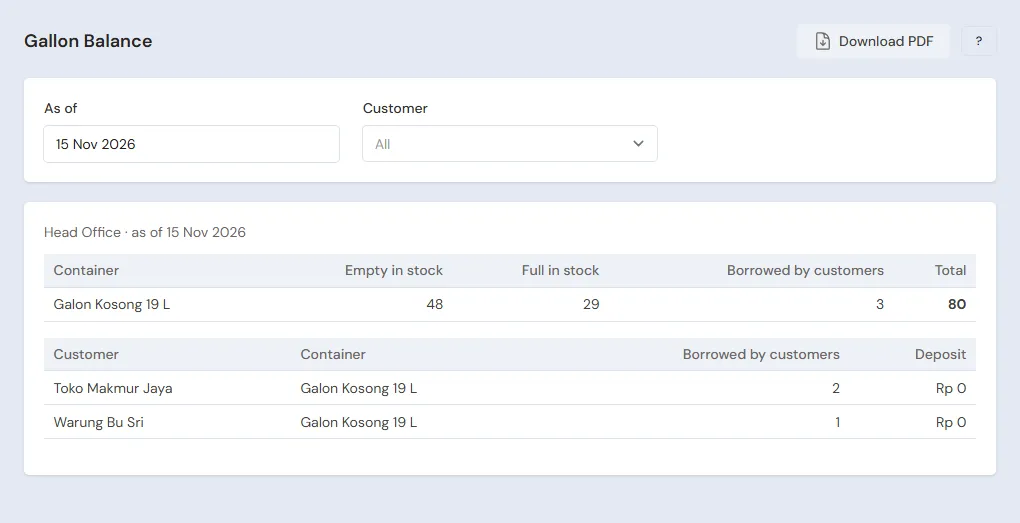
| Reports → Gallon Balance | Empty and full gallons in the warehouses, the gallons every customer keeps (the Goods at Customers warehouse) | Owner, Store Head, Head Cashier | Daily |
| Reports → Container Deposits | Every customer's deposit | Owner, Store Head, Head Cashier | Monthly |
| Reports → Fleet | Sales, receivables, hand-ins and differences of every vehicle per day | Owner, Store Head, Head Cashier | Daily |
| Reports → Stock and Reports → Stock Card | The goods left per warehouse and batch, and their history | Owner, Store Head, Warehouse Admin | Daily |
| Transactions → Production QC | The QC result of every batch per day | Owner, Store Head, Warehouse Admin, QC officer | Daily |
| Reports → Worker Output & Wages | Good and rejected output, wages, and what is still owed | Owner, Store Head, Warehouse Admin | Weekly |
| Reports → Receivables and Reports → Receivable Card | The shops and warungs that have not paid, by the age of their notes | Owner, Store Head, Finance Admin | Weekly |
| Reports → Payables | What is owed to every supplier and the expenses not paid yet | Owner, Store Head, Finance Admin | Weekly |
| Reports → Cash Balance | The money in every account, the vehicle cash included | Owner, Store Head, Finance Admin | Daily |
| Reports → Profit & Loss | Sales, cost of goods, expenses and profit; the Cost of goods sold breakdown opens the cost of goods into gallons, caps, labels, wages, factory costs and production use | Owner, Finance Head | Monthly |
See Reading the stock reports, Receivables and payables reports, and Reading Profit & Loss.
Daily checklist
- Warehouse Admin: every production order of the day has its output on the Production Board, and its finished goods are in the warehouse with a batch.
- QC officer: every new batch is checked in Transactions → Production QC.
- Warehouse Admin: the rejected batches are taken out, and what passed is moved to Gudang Barang Jadi.
- Warehouse Admin: every canvassing vehicle on the road has a fleet run that day, loaded with Load.
- Salesperson: every visit is sent. The Head Cashier reads Reports → Visits per Sales Person.
- Head Cashier: the orders sent that day have a delivery note and a note, and every delivery run of the day is Done.
- Afternoon: the Warehouse Admin presses Unload All, then the Finance Admin records the collected money the driver brings and presses Hand In, with the difference recorded.
- Warehouse Admin: the day's empty gallons are moved to Gudang Bahan.
- Finance Admin: the day's customer payments and expenses are recorded.
- Owner or Head Cashier: the empty gallons in the warehouse match Reports → Gallon Balance.
Weekly checklist
- Finance Admin, Reports → Receivables: chase the shops whose notes are past due, send their Receivable Card.
- Finance Admin: pay the piece-rate wages in Transactions → Wages & Makloon Payments, the daily wages, and the suppliers that are due.
- Head Cashier, Reports → Sales KPI (an extra feature, switched on in Settings → Sales Activity): go through what to act on with every salesperson.
- Owner or Head Cashier, Reports → Gallon Balance: check the customers who borrow too many gallons.
- Owner or Head Cashier, Reports → Fleet: check every driver's hand-in differences. The Finance Admin checks the driver advance repayments in Transactions → Finance → Advances.
- Warehouse Admin: count the empty gallons, cups, bottles, caps, labels, cartons and tape with Transactions → Stocktakes, then check Gudang Retur and the goods near expiry. See Counting stock with a stocktake.
- Purchasing Admin: buy the materials that run low.
- Owner: download a backup in Settings → Backup. See Making a data backup.
Monthly checklist
- Finance Admin: record that month's salaries, electricity and other factory costs.
- Warehouse Admin: take out the tape (Lakban) used that month with Transactions → Stock Adjustments in the Production use category, then fill in that month's Transactions → Monthly Factory Costs when the factory uses it.
- Head Cashier: work out the sales commissions or bonuses from Reports → Visits per Sales Person and Reports → Fleet, then the Finance Admin pays them.
- Owner or Head Cashier: compare Reports → Container Deposits with the deposit money kept.
- Owner: read that month's Reports → Profit & Loss and compare it with the month before.
A running business
This part is for the team moving a bottled drinking water factory (AMDK) that is already running to Vende. The factory already has money, stock of materials and finished goods, receivables from shops and warungs, supplier payables, machines and vehicles, salespeople with their routes, a canvassing vehicle, and gallons held by its customers. The order is always the same:
- Enter the master data.
- Practise transactions until every part is used to them.
- Empty the practice transactions.
- Enter the opening balances on the first day.
- Go live.
The opening balances come last on purpose, so the practice does not spoil their figures. A factory that starts without old balances only needs the part A new business. The examples in this part use Pabrik Air Contoh from that part.
1. Master data
Work through the parts Who does what, 1. Shop details and users and 2. Master data of the new business part: users with their job titles, the materials, finished goods, return and vehicle warehouses, materials and packaging, finished goods per size, recipes with their stages and piece-rate wages, production workers, the gallon deposit, vehicles and their cash, customer groups with their prices and credit limits, Special Prices, customers, sales routes, suppliers and cash accounts.
For a running business, also mind these:
- List every customer who holds gallons now and every shop or warung that still owes money. Both are needed for the opening balances.
- Put the shops and warungs on the sales routes by the visit days already in use, in the usual visiting order.
- Add the drivers who still owe an advance in Master Data → Borrowers.
- Import many products, customers, suppliers and recipes from Excel. See Importing data from Excel.
- Data from another program can come over at once with the extra feature Full Data Import. See Moving from Doctor Accounting or another program.
Master data is not deleted when the practice transactions are emptied later.
2. Practice for the team
The team works through this practice step by step with the data of Pabrik Air Contoh, in three parts in order: master data, daily transactions, then opening balances. Every step names who does it, the exact data, and what must show afterwards. When what shows is different, find the step that was missed before going on. The full way of doing each step is in the new business part, in the part linked.
Do it in a practice shop: a shop of the Drinking water factory & distribution type made only for practice. Practice master data is not deleted by Empty Transactions, so do not use the real shop for Practice 1, unless its master data is really that factory's.
The practice uses six accounts, the user limit of this package: the Owner, Rina (Salesperson), Pak Joko (Cashier, canvassing driver), Bu Lina (Head Cashier, sales admin), Bu Dewi (Finance Admin with the extra Cashier Operator role, finance and office cashier), and Mas Rudi (Warehouse Admin with the extra Purchasing Operator role, warehouse, production, QC and purchasing). A shop with a larger user limit may give Production, the QC officer and the Purchasing Admin to other people.
Practice 1: master data
The exact data is in the tables of Master data in the new business part.
- Owner: fill in the name Pabrik Air Contoh in Settings → Shop, then make the five users in Settings → Users with their job titles and extra roles.
- Check: everyone signs in from their own phone or computer. Rina does not see the till, and Bu Dewi does not see Profit & Loss.
- Mas Rudi: in Master Data → Warehouses, make Mobil Box L300 B 1234 XY (Vehicle (fleet)); Gudang Barang Jadi, Gudang Bahan, Gudang Produksi and Gudang Retur already exist. For the new warehouse, pick its branch under Branches Allowed: a warehouse without a branch does not show on notes, returns or fleet runs.
- Check: five active warehouses. In Transactions → Fleet Loading & Settlement, New Fleet Run offers Mobil Box L300 B 1234 XY under Vehicle, and Loading warehouse already holds Gudang Barang Jadi.
- Owner: in Master Data → Cash Accounts, rename Cashier Cash to Kas Kantor and make Kas Mobil L300 with the same branch under Branches Allowed.
- Check: in Transactions → Fleet Loading & Settlement, Vehicle cash offers Kas Mobil L300.
- Owner: in Settings → Users, set Pak Joko's Default Cash Account for Cash Sales to Kas Mobil L300 and his Sales Input & Till Display to Till, then Bu Dewi's default cash account to Kas Kantor.
- Mas Rudi: make the 19 materials and packaging, the 5 finished goods with batches and their Carton unit, and the service Jaminan Galon 19 L.
- Check: the product list holds 24 products. Air Galon 19 L uses batches and has Galon Kosong 19 L as its container.
- Mas Rudi: make the 5 production recipes and the 4 production workers (Pak Darto, Bu Sri, Mas Andi, Bu Ani).
- Check: the recipe of Air Galon 19 L has the stages Cuci Galon Rp 200, Isi dan Tutup Rp 200 and Segel Rp 100.
- Head Cashier: make the groups Toko Besar and Warung with their credit limits in Master Data → Customer Groups, the five customers in Master Data → Customers, and Toko Sejahtera's Special Price in Master Data → Special Prices.
- Head Cashier: make Rute Cibadak for Rina in Master Data → Sales Routes with Toko Maju Jaya, then Warung Bu Tini. During the practice, leave Visit days empty so the route shows every day.
- Check: on Rina's phone, Transactions → Today's Visits shows Toko Maju Jaya, then Warung Bu Tini.
- Mas Rudi: fill in the Toko Besar and Warung prices on the Price List tab of every finished product, per Carton for cups and bottles and per Gallon for gallon water.
- Check: Bu Dewi opens the till, picks Warung Pak Budi, then adds 1 Carton of Air Gelas 220 ml: its price is Rp 18.000. Change the customer to Toko Maju Jaya: Rp 17.000. Remove the line without saving.
- Mas Rudi: make the suppliers Sumber Galon, Kemasan Jaya, and Filter dan Kimia Air.
- Finance Admin: make the categories Bahan Olah Air, Komisi Sales and Bonus Sales in Master Data → Expense Categories.
Practice 2: daily transactions
Two working days with the figures of A working day of the new business part. Reports are read by the job title that opens them: Reports → Gallon Balance, Reports → Fleet and Reports → Visits per Sales Person are opened by the Owner or the Head Cashier. Reports → Receivables, Reports → Payables and Reports → Cash Balance are opened by the Finance Admin. Reports → Stock and Reports → Worker Output & Wages are opened by the Warehouse Admin.
Do the second day on the next date, for example the day after. A vehicle has only one fleet run per date, and Pak Joko's till notes carry that day's date, so a second day done on the same date is refused at step 22.
The first day:
- Owner: Owner's Capital of Rp 100.000.000 into Bank BCA.
- Mas Rudi: the Sumber Galon purchase note on 30 days' credit (300 Galon Kosong 19 L, 1.000 Tutup dan Segel Galon, 1.000 Label Galon, Rp 9.750.000), with All goods have been received switched off and Payment Now Rp 2.750.000 from Bank BCA. Then Receive Goods: 200 gallons, 1.000 caps and seals, and 1.000 labels.
- Mas Rudi: the Kemasan Jaya note of Rp 4.330.000, paid in full from Bank BCA, into Gudang Bahan.
- Finance Admin: an expense in the category Bahan Olah Air of Rp 600.000 from Filter dan Kimia Air, Unpaid, due in 30 days.
- Check: Reports → Cash Balance shows Bank BCA Rp 92.920.000; Reports → Payables shows Sumber Galon Rp 7.000.000 and the Bahan Olah Air expense Rp 600.000.
- Mas Rudi: a stock transfer of the materials from Gudang Bahan to Gudang Produksi, then three production orders in Gudang Produksi (Air Galon 19 L 200, Air Gelas 220 ml 4.800, Air Botol 600 ml 2.400), the output on the Production Board (Pak Darto, Bu Sri and Mas Andi 200 gallons each; Bu Ani 4.800 cups and 2.400 bottles), then Receive Goods: AG-001 200 gallons, B600-001 2.400 bottles, GL-001 4.560 cups, and GL-002 240 cups.
- Check: Reports → Worker Output & Wages shows Rp 148.000 of wages unpaid, Bu Ani's Rp 48.000. Reports → Stock for Gudang Produksi: Galon Kosong 19 L 0, Air Galon 19 L 200 at a cost of Rp 31.250.
- Mas Rudi: QC of AG-001, GL-001 and B600-001 Passed, B600-001 checked again in the afternoon Passed, and GL-002 Leaking, Rejected.
- Check: Transactions → Production QC shows 5 checks that day, 1 rejected.
- Mas Rudi: a stock adjustment in Gudang Produksi, Out, category Damaged, 240 Air Gelas 220 ml of batch GL-002. Then a stock transfer from Gudang Produksi to Gudang Barang Jadi: 200 Air Galon 19 L, 95 Cartons of Air Gelas 220 ml and 100 Cartons of Air Botol 600 ml.
- Check: Reports → Stock for Gudang Barang Jadi: 200 gallons, 4.560 cups (95 cartons) and 2.400 bottles (100 cartons).
- Mas Rudi: a fleet run for Mobil Box L300 B 1234 XY with Pak Joko and Kas Mobil L300, Loading warehouse Gudang Barang Jadi. Load 60 Air Galon 19 L, 30 Cartons of Air Gelas 220 ml and 30 Cartons of Air Botol 600 ml.
- Salesperson: in Transactions → Today's Visits, check in at Toko Maju Jaya and order 40 Air Galon 19 L and 20 Cartons of Air Botol 600 ml (Rp 1.160.000), then at Warung Bu Tini No order with the reason Enough stock left.
- Check: the Head Cashier opens Reports → Visits per Sales Person: Rina 2 visits, 1 order of Rp 1.160.000, 1 no order.
- Head Cashier: in Transactions → Sales Orders, the order of Toko Sejahtera for 50 Cartons of Air Gelas 220 ml and 30 Cartons of Air Botol 600 ml (Rp 1.630.000), then Receive Down Payment Rp 500.000 into Bank BCA.
- Mas Rudi: a delivery run from Gudang Barang Jadi with driver name Pak Wawan and vehicle Pikap B 5678 XY: the order of Toko Maju Jaya, then Toko Sejahtera. Print it, then record from the paper: Toko Maju Jaya Delivered, Toko Sejahtera Partly with 30 cartons of cups and 30 cartons of bottles received.
- Check: Transactions → Delivery Runs: the run is Done, Toko Maju Jaya 40 gallons and 20 cartons of bottles, Toko Sejahtera 30 cartons of cups and 30 cartons of bottles. Toko Sejahtera's order still waits for 20 cartons of cups.
- Head Cashier: Make Note from Delivery Notes for Toko Maju Jaya, Unpaid.
- Check: the Finance Admin opens Reports → Receivables: Toko Maju Jaya Rp 1.160.000.
- Cashier (Pak Joko): every time the till is opened, press Change customer, warehouse and date and make sure Warehouse holds Mobil Box L300 B 1234 XY, then three canvassing notes: a walk-in buyer swapping 2 gallons, Rp 40.000; Warung Pak Budi 3 gallons with Empty gallons back 1, Jaminan Galon 19 L 2 and 5 Cartons of Air Gelas 220 ml, Rp 241.000 in cash; Warung Bu Siti 5 gallons with Empty gallons back 3 and 5 Cartons of Air Botol 600 ml, Rp 220.000 Unpaid.
- Check: the Owner or the Head Cashier, Reports → Gallon Balance: Warung Pak Budi borrows 2 gallons with a deposit of Rp 100.000, Warung Bu Siti 2 gallons without a deposit.
- Bu Dewi, on the office till: a walk-in buyer swaps 1 gallon, Rp 20.000 in cash.
- Mas Rudi: Unload All. Bu Dewi: Hand In, Money received Rp 276.000 into Kas Kantor (Handed in to), the Rp 5.000 difference as Driver kasbon (paid back by the driver).
- Check: the Owner or the Head Cashier, Reports → Fleet: a Rp 5.000 difference. The Finance Admin, Reports → Cash Balance: Kas Mobil L300 Rp 0 and Kas Kantor Rp 296.000.
- Mas Rudi: a stock transfer of 47 Galon Kosong 19 L from Gudang Barang Jadi to Gudang Bahan.
- Check: the Warehouse Admin, Reports → Stock: Gudang Barang Jadi 149 full gallons, 2.880 cups (60 cartons) and 1.080 bottles (45 cartons); Gudang Bahan 47 empty gallons.
- Check: the Owner or the Head Cashier, Reports → Gallon Balance: 200 gallons in all, 149 full, 47 empty and 4 borrowed.
The second day, on the next date:
- Mas Rudi: Receive Goods for the other 100 gallons of the Sumber Galon note.
- Check: the Owner or the Head Cashier, Reports → Gallon Balance: 300 gallons in all.
- Mas Rudi: the second day's delivery run with the rest of Toko Sejahtera's order, 20 Cartons of Air Gelas 220 ml, driver name Pak Wawan, printed and then recorded Delivered. Then the Head Cashier: Make Note from Delivery Notes from both its delivery notes, Unpaid.
- Check: the Finance Admin, Reports → Receivables: Toko Sejahtera Rp 1.130.000, that is Rp 1.630.000 less the Rp 500.000 down payment.
- Bu Dewi, on the office till: Warung Pak Budi swaps 1 dented carton of cups. Add return 1 Carton of Air Gelas 220 ml from yesterday's canvassing note, then sell 1 Carton of Air Gelas 220 ml on the same note: Rp 0.
- Head Cashier, on the till: Warung Bu Siti hands back 1 carton of 600 ml bottles near expiry and takes 2 cartons of cups delivered by Pak Wawan. One note: Add return 1 Carton of Air Botol 600 ml from yesterday's note and sell 2 Cartons of Air Gelas 220 ml, Unpaid Rp 9.000.
- Check: the Finance Admin, Reports → Receivables: Warung Bu Siti Rp 229.000.
- Mas Rudi: a stock adjustment in Gudang Retur, Out: 1 Carton of Air Gelas 220 ml in the category Damaged and 1 Carton of Air Botol 600 ml in the category Expired.
- Check: the Warehouse Admin, Reports → Stock: Gudang Retur is empty.
- Mas Rudi: the second day's fleet run, Load 20 Air Galon 19 L. Pak Joko picks Mobil Box L300 B 1234 XY under Warehouse on the till again, then sells 10 swapped gallons to walk-in buyers, Rp 200.000, and takes Rp 229.000 from Warung Bu Siti.
- Finance Admin: before the hand-in, record Warung Bu Siti's payment of Rp 229.000 in Transaction Details → Sale Payments with Cash Account Kas Mobil L300.
- Mas Rudi: Unload All (10 full and 10 empty gallons), then a stock transfer of the 10 empties to Gudang Bahan. Bu Dewi: Hand In, Money received Rp 429.000 into Kas Kantor, no difference. Pak Joko pays back his Rp 5.000 kasbon: Bu Dewi records it as an advance repayment into Kas Kantor.
- Check: the Finance Admin, Reports → Receivables: Warung Bu Siti paid off.
- Finance Admin: pay Bu Ani's Rp 48.000 wages from Kas Kantor in Transactions → Wages & Makloon Payments, pay Sumber Galon Rp 7.000.000 from Bank BCA in Transaction Details → Purchase Payments, and record Toko Maju Jaya paying Rp 1.160.000 into Bank BCA in Transaction Details → Sale Payments.
- Head Cashier: Rina's commission of 2% of the Rp 1.160.000 order value in Reports → Visits per Sales Person = Rp 23.200. Then the Finance Admin pays it in Transactions → Finance → Expenses, category Komisi Sales, from Kas Kantor.
At the end of the second day, this must show:
| Report | What must show |
|---|---|
| Reports → Cash Balance | Bank BCA Rp 87.580.000, Kas Kantor Rp 658.800, Kas Mobil L300 Rp 0 |
| Reports → Receivables | Only Toko Sejahtera Rp 1.130.000 |
| Reports → Payables | Sumber Galon paid off, the Bahan Olah Air expense Rp 600.000 |
| Reports → Stock | Gudang Barang Jadi: 139 gallons, 1.776 cups (37 cartons), 1.080 600 ml bottles (45 cartons). Gudang Bahan: 157 empty gallons. Gudang Retur and the vehicle empty |
| Reports → Gallon Balance | 300 gallons: 139 full, 157 empty and 4 borrowed (Warung Pak Budi 2 with a Rp 100.000 deposit, Warung Bu Siti 2) |
| Reports → Worker Output & Wages | Wages Rp 148.000, paid Rp 48.000, Rp 100.000 still owed |
| Reports → Fleet | The first day a Rp 5.000 difference, the second day none |
| Reports → Profit & Loss | Opened by the Owner: the sales and cost of goods of both days, the expenses Bahan Olah Air Rp 600.000 and Komisi Sales Rp 23.200, and the stock loss from the rejected batch and the returned goods |
A different figure means a step was missed or filled in wrong. Look it up in Reports → Stock Card or the list of its transactions, set it right, then check again.
Practice 3: opening balances
- Owner: empty Practice 2 as in part 3 below.
- Check: Reports → Stock and Reports → Cash Balance are empty, the master data of Practice 1 is still there.
- Owner: enter the opening balances with every example figure of part 4 below: stock per warehouse and batch, receivables, payables, Pak Joko's advance, the old gallons of Warung Pak Budi and Warung Bu Siti in Goods at Customers with Warung Pak Budi's old deposit, and cash.
- Owner: check as in part 5. What must show: Cash Balance Bank BCA Rp 25.000.000, Kas Kantor Rp 2.000.000 and Kas Mobil L300 Rp 0; Receivables Rp 1.700.000; Payables Rp 5.000.000; Gallon Balance 217 gallons (120 empty, 90 full and 7 at customers); Container Deposits Warung Pak Budi Rp 150.000; Profit & Loss for that month shows no cost of goods without sales, only a depreciation of Rp 400.000 when Mesin Pengisi Gelas is recorded with the extra feature Fixed Assets and the first day is the 1st to the 15th.
The practice is done when everyone can do their part without help and the figures of every part match.
3. Emptying the practice transactions
Done by the Owner in Settings → Empty Transactions, button Empty All Transactions. Do not use Empty All Data: that option deletes the master data too.
What goes: every note, order with its down payments, delivery note, delivery run, sales visit, purchase with its goods receipts, payment, stock adjustment, production, production order with its output on the Production Board, wages and makloon payment, monthly factory cost, QC check, batch, stock transfer, fleet run with its hand-in, advance, cash document, fixed asset, attendance and payroll while those features are on, and any opening balance already entered. Borrowed gallons and deposits are read from the notes, so they go back to zero too.
What stays: products and services with their latest cost price, recipes with their stages and piece-rate wages, production workers, customers, groups with their prices and credit limits, Special Prices, sales routes, suppliers, warehouses including vehicles, cash accounts, users with their default cash accounts, and the settings.
Afterwards the stock and every cash account balance are zero, and document numbering starts again from the beginning. Vende makes a full backup first, which can be downloaded in Settings → Backup for 7 days. See Emptying transactions or all data.
4. Opening balances
Done by the Owner in Settings → Opening Balances on the morning of the first day, before the first note. Enter them all with As of that day. See Entering opening cash, stock, receivables and payables.
The day before, prepare the counts: the money in every cash account, the materials and packaging in the materials warehouse, the finished goods per batch in the finished goods warehouse and in every vehicle, the shop and warung notes not paid yet, what is owed to every supplier, driver advances, the gallons and deposits at every customer, and the list of machines, lab tools and vehicles.
Before the first day, finish the goods still being worked on and count them as stock, and pay the old piece-rate wages. Opening Balances has no field for goods half made or for wages still owed.
Stock
On the Opening Stock tab, press Add opening stock for every product in every warehouse. The example of Pabrik Air Contoh:
| Warehouse | Product | Quantity | Batch | Cost Price per Unit |
|---|---|---|---|---|
| Gudang Bahan | Galon Kosong 19 L | 120 Gallons | - | Rp 30.000 |
| Gudang Bahan | Tutup dan Segel Galon | 1.500 Pcs | - | Rp 600 |
| Gudang Bahan | Gelas Kosong 220 ml | 4.800 Pcs | - | Rp 100 |
| Gudang Bahan | Botol Kosong 600 ml | 2.400 Pcs | - | Rp 350 |
| Gudang Barang Jadi | Air Galon 19 L | 80 Gallons | AG-0930 | Rp 31.250 |
| Gudang Barang Jadi | Air Gelas 220 ml | 40 Cartons | GL-0930 | Rp 8.540 |
| Gudang Barang Jadi | Air Botol 600 ml | 30 Cartons | B600-0930 | Rp 13.340 |
| Mobil Box L300 B 1234 XY | Air Galon 19 L | 10 Gallons | AG-0930 | Rp 31.250 |
Other materials, such as labels, lids, straws, bottle caps, cartons, tape and shrink plastic, are entered the same way. For a batch-tracked product, pick its batch or fill in Batch number and Expiry. Finished goods counted by the carton are entered with the Unit Carton and the cost per carton. Full gallons still in a vehicle go in its vehicle warehouse.
Many products? Press Import Opening Stock: its Excel file has batch columns. Batches from opening stock are not QC checked yet and can still be sold; a batch rejected by QC afterwards cannot.
Receivables, payables and advances
- Opening Receivables: one row per unpaid note, with its Due Date: Toko Maju Jaya Rp 1.500.000 due in 10 days, and Warung Bu Siti Rp 200.000. These notes are paid like any note.
- Opening Payables: what is owed to every supplier, for example Sumber Galon Rp 5.000.000.
- Opening Advances: driver advances not paid back yet, in the name of the borrower already added, for example Pak Joko Rp 100.000.
Loans are an extra feature: the Opening Loans tab for a bank loan only shows while the Loans feature is on.
Gallons customers are borrowing now
Gallons customers have held for a long time are recorded in the Goods at Customers warehouse, in the customer's name. They stay the factory's asset: their value is in inventory, not in the cost of goods sold. Do it on the same day as the As of of the opening balances.
- Owner: collect from the sales people and the old records how many gallons each customer holds. The sales people can simply report by chat.
- Warehouse Admin or Owner: in Transactions → Stock Adjustments, press Create, pick the direction In, the category Opening stock, and the warehouse Goods at Customers. A Customer field appears: pick the customer. Add Galon Kosong 19 L for the gallons they hold, with Cost Price per Unit Rp 30.000 (the cost of Galon Kosong 19 L), then save. One adjustment per customer.
- The customer once left a deposit? In Master Data → Customers, press Old deposit on the customer's row: pick Jaminan Galon 19 L, fill in the number of gallons and the whole deposit amount. The money goes into Reports → Container Deposits against the opening capital, and cash does not change. A typo? Press Old deposit again on the same row: the entry appears and what you save replaces the old one, or press Remove old deposit. Without a deposit, skip this step.
An example: Warung Pak Budi holds 3 gallons with a deposit of 3 × Rp 50.000, and Warung Bu Siti 4 gallons without a deposit. Warung Pak Budi's Stock Adjustment: Opening stock, the Goods at Customers warehouse, 3 Galon Kosong 19 L at Rp 30.000, and an Old deposit of 3 gallons, Rp 150.000. Warung Bu Siti's adjustment: Opening stock, 4 Galon Kosong 19 L at Rp 30.000. Reports → Gallon Balance then shows Warung Pak Budi holding 3 gallons with a Rp 150.000 deposit, and Warung Bu Siti 4 gallons.
Gallons lost or damaged at a customer are taken out with the same Stock Adjustment, the category Lost or Damaged, the Goods at Customers warehouse and the customer; the quantity cannot be more than they hold.
When such a customer later hands back more empties than the full gallons bought, their old gallons move from Goods at Customers back to the note's warehouse. A customer who stops hands back all their gallons with Transactions → Stock Transfers from Goods at Customers to the factory warehouse with the customer picked, and their deposit is paid back on a sale note with a return line of Jaminan Galon 19 L. See Gallon exchange and borrowed gallons.
Important: Old gallons recorded with Opening stock go into inventory and the opening capital at their cost, and never become cost of goods sold. So Reports → Profit & Loss on the first day books no cost of goods sold without sales, and an old gallon coming back adds no profit. Do not fill in a cost of 0: the value of the old gallons would then be missing from inventory and the opening capital.
Machines, lab tools and vehicles
Opening Balances has no fixed asset tab. With the extra feature Fixed Assets, the old machines, lab tools and vehicles are recorded as assets bought on the first day, with their money added to the opening cash:
- Owner: work out every asset's book value today and the months of life left, for example Mesin Pengisi Gelas at Rp 18.000.000 with 45 months left.
- Owner: on the Opening Cash tab, fill in Bank BCA with the money counted plus the book value of every asset: Rp 25.000.000 + Rp 18.000.000 = Rp 43.000.000.
- Finance Admin or Owner: in Transactions → Finance → Fixed Assets (an extra feature), record Mesin Pengisi Gelas with the Purchase Date of the first day, Purchase Price Rp 18.000.000, Salvage Value 0, Useful Life (months) 45, and Paid With Cash from Bank BCA.
Afterwards Bank BCA is back to Rp 25.000.000, the asset is recorded at Rp 18.000.000 as part of the opening capital, not as an expense. Profit & Loss only shows its depreciation, Rp 400.000 a month, from that month when the first day is the 1st to the 15th, or from the next month. Each month's depreciation is dated the 1st, so the first month's depreciation is in that month's Profit & Loss, not in a Profit & Loss of the first day alone. Without the Fixed Assets feature, old assets are not recorded and the opening cash is just the money counted. See Fixed assets and depreciation.
Cash
On the Opening Cash tab, fill in the money in every cash account. A vehicle cash account gets the money the driver still carries, usually zero when everything was handed in. Old deposits do not go through cash, so fill in the money counted as it is. An example: Kas Kantor Rp 2.000.000. Bank BCA Rp 25.000.000, or Rp 43.000.000 when the old assets are recorded as above.
5. Checking before going live
Done by the Owner, who can open every report:
- Reports → Cash Balance: every account, the vehicle cash included, equals the money counted. For example: Bank BCA Rp 25.000.000, Kas Kantor Rp 2.000.000, Kas Mobil L300 Rp 0.
- Reports → Stock: every product and batch in every warehouse equals the warehouse count.
- Reports → Receivables and Reports → Payables: equal to the old lists, for example receivables of Rp 1.700.000 and payables of Rp 5.000.000.
- Reports → Gallon Balance: the gallons in the warehouses and vehicles plus the gallons at customers equal all the gallons the factory owns, for example 120 empty + 90 full + 7 at customers = 217.
- Reports → Container Deposits: every customer's deposit, for example Warung Pak Budi Rp 150.000.
- Master Data → Sales Routes: every salesperson has their routes, with the right shops and warungs.
Something wrong? Fix its row in Settings → Opening Balances with Edit or Delete.
6. Going live
From that day every transaction is recorded in Vende, following A working day. The daily, weekly and monthly checklists are those of the new business part.
In the first week, add:
- Owner or Head Cashier: every afternoon, compare Reports → Gallon Balance with the empty gallons counted in the warehouse.
- Owner: a customer names a different number of borrowed gallons than Reports → Gallon Balance? Open their old gallons' Stock Adjustment in Transactions → Stock Adjustments, then correct it when wrong.
- Head Cashier: every day, read Reports → Visits per Sales Person. A shop names a different price than its order? Check its group and its Special Price.
- The Finance Admin finds a shop that paid an old note before the first day but is still in Reports → Receivables? Tell the Owner, who changes its opening receivable row in Settings → Opening Balances. Only the Owner opens Opening Balances.
- Warehouse Admin: at the end of the week, count the empty gallons, cups, bottles, caps, labels, cartons and tape with Transactions → Stocktakes.
- Owner: download a backup in Settings → Backup.