
Garment maker guide
A learning path for a garment maker, new or running: job titles, fabric and size variants, one uniform order to paid, team practice, opening balances.
On this page
- A new business
- Who does what
- 1. Shop details and users
- 2. Master data
- 3. Starting capital and buying fabric
- 4. One uniform order from quotation to paid in full
- 5. Receivables and payables
- 6. Wages, makloon and factory costs
- 7. Reports per job title
- 8. Checklist
- A running business
- 1. Master data
- 2. Practice for the team
- 3. Emptying the practice transactions
- 4. Opening balances
- 5. Check before going live
- 6. Going live
This guide is for the team setting up Vende at a garment maker that sews clothes from fabric, to order and for stock. It has two parts: A new business for a garment maker just starting, with no stock, receivables or payables from before, and A running business for one moving to Vende, with team practice and opening balances. The example is Konveksi Rapi Jaya. The names of the business, customers, suppliers and people and all the figures are made up.
What the business looks like:
- Products: white uniform shirts in sizes S, M, L and XL, sold to schools and offices to order, and to resellers from stock.
- Materials: fabric bought per metre on credit; buttons, plastic bags and thread bought in cash.
- Production: four stages. Cutting, Sewing and Finishing are done by piece-rate workers; the logo is embroidered at an outside embroidery shop (makloon).
- Selling: a school asks for a quotation, orders with half paid down, then receives its uniforms and pays the rest later.
Work through it from the top. Every step names its menu, who does it, what changes afterwards, and an example with figures.
The features in this guide come with the Garment maker/factory business type package, except those marked extra. The shop's features show under Settings → Subscription, section This shop's features. If a menu is missing, contact the Vende team.
Tip: Lost on a page? Press the ? button at the top of that page. A short tour shows every field, on the Production Board too.
A new business
Who does what
This package holds five users, the owner included.
| Part of the business | Job title in Vende | What they do and open |
|---|---|---|
| Owner | Owner | Every menu, also suppliers and fabric purchase notes, opening balances, and Reports → Profit & Loss |
| Head of production and warehouse | Warehouse Admin | Products and variants, recipes, production workers, production orders, makloon, receiving output, monthly factory costs, Reports → Stock and Reports → Worker Output & Wages |
| Sewing supervisor | Production | The Production Board: the output of every worker per stage |
| Sales admin | Head Cashier | Customers, groups and Special Prices, quotations, orders and down payments, notes |
| Finance admin | Finance Admin | Customer and supplier payments, wages and makloon payments, expenses, Reports → Receivables, Reports → Payables, Reports → Cash Balance |
Piece-rate tailors need no account; they are listed under Master Data → Production Workers.
A bigger garment maker gives buying to a Purchasing Admin by adding a user to its subscription. Every role is explained in Roles and permissions.
1. Shop details and users
Done by the Owner: fill in Settings → Shop (name, address, WhatsApp, logo), then create the accounts in Settings → Users with the Job title of the table above. See Adding and managing users.
The people at Konveksi Rapi Jaya: Bu Wati (owner), Kang Asep (head of production and warehouse, Warehouse Admin), Teh Neng (sewing supervisor, Production), Mbak Lia (sales admin, Head Cashier) and Bu Yuyun (finance admin, Finance Admin).
2. Master data
A shop of this business type already has the product categories Finished Garments, Uniforms, Fabrics, Sewing Supplies and Tailoring Services, the units Metre, Yard, Roll and Kodi, and the expense categories Piece-rate Wages and Machine Maintenance.
Warehouse
A new shop of this business type already has four warehouses at branch Pusat: Gudang Barang Jadi (Finished Goods Warehouse, the first warehouse, used by every new note and order), Gudang Bahan (Materials Warehouse, for fabric and supplies), Gudang Produksi (Production Warehouse, where the sewing is done, already filled into the Production warehouse field) and Gudang Retur (Returns Warehouse, kind Return, left out of the minimum stock warnings). There is nothing to create. A shop created before this only has Gudang Utama: the Warehouse Admin renames it to Gudang Barang Jadi in Master Data → Warehouses, then adds Gudang Bahan and Gudang Produksi with New Warehouse. See Managing warehouses.
Materials
Warehouse Admin: in Master Data → Products, create every material with the Type Raw Material:
| Material | Category | Unit | First cost price |
|---|---|---|---|
| Kain Katun Drill Putih (white drill cotton) | Fabrics | Metre | Rp 30.000 |
| Kancing Kemeja Putih (white shirt buttons) | Sewing Supplies | Pcs | Rp 200 |
| Plastik Kemasan Kemeja (shirt bag) | Sewing Supplies | Pcs | Rp 500 |
| Benang Jahit Putih (white thread) | Sewing Supplies | Pcs (one cone) | Rp 15.000 |
A shirt with size variants
Warehouse Admin:
- In Master Data → Products, create a product with the Name Kemeja Seragam Putih, the Category Uniforms and the base unit Pcs.
- Under Variants, switch on the variants, enter the option Ukuran (size) with the values S, M, L and XL, then make the variant combinations.
- Enter the parent's Selling Price of Rp 85.000. A variant with an empty selling price follows the parent. Press Create.
Every size becomes a good of its own, for example Kemeja Seragam Putih - M, with its own stock and cost. See Product variants.
A recipe per size and the work stages
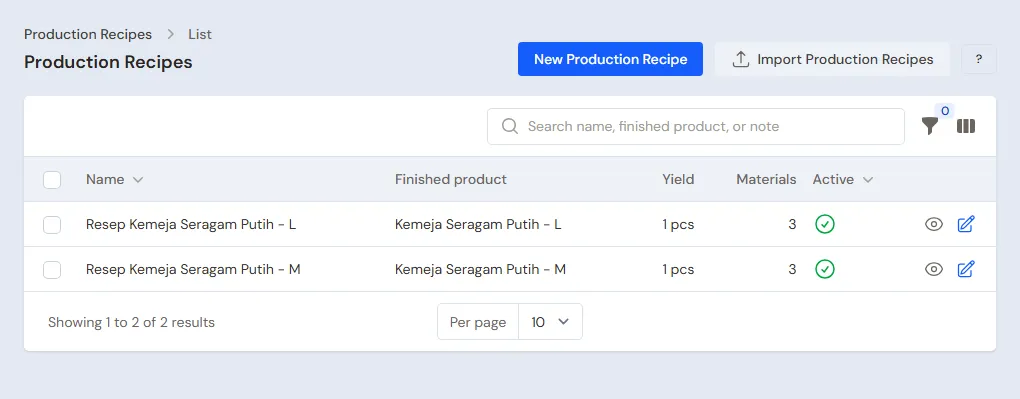
Warehouse Admin: in Master Data → Production Recipes, create one recipe for every size sewn. Example for size M:
- Enter the Name Kemeja Seragam Putih M, the Finished product Kemeja Seragam Putih - M and the Yield 1.
- Under Materials per recipe, add 1,5 Metre of Kain Katun Drill Putih, 7 Kancing Kemeja Putih and 1 Plastik Kemasan Kemeja.
- Under Production stages, add Potong (cutting) Rp 1.500, Jahit (sewing) Rp 8.000, Bordir Logo (logo embroidery) with Makloon switched on Rp 3.000, and Finishing dan Packing Rp 1.000, all as Piece-rate wage per unit.
- Press Create. Create the recipe for size L with 1,7 Metre of fabric and the same stages.
The cost of one shirt before factory costs:
| Size | Materials | Wages and makloon | Cost |
|---|---|---|---|
| M | Rp 45.000 + Rp 1.400 + Rp 500 = Rp 46.900 | Rp 13.500 | Rp 60.400 |
| L | Rp 51.000 + Rp 1.400 + Rp 500 = Rp 52.900 | Rp 13.500 | Rp 66.400 |
Thread is not in the recipe, because one cone is used for many shirts. It goes out as production use in part 6.
Workers, the embroidery shop, customers and suppliers
- Warehouse Admin: in Master Data → Production Workers, list Mang Dadang (cutting), Bu Euis and Teh Imas (sewing) and Kang Rudi (finishing).
- Owner: in Master Data → Suppliers, list Toko Kain Sumber Makmur (30 days to pay), Toko Aksesori Mulia, and the embroidery shop Bordir Pak Endang. A makloon place is a supplier.
- Head Cashier: in Master Data → Customers, list SMP Tunas Harapan with 30 days to pay. In Master Data → Customer Groups, create the group Reseller.
Resellers buying a dozen or more can get a lower price from that quantity with quantity prices. See Quantity prices.
3. Starting capital and buying fabric
- The Owner records capital of Rp 30.000.000 into Bank BCA in Transactions → Finance → Owner's Capital.
- The Owner records the note of Toko Kain Sumber Makmur in Transactions → Purchases: 160 Metres of Kain Katun Drill Putih × Rp 30.000 = Rp 4.800.000, 30 days, unpaid. The payable is recorded.
- The Owner records the note of Toko Aksesori Mulia, paid in full from Bank BCA: 700 Kancing Kemeja Putih (Rp 140.000), 100 Plastik Kemasan Kemeja (Rp 50.000) and 10 Benang Jahit Putih (Rp 150.000), so Rp 340.000.
See Recording a purchase note.
4. One uniform order from quotation to paid in full
Example: SMP Tunas Harapan orders 50 shirts in size M and 50 in size L, Rp 85.000 a shirt, so Rp 8.500.000.
Quotation, order and down payment
Head Cashier:
- In Transactions → Quotations, create a quotation for SMP Tunas Harapan with 50 Kemeja Seragam Putih - M and 50 Kemeja Seragam Putih - L, save it and send its PDF. See Making a quotation.
- When the school agrees, press Convert to Order and enter the Pickup Date of the handover.
- On the order, press Receive Down Payment of Rp 4.250.000 into Bank BCA.
The down payment is held by the order until its note is made; there is no income yet. See Receiving an order down payment.
A production order per size
Warehouse Admin: first move the fabric, buttons and bags to be sewn from Gudang Bahan to Gudang Produksi in Transactions → Stock Transfers. See Transferring stock between warehouses.
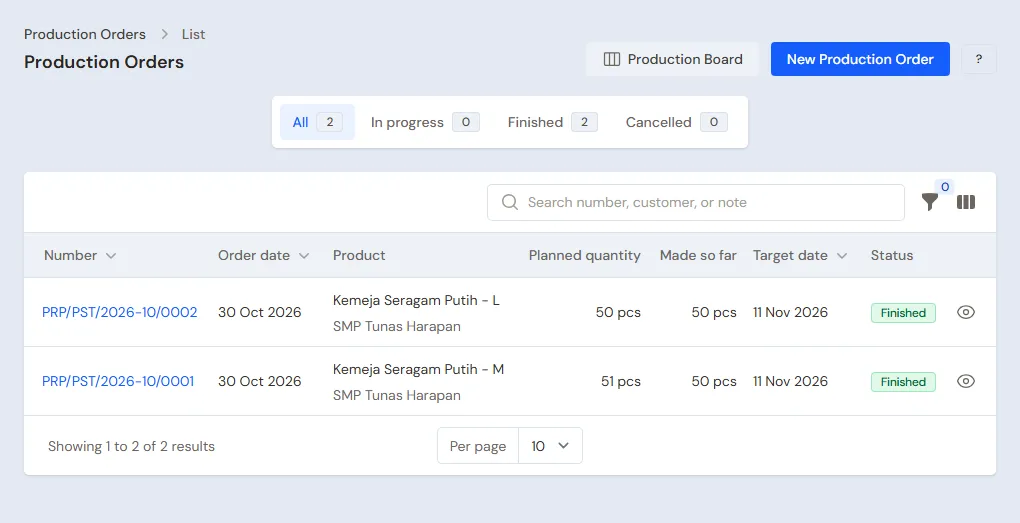
Owner: open the order of SMP Tunas Harapan in Transactions → Sales Orders and press Create Production Orders. Both shirt lines are already filled in with the Recipe Kemeja Seragam Putih M and L, the Planned quantity 50 and 50, and the Production warehouse Gudang Produksi; set the Target date, then press Create orders. Each production order records the sales order and its customer, SMP Tunas Harapan, and shows on the Production Board. On the order's page, the Production section shows how far the shirts have come. Goods for stock, without an order, are made from Transactions → Production Orders with New Production Order.
Output and embroidery
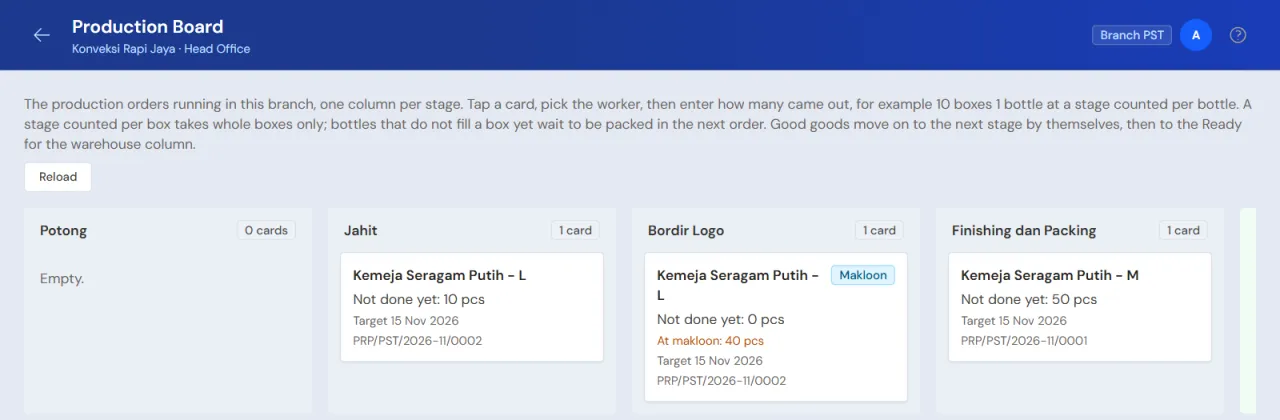
- Production (Teh Neng): in Transactions → Production Board, record Mang Dadang's output at Potong for both orders, 50 and 50. Then at Jahit: Bu Euis 50 M and 10 L, Teh Imas 40 L.
- Warehouse Admin: on each order, press Send to Makloon for the stage Bordir Logo to Bordir Pak Endang, 50 shirts. When they come back, press the Receive Goods icon (a box with a down arrow) on that dispatch and enter the good quantity.
- Production: record Kang Rudi's output at Finishing dan Packing, 50 and 50.
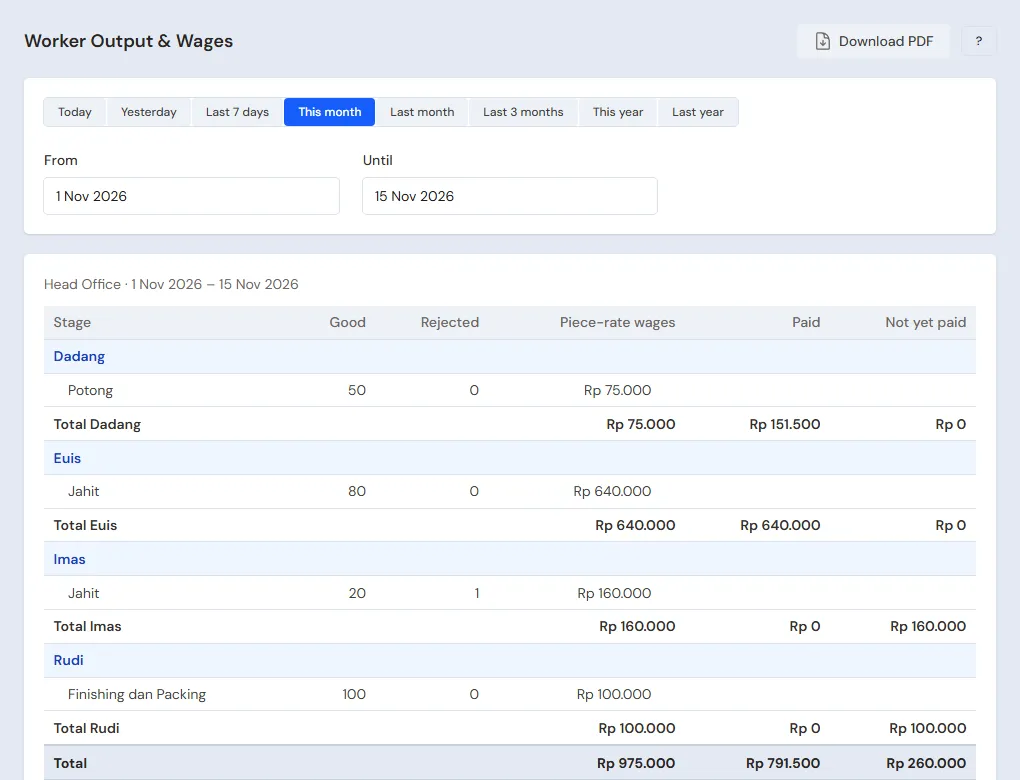
The wages recorded: Mang Dadang 100 × Rp 1.500 = Rp 150.000, Bu Euis 60 × Rp 8.000 = Rp 480.000, Teh Imas 40 × Rp 8.000 = Rp 320.000, Kang Rudi 100 × Rp 1.000 = Rp 100.000, and the embroidery fee 100 × Rp 3.000 = Rp 300.000. Together Rp 1.350.000, the same as 100 × Rp 13.500.
A shirt sewn wrongly is recorded with the Finished goods rejected and Rejected goods reworked: it goes back to the stage before to be sewn again, with no extra wage.
Shirts into the warehouse
Warehouse Admin: on each order, press Receive Goods, enter the Finished goods 50, tick Finish this production order, then press Put into the warehouse. Shirts that pass the check are moved from Gudang Produksi to Gudang Barang Jadi with Transactions → Stock Transfers.
Fabric wasted beyond the recipe, for example 2 metres cut wrong, is recorded under Spoiled materials in Receive Goods: pick Kain Katun Drill Putih and enter Quantity spoiled 2. That fabric leaves stock too and its value goes into the cost of the shirts.
The fabric goes down by 160 metres, the buttons by 700 and the bags by 100. The Owner sees the cost under Finished goods cost on the order page: Rp 60.400 per M shirt and Rp 66.400 per L shirt before factory costs.
Goods that are good at one stage but not yet taken by the next when the order is finished, for example 5 shirts sewn but not yet buttoned, become a leftover between stages: semi-finished stock in that order's warehouse with the wages already on it. In another order for the same shirt and the same warehouse, tap the stage card on the Production Board and press Take leftover (the card exists only when that order already has goods waiting at that stage; otherwise use Take leftovers between stages on the order's page). The wages move with it, so the cost of the shirts stays right. Leftovers nobody has taken are listed under Transactions → Stage Leftovers with their age and wages. If they will not be used, press Discard leftover (one at a time or several at once): their wages and materials become a Stock Loss of that month, Work in Process is clean again, and it can be undone with Undo discard while the month is still open.
Handing over the uniforms and the note
Head Cashier: on the order, press Convert to Sale. A draft note opens with both lines. Press Pay: Taken from the order down payment shows Rp 4.250.000. Press Unpaid, then Save transaction.
The other Rp 4.250.000 becomes SMP Tunas Harapan's receivable, due in 30 days, and the shirts leave Gudang Konveksi. See Recording a sales order.
5. Receivables and payables
- The Finance Admin records the school's payment in Transaction Details → Sale Payments: Rp 4.250.000 into Bank BCA. See Paying a note.
- The Finance Admin pays Toko Kain Sumber Makmur before the due date in Transaction Details → Purchase Payments: Rp 4.800.000.
6. Wages, makloon and factory costs
- The Finance Admin, every Saturday: in Transactions → Wages & Makloon Payments, pays every tailor's wages and Bordir Pak Endang's fee, as much as is still owed.
- The Finance Admin records the electricity of Rp 600.000 in Transactions → Finance → Expenses.
- The Warehouse Admin takes out 10 cones of Benang Jahit Putih in Transactions → Stock Adjustments, direction Out, category Production use (Rp 150.000). See Production use.
- The Warehouse Admin fills in Transactions → Monthly Factory Costs for that month with Factory costs (overhead) Rp 600.000.
The costs of that month, Rp 600.000 + Rp 150.000 = Rp 750.000, are shared over the shirts that came into stock that month in proportion to their cost. If this order was the only one sewn that month (cost Rp 6.340.000), every shirt grows by about 11,8%: an M shirt to about Rp 67.545 and an L shirt to about Rp 74.255. This order leaves a gross profit of about Rp 8.500.000 − Rp 7.090.000 = Rp 1.410.000.
7. Reports per job title
| Report | What it holds | Opened by | When |
|---|---|---|---|
| Reports → Stock | Fabric, supplies and shirts per size; switch on the variants per parent for the total of every size | Warehouse Admin | Every day |
| Reports → Worker Output & Wages | Output per tailor per stage and their wages | Warehouse Admin | Every Saturday |
| Reports → Receivables | What every customer still owes | Finance Admin | Every week |
| Reports → Payables | Fabric payables and their due dates | Finance Admin | Every week |
| Reports → Profit & Loss | Sales, cost of shirts sold, and expenses | Owner | Every month |
8. Checklist
- Every day: Production records the output before the tailors go home. The Warehouse Admin sends and receives makloon and puts finished shirts into the warehouse.
- Every week: the Finance Admin pays wages and makloon, then reads Receivables and Payables.
- Every month: the Warehouse Admin records the thread used, fills in Monthly Factory Costs, then counts the fabric. The Owner reads the Profit & Loss.
A running business
This part is for the team moving a running garment maker to Vende: fabric and shirts in the warehouse, orders being sewn, receivables from schools or offices, and fabric payables. The order is always the same:
- Enter the master data.
- Practise transactions until every part is used to them.
- Empty the practice transactions.
- Enter the opening balances on the first day.
- Go live.
The opening balances come last on purpose, so the practice does not spoil their figures. The examples in this part use Konveksi Rapi Jaya from the new business part.
1. Master data
Work through the parts Who does what, 1. Shop details and users and 2. Master data above. Also list every customer who still owes money, every supplier still owed, and every size still in stock. The master data is not deleted when the practice transactions are emptied.
2. Practice for the team
Work in a practice shop of the Garment maker/factory type with the five accounts. Every step names who does it and what must show.
Practice 1: master data
- Owner: the shop details, the four users and the three suppliers.
- Check: Teh Neng only sees the Production Board and Production Orders.
- Kang Asep (Warehouse Admin): the materials, Kemeja Seragam Putih with four sizes, the M and L recipes, and the four workers.
- Check: in Master Data → Products, switch on the filter that hides variant rows: Kemeja Seragam Putih shows once with four variants.
- Head Cashier: SMP Tunas Harapan and the group Reseller.
Practice 2: one uniform order
- Owner: capital of Rp 30.000.000 and both purchase notes as in part 3.
- Head Cashier: the quotation, the order and the down payment of Rp 4.250.000.
- Bu Wati makes both production orders from the order's page. Kang Asep and Teh Neng: the output, sending and receiving the embroidery, then receiving 50 and 50.
- Check: Reports → Worker Output & Wages shows Rp 1.050.000 of wages for the four tailors. Opened by the Warehouse Admin.
- Head Cashier: convert to a sale with the other Rp 4.250.000 unpaid.
- Finance Admin: pay the four tailors, the embroidery fee of Rp 300.000, and the school's Rp 4.250.000.
After Practice 2 this must show:
| Report | What must show | Opened by |
|---|---|---|
| Reports → Cash Balance | Bank BCA Rp 30.000.000 − Rp 340.000 + Rp 4.250.000 − Rp 1.350.000 + Rp 4.250.000 = Rp 36.810.000 | Finance Admin |
| Reports → Payables | Toko Kain Sumber Makmur Rp 4.800.000 | Finance Admin |
| Reports → Stock | Fabric 0 metres, M and L shirts 0, thread 10 cones | Warehouse Admin |
| Reports → Profit & Loss | Sales Rp 8.500.000 and cost of goods sold Rp 6.340.000 | Owner |
Practice 3: opening balances
Enter the opening balances with the example of part 4 below, check them as in part 5, then empty them again.
3. Emptying the practice transactions
Done by the Owner in Settings → Empty Transactions, button Empty All Transactions. Quotations, orders and their down payments, notes, purchases, production orders with their output and makloon dispatches, wage payments, monthly factory costs, stock adjustments, payments, expenses, capital and opening balances are deleted. Products with their variants, recipes, workers, customers, suppliers, warehouses, cash accounts, users and settings stay. Vende makes a full backup first. See Emptying transactions or all data.
4. Opening balances
Done by the Owner in Settings → Opening Balances on the morning of the first day, with As of that day. Before that, finish the shirts being sewn and count them as stock, and pay the old piece-rate wages and makloon fees: Opening Balances has no field for work in progress. See Entering opening cash, stock, receivables and payables.
- Opening Stock: Kain Katun Drill Putih 80 Metres at Rp 30.000, Kemeja Seragam Putih - M 20 Pcs at Rp 67.500 and Kemeja Seragam Putih - L 15 Pcs at Rp 74.000. Every size is entered on its own.
- Opening Receivables: SD Cahaya Ilmu Rp 2.000.000 with its due date.
- Opening Payables: Toko Kain Sumber Makmur Rp 2.400.000.
- Opening Cash: the money counted in every account, for example Bank BCA Rp 20.000.000 and Kas Tunai Pemilik Rp 1.000.000.
An order whose down payment came in before the first day is recorded as a new order on the first day with Receive Down Payment of what was received. Its account's Opening Cash is the money counted less that down payment, so it is not counted twice.
5. Check before going live
| Report | What must show | Opened by |
|---|---|---|
| Reports → Cash Balance | The money counted in every account | Finance Admin |
| Reports → Stock | Fabric 80 metres, M shirts 20 and L shirts 15 | Warehouse Admin |
| Reports → Receivables | SD Cahaya Ilmu Rp 2.000.000 | Finance Admin |
| Reports → Payables | Toko Kain Sumber Makmur Rp 2.400.000 | Finance Admin |
The figures differ? The Owner corrects the row in Settings → Opening Balances before any real transaction is recorded.
6. Going live
From that day every quotation, order, production, note and payment is recorded in Vende as in the new business part, with the same checklist. In the first week the Warehouse Admin matches Reports → Stock with the warehouse count, and the Owner checks that Reports → Profit & Loss only holds sales and costs since the first day.