
Food producer guide
A learning path for a food producer, new or running: recipes, batches, sales routes, orders, delivery runs, team practice and opening balances.
On this page
- A new business
- Who does what
- 1. Shop details and users
- 2. Master data
- 3. Starting capital and buying materials
- 4. A working day
- 5. Receivables and collection
- 6. Wages, factory costs and expired goods
- 7. Reports per job title
- 8. Checklist
- A running business
- 1. Master data
- 2. Practice for the team
- 3. Emptying the practice transactions
- 4. Opening balances
- 5. Check before going live
- 6. Going live
This guide is for the team setting up Vende at a food producer or small business that makes packed food and sells it to warungs and shops through salespeople. It has two parts: A new business for a business just starting, with no stock, receivables or payables from before, and A running business for one moving to Vende, with team practice and opening balances. The example is Dapur Camilan Lestari. The names of the business, warungs, suppliers and people and all the figures are made up.
What the business looks like:
- Products: Keripik Singkong Balado (spicy cassava chips) and Keripik Pisang Manis (sweet banana chips) in 200 gram packs, with an expiry date per batch.
- Materials: cassava, bananas, cooking oil, seasoning and plastic packs, bought in cash or on credit.
- Production: three stages. Peeling and Slicing and Packing are done by piece-rate workers, Frying and Seasoning by a frier on a fixed wage.
- Selling: a salesperson visits warungs and shops along a route and takes orders on the phone. A driver delivers the next day, and the notes are paid within 14 days.
Work through it from the top. Every step names its menu, who does it, what changes afterwards, and an example with figures.
The features in this guide come with the Food producer/small food factory business type package, except those marked extra. The shop's features show under Settings → Subscription, section This shop's features. If a menu is missing, contact the Vende team. This package also holds Invoice mode, a screen for writing notes to stalls and shops like an invoice by keyboard. See Making a note in invoice mode. A new shop with this package opens Invoice mode when you press New sale, on a phone too; change it in Settings → Till display if you prefer the till.
Tip: Lost on a page? Press the ? button at the top of that page. A short tour shows every field, on the Production Board and Today's Visits too.
A new business
Who does what
This package holds six users, the owner included.
| Part of the business | Job title in Vende | What they do and open |
|---|---|---|
| Owner | Owner | Every menu, also suppliers and material purchase notes, opening balances, and Reports → Profit & Loss |
| Head of production and warehouse | Warehouse Admin | Products, batches, recipes, production workers, production orders, receiving output, delivery runs, monthly factory costs, Reports → Stock and Reports → Worker Output & Wages |
| Kitchen supervisor | Production | The Production Board: the output of every worker per stage |
| Sales admin | Head Cashier | Customers, price groups and credit limits, sales routes, orders, delivery notes, notes, Reports → Visits per Sales Person |
| Salesperson | Salesperson | Transactions → Today's Visits on the phone: check in, order, shelf photos. Records no money |
| Finance admin | Finance Admin | Warung and supplier payments, wages, expenses, Reports → Receivables, Reports → Payables, Reports → Cash Balance |
The driver needs no account: the delivery run and its delivery notes are printed, and the Warehouse Admin records the results from that paper. A driver who records them on the phone is invited with the job title Driver, by adding a user to the subscription. Every role is explained in Roles and permissions.
1. Shop details and users
Done by the Owner: fill in Settings → Shop (name, address, WhatsApp, logo, the food permit number in the note footer if needed), then create the accounts in Settings → Users with the Job title of the table above. See Adding and managing users.
The people at Dapur Camilan Lestari: Bu Lestari (owner), Mbak Dewi (head of production and warehouse, Warehouse Admin), Bu Marni (kitchen supervisor, Production), Mas Fajar (sales admin, Head Cashier), Doni (Salesperson) and Bu Siska (finance admin, Finance Admin). Pak Karto, the delivery driver, has no account.
2. Master data
A shop of this business type already has the product categories Finished Products, Snacks, Beverages, Ingredients and Packaging, the units Box and Carton, and the expense categories Cooking Gas, Piece-rate Wages, Machine Maintenance and Permits and Certification.
Materials and finished goods with batches
Warehouse Admin in Master Data → Products:
- Create the materials with the Type Raw Material: Singkong (cassava, Kilogram, cost Rp 6.000), Minyak Goreng (cooking oil, Litre, Rp 18.000), Bumbu Balado (seasoning, Kilogram, Rp 40.000) and Plastik Kemasan 200 g (Pcs, Rp 600).
- Create the finished good Keripik Singkong Balado 200 g: Category Snacks, base unit Pak, Selling Price Rp 15.000, and under Other Units Carton holding 20 Pak.
- Under Tracking, switch on Track batches & expiry, then fill in Shelf life 3 Months, so every production run gets a batch number and an expiry date.
Production recipe and work stages
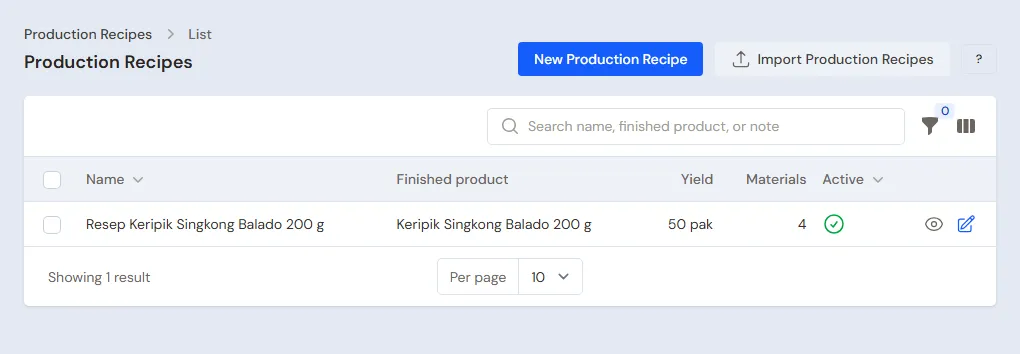
Warehouse Admin in Master Data → Production Recipes:
- Create a recipe with the Name Keripik Singkong Balado, the Finished product Keripik Singkong Balado 200 g and the Yield 50.
- Under Materials per recipe, add 15 Kilogram of Singkong, 3 Litres of Minyak Goreng, 1 Kilogram of Bumbu Balado and 50 Plastik Kemasan 200 g.
- Under Production stages: Kupas dan Iris (peeling and slicing) with a Piece-rate wage per unit of Rp 200, Goreng dan Bumbu (frying and seasoning) without a wage (the frier is on a fixed wage), then Kemas (packing) Rp 150.
- Press Create.
The materials of 50 packs cost Rp 90.000 + Rp 54.000 + Rp 40.000 + Rp 30.000 = Rp 214.000, so Rp 4.280 a pack. With Rp 350 of piece-rate wages, the cost before factory costs is Rp 4.630 a pack.
Production workers
Warehouse Admin: in Master Data → Production Workers, list Bu Ijah (peeling and slicing), Pak Slamet (frying) and Mbak Tini (packing). Pak Slamet is listed so his frying output is recorded, though his stage has no piece-rate wage.
Groups, prices and credit limits
- Head Cashier: in Master Data → Customer Groups, create the group Warung with a Credit Limit of at most Rp 1.000.000 and an oldest note of at most 14 days.
- Warehouse Admin: open Keripik Singkong Balado 200 g, tab Price List, add a price for Warung, unit Pak, Price Rp 12.000.
- Head Cashier: in Master Data → Customers, create Warung Bu Ani and Toko Berkah in the Warung group, with 14 days to pay.
See Prices per customer group and Managing customer receivables.
Sales route
Head Cashier in Master Data → Sales Routes: create Rute Klaten Utara, pick Doni as the salesperson, tick the Visit days Monday and Thursday, then add Warung Bu Ani and then Toko Berkah as the route's customers. This order is the order of the visits on the salesperson's phone.
Suppliers and cash accounts
- Owner: in Master Data → Suppliers, list Petani Singkong Pak Darmo (cash) and Toko Kemasan Sejahtera (30 days to pay).
- Owner: in Master Data → Cash Accounts, make sure there are Bank BCA and Kas Tunai Pemilik.
3. Starting capital and buying materials
- The Owner records capital of Rp 20.000.000 into Bank BCA in Transactions → Finance → Owner's Capital.
- The Owner records the note of Petani Singkong Pak Darmo in Transactions → Purchases, paid in cash from Bank BCA: 60 Kilograms of Singkong (Rp 360.000), plus 12 Litres of Minyak Goreng (Rp 216.000) and 4 Kilograms of Bumbu Balado (Rp 160.000) from the market, so Rp 736.000.
- The Owner records the note of Toko Kemasan Sejahtera, 30 days: 1.000 Plastik Kemasan 200 g × Rp 600 = Rp 600.000.
See Recording a purchase note.
4. A working day
| Time | Work | Who |
|---|---|---|
| Monday morning | Production order of 200 packs | Warehouse Admin |
| Monday midday | Output per stage | Production |
| Monday afternoon | Receiving output with a batch | Warehouse Admin |
| Monday | Warung visits and orders | Salesperson |
| Tuesday morning | Delivery run and delivery notes | Warehouse Admin |
| Tuesday afternoon | Notes from the delivery notes | Head Cashier |
Morning: production order
Warehouse Admin: in Transactions → Production Orders, create an order, pick the Recipe Keripik Singkong Balado, enter the Planned quantity 200 (four runs of the recipe) and save. The order shows on the Production Board straight away.
Output on the Production Board
Production (Bu Marni), on a phone or tablet in the kitchen: open Transactions → Production Board and record Bu Ijah's 200 Pak at Kupas dan Iris, Pak Slamet's 200 Pak at Goreng dan Bumbu and Mbak Tini's 200 Pak at Kemas (type 200 in the Pak field, not the Dus field), each with Save output.
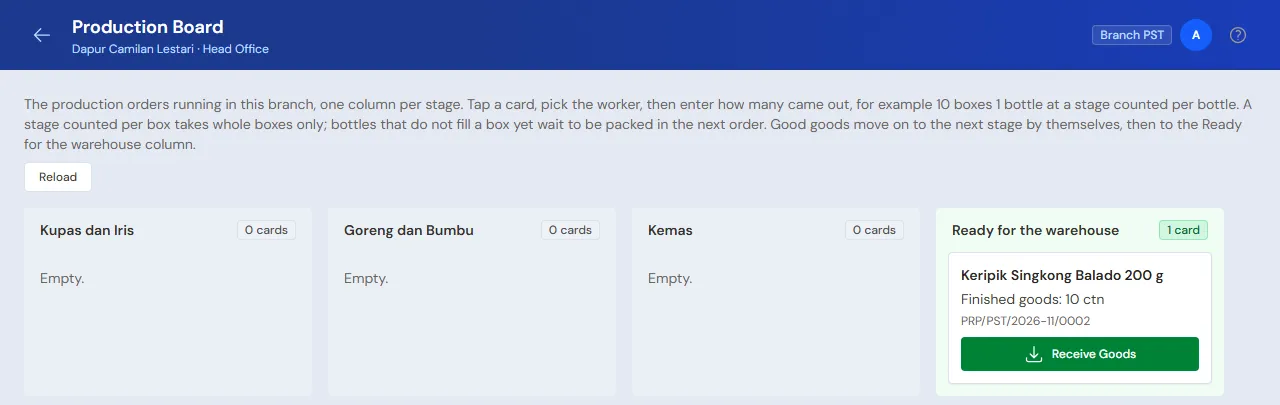
The wages recorded: Bu Ijah 200 × Rp 200 = Rp 40.000 and Mbak Tini 200 × Rp 150 = Rp 30.000. Pak Slamet gets no piece-rate wage; his salary goes into Monthly Factory Costs in part 6.
Afternoon: receiving output with a batch
Warehouse Admin: on the order, press Receive Goods, enter the Finished goods 200, leave the Batch number and Expiry filled in from the production date and the shelf life (or type your own number, for example KSB-1103), tick Finish this production order, then press Put into the warehouse.
Packs torn while packing, for example 5, are recorded under Spoiled materials in Receive Goods (pick Plastik Kemasan 200 g, Quantity spoiled 5): they leave stock too and their value goes into the cost of the chips.
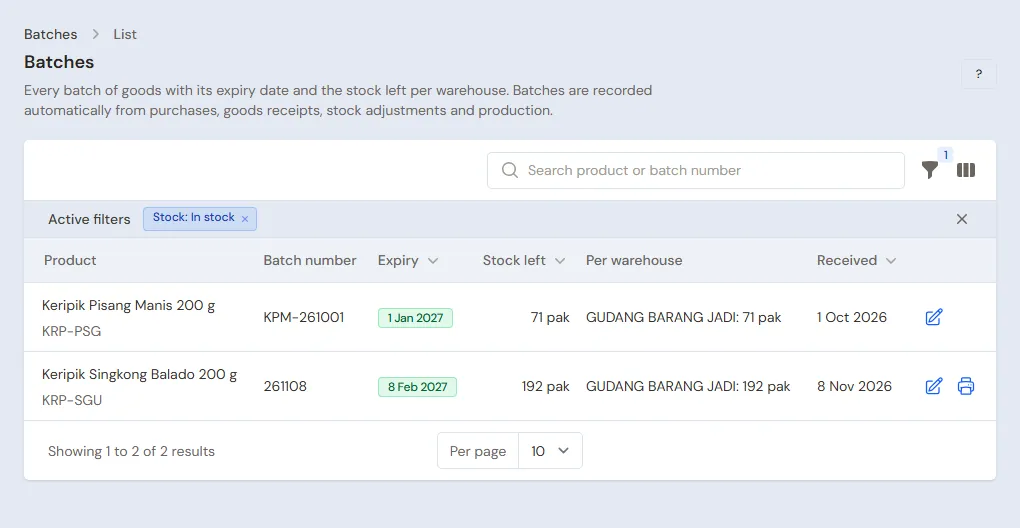
The materials go down (60 kg of cassava, 12 litres of oil, 4 kg of seasoning, 200 packs), and 200 packs of batch KSB-1103 come into stock. When they are sold, the batch that expires first leaves first.
Goods that are good at one stage but not yet taken by the next when the order is finished, for example 20 packs fried but not yet packed, become a leftover between stages: semi-finished stock in that order's warehouse with the wages already on it. In another order for the same chips and the same warehouse, tap the stage card on the Production Board and press Take leftover (the card exists only when that order already has goods waiting at that stage; otherwise use Take leftovers between stages on the order's page). The wages move with it, so the cost of the chips stays right. Leftovers nobody has taken are listed under Transactions → Stage Leftovers with their age and wages. If they will not be used, press Discard leftover (one at a time or several at once): their wages and materials become a Stock Loss of that month, Work in Process is clean again, and it can be undone with Undo discard while the month is still open.
An order that is wrong from top to bottom does not need to be undone piece by piece: on its page open the More menu, then press Delete everything. The confirmation lists the receipts, work and makloon dispatches that are undone and the stock that comes back, then everything is undone at once and the order is deleted. Refused if its wages or makloon were paid (delete the payment first in Wages & Makloon Payment), the month is closed, or another order took its leftovers.
Sales visits
Salesperson (Doni), on the phone:
- Open Transactions → Today's Visits. The tab Today's routes holds Warung Bu Ani, then Toko Berkah.
- At Warung Bu Ani, press Check in, pick Order and enter 20 Pak of Keripik Singkong Balado 200 g. The price follows the Warung group: 20 × Rp 12.000 = Rp 240.000. Press Send visit.
- At Toko Berkah, order 40 Pak: Rp 480.000. If needed, take Shelf photos and write expired goods to be taken back under Returns & notes.
The order becomes a Sales Order at the office. Without a signal the visit is kept on the phone and sent by itself when the signal returns.
Sending with a delivery run
Warehouse Admin, Tuesday morning:
- Open Transactions → Delivery Runs, press Make Delivery Run and pick Sales orders.
- Tick the orders of Warung Bu Ani and Toko Berkah, then pick Make Delivery Run. Enter the Driver name Pak Karto and his vehicle.
- Press Print & make delivery notes. Both delivery notes are made and their stock leaves. Print them for Pak Karto.
- In the afternoon, from the paper brought back, mark both shops Delivered.
See Delivering with the daily delivery run.
Billing what was delivered
Head Cashier: on each order, press Make Note from Delivery Notes, then Make Draft Note. Press Pay, Unpaid, then Save transaction.
Afterwards Warung Bu Ani owes Rp 240.000 and Toko Berkah Rp 480.000, due in 14 days. A note over the Warung group's credit limit is held until the Reason for passing the credit limit is filled in. The chips left in stock are 200 − 60 = 140 packs.
5. Receivables and collection
- On the next visit, Doni sees the warung's receivable and the bills due on the check-in screen. A salesperson records no money.
- The Finance Admin records the payments that come in under Transaction Details → Sale Payments, for example Warung Bu Ani's Rp 240.000 in cash into Kas Tunai Pemilik. See Paying a note.
- The Finance Admin reads Reports → Receivables every week, and the Head Cashier reads Reports → Visits per Sales Person.
6. Wages, factory costs and expired goods
- The Finance Admin, every Saturday: in Transactions → Wages & Makloon Payments, pays Bu Ijah's and Mbak Tini's wages, as much as is still owed.
- The Finance Admin records Pak Slamet's salary of Rp 2.600.000, gas of Rp 900.000 (category Cooking Gas) and electricity of Rp 300.000 in Transactions → Finance → Expenses.
- The Warehouse Admin fills in Transactions → Monthly Factory Costs: Fixed wages Rp 2.600.000 and Factory costs (overhead) Rp 1.200.000.
The Rp 3.800.000 of that month is shared over the finished goods that came into stock that month, in proportion to their cost. Example: 4.000 packs worth Rp 18.520.000 came in that month, so every pack grows by about Rp 950, to about Rp 5.580. A pack sold to a warung for Rp 12.000 leaves a gross profit of about Rp 6.420.
Chips that expired or were taken back from a warung are taken out by the Warehouse Admin in Transactions → Stock Adjustments, direction Out, category Expired, with their batch. Their value becomes a loss in the Profit & Loss. See Stock adjustments.
7. Reports per job title
| Report | What it holds | Opened by | When |
|---|---|---|---|
| Reports → Stock | Materials and chips per batch | Warehouse Admin | Every day |
| Reports → Worker Output & Wages | Output per worker per stage and their wages | Warehouse Admin | Every Saturday |
| Reports → Visits per Sales Person | Visits, orders and no orders of every salesperson | Head Cashier | Every day |
| Reports → Receivables | Every warung's bills and their age | Finance Admin | Every week |
| Reports → Cash Balance | Money in every cash account | Finance Admin | Every day |
| Reports → Profit & Loss | Sales, cost of goods sold, wages and expenses | Owner | Every month |
8. Checklist
- Every day: Production records the output, the Warehouse Admin receives the output with its batch and makes the delivery run, the Head Cashier makes the notes from the delivered delivery notes.
- Every week: the Finance Admin pays piece-rate wages and reads Receivables. The Warehouse Admin checks the batches close to expiry.
- Every month: the Warehouse Admin fills in Monthly Factory Costs and counts the materials. The Owner reads the Profit & Loss.
A running business
This part is for the team moving a running food producer to Vende: materials and finished goods per batch, warungs that still owe money, supplier payables and sales routes already running. The order is always the same:
- Enter the master data.
- Practise transactions until every part is used to them.
- Empty the practice transactions.
- Enter the opening balances on the first day.
- Go live.
The opening balances come last on purpose, so the practice does not spoil their figures. The examples in this part use Dapur Camilan Lestari from the new business part.
1. Master data
Work through the parts Who does what, 1. Shop details and users and 2. Master data above. Also list every warung that still owes money and every supplier still owed, and put the warungs on the routes of the visit days already running. The master data is not deleted when the practice transactions are emptied.
2. Practice for the team
Work in a practice shop of the Food producer/small food factory type with the six accounts. During the practice, leave the route's Visit days empty so it shows every day.
Practice 1: master data
- Owner: the shop details, the five users, both suppliers.
- Check: Doni only sees Customers, Sales Routes, Sales Orders, Sales Visits and Today's Visits.
- Mbak Dewi (Warehouse Admin): the four materials, Keripik Singkong Balado 200 g with batches and the unit Carton, its recipe, and the three workers.
- Head Cashier: the group Warung, both warungs and Rute Klaten Utara.
- Check: on Doni's phone, Transactions → Today's Visits shows Warung Bu Ani, then Toko Berkah.
Practice 2: a working day
- Owner: capital of Rp 20.000.000 and both purchase notes as in part 3.
- Mbak Dewi and Bu Marni: the production order of 200 packs, the output of all three stages, receiving batch KSB-1103.
- Check: Reports → Stock shows 200 packs of batch KSB-1103. Opened by the Warehouse Admin.
- Doni: the visits and orders of both warungs.
- Mbak Dewi: the delivery run, printing the delivery notes, marking them Delivered.
- Head Cashier: both notes from the delivery notes, unpaid.
- Finance Admin: pay Bu Ijah's Rp 40.000 and Mbak Tini's Rp 30.000 from Bank BCA, then receive Rp 240.000 in cash from Warung Bu Ani into Kas Tunai Pemilik.
After Practice 2 this must show:
| Report | What must show | Opened by |
|---|---|---|
| Reports → Cash Balance | Bank BCA Rp 20.000.000 − Rp 736.000 − Rp 70.000 = Rp 19.194.000, Kas Tunai Pemilik Rp 240.000 | Finance Admin |
| Reports → Receivables | Toko Berkah Rp 480.000 | Finance Admin |
| Reports → Payables | Toko Kemasan Sejahtera Rp 600.000 | Finance Admin |
| Reports → Stock | Chips 140 packs of batch KSB-1103, plastic packs 800 | Warehouse Admin |
| Reports → Profit & Loss | Sales Rp 720.000 and cost of goods sold 60 × Rp 4.630 = Rp 277.800 | Owner |
Practice 3: opening balances
Enter the opening balances with the example of part 4 below, check them as in part 5, then empty them again.
3. Emptying the practice transactions
Done by the Owner in Settings → Empty Transactions, button Empty All Transactions. Notes, orders, delivery notes, delivery runs, sales visits, purchases, production orders with their output, batches, wage payments, monthly factory costs, stock adjustments, payments, expenses, capital and opening balances are deleted. Products, recipes, workers, customers, groups with their prices and credit limits, sales routes, suppliers, cash accounts, users and settings stay. Vende makes a full backup first. See Emptying transactions or all data.
4. Opening balances
Done by the Owner in Settings → Opening Balances on the morning of the first day, with As of that day. First finish the production under way and pay the old piece-rate wages: Opening Balances has no field for work in progress. See Entering opening cash, stock, receivables and payables.
- Opening Stock: Keripik Singkong Balado 200 g 150 Pak with the Batch number KSB-1028 and its Expiry, cost Rp 5.580; Plastik Kemasan 200 g 500 Pcs at Rp 600; Minyak Goreng 10 Litres at Rp 18.000. Every batch is a row of its own.
- Opening Receivables: one row per unpaid warung note, for example Toko Berkah Rp 360.000 due in 5 days.
- Opening Payables: Toko Kemasan Sejahtera Rp 300.000.
- Opening Cash: the money counted in every account, for example Bank BCA Rp 8.000.000 and Kas Tunai Pemilik Rp 500.000.
5. Check before going live
| Report | What must show | Opened by |
|---|---|---|
| Reports → Cash Balance | The money counted | Finance Admin |
| Reports → Stock | Chips 150 packs of batch KSB-1028, plastic packs 500, oil 10 litres | Warehouse Admin |
| Reports → Receivables | Toko Berkah Rp 360.000 | Finance Admin |
| Reports → Payables | Toko Kemasan Sejahtera Rp 300.000 | Finance Admin |
The figures differ? The Owner corrects the row in Settings → Opening Balances before any real transaction is recorded.
6. Going live
From that day every production, visit, order, delivery run, note and payment is recorded in Vende as in the new business part, with the same checklist. In the first week the Head Cashier checks that every route shows on the salesperson's phone on its day, and the Finance Admin checks that payments of old receivables bring down Reports → Receivables.