
Plastic factory guide
A learning path for a plastic factory, new or running: resin, recipes, piece-rate wages, scrap, machines and moulds, orders, practice, opening balances.
On this page
- A new business
- Who does what
- 1. Shop details and users
- 2. Master data
- 3. Starting capital and buying materials
- 4. One order from materials to customer
- 5. Receivables and collection
- 6. Wages and supplier payments
- 7. Factory costs
- 8. Reports per job title
- 9. Checklist
- A running business
- 1. Master data
- 2. Team practice
- 3. Empty the practice transactions
- 4. Opening balances
- 5. Check before starting
- 6. Starting for real
This guide is for the team setting up Vende at a small to mid-size plastic factory: one that buys resin by the sack or the kilogram, moulds it by injection, blow moulding or extrusion into goods such as buckets, basins, jerrycans or bottles, and sells them to shops, distributors and factory buyers. It has two parts: A new business for a factory just starting, with no stock, receivables or payables from before, and A running business for one moving to Vende, with team practice and opening balances. The example is Pabrik Plastik Mega Jaya. The names of the business, suppliers and people and all the figures are made up.
What the factory looks like:
- Product: a 10 L Plastic Bucket from an injection machine, sold by the piece or the bale (20 pieces), with a 10 L Plastic Bucket Second Grade for slightly flawed output.
- Materials: PP resin bought by the sack (25 kilograms), blue masterbatch, PP regrind (scrap ground up again) and packing sacks. Resin is counted per kilogram and bought per sack.
- Machines: an injection moulding machine and the bucket mould. Operators work in two shifts.
- Warehouses: Gudang Bahan, Gudang Produksi, Gudang Barang Jadi and Gudang Retur.
- Production: three stages. Injection, Finishing (trimming the gate and tidying up) and Packing, all done by piece-rate operators paid per piece.
- Selling: shops and distributors order, the goods go out with a delivery note, the price drops for a bale, and the invoice is on credit.
Work through it from the top. Every step names the menu, who does it, what changes afterwards and an example with figures.
The features in this guide come with the Plastic factory business type package. The shop's features show under Settings → Subscription, in This shop's features. If a menu is missing, contact the Vende team. This package also holds Invoice mode, a screen for writing notes to shops and distributors like an invoice by keyboard. See Making a note in invoice mode. A new shop with this package opens Invoice mode when you press New sale, on a phone too; change it in Settings → Till display if you prefer the till.
Vende records materials, production, wages and sales, including scrap that is ground up again (see Scrap and regrind). Machines and moulds have a register of their own with their maintenance history and use, and each work result records its machine, mould and shift (see Machines, moulds and shifts).
Tip: Lost on a page? Press the ? button at the top of that page. A short tour shows every field, also on the Production Board.
A new business
Who does what
This package holds six users, the owner included.
| Part of the business | Job title in Vende | What they do and open |
|---|---|---|
| Owner | Owner | All menus, also suppliers, opening balances and Reports → Profit & Loss |
| Head of warehouse and production | Warehouse Admin | Products, recipes, production workers, production orders, receiving output, stock transfers, stock adjustments, monthly factory costs, Reports → Stock and Reports → Worker Output & Wages |
| Shift supervisor | Production | Production Board: every operator's output per stage |
| Purchasing admin | Purchasing Admin | Suppliers, purchase notes, receiving goods |
| Sales admin | Head Cashier | Customers, price groups and credit limits, quotations, orders, delivery notes, notes |
| Finance admin | Finance Admin | Payments from shops and distributors, supplier payments, paying wages, expenses, Reports → Receivables, Reports → Payables, Reports → Cash Balance |
The delivery driver needs no account: the delivery note is printed and the result recorded from that paper. Every role is explained in Roles and access rights.
1. Shop details and users
Done by the Owner: fill in Settings → Shop (name, address, WhatsApp and logo), then create accounts under Settings → Users with the Job title from the table above. See Adding and managing users.
The people at Pabrik Plastik Mega Jaya: Bu Dewi (owner), Pak Bambang (head of production and warehouse, Warehouse Admin), Pak Hasan (shift supervisor, Production), Mas Rizal (purchasing admin, Purchasing Admin), Mbak Sinta (sales admin, Head Cashier) and Bu Wati (finance admin, Finance Admin).
2. Master data
A shop of this business type already has the product categories Finished Products, Plastic Resin, Colour and Additives, Scrap and Regrind, Packaging and Spare Parts, the units Sack, Bale, Carton and Roll (besides the common ones such as Pieces and Kilogram), and the expense categories Piece-rate Wages, Machine Maintenance, Mould Maintenance and Fuel. A factory shop also starts with four warehouses. See Setting up warehouses.
Materials and finished goods
Warehouse Admin in Master Data → Products:
- Create the materials with Type Raw Material: PP Resin (Base Unit Kilogram, cost Rp 17.500, with Sack of 25 Kilograms under Other Units), PP Regrind (Kilogram, Rp 8.000), Blue Masterbatch (Kilogram, Rp 45.000) and Packing Sack for Buckets (Pieces, Rp 2.500).
- Create the finished product 10 L Plastic Bucket: Category Finished Products, Base Unit Pieces, Selling Price Rp 18.000, and under Other Units a Bale of 20 Pieces.
- Create 10 L Plastic Bucket Second Grade: Finished Products, Pieces, Selling Price Rp 9.000. This product takes in buckets with a slight flaw.
- In the Quantity prices table of the 10 L Plastic Bucket, fill in From quantity 20 with Price Rp 16.000, so a buyer of a whole bale gets a lower price without setting it on every note. See Quantity prices.
Suppliers and shops talk about resin per sack, while the recipe uses it per kilogram. With Sack as another unit, the purchase note is written per sack and the stock is still counted per kilogram. See Other units and the main unit.
Production recipes and stages
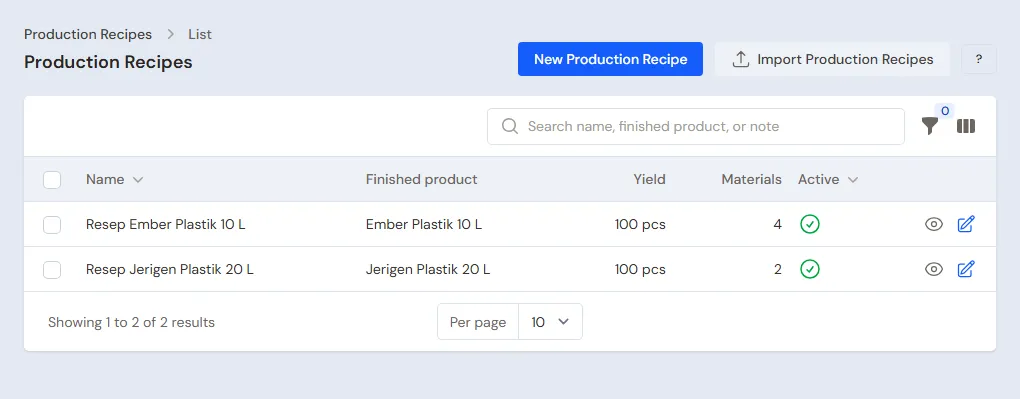
Warehouse Admin in Master Data → Production Recipes, button Create Production Recipe:
- Fill in Name 10 L Plastic Bucket, Product 10 L Plastic Bucket and Yield 100.
- Under Materials per recipe, add 52 Kilograms PP Resin, 5 Kilograms PP Regrind, 1 Kilogram Blue Masterbatch and 5 Packing Sacks for Buckets. The 52 kilograms of resin already include a normal amount of gate waste and scrap.
- Under Production stages: Injection with Piece-rate wage per unit Rp 40, Finishing Rp 15 and Packing Rp 10. If the logo is printed by an outside party, add a Printing stage with Makloon switched on.
- Press Create.
The material cost of 100 buckets: Rp 910.000 + Rp 40.000 + Rp 45.000 + Rp 12.500 = Rp 1.007.500, so Rp 10.075 a piece. Add the piece-rate wage of Rp 65 and the cost before factory costs is Rp 10.140 a piece when nothing is rejected. Rejected buckets still use material, so they add to the cost of the good ones: in the example below 1,000 buckets are worked and 960 are good, so the cost is (Rp 10.075.000 + Rp 62.800) ÷ 960 = about Rp 10.560 a piece.
A factory that makes several products from the same resin (basins, dippers, blow moulded jerrycans, extruded bags) makes one recipe per product, with its own materials and stages. Extruded goods sold by the kilogram use Kilogram as Base Unit, and rolls of film use Roll.
Production workers
Warehouse Admin: under Master Data → Production Workers, register Pak Rahmat and Pak Joko (injection operators on shift 1 and shift 2), Pak Surya (finishing) and Bu Nani (packing). Every operator paid per result is registered here. Workers on a monthly salary, such as the machine technician and the supervisor, need not be registered: their pay goes into the Monthly Factory Costs.
Machines, moulds and shifts
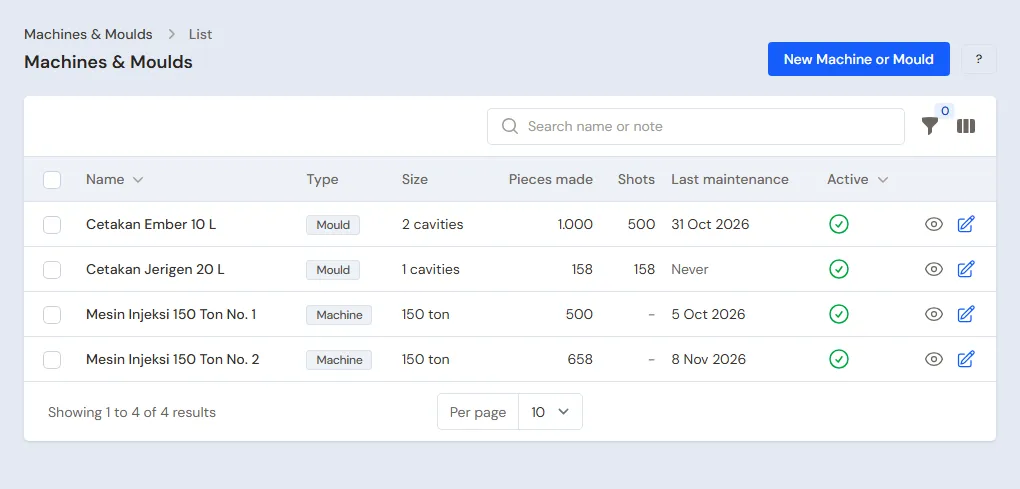
Warehouse Admin: under Master Data → Machines & Moulds, press Create Machine or Mould and register the machines and moulds used on the production floor:
- Type Machine: Injection Machine 150 Ton No. 1 and No. 2, with Tonnage 150.
- Type Mould: Bucket Mould 10 L with Cavities 2 (two buckets in one shot), and Jerrycan Mould 20 L with 1 cavity.
- Installed on is optional. When the shop uses the extra feature Fixed Assets, pick its Fixed asset: the machine at Rp 180.000.000 over 96 months and the mould at Rp 45.000.000 over 60 months stay recorded under Transactions → Finance → Fixed Assets and their depreciation goes into Profit & Loss, so the money is never recorded twice. See Fixed assets and depreciation.
Open a machine or mould to record its Maintenance history: press Create Maintenance, fill in the date, the type (Routine maintenance or Repair) and the work done, for example "Hydraulic oil changed and cooler cleaned". The Finance Admin records its cost under Transactions → Finance → Expenses with the category Perawatan Mesin or Perawatan Cetakan; pick that expense in the maintenance entry and its amount is read without being recorded twice. The Use tab shows the work results made with that machine or mould, and in the list the Shots of a mould are its pieces made divided by its cavities.
The Shift is written directly on the work result (see Output on the Production Board): type for example Shift 1 or Shift 2, and its list remembers the ones used before. The Worker Output & Wages report has the filters Machine, Mould and Shift, so the output of each shift and each machine can be seen without depending on the operator.
Groups, prices and credit limits
- Head Cashier: under Master Data → Customer Groups, create the group Distributor with a Credit Limit of at most Rp 25.000.000.
- Warehouse Admin: open the 10 L Plastic Bucket, tab Price List, press Create Price, pick Distributor, Unit Pieces, Price Rp 15.000.
- Head Cashier: under Master Data → Customers, create CV Mitra Perabot in the Distributor group (30 days' terms) and Toko Plastik Sumber Rejeki without a group (30 days' terms).
A buyer who is in the group and also meets a quantity price gets the lowest of all the prices that apply. See Prices per customer group and Managing and tracking customer receivables.
Suppliers and cash accounts
- Purchasing Admin: under Master Data → Suppliers, register PT Petro Resin Mandiri (resin and regrind, 30 days' terms) and Toko Kemasan dan Pewarna Jaya (masterbatch and sacks, 14 days' terms).
- Owner: under Master Data → Cash Accounts, make sure there are Bank BCA and Owner's Cash.
3. Starting capital and buying materials
- The Owner records capital of Rp 80.000.000 into Bank BCA under Transactions → Finance → Owner's Capital.
- Purchasing Admin records every supplier note under Transactions → Purchases, into the Warehouse Gudang Bahan. See Recording a purchase note.
- PT Petro Resin Mandiri note, 30 days' terms: 21 Sacks PP Resin × Rp 437.500 = Rp 9.187.500 (525 kilograms) and 50 Kilograms PP Regrind × Rp 8.000 = Rp 400.000, so Rp 9.587.500. The note is unpaid, so it becomes a payable.
- Toko Kemasan dan Pewarna Jaya note, paid in full from Bank BCA: 10 Kilograms Blue Masterbatch × Rp 45.000 = Rp 450.000 and 100 Packing Sacks for Buckets × Rp 2.500 = Rp 250.000, so Rp 700.000. Fill in Payment Now Rp 700.000.
Afterwards the materials are in Gudang Bahan, Bank BCA is Rp 700.000 lower, and the payable to PT Petro Resin Mandiri is Rp 9.587.500 with its due date.
If a supplier delivers in parts, switch off All goods have been received when recording the note, then press Receive Goods on that note each time goods arrive. Ordering from a supplier first with a purchase order (PO) uses the extra feature Purchase orders (PO), under Transactions → Purchase Orders. See Receiving goods that arrive in parts and Purchase orders.
4. One order from materials to customer
| When | Work | Who |
|---|---|---|
| Monday morning | Materials to Gudang Produksi, production order for 1,000 buckets | Warehouse Admin |
| Monday to Wednesday | Output of each shift per stage | Production |
| Wednesday afternoon | Receive the output with the weighed scrap | Warehouse Admin |
| Thursday | Move to Gudang Barang Jadi | Warehouse Admin |
| Thursday | Quotation, order, then delivery note | Head Cashier |
| Friday | Note from the delivery note | Head Cashier |
Morning: materials and the production order
Warehouse Admin:
- Move the materials used from Gudang Bahan to Gudang Produksi under Transactions → Stock Transfers: 520 Kilograms PP Resin, 50 Kilograms PP Regrind, 10 Kilograms Blue Masterbatch and 50 Packing Sacks for Buckets. Production always takes its materials from the warehouse of its order. See Stock transfers between warehouses.
- Under Transactions → Production Orders, press Create Production Order, pick Recipe 10 L Plastic Bucket and Warehouse Gudang Produksi, fill in Planned quantity 1.000 (ten times the recipe), then save. The order shows on the Production Board at once.
Output on the Production Board
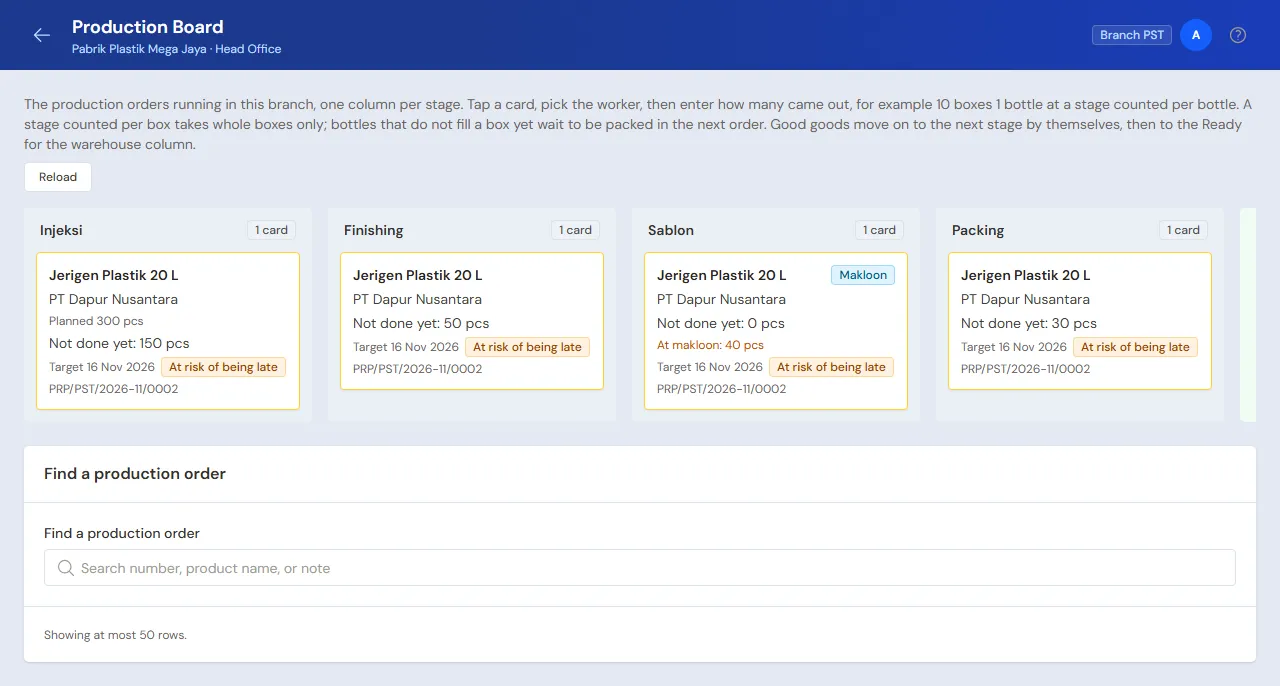
Production (Pak Hasan), on a tablet or phone on the production floor: open Transactions → Production Board. Each time an operator hands in output, tap the order's card in the column of that stage, pick the Worker, Machine and Mould, write the Shift, fill in Good output, then press Save output. The last machine, mould and shift are remembered on that device, so for the next hand-in change them only when they differ.
- Injection shift 1: Pak Rahmat on Injection Machine 150 Ton No. 1 with Bucket Mould 10 L, 480 good, 20 rejected. Injection shift 2: Pak Joko on Injection Machine 150 Ton No. 2 with the same mould, 490 good, 10 rejected.
- Finishing: Pak Surya 960 good, 10 rejected.
- Packing: Bu Nani 960 good.
Rejected output goes into Finished goods rejected, then pick Rejected goods: thrown away, redone (back to that stage) or made second grade. A cracked bucket is thrown away, a bucket with only a fine line becomes second grade: pick 10 L Plastic Bucket Second Grade, and its stock grows by as many as were rejected.
The wages recorded: Pak Rahmat 480 × Rp 40 = Rp 19.200, Pak Joko 490 × Rp 40 = Rp 19.600, Pak Surya 960 × Rp 15 = Rp 14.400 and Bu Nani 960 × Rp 10 = Rp 9.600. The wages are a wage payable until paid.
Afternoon: receiving the output
Warehouse Admin: on the order, press Receive Goods, enter the Finished goods 960, tick Finish this production order, then press Put into the warehouse. The day's scrap is weighed under By-products on the same form (see Scrap and regrind).
The materials go down by the recipe and 960 buckets enter Gudang Produksi at their cost. Goods that are good at one stage but not yet taken by the next when the order is finished become leftover between stages, shown under Transactions → Stage Leftovers. An order that is wrong from start to end is undone with Delete everything in the More menu of its page.
Scrap and regrind
Gate and runner waste, rejected goods and machine purge are ground up and mixed into new resin again, usually 5 to 20 percent. In Vende:
- If the scrap need not be recorded: leave it as in the recipe. The recipe uses 52 kilograms of resin for 100 buckets, which already includes scrap, and the PP Regrind in the recipe is taken from the materials stock.
- If you want regrind stock recorded: weigh the scrap that came out when the output is received, then Warehouse Admin records it in Receive Goods under By-products (folded, press its title to open it). Press Add by-product, pick the item (PP Regrind) and enter the Quantity in kilograms, for example 25. You may leave Value per base unit empty: Vende then uses the current cost of PP Regrind (Rp 8.000), so 25 kilograms are worth Rp 200.000.
What happens: 25 kilograms of PP Regrind enter the stock of the order's warehouse at a value of their own, and that value is taken off the cost of the buckets. So the buckets do not carry the cost of scrap that can be used again, and the same material is not counted twice when the regrind is mixed in again in a recipe. On the order, the By-products section shows the scrap per receipt, and Cost of finished goods has a Less by-products line. Cancelling the receipt takes the regrind out of stock too. The value cannot be more than the material cost of that receipt, and an item with batches or serial numbers cannot be used here; Vende says why when it refuses.
An owner who sells the ground scrap can type Value per base unit themselves, for example the selling price of regrind. A sale of regrind is recorded like any other sale.
Move to Gudang Barang Jadi
Warehouse Admin: open Transactions → Stock Transfers, move 960 Pieces 10 L Plastic Bucket from Gudang Produksi to Gudang Barang Jadi.
Quotation, order and delivery note
Head Cashier:
- A buyer who wants buckets with their own brand asks for a price first. Under Transactions → Quotations, press Create Quotation, pick the customer, fill in the goods and quantities, then save and Print PDF. When the customer agrees, press Convert to Order. See Making a quotation.
- For a regular order, open Transactions → Sales Orders and make CV Mitra Perabot's order for 400 Pieces 10 L Plastic Bucket: 400 × Rp 15.000 = Rp 6.000.000 (the Distributor price), and Toko Plastik Sumber Rejeki's order for 100 Pieces: 100 × Rp 16.000 = Rp 1.600.000 (the quantity price, because 100 is past 20).
- Under Transactions → Delivery Runs, press Make Delivery Run, pick Sales orders, tick both orders, then pick Make Delivery Run with the Driver name and the vehicle. Press Print & make delivery notes: the stock leaves Gudang Barang Jadi.
- In the afternoon, mark both stops Delivered.
See Sales orders, Delivery notes and Delivering with a daily delivery run.
Invoicing what was delivered
Head Cashier: on every order, press Make Note from Delivery Notes, then Make Draft Note. Press Pay, Unpaid, then Save transaction.
Afterwards CV Mitra Perabot owes Rp 6.000.000 (due in 30 days) and Toko Plastik Sumber Rejeki Rp 1.600.000 (30 days). A note past its group's credit limit is held until the Reason for passing the credit limit is filled in. The stock is down to 960 − 500 = 460 buckets.
5. Receivables and collection
- Finance Admin records the payments that come in under Transaction Details → Sale Payments, for example CV Mitra Perabot Rp 6.000.000 by transfer to Bank BCA. See Payments on a note.
- Finance Admin reads Reports → Receivables every week.
6. Wages and supplier payments
- Finance Admin, every Saturday: under Transactions → Wages & Makloon Payments, pay Pak Rahmat, Pak Joko, Pak Surya and Bu Nani what is still owed.
- Finance Admin pays the supplier purchase notes that fall due under Transaction Details → Purchase Payments.
7. Factory costs
- Finance Admin records the machine technician's and supervisor's pay of Rp 400.000, mould maintenance of Rp 150.000 (category Mould Maintenance) and the electricity bill of Rp 500.000 under Transactions → Finance → Expenses.
- Warehouse Admin fills in Transactions → Monthly Factory Costs: Fixed wages Rp 400.000 and Factory costs (overhead) Rp 650.000 (electricity and mould maintenance). The figures are small because this example holds only one production order in that month.
That month's costs are spread over the finished goods received into the warehouse that month, in proportion to their cost. Without Monthly Factory Costs the costs are still in Profit & Loss, they just do not go into the cost of finished goods.
Buckets that are too damaged to sell are taken out by Warehouse Admin under Transactions → Stock Adjustments, direction Out, category Damaged. See Stock adjustments.
8. Reports per job title
| Report | What it holds | Opened by | When |
|---|---|---|---|
| Reports → Stock | Resin, regrind and finished goods per warehouse | Warehouse Admin | Every day |
| Reports → Worker Output & Wages | Output per operator per stage and the wages | Warehouse Admin | Every Saturday |
| Reports → Receivables | What every shop and distributor owes and how old it is | Finance Admin | Every week |
| Reports → Payables | What the resin and packing suppliers are owed | Finance Admin | Every week |
| Reports → Cash Balance | The money in every cash account | Finance Admin | Every day |
| Reports → Profit & Loss | Sales, cost of goods sold, wages and expenses | Owner | Every month |
9. Checklist
- Every day: Production records every shift's output, Warehouse Admin receives the output and moves it to the finished goods warehouse, Head Cashier makes delivery notes and notes from what was delivered.
- Every week: Finance Admin pays the piece-rate wages and reads Receivables and Payables. Warehouse Admin checks the resin stock against its minimum stock.
- Every month: Warehouse Admin fills in the Monthly Factory Costs and does a stocktake of the materials. The Owner reads Profit & Loss.
A running business
This part is for the team moving a plastic factory that already runs to Vende: there are resin and finished goods in the warehouse, shops and distributors who still owe money, and payables to the resin suppliers. The order is always the same:
- Fill in the master data.
- Practise transactions until every part is familiar.
- Empty the practice transactions.
- Fill in the opening balances on the start day.
- Start for real.
The opening balances are filled in last on purpose, so practice does not disturb their figures. The examples in this part use Pabrik Plastik Mega Jaya from the new business part.
1. Master data
Do the parts Who does what, 1. Shop details and users and 2. Master data above. Also register every shop and distributor that still has an invoice outstanding and every supplier still owed. Master data is not deleted when the practice transactions are emptied.
2. Team practice
Do this in a practice shop of the Plastic factory type with all six accounts.
Practice 1: master data
- Owner: shop details, the five users, both suppliers.
- Pak Bambang (Warehouse Admin): the four materials, the 10 L Plastic Bucket Second Grade, the 10 L Plastic Bucket with the Bale unit and quantity price, its recipe and the four operators.
- Head Cashier: the Distributor group with its credit limit, the group price and both customers.
Practice 2: one order
- Owner: capital of Rp 80.000.000. Purchasing Admin: both purchase notes, the PT Petro Resin Mandiri note unpaid and the Toko Kemasan dan Pewarna Jaya note paid in full from Bank BCA.
- Pak Bambang and Pak Hasan: transfer the materials, production order for 1,000 buckets, output of the three stages, receive 960 buckets, then move them to Gudang Barang Jadi.
- Check: Reports → Stock shows 960 buckets in Gudang Barang Jadi. Opened by Warehouse Admin.
- Head Cashier: both customers' orders, delivery run, print the delivery notes, mark Delivered, then the unpaid note.
- Finance Admin: pay the four operators' wages from Bank BCA, then receive Rp 1.600.000 from Toko Plastik Sumber Rejeki into Bank BCA.
After Practice 2 you should see:
| Report | What it should show | Opened by |
|---|---|---|
| Reports → Cash Balance | Bank BCA Rp 80.000.000 − Rp 700.000 − Rp 62.800 + Rp 1.600.000 = Rp 80.837.200 | Finance Admin |
| Reports → Receivables | CV Mitra Perabot Rp 6.000.000 | Finance Admin |
| Reports → Payables | PT Petro Resin Mandiri Rp 9.587.500 | Finance Admin |
| Reports → Stock | 10 L Plastic Bucket 460 pieces | Warehouse Admin |
Practice 3: opening balances
Fill in the opening balances with the example in part 4 below, check as in part 5, then empty them again.
3. Empty the practice transactions
Done by the Owner under Settings → Empty Transactions, button Empty All Transactions. Notes, orders, delivery notes, delivery runs, purchases, production orders with their output, wage payments, monthly factory costs, stock adjustments, payments, expenses, capital and opening balances are deleted. Products, recipes, workers, customers, groups with their prices and credit limits, suppliers, cash accounts, users and settings stay. Vende makes a full backup first. See Emptying transactions or all data.
4. Opening balances
Done by the Owner under Settings → Opening Balances on the morning of the start day, with As of that day. Finish the production under way first and pay the old piece-rate wages: Opening Balances has no field for half-finished goods. See Filling in opening balances for cash, stock, receivables and payables.
- Opening Stock: 10 L Plastic Bucket 700 Pieces, cost Rp 10.560; PP Resin 300 Kilograms, Rp 17.500; PP Regrind 40 Kilograms, Rp 8.000; Blue Masterbatch 6 Kilograms, Rp 45.000; Packing Sack for Buckets 80 Pieces, Rp 2.500.
- Opening Receivables: one row per unpaid shop or distributor note, for example CV Mitra Perabot Rp 4.000.000 due in 20 days.
- Opening Payables: Toko Kemasan dan Pewarna Jaya Rp 300.000.
- Opening Cash: the money counted in each cash account, for example Bank BCA Rp 25.000.000 and Owner's Cash Rp 500.000.
Machines and moulds you already own are registered under Master Data → Machines & Moulds. When the shop uses Fixed Assets, record their purchase price and date there too, then pick the fixed asset on the machine or mould: the depreciation then runs by itself.
5. Check before starting
| Report | What it should show | Opened by |
|---|---|---|
| Reports → Cash Balance | The same as the money counted | Finance Admin |
| Reports → Stock | Buckets 700 pieces, resin 300 kilograms, regrind 40 kilograms, masterbatch 6 kilograms, sacks 80 | Warehouse Admin |
| Reports → Receivables | CV Mitra Perabot Rp 4.000.000 | Finance Admin |
| Reports → Payables | Toko Kemasan dan Pewarna Jaya Rp 300.000 | Finance Admin |
Figures differ? The Owner corrects the rows under Settings → Opening Balances before any real transaction is recorded.
6. Starting for real
From that day every resin purchase, production run, order, delivery note, note and payment goes into Vende as in the new business part, with the same checklist. In the first week Warehouse Admin checks that every finished production order has been received into the warehouse, and Finance Admin checks that payments of the old receivables bring Reports → Receivables down.