
Clothing store guide
A learning path for a clothing store, new or running: job titles, size and colour variants, labels, a day of selling, size swaps, practice, opening balances.
On this page
- A new business
- Who does what
- 1. Shop details and users
- 2. Master data
- 3. Starting capital, purchases and labels
- 4. A day of selling
- 5. Receivables, payables and costs
- 6. Reports per job title
- 7. Checklists
- A running business
- 1. Master data
- 2. Practice for the team
- 3. Emptying the practice transactions
- 4. Opening balances
- 5. Check before going live
- 6. Going live
This guide is for the team setting up Vende at a clothing store, boutique or fashion outlet that sells clothes off the rack to buyers who walk in. It has two parts: A new business for a store just opening, with no stock, receivables or payables from before, and A running business for one moving to Vende, with team practice and opening balances. The example is Butik Anggun Fashion. The names of the store, customers, suppliers and people and all the figures are made up.
What the business looks like:
- Products: t-shirts and jeans in several sizes and colours, and socks without sizes.
- Buying: clothes are bought from a garment maker on 30 days' credit, socks per score and paid in full.
- Selling: buyers come to the till, the barcode labels are scanned, members collect points, and resellers buy at a discount and pay later.
- Size swaps: clothes that do not fit may be swapped by bringing the note.
Work through it from the top. Every step names its menu, who does it, what changes afterwards, and an example with figures.
The features in this guide come with the Clothing store business type package, except those marked extra. The shop's features show under Settings → Subscription, section This shop's features. If a menu is missing, contact the Vende team.
Tip: Lost on a page? Press the ? button at the top of that page. A short tour shows every field, on the till too.
A new business
Who does what
This package holds four users, the owner included.
| Part of the store | Job title in Vende | What they do and open |
|---|---|---|
| Owner | Owner | Every menu, also Settings → Points, opening balances and Reports → Profit & Loss |
| Store head | Store Head | Products and variants, suppliers, purchase notes, barcode labels, promotions, customer groups, banking the till cash, payments, Reports → Stock, Reports → Receivables and Reports → Cash Balance |
| Senior cashier | Head Cashier | Selling at the till, typing prices, returns without a note, customers and members, Transaction Details → Sale Lines |
| Cashier | Cashier | Selling at the till, returns from the original note, signing up new members |
Shop assistants who do not use the till need no account. Every role is explained in Roles and permissions.
1. Shop details and users
Done by the Owner: fill in Settings → Shop (name, address, WhatsApp, logo), then make the accounts in Settings → Users with the Job title from the table above. Fill in Settings → Print too, for example "Size swaps within 7 days with the label still on." See Adding and managing users and Setting up the receipt.
The people at Butik Anggun Fashion: Bu Yuni (owner), Mas Bima (store head, Store Head), Sinta Maharani (senior cashier, Head Cashier) and Dini (cashier, Cashier).
2. Master data
A shop of this business type already has the product categories Tops, Bottoms, Dresses, Children's Clothing and Accessories, the unit Score (20 pcs) besides Pcs and Dozen, and the usual expense categories such as Electricity, Rent and Salaries.
T-shirts with size and colour variants
Store Head:
- In Master Data → Products, press New Product, fill in Name Kaos Polos Katun, Category Tops, Base Unit Pcs.
- In the Variants section, switch on Has variants (size, colour and more). Fill in the Option name Size with the values S, M, L and XL, press Add option, then fill in Colour with the values Hitam and Putih.
- Press Make variant combinations. Eight rows show under Variants, for example S, Hitam.
- Press Fill in empty codes so every variant has a code for its barcode.
- Fill in the parent's Selling Price Rp 69.000. On the rows XL, Hitam and XL, Putih, fill in Selling price Rp 75.000. The other variants stay empty so they take the parent's price.
- Press Create.
Every combination becomes an item of its own, for example Kaos Polos Katun - M, Hitam, with its own stock and cost. Make Celana Jeans Slim (Bottoms) too, with the option Size 28, 30 and 32, selling price Rp 189.000. See Product variants.
The Store Head does not see Cost Price, because the cost of goods shows only to the Owner and holders of Sensitive Reports. Leave it: the purchase notes in part 3 fill in every item's cost, for example Rp 35.000 for the T-shirts and Rp 120.000 for the jeans. See Cost price of goods.
Socks per score
Store Head: make Kaos Kaki Katun (Accessories), Base Unit Pcs, selling price Rp 15.000. In the Other Units section, press Add Unit, choose Score (20 pcs), fill in Contains (in base units) 20. Socks are bought per score and sold per pcs. See Base unit, other units and main unit.
Suppliers, customers and the reseller group
- Store Head: in Master Data → Suppliers, list Konveksi Sinar Baru with Payment Terms (days) 30, and Grosir Kaos Kaki Bandung.
- Store Head: in Master Data → Customer Groups, make the group Reseller with Group Discount 10% and Spend per Point 0, so resellers get the discount but no points. See Setting up customer groups.
- Head Cashier: in Master Data → Customers, list Toko Baju Melati with Group Reseller and Payment Terms (days) 14, and the first member, Kak Tika, without a group.
Points and a promotion
- Owner: in Settings → Points, switch on Enable customer points, fill in Spending per point 10.000 and Value of 1 point 100. See Giving and redeeming customer points.
- Store Head: in Master Data → Promotions, make the promotion "Buy 3 socks get 1 free": under What must be bought 3 Kaos Kaki Katun, under What is given free 1 Kaos Kaki Katun. A new promotion is always off; switch on Active after checking its rule. See Automatic promotions.
A promotion is set per item. A promotion for clothes with variants is made per variant, so promotions are easiest for items without variants such as socks.
3. Starting capital, purchases and labels
- The Owner records capital of Rp 20.000.000 into Bank BCA in Transactions → Finance → Owner's Capital.
- The Store Head moves Rp 500.000 from Bank BCA to Cashier Cash as change money in Transactions → Finance → Cash Transfers.
- The Store Head records the note of Konveksi Sinar Baru in Transactions → Purchases, without a payment: 5 pcs of every variant of Kaos Polos Katun (40 pcs × Rp 35.000 = Rp 1.400.000) and 4 pcs of every size of Celana Jeans Slim (12 pcs × Rp 120.000 = Rp 1.440.000), so Rp 2.840.000. Type the parent's name and all its variants show. The payable is recorded, due in 30 days.
- The Store Head records the note of Grosir Kaos Kaki Bandung, paid in full from Bank BCA: 1 Score (20 pcs) of Kaos Kaki Katun × Rp 100.000. The stock goes up by 20 pcs.
- The Store Head prints the labels in Master Data → Print Labels: Source Purchase note and Number of labels By quantity (base unit). Choose the Konveksi Sinar Baru note under Document and press Take Goods, then choose the Grosir Kaos Kaki Bandung note and press Take Goods again. Press Preview & Print. 72 labels come out, one for every pcs: 1 score of socks gives 20 pcs labels. See Printing price labels and barcodes.
See Recording a purchase note.
4. A day of selling
| Time | Who | Work |
|---|---|---|
| 09.00 | Cashier | Opens the till |
| All day | Cashier, Head Cashier | Sells to walk-in buyers, members and resellers |
| Afternoon | Cashier | A size swap |
| Closing | Store Head | Counts the drawer and banks the money |
Selling at the till
Open the till with New sale on the Dashboard. Scan the barcode label, or type the item's name.
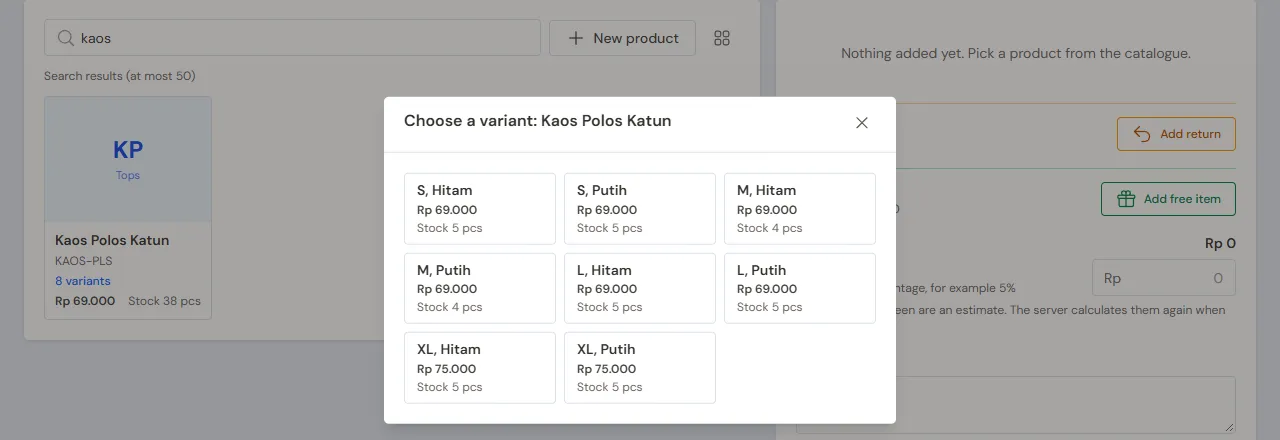
- Cashier (Dini): a walk-in buyer takes Kaos Polos Katun - M, Hitam (Rp 69.000) and Celana Jeans Slim - 30 (Rp 189.000). Scan both labels, press Pay, take Rp 258.000 in cash, then Save transaction.
- Cashier: Kak Tika picks Kaos Polos Katun - L, Putih (Rp 69.000), Kaos Polos Katun - XL, Hitam (Rp 75.000) and 3 Kaos Kaki Katun (Rp 45.000). Choose Kak Tika under Customer. On saving, the promotion adds 1 free Kaos Kaki Katun under Promotions. She pays Rp 189.000 by QRIS into Bank BCA and earns 18 points.
- Head Cashier (Sinta): Toko Baju Melati takes 5 Kaos Polos Katun - S, Putih and 5 Kaos Polos Katun - M, Putih. Choose Toko Baju Melati: every line gets Group discount 10% right away. The total is 10 × Rp 69.000 − Rp 69.000 = Rp 621.000. Press Pay, Unpaid, then Save transaction. The receivable falls due in 14 days.
See Recording sales on the till and Taking payment at the till.
A size swap
Cashier: Kak Tika comes back because the L t-shirt is too small and takes Kaos Polos Katun - XL, Putih instead.
- Press Add return, find Kak Tika's note on the tab From the original note, tap Kaos Polos Katun - L, Putih, then press Done.
- Scan the label of Kaos Polos Katun - XL, Putih as for any sale.
- Press Pay. What is to pay is the difference, Rp 75.000 − Rp 69.000 = Rp 6.000. Take it in cash, then Save transaction.
The L t-shirt goes back into stock. A buyer who lost the note is served by the Head Cashier with the tab Without an original note. See Recording a sales return.
Closing and banking the till cash
The Store Head (Mas Bima) counts the drawer: Rp 500.000 change money + Rp 258.000 + Rp 6.000 = Rp 764.000. The money above the change money, Rp 264.000, is moved to Owner Cash in Transactions → Finance → Cash Transfers, so the drawer starts at Rp 500.000 again tomorrow. See Moving money between cash accounts.
The drawer holds less or more than counted? The Store Head records the difference in Transactions → Finance → Cash Adjustments. See Recording cash differences with Cash Adjustments.
5. Receivables, payables and costs
- The Store Head records the payment of Toko Baju Melati in Transaction Details → Sale Payments: Rp 621.000 into Bank BCA. See Recording payments of unpaid notes.
- The Store Head pays Konveksi Sinar Baru before the due date in Transaction Details → Purchase Payments: Rp 2.840.000. See Paying what you owe suppliers.
- The Store Head records rent, electricity and salaries in Transactions → Finance → Expenses. See Recording shop expenses.
The free socks of the promotion are not sold: their cost, Rp 5.000, is recorded as Promotion Expense in Profit & Loss. The points members earn are recorded when the note is saved too: 18 points × Rp 100 = Rp 1.800 as Points Expense, and the same Points Liability until the points are redeemed.
6. Reports per job title
| Report | What it holds | Opened by | When |
|---|---|---|---|
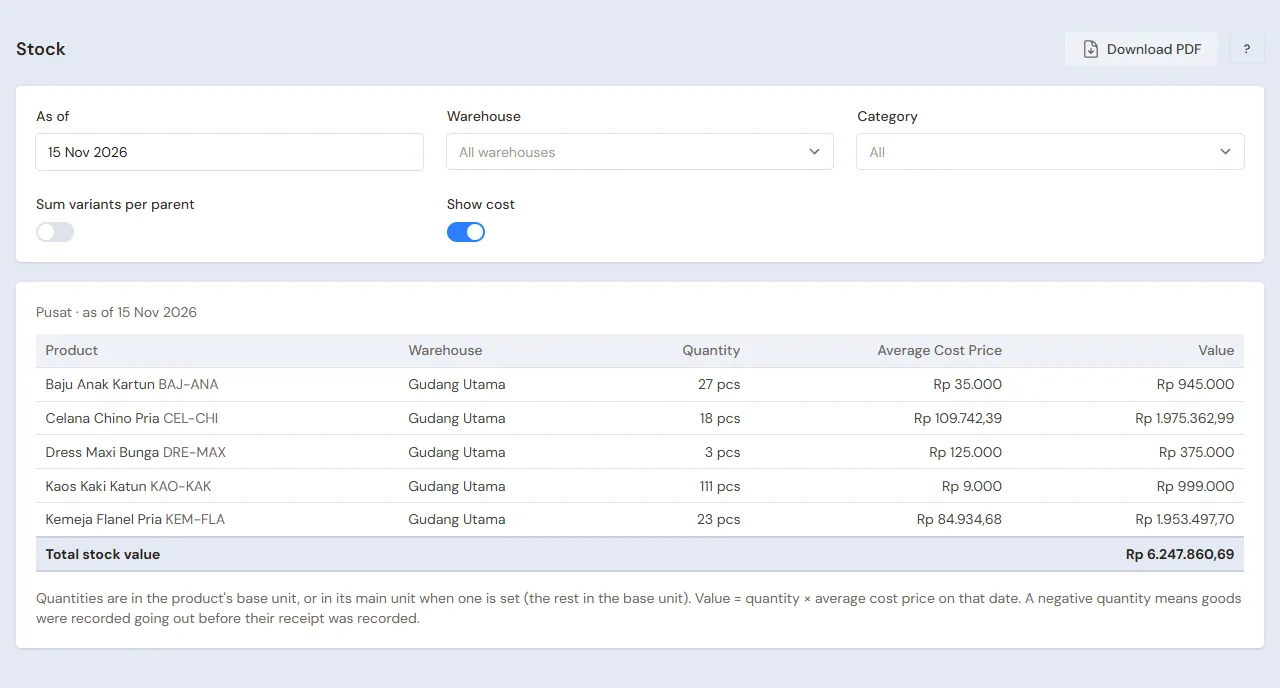
| Reports → Stock | The stock of every size and colour; switch on Sum variants per parent for the total per model | Store Head | Every day |
| Transaction Details → Sale Lines | The items sold per size, the Returns tab for size swaps | Head Cashier | Every day |
| Reports → Cash Balance | The drawer, Owner Cash and the bank | Store Head | Every day |
| Reports → Receivables | What every reseller still owes | Store Head | Every week |
| Reports → Payables | What is owed to the garment maker and when | Store Head | Every week |
| Reports → Profit & Loss | Sales, cost of goods sold, expenses, Promotion Expense and Points Expense | Owner | Every month |
7. Checklists
- Every day: the Cashier scans the labels instead of typing names, so the size and colour are right. The Store Head counts the drawer and banks the money above the change money.
- Every week: the Store Head collects from resellers whose notes are due, pays the garment maker, and prints labels for new stock.
- Every month: the Store Head counts the stock with a stocktake. The Owner reads Profit & Loss. See Counting stock with a stocktake.
A running business
This part is for the team moving a running clothing store to Vende: clothes on the racks and in the store room, resellers who still owe money, payables to the garment maker, and members who already have points. The order is always the same:
- Enter the master data.
- Practise transactions until every part is used to them.
- Empty the practice transactions.
- Enter the opening balances on the first day.
- Go live.
The opening balances come last on purpose, so the practice does not spoil their figures. The examples in this part use Butik Anggun Fashion from the new business part.
1. Master data
Work through the parts Who does what, 1. Shop details and users and 2. Master data above. Also list every model with every size and colour still in stock, every reseller who still owes money, every garment maker still owed, and every member with points. Many products are quicker to import from Excel, variants included. See Importing and exporting products with Excel. The master data is not deleted when the practice transactions are emptied.
2. Practice for the team
Work in a practice shop of the Clothing store type with the four accounts. Every step names who does it and what must show.
Practice 1: master data
- Owner: the shop details, the three users, the receipt and the points.
- Check: Dini only sees the selling and customer menus, without purchases or money reports.
- Store Head: Kaos Polos Katun with eight variants, Celana Jeans Slim with three sizes, Kaos Kaki Katun with the unit Score (20 pcs), both suppliers, the group Reseller and the sock promotion.
- Check: in Master Data → Products, switch on the filter Hide variant rows: Kaos Polos Katun shows once with eight variants.
- Head Cashier: Toko Baju Melati and Kak Tika.
Practice 2: a day of selling
- Owner: capital of Rp 20.000.000 into Bank BCA.
- Store Head: the transfer of Rp 500.000 to Cashier Cash, both purchase notes as in part 3, and the 72 labels.
- Dini (Cashier): the sales to the walk-in buyer and to Kak Tika as in part 4.
- Check: on Kak Tika's note, the Promotions part holds 1 Kaos Kaki Katun.
- Head Cashier: the sale to Toko Baju Melati, unpaid.
- Dini: Kak Tika's size swap with a difference of Rp 6.000.
- Store Head: the transfer of Rp 264.000 from Cashier Cash to Owner Cash.
After Practice 2 this must show:
| Report | What must show | Opened by |
|---|---|---|
| Reports → Cash Balance | Cashier Cash Rp 500.000; Owner Cash Rp 264.000; Bank BCA Rp 20.000.000 − Rp 500.000 − Rp 100.000 + Rp 189.000 = Rp 19.589.000 | Store Head |
| Reports → Receivables | Toko Baju Melati Rp 621.000 | Store Head |
| Reports → Payables | Konveksi Sinar Baru Rp 2.840.000 | Store Head |
| Reports → Stock | Kaos Polos Katun 27 pcs (with Sum variants per parent), Celana Jeans Slim 11 pcs, Kaos Kaki Katun 16 pcs | Store Head |
| Reports → Profit & Loss | Net sales Rp 258.000 + Rp 189.000 + Rp 621.000 + Rp 6.000 = Rp 1.074.000, cost of goods sold Rp 590.000, Promotion Expense Rp 5.000, Points Expense Rp 1.800 | Owner |
The 27 pcs of Kaos Polos Katun come from 40 − 1 − 2 − 10 + 1 − 1. Cost of goods sold: Rp 155.000 (the walk-in sale) + Rp 85.000 (Kak Tika) + Rp 350.000 (the reseller); the size swap does not change the cost, because the L and XL t-shirts cost the same.
Practice 3: opening balances
Enter the opening balances with the example of part 4 below, check them as in part 5, then empty them again.
3. Emptying the practice transactions
Done by the Owner in Settings → Empty Transactions, button Empty All Transactions. Sale and return notes, purchases, payments, cash transfers, capital, expenses, stock adjustments, the points history and point adjustments, and opening balances are deleted. Products with their variants, promotions, customer groups, customers, suppliers, point adjustment categories, cash accounts, users and settings stay. Vende makes a full backup first. See Emptying transactions or all data.
4. Opening balances
Done by the Owner in Settings → Opening Balances on the morning of the first day, with As of that day, before the store opens. See Entering opening cash, stock, receivables and payables.
- Opening Stock: one row for every variant, from the count of the racks and the store room, for example Kaos Polos Katun - M, Hitam 12 Pcs at Rp 35.000 and Celana Jeans Slim - 30 6 Pcs at Rp 120.000. A variant parent has no stock of its own. Much stock is quicker with Import Opening Stock.
- Opening Receivables: Toko Baju Melati Rp 450.000 with its due date.
- Opening Payables: Konveksi Sinar Baru Rp 1.500.000.
- Opening Cash: the money counted in every account, for example Cashier Cash Rp 500.000 and Bank BCA Rp 12.000.000.
Members' points from before
Opening Balances has no points tab. The points of old members are recorded with point adjustments on the first day:
- The Head Cashier makes the category Poin awal in Master Data → Point Adjustment Categories.
- The Head Cashier records every member's points in Transactions → Point Adjustments: choose Kak Tika, Category Poin awal, Add, Points 120, note "Points from the old member book".
A point adjustment changes no cash. Like points earned on a purchase, its value is recorded as Points Expense and Points Liability: 120 × Rp 100 = Rp 12.000. So Profit & Loss of the first month holds Points Expense of Rp 12.000 from these old points; tell the owner and the accountant. When Kak Tika redeems 50 points on a Rp 69.000 t-shirt, her note is cut by Rp 5.000 and she pays Rp 64.000. Her points are 120 − 50 + 6 points from that purchase = 76.
5. Check before going live
| Report | What must show | Opened by |
|---|---|---|
| Reports → Cash Balance | The money counted in every account | Store Head |
| Reports → Stock | The count of every size and colour | Store Head |
| Reports → Receivables | Toko Baju Melati Rp 450.000 | Store Head |
| Reports → Payables | Konveksi Sinar Baru Rp 1.500.000 | Store Head |
| Master Data → Customers | The Points column: Kak Tika 120 | Head Cashier |
The figures differ? The Owner corrects the row in Settings → Opening Balances before any real transaction is recorded. Wrong points are corrected with a point adjustment that adds or deducts.
6. Going live
From that day every sale, size swap, purchase and payment is recorded in Vende as in the new business part, with the same checklist. In the first week the Store Head prints labels for clothes without one and matches Reports → Stock with the count of the racks, and the Owner checks that Reports → Profit & Loss only holds sales and costs since the first day.