
Pharmacy guide
A learning path for a pharmacy, new or running: job titles, tablets, strips and boxes, batches and expiry, prescription notes, compounds, opening balances.
On this page
- A new business
- Who does what
- 1. Shop details and users
- 2. Master data
- 3. Starting capital and buying medicines
- 4. A day at the pharmacy
- 5. Receivables, payables and costs
- 6. Reports per job title
- 7. Checklists
- A running business
- 1. Master data
- 2. Practice for the team
- 3. Emptying the practice transactions
- 4. Opening balances
- 5. Check before going live
- 6. Going live
This guide is for the team setting up Vende at a pharmacy that sells over-the-counter medicines and medicines on a doctor's prescription, compounds included. It has two parts: A new business for a pharmacy just opening, with no stock, receivables or payables from before, and A running business for one moving to Vende, with team practice and opening balances. The example is Apotek Sehat Sentosa. The names of the pharmacy, customers, doctor, suppliers and people and all the figures are made up.
What the business looks like:
- Medicines: bought per box from a pharmaceutical wholesaler (PBF) on 30 days' credit, sold per tablet, strip or box. Every medicine has a batch number and an expiry date.
- Prescriptions: prescription medicines are only sold on a prescription. A note holding one asks for the prescription number and the doctor.
- Compounds: powders are made from several tablets and sold as one line with their compounding fee.
- Customers: walk-in buyers pay in full; a regular clinic pays 30 days later.
Work through it from the top. Every step names its menu, who does it, what changes afterwards, and an example with figures.
The features in this guide come with the Pharmacy business type package, except those marked extra. The shop's features show under Settings → Subscription, section This shop's features. If a menu is missing, contact the Vende team.
Tip: Lost on a page? Press the ? button at the top of that page. A short tour shows every field, the compound window on the till too.
A new business
Who does what
This package holds four users, the owner included.
| Part of the pharmacy | Job title in Vende | What they do and open |
|---|---|---|
| Owner | Owner | Every menu, also Settings → Alerts, opening balances and Reports → Profit & Loss |
| Responsible pharmacist | Store Head | Medicines and their units, suppliers, purchase notes with their batches, compound templates, expired medicines, banking the till cash, payments, Master Data → Batches, Reports → Stock, Reports → Prescription Medicine Sales and Reports → Cash Balance |
| Pharmacist at the counter | Head Cashier | Prescription notes and compounds, typing prices and compounding fees, customers, Reports → Prescription Medicine Sales |
| Pharmacy assistant at the till | Cashier | Selling over-the-counter medicines at the till, compounds from a template, customers |
Every role is explained in Roles and permissions.
1. Shop details and users
Done by the Owner: fill in Settings → Shop (name, address, WhatsApp, logo), then make the accounts in Settings → Users with the Job title from the table above. Fill in Settings → Print too, for example "Keep medicines in a cool, dry place." See Adding and managing users.
The people at Apotek Sehat Sentosa: Pak Gunawan (owner), Fitri Handayani (responsible pharmacist, Store Head), Ratna Sari (pharmacist at the counter, Head Cashier) and Andi Saputra (pharmacy assistant, Cashier).
2. Master data
A shop of this business type already has the product categories Over-the-counter Medicines, Limited Over-the-counter Medicines, Prescription Medicines, Vitamins and Supplements, Medical Devices and Personal Care, and the units Tablet, Strip, Bottle and Box besides Pcs.
Medicines per tablet, strip and box
Store Head: in Master Data → Products, make every medicine with the smallest unit sold as its Base Unit, and switch on Track batches & expiry in the Tracking section. Tablets get the Other Units Strip containing 10 and Box containing 100. A strip or box selling price left empty is the tablet price times what it contains. Also fill in the medicine's Registration Number (BPOM) in the Registration & Certificates section, and the licence number of the PBF or pharmacy customer in their record: both print on notes and delivery notes. See Registration numbers, halal certificates and customer licences.
| Medicine | Category | Base Unit | Selling Price | Prescription required |
|---|---|---|---|---|
| Parasetamol 500 mg | Over-the-counter Medicines | Tablet | Rp 250 | No |
| Klorfeniramin Maleat 4 mg | Limited Over-the-counter Medicines | Tablet | Rp 150 | No |
| Amoksisilin 500 mg | Prescription Medicines | Tablet | Rp 700 | Yes |
| Sirup Obat Batuk Hitam 100 ml | Limited Over-the-counter Medicines | Bottle | Rp 18.500 | No |
The Store Head does not see Cost Price, because the cost of goods shows only to the Owner and holders of Sensitive Reports. Leave it: the purchase note in part 3 fills in every medicine's cost, for example Rp 150 per Parasetamol tablet. See Cost price of goods.
For Amoksisilin 500 mg, switch on Prescription required: the sales screen asks for the prescription number and the doctor before a note with this medicine is saved. See Base unit, other units and main unit and Batches and expiry dates.
Compound templates
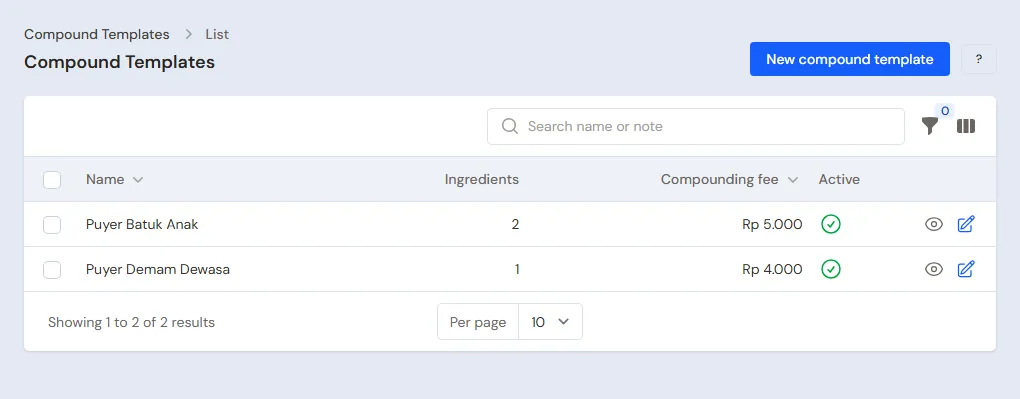
Store Head: in Master Data → Compound Templates, press the new button, then fill in:
- Name Puyer Batuk Anak, Compounding fee Rp 5.000.
- Under Ingredients per compound, add Parasetamol 500 mg 1 Tablet and Klorfeniramin Maleat 4 mg 1 Tablet. The quantities are for one compound (one sachet); at the till they are multiplied by the number of compounds sold.
- Press Create.
A compound made often is saved once. The compounding fee holds for one compound line, however many sachets. Cashiers who may not change prices use the template's fee.
Supplier, customers and the expiry alert
- Store Head: in Master Data → Suppliers, list PBF Sehat Farma with Payment Terms (days) 30.
- Store Head: in Master Data → Customers, list Klinik Pratama Harapan with Payment Terms (days) 30.
- Owner: in Settings → Alerts, fill in About to Expire 90, so the bell tells of batches expiring within 90 days.
3. Starting capital and buying medicines
- The Owner records capital of Rp 20.000.000 into Bank BCA in Transactions → Finance → Owner's Capital.
- The Store Head moves Rp 500.000 from Bank BCA to Cashier Cash as change money in Transactions → Finance → Cash Transfers.
- The Store Head records the invoice of PBF Sehat Farma in Transactions → Purchases, without a payment, with the batch number and expiry of every medicine in its line details (tap the medicine's name):
| Medicine | Quantity | Price | Subtotal | Batch | Expiry |
|---|---|---|---|---|---|
| Parasetamol 500 mg | 5 Boxes | Rp 15.000 | Rp 75.000 | PCT2712 | 12/2027 |
| Klorfeniramin Maleat 4 mg | 2 Boxes | Rp 6.000 | Rp 12.000 | CTM2610 | 10/2027 |
| Amoksisilin 500 mg | 3 Boxes | Rp 40.000 | Rp 120.000 | AMX2803 | 03/2028 |
| Sirup Obat Batuk Hitam 100 ml | 12 Bottles | Rp 14.000 | Rp 168.000 | OBH2610 | 10/2027 |
That is Rp 375.000, and the payable falls due in 30 days. The stock is kept in tablets: Parasetamol 500 tablets, Klorfeniramin Maleat 200 and Amoksisilin 300. See Recording a purchase note.
4. A day at the pharmacy
| Time | Who | Work |
|---|---|---|
| 07.00 | Cashier | Opens the till |
| All day | Cashier | Over-the-counter medicines for walk-in buyers |
| All day | Head Cashier | Prescription notes and compounds |
| Midday | Head Cashier | The regular clinic's order |
| Closing | Store Head | Counts the drawer and banks the money |
Open the till with New sale on the Dashboard. A sale always takes the batch closest to expiry first, so the cashier does not choose a batch.
Returns from customers follow Settings → Batch. A newly opened pharmacy starts with Strict: a medicine can only be returned from a batch that was sold to that customer, up to what they received minus what they already returned. Goods coming in from the wholesaler also need a batch number and an expiry date. See Returning batch-tracked goods from a sale.
Over-the-counter medicines
Cashier (Andi): a walk-in buyer buys 1 Strip of Parasetamol 500 mg (Rp 2.500) and 1 Bottle of Sirup Obat Batuk Hitam 100 ml (Rp 18.500). Change the unit of the Parasetamol line to Strip, press Pay, take Rp 21.000 in cash, then Save transaction. See Recording sales on the till.
A prescription note with a compound
Head Cashier (Ratna): a patient brings prescription RSP/1026/021 from dr. Siti Rahmawati for 1 strip of Amoksisilin 500 mg and 10 sachets of Puyer Batuk Anak.
- Add Amoksisilin 500 mg and change its unit to Strip: Rp 7.000. The note is marked PRESCRIPTION right away.
- Fill in Prescription number RSP/1026/021 and Doctor dr. Siti Rahmawati.
- Press Compound under the search box. Choose the Compound template Puyer Batuk Anak and fill in Number of compounds 10. The ingredients fill in by themselves: 10 tablets of Parasetamol 500 mg and 10 tablets of Klorfeniramin Maleat 4 mg.
- Check the price per compound: the ingredients are worth 10 × Rp 250 + 10 × Rp 150 = Rp 4.000 over 10 sachets, so Rp 400. The compounding fee of Rp 5.000 becomes a line of its own. Press Save compound.
- Press Pay. The total is Rp 7.000 + Rp 4.000 + Rp 5.000 = Rp 16.000. Take it in cash, then Save transaction.
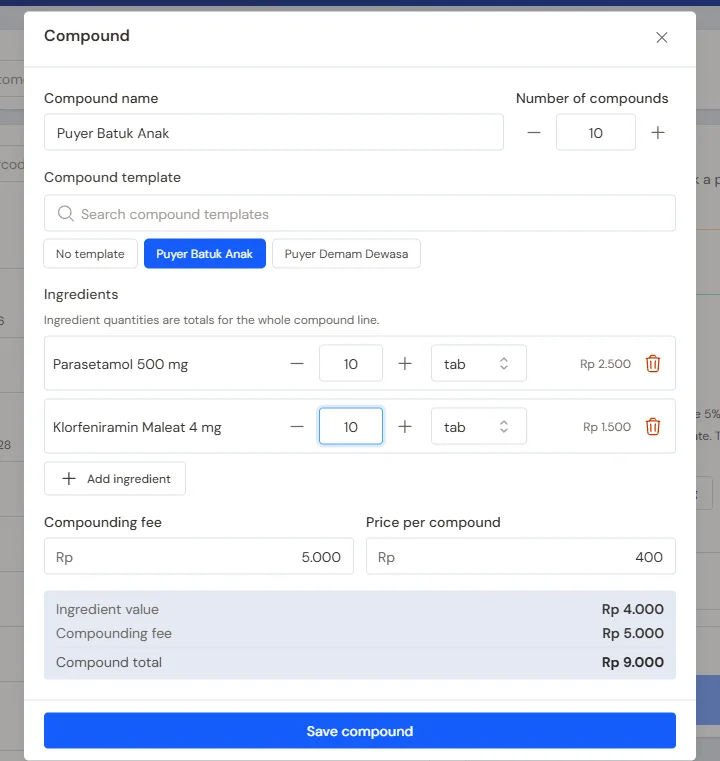
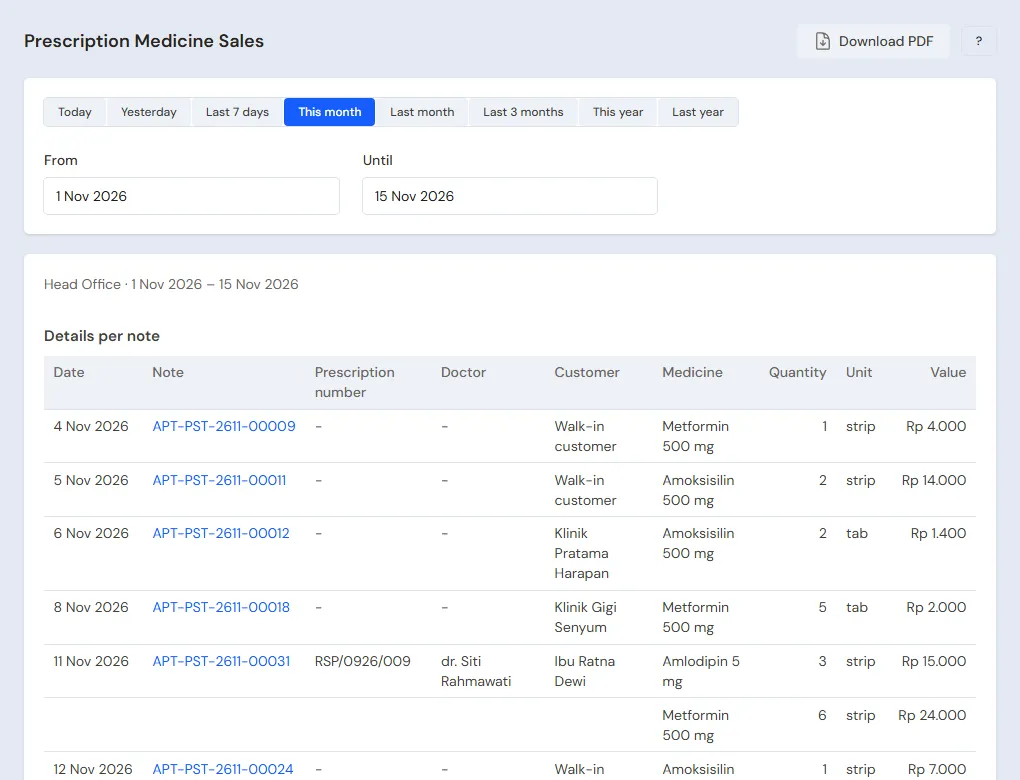
The ingredients leave the stock of their own batches, and the prescription number and doctor are printed on the receipt. Prescription notes show in Reports → Prescription Medicine Sales, prescription medicines used as compound ingredients included. Opened by the Head Cashier.
The regular clinic's order
Head Cashier: Klinik Pratama Harapan takes 2 Boxes of Parasetamol 500 mg, 2 × Rp 25.000 = Rp 50.000. Choose the clinic, press Pay, Unpaid, then Save transaction. The receivable falls due in 30 days.
Expired medicines
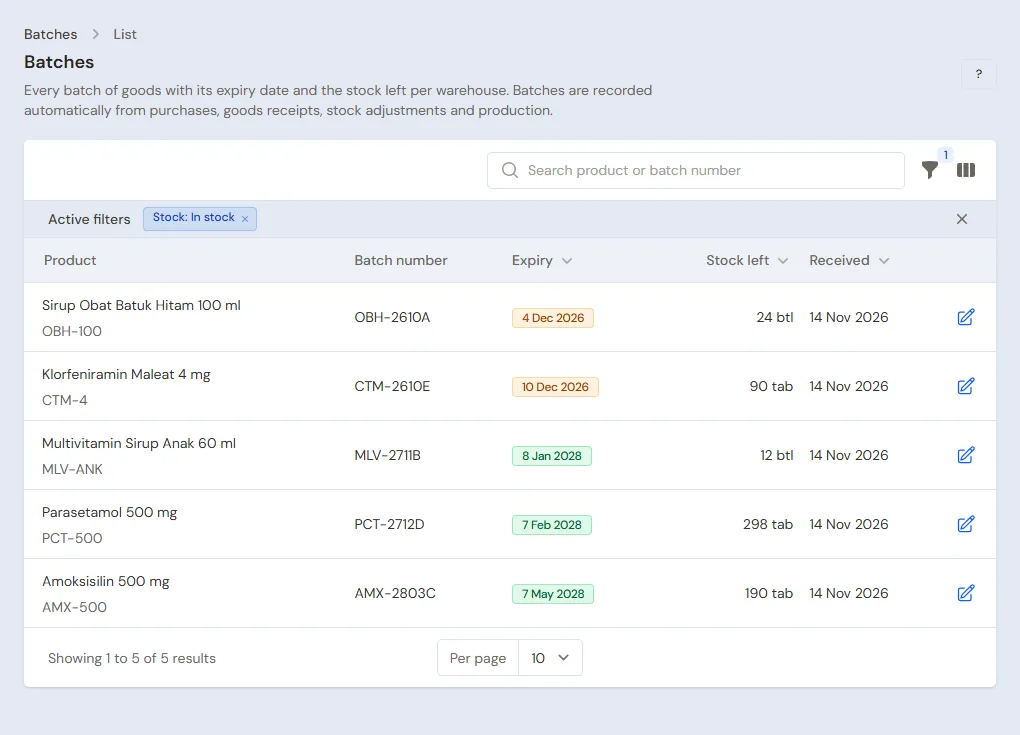
The bell writes "Stock expiring soon" for batches with 90 days left. Medicines past their date are taken out by the Store Head in Transactions → Stock Adjustments with Direction Out and Category Expired; their cost becomes Inventory Losses. Medicines the wholesaler takes back are recorded as a purchase return. See Stock adjustments and Returning purchases to the supplier.
Closing and banking the till cash
The Store Head (Fitri) counts the drawer: Rp 500.000 change money + Rp 21.000 + Rp 16.000 = Rp 537.000. The Rp 37.000 is moved to Owner Cash in Transactions → Finance → Cash Transfers. The drawer holds less or more than counted? The Store Head records the difference in Transactions → Finance → Cash Adjustments. See Moving money between cash accounts.
5. Receivables, payables and costs
- The Store Head records the payment of Klinik Pratama Harapan in Transaction Details → Sale Payments: Rp 50.000 into Bank BCA. See Recording payments of unpaid notes.
- The Store Head pays PBF Sehat Farma before the due date in Transaction Details → Purchase Payments: Rp 375.000. See Paying what you owe suppliers.
- The Store Head records rent, electricity and salaries in Transactions → Finance → Expenses. See Recording shop expenses.
6. Reports per job title
| Report | What it holds | Opened by | When |
|---|---|---|---|
| Reports → Prescription Medicine Sales | Every prescription note with its number, doctor and medicines, then a summary per medicine | Head Cashier | Every day |
| Master Data → Batches | Every batch, its expiry and what is left | Store Head | Every week |
| Reports → Stock | The stock of every medicine; switch on Break down by batch for what is left of every batch | Store Head | Every day |
| Reports → Cash Balance | The drawer, Owner Cash and the bank | Store Head | Every day |
| Reports → Receivables | What every clinic still owes | Store Head | Every week |
| Reports → Payables | What is owed to the wholesaler and when | Store Head | Every week |
| Reports → Profit & Loss | Medicine sales, compounding fee income, cost of medicines sold, expenses and Inventory Losses | Owner | Every month |
7. Checklists
- Every day: the Head Cashier makes sure every note with a prescription medicine has its prescription number and doctor. The Store Head counts the drawer and banks the money.
- Every week: the Store Head reads the expiry alerts, moves those batches to the front, collects from the clinic and orders medicines running low.
- Every month: the Store Head takes expired medicines out and counts the stock with a stocktake. The Owner reads Profit & Loss. See Counting stock with a stocktake.
A running business
This part is for the team moving a running pharmacy to Vende: medicines from several batches on the shelves, clinics that still owe money, and payables to the wholesaler. The order is always the same:
- Enter the master data.
- Practise transactions until every part is used to them.
- Empty the practice transactions.
- Enter the opening balances on the first day.
- Go live.
The opening balances come last on purpose, so the practice does not spoil their figures. The examples in this part use Apotek Sehat Sentosa from the new business part.
1. Master data
Work through the parts Who does what, 1. Shop details and users and 2. Master data above. Also list every medicine still in stock with its units and prescription mark, every compound made often, every customer who still owes money, and every wholesaler still owed. Many medicines are quicker to import from Excel. See Importing and exporting products with Excel. The master data is not deleted when the practice transactions are emptied.
2. Practice for the team
Work in a practice shop of the Pharmacy type with the four accounts. Every step names who does it and what must show.
Practice 1: master data
- Owner: the shop details, the three users, the receipt and the expiry alert.
- Store Head: the four medicines with their units, batches and prescription marks, the template Puyer Batuk Anak, the supplier and the clinic.
- Check: in Master Data → Compound Templates, Puyer Batuk Anak holds 2 ingredients with a compounding fee of Rp 5.000.
Practice 2: a day at the pharmacy
- Owner: capital of Rp 20.000.000 into Bank BCA.
- Store Head: the transfer of Rp 500.000 to Cashier Cash and the wholesaler's invoice as in part 3.
- Check: Master Data → Batches holds PCT2712, CTM2610, AMX2803 and OBH2610. Opened by the Store Head.
- Andi (Cashier): the over-the-counter sale of Rp 21.000.
- Head Cashier: the prescription note with the compound, Rp 16.000, then the clinic's order of Rp 50.000, unpaid.
- Check: try to save the Amoksisilin note without a prescription number: Vende refuses it and asks for the prescription number and the doctor.
- Store Head: the transfer of Rp 37.000 from Cashier Cash to Owner Cash.
After Practice 2 this must show:
| Report | What must show | Opened by |
|---|---|---|
| Reports → Cash Balance | Cashier Cash Rp 500.000; Owner Cash Rp 37.000; Bank BCA Rp 20.000.000 − Rp 500.000 = Rp 19.500.000 | Store Head |
| Reports → Receivables | Klinik Pratama Harapan Rp 50.000 | Store Head |
| Reports → Payables | PBF Sehat Farma Rp 375.000 | Store Head |
| Reports → Stock | Parasetamol 500 mg 500 − 10 − 10 − 200 = 280 tablets, Klorfeniramin Maleat 4 mg 190, Amoksisilin 500 mg 290, Sirup Obat Batuk Hitam 100 ml 11 | Store Head |
| Reports → Prescription Medicine Sales | 1 note RSP/1026/021, dr. Siti Rahmawati, Amoksisilin 500 mg 1 strip | Head Cashier |
| Reports → Profit & Loss | Net sales Rp 21.000 + Rp 16.000 + Rp 50.000 = Rp 87.000 (Rp 5.000 of it compounding fee income), cost of goods sold Rp 51.600 | Owner |
Cost of goods sold: Parasetamol 220 tablets × Rp 150 = Rp 33.000, Klorfeniramin Maleat 10 × Rp 60 = Rp 600, Amoksisilin 10 × Rp 400 = Rp 4.000, and the syrup Rp 14.000.
Practice 3: opening balances
Enter the opening balances with the example of part 4 below, check them as in part 5, then empty them again.
3. Emptying the practice transactions
Done by the Owner in Settings → Empty Transactions, button Empty All Transactions. Sale and prescription notes, purchases, batches, stock adjustments, payments, cash transfers, capital, expenses and opening balances are deleted. Medicines with their units and prescription marks, compound templates, customers, suppliers, cash accounts, users and settings stay. Vende makes a full backup first. See Emptying transactions or all data.
4. Opening balances
Done by the Owner in Settings → Opening Balances on the morning of the first day, with As of that day, before the pharmacy opens. See Entering opening cash, stock, receivables and payables.
- Opening Stock: one row for every batch, with the Batch number and Expiry from the packaging. For example Parasetamol 500 mg 3 Boxes batch PCT2703 expiring 03/2027 and 2 Boxes batch PCT2712 expiring 12/2027, both at Rp 15.000 per box. Opened strips are counted per tablet with Unit Tablet.
- Opening Receivables: Klinik Pratama Harapan Rp 300.000 with its due date.
- Opening Payables: PBF Sehat Farma Rp 1.500.000.
- Opening Cash: the money counted in every account, for example Cashier Cash Rp 500.000 and Bank BCA Rp 15.000.000.
Medicines already past their date are not entered as opening stock: take them off the shelf first. Old prescriptions need not be entered again; Reports → Prescription Medicine Sales starts on the first day.
5. Check before going live
| Report | What must show | Opened by |
|---|---|---|
| Reports → Cash Balance | The money counted in every account | Store Head |
| Master Data → Batches | PCT2703 300 tablets and PCT2712 200 tablets with their expiry dates | Store Head |
| Reports → Stock | Parasetamol 500 mg 500 tablets | Store Head |
| Reports → Receivables | Klinik Pratama Harapan Rp 300.000 | Store Head |
| Reports → Payables | PBF Sehat Farma Rp 1.500.000 | Store Head |
The figures differ? The Owner corrects the row in Settings → Opening Balances before any real transaction is recorded.
6. Going live
From that day every sale, prescription note, compound, purchase with its batches and payment is recorded in Vende as in the new business part, with the same checklist. In the first week the Store Head matches Master Data → Batches with the packaging on the shelves and reads the expiry alerts, and the Owner checks that Reports → Profit & Loss only holds sales and costs since the first day.