
Stationery and photocopying shop guide
A learning path for a stationery and photocopy shop, new or running: job titles, paper per ream and sheet, photocopying, school prices, opening balances.
On this page
- A new business
- Who does what
- 1. Shop details and users
- 2. Master data
- 3. Starting capital and purchases
- 4. A day of selling
- 5. Receivables and payables
- 6. Reports per job title
- 7. Checklists
- A running business
- 1. Master data
- 2. Practice for the team
- 3. Emptying the practice transactions
- 4. Opening balances
- 5. Check before going live
- 6. Going live
This guide is for the team setting up Vende at a stationery shop that also does photocopying and binding. It has two parts: A new business for a shop just opening, with no stock, receivables or payables from before, and A running business for one moving to Vende, with team practice and opening balances. The example is Toko ATK Pelita. The names of the shop, customers, suppliers and people and all the figures are made up.
What the business looks like:
- Stationery: pens and exercise books are bought from a wholesaler per dozen and per pack, sold per pcs, cheaper when buying many.
- Paper: bought per ream, sold per ream, and used by the photocopier per sheet.
- Services: photocopying per sheet and spiral binding. Every photocopied sheet lowers the paper stock.
- Customers: students pay cash; schools and offices get a discount and pay 30 days later.
Work through it from the top. Every step names its menu, who does it, what changes afterwards, and an example with figures.
The features in this guide come with the Stationery and photocopying business type package, except those marked extra. The shop's features show under Settings → Subscription, section This shop's features. If a menu is missing, contact the Vende team.
Tip: Lost on a page? Press the ? button at the top of that page. A short tour shows every field, on the service form too.
A new business
Who does what
This package holds three users, the owner included.
| Part of the shop | Job title in Vende | What they do and open |
|---|---|---|
| Owner | Owner | Every menu, also products and services, suppliers, purchase notes, labels, banking the till cash, payments, machine costs, opening balances, Reports → Stock, Reports → Cash Balance and Reports → Profit & Loss |
| Senior cashier | Head Cashier | Selling at the till, typing prices, the school group and Special Prices, customers, Transaction Details → Sale Lines |
| Cashier and photocopy operator | Cashier | Photocopying, binding and selling at the till, returns from the original note |
Every role is explained in Roles and permissions.
1. Shop details and users
Done by the Owner: fill in Settings → Shop (name, address, WhatsApp, logo), then make the accounts in Settings → Users with the Job title from the table above. See Adding and managing users.
The people at Toko ATK Pelita: Pak Joko (owner), Mbak Wulan (senior cashier, Head Cashier) and Eko (cashier and photocopy operator, Cashier).
2. Master data
A shop of this business type already has the product categories Writing Supplies, Paper, Office Supplies, School Supplies, and Photocopy and Printing Services, the units Ream, Sheet and Box besides Pcs, Dozen and Pack, and the expense categories Machine Maintenance and Internet and Phone Credit.
Paper per sheet and per ream
Owner: in Master Data → Products, make Kertas HVS A4 70 gsm, Category Paper, Base Unit Sheet, Cost Price Rp 90, Selling Price Rp 200.
- In the Other Units section, press Add Unit, choose Ream, fill in Contains (in base units) 500 and Selling Price Rp 55.000.
- Choose Main Unit Ream, so the stock shows like 13 Ream 450 Sheet.
- Press Create.
The base unit Sheet is chosen because photocopying uses paper per sheet. See Base unit, other units and main unit.
Stationery with quantity prices
Owner: make Pulpen Gel Hitam (Writing Supplies, Pcs, other unit Dozen containing 12, cost Rp 2.000, selling price Rp 3.500) and Buku Tulis 38 Lembar (School Supplies, Pcs, other unit Pack containing 10, cost Rp 3.000, selling price Rp 5.000). In the Quantity prices table of Pulpen Gel Hitam, fill in From quantity 12 with the price Rp 3.000. See Quantity prices.
A photocopy service that uses paper
Owner: in Master Data → Services, press New Service:
- Fill in Name Fotokopi A4, Price Rp 300, Category Photocopy and Printing Services.
- In the Materials used section, press Add material, choose Kertas HVS A4 70 gsm, fill in Quantity per service 1 Sheet.
- Press Create.
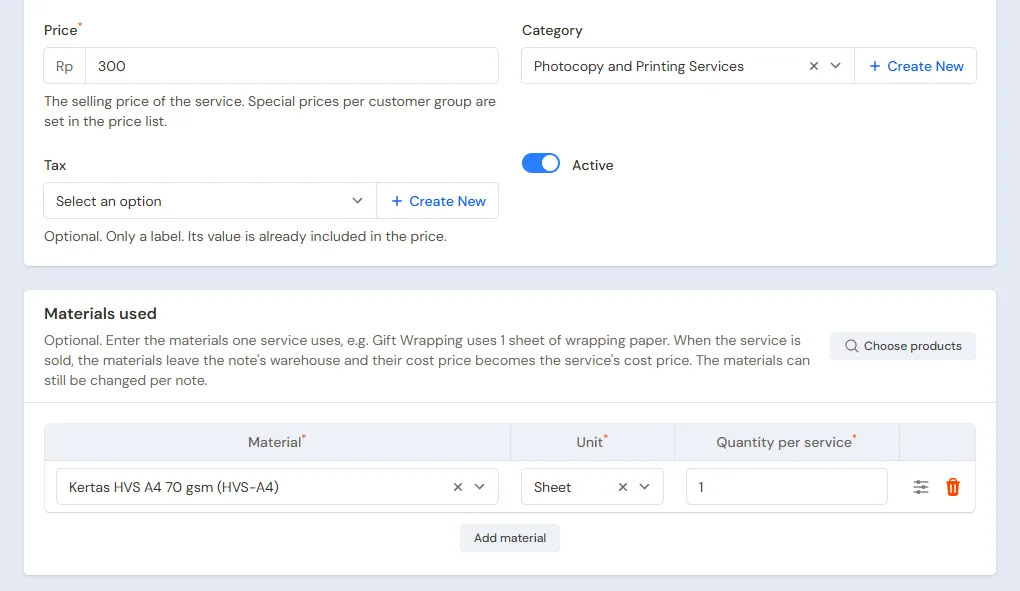
Make Jilid Spiral too, Rp 7.000, without materials. Every Fotokopi A4 sold takes 1 sheet of paper from stock, and the paper's cost, Rp 90, becomes the cost of that service. See Adding services.
Suppliers, customers and school prices
- Owner: in Master Data → Suppliers, list CV Sumber Kertas with Payment Terms (days) 30, and Grosir ATK Jaya.
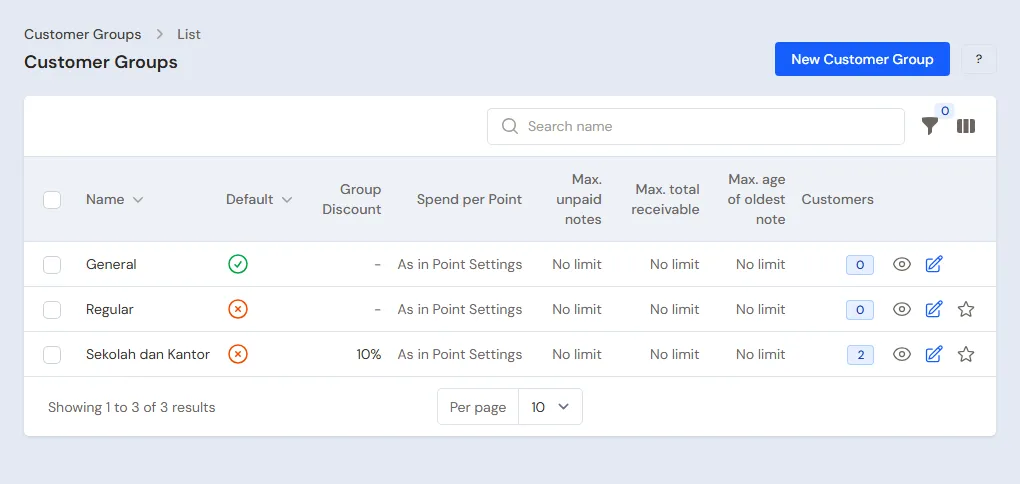
- Head Cashier: in Master Data → Customer Groups, make the group Sekolah dan Kantor with Group Discount 10%. The discount holds for goods and services. See Setting up customer groups.
- Head Cashier: in Master Data → Customers, list SD Harapan Bangsa with Group Sekolah dan Kantor and Payment Terms (days) 30.
3. Starting capital and purchases
- The Owner records capital of Rp 10.000.000 into Bank BCA in Transactions → Finance → Owner's Capital, then moves Rp 300.000 to Cashier Cash as change money in Transactions → Finance → Cash Transfers.
- The Owner records the note of CV Sumber Kertas in Transactions → Purchases, without a payment: 20 Reams of Kertas HVS A4 70 gsm × Rp 45.000 = Rp 900.000. The stock is 10.000 sheets, and the payable falls due in 30 days.
- The Owner records the note of Grosir ATK Jaya, paid in full from Bank BCA: 10 Dozen Pulpen Gel Hitam × Rp 24.000 = Rp 240.000 and 20 Packs of Buku Tulis 38 Lembar × Rp 30.000 = Rp 600.000, so Rp 840.000.
- The Owner prints shelf labels in Master Data → Print Labels with Number of labels One label per product. See Printing price labels and barcodes.
See Recording a purchase note.
4. A day of selling
| Time | Who | Work |
|---|---|---|
| 07.30 | Cashier | Opens the till |
| All day | Cashier | Photocopying, binding and stationery for students |
| Midday | Head Cashier | The school's order |
| Afternoon | Owner | The photocopier's service |
| Closing | Owner | Banks the till cash |
Open the till with New sale on the Dashboard. Services are in the item list like any item, marked Service.
- Cashier (Eko): a student photocopies 50 sheets and has them bound. Add Fotokopi A4 with quantity 50 (Rp 15.000) and Jilid Spiral (Rp 7.000). Take Rp 22.000 in cash. The paper stock goes down by 50 sheets.
- Cashier: a walk-in buyer buys 12 Pulpen Gel Hitam and 3 Buku Tulis 38 Lembar. The quantity price applies right away: 12 × Rp 3.000 = Rp 36.000, plus 3 × Rp 5.000 = Rp 15.000. They pay Rp 51.000 by QRIS into Bank BCA.
- Head Cashier (Mbak Wulan): SD Harapan Bangsa orders 500 photocopies and 5 Reams of Kertas HVS A4 70 gsm. Choose SD Harapan Bangsa: every line gets Group discount 10% right away. The photocopies 500 × Rp 300 = Rp 150.000 become Rp 135.000, the paper 5 × Rp 55.000 = Rp 275.000 becomes Rp 247.500, so Rp 382.500. Press Pay, Unpaid, then Save transaction.
Failed or blurred copies are not sold, but their paper is used up all the same. Record that paper once a month in Transactions → Stock Adjustments with Category Used in the shop, done by the Owner. See Recording sales on the till and Stock adjustments.
The machine's service and closing
- The Owner records the photocopier's service, Rp 250.000 from Bank BCA, in Transactions → Finance → Expenses with the category Machine Maintenance. See Recording shop expenses.
- The Owner (Pak Joko) counts the drawer: Rp 300.000 change money + Rp 22.000 = Rp 322.000. The Rp 22.000 is moved to Owner Cash in Transactions → Finance → Cash Transfers. A drawer difference is recorded in Transactions → Finance → Cash Adjustments. See Moving money between cash accounts.
5. Receivables and payables
- The Owner records the payment of SD Harapan Bangsa in Transaction Details → Sale Payments: Rp 382.500 into Bank BCA. See Recording payments of unpaid notes.
- The Owner pays CV Sumber Kertas before the due date in Transaction Details → Purchase Payments: Rp 900.000. See Paying what you owe suppliers.
6. Reports per job title
| Report | What it holds | Opened by | When |
|---|---|---|---|
| Transaction Details → Sale Lines | The goods and services sold, the number of photocopied sheets too | Head Cashier | Every day |
| Reports → Stock | Paper in reams and sheets, stationery per pcs | Owner | Every week |
| Reports → Cash Balance | The drawer, Owner Cash and the bank | Owner | Every day |
| Reports → Receivables | What every school and office still owes | Owner | Every week |
| Reports → Profit & Loss | Goods sales, service income, the cost of goods and paper, machine costs | Owner | Every month |
7. Checklists
- Every day: the Cashier types the number of photocopied sheets as the machine counts them. The Owner counts the drawer and banks the money.
- Every week: the Owner collects from schools and offices whose notes are due and orders paper before it runs out.
- Every month: the Owner records spoiled paper or paper used in the shop, counts the stock with a stocktake, and reads Profit & Loss. See Counting stock with a stocktake.
A running business
This part is for the team moving a running stationery and photocopy shop to Vende: paper and stationery on the shelves, schools and offices that still owe money, and payables to the paper supplier. The order is always the same:
- Enter the master data.
- Practise transactions until every part is used to them.
- Empty the practice transactions.
- Enter the opening balances on the first day.
- Go live.
The opening balances come last on purpose, so the practice does not spoil their figures. The examples in this part use Toko ATK Pelita from the new business part.
1. Master data
Work through the parts Who does what, 1. Shop details and users and 2. Master data above. Also list every item still in stock, every service with its materials, every school and office that still owes money, and every supplier still owed. The master data is not deleted when the practice transactions are emptied.
2. Practice for the team
Work in a practice shop of the Stationery and photocopying type with the three accounts. Every step names who does it and what must show.
Practice 1: master data
- Owner: the shop details, the two users, the paper, the stationery, both services and both suppliers.
- Check: in Master Data → Services, Fotokopi A4 uses 1 Sheet of Kertas HVS A4 70 gsm.
- Head Cashier: the group Sekolah dan Kantor and SD Harapan Bangsa.
Practice 2: a day of selling
- Owner: capital of Rp 10.000.000, the transfer of Rp 300.000 to Cashier Cash, and both purchase notes as in part 3.
- Eko (Cashier): photocopying and binding for Rp 22.000, then stationery for Rp 51.000.
- Head Cashier: the order of SD Harapan Bangsa, Rp 382.500, unpaid.
- Owner: the machine's service of Rp 250.000 and the transfer of Rp 22.000 from Cashier Cash to Owner Cash.
After Practice 2 this must show:
| Report | What must show | Opened by |
|---|---|---|
| Reports → Cash Balance | Cashier Cash Rp 300.000; Owner Cash Rp 22.000; Bank BCA Rp 10.000.000 − Rp 300.000 − Rp 840.000 + Rp 51.000 − Rp 250.000 = Rp 8.661.000 | Owner |
| Reports → Receivables | SD Harapan Bangsa Rp 382.500 | Owner |
| Reports → Payables | CV Sumber Kertas Rp 900.000 | Owner |
| Reports → Stock | Kertas HVS A4 70 gsm 10.000 − 50 − 500 − 2.500 = 6.950 sheets (13 Ream 450 Sheet), Pulpen Gel Hitam 108, Buku Tulis 38 Lembar 197 | Owner |
| Reports → Profit & Loss | Net sales Rp 22.000 + Rp 51.000 + Rp 382.500 = Rp 455.500, cost of goods sold Rp 307.500, Machine Maintenance Rp 250.000 | Owner |
Cost of goods sold: photocopy paper 550 sheets × Rp 90 = Rp 49.500, paper sold 2.500 sheets × Rp 90 = Rp 225.000, pens Rp 24.000 and books Rp 9.000.
Practice 3: opening balances
Enter the opening balances with the example of part 4 below, check them as in part 5, then empty them again.
3. Emptying the practice transactions
Done by the Owner in Settings → Empty Transactions, button Empty All Transactions. Sale notes, purchases, stock adjustments, payments, cash transfers, capital, expenses and opening balances are deleted. Products and services with their materials, quantity prices, customer groups, customers, suppliers, cash accounts, users and settings stay. Vende makes a full backup first. See Emptying transactions or all data.
4. Opening balances
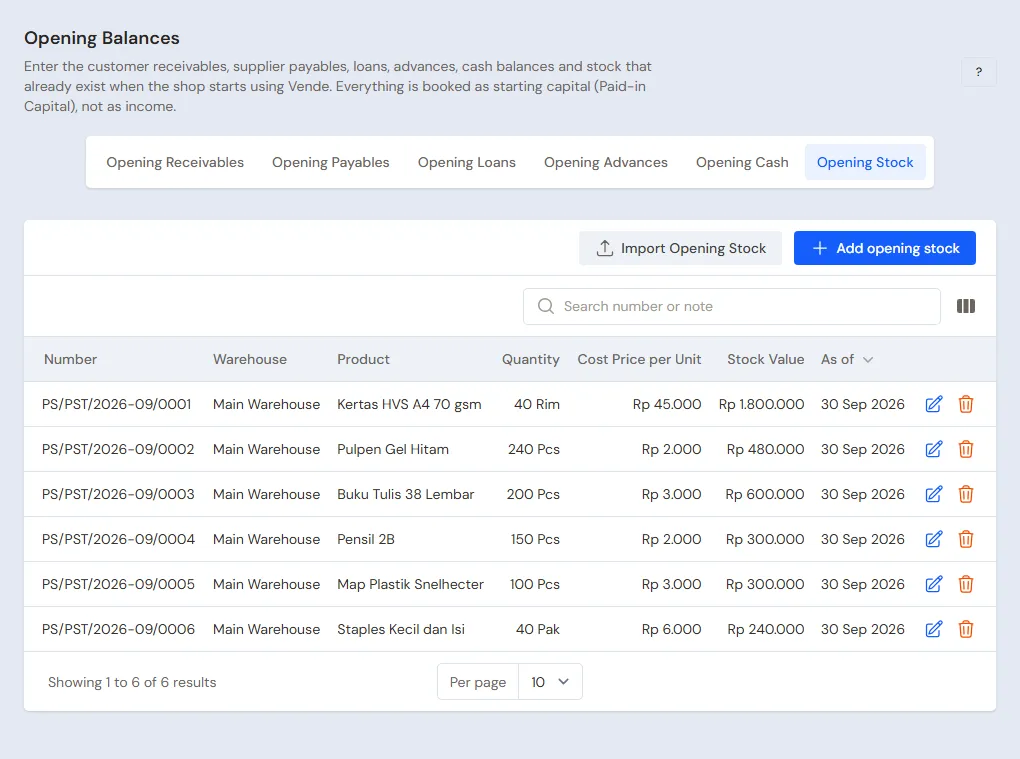
Done by the Owner in Settings → Opening Balances on the morning of the first day, with As of that day, before the shop opens. See Entering opening cash, stock, receivables and payables.
- Opening Stock: whole reams and the sheets of an opened ream go on two rows, for example Kertas HVS A4 70 gsm 12 Reams at Rp 45.000 and 300 Sheets at Rp 90. Stationery per pcs, for example Pulpen Gel Hitam 60 Pcs at Rp 2.000. Services have no stock.
- Opening Receivables: SD Harapan Bangsa Rp 500.000 with its due date.
- Opening Payables: CV Sumber Kertas Rp 450.000.
- Opening Cash: the money counted in every account, for example Cashier Cash Rp 300.000 and Bank BCA Rp 5.000.000.
A photocopier the shop already owns is recorded with the extra feature Fixed Assets, not in Opening Balances. See Machines and vehicles.
5. Check before going live
| Report | What must show | Opened by |
|---|---|---|
| Reports → Cash Balance | The money counted in every account | Owner |
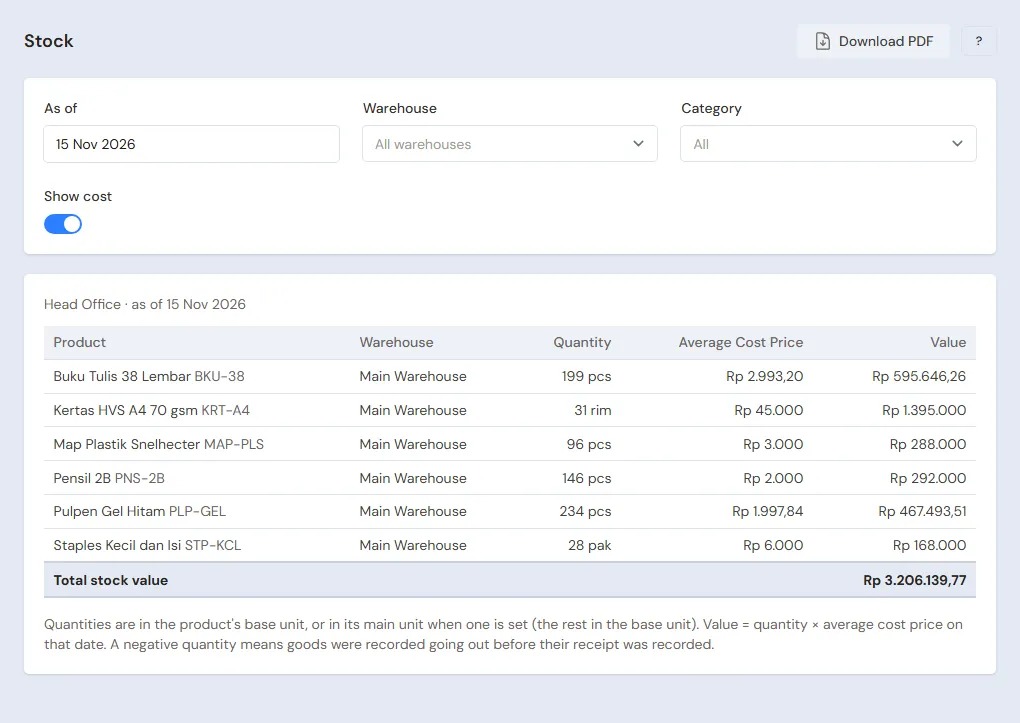
| Reports → Stock | Kertas HVS A4 70 gsm 12 Ream 300 Sheet, Pulpen Gel Hitam 60 | Owner |
| Reports → Receivables | SD Harapan Bangsa Rp 500.000 | Owner |
| Reports → Payables | CV Sumber Kertas Rp 450.000 | Owner |
The figures differ? The Owner corrects the row in Settings → Opening Balances before any real transaction is recorded.
6. Going live
From that day every photocopy, binding, sale, purchase and payment is recorded in Vende as in the new business part, with the same checklist. In the first week the Owner matches the paper left in Reports → Stock with the reams on the shelf and the machine's count, then checks that Reports → Profit & Loss only holds sales and costs since the first day.