
Fishing tackle shop guide
A learning path for a fishing tackle shop, new or running: job titles, line per metre, bait with batches, reel servicing, pond prices, points, opening balances.
On this page
- A new business
- Who does what
- 1. Shop details and users
- 2. Master data
- 3. Starting capital, purchases and receiving goods
- 4. A day of selling
- 5. Receivables, payables, expenses and expiry
- 6. Reports per job title
- 7. Checklists
- A running business
- 1. Master data
- 2. Practice for the team
- 3. Emptying the practice transactions
- 4. Opening balances
- 5. Check before going live
- 6. Going live
This guide is for the team setting up Vende at a fishing tackle shop that sells rods, reels, line per metre, hooks and bait, and services reels. It has two parts: A new business for a shop just opening, with no stock, receivables or payables from before, and A running business for one moving to Vende, with team practice and opening balances. The example is Toko Pancing Bahari. The names of the shop, customers, suppliers and people and all the figures are made up.
What the business looks like:
- Rods, reels and bait: bought from a distributor on 30 days' credit. Bait has a batch number and an expiry date.
- Line and hooks: line bought per spool of 100 metres and sold per metre, hooks bought per pack and sold per pcs or per pack.
- Services: spooling line onto a reel and servicing anglers' own reels.
- Customers: members collect points; fishing ponds buy bait at a discount and pay later.
Work through it from the top. Every step names its menu, who does it, what changes afterwards, and an example with figures.
The features in this guide come with the Fishing tackle shop business type package, except those marked extra. The shop's features show under Settings → Subscription, section This shop's features. If a menu is missing, contact the Vende team.
Tip: Lost on a page? Press the ? button at the top of that page. A short tour shows every field, in the Other Units section of the product form too.
A new business
Who does what
This package holds three users, the owner included.
| Part of the shop | Job title in Vende | What they do and open |
|---|---|---|
| Owner | Owner | Every menu, also suppliers, purchase notes, the fishing pond group, points, banking the till cash, payments, opening balances, Reports → Cash Balance and Reports → Profit & Loss |
| Store room and shelves | Warehouse Admin | Products and services, receiving goods with their batches, barcode labels, expired bait, stocktakes, Master Data → Batches and Reports → Stock |
| Cashier and servicing | Cashier | Selling at the till, spooling line, reel servicing, members, Transaction Details → Sale Lines |
Every role is explained in Roles and permissions.
1. Shop details and users
Done by the Owner: fill in Settings → Shop (name, address, WhatsApp, logo), then make the accounts in Settings → Users with the Job title from the table above. See Adding and managing users.
The people at Toko Pancing Bahari: Pak Rahmat (owner), Mas Tono (store room and shelves, Warehouse Admin) and Yudi (cashier and servicing, Cashier).
2. Master data
A shop of this business type already has the product categories Fishing Rods, Reels, Fishing Lines, Hooks, Baits, Accessories and Repair Services, the units Metre (with two decimals), Spool and Set besides Pcs and Pack, and the expense categories Shopping Bags and Equipment Maintenance.
Products
Warehouse Admin: in Master Data → Products, make every product:
| Product | Category | Base Unit | Selling Price | Tracking |
|---|---|---|---|---|
| Joran Carbon 210 cm | Fishing Rods | Pcs | Rp 250.000 | None |
| Reel Spinning 3000 | Reels | Pcs | Rp 300.000 | None |
| Senar Nilon 0,30 mm | Fishing Lines | Metre | Rp 1.000 | None |
| Kail Nomor 8 | Hooks | Pcs | Rp 1.500 | None |
| Umpan Pelet Ikan Mas 500 g | Baits | Pcs | Rp 25.000 | Track batches & expiry |
The Warehouse Admin does not see Cost Price, because the cost of goods shows only to the Owner and holders of Sensitive Reports. Leave it: the Owner's purchase notes in part 3 fill in their cost, for example Rp 500 per metre of line. See Cost price of goods.
Line per metre and per spool
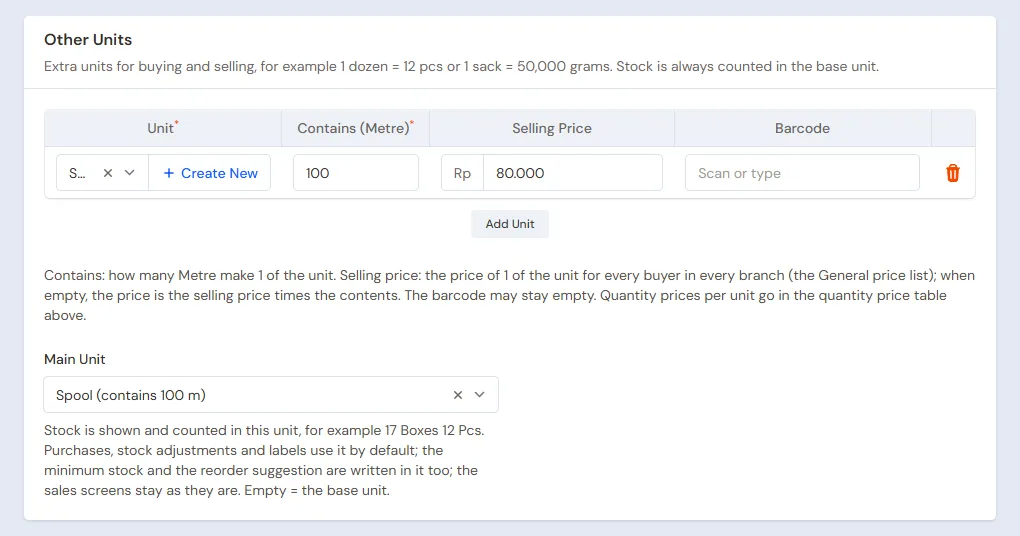
Senar Nilon 0,30 mm uses the Base Unit Metre, because the line is sold per metre:
- In the Other Units section, press Add Unit, choose Spool, fill in Contains (Metre) 100 and Selling Price Rp 80.000.
- Choose Main Unit Spool, so the stock shows like 9 Spool 50 Metre.
- Press Create.
Kail Nomor 8 gets the other unit Pack containing 10 with Selling Price Rp 12.000. See Base unit, other units and main unit.
Services
Warehouse Admin: in Master Data → Services, make Isi Senar ke Reel (Price Rp 10.000, Category Repair Services) and Servis Reel (Price Rp 50.000, Category Repair Services), both without materials. The line spooled is sold on its own per metre. See Adding services.
Suppliers, fishing ponds, members and points
- Owner: in Master Data → Suppliers, list CV Mancing Jaya with Payment Terms (days) 30, and Grosir Senar Nusantara.
- Owner: in Master Data → Customer Groups, make the group Kolam Pemancingan with Group Discount 10% and Spend per Point 0, so ponds get the discount but no points. See Setting up customer groups.
- Cashier: in Master Data → Customers, list Kolam Pancing Telaga Biru with Group Kolam Pemancingan and Payment Terms (days) 14, and the first member, Pak Joni, with his WhatsApp number.
- Owner: in Settings → Points, switch on Enable customer points, fill in Spending per point 10.000 and Value of 1 point 100. See Giving and redeeming customer points.
- Owner: in Settings → Alerts, fill in About to Expire 30.
3. Starting capital, purchases and receiving goods
- The Owner records capital of Rp 10.000.000 into Bank BCA in Transactions → Finance → Owner's Capital, then moves Rp 300.000 to Cashier Cash as change money in Transactions → Finance → Cash Transfers.
- The Owner records the invoice of CV Mancing Jaya in Transactions → Purchases, without a payment: 5 Joran Carbon 210 cm × Rp 150.000 = Rp 750.000, 5 Reel Spinning 3000 × Rp 180.000 = Rp 900.000 and 40 Umpan Pelet Ikan Mas 500 g × Rp 15.000 = Rp 600.000, so Rp 2.250.000. Switch off All goods have been received, because the goods are received in the store room.
- The Warehouse Admin (Mas Tono) opens Transactions → Receive Goods, presses Receive on that invoice, and fills in the quantities that came and the bait's batch: PLT2610 expiring 04/2027. Press Save Receipt. This screen shows no purchase prices.
- The Owner records the note of Grosir Senar Nusantara, paid in full from Bank BCA: 10 Spools of Senar Nilon 0,30 mm × Rp 50.000 = Rp 500.000 (1.000 metres) and 20 Packs of Kail Nomor 8 × Rp 8.000 = Rp 160.000, so Rp 660.000.
- The Warehouse Admin prints labels in Master Data → Print Labels: Source Purchase note, choose the CV Mancing Jaya invoice under Document, press Take Goods, and choose Number of labels By quantity (unit on the document). 50 labels come out. Line and hooks get shelf labels with Number of labels One label per product. See Printing price labels and barcodes.
See Recording a purchase note and Receiving goods that arrive in parts.
4. A day of selling
| Time | Who | Work |
|---|---|---|
| 06.00 | Cashier | Opens the till |
| Morning | Cashier | Anglers buy gear and bait |
| Midday | Cashier | Bait for a fishing pond, a reel service |
| Closing | Owner | Banks the till cash |
Selling at the till
Open the till with New sale on the Dashboard, then scan the barcode label. Services are in the item list like any item, marked Service.
- Cashier (Yudi): Pak Joni buys Joran Carbon 210 cm (Rp 250.000), Reel Spinning 3000 (Rp 300.000), 50 metres of Senar Nilon 0,30 mm (Rp 50.000) and Isi Senar ke Reel (Rp 10.000). Choose Pak Joni under Customer. He pays Rp 610.000 with QRIS into Bank BCA and earns 61 points.
- Cashier: a walk-in buyer buys 2 Packs of Kail Nomor 8 (Rp 24.000) and 1 Umpan Pelet Ikan Mas 500 g (Rp 25.000), so Rp 49.000 in cash. The bait comes from the batch closest to expiry first.
- Cashier: Kolam Pancing Telaga Biru takes 20 Umpan Pelet Ikan Mas 500 g. Choose Kolam Pancing Telaga Biru: every line gets the Group discount 10% at once, so 20 × Rp 25.000 − 10% = Rp 450.000. Press Pay, Unpaid, then Save transaction. The receivable falls due in 14 days.
- Cashier: an angler brings his own reel to be serviced. Add Servis Reel, Rp 50.000 in cash.
See Recording sales on the till.
Closing and banking the till cash
The Owner (Pak Rahmat) counts the drawer: Rp 300.000 change money + Rp 49.000 + Rp 50.000 = Rp 399.000. The Rp 99.000 is moved to Owner Cash in Transactions → Finance → Cash Transfers. A drawer holding less or more than counted is recorded in Transactions → Finance → Cash Adjustments. See Moving money between cash accounts.
5. Receivables, payables, expenses and expiry
- The Owner records the payment of Kolam Pancing Telaga Biru in Transaction Details → Sale Payments: Rp 450.000 into Bank BCA. See Recording payments of unpaid notes.
- The Owner pays CV Mancing Jaya before the due date in Transaction Details → Purchase Payments: Rp 2.250.000. See Paying what you owe suppliers.
- The Owner records rent, electricity, salaries, shopping bags and servicing tools in Transactions → Finance → Expenses. See Recording shop expenses.
- The Warehouse Admin takes bait past its date out in Transactions → Stock Adjustments with Direction Out and Category Expired. See Stock adjustments.
Pak Joni's points are recorded when the note is saved: 61 points × Rp 100 = Rp 6.100 as Points Expense, and the same Points Liability until the points are redeemed.
6. Reports per job title
| Report | What it holds | Opened by | When |
|---|---|---|---|
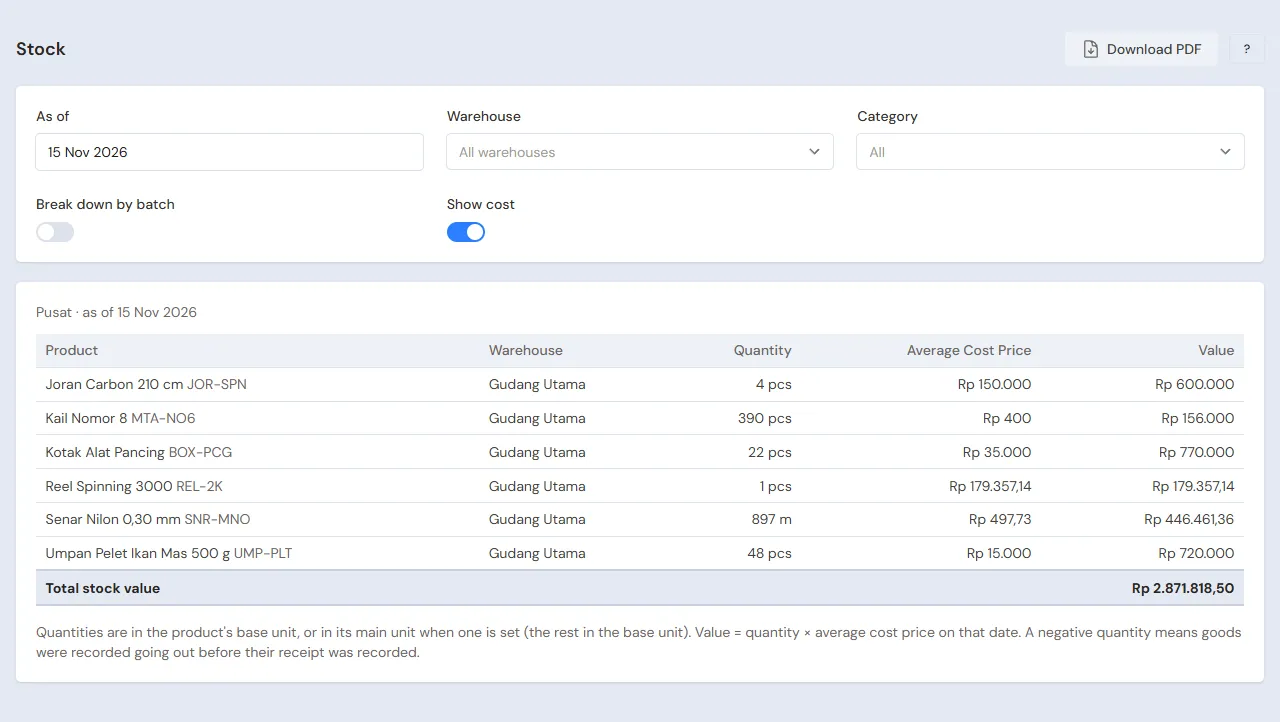
| Reports → Stock | The stock of every product, line in spools and metres; switch on Break down by batch for what is left of every bait batch | Warehouse Admin | Every week |
| Master Data → Batches | Every bait batch, its expiry and what is left | Warehouse Admin | Every week |
| Transaction Details → Sale Lines | The goods and services sold per note | Cashier | Every day |
| Reports → Cash Balance | The drawer, Owner Cash and the bank | Owner | Every day |
| Reports → Receivables | What every fishing pond still owes | Owner | Every week |
| Reports → Profit & Loss | Sales of goods and services, cost of goods sold, expenses and Points Expense | Owner | Every month |
7. Checklists
- Every day: the Cashier types the exact length of line cut. The Owner counts the drawer and banks the money.
- Every week: the Warehouse Admin reads the expiry alerts and moves those bait batches to the front of the shelf. The Owner collects from fishing ponds when due.
- Every month: the Warehouse Admin measures what is left on every opened spool and counts the stock with a stocktake. The Owner reads Profit & Loss. See Counting stock with a stocktake.
A running business
This part is for the team moving a running fishing tackle shop to Vende: rods and reels on the shelves, spools of line partly cut, bait from several batches, fishing ponds that still owe, payables to the distributor, and members who already have points. The order is always the same:
- Enter the master data.
- Practise transactions until every part is used to them.
- Empty the practice transactions.
- Enter the opening balances on the first day.
- Go live.
The opening balances come last on purpose, so the practice does not spoil their figures. The examples in this part use Toko Pancing Bahari from the new business part.
1. Master data
Work through the parts Who does what, 1. Shop details and users and 2. Master data above. Also list every product still in stock, every fishing pond that still owes, every distributor still owed, and every member with points. The master data is not deleted when the practice transactions are emptied.
2. Practice for the team
Work in a practice shop of the Fishing tackle shop type with the three accounts. Every step names who does it and what must show.
Practice 1: master data
- Owner: the shop details, the two users, both suppliers, the group Kolam Pemancingan, the points and the alert.
- Check: Yudi sees no purchase menus and no money reports.
- Warehouse Admin: the five products with their spool and pack units, and both services.
- Cashier: Kolam Pancing Telaga Biru and Pak Joni.
Practice 2: a day of selling
- Owner: capital of Rp 10.000.000, the transfer of Rp 300.000 to Cashier Cash, and both purchase notes as in part 3.
- Warehouse Admin: receive the goods of the CV Mancing Jaya invoice with the bait batch, then print the 50 labels.
- Check: in Master Data → Batches, PLT2610 holds 40 baits with its expiry. Opened by the Warehouse Admin.
- Yudi (Cashier): the four notes as in part 4.
- Check: Pak Joni earns 61 points.
- Owner: the transfer of Rp 99.000 from Cashier Cash to Owner Cash.
After Practice 2 this must show:
| Report | What must show | Opened by |
|---|---|---|
| Reports → Cash Balance | Cashier Cash Rp 300.000; Owner Cash Rp 99.000; Bank BCA Rp 10.000.000 − Rp 300.000 − Rp 660.000 + Rp 610.000 = Rp 9.650.000 | Owner |
| Reports → Receivables | Kolam Pancing Telaga Biru Rp 450.000 | Owner |
| Reports → Payables | CV Mancing Jaya Rp 2.250.000 | Owner |
| Reports → Stock | Joran Carbon 210 cm 4, Reel Spinning 3000 4, Senar Nilon 0,30 mm 9 Spool 50 Metre, Kail Nomor 8 180 pcs, Umpan Pelet Ikan Mas 500 g 19 | Warehouse Admin |
| Reports → Profit & Loss | Net sales Rp 610.000 + Rp 49.000 + Rp 450.000 + Rp 50.000 = Rp 1.159.000, cost of goods sold Rp 686.000, Points Expense Rp 6.100 | Owner |
Cost of goods sold: the rod Rp 150.000, the reel Rp 180.000, the line 50 × Rp 500 = Rp 25.000, the hooks 20 pcs × Rp 800 = Rp 16.000, and the bait 21 × Rp 15.000 = Rp 315.000. Services without materials have no cost.
Practice 3: opening balances
Enter the opening balances with the example of part 4 below, check them as in part 5, then empty them again.
3. Emptying the practice transactions
Done by the Owner in Settings → Empty Transactions, button Empty All Transactions. Sale notes, purchases and their goods receipts, batches, stock adjustments, the points history and point adjustments, payments, cash transfers, capital, expenses and opening balances are deleted. Products with their units, services, customer groups, customers, suppliers, point adjustment categories, cash accounts, users and settings stay. Vende makes a full backup first. See Emptying transactions or all data.
4. Opening balances
Done by the Owner in Settings → Opening Balances on the morning of the first day, with As of that day, before the shop opens. See Entering opening cash, stock, receivables and payables.
- Opening Stock: line is entered in metres, adding whole spools and what is left on the opened spool: 4 whole spools and one spool with 37,5 metres left make Senar Nilon 0,30 mm 437,5 Metres at Rp 500. Bait one row per batch with its Batch number and Expiry, for example Umpan Pelet Ikan Mas 500 g 12 Pcs batch PLT2608 expiring 02/2027 at Rp 15.000. Rods, reels and hooks one row per product.
- Opening Receivables: Kolam Pancing Telaga Biru Rp 225.000 with its due date.
- Opening Payables: CV Mancing Jaya Rp 1.000.000.
- Opening Cash: the money counted in every account, for example Cashier Cash Rp 300.000 and Bank BCA Rp 6.000.000.
Members' points from before
Opening Balances has no points tab. The Owner makes the category Poin awal in Master Data → Point Adjustment Categories, then records every member's points in Transactions → Point Adjustments: Pak Joni, Category Poin awal, Add, Points 150.
A point adjustment changes no cash, but like points earned on a purchase, its value is recorded as Points Expense and Points Liability: 150 × Rp 100 = Rp 15.000 in Profit & Loss of the first month.
5. Check before going live
| Report | What must show | Opened by |
|---|---|---|
| Reports → Cash Balance | The money counted in every account | Owner |
| Reports → Stock | Senar Nilon 0,30 mm 437,5 metres (4 Spool 37,5 Metre), and the count of every other product | Warehouse Admin |
| Master Data → Batches | PLT2608 12 baits with its expiry | Warehouse Admin |
| Reports → Receivables | Kolam Pancing Telaga Biru Rp 225.000 | Owner |
| Reports → Payables | CV Mancing Jaya Rp 1.000.000 | Owner |
| Master Data → Customers | The Points column: Pak Joni 150 | Cashier |
The figures differ? The Owner corrects the row in Settings → Opening Balances before any real transaction is recorded. Wrong points are corrected with a point adjustment Subtract or Add.
6. Going live
From that day every sale, line spooling, service, purchase, goods receipt and payment is recorded in Vende as in the new business part, with the same checklist. In the first week the Warehouse Admin labels goods without a label and matches Reports → Stock with the shelves, and the Owner checks that Reports → Profit & Loss only holds sales and costs since the first day.