
Local speciality and souvenir shop guide
A learning path for a local speciality shop, new or running: job titles, bakpia with batches, small makers' consigned goods, tour agency prices, opening stock.
On this page
- A new business
- Who does what
- 1. Shop details and users
- 2. Master data
- 3. Starting capital, purchases and consigned goods
- 4. A day of selling
- 5. Consignors, expiry, receivables and payables
- 6. Reports per job title
- 7. Checklists
- A running business
- 1. Master data
- 2. Practice for the team
- 3. Emptying the practice transactions
- 4. Opening balances
- 5. Check before going live
- 6. Going live
This guide is for the team setting up Vende at a local speciality and souvenir shop that sells regional food, handicrafts and goods left by small makers to tourists and tour groups. It has two parts: A new business for a shop just opening, with no stock, receivables or payables from before, and A running business for one moving to Vende, with team practice and opening balances. The example is Oleh-oleh Sari Rasa. The names of the shop, customers, suppliers, consignors and people and all the figures are made up.
What the business looks like:
- Regional food: bakpia and canned gudeg bought from the factory on 14 days' credit. Bakpia keeps only a few days, so every delivery is recorded with its batch and expiry date.
- Handicrafts and T-shirts: bought in full from craftsmen.
- Consigned goods: small makers leave yangko and crisps with the shop. The shop pays only for what is sold (consignment).
- Customers: tourists pay in cash or with QRIS; tour agencies order for their groups at a discount and pay later.
Work through it from the top. Every step names its menu, who does it, what changes afterwards, and an example with figures.
The features in this guide come with the Local speciality and souvenir shop business type package, except those marked extra. The shop's features show under Settings → Subscription, section This shop's features. If a menu is missing, contact the Vende team.
Tip: Lost on a page? Press the ? button at the top of that page. A short tour shows every field, on the Consignment Notes and Consignment Settlements too.
A new business
Who does what
This package holds four users, the owner included.
| Part of the shop | Job title in Vende | What they do and open |
|---|---|---|
| Owner | Owner | Every menu, also opening balances and Reports → Profit & Loss |
| Shop head | Store Head | Products, suppliers and consignors, purchase notes, Transactions → Consignment Notes, Transactions → Consignment Settlements, batches, labels, banking the till cash, payments, Reports → Consignment, Reports → Stock and Reports → Cash Balance |
| Senior cashier | Head Cashier | Selling at the till, typing prices, the tour agencies' Special Prices, customers, Transaction Details → Sale Lines |
| Cashier | Cashier | Selling at the till, returns from the original note |
Every role is explained in Roles and permissions.
1. Shop details and users
Done by the Owner: fill in Settings → Shop (name, address, WhatsApp, logo), then make the accounts in Settings → Users with the Job title from the table above. See Adding and managing users.
The people at Oleh-oleh Sari Rasa: Bu Sari (owner), Agus Prasetyo (shop head, Store Head), Tini Rahayu (senior cashier, Head Cashier) and Rudi (cashier, Cashier).
2. Master data
A shop of this business type already has the product categories Regional Specialities, Snacks, Beverages, Handicrafts, Souvenirs and Gift Packages, the units Box and Bottle besides Pcs and Pack, and the expense category Shopping Bags.
The shop's own products
Store Head: in Master Data → Products, make every product:
| Product | Category | Base Unit | Selling Price | Tracking |
|---|---|---|---|---|
| Bakpia Kacang Hijau isi 20 | Regional Specialities | Box | Rp 38.000 | Track batches & expiry |
| Gudeg Kaleng | Regional Specialities | Pcs | Rp 32.000 | Track batches & expiry |
| Kaos Malioboro | Souvenirs | Pcs | Rp 55.000 | None |
| Tas Anyaman Pandan | Handicrafts | Pcs | Rp 45.000 | None |
The Store Head does not see Cost Price, because the cost of goods shows only to the Owner and holders of Sensitive Reports. Leave it: the purchase notes in part 3 fill in their cost, for example Rp 28.000 for the bakpia. See Cost price of goods and Batches and expiry dates.
Consignors and consigned goods
- Store Head: in Master Data → Suppliers, list CV Bakpia Mutiara Rasa with Payment Terms (days) 14, Kerajinan Kasongan Abadi, and both consignors: Yangko Bu Pujo and UMKM Belut Pak Slamet. Consignors are listed as suppliers.
- Store Head: in Master Data → Products, make Yangko Kotagede (Regional Specialities, Box, Selling Price Rp 25.000). In the Consignment section, choose the Consignor Yangko Bu Pujo, Consignor Share Fixed consignment price, and fill in Consignment Price Rp 20.000.
- Store Head: make Keripik Belut Godean (Snacks, Pack, Selling Price Rp 30.000) with the Consignor UMKM Belut Pak Slamet, Consignor Share Shop commission (percent of the selling price), and Shop Commission 20. The consignor gets Rp 30.000 − 20% = Rp 24.000 for every pack sold.
Consigned goods have no cost price. They come in and go back only through a Consignment Note, never through a purchase or opening stock.
Tour agencies and alerts
- Head Cashier: in Master Data → Customer Groups, make the group Biro Wisata. See Setting up customer groups.
- Head Cashier: in Master Data → Special Prices, make a rule For the Customer Group Biro Wisata, Applies to the Category Regional Specialities, Rule Discount, Discount 10%. See Special Prices for customers and groups.
- Head Cashier: in Master Data → Customers, list Biro Wisata Jogja Ceria with Group Biro Wisata and Payment Terms (days) 14.
- Owner: in Settings → Alerts, fill in About to Expire 2, so bakpia with two days left shows in the alerts.
3. Starting capital, purchases and consigned goods
-
The Owner records capital of Rp 10.000.000 into Bank BCA in Transactions → Finance → Owner's Capital, then the Store Head moves Rp 300.000 to Cashier Cash as change money in Transactions → Finance → Cash Transfers.
-
The Store Head records the invoice of CV Bakpia Mutiara Rasa in Transactions → Purchases, without a payment:
- 40 Boxes of Bakpia Kacang Hijau isi 20 × Rp 28.000 = Rp 1.120.000, batch BKP2810, expiring in 5 days;
- 24 Pcs of Gudeg Kaleng × Rp 22.000 = Rp 528.000, batch GDG2610, expiring 10/2027.
The total is Rp 1.648.000 and the payable falls due in 14 days. The batch number and expiry are filled in the line details: tap the item's name.
-
The Store Head records the note of Kerajinan Kasongan Abadi, paid in full from Bank BCA: 10 Kaos Malioboro × Rp 35.000 = Rp 350.000 and 6 Tas Anyaman Pandan × Rp 25.000 = Rp 150.000, so Rp 500.000.
-
The Store Head records the consigned goods in Transactions → Consignment Notes: choose the Consignor Yangko Bu Pujo, add 30 Yangko Kotagede, then save. Make one more note for UMKM Belut Pak Slamet with 20 Keripik Belut Godean. Their stock goes up with no cost and no payable.
-
The Store Head prints labels in Master Data → Print Labels with Source Purchase note and Number of labels By quantity (unit on the document). See Printing price labels and barcodes.
See Recording a purchase note.
4. A day of selling
| Time | Who | Work |
|---|---|---|
| 08.00 | Cashier | Opens the till |
| All day | Cashier | Sells to tourists |
| Midday | Head Cashier | A tour agency's group order |
| Closing | Store Head | Counts the drawer and banks the money |
Selling at the till
Open the till with New sale on the Dashboard, then scan the barcode label. Bakpia always comes from the batch closest to expiry first, and consigned goods are sold like any other item.
- Cashier (Rudi): a tourist buys 2 Bakpia Kacang Hijau isi 20 (Rp 76.000), 1 Yangko Kotagede (Rp 25.000) and 1 Keripik Belut Godean (Rp 30.000), so Rp 131.000 in cash.
- Cashier: another tourist buys Kaos Malioboro (Rp 55.000) and Gudeg Kaleng (Rp 32.000), so Rp 87.000 with QRIS into Bank BCA.
- Head Cashier (Tini Rahayu): Biro Wisata Jogja Ceria takes 20 Bakpia Kacang Hijau isi 20 for a tour group. Choose Biro Wisata Jogja Ceria: every line shows the Special Price discount of 10%, so 20 × Rp 38.000 − 10% = Rp 684.000. Press Pay, Unpaid, then Save transaction. The receivable falls due in 14 days.
See Recording sales on the till.
Closing and banking the till cash
The Store Head (Agus Prasetyo) counts the drawer: Rp 300.000 change money + Rp 131.000 = Rp 431.000. The Rp 131.000 is moved to Owner Cash in Transactions → Finance → Cash Transfers. A drawer holding less or more than counted is recorded in Transactions → Finance → Cash Adjustments. See Moving money between cash accounts.
5. Consignors, expiry, receivables and payables
Paying the consignors
At the end of every week the Store Head pays the consignors for their goods sold in Transactions → Consignment Settlements:
- Press the new button, choose the Consignor Yangko Bu Pujo, and fill in Up To today.
- Goods Sold shows Yangko Kotagede: 1 box, Rp 20.000.
- Under Pay Now, choose Paid From Cash Account Owner Cash and fill in Amount Paid Rp 20.000, then save.
- Do the same for UMKM Belut Pak Slamet: 1 Keripik Belut Godean, Rp 24.000, paid from Owner Cash.
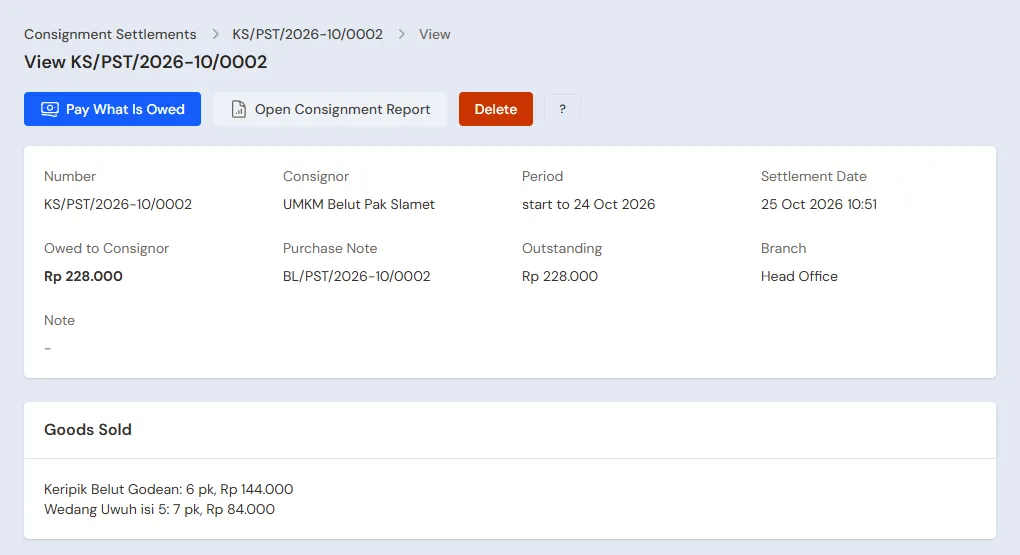
Every settlement makes one purchase note to the consignor. What is not paid now becomes a payable, paid later in Transaction Details → Purchase Payments. Consigned goods that do not sell go back with Return to Consignor in Transactions → Consignment Notes.
In Profit & Loss, the consigned goods sold still count as sales, Rp 25.000 and Rp 30.000, and the consignors' shares, Rp 20.000 and Rp 24.000, become cost of goods sold.
Expired bakpia
The Store Head reads About to Expire in the notification bell every morning and puts that batch at the front of the shelf. Bakpia past its date is taken out in Transactions → Stock Adjustments with Direction Out and Category Expired, for example 2 boxes × Rp 28.000 = Rp 56.000, which becomes an expense in Profit & Loss. See Stock adjustments.
Receivables, payables and expenses
- The Store Head records the payment of Biro Wisata Jogja Ceria in Transaction Details → Sale Payments: Rp 684.000 into Bank BCA. See Recording payments of unpaid notes.
- The Store Head pays CV Bakpia Mutiara Rasa before the due date in Transaction Details → Purchase Payments: Rp 1.648.000. See Paying what you owe suppliers.
- The Store Head records rent, electricity, salaries and shopping bags in Transactions → Finance → Expenses. See Recording shop expenses.
6. Reports per job title
| Report | What it holds | Opened by | When |
|---|---|---|---|
| Reports → Stock | The stock of every product; switch on Break down by batch for what is left of every bakpia batch | Store Head | Every day |
| Master Data → Batches | Every batch, its expiry and what is left | Store Head | Every day |
| Reports → Consignment | Per consignor and item: received, sold, returned, still in the shop, and the consignor's share not settled yet | Store Head | Every week |
| Transaction Details → Sale Lines | The goods sold per note | Head Cashier | Every day |
| Reports → Cash Balance | The drawer, Owner Cash and the bank | Store Head | Every day |
| Reports → Receivables | What every tour agency still owes | Store Head | Every week |
| Reports → Profit & Loss | Sales, cost of goods sold with the consignors' shares, expired goods and expenses | Owner | Every month |
7. Checklists
- Every day: the Store Head checks the bakpia about to expire, counts the drawer and banks the money.
- Every week: the Store Head makes a Consignment Settlement for every consignor, hands over their Consignment report, collects from tour agencies when due and pays the bakpia factory.
- Every month: the Store Head counts the stock with a stocktake and returns consigned goods that have not sold for long. The Owner reads Profit & Loss. See Counting stock with a stocktake.
A running business
This part is for the team moving a running shop to Vende: bakpia from several batches, handicrafts on the shelves, consigned goods partly sold but not yet paid to their consignors, tour agencies that still owe, and payables to the factory. The order is always the same:
- Enter the master data.
- Practise transactions until every part is used to them.
- Empty the practice transactions.
- Enter the opening balances on the first day.
- Go live.
The opening balances come last on purpose, so the practice does not spoil their figures. The examples in this part use Oleh-oleh Sari Rasa from the new business part.
1. Master data
Work through the parts Who does what, 1. Shop details and users and 2. Master data above. Also list every product still in stock, every consigned item with its consignor and share, every tour agency that still owes, and every factory still owed. The master data is not deleted when the practice transactions are emptied.
2. Practice for the team
Work in a practice shop of the Local speciality and souvenir shop type with the four accounts. Every step names who does it and what must show.
Practice 1: master data
- Owner: the shop details, the three users and the alert.
- Check: Rudi sees no purchase menus and no money reports.
- Store Head: the four suppliers and consignors, the four products with their batches, and both consigned items.
- Head Cashier: the group Biro Wisata with its Special Price, and Biro Wisata Jogja Ceria.
Practice 2: a day of selling
- Owner: capital of Rp 10.000.000.
- Store Head: the transfer of Rp 300.000 to Cashier Cash, both purchase notes and both consignment notes as in part 3.
- Check: in Master Data → Batches, BKP2810 holds 40 boxes with its expiry. Opened by the Store Head.
- Rudi (Cashier): both tourists' notes as in part 4.
- Head Cashier: the note of Biro Wisata Jogja Ceria, Rp 684.000, unpaid.
- Store Head: the transfer of Rp 131.000 from Cashier Cash to Owner Cash, then both consignment settlements, paid from Owner Cash.
After Practice 2 this must show:
| Report | What must show | Opened by |
|---|---|---|
| Reports → Cash Balance | Cashier Cash Rp 300.000; Owner Cash Rp 131.000 − Rp 20.000 − Rp 24.000 = Rp 87.000; Bank BCA Rp 10.000.000 − Rp 300.000 − Rp 500.000 + Rp 87.000 = Rp 9.287.000 | Store Head |
| Reports → Receivables | Biro Wisata Jogja Ceria Rp 684.000 | Store Head |
| Reports → Payables | CV Bakpia Mutiara Rasa Rp 1.648.000 | Store Head |
| Reports → Consignment | Yangko Kotagede received 30, sold 1, still in the shop 29; Keripik Belut Godean received 20, sold 1, still in the shop 19; not settled Rp 0 | Store Head |
| Reports → Stock | Bakpia Kacang Hijau isi 20 18 boxes, Gudeg Kaleng 23, Kaos Malioboro 9, Tas Anyaman Pandan 6 | Store Head |
| Reports → Profit & Loss | Net sales Rp 131.000 + Rp 87.000 + Rp 684.000 = Rp 902.000, cost of goods sold Rp 717.000 | Owner |
Cost of goods sold: the bakpia 22 × Rp 28.000 = Rp 616.000, the T-shirt Rp 35.000, the gudeg Rp 22.000, and the consignors' shares Rp 20.000 + Rp 24.000.
Practice 3: opening balances
Enter the opening balances with the example of part 4 below, check them as in part 5, then empty them again.
3. Emptying the practice transactions
Done by the Owner in Settings → Empty Transactions, button Empty All Transactions. Sale notes, purchases, batches, consignment notes, consignment settlements, stock adjustments, payments, cash transfers, capital, expenses and opening balances are deleted. Products with their consignors and shares, Special Prices, customer groups, customers, suppliers, cash accounts, users and settings stay. Vende makes a full backup first. See Emptying transactions or all data.
4. Opening balances
Done by the Owner in Settings → Opening Balances on the morning of the first day, with As of that day, before the shop opens. See Entering opening cash, stock, receivables and payables.
- Opening Stock: bakpia and gudeg one row per batch with its Batch number and Expiry, for example Bakpia Kacang Hijau isi 20 12 Boxes batch BKP2710 expiring in 2 days at Rp 28.000. T-shirts and bags one row per product. The Store Head's count gives the quantities.
- Opening Receivables: Biro Wisata Jogja Ceria Rp 342.000 with its due date.
- Opening Payables: CV Bakpia Mutiara Rasa Rp 840.000.
- Opening Cash: the money counted in every account, for example Cashier Cash Rp 300.000 and Bank BCA Rp 7.000.000.
Consigned goods already in the shop
Consigned goods cannot go into Opening Stock: Vende refuses them, because they belong to the consignor. Record them in these two ways on the first day:
- Goods still on the shelf: the Store Head records them in Transactions → Consignment Notes as in part 3, for example 15 Yangko Kotagede from Yangko Bu Pujo. Their stock goes up with no cost and no payable.
- Goods already sold but not yet paid to the consignor: the Owner writes the consignor's share as that consignor's Opening Payables, for example 6 boxes × Rp 20.000 = Rp 120.000 for Yangko Bu Pujo.
The first Consignment Settlement counts only the goods sold since the first day. The opening payable of Rp 120.000 is paid on its own in Transaction Details → Purchase Payments, so nothing is counted twice.
5. Check before going live
| Report | What must show | Opened by |
|---|---|---|
| Reports → Cash Balance | The money counted in every account | Store Head |
| Master Data → Batches | BKP2710 12 boxes with its expiry | Store Head |
| Reports → Consignment | Yangko Kotagede received 15, still in the shop 15, not settled Rp 0 | Store Head |
| Reports → Receivables | Biro Wisata Jogja Ceria Rp 342.000 | Store Head |
| Reports → Payables | CV Bakpia Mutiara Rasa Rp 840.000; Yangko Bu Pujo Rp 120.000 | Store Head |
The figures differ? The Owner corrects the row in Settings → Opening Balances before any real transaction is recorded. A wrong consignment note is changed from its own page.
6. Going live
From that day every sale, purchase, consigned item, settlement and payment is recorded in Vende as in the new business part, with the same checklist. In the first week the Store Head matches Reports → Stock and Reports → Consignment with the shelves, and the Owner checks that Reports → Profit & Loss only holds sales and costs since the first day.