
Spare parts shop guide
A learning path for a spare parts shop, new or running: job titles, back warehouse and racks, prices for regular workshops, labels, opening balances.
On this page
- A new business
- Who does what
- 1. Shop details and users
- 2. Master data
- 3. First capital, buying and the shop racks
- 4. One day at the till
- 5. Receivables, payables and expenses
- 6. Reports per job title
- 7. Checklists
- A running business
- 1. Master data
- 2. Team practice
- 3. Empty the practice transactions
- 4. Opening balances
- 5. Check before going live
- 6. Going live
This guide is for the team setting up Vende at a motorcycle and car parts shop that sells over the counter and supplies regular workshops at their own prices and on credit. It has two parts: A new business for a shop just opening, with no stock, receivables or payables from before, and A running business for a shop moving to Vende, with team practice and opening balances. The example is Toko Sparepart Roda Jaya. The names of the shop, customers, suppliers and people and all the figures are made up.
What the business looks like:
- Goods: oil, brake pads, tyres and batteries, with barcode labels on the racks so the cashier only scans.
- Places: the shop racks for selling, the back warehouse for the spare stock.
- Buyers: riders who pay cash and often want the part fitted, and regular workshops that get workshop prices and pay on credit.
Work through it from the top. Every step names its menu, who does it, what changes afterwards, and an example with figures.
The features in this guide come with the Motorcycle and car parts shop business type package, except those marked extra. The shop's features show under Settings → Subscription, section This shop's features. If a menu is missing, contact the Vende team.
Tip: Lost on a page? Press the ? button at the top of that page. A short tour shows every field.
A new business
Who does what
This package holds four users, the owner included.
| Part of the shop | Job title in Vende | What they do and open |
|---|---|---|
| Owner | Owner | Every menu, also suppliers and purchase notes, workshop and supplier payments, expenses, opening balances, and Reports → Profit & Loss |
| Senior cashier | Head Cashier | Customers, groups and workshop Special Prices, service staff, selling on the till including workshops' credit notes |
| Cashier | Cashier | Selling on the till to walk-in buyers |
| Warehouse | Warehouse Admin | Products, services, warehouses, stock transfers, barcode labels, Reports → Stock |
The tyre fitter needs no account; he is listed under Master Data → Service Staff. Every role is explained in Roles and permissions.
1. Shop details and users
Done by the Owner: fill in Settings → Shop (name, address, WhatsApp, logo), then create the accounts in Settings → Users with the Job title of the table above. See Adding and managing users.
The people at Toko Sparepart Roda Jaya: Pak Gunawan (owner), Mbak Tika (senior cashier, Head Cashier), Mas Riko (cashier, Cashier), Mas Anwar (warehouse, Warehouse Admin) and Mang Ujang (tyre fitter, no account).
2. Master data
A shop of this business type already has the product categories Motorcycle Parts, Car Parts, Oils and Fluids, Tyres, Vehicle Batteries and Accessories, and the units Set, Pair and Box. Its expense categories are the common ones, such as Electricity, Rent and Salaries.
Two warehouses
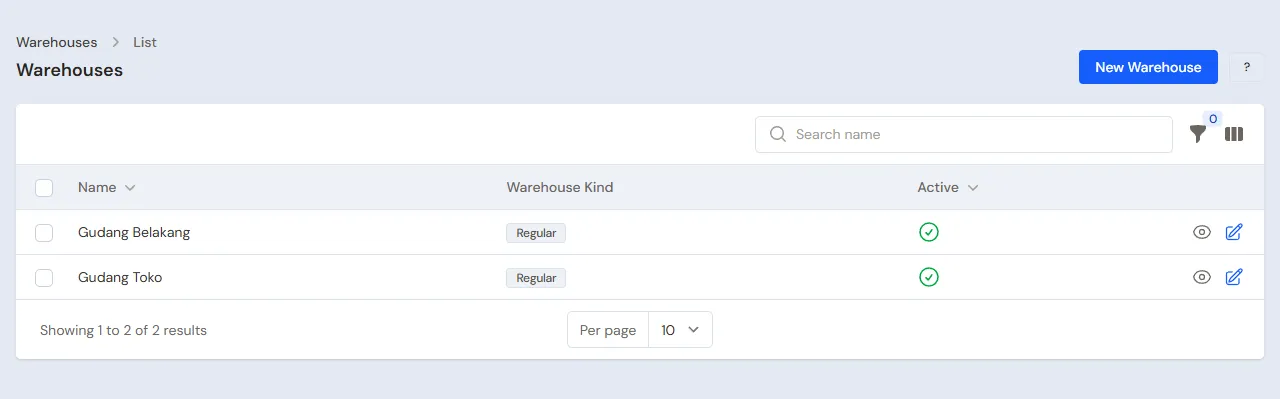
Warehouse Admin: in Master Data → Warehouses, rename the Main Warehouse to Gudang Toko, then press New Warehouse for Gudang Belakang with the Branches Allowed Head Office. Goods are bought into Gudang Belakang and moved to the shop racks with stock transfers. See Setting up warehouses.
Goods
Warehouse Admin: in Master Data → Products, create every good. Fill in the Rack Location in Gudang Toko, for example Rak Oli, so goods are found fast:
| Good | Category | Base Unit | First cost price | Selling Price |
|---|---|---|---|---|
| Oli Mesin Motor 1 L | Oils and Fluids | Pieces | Rp 45.000 | Rp 55.000 |
| Kampas Rem Depan Motor | Motorcycle Parts | Set | Rp 30.000 | Rp 45.000 |
| Ban Luar Motor 80/90-17 | Tyres | Pieces | Rp 180.000 | Rp 230.000 |
| Aki Kering 5 Ah | Vehicle Batteries | Pieces | Rp 200.000 | Rp 260.000 |
On the product Oli Mesin Motor 1 L, fill in the Quantity prices table: From quantity 12, Price Rp 50.000. A buyer of a dozen bottles or more gets Rp 50.000 a bottle by itself. See Quantity prices.
Fitting service and fitter
- Warehouse Admin: in Master Data → Services, create Pasang Ban (tyre fitting) Rp 15.000. See Adding a service.
- Head Cashier: in Master Data → Service Staff, register Mang Ujang. His name is chosen on the service line of a note.
Regular workshops and suppliers
- Head Cashier: in Master Data → Customer Groups, create the group Bengkel Langganan. In Master Data → Special Prices, press New Special Price: For the Customer Group Bengkel Langganan, Applies to the Category Motorcycle Parts, Discount 10%. See Special Prices for customers and groups.
- Head Cashier: in Master Data → Customers, register Bengkel Pak Kardi with the Group Bengkel Langganan and the Payment Terms (days) 14.
- Owner: in Master Data → Suppliers, register CV Sumber Onderdil Utama (30 days' credit).
3. First capital, buying and the shop racks
- The Owner records Rp 15.000.000 of capital into Bank BCA in Transactions → Finance → Owner's Capital.
- The Owner records the note of CV Sumber Onderdil Utama in Transactions → Purchases, warehouse Gudang Belakang, 30 days' credit: 48 Oli Mesin Motor 1 L × Rp 45.000 (Rp 2.160.000), 20 Kampas Rem Depan Motor × Rp 30.000 (Rp 600.000), 10 Ban Luar Motor 80/90-17 × Rp 180.000 (Rp 1.800.000) and 5 Aki Kering 5 Ah × Rp 200.000 (Rp 1.000.000), so Rp 5.560.000.
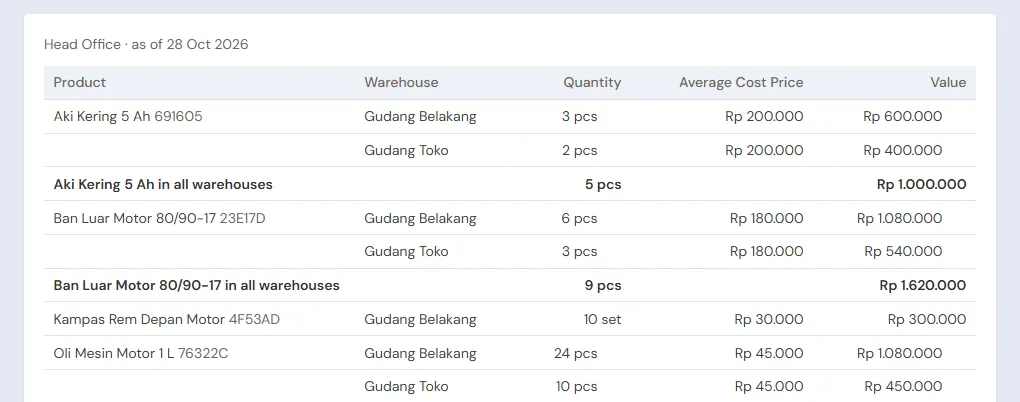
- The Warehouse Admin moves to Gudang Toko in Transactions → Stock Transfers: 24 oils, 10 brake pad sets, 4 tyres and 2 batteries. See Stock transfers between warehouses.
- The Warehouse Admin prints the barcode labels in Master Data → Print Labels, Source Stock transfer, Number of labels by quantity, then sticks them on every good on the racks. See Printing price labels and barcodes.
4. One day at the till
The cashiers sell from Gudang Toko through Transactions → Sales, button New sale, scanning every good's label.
- Cashier (Mas Riko): a walk-in buyer buys 1 Ban Luar Motor 80/90-17 for Rp 230.000, Pasang Ban for Rp 15.000 with Mang Ujang as the service staff, and 2 Oli Mesin Motor 1 L × Rp 55.000 = Rp 110.000. The total is Rp 355.000, cash into Cashier Cash.
- Head Cashier (Mbak Tika): Bengkel Pak Kardi takes 12 Oli Mesin Motor 1 L × Rp 50.000 (quantity price) = Rp 600.000 and 10 Kampas Rem Depan Motor × Rp 40.500 (Special Price, Rp 45.000 less 10%) = Rp 405.000. The total is Rp 1.005.000. She chooses Bengkel Pak Kardi, presses Pay, Unpaid, then Save transaction.
The workshop's note becomes a receivable of Rp 1.005.000, due in 14 days. The workshop prices fill themselves in once Bengkel Pak Kardi is chosen. See Recording a sale on the till.
5. Receivables, payables and expenses
- The Owner records Bengkel Pak Kardi's payment in Transaction Details → Sale Payments: Rp 1.005.000 into Bank BCA. A workshop paying several notes at once is recorded with one payment. See Recording payment of an unpaid note.
- The Owner pays CV Sumber Onderdil Utama before the due date in Transaction Details → Purchase Payments. See Paying what you owe suppliers.
- The Owner records rent, electricity and salaries in Transactions → Finance → Expenses. See Recording shop expenses.
6. Reports per job title
| Report | What it shows | Opened by | When |
|---|---|---|---|
| Reports → Stock | The stock of every good per warehouse, to refill the shop racks | Warehouse Admin | Every day |
| Reports → Receivables | What every workshop still owes, by age | Owner | Every week |
| Reports → Receivable Card | Every note and payment of one workshop, to match with the workshop | Owner | Every month |
| Reports → Payables | What is owed to suppliers, with due dates | Owner | Every week |
| Reports → Profit & Loss | Sales, fitting services, cost of goods sold and expenses | Owner | Every month |
7. Checklists
- Every day: the Warehouse Admin refills the shop racks from Gudang Belakang with stock transfers and prints their labels. The Cashier and the Head Cashier close the till sales.
- Every week: the Owner reads Receivables, collects from the workshops that are due, and reads Payables.
- Every month: the Warehouse Admin counts the stock of both warehouses with a stocktake. The Owner reads Profit & Loss.
A running business
This part is for the team moving a spare parts shop already running to Vende: there is already stock on the racks and in the back warehouse, unpaid workshop notes and debts to suppliers. The order is always the same:
- Fill in the master data.
- Practise transactions until every part is used to them.
- Empty the practice transactions.
- Fill in the opening balances on the first day.
- Go live.
The opening balances come last on purpose, so the practice does not upset their figures. The examples in this part use Toko Sparepart Roda Jaya from the new business part.
1. Master data
Do Who does what, 1. Shop details and users and 2. Master data above. Also register every workshop still owing money, every supplier still owed, and every good still in stock. A spare parts shop often has thousands of goods: import them from Excel. See Importing and exporting products with Excel.
Master data is not deleted when the practice transactions are emptied.
2. Team practice
Work in a practice shop of the type Motorcycle and car parts shop with all four accounts. Every step names who and what must show.
Practice 1: master data
- Owner: shop details, the three users and the supplier.
- Mas Anwar (Warehouse Admin): both warehouses, the four goods, the quantity price of oil and the service Pasang Ban.
- Head Cashier: Mang Ujang, the group Bengkel Langganan with its Special Price, and Bengkel Pak Kardi.
- Check: on the till, Kampas Rem Depan Motor for Bengkel Pak Kardi shows Rp 40.500, and 12 oils Rp 50.000 a bottle.
Practice 2: one working day
- Owner: Rp 15.000.000 of capital and the purchase note as in part 3.
- Warehouse Admin: the stock transfer to Gudang Toko and its labels.
- Check: Reports → Stock of Gudang Toko holds 24 oils, 10 brake pad sets, 4 tyres and 2 batteries. Opened by the Warehouse Admin.
- Cashier and Head Cashier: both sales as in part 4.
- Owner: Bengkel Pak Kardi's Rp 1.005.000 payment.
After Practice 2 this must show:
| Report | What must show | Opened by |
|---|---|---|
| Reports → Cash Balance | Bank BCA Rp 15.000.000 + Rp 1.005.000 = Rp 16.005.000; Cashier Cash Rp 355.000 | Owner |
| Reports → Payables | CV Sumber Onderdil Utama Rp 5.560.000 | Owner |
| Reports → Stock | Gudang Toko: oil 24 − 12 − 2 = 10, brake pads 0, tyres 3, batteries 2. Gudang Belakang: oil 24, brake pads 10, tyres 6, batteries 3 | Warehouse Admin |
| Reports → Profit & Loss | Sales Rp 355.000 + Rp 1.005.000 = Rp 1.360.000, cost of goods sold Rp 630.000 + Rp 300.000 + Rp 180.000 = Rp 1.110.000 | Owner |
The cost of goods sold: 14 oils × Rp 45.000, 10 brake pad sets × Rp 30.000 and 1 tyre at Rp 180.000. The service Pasang Ban has no cost.
Practice 3: opening balances
Fill in the opening balances with the example of part 4 below, check them as in part 5, then empty again.
3. Empty the practice transactions
Done by the Owner in Settings → Empty Transactions, button Empty All Transactions. Notes, purchases, stock transfers, payments, expenses, capital and opening balances are deleted. Products with their rack locations, quantity prices, services, service staff, Special Prices, groups, customers, suppliers, warehouses, cash accounts, users and settings stay. Vende makes a full backup first. See Emptying transactions or all data.
4. Opening balances
Done by the Owner in Settings → Opening Balances on the morning of the first day, with As of that day. See Entering opening cash, stock, receivables and payables.
- Opening Stock: every row picks its Warehouse, so a good both on the shop racks and in the back warehouse takes two rows. Example: Oli Mesin Motor 1 L 20 Pieces in Gudang Toko and 36 Pieces in Gudang Belakang, both at Rp 45.000. Many goods are imported with Import Opening Stock: fill the warehouse column on every row, so both warehouses fit in one file.
- Opening Receivables: one row for every unpaid workshop note, with its own due date. Example: Bengkel Pak Kardi two notes, Rp 750.000 and Rp 450.000. Their payments are later recorded against the same notes as the workshop pays them.
- Opening Payables: CV Sumber Onderdil Utama Rp 2.500.000 with its due date.
- Opening Cash: the money counted in every account. Example: the Bank BCA account Rp 12.000.000, the cashier's drawer Rp 400.000.
Everything a spare parts shop holds has its own tab in Opening Balances, so nothing needs to be recorded another way.
5. Check before going live
| Report | What must show | Opened by |
|---|---|---|
| Reports → Cash Balance | Bank BCA Rp 12.000.000 and Cashier Cash Rp 400.000, the same as the money counted | Owner |
| Reports → Stock | Oil 20 in Gudang Toko and 36 in Gudang Belakang, the same as the count | Warehouse Admin |
| Reports → Receivables | Bengkel Pak Kardi Rp 1.200.000 in two notes | Owner |
| Reports → Payables | CV Sumber Onderdil Utama Rp 2.500.000 | Owner |
The figures differ? The Owner corrects the row in Settings → Opening Balances before real transactions are recorded.
6. Going live
From that day every sale, purchase, stock transfer and payment is recorded in Vende as in the new business part, with the same checklists. In the first week, the Warehouse Admin compares Reports → Stock of every warehouse with the count on the racks, and the Owner checks that Reports → Profit & Loss holds only sales and expenses since the first day.