
Building supply store guide
A learning path for a building supply store, new or running: job titles, two warehouses, contractor prices, an order to paid, practice, opening balances.
On this page
- A new business
- Who does what
- 1. Shop details and users
- 2. Master data
- 3. First capital and buying
- 4. Walk-in sales at the store
- 5. One contractor order from quotation to paid
- 6. Receivables, payables and expenses
- 7. Reports per job title
- 8. Checklists
- A running business
- 1. Master data
- 2. Team practice
- 3. Empty the practice transactions
- 4. Opening balances
- 5. Check before going live
- 6. Going live
This guide is for the team setting up Vende at a building supply store that sells building materials over the counter and in bulk to contractors, with the goods delivered. It has two parts: A new business for a store just opening, with no stock, receivables or payables from before, and A running business for a store moving to Vende, with team practice and opening balances. The example is Toko Bangunan Kokoh Mandiri. The names of the store, customers, suppliers and people and all the figures are made up.
What the business looks like:
- Goods: cement by the sack, reinforcing steel by the rod, wall paint in several colours, and pipes by the rod.
- Places: the shop racks at the front for walk-in buyers, the back warehouse for cement and steel.
- Buyers: builders and households who pay cash at the counter, and contractors who ask for a quotation, order with a down payment, then pay on credit.
- Delivery: ordered goods go out on the store's truck, often in several trips.
Work through it from the top. Every step names its menu, who does it, what changes afterwards, and an example with figures.
The features in this guide come with the Hardware/building supply store business type package, except those marked extra. The shop's features show under Settings → Subscription, section This shop's features. If a menu is missing, contact the Vende team. This package also holds Invoice mode, a screen for writing long notes to contractors like an invoice by keyboard; a new shop opens it straight away from New sale, on a phone too. Whoever serves walk-in buyers at the front can keep the Till: set that person's Sales input in Settings → Users. See Making a note in invoice mode.
Tip: Lost on a page? Press the ? button at the top of that page. A short tour shows every field.
A new business
Who does what
This package holds five users, the owner included.
| Part of the store | Job title in Vende | What they do and open |
|---|---|---|
| Owner | Owner | Every menu, also suppliers and purchase notes, opening balances, and Reports → Profit & Loss |
| Sales admin and cashier | Head Cashier | Customers, groups and Special Prices, quotations, orders and down payments, selling on the till, delivery runs, notes from delivery notes |
| Head of the warehouse | Warehouse Admin | Products, warehouses, stock transfers from the back warehouse, delivery notes, Reports → Stock |
| Finance admin | Finance Admin | Customer and supplier payments, expenses, Reports → Receivables, Reports → Payables, Reports → Cash Balance |
| Truck driver | Driver | Today's Deliveries on the phone: the result of every stop |
A bigger store gives buying to a Purchasing Admin, or adds a second cashier with the Cashier job title, by adding users to its subscription. Every role is explained in Roles and permissions.
1. Shop details and users
Done by the Owner: fill in Settings → Shop (name, address, WhatsApp, logo), then create the accounts in Settings → Users with the Job title of the table above. See Adding and managing users.
The people at Toko Bangunan Kokoh Mandiri: Pak Hendra (owner), Bu Rina (sales admin and cashier, Head Cashier), Mas Joko (head of the warehouse, Warehouse Admin), Bu Lastri (finance admin, Finance Admin) and Pak Darno (truck driver, Driver).
2. Master data
A shop of this business type already has the product categories Building Materials, Paint, Tools, Electrical, Plumbing and Sanitary, and Nails and Bolts, and the units Metre, Rod, Sack, Sheet and Box. Its expense categories are the common ones, such as Electricity, Salaries and Transport.
Two warehouses
Warehouse Admin:
- In Master Data → Warehouses, rename the Main Warehouse to Gudang Toko. The shop racks and walk-in buyers use this warehouse.
- Press New Warehouse, enter the Name Gudang Belakang, the Warehouse Kind Regular and the Branches Allowed Head Office, then press Create.
Cement and steel are bought into Gudang Belakang, then part of them moves to Gudang Toko with Transactions → Stock Transfers. See Setting up warehouses.
Goods
Warehouse Admin: in Master Data → Products, create every good:
| Good | Category | Base Unit | First cost price | Selling Price |
|---|---|---|---|---|
| Semen 50 kg | Building Materials | Sack | Rp 60.000 | Rp 68.000 |
| Besi Beton 10 mm | Building Materials | Rod | Rp 80.000 | Rp 90.000 |
| Cat Tembok 5 kg | Paint | Pieces | Rp 100.000 | Rp 125.000 |
| Pipa PVC 3/4 inci | Plumbing and Sanitary | Rod | Rp 25.000 | Rp 32.000 |
Cat Tembok 5 kg is made with variants: under Variants, switch on Has variants (size, colour and more), enter the Option name Warna (colour) with the values Putih and Krem, then press Make variant combinations. Every colour has its own stock. See Product variants.
Goods also sold by the box or the bundle get another unit under Other Units, for example nails by the Box of 100 Pieces. See Base unit, other units and main unit.
Quantity price of cement
Warehouse Admin: on the product Semen 50 kg, fill in the Quantity prices table below the Selling Price: From quantity 50, Price Rp 66.000, then press Save changes. A buyer of 50 sacks or more gets Rp 66.000 a sack by itself, on the till as well as on quotations and orders. See Quantity prices.
When the factory gives the bulk price for the quantity of several products together, for example corrugated roofing sheets in 3M and 4M that add up to 2,000 metres, fill in the same Bulk Price Group on those products. Each product keeps its own price table, but the quantities on a note are counted together. See Quantity prices.
Contractors: group, Special Price and credit limit
Head Cashier:
- In Master Data → Customer Groups, create the group Kontraktor. Under Credit Limit, enter the Max. total receivable Rp 20.000.000 and the Max. age of oldest note 60 days.
- In Master Data → Special Prices, press New Special Price: For the Customer Group Kontraktor, Applies to One product Besi Beton 10 mm in the unit Rod, Fixed price Rp 87.000.
- In Master Data → Customers, register CV Tiga Pilar Konstruksi with the Group Kontraktor and the Payment Terms (days) 30, and Pak Udin (a foreman) without a group with 14 days.
A contractor's note that takes its receivable above Rp 20.000.000, or whose oldest unpaid note is already older than 60 days, is refused when saved, unless the Head Cashier gives a reason. See Setting and monitoring customer receivables and Special Prices for customers and groups.
Suppliers
Owner: in Master Data → Suppliers, register Distributor Semen Jaya Abadi (30 days' credit), Toko Besi Baja Prima (14 days' credit) and Agen Cat dan Pipa Warna Indah. See Adding a supplier.
3. First capital and buying
- The Owner records Rp 50.000.000 of capital into Bank BCA in Transactions → Finance → Owner's Capital.
- The Owner records the note of Distributor Semen Jaya Abadi in Transactions → Purchases, warehouse Gudang Belakang: 200 sacks of Semen 50 kg × Rp 60.000 = Rp 12.000.000, 30 days' credit, no payment.
- The Owner records the note of Toko Besi Baja Prima, warehouse Gudang Belakang: 100 rods of Besi Beton 10 mm × Rp 80.000 = Rp 8.000.000, 14 days' credit.
- The Owner records the note of Agen Cat dan Pipa Warna Indah, warehouse Gudang Toko, paid in full from Bank BCA: 10 Cat Tembok 5 kg - Putih and 10 Cat Tembok 5 kg - Krem × Rp 100.000 (Rp 2.000.000), and 50 rods of Pipa PVC 3/4 inci × Rp 25.000 (Rp 1.250.000), so Rp 3.250.000.
- The Warehouse Admin moves 20 sacks of cement from Gudang Belakang to Gudang Toko in Transactions → Stock Transfers. See Stock transfers between warehouses.
What is owed to both suppliers, Rp 20.000.000, is recorded. See Recording a purchase note.
4. Walk-in sales at the store
The Head Cashier serves buyers on the till through Transactions → Sales, button New sale, from Gudang Toko. An example day, all cash into Cashier Cash:
| Buyer | Goods | Amount |
|---|---|---|
| Builder | 5 sacks of Semen 50 kg × Rp 68.000 | Rp 340.000 |
| Household | 2 Cat Tembok 5 kg - Putih × Rp 125.000 | Rp 250.000 |
| Builder | 4 rods of Pipa PVC 3/4 inci × Rp 32.000 | Rp 128.000 |
The cash of that day is Rp 718.000. See Recording a sale on the till.
5. One contractor order from quotation to paid
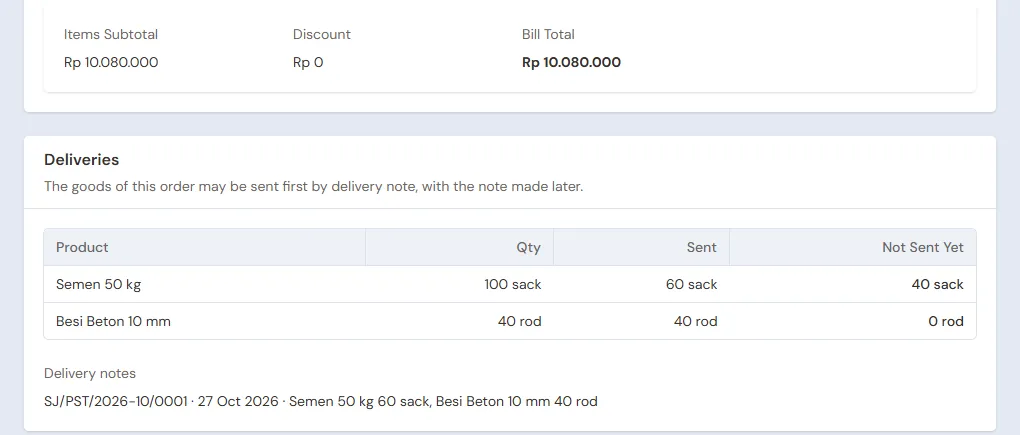
Example: CV Tiga Pilar Konstruksi orders 100 sacks of cement and 40 rods of steel for a shophouse project, delivered in two trips.
| Goods | Price | Amount |
|---|---|---|
| 100 sacks of Semen 50 kg | Rp 66.000 (quantity price) | Rp 6.600.000 |
| 40 rods of Besi Beton 10 mm | Rp 87.000 (Kontraktor Special Price) | Rp 3.480.000 |
| Total | Rp 10.080.000 |
Quotation, order and down payment
Head Cashier:
- In Transactions → Quotations, press New Quotation, choose CV Tiga Pilar Konstruksi, enter both goods, then save and send its PDF. The prices fill themselves in from the table above. See Making a price quotation.
- When the contractor agrees, press Convert to Order, choose the Warehouse Gudang Belakang, and fill in the Pickup Date with the date of the first trip.
- On the order page, press Receive Down Payment of Rp 3.000.000 into Bank BCA.
The order holds the down payment until its note is made; there is no income yet, and no stock leaves. See Taking a down payment on an order.
Delivery note of the first trip
Warehouse Admin: in Transactions → Delivery Notes, press Make Delivery Note, choose the order of CV Tiga Pilar Konstruksi, then Continue. Fill in From Warehouse Gudang Belakang, the Driver Pak Darno, and in the Sent column 60 sacks of cement and 40 rods of steel. Press Save Delivery Note, then print it for the driver.
The stock of Gudang Belakang drops by 60 sacks and 40 rods at once. The Not sent yet column leaves 40 sacks of cement. See Sending goods in several deliveries with delivery notes.
Second trip with a delivery run
- Head Cashier: a week later, in Transactions → Delivery Runs, press Make Delivery Run, pick Sales orders, tick the order of CV Tiga Pilar Konstruksi, then pick Make Delivery Run in the bulk actions.
- She fills in From warehouse Gudang Belakang, Driver on the phone Pak Darno and the Vehicle, then presses Print & make delivery notes and Print. The delivery note of the 40 sacks of cement still waiting is made by itself, and their stock leaves then.
- Driver (Pak Darno): in Transactions → Today's Deliveries, press Delivered once the cement is unloaded at the site.
If only part is received, Pak Darno presses Partly, and the rest goes back to Gudang Belakang to wait for another trip. See Delivering goods with a daily delivery run.
Note and receivable
Head Cashier: on the order page, press Make Note from Delivery Notes, choose both delivery notes, then Make Draft Note. The draft opens on the sales screen at the order's prices, Rp 10.080.000. Press Pay: Taken from the order down payment shows Rp 3.000.000. Press Unpaid, then Save transaction.
The rest, Rp 7.080.000, becomes a receivable of CV Tiga Pilar Konstruksi, due in 30 days, still under the Rp 20.000.000 limit. The stock does not drop again, because it already left with its delivery notes.
6. Receivables, payables and expenses
- The Finance Admin records the settlement of CV Tiga Pilar Konstruksi in Transaction Details → Sale Payments: Rp 7.080.000 into Bank BCA. See Recording payment of an unpaid note.
- The Finance Admin pays Toko Besi Baja Prima before the due date in Transaction Details → Purchase Payments: Rp 8.000.000 from Bank BCA. See Paying what you owe suppliers.
- The Finance Admin records the truck's diesel of Rp 300.000 in the category Transport in Transactions → Finance → Expenses, from Cashier Cash. See Recording shop expenses.
7. Reports per job title
| Report | What it shows | Opened by | When |
|---|---|---|---|
| Reports → Stock | The stock of every good per warehouse; pick the warehouse for Gudang Toko or Gudang Belakang | Warehouse Admin | Every day |
| Reports → Receivables | What every contractor still owes, by age | Finance Admin | Every week |
| Reports → Payables | What is owed for cement and steel, with due dates | Finance Admin | Every week |
| Reports → Cash Balance | The money in Cashier Cash and Bank BCA | Finance Admin | Every day |
| Reports → Profit & Loss | Sales, cost of goods sold and expenses | Owner | Every month |
8. Checklists
- Every day: the Head Cashier closes the till sales and checks tomorrow's delivery run. The Warehouse Admin makes a delivery note for every load that leaves and refills Gudang Toko with stock transfers. The driver records the stop results before going home.
- Every week: the Head Cashier makes notes from the delivery notes that arrived. The Finance Admin reads Receivables and Payables, then collects and pays what is due.
- Every month: the Warehouse Admin counts the cement and steel with a stocktake. The Owner reads Profit & Loss.
A running business
This part is for the team moving a building supply store already running to Vende: there is already cement and steel in the warehouse, contractors owing money, debts to distributors, and orders paid for whose goods are not all delivered yet. The order is always the same:
- Fill in the master data.
- Practise transactions until every part is used to them.
- Empty the practice transactions.
- Fill in the opening balances on the first day.
- Go live.
The opening balances come last on purpose, so the practice does not upset their figures. The examples in this part use Toko Bangunan Kokoh Mandiri from the new business part.
1. Master data
Do Who does what, 1. Shop details and users and 2. Master data above. Also register every customer still owing money or with an order, every supplier still owed, and every good still in stock. Many goods are imported from Excel. See Importing and exporting products with Excel.
Master data is not deleted when the practice transactions are emptied.
2. Team practice
Work in a practice shop of the type Hardware/building supply store with all five accounts. Every step names who and what must show.
Practice 1: master data
- Owner: shop details, the four users and the three suppliers.
- Check: Pak Darno sees only Today's Deliveries.
- Mas Joko (Warehouse Admin): both warehouses, the four goods with Cat Tembok in two colours, and the quantity price of cement.
- Head Cashier: the group Kontraktor with its credit limit, the Special Price of steel, CV Tiga Pilar Konstruksi and Pak Udin.
- Check: on the till, 50 sacks of cement for a walk-in buyer show Rp 66.000 a sack, and steel for CV Tiga Pilar Konstruksi Rp 87.000.
Practice 2: one working day and one order
- Owner: Rp 50.000.000 of capital and the three purchase notes as in part 3.
- Warehouse Admin: transfer 20 sacks of cement to Gudang Toko.
- Head Cashier: the three walk-in sales as in part 4, Rp 718.000 cash.
- Head Cashier: the quotation, the order and the Rp 3.000.000 down payment.
- Mas Joko and Pak Darno: the delivery note of 60 sacks of cement and 40 rods of steel, then a delivery run of 40 sacks of cement with the result Delivered.
- Check: the order page leaves no goods waiting to be sent.
- Head Cashier: the note from both delivery notes, the rest of Rp 7.080.000 unpaid.
- Finance Admin: the Rp 7.080.000 settlement, paying Toko Besi Baja Prima Rp 8.000.000, and the Rp 300.000 diesel expense.
After Practice 2 this must show:
| Report | What must show | Opened by |
|---|---|---|
| Reports → Cash Balance | Bank BCA Rp 50.000.000 − Rp 3.250.000 + Rp 3.000.000 + Rp 7.080.000 − Rp 8.000.000 = Rp 48.830.000; Cashier Cash Rp 718.000 − Rp 300.000 = Rp 418.000 | Finance Admin |
| Reports → Payables | Distributor Semen Jaya Abadi Rp 12.000.000 | Finance Admin |
| Reports → Stock | Gudang Belakang: cement 200 − 20 − 100 = 80 sacks, steel 60 rods. Gudang Toko: cement 15 sacks, Cat Tembok Putih 8 and Krem 10, pipes 46 rods | Warehouse Admin |
| Reports → Profit & Loss | Sales Rp 10.080.000 + Rp 718.000 = Rp 10.798.000, cost of goods sold Rp 9.800.000, expenses Rp 300.000 | Owner |
The cost of goods sold: 105 sacks of cement × Rp 60.000, 40 rods of steel × Rp 80.000, 2 paints × Rp 100.000 and 4 pipes × Rp 25.000.
Practice 3: opening balances
Fill in the opening balances with the example of part 4 below, check them as in part 5, then empty again.
3. Empty the practice transactions
Done by the Owner in Settings → Empty Transactions, button Empty All Transactions. Quotations, orders with their down payments, delivery notes, delivery runs, notes, purchases, stock transfers, payments, expenses, capital and opening balances are deleted. Products with their variants, quantity prices, Special Prices, groups with their credit limits, customers, suppliers, warehouses, cash accounts, users and settings stay. Vende makes a full backup first. See Emptying transactions or all data.
4. Opening balances
Done by the Owner in Settings → Opening Balances on the morning of the first day, with As of that day. See Entering opening cash, stock, receivables and payables.
- Opening Stock: every row picks its Warehouse. Gudang Belakang: Semen 50 kg 120 sacks at Rp 60.000 and Besi Beton 10 mm 80 rods at Rp 80.000. Gudang Toko: Semen 50 kg 20 sacks, Cat Tembok 5 kg - Putih 15 and - Krem 15 at Rp 100.000, Pipa PVC 3/4 inci 60 rods at Rp 25.000. Every paint colour is entered on its own.
- Opening Receivables: CV Tiga Pilar Konstruksi Rp 15.000.000 with its due date.
- Opening Payables: Distributor Semen Jaya Abadi Rp 6.000.000.
- Opening Cash: the money counted in every account, less the down payment below. Example: the Bank BCA account holds Rp 40.000.000 and the cashier's drawer Rp 500.000.
Opening receivables count toward the credit limit. CV Tiga Pilar Konstruksi, already owing Rp 15.000.000, can add only Rp 5.000.000 more of credit notes up to the limit of the Kontraktor group. One old receivable split into several rows also counts as several notes in Max. unpaid notes, and the age of the oldest note counts from As of, not from the date of its old note.
Goods paid for but not delivered yet
Opening Balances has no tab for an order whose down payment was received, or whose note was paid, before the first day while its goods are not all delivered yet. The way to do it with what is there:
- The goods are still in the warehouse, so they are counted in Opening Stock.
- The Head Cashier makes a new order on the first day in Transactions → Sales Orders holding only the goods not delivered yet, at the agreed prices.
- On the order page, she presses Receive Down Payment for what was already paid for those goods, into the cash account that now holds the money, dated the first day.
- The Owner fills in that account's Opening Cash with the money counted less that down payment, so the money is not counted twice.
Example: Pak Udin already paid Rp 2.000.000 for 50 sacks of cement (50 × Rp 66.000 = Rp 3.300.000) not delivered yet. His order holds 50 sacks of cement, its down payment is Rp 2.000.000 into Bank BCA, and the Opening Cash of Bank BCA is Rp 40.000.000 − Rp 2.000.000 = Rp 38.000.000.
What follows:
- Bank BCA comes back to Rp 40.000.000, the same as the account, and the order holds Rp 2.000.000 as its down payment.
- When the cement is delivered and its note is made from the delivery note, the Rp 2.000.000 down payment is taken off, and the rest, Rp 1.300.000, becomes Pak Udin's receivable. The cement stock leaves with its delivery note.
- Reports → Profit & Loss records the Rp 3.300.000 sale on the day of the note. If the old note in the previous program already recorded that sale, the year's profit in both records is added up with care so it is not counted twice.
5. Check before going live
| Report | What must show | Opened by |
|---|---|---|
| Reports → Cash Balance | Bank BCA Rp 40.000.000 and Cashier Cash Rp 500.000, the same as the money counted | Finance Admin |
| Reports → Stock | Gudang Belakang cement 120 and steel 80; Gudang Toko cement 20, both paints 15, pipes 60 | Warehouse Admin |
| Reports → Receivables | CV Tiga Pilar Konstruksi Rp 15.000.000 | Finance Admin |
| Reports → Payables | Distributor Semen Jaya Abadi Rp 6.000.000 | Finance Admin |
| Transactions → Sales Orders | Pak Udin's order with a Rp 2.000.000 down payment | Head Cashier |
The figures differ? The Owner corrects the row in Settings → Opening Balances before real transactions are recorded.
6. Going live
From that day every quotation, order, delivery note, note and payment is recorded in Vende as in the new business part, with the same checklists. In the first week, the Warehouse Admin compares Reports → Stock of every warehouse with the count on the racks and in the back warehouse, and the Owner checks that Reports → Profit & Loss holds only sales and expenses since the first day.