
Bicycle shop guide
A learning path for a bicycle shop, new or running: job titles, frame sizes and frame numbers, one repair to pickup, practice, opening balances.
On this page
- A new business
- Who does what
- 1. Shop details and users
- 2. Master data
- 3. First capital and buying
- 4. Selling at the shop
- 5. One repair from drop-off to pickup
- 6. Payables and expenses
- 7. Reports per job title
- 8. Checklists
- A running business
- 1. Master data
- 2. Team practice
- 3. Empty the practice transactions
- 4. Opening balances
- 5. Check before going live
- 6. Going live
This guide is for the team setting up Vende at a bicycle shop that sells new bicycles, parts and gear, and has a repair workshop. It has two parts: A new business for a shop just opening, with no stock, receivables or payables from before, and A running business for a shop moving to Vende, with team practice and opening balances. The example is Toko Sepeda Kayuh Ceria. The names of the shop, customers, suppliers and people and all the figures are made up.
What the business looks like:
- Bicycles: mountain bikes in two frame sizes, every unit known by its frame number.
- Parts and gear: inner tubes, chains and helmets.
- Workshop: customers' bicycles come in with a work order, the mechanic works on them, then they are paid at pickup.
Work through it from the top. Every step names its menu, who does it, what changes afterwards, and an example with figures.
The features in this guide come with the Bicycle shop business type package, except those marked extra. The shop's features show under Settings → Subscription, section This shop's features. If a menu is missing, contact the Vende team.
Tip: Lost on a page? Press the ? button at the top of that page. A short tour shows every field, on the Workshop Board too.
A new business
Who does what
This package holds three users, the owner included.
| Part of the shop | Job title in Vende | What they do and open |
|---|---|---|
| Owner | Owner | Every menu, also products, services, service packages, suppliers and purchase notes, payments, expenses, opening balances, and Reports → Profit & Loss |
| Cashier and workshop desk | Head Cashier | Customers and their service units, service staff, promotions, selling on the till, work orders |
| Mechanic | Technician | Work Orders and the Workshop Board: the status of every repair |
A bigger shop adds a Warehouse Admin for products and stock by adding users to its subscription. Every role is explained in Roles and permissions.
1. Shop details and users
Done by the Owner: fill in Settings → Shop (name, address, WhatsApp, logo), then create the accounts in Settings → Users with the Job title of the table above. See Adding and managing users.
The people at Toko Sepeda Kayuh Ceria: Pak Bambang (owner), Mbak Yuni (cashier and workshop desk, Head Cashier) and Mas Doni (mechanic, Technician).
2. Master data
A shop of this business type already has the product categories Bicycles, Spare Parts, Accessories, Cycling Apparel and Helmets, and Repair Services, the units Unit, Set and Pair, and the expense category Equipment Maintenance.
Bicycles with frame sizes and frame numbers
Owner:
- In Master Data → Products, press New Product, enter the Name Sepeda Gunung 27,5 inci, the Category Bicycles, the Base Unit Unit, a cost price of Rp 2.000.000 and the Selling Price Rp 2.600.000.
- Under Tracking, switch on Track serial numbers. A bicycle's serial number is its frame number.
- Under Variants, switch on Has variants (size, colour and more), enter the Option name Ukuran Frame (frame size) with the values S and M, then press Make variant combinations.
- Press Create.
Every size has its own stock and uses frame numbers too. See Product variants and Serial numbers and IMEI.
Parts and gear
Owner: create the other goods with the Base Unit Pieces:
| Good | Category | First cost price | Selling Price |
|---|---|---|---|
| Ban Dalam 26 inci | Spare Parts | Rp 25.000 | Rp 40.000 |
| Rantai Sepeda 8 Speed | Spare Parts | Rp 60.000 | Rp 90.000 |
| Helm Sepeda | Cycling Apparel and Helmets | Rp 120.000 | Rp 175.000 |
Services and service packages
Owner:
- In Master Data → Services, create Servis Sepeda Rp 50.000 and Setel Rem (brake adjustment) Rp 20.000, in the category Repair Services. See Adding a service.
- In Master Data → Service Packages, create the package Servis Sepeda holding the service Servis Sepeda 1 and Rantai Sepeda 8 Speed 1.
Mechanic, customers and suppliers
- Head Cashier: in Master Data → Service Staff, register Mas Doni and pick his account in Linked User. His name is chosen in the Mechanic field of a work order, and the work orders with his name show on Mas Doni's Workshop Board. Without a Linked User, Mas Doni's Workshop Board stays empty.
- Head Cashier: in Master Data → Customers, register Pak Bagus. His bicycle becomes a service unit when his first work order is made.
- Owner: in Master Data → Suppliers, register Distributor Sepeda Gowes Mandiri (30 days' credit) and Toko Onderdil Sepeda Lancar.
A promotion, for example buy a Helm Sepeda and get a Ban Dalam 26 inci free, is made by the Head Cashier in Master Data → Promotions. Serial-numbered goods, such as bicycles with their frame numbers, cannot be used in a promotion. See Giving discounts and free goods.
3. First capital and buying
- The Owner records Rp 15.000.000 of capital into Bank BCA in Transactions → Finance → Owner's Capital.
- The Owner records the note of Distributor Sepeda Gowes Mandiri in Transactions → Purchases, 30 days' credit: 2 Sepeda Gunung 27,5 inci - S and 2 - M × Rp 2.000.000 = Rp 8.000.000. In the details of every line, fill in the Serial numbers with every bicycle's frame number, one per line.
- The Owner records the note of Toko Onderdil Sepeda Lancar, paid in full from Bank BCA: 20 Ban Dalam 26 inci (Rp 500.000), 10 Rantai Sepeda 8 Speed (Rp 600.000) and 5 Helm Sepeda (Rp 600.000), so Rp 1.700.000.
See Recording a purchase note and Recording serial numbers when buying.
4. Selling at the shop
The Head Cashier serves buyers on the till through Transactions → Sales, button New sale. An example day:
| Goods | Paid | Amount |
|---|---|---|
| 1 Sepeda Gunung 27,5 inci - M (frame number scanned) and 1 Helm Sepeda | Transfer into Bank BCA | Rp 2.775.000 |
| 2 Ban Dalam 26 inci × Rp 40.000 | Cash | Rp 80.000 |
The frame number prints on the receipt, so a bicycle's warranty claim is easy to check. See Recording a sale on the till.
5. One repair from drop-off to pickup
Example: Pak Bagus brings in his folding bike with a broken chain.
- Head Cashier: in Transactions → Work Orders, press New Work Order. Choose Pak Bagus, fill in a new unit: the Plate / Serial No. his bicycle's frame number, the Unit Type Sepeda lipat (folding bike), the Brand / Model Lipat 20 inci. Enter the Complaint Rantai putus, rem kurang pakem (broken chain, weak brakes), the Mechanic Mas Doni and the Warranty (days) 7.
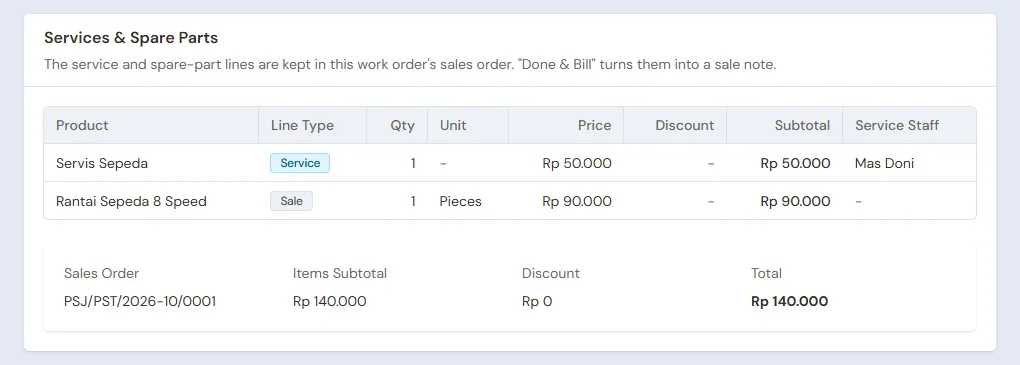
- In Service package, choose Servis Sepeda, then press Add: the service Rp 50.000 and the chain Rp 90.000, a total of Rp 140.000. Save, then press Send Estimate (WhatsApp).
- Technician (Mas Doni): in Transactions → Workshop Board, tap that bicycle's card and move it to In progress.
- Head Cashier: once the bicycle is done, press Done & Bill on the work order. The draft note opens on the till. Pak Bagus pays Rp 140.000 in cash, then press Save transaction.
- Head Cashier: when the bicycle is handed over, press Picked Up.
The chain leaves the stock when the note is saved. The next repair only picks Pak Bagus's bicycle from his service units. A big repair may get a down payment in Down payment amount; it is taken off when billed.
6. Payables and expenses
- The Owner pays Distributor Sepeda Gowes Mandiri before the due date in Transaction Details → Purchase Payments. See Paying what you owe suppliers.
- The Owner records the upkeep of the workshop tools in the category Equipment Maintenance, and the rent and electricity too, in Transactions → Finance → Expenses. See Recording shop expenses.
7. Reports per job title
| Report | What it shows | Opened by | When |
|---|---|---|---|
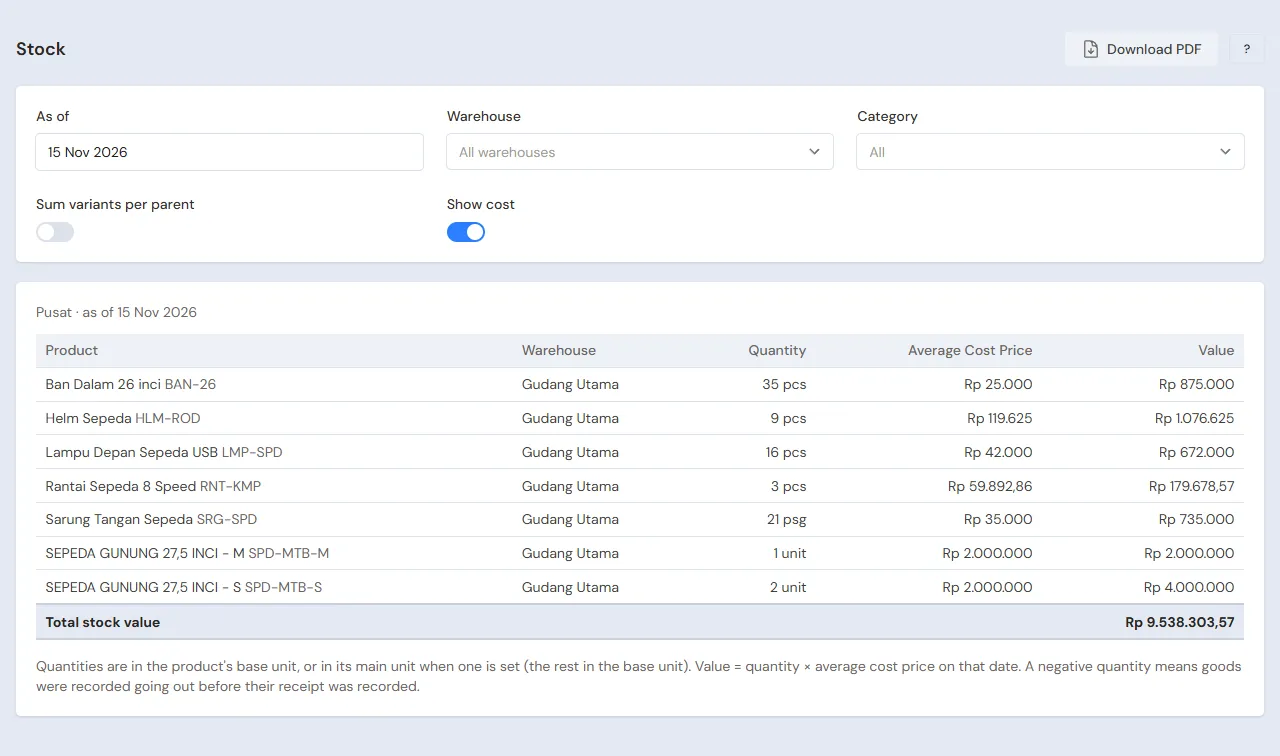
| Reports → Stock | Bicycles per size, parts and helmets | Owner | Every week |
| Transactions → Workshop Board | The bicycles still in the workshop by status | Technician | Every day |
| Transactions → Work Orders | Every repair, also those picked up, with its warranty | Head Cashier | When a claim comes |
| Reports → Payables | What is owed to distributors, with due dates | Owner | Every week |
| Reports → Profit & Loss | Sales, repairs, cost of goods sold and expenses | Owner | Every month |
8. Checklists
- Every day: the Head Cashier records every bicycle coming into the workshop and closes those picked up. The Technician keeps the status on the Workshop Board up to date.
- Every week: the Owner reads Stock and Payables, then orders the parts running low.
- Every month: the Owner counts the stock with a stocktake and reads Profit & Loss.
A running business
This part is for the team moving a bicycle shop already running to Vende: there are already bicycles with frame numbers in the showroom, parts, customers' bicycles in the workshop, and debts to distributors. The order is always the same:
- Fill in the master data.
- Practise transactions until every part is used to them.
- Empty the practice transactions.
- Fill in the opening balances on the first day.
- Go live.
The opening balances come last on purpose, so the practice does not upset their figures. The examples in this part use Toko Sepeda Kayuh Ceria from the new business part.
1. Master data
Do Who does what, 1. Shop details and users and 2. Master data above. Also register every customer whose bicycle is in the workshop, every supplier still owed, and every good still in stock, with Track serial numbers already on for the bicycles. That choice cannot change any more once its stock has moved.
Master data is not deleted when the practice transactions are emptied. The service units of practice customers stay too.
2. Team practice
Work in a practice shop of the type Bicycle shop with all three accounts. Every step names who and what must show.
Practice 1: master data
- Owner: shop details, both users, the four goods with frame sizes and serial numbers, both services, the package Servis Sepeda and both suppliers.
- Check: Mas Doni sees only Work Orders and the Workshop Board.
- Head Cashier: Mas Doni as service staff with his account in Linked User, and Pak Bagus.
Practice 2: one working day and one repair
- Owner: Rp 15.000.000 of capital and both purchase notes as in part 3, with four frame numbers.
- Head Cashier: both sales as in part 4.
- Mbak Yuni and Mas Doni: Pak Bagus's repair as in part 5, up to Picked Up.
- Check: the Workshop Board is empty again.
After Practice 2 this must show:
| Report | What must show | Opened by |
|---|---|---|
| Reports → Cash Balance | Bank BCA Rp 15.000.000 − Rp 1.700.000 + Rp 2.775.000 = Rp 16.075.000; Cashier Cash Rp 80.000 + Rp 140.000 = Rp 220.000 | Owner |
| Reports → Payables | Distributor Sepeda Gowes Mandiri Rp 8.000.000 | Owner |
| Reports → Stock | Bicycles S 2 and M 1, helmets 4, chains 9, inner tubes 18 | Owner |
| Reports → Profit & Loss | Sales Rp 2.775.000 + Rp 80.000 + Rp 140.000 = Rp 2.995.000, cost of goods sold Rp 2.000.000 + Rp 120.000 + Rp 50.000 + Rp 60.000 = Rp 2.230.000 | Owner |
Practice 3: opening balances
Fill in the opening balances with the example of part 4 below, check them as in part 5, then empty again.
3. Empty the practice transactions
Done by the Owner in Settings → Empty Transactions, button Empty All Transactions. Notes, work orders with their down payments, purchases, the serial numbers recorded, payments, expenses, capital and opening balances are deleted. Products with their variants, services, service packages, service staff, promotions, customers with their service units, suppliers, cash accounts, users and settings stay. Vende makes a full backup first. See Emptying transactions or all data.
4. Opening balances
Done by the Owner in Settings → Opening Balances on the morning of the first day, with As of that day. See Entering opening cash, stock, receivables and payables.
- Opening Stock: Sepeda Gunung 27,5 inci - S 1 Unit and - M 2 Units at Rp 2.000.000, each with Serial numbers holding every bicycle's frame number. Ban Dalam 26 inci 15 Pieces at Rp 25.000, Rantai Sepeda 8 Speed 8 Pieces at Rp 60.000, Helm Sepeda 4 Pieces at Rp 120.000.
- Opening Payables: Distributor Sepeda Gowes Mandiri Rp 4.000.000 with its due date.
- Opening Cash: the money counted in every account, less the repair down payment below. Example: the Bank BCA account Rp 10.000.000, the cashier's drawer Rp 500.000.
Customers' bicycles in the workshop
Opening Balances has no tab for repairs under way. The way to do it with what is there:
- The Head Cashier makes a work order on the first day for every bicycle still in the workshop, with the complaint, the mechanic, and the agreed services and parts, as in part 5.
- The down payment already received goes into Down payment amount, into the cash account that now holds the money.
- The Owner fills in that account's Opening Cash with the money counted less that down payment.
Example: Bu Yanti's mountain bike is being serviced with the package Servis Sepeda at Rp 140.000, and a Rp 50.000 cash down payment was received yesterday. Its work order is made this morning with a Rp 50.000 down payment into Cashier Cash, and the Opening Cash of Cashier Cash is Rp 500.000 − Rp 50.000 = Rp 450.000.
What follows:
- Cashier Cash comes back to Rp 500.000, the same as the drawer, and the work order holds Rp 50.000 as its down payment.
- When the bicycle is done, Done & Bill opens a Rp 140.000 note with the Rp 50.000 down payment taken off, and Bu Yanti pays Rp 90.000 more. The chain leaves the stock then.
- Reports → Profit & Loss records that repair at Rp 140.000 on the day of the note.
5. Check before going live
| Report | What must show | Opened by |
|---|---|---|
| Reports → Cash Balance | Bank BCA Rp 10.000.000 and Cashier Cash Rp 500.000, the same as the money counted | Owner |
| Reports → Stock | Bicycles S 1 and M 2, inner tubes 15, chains 8, helmets 4 | Owner |
| Master Data → Serial Numbers | Three bicycles Available with the same frame numbers as the bicycles | Owner |
| Reports → Payables | Distributor Sepeda Gowes Mandiri Rp 4.000.000 | Owner |
| Transactions → Workshop Board | Bu Yanti's bicycle in the Queued column | Technician |
The figures differ? The Owner corrects the row in Settings → Opening Balances before real transactions are recorded.
6. Going live
From that day every sale, repair, purchase and payment is recorded in Vende as in the new business part, with the same checklists. In the first week, the Owner compares Master Data → Serial Numbers with the bicycles in the showroom and checks that Reports → Profit & Loss holds only sales, repairs and expenses since the first day.