
CCTV shop guide
A learning path for a CCTV shop, new or running: job titles, camera serial numbers, one installation to paid, monthly maintenance, opening balances.
On this page
- A new business
- Who does what
- 1. Shop details and users
- 2. Master data
- 3. First capital and buying
- 4. One installation from quotation to paid
- 5. Monthly maintenance
- 6. Receivables, payables and expenses
- 7. Reports per job title
- 8. Checklists
- A running business
- 1. Master data
- 2. Team practice
- 3. Empty the practice transactions
- 4. Opening balances
- 5. Check before going live
- 6. Going live
This guide is for the team setting up Vende at a CCTV and security shop that sells the devices, installs them at the customer's place and maintains them every month. It has two parts: A new business for a shop just opening, with no stock, receivables or payables from before, and A running business for a shop moving to Vende, with team practice and opening balances. The example is Toko CCTV Awas Aman. The names of the shop, customers, suppliers and people and all the figures are made up.
What the business looks like:
- Devices: cameras and DVRs known by their serial numbers, cable by the metre, and adaptors.
- Installation: the customer gets a quotation, pays a down payment, then the technician installs a camera package at the customer's place.
- Maintenance: customers with a maintenance contract are billed every month.
Work through it from the top. Every step names its menu, who does it, what changes afterwards, and an example with figures.
The features in this guide come with the CCTV and security shop business type package, except those marked extra. The shop's features show under Settings → Subscription, section This shop's features. If a menu is missing, contact the Vende team.
Tip: Lost on a page? Press the ? button at the top of that page. A short tour shows every field, on the Workshop Board too.
A new business
Who does what
This package holds four users, the owner included.
| Part of the shop | Job title in Vende | What they do and open |
|---|---|---|
| Owner | Owner | Every menu, also suppliers and purchase notes, payments, expenses, opening balances, and Reports → Profit & Loss |
| Sales admin | Head Cashier | Customers, service staff, quotations, installation work orders, selling on the till, maintenance subscriptions |
| Installer | Technician | Work Orders and the Workshop Board: the status of every installation and repair |
| Warehouse | Warehouse Admin | Products, services, service packages, serial numbers, Reports → Stock |
A second installer who does not use Vende is only listed under Master Data → Service Staff. Every role is explained in Roles and permissions.
1. Shop details and users
Done by the Owner: fill in Settings → Shop (name, address, WhatsApp, logo), then create the accounts in Settings → Users with the Job title of the table above. See Adding and managing users.
The people at Toko CCTV Awas Aman: Pak Rudi (owner), Mbak Sinta (sales admin, Head Cashier), Mas Fajar (installer, Technician) and Mas Toni (warehouse, Warehouse Admin).
2. Master data
A shop of this business type already has the product categories CCTV Cameras, DVRs and NVRs, Alarms and Door Locks, Cables, Accessories, Installation Services and Repair Services, the units Unit, Set, Metre, Roll, Box, Point and Lump sum, and the expense categories Fuel, Vehicle Maintenance and Equipment Maintenance. A CCTV shop created before the units Point and Lump sum existed can make them with + Create new in the Unit field of the Service form.
Devices
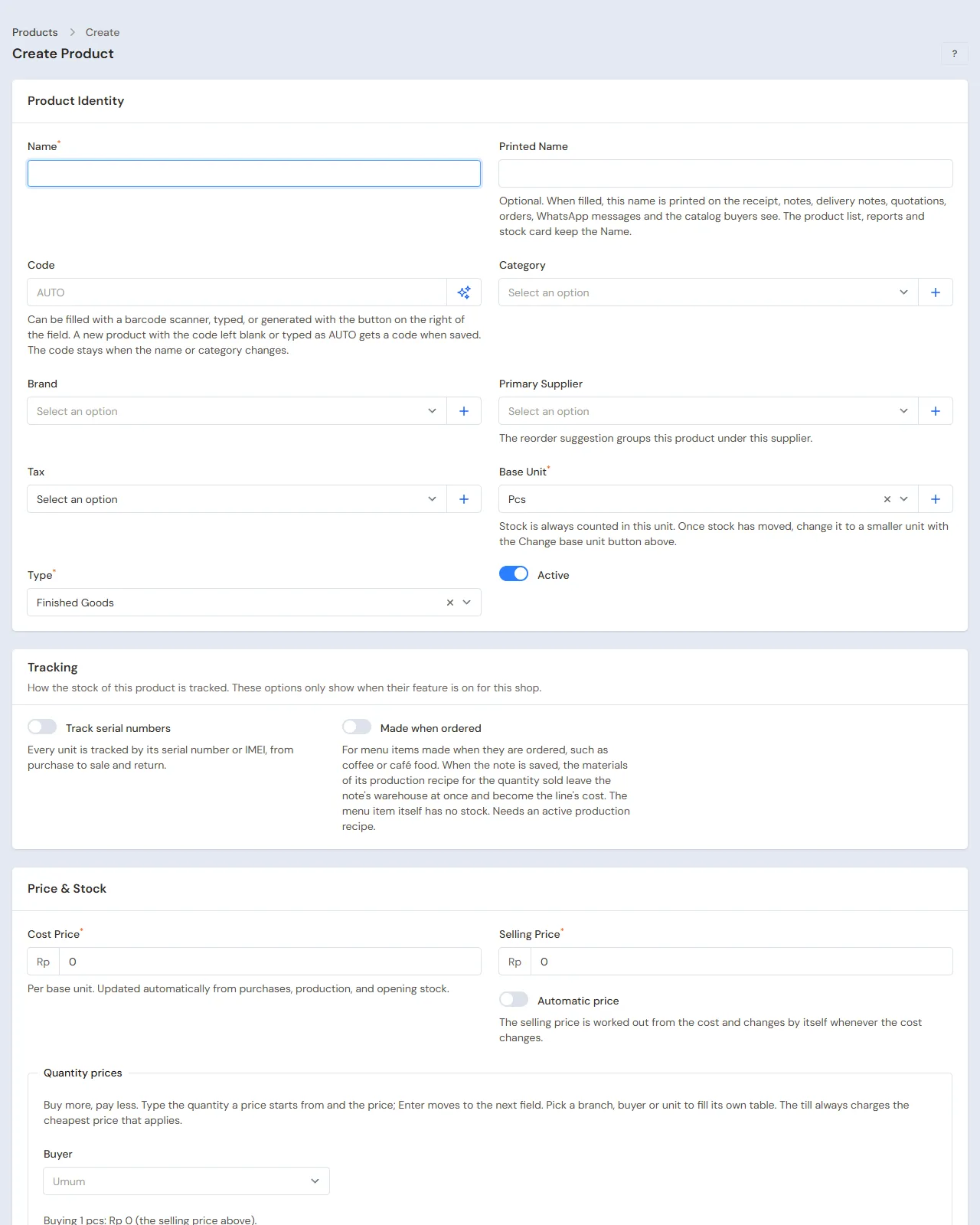
Warehouse Admin: in Master Data → Products, create every good. For cameras and DVRs, switch on Track serial numbers under Tracking before the goods are bought:
| Good | Category | Base Unit | Serial number | First cost price | Selling Price |
|---|---|---|---|---|---|
| Kamera CCTV 2 MP | CCTV Cameras | Unit | Yes | Rp 250.000 | Rp 350.000 |
| DVR 4 Channel | DVRs and NVRs | Unit | Yes | Rp 600.000 | Rp 850.000 |
| Kabel Coaxial RG59 | Cables | Metre | No | Rp 2.000 | Rp 4.000 |
| Adaptor 12 V 2 A | Accessories | Pieces | No | Rp 40.000 | Rp 60.000 |
The cable gets the other unit Roll of 300 under Other Units, so it is bought by the roll and used by the metre. See Base unit, other units and main unit and Serial numbers and IMEI.
Services and the installation package
Warehouse Admin:
- In Master Data → Services, create Pasang CCTV per Titik (fitting per camera point) Rp 150.000 in the category Installation Services with the Unit Point (a job at a fixed price may use the unit Lump sum), and Maintenance CCTV Bulanan Rp 200.000 in the category Repair Services with the Default subscription length 1. See Adding a service.
- In Master Data → Service Packages, create the package Pasang CCTV 4 Kamera holding Kamera CCTV 2 MP 4, DVR 4 Channel 1, Kabel Coaxial RG59 80, Adaptor 12 V 2 A 4 and Pasang CCTV per Titik 4.
One package is worth 4 × Rp 350.000 + Rp 850.000 + 80 × Rp 4.000 + 4 × Rp 60.000 + 4 × Rp 150.000 = Rp 3.410.000.
Installer, customers and suppliers
- Head Cashier: in Master Data → Service Staff, register Mas Fajar and pick his account in Linked User. His name is chosen in the Mechanic field of a work order, and the work orders with his name show on Mas Fajar's Workshop Board. Without a Linked User, Mas Fajar's Workshop Board stays empty.
- Head Cashier: in Master Data → Customers, register CV Sinar Mandala with the Payment Terms (days) 14. Regular installers may get a group with their own prices in Master Data → Customer Groups and Master Data → Special Prices. See Special Prices for customers and groups.
- Owner: in Master Data → Suppliers, register CV Visi Aman Teknologi (30 days' credit) and Toko Kabel dan Aksesori Andalan.
3. First capital and buying
- The Owner records Rp 20.000.000 of capital into Bank BCA in Transactions → Finance → Owner's Capital.
- The Owner records the note of CV Visi Aman Teknologi in Transactions → Purchases, 30 days' credit: 10 Kamera CCTV 2 MP × Rp 250.000 (Rp 2.500.000) and 3 DVR 4 Channel × Rp 600.000 (Rp 1.800.000), so Rp 4.300.000. In the details of every line, fill in the Serial numbers of every unit, one per line.
- The Owner records the note of Toko Kabel dan Aksesori Andalan, paid in full from Bank BCA: 1 Roll of Kabel Coaxial RG59 (300 metres × Rp 2.000 = Rp 600.000) and 20 Adaptor 12 V 2 A × Rp 40.000 (Rp 800.000), so Rp 1.400.000.
See Recording a purchase note and Recording serial numbers when buying.
4. One installation from quotation to paid
Example: CV Sinar Mandala installs four cameras at its office, Rp 3.410.000.
Quotation
Head Cashier: in Transactions → Quotations, press New Quotation, choose CV Sinar Mandala, enter the five lines of the package above, then save and send its PDF. See Making a price quotation.
A quotation cannot become a work order. Once the customer agrees, fill in the work order with the same package.
Installation work order and down payment
Head Cashier:
- In Transactions → Work Orders, press New Work Order. Choose CV Sinar Mandala, fill in a new unit: the Plate / Serial No. the serial number of the DVR to be installed, the Unit Type Sistem CCTV, the Brand / Model 4 Kamera 2 MP. Enter the Complaint Pasang 4 kamera di kantor (install 4 cameras at the office), the Mechanic Mas Fajar and the Warranty (days) 90.
- In Service package, choose Pasang CCTV 4 Kamera, then press Add. The total is Rp 3.410.000.
- Enter a Down payment amount of Rp 1.500.000, the account Bank BCA and the payment method transfer, then save.
The work order holds the down payment until it is billed; there is no income yet, and no device leaves the stock.
Installing
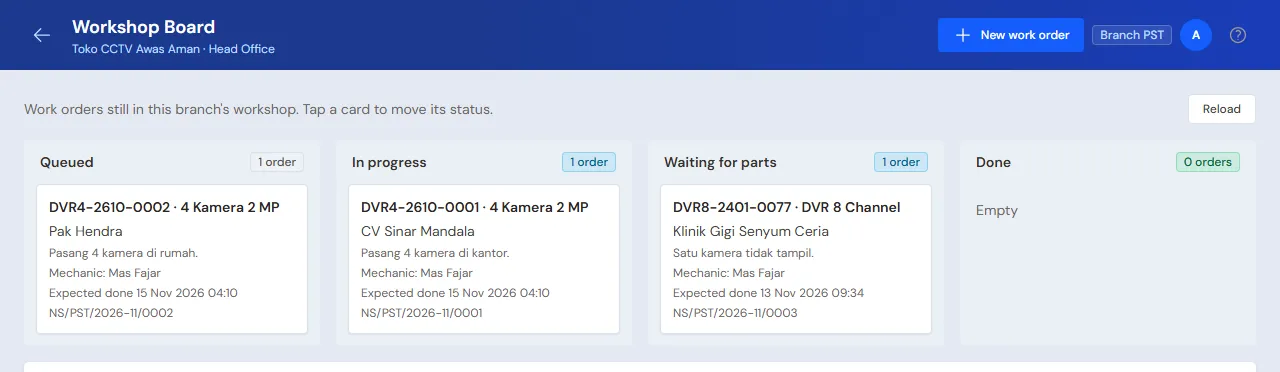
- Technician (Mas Fajar): in Transactions → Workshop Board, tap the card of that work order and move it to In progress when he leaves to install.
- He writes the serial numbers of the four cameras installed in the card's Note, so the cashier fills them in when billing.
Bill and receivable
Head Cashier: once installed, press Done & Bill on the work order. The draft note opens on the till. Fill in the serial numbers of the four cameras and their DVR, then press Pay: Taken from the order down payment shows Rp 1.500.000. Press Unpaid, then Save transaction, and last Picked Up on the work order.
The rest, Rp 1.910.000, becomes a receivable of CV Sinar Mandala, due in 14 days. The cameras, the DVR, 80 metres of cable and the adaptors leave the stock when the note is saved. The 90-day warranty counts from the day the installation is done.
5. Monthly maintenance
- Head Cashier: CV Sinar Mandala takes a maintenance contract. Sell the first month on the till through Transactions → Sales: Maintenance CCTV Bulanan Rp 200.000, paid by transfer into Bank BCA. The line is marked 1-month subscription.
- Head Cashier: in Transactions → Customer Subscriptions, press New Customer Subscription, choose that line under From sale note, check Next period starts, then press Create.
Three days before the next period, Vende makes a maintenance draft note and gives notice in the bell: Subscription note draft for CV Sinar Mandala. The Head Cashier opens it, checks it, then saves it with a payment or as a receivable. See Billing customer subscriptions automatically.
A maintenance visit that replaces goods is recorded with a work order like an installation, on the same service unit.
6. Receivables, payables and expenses
- The Owner records the settlement of CV Sinar Mandala in Transaction Details → Sale Payments: Rp 1.910.000 into Bank BCA. See Recording payment of an unpaid note.
- The Owner pays CV Visi Aman Teknologi before the due date in Transaction Details → Purchase Payments. See Paying what you owe suppliers.
- The Owner records the installers' motorbike petrol in the category Fuel in Transactions → Finance → Expenses. See Recording shop expenses.
7. Reports per job title
| Report | What it shows | Opened by | When |
|---|---|---|---|
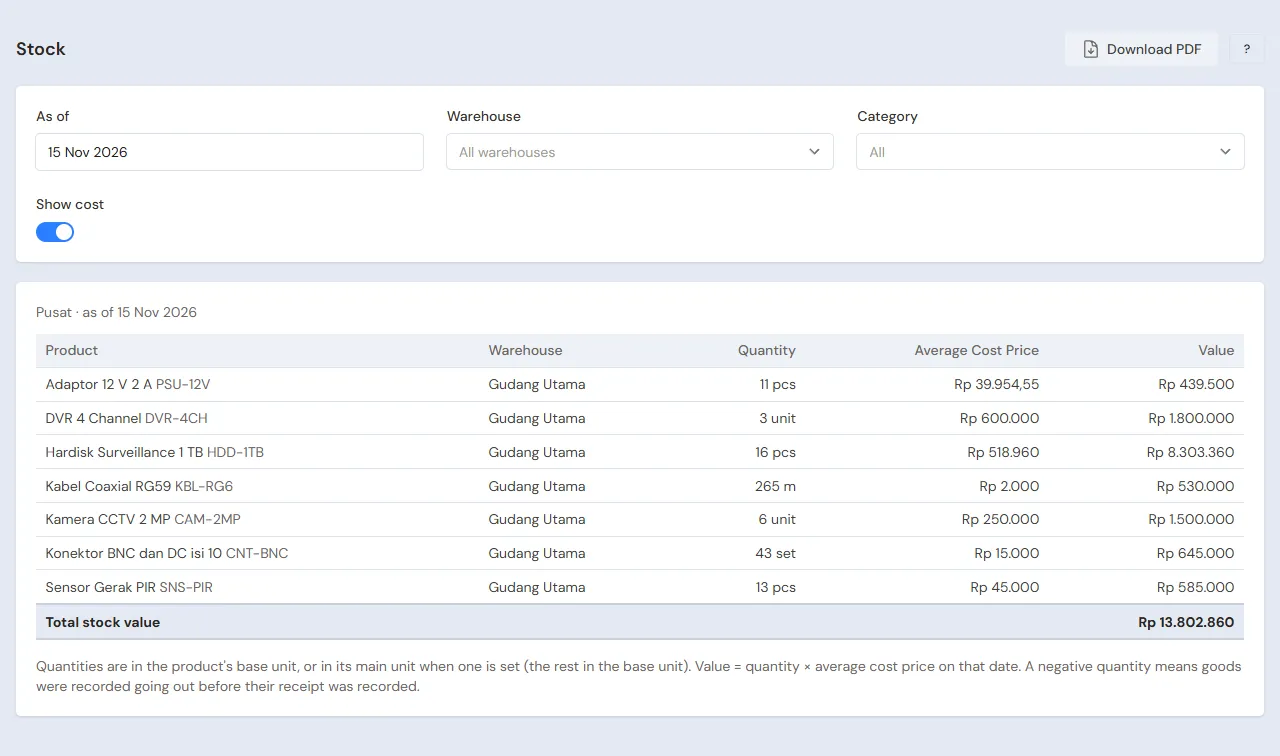
| Reports → Stock | Cameras, DVRs, cable in metres and adaptors | Warehouse Admin | Every week |
| Master Data → Serial Numbers | The status of every camera and DVR and its sale note, for warranty claims | Warehouse Admin | When a claim comes |
| Transactions → Workshop Board | Installations and repairs under way | Technician | Every day |
| Transactions → Customer Subscriptions | Active maintenance customers with their next period | Head Cashier | Every week |
| Reports → Receivables | What is still owed for installations and maintenance | Owner | Every week |
| Reports → Profit & Loss | Sales of devices and services, maintenance income, cost of goods sold and expenses | Owner | Every month |
8. Checklists
- Every day: the Technician keeps the installations' status on the Workshop Board up to date. The Head Cashier bills the installations done and saves the maintenance drafts in the bell.
- Every week: the Owner reads Receivables and Payables, then collects and pays what is due.
- Every month: the Warehouse Admin counts the devices and cable with a stocktake. The Owner reads Profit & Loss.
A running business
This part is for the team moving a CCTV shop already running to Vende: there are already serial-numbered devices in the warehouse, installations whose down payment was received, maintenance customers billed every month, and debts to distributors. The order is always the same:
- Fill in the master data.
- Practise transactions until everyone is used to them.
- Empty the practice transactions.
- Fill in the opening balances on the first day.
- Go live.
The opening balances come last on purpose, so the practice does not upset their figures. The examples in this part use Toko CCTV Awas Aman from the new business part.
1. Master data
Do Who does what, 1. Shop details and users and 2. Master data above. Also register every customer still owing money, with an installation not finished, or with maintenance, every supplier still owed, and every device still in stock, with Track serial numbers already on. That choice cannot change any more once its stock has moved.
Master data is not deleted when the practice transactions are emptied. Customer subscriptions are master data too, so the practice subscriptions are deleted by hand (part 3).
2. Team practice
Work in a practice shop of the type CCTV and security shop with all four accounts. Every step names who and what must show.
Practice 1: master data
- Owner: shop details, the three users and both suppliers.
- Check: Mas Fajar sees only Work Orders and the Workshop Board.
- Mas Toni (Warehouse Admin): the four goods, both services and the package Pasang CCTV 4 Kamera.
- Head Cashier: Mas Fajar as service staff with his account in Linked User, and CV Sinar Mandala.
Practice 2: one installation and maintenance
- Owner: Rp 20.000.000 of capital and both purchase notes as in part 3, with thirteen serial numbers.
- Head Cashier: the quotation, and the installation work order with a Rp 1.500.000 down payment.
- Mas Fajar and Mbak Sinta: the installation up to Done & Bill, the rest of Rp 1.910.000 unpaid.
- Check: in Master Data → Serial Numbers, Mas Toni sees four cameras and one DVR Sold.
- Head Cashier: the first month of maintenance for Rp 200.000 and its subscription.
- Owner: the Rp 1.910.000 settlement.
After Practice 2 this must show:
| Report | What must show | Opened by |
|---|---|---|
| Reports → Cash Balance | Bank BCA Rp 20.000.000 − Rp 1.400.000 + Rp 1.500.000 + Rp 200.000 + Rp 1.910.000 = Rp 22.210.000 | Owner |
| Reports → Payables | CV Visi Aman Teknologi Rp 4.300.000 | Owner |
| Reports → Stock | Cameras 6, DVRs 2, cable 220 metres, adaptors 16 | Warehouse Admin |
| Reports → Profit & Loss | Installation sales Rp 3.410.000 and cost of goods sold Rp 1.000.000 + Rp 600.000 + Rp 160.000 + Rp 160.000 = Rp 1.920.000. The Rp 200.000 of maintenance comes in as subscription income in the month of its note (a note on the 1st to the 15th) or the month after | Owner |
Practice 3: opening balances
Fill in the opening balances with the example of part 4 below, check them as in part 5, then empty again.
3. Empty the practice transactions
Done by the Owner in Settings → Empty Transactions, button Empty All Transactions. Quotations, work orders with their down payments, notes, purchases, the serial numbers recorded, payments, expenses, capital and opening balances are deleted. Products, services, service packages, service staff, customers with their service units, customer subscriptions, suppliers, cash accounts, users and settings stay. Vende makes a full backup first. See Emptying transactions or all data.
The practice subscriptions are still there and their Next period starts has moved on. After emptying, the Head Cashier deletes them in Transactions → Customer Subscriptions, then registers the real subscriptions in part 4.
4. Opening balances
Example: Toko CCTV Awas Aman starts using Vende for real on Monday, 2 November.
Stock, receivables, payables
Done by the Owner in Settings → Opening Balances, with As of that day. See Entering opening cash, stock, receivables and payables.
- Opening Stock: Kamera CCTV 2 MP 8 Units at Rp 250.000 and DVR 4 Channel 2 Units at Rp 600.000, each with the Serial numbers of every unit, one per line. Kabel Coaxial RG59 450 Metres at Rp 2.000, Adaptor 12 V 2 A 10 Pieces at Rp 40.000.
- Opening Receivables: Klinik Gigi Senyum Ceria Rp 200.000 for the unpaid maintenance of October.
- Opening Payables: CV Visi Aman Teknologi Rp 2.000.000 with its due date.
Installations under way
Opening Balances has no tab for installations whose down payment was received. The way to do it with what is there:
- The devices are still in the warehouse, so they are counted in Opening Stock.
- The Head Cashier makes a work order on the first day with the agreed package and price, as in part 4.
- The down payment already received goes into Down payment amount, into the cash account that now holds the money.
- The Owner fills in that account's Opening Cash with the money counted less that down payment.
Example: the installation Pasang CCTV 4 Kamera at Pak Hendra's house for Rp 3.410.000, with a Rp 1.000.000 down payment transferred last week. Its work order is made this morning with a Rp 1.000.000 down payment into Bank BCA.
What follows:
- Bank BCA is the same as the account, and the work order holds Rp 1.000.000 as its down payment.
- When the installation is done, Done & Bill opens a Rp 3.410.000 note with the Rp 1.000.000 down payment taken off, and the rest, Rp 2.410.000, is paid or becomes a receivable. The devices leave the stock then.
Maintenance contracts running
Done by the Head Cashier in Transactions → Customer Subscriptions, button New Customer Subscription, one for every maintenance customer. From sale note stays empty, because the old note is not in Vende.
- Choose the Customer and the Subscription service Maintenance CCTV Bulanan, then fill in the Billing period 1. A customer who pays another amount than the service price: fill in the Price per period with what they pay too.
- Fill in Subscribed since with the real start date, even if long ago.
- Fill in Next period starts with the start of the month not billed yet, at the earliest the start of this month.
- Press Create.
| Customer | Billed up to | Next period starts |
|---|---|---|
| CV Sinar Mandala | October, paid | 1 November |
| Klinik Gigi Senyum Ceria | October, unpaid (in Opening Receivables) | 1 November |
Vende makes the November bill drafts for both. The months paid before the first day are not recorded again.
Opening cash
The Owner fills in the Opening Cash tab for every account. Example: the Bank BCA account holds Rp 18.000.000 on the morning of the first day, Rp 1.000.000 of it Pak Hendra's down payment, so the Opening Cash of Bank BCA is Rp 17.000.000. Cashier Cash gets the money counted, for example Rp 300.000.
5. Check before going live
| Report | What must show | Opened by |
|---|---|---|
| Reports → Cash Balance | Bank BCA Rp 18.000.000 and Cashier Cash Rp 300.000, the same as the money counted | Owner |
| Reports → Stock | Cameras 8, DVRs 2, cable 450 metres, adaptors 10 | Warehouse Admin |
| Reports → Receivables | Klinik Gigi Senyum Ceria Rp 200.000 | Owner |
| Reports → Payables | CV Visi Aman Teknologi Rp 2.000.000 | Owner |
| Transactions → Workshop Board | Pak Hendra's installation waiting to be done | Technician |
| Transactions → Customer Subscriptions | Two Active subscriptions with the next period on 1 November | Head Cashier |
The figures differ? The Owner corrects the row in Settings → Opening Balances before real transactions are recorded.
6. Going live
From that day every quotation, installation, maintenance, purchase and payment is recorded in Vende as in the new business part.
First week checks:
- Head Cashier: the November maintenance bill drafts show in the bell and are saved.
- Warehouse Admin: Master Data → Serial Numbers matches the devices in the warehouse.
- Owner: Reports → Profit & Loss of the first week holds only income and expenses since the first day.