
Billboard rental guide
A learning path for a billboard rental business, new or running: sites, rental contracts, rent in advance, printing, subscriptions, opening balances.
On this page
- A new business
- Who does what
- 1. Shop details and users
- 2. Master data
- 3. One rental contract from quotation to paid
- 4. Maintenance subscriptions
- 5. Expenses
- 6. Reports per job title
- 7. Checklist
- A running business
- 1. Master data
- 2. Practice for the team
- 3. Emptying the practice transactions
- 4. Opening balances
- 5. Check before going live
- 6. Going live
This guide is for the team setting up Vende at a business that rents out billboard sites by the month, often with printing and installing the artwork. It has two parts: A new business for a business just starting, and A running business for one moving to Vende with contracts already running, with team practice and opening balances. The example is Cakra Reklame. The names of the business, tenants and people and all the figures are made up.
What the business looks like:
- Sites: Baliho Simpang Jombor (5 x 10 m, Rp 9.000.000 a month) and Baliho Ring Road Utara (4 x 8 m, Rp 7.000.000 a month).
- Rentals: a tenant takes one site for some months and pays in advance for the whole period.
- Services: printing and installing the billboard artwork, and monthly lamp maintenance for signs owned by customers.
Work through it from the top. Every step names its menu, who does it, what changes afterwards, and an example with figures.
The features in this guide come with the Billboard rental business type package, except those marked extra. The shop's features show under Settings → Subscription, section This shop's features. If a menu is missing, contact the Vende team.
Tip: Lost on a page? Press the ? button at the top of that page. A short tour shows every field.
A new business
Who does what
This package holds three users, the owner included.
| Part of the business | Job title in Vende | What they do and open |
|---|---|---|
| Owner | Owner | Every menu, also receiving rent, opening balances, and Reports → Profit & Loss |
| Marketing admin | Head Cashier | Customers, billboard sites, rental contracts, quotations, service notes, customer subscriptions |
| Finance admin | Finance Admin | Note payments, expenses, Reports → Receivables and Reports → Cash Balance |
Receive Rent on a contract records income received in advance, so its button only shows to someone who opens rental contracts and also records finance money: the Owner, or a user with the job title Custom holding the Head Cashier roles and Finance Operator. Every role is explained in Roles and permissions.
1. Shop details and users
Done by the Owner: fill in Settings → Shop (name, address, WhatsApp, logo), then create the accounts in Settings → Users. See Adding and managing users.
The people at Cakra Reklame: Pak Bima (owner), Mbak Laras (marketing admin, Head Cashier) and Bu Rini (finance admin, Finance Admin).
2. Master data
A shop of this business type already has the product categories Venue Rental and Printing Services, the units Unit and Square Metre, and the expense categories Permits and Certification and Equipment Maintenance.
Billboard sites
Done by the Head Cashier in Master Data → Billboard Sites:
| Code | Name | Location | Size | Price per Month |
|---|---|---|---|---|
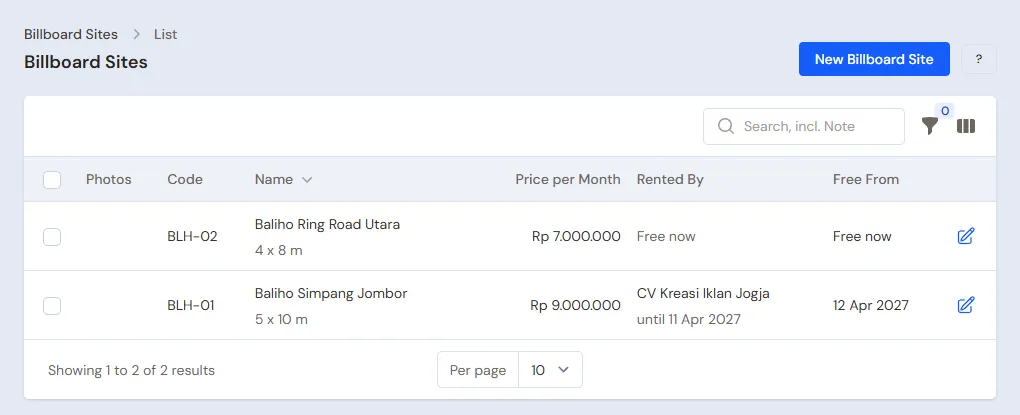
| BLH-01 | Baliho Simpang Jombor | Simpang Jombor | 5 x 10 m | Rp 9.000.000 |
| BLH-02 | Baliho Ring Road Utara | Ring Road Utara | 4 x 8 m | Rp 7.000.000 |
Add the photos of the site. The site list shows every site's Rented By and Free From, so marketing sees at once which sites can be offered.
Services
Done by the Owner in Master Data → Services: Cetak dan Pasang Materi Baliho (printing and installing, category Printing Services) Rp 3.000.000, and Perawatan Lampu Baliho Bulanan (monthly lamp maintenance, category Venue Rental) Rp 500.000 with a default subscription length of 1 month. See Adding a service.
Customers and cash accounts
- Head Cashier: in Master Data → Customers, list CV Kreasi Iklan Jogja and Toko Elektronik Sinar with their payment terms.
- Owner: in Master Data → Cash Accounts, make sure there is Bank BCA.
3. One rental contract from quotation to paid
Example: CV Kreasi Iklan Jogja rents Baliho Simpang Jombor for six months from 1 November, and orders the printing and installing of its artwork.
Quotation
Head Cashier: in Transactions → Quotations, create a quotation for CV Kreasi Iklan Jogja with the line Cetak dan Pasang Materi Baliho, and write the site, its size and its rent in the quotation's note. Send its PDF. See Making a quotation.
Rental contract
Head Cashier: in Transactions → Billboard Rentals, create a rental for the site Baliho Simpang Jombor, the Tenant CV Kreasi Iklan Jogja, Starts 1 November and Length (months) 6. The Rent fills in by itself: 6 × Rp 9.000.000 = Rp 54.000.000. Press Create.
The site cannot be rented again for the same period, and the site list shows it free from 1 May.
Rent paid in advance
Owner: on the contract, press Receive Rent, pick Bank BCA, enter the Date Received and save.
Bank BCA grows by Rp 54.000.000, but the income is not recorded at once: the rent is income received in advance, recognised at Rp 9.000.000 every month from November to April in Reports → Profit & Loss. See Income received in advance.
Printing and installing the artwork
Head Cashier: convert the quotation to a sale, or record it on the sales screen: Cetak dan Pasang Materi Baliho Rp 3.000.000. CV Kreasi Iklan Jogja pays later, so press Pay, Unpaid, then Save transaction. The Rp 3.000.000 becomes a receivable and service income of that month.
The Finance Admin records its payment in Transaction Details → Sale Payments when the transfer comes in. See Paying a note.
Renewing or cancelling
- A month before the end, the Head Cashier presses Renew on the contract. A follow-up contract is made for the same site and tenant, and its rent is received like the first one.
- A tenant pulls out before paying: the Head Cashier presses Cancel Contract. The button is only there while the rent has not been received.
- A contract whose rent has been received cannot be cancelled. Its rent is still recognised as income month by month until the period ends, and the site can only be rented again from the day after its end date.
4. Maintenance subscriptions
Toko Elektronik Sinar owns its own sign and pays Rp 500.000 every month for lamp maintenance.
Head Cashier: in Transactions → Customer Subscriptions, create a subscription for Toko Elektronik Sinar with the service Perawatan Lampu Baliho Bulanan, enter its start date, then press Create. Every month its draft bill comes by itself and only needs saving. See Customer subscriptions.
5. Expenses
The Finance Admin records in Transactions → Finance → Expenses:
- The advertising tax and permit of every site, category Permits and Certification, for example Rp 6.000.000 a year for Baliho Simpang Jombor.
- Lamp electricity and frame repairs, category Equipment Maintenance.
- Artwork printed at an outside printer, if it is printed outside.
6. Reports per job title
| Report | What it holds | Opened by | When |
|---|---|---|---|
| Master Data → Billboard Sites | The current tenant and free date of every site | Head Cashier | Every week |
| Reports → Receivables | Unpaid service notes and subscription bills | Finance Admin | Every week |
| Reports → Cash Balance | Money in every cash account | Finance Admin | Every day |
| Reports → Profit & Loss | The rent recognised that month, service income and expenses | Owner | Every month |
7. Checklist
- Every week: the Head Cashier checks the sites about to be free and offers them, and saves the subscription draft bills. The Finance Admin reads Receivables.
- Every month: the Head Cashier offers a renewal to the contracts ending next month. The Owner reads the Profit & Loss.
- Every year: the Finance Admin pays the advertising tax and permit of every site before it is due.
A running business
This part is for the team moving a running billboard business to Vende: sites rented and paid in advance, unpaid service notes, and subscription customers. The order is always the same:
- Enter the master data.
- Practise transactions until everyone is used to them.
- Empty the practice transactions.
- Enter the opening balances on the first day.
- Go live.
The opening balances come last on purpose, so the practice does not spoil their figures. The examples in this part use Cakra Reklame from the new business part.
1. Master data
Work through the parts Who does what, 1. Shop details and users and 2. Master data above: every site, the services, every tenant and subscription customer, and the cash accounts. The master data is not deleted when the practice transactions are emptied.
2. Practice for the team
Work in a practice shop of the Billboard rental type with the three accounts.
- Owner: the shop details, the two users and Bank BCA.
- Head Cashier: both sites, both customers and the six-month contract of Baliho Simpang Jombor.
- Check: Master Data → Billboard Sites shows CV Kreasi Iklan Jogja renting Baliho Simpang Jombor.
- Owner: Receive Rent of Rp 54.000.000 into Bank BCA.
- Head Cashier: the note of Cetak dan Pasang Materi Baliho of Rp 3.000.000, unpaid, and the maintenance subscription of Toko Elektronik Sinar.
- Finance Admin: the payment of the Rp 3.000.000 note, and the advertising tax expense of Rp 6.000.000.
After the practice this must show:
| Report | What must show | Opened by |
|---|---|---|
| Reports → Cash Balance | Bank BCA Rp 54.000.000 + Rp 3.000.000 − Rp 6.000.000 = Rp 51.000.000 | Finance Admin |
| Reports → Receivables | Empty, until the first subscription bill is saved | Finance Admin |
| Reports → Profit & Loss | November: rent Rp 9.000.000, services Rp 3.000.000, expenses Rp 6.000.000 | Owner |
3. Emptying the practice transactions
Done by the Owner in Settings → Empty Transactions, button Empty All Transactions. Rental contracts with their rent, quotations, notes, payments, expenses and opening balances are deleted. Billboard sites, services, customers, cash accounts, users and settings stay. Customer subscriptions stay too: delete the practice subscription in Transactions → Customer Subscriptions afterwards. Vende makes a full backup first. See Emptying transactions or all data.
4. Opening balances
Everything is dated the first day, for example 1 December.
Contracts already paid in advance
Opening Balances has no tab for rentals. Record what is left of the period as a new contract:
- The Head Cashier makes a contract from 1 December for the months left. Example: the contract of Baliho Ring Road Utara from July to December was paid Rp 42.000.000; one month is left, so the new contract is one month at Rp 7.000.000.
- The Owner presses Receive Rent for that contract into Bank BCA.
- The Opening Cash of Bank BCA is the money in the account less Rp 7.000.000, so that money is not counted twice.
The rent of the months before is already income in the old books, so it is not recorded again.
Receivables, cash and subscriptions
- Owner: in Settings → Opening Balances, tab Opening Receivables, one row per unpaid service note, for example Toko Elektronik Sinar Rp 500.000 for November's maintenance.
- Owner: tab Opening Cash, for example Rp 30.000.000 in the account, so the Opening Cash of Bank BCA is Rp 23.000.000.
- Head Cashier: the running maintenance subscriptions are made in Transactions → Customer Subscriptions with the next period starting on 1 December.
See Entering opening cash, stock, receivables and payables.
5. Check before going live
| Report | What must show | Opened by |
|---|---|---|
| Reports → Cash Balance | Bank BCA Rp 30.000.000, the same as the account | Finance Admin |
| Reports → Receivables | Toko Elektronik Sinar Rp 500.000 | Finance Admin |
| Master Data → Billboard Sites | Baliho Ring Road Utara rented until 31 December | Head Cashier |
The figures differ? Correct the records of the first day before any real transaction is recorded.
6. Going live
From that day every contract, rent, service note, subscription and expense is recorded in Vende as in the new business part, with the same checklist. In the first week the Owner checks that December's Reports → Profit & Loss only holds December's rent.