
Property developer guide
A learning path for a property developer, new or running: projects, units, shared costs, contractors, cash, instalment and mortgage sales, opening balances.
On this page
- A new business
- Who does what
- 1. Shop details and users
- 2. Master data
- 3. Capital and project costs
- 4. One unit from booking to handover
- 5. Reports per job title
- 6. Checklist
- A running business
- 1. Master data
- 2. Practice for the team
- 3. Emptying the practice transactions
- 4. Opening balances
- 5. Check before going live
- 6. Going live
This guide is for the team setting up Vende at a property developer that builds and sells the houses and shophouses of its projects. It has two parts: A new business for a developer with its first project, and A running business for a developer moving to Vende in the middle of a project, with team practice and opening balances. The example is Griya Makmur Properti with the project Griya Makmur Residence. The names of the business, buyers, contractors and people and all the figures are made up.
What the business looks like:
- Project: a 1.200 m² parent plot with four units: houses A1 and A2 of type 36/90 (Rp 385.000.000), house A3 of type 45/120 (Rp 495.000.000) and shophouse B1 (Rp 650.000.000).
- Costs: land, permits and roads are shared by every unit; buildings are paid per unit, partly through a contractor with a work order and stage payments.
- Sales: a buyer books with a booking fee, pays a down payment, then settles in cash, pays instalments to the developer, or through a bank mortgage (KPR). The sale is recognised at handover.
Work through it from the top. Every step names its menu, who does it, what changes afterwards, and an example with figures.
The features in this guide come with the Property developer business type package, except those marked extra. The shop's features show under Settings → Subscription, section This shop's features. If a menu is missing, contact the Vende team.
Tip: Lost on a page? Press the ? button at the top of that page. A short tour shows every field.
A new business
Who does what
This package holds five users, the owner included.
| Part of the developer | Job title in Vende | What they do and open |
|---|---|---|
| Owner or director | Owner | Every menu, also commissions, Reports → Project Money In & Out and Reports → Profit & Loss |
| Marketing admin | Head Cashier | Customers, the Unit Board, unit sales, signing, handover, quotations, billboard rentals, Reports → Unit Availability |
| Technical admin | Warehouse Admin | Projects, blocks and land splits, property units with their documents and building progress, building materials in the warehouse |
| Purchasing admin | Purchasing Admin | Suppliers and contractors, contractor work orders, building material purchases |
| Finance admin | Finance Admin | Unit payments received, project costs, contractor stage payments, office expenses, Reports → Unit Buyer Receivables and Reports → Cash Balance |
A field marketer who only makes quotations gets the job title Salesperson, by adding a user to the subscription. Every role is explained in Roles and permissions.
1. Shop details and users
Done by the Owner: fill in Settings → Shop (the company name, the marketing office address, WhatsApp, logo), then create the accounts in Settings → Users with the Job title of the table above. See Adding and managing users.
The people at Griya Makmur Properti: Pak Gunawan (director), Mbak Sinta (marketing admin, Head Cashier), Mas Teguh (technical admin, Warehouse Admin), Bayu (purchasing admin, Purchasing Admin) and Maya (finance admin, Finance Admin).
2. Master data
A shop of this business type already has the product categories Building Materials and Repair Services, the units Unit, Square Metre, Metre and Sack, and the expense categories Marketing Commission, Permits and Certification, and Fuel.
Project
Done by the Warehouse Admin in Master Data → Projects.
- Create a project with the Code GMR, the Name Griya Makmur Residence, its address and the Parent land area 1.200.
- Pick Shared costs spread by land area.
- Enter the Late fee per day 1 (0,1% a day of a late instalment) and the Late fee grace period of 3 days.
- Press Create.
Units
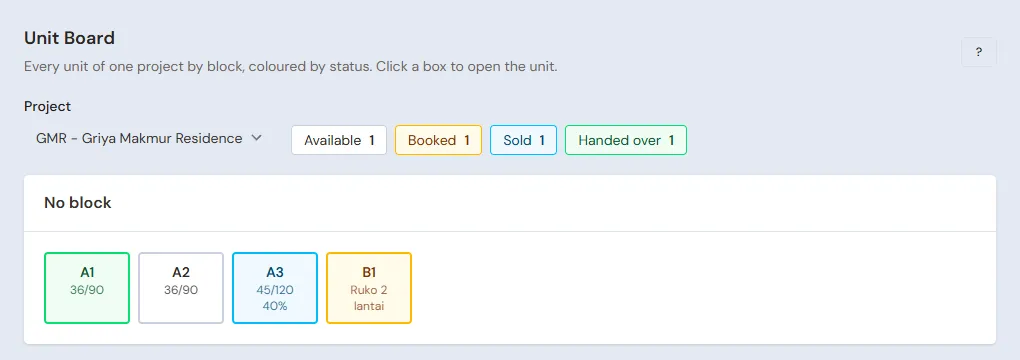
Done by the Warehouse Admin in Master Data → Property Units, one for every unit:
| Code | Kind | Building Type | Land Area | Building Area | List Price |
|---|---|---|---|---|---|
| A1 | House | 36/90 | 90 m² | 36 m² | Rp 385.000.000 |
| A2 | House | 36/90 | 90 m² | 36 m² | Rp 385.000.000 |
| A3 | House | 45/120 | 120 m² | 45 m² | Rp 495.000.000 |
| B1 | Shophouse | Ruko 2 lantai | 100 m² | 160 m² | Rp 650.000.000 |
Many plots in one block? On the project page, the Split Land button makes a row of plots at once, for example A1 to A20 of the same area, then a different area is changed per unit. Every unit's listing date decides from when it carries the shared costs.
Buyers, contractors and cash accounts
- Head Cashier: buyers are listed in Master Data → Customers when they book a unit.
- Purchasing Admin: list the contractor CV Karya Bangun Mandiri and the building material shops in Master Data → Suppliers.
- Owner: in Master Data → Cash Accounts, make sure there is the project account Bank BCA.
3. Capital and project costs
Capital
The Owner records the project capital of Rp 900.000.000 into Bank BCA in Transactions → Finance → Owner's Capital.
Shared costs
Done by the Finance Admin in Transactions → Finance → Project Costs. The unit is left empty, because the cost is shared:
| Kind of Cost | Description | Amount |
|---|---|---|
| Land | Paying off the 1.200 m² of land | Rp 540.000.000 |
| Permits | Building permit and site plan approval | Rp 18.000.000 |
| Roads, drains, public facilities | Estate road and drains | Rp 45.000.000 |
The Rp 603.000.000 of shared costs go into the project's stock, not into expenses yet. When a unit is handed over, it takes its share by its land area out of all the units not handed over yet. A shared cost that comes after every unit is handed over is an expense of that month straight away.
Costs per unit
The building of A1 is done by the developer's own builders: the Finance Admin records a Project Cost of the Kind of Cost Building with the unit A1, Rp 120.000.000 in all (materials and wages). It is the cost of unit A1 until its handover.
Contractor work order and stage payments
House A3 is built by a contractor:
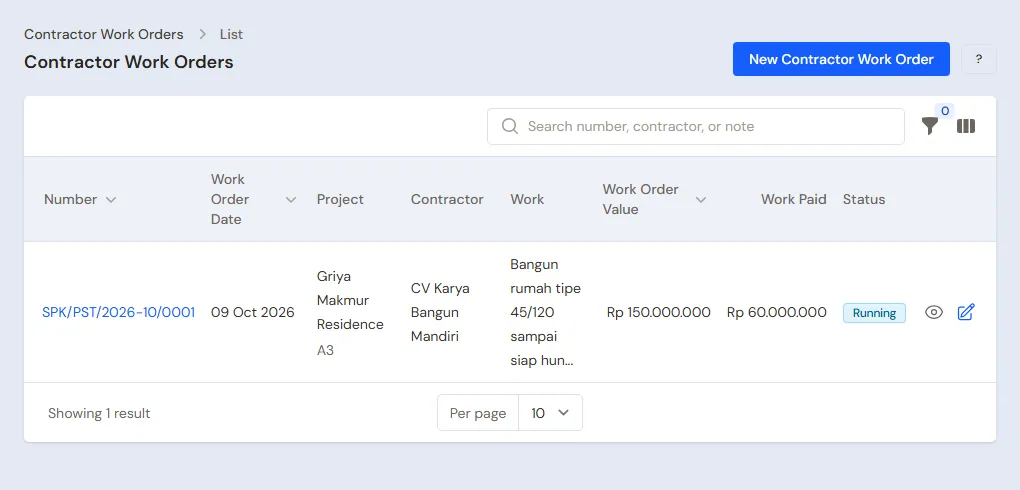
- Purchasing Admin: in Transactions → Contractor Work Orders, create a work order with the Contractor CV Karya Bangun Mandiri, the unit A3, the Work Build a type 45/120 house ready to live in, the Work Order Value Rp 150.000.000 and the Retention 5%.
- Finance Admin: when the first stage is billed, open Transactions → Finance → Contractor Stage Payments, create a payment, pick the work order, enter the Work Value Rp 60.000.000 and the Progress 40%, then pick the cash account.
Rp 3.000.000 (5%) is held back as retention, and Rp 57.000.000 is paid from the cash account. The cost of unit A3 grows by Rp 60.000.000, and the retention is a payable to the contractor until it is released with Release Retention after the maintenance period.
4. One unit from booking to handover
Example: Rina Kusumawati buys house A1 for Rp 385.000.000, paying in Cash in stages: a booking fee of Rp 5.000.000, a down payment of Rp 120.000.000 and a settlement of Rp 260.000.000.
Booking the unit
Head Cashier:
- Check in Transactions → Unit Board that A1 is still available.
- Open Transactions → Unit Sales, create a unit sale, pick the unit A1, then pick or create the buyer Rina Kusumawati, enter the Price Rp 385.000.000, the Payment Cash, the Booking Fee Rp 5.000.000, the Down Payment Rp 120.000.000 with its Down Payment Due, and the Settlement Due.
- Press Create. The Book This Unit button on the unit page opens the same form.
The Payment plan shows every bill with its due date, and unit A1 becomes Booked on the Unit Board.
Receiving payments
Finance Admin: in Transactions → Finance → Unit Payments Received, create a payment, pick the sale of A1, the Kind From the buyer, the Amount Rp 5.000.000 and the cash account Bank BCA. When the down payment comes in, record Rp 120.000.000 the same way.
The money received before the handover is held as the buyer's down payment, not income yet. When a buyer is late, the late fee paid fills in with the running fee; change it to 0 when the fee is waived. See Reports → Unit Buyer Receivables for the bills due.
Signing and handover
Head Cashier:
- On the sale of A1, press Sign. The unit counts as sold; the money received stays a down payment.
- When the keys are handed over, press Hand Over.
After the handover:
- The sale of Rp 385.000.000 is recognised in Reports → Profit & Loss. The Rp 125.000.000 of down payments becomes payment, and the other Rp 260.000.000 becomes Rina's receivable.
- The cost of unit A1 becomes its cost of sale: its own cost of Rp 120.000.000 plus its share of the shared costs, Rp 603.000.000 × 90 / 400 = Rp 135.675.000, so Rp 255.675.000. A1 leaves a gross profit of Rp 129.325.000.
- The settlement of Rp 260.000.000 is recorded by the Finance Admin in Transactions → Finance → Unit Payments Received as above.
The 400 is the land area of the four units not handed over yet (90 + 90 + 120 + 100). The next unit shares what is left of the shared costs with the units still not handed over, and the last unit takes what is left.
Instalments to the developer and mortgages
- Instalments to the developer, house A3 at Rp 495.000.000: a booking fee of Rp 5.000.000, a down payment of Rp 95.000.000, then 24 for the Number of Instalments with the First Instalment date. Vende spreads the Rp 395.000.000 over 24 monthly instalments in the Payment plan, and works out the late fee of an instalment late past the grace period.
- Bank mortgage (KPR), shophouse B1 at Rp 650.000.000: a booking fee of Rp 10.000.000, a down payment of Rp 130.000.000, a Mortgage Amount of Rp 510.000.000, the Mortgage Bank and a Bank Retention of 5%. After the signing, the Finance Admin records a Unit Payment Received of the Kind Mortgage disbursement of Rp 510.000.000: Rp 25.500.000 is held back by the bank as retention, and Rp 484.500.000 comes into the cash account. The retention is recorded again with the Kind Retention released when the certificate is done.
The buyer pulls out? The Head Cashier presses Cancel Sale and enters the refund. The rest is forfeited and becomes other income, and the unit is available again.
Documents, building progress and commission
- The Warehouse Admin records the PPJB, AJB and certificate of every unit under Unit Documents on the unit page, with a target date. The bell reminds a week before. Building progress is recorded with photos under Construction Progress.
- The Owner records the marketing commission under Commissions on the sale page: a percentage of the price or a fixed amount, and when it may be paid. It is paid with the Pay button as a Marketing Commission expense.
5. Reports per job title
| Report | What it holds | Opened by | When |
|---|---|---|---|
| Reports → Unit Availability | Units available, booked, sold and handed over per project | Head Cashier | Every day |
| Reports → Unit Buyer Receivables | Every buyer's bills, what is due, late fees and mortgage retention | Finance Admin | Every week |
| Reports → Cash Balance | Money in every cash account | Finance Admin | Every day |
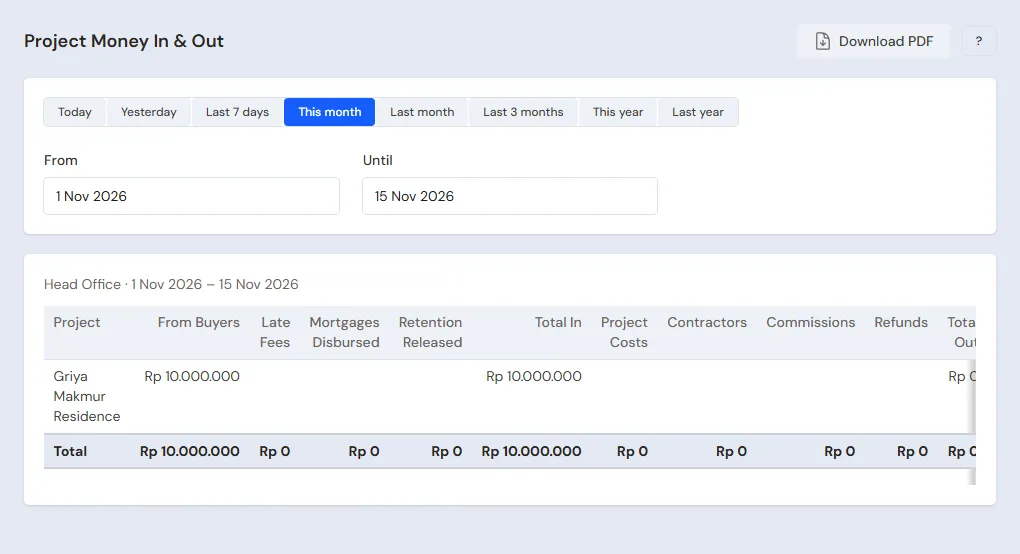
| Reports → Project Money In & Out | Money from buyers and banks, project costs and stage payments per project | Owner | Every month |
| Reports → Profit & Loss | Sales of units handed over, property cost of sales, and expenses | Owner | Every month |
6. Checklist
- Every day: the Head Cashier records new unit bookings, the Finance Admin records every money in and out of the project.
- Every week: the Finance Admin reads Unit Buyer Receivables and calls the late buyers. The Warehouse Admin updates building progress and documents.
- Every month: the Owner reads Project Money In & Out and the Profit & Loss, and pays the commissions that may be paid.
A running business
This part is for the team moving a developer in the middle of a project to Vende: part of the project costs are paid, some units are booked or paid in instalments, and contractors are still at work. The order is always the same:
- Enter the master data.
- Practise transactions until every part is used to them.
- Empty the practice transactions.
- Enter the opening balances on the first day.
- Go live.
The opening balances come last on purpose, so the practice does not spoil their figures. The examples in this part use Griya Makmur Residence from the new business part.
1. Master data
Work through the parts Who does what, 1. Shop details and users and 2. Master data above: the project, every unit not handed over yet with its listing date, the buyers still paying, the contractors and the cash accounts. The master data is not deleted when the practice transactions are emptied.
2. Practice for the team
Work in a practice shop of the Property developer type with the five accounts.
Practice 1: master data
- Owner: the shop details and the four users.
- Check: Maya does not see the Profit & Loss or Project Money In & Out.
- Mas Teguh (Warehouse Admin): the project Griya Makmur Residence and its four units.
- Check: Transactions → Unit Board shows four units Available. Opened by the Head Cashier.
- Bayu (Purchasing Admin): the contractor CV Karya Bangun Mandiri.
Practice 2: costs, one sale and a stage payment
- Owner: capital of Rp 900.000.000.
- Finance Admin: the three shared costs and the Building cost of A1, Rp 120.000.000.
- Head Cashier: book A1 for Rina Kusumawati as in part 4.
- Finance Admin: the booking fee of Rp 5.000.000 and the down payment of Rp 120.000.000.
- Head Cashier: Sign, then Hand Over A1.
- Bayu and the Finance Admin: the work order of A3 and its first stage payment of Rp 60.000.000.
After Practice 2 this must show:
| Report | What must show | Opened by |
|---|---|---|
| Reports → Cash Balance | Bank BCA Rp 900.000.000 − Rp 603.000.000 − Rp 120.000.000 + Rp 125.000.000 − Rp 57.000.000 = Rp 245.000.000 | Finance Admin |
| Reports → Unit Buyer Receivables | Rina Kusumawati Rp 260.000.000 | Finance Admin |
| Reports → Unit Availability | A1 handed over, A2, A3 and B1 available | Head Cashier |
| Reports → Profit & Loss | Sales Rp 385.000.000 and property cost of sales Rp 255.675.000 | Owner |
Practice 3: opening balances
Enter the opening balances with the example of part 4 below, check them as in part 5, then empty them again.
3. Emptying the practice transactions
Done by the Owner in Settings → Empty Transactions, button Empty All Transactions. Unit sales with their payments, project costs, contractor work orders and stage payments, billboard rentals, notes, purchases, expenses, capital and opening balances are deleted. Projects, units, customers, suppliers, cash accounts, users and settings stay. Vende makes a full backup first. See Emptying transactions or all data.
4. Opening balances
Opening Balances has no tab for projects. The way with what is there, all dated the first day:
- Costs already paid: the Finance Admin records the old project costs as Project Costs from the cash account of today. A cost of one unit is recorded in full on that unit. A shared cost is only recorded for the part still carried by the units not handed over, because Vende shares shared costs over the units not handed over only; the part of the units already handed over is already cost of sales in the old books. Example: land Rp 540.000.000 and permits Rp 18.000.000 shared over four units of 400 m² in all, and A1 (90 m²) was handed over before the first day. A2, A3 and B1 still carry 310 / 400 of it, so record land Rp 540.000.000 × 310 / 400 = Rp 418.500.000 and permits Rp 18.000.000 × 310 / 400 = Rp 13.950.000, shared, Rp 432.450.000 in all. When A2 is handed over, its share is Rp 432.450.000 × 90 / 310 = Rp 125.550.000, the same as A1's share was.
- Units the buyers are paying: the Head Cashier records the sale on the first day. What the buyer has already paid goes in Booking Fee and Down Payment, with the first day as the Down Payment Due; instalments already paid are added to the Down Payment. Number of Instalments is the instalments still left, and First Instalment the due date of the next one. Then the Finance Admin records the money already received as Unit Payments Received on that same day. Do not keep the old due dates for bills already paid: Vende counts a late fee up to the day the money is recorded, so an old bill recorded as paid on the first day counts as late. Example: A3 on instalments, with the booking fee of Rp 5.000.000 and the down payment of Rp 95.000.000 paid, and 24 instalments from next month. Instalments of different sizes are set with Change Payment Plan in the More menu. A signing that already happened is recorded with Sign.
- Work orders still running: the Purchasing Admin records the work order, then the Finance Admin records the stages already paid as Contractor Stage Payments.
- Units handed over before the first day are not recorded as units. What their buyers still owe is entered by the Owner in Settings → Opening Balances, tab Opening Receivables, in the buyer's name.
- Opening Cash: the Owner fills in Settings → Opening Balances, tab Opening Cash, with the money counted in the account, plus the costs and stage payments of steps 1 and 3, less the payments received of step 2. Then the Bank BCA balance after every step equals the account.
Example: the account holds Rp 250.000.000. The costs recorded are Rp 432.450.000 and the payments received Rp 100.000.000, so the Opening Cash of Bank BCA is Rp 250.000.000 + Rp 432.450.000 − Rp 100.000.000 = Rp 582.450.000.
5. Check before going live
| Report | What must show | Opened by |
|---|---|---|
| Reports → Cash Balance | Bank BCA Rp 250.000.000, the same as the account | Finance Admin |
| Reports → Unit Buyer Receivables | A3 with Rp 395.000.000 left along its instalment plan, nothing overdue and no late fee | Finance Admin |
| Reports → Unit Availability | A3 sold, the other units as they really are | Head Cashier |
The figures differ? Correct the records of the first day before any real transaction is recorded.
6. Going live
From that day every unit booking, payment received, project cost and stage payment is recorded in Vende as in the new business part, with the same checklist. In the first week the Finance Admin matches Reports → Unit Buyer Receivables with the old instalment records, and the Owner checks that Reports → Profit & Loss only holds handovers since the first day.
Billboard sites owned by the developer can be rented out with the same feature as a billboard business. See Billboard rental guide.